- Local time
- 1:39 PM
- Posts
- 284
- OS
- Windows 11 Pro 22H2
After spending days trying to figure out why my User Config Group Policy settings does not want to stick, it appears that this Admin Protection feature is allocating all the User Config policy settings to the ADMIN_account profile....
Despite opening the GPEDIT as a local Admin user, it would still ask me for the Windows Hello credentials and at the prompt, I can see my COMPUTERNAME\USERNAME.
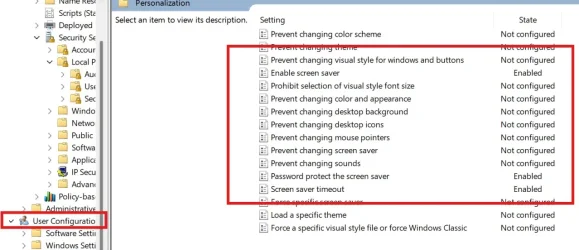
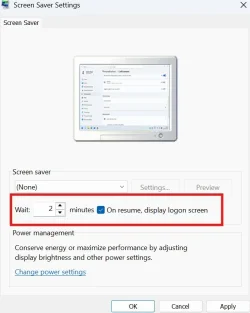
You can see my attached images. There all correct. But the settings are not saved under my user profile. But instead, saved under the ADMIN_account user profile.
How can I set these policies without these policies spilling over to the ADMIN\account user profile?
I want these policies to be set for my account which is a Local Admin Account.
When run the GPUPDATE /FORCE with elevated Commanded Prompt using ADMIN PROTECTION, both Computer and User updated policies output were Successful
However, When run the GPUPDATE /FORCE is forced under my Local Admin Account, only the User Config gets an output as failed...
I was very much waiting for this feature to roll out, but looks like its not a clever solution after all...
This feature still needs to be tested.
Despite opening the GPEDIT as a local Admin user, it would still ask me for the Windows Hello credentials and at the prompt, I can see my COMPUTERNAME\USERNAME.
You can see my attached images. There all correct. But the settings are not saved under my user profile. But instead, saved under the ADMIN_account user profile.
How can I set these policies without these policies spilling over to the ADMIN\account user profile?
I want these policies to be set for my account which is a Local Admin Account.
When run the GPUPDATE /FORCE with elevated Commanded Prompt using ADMIN PROTECTION, both Computer and User updated policies output were Successful
However, When run the GPUPDATE /FORCE is forced under my Local Admin Account, only the User Config gets an output as failed...
I was very much waiting for this feature to roll out, but looks like its not a clever solution after all...
This feature still needs to be tested.
Attachments
My Computer
At a glance
Windows 11 Pro 22H2
- OS
- Windows 11 Pro 22H2