can't get ublock origin to work win11 23h2


corvairbob

Well-known member
Member
VIP
Local time
2:48 PM
Posts
239
OS
win10 64 bit 20h2 ver. now it is 22h2
i have my sisters pc on my table because she got some type of browser hack and could not get anyplace on that take over so i went into task manager and disabled the 2 selection that got installed so that i could get back to the chrome browser. and then ran defender and then malwarebytes.

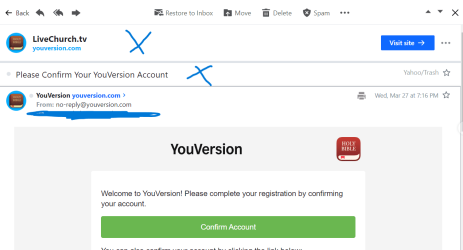
anyway i have ABP plus i ublock origin running. she also had a few extensions running that i did not install so that hack may have set them there. but my issues is when she is in her emails she has sections in that email like across the top that have worthless info in them, like an email from nextdoor and across the top it takes up 1/3 of the email page with nextdoor but just below that in the return address it says nextdoor, so that top line is worthless.

i tried lots of times to get ublock to remove those areas and they do go away with the zapper tool but not with the dropper or with the right mouse and pick an area. also after they go away i can close the email and reopen it and they are back. in ublock settings i see lines of text with todays date telling me that ublock tried to do something but is not enforcing the commands.

so is it now that ublock is not working in win11? it seems to work good on win10 that i have on this pc writing this issue. but is not working on the win11 pc. plus i have removed it and reinstalled it a few times and it still is misbehaving as i know it works. thanks

this photo is what i have blocked for those headers this photo shows the headers i want to remove with an x in those fields
 
Windows Build/Version
23h2 22631.3374

Attachments

  • ublock settings.jpg.png
    ublock settings.jpg.png
    17.8 KB · Views: 2
  • email issue.jpg (1).png
    email issue.jpg (1).png
    25.5 KB · Views: 3
Last edited:

My Computer

System One

  • OS
    win10 64 bit 20h2 ver. now it is 22h2
    Computer type
    Laptop
    Manufacturer/Model
    hp elitebook
    CPU
    AMD A4-3310MX APU with Ra
    Memory
    16gb
Have you tried a repair install? You don't lose anything doing this. See: -


My Computers

System One System Two

  • OS
    Windows 11 Pro
    Computer type
    PC/Desktop
    Manufacturer/Model
    GMKtec K11
    CPU
    AMD Ryzen 9 8945HS
    Memory
    32GB DDR5 SO-DIMM
    Graphics Card(s)
    Integrated AMD Radeon 780M (4.00 GHz)
    Monitor(s) Displays
    Benq 2250HM
    Screen Resolution
    1920 x 1080
    Hard Drives
    1 TB PCIe 4.0 NVMe M.2 SSD
  • Operating System
    Windows 11 Home
    Computer type
    Laptop
    Manufacturer/Model
    ASUS Zenbook 14 OLED 14" Laptop - UX3405CA-QL192W
    CPU
    Intel® Core™ Ultra 7 - 255H processor
    Memory
    16 GB LPDDR5 SDRAM
    Graphics card(s)
    Intel Arc 140T onboard graphics
    Screen Resolution
    1920 x 1200 (16:10 WUXGA resolution) OLED Touchscreen
    Hard Drives
    1TB SSD
i just installed win11 about a week ago i got this pc maybe 2 weeks ago and put win10 on it and in a day win10 updates gave me permission to do win11 so i installed it. but i never bother to go into her emails to see how they displayed. but yesterday she manages to click on one or those emails on that section above the email header and got hacked. so now i'm trying to get those removed with ublock and ublock is not removing them. so if you think i may need to do a reset i will i know how but i did not figure i would have to with this new install. thanks
 

My Computer

System One

  • OS
    win10 64 bit 20h2 ver. now it is 22h2
    Computer type
    Laptop
    Manufacturer/Model
    hp elitebook
    CPU
    AMD A4-3310MX APU with Ra
    Memory
    16gb
i just checked the space and she has a 128gb drive and 60gb used i really do not want to take up 20gb of old windows for this. if it is really needed i will just reinstall win10 and let it ride for now. i have karans backup for the pc
 

My Computer

System One

  • OS
    win10 64 bit 20h2 ver. now it is 22h2
    Computer type
    Laptop
    Manufacturer/Model
    hp elitebook
    CPU
    AMD A4-3310MX APU with Ra
    Memory
    16gb
ok i did chrome cache and that failed to work so i'm not jsut going to do the reset and see if that works. i have it running now. the wife has the same pc and win11 but on her pc she does not have the section under device security and then core isolation or secure boot or that security processor. but her pc also came up and told her the pc was ready for win11. also she can remove sections in her email with ublock origin and the stay blocked and also are gone in the rest of her emails now as they should be. i checked a few emails and saw them there and after i removed one of them the rest were gone.

anyway my sisters pc now is at 61% for installing win11 23h2 repair version and i will see if that works. and if she needs the extra space one day i will have her delete the old windows folder. i will stop back and let you know if it works
 

My Computer

System One

  • OS
    win10 64 bit 20h2 ver. now it is 22h2
    Computer type
    Laptop
    Manufacturer/Model
    hp elitebook
    CPU
    AMD A4-3310MX APU with Ra
    Memory
    16gb
ok i went thru the reset and it is still doing it. i turned off core isolation and it still does it. ei compared her yahoo settings to mine and they are the same so i don't think it is yahoo doing it. normally i would not care but i just know she will click on that area again and i will have that pc back on my table again. so i need to get that to work. thanks.
 

My Computer

System One

  • OS
    win10 64 bit 20h2 ver. now it is 22h2
    Computer type
    Laptop
    Manufacturer/Model
    hp elitebook
    CPU
    AMD A4-3310MX APU with Ra
    Memory
    16gb
ok if you notice the above photo of the ublock lines those are junk the lines below are what should have been going into the filters list. now she may still have a virus on her pc that is forcing those lines to show up. i ran defender and malware app and i got nothing on defender and 62 pup types on malware that i quarantined. any way for the last few i clicked on the emails and went to block element and again i had those above lines. so i went just below them to another set of lines that looked closer to the lines below and copied one line in the my filters and that removed the last section i need to be gone. so i went thru her emails and i did not have the areas that i needed to be gone anymore and i also checked her trash and they were gone from the trash also. so i may have it now.

also i copied that filter list and made a text for the next time i may need it.

! 2024-03-28 Yahoo Mail - Organized Email
mail.yahoo.com##.W_6D6F.ek_BB.D_F > .W_6D6F.I_ZkbNhI
mail.yahoo.com##.ab_CI.I_ZkbNhI.P_Z1A2bQX.m_Z12nDQf.D_F
mail.yahoo.com##.H_72FG.M_1IaimO.gl_FM.u_b.ek_EZ.D_F.ab_C
 

My Computer

System One

  • OS
    win10 64 bit 20h2 ver. now it is 22h2
    Computer type
    Laptop
    Manufacturer/Model
    hp elitebook
    CPU
    AMD A4-3310MX APU with Ra
    Memory
    16gb
ok i got a thread continued here and it took me to win11 i reposted on win10 just in case someone there may have had the same issues. thanks
 

My Computer

System One

  • OS
    win10 64 bit 20h2 ver. now it is 22h2
    Computer type
    Laptop
    Manufacturer/Model
    hp elitebook
    CPU
    AMD A4-3310MX APU with Ra
    Memory
    16gb

Latest Support Threads

Back
Top Bottom