Solved Can't move Folders out from under onedrive


Ztruker

Well-known member
Member
VIP
Local time
9:19 PM
Posts
254
Location
Space Coast of Florida
OS
Windows 11 Pro X64 25H2 Build 26200.7019
Trying to move Desktop, Documents and Downloads from under account\OneDrive to just account\ as follows:

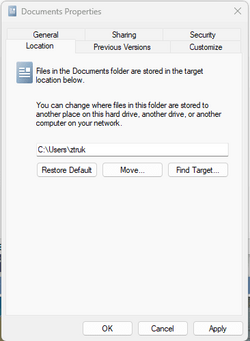
Clicked on Properties for Documents

2023-10-17 17_07_08-Documents Properties.png Shows it's in C:\Users\ztruk\OneDrive\Documents. Click on the Location tab.

2023-10-17 17_17_40-Documents Properties.png Click on Move. Navigate to new location, select that folder. I selected my account folder under Users.

2023-10-17 17_11_17-Documents Properties.png Then I added Documents as the target folder after account name then clicked on Apply.

2023-10-17 16_59_21-Documents Properties.png

2023-10-17 17_00_11-Move Folder.png Click on Yes
2023-10-17 16_59_55-Create Folder.png Click on Yes
2023-10-17 17_00_29-The folder can't be moved here.png I get this error message every time. How do I fix this?

Edit: Same thing happens when I try to move Pictures
 

Attachments

  • 2023-10-17 16_59_21-Documents Properties.png
    2023-10-17 16_59_21-Documents Properties.png
    8.1 KB · Views: 0
  • 2023-10-17 17_11_17-Documents Properties.png
    2023-10-17 17_11_17-Documents Properties.png
    7.5 KB · Views: 0

My Computers My Computers

  • At a glance

    Windows 11 Pro X64 25H2 Build 26200.701912th Gen Intel Core i7-12700, 2.1Ghz32.0GB PC3-12800 DDR3 SDRAMEVGA GeForce GTX 780
    OS
    Windows 11 Pro X64 25H2 Build 26200.7019
    Computer type
    PC/Desktop
    Manufacturer/Model
    Dell Vostro 3910
    CPU
    12th Gen Intel Core i7-12700, 2.1Ghz
    Memory
    32.0GB PC3-12800 DDR3 SDRAM
    Graphics Card(s)
    EVGA GeForce GTX 780
    Sound Card
    Realtek HD Audio
    Monitor(s) Displays
    Visio 32" TV
    Screen Resolution
    1920x1080
    Hard Drives
    2TB Samsung NVME SSD 990 PRO with Heatsink
    4TB Fanxiang 2.5" SATA III SSD S101Q
    PSU
    ?
    Keyboard
    Dell USB SK-8115
    Mouse
    Microsoft Sculpt Mobile Mouse 1569
    Internet Speed
    374.10MB Down, 11.75MB Up
    Browser
    Edge - eM Client Pro for E-Mail
    Antivirus
    Windows Security
    Other Info
    Purchased December 2013, many upgrades since then
  • At a glance

    Windows 7 Pro X64Intel Core i3-3240 2X3.4Ghz8GB 2X4GB PC3 12800U DDR3ATI FireGL V3300
    Operating System
    Windows 7 Pro X64
    Computer type
    PC/Desktop
    Manufacturer/Model
    Dell Inspiron 660
    CPU
    Intel Core i3-3240 2X3.4Ghz
    Motherboard
    HP 0A68h
    Memory
    8GB 2X4GB PC3 12800U DDR3
    Graphics card(s)
    ATI FireGL V3300
    Sound Card
    Realtek HD Audio
    Monitor(s) Displays
    Acer KN242HYL 24"
    Screen Resolution
    1920X1080
    Hard Drives
    Kingston SA400S37 120GB SSD (boot)
    Toshiba DT01ACA200 2TB SATA
    Keyboard
    Dell USB (KVMS)
    Mouse
    Logitec USB (KVMS)
    Internet Speed
    481.77 UP; 23.21 DOWN
    Browser
    Seamonkey, Internet Explorer
    Antivirus
    Microsoft Security Essentials
    Other Info
    Apache Webserver since 2001
OneDrive folders cannot be moved
Open up OneDrive and each of the folders Documents, Pictures etc separately. Select all the files and Copy them and open the named folder in your User files (ie) Documents or whatever and Paste the files into there.
If you don't use it, you can Unlink OneDrive from syncing your files
Or you can Uninstall it.
 

My Computer My Computer

At a glance

Windows 11 Pro Insider 64 bit 25H2 26200.5742Intel Core i7 9700K 3.6016 GBnVidia GEForce RTX 2060 Super
OS
Windows 11 Pro Insider 64 bit 25H2 26200.5742
Computer type
PC/Desktop
Manufacturer/Model
Gigabyte Z390 UD
CPU
Intel Core i7 9700K 3.60
Motherboard
Gigabyte Z390 UD
Memory
16 GB
Graphics Card(s)
nVidia GEForce RTX 2060 Super
Sound Card
onboard
Monitor(s) Displays
Two 27" Dell 4K monitors
Screen Resolution
3840 x 2160
Hard Drives
M.2 NVME SSD, 500 GB; Two 2TB Mechanical HDD's
PSU
850w PSU
Case
Cyberpower PC
Cooling
Water cooled
Keyboard
Backlit Cyberpower gaming keyboard
Mouse
Backlit Cyberpower gaming mouse
Internet Speed
1 GB mbps
Browser
Brave
Antivirus
Windows Security
How do I get the damned folders out from under Onedrive? I've turned off sync, removed the folders from being synced by Onedrive but I still can get the ones under c:\Users\ztruk to be my Desktop, Documents, Downloads, Pictures folders.
I can't even delete them.
 

My Computers My Computers

  • At a glance

    Windows 11 Pro X64 25H2 Build 26200.701912th Gen Intel Core i7-12700, 2.1Ghz32.0GB PC3-12800 DDR3 SDRAMEVGA GeForce GTX 780
    OS
    Windows 11 Pro X64 25H2 Build 26200.7019
    Computer type
    PC/Desktop
    Manufacturer/Model
    Dell Vostro 3910
    CPU
    12th Gen Intel Core i7-12700, 2.1Ghz
    Memory
    32.0GB PC3-12800 DDR3 SDRAM
    Graphics Card(s)
    EVGA GeForce GTX 780
    Sound Card
    Realtek HD Audio
    Monitor(s) Displays
    Visio 32" TV
    Screen Resolution
    1920x1080
    Hard Drives
    2TB Samsung NVME SSD 990 PRO with Heatsink
    4TB Fanxiang 2.5" SATA III SSD S101Q
    PSU
    ?
    Keyboard
    Dell USB SK-8115
    Mouse
    Microsoft Sculpt Mobile Mouse 1569
    Internet Speed
    374.10MB Down, 11.75MB Up
    Browser
    Edge - eM Client Pro for E-Mail
    Antivirus
    Windows Security
    Other Info
    Purchased December 2013, many upgrades since then
  • At a glance

    Windows 7 Pro X64Intel Core i3-3240 2X3.4Ghz8GB 2X4GB PC3 12800U DDR3ATI FireGL V3300
    Operating System
    Windows 7 Pro X64
    Computer type
    PC/Desktop
    Manufacturer/Model
    Dell Inspiron 660
    CPU
    Intel Core i3-3240 2X3.4Ghz
    Motherboard
    HP 0A68h
    Memory
    8GB 2X4GB PC3 12800U DDR3
    Graphics card(s)
    ATI FireGL V3300
    Sound Card
    Realtek HD Audio
    Monitor(s) Displays
    Acer KN242HYL 24"
    Screen Resolution
    1920X1080
    Hard Drives
    Kingston SA400S37 120GB SSD (boot)
    Toshiba DT01ACA200 2TB SATA
    Keyboard
    Dell USB (KVMS)
    Mouse
    Logitec USB (KVMS)
    Internet Speed
    481.77 UP; 23.21 DOWN
    Browser
    Seamonkey, Internet Explorer
    Antivirus
    Microsoft Security Essentials
    Other Info
    Apache Webserver since 2001
See if this video helps....
 

My Computer My Computer

At a glance

Windows 10 Pro
OS
Windows 10 Pro
Hello Rich, :alien:

Just to confirm, did you turn off backing up these folders to OneDrive like below?


If so, then you could try option three below to restore the default folder location.
 

My Computers My Computers

  • At a glance

    Windows 11 Pro for WorkstationsIntel i7-8700K 5 GHz64 GB (4x16GB) G.SKILL TridentZ RGB DDR4 3600...ASUS ROG-STRIX-GTX1080TI-O11G-GAMING (11GB GD...
    OS
    Windows 11 Pro for Workstations
    Computer type
    PC/Desktop
    Manufacturer/Model
    Custom self build
    CPU
    Intel i7-8700K 5 GHz
    Motherboard
    ASUS ROG Maximus XI Formula Z390
    Memory
    64 GB (4x16GB) G.SKILL TridentZ RGB DDR4 3600 MHz (F4-3600C18D-32GTZR)
    Graphics Card(s)
    ASUS ROG-STRIX-GTX1080TI-O11G-GAMING (11GB GDDR5X)
    Sound Card
    Integrated Digital Audio (S/PDIF)
    Monitor(s) Displays
    2 x Samsung Odyssey G75 27"
    Screen Resolution
    2560x1440
    Hard Drives
    1TB Samsung 990 PRO M.2,
    4TB Samsung 990 PRO M.2,
    TerraMaster F8 SSD Plus NAS
    PSU
    Seasonic Prime Titanium 850W
    Case
    Thermaltake Core P3 wall mounted
    Cooling
    Corsair Hydro H115i
    Keyboard
    Amazon Basics Wired Full Keyboard MD005
    Mouse
    Logitech MX Master 4
    Internet Speed
    2 Gbps Download and 100 Mbps Upload
    Browser
    Chrome and Edge
    Antivirus
    Microsoft Defender
    Other Info
    Logitech Z625 speaker system,
    Logitech BRIO 4K Pro webcam,
    HP Color LaserJet Pro MFP M477fdn,
    CyberPower CP1500PFCLCD
    Galaxy S23 Plus phone
  • At a glance

    Windows 11 ProSnapdragon X Elite (12 core) 3.42 GHz16 GB LPDDR5x-7467 MHz
    Operating System
    Windows 11 Pro
    Computer type
    Laptop
    Manufacturer/Model
    Surface Laptop 7 Copilot+ PC
    CPU
    Snapdragon X Elite (12 core) 3.42 GHz
    Memory
    16 GB LPDDR5x-7467 MHz
    Monitor(s) Displays
    15" HDR
    Screen Resolution
    2496 x 1664
    Hard Drives
    1 TB SSD
    Internet Speed
    Wi-Fi 7 and Bluetooth 5.4
    Browser
    Chrome and Edge
    Antivirus
    Microsoft Defender

My Computers My Computers

  • At a glance

    Windows 11 Pro X64 25H2 Build 26200.701912th Gen Intel Core i7-12700, 2.1Ghz32.0GB PC3-12800 DDR3 SDRAMEVGA GeForce GTX 780
    OS
    Windows 11 Pro X64 25H2 Build 26200.7019
    Computer type
    PC/Desktop
    Manufacturer/Model
    Dell Vostro 3910
    CPU
    12th Gen Intel Core i7-12700, 2.1Ghz
    Memory
    32.0GB PC3-12800 DDR3 SDRAM
    Graphics Card(s)
    EVGA GeForce GTX 780
    Sound Card
    Realtek HD Audio
    Monitor(s) Displays
    Visio 32" TV
    Screen Resolution
    1920x1080
    Hard Drives
    2TB Samsung NVME SSD 990 PRO with Heatsink
    4TB Fanxiang 2.5" SATA III SSD S101Q
    PSU
    ?
    Keyboard
    Dell USB SK-8115
    Mouse
    Microsoft Sculpt Mobile Mouse 1569
    Internet Speed
    374.10MB Down, 11.75MB Up
    Browser
    Edge - eM Client Pro for E-Mail
    Antivirus
    Windows Security
    Other Info
    Purchased December 2013, many upgrades since then
  • At a glance

    Windows 7 Pro X64Intel Core i3-3240 2X3.4Ghz8GB 2X4GB PC3 12800U DDR3ATI FireGL V3300
    Operating System
    Windows 7 Pro X64
    Computer type
    PC/Desktop
    Manufacturer/Model
    Dell Inspiron 660
    CPU
    Intel Core i3-3240 2X3.4Ghz
    Motherboard
    HP 0A68h
    Memory
    8GB 2X4GB PC3 12800U DDR3
    Graphics card(s)
    ATI FireGL V3300
    Sound Card
    Realtek HD Audio
    Monitor(s) Displays
    Acer KN242HYL 24"
    Screen Resolution
    1920X1080
    Hard Drives
    Kingston SA400S37 120GB SSD (boot)
    Toshiba DT01ACA200 2TB SATA
    Keyboard
    Dell USB (KVMS)
    Mouse
    Logitec USB (KVMS)
    Internet Speed
    481.77 UP; 23.21 DOWN
    Browser
    Seamonkey, Internet Explorer
    Antivirus
    Microsoft Security Essentials
    Other Info
    Apache Webserver since 2001

Hello Rich, :alien:

Just to confirm, did you turn off backing up these folders to OneDrive like below?


If so, then you could try option three below to restore the default folder location.
Thanks Shawn. Yes, I did turn off backup of all folders. I also disabled Onedrive integration via \Disable_OneDrive_Integration.reg.
I'll give some of the above a try, but every time I've tried moving Desktop, Documents, Downloads or Pictures I get

1697653640030.png
 

My Computers My Computers

  • At a glance

    Windows 11 Pro X64 25H2 Build 26200.701912th Gen Intel Core i7-12700, 2.1Ghz32.0GB PC3-12800 DDR3 SDRAMEVGA GeForce GTX 780
    OS
    Windows 11 Pro X64 25H2 Build 26200.7019
    Computer type
    PC/Desktop
    Manufacturer/Model
    Dell Vostro 3910
    CPU
    12th Gen Intel Core i7-12700, 2.1Ghz
    Memory
    32.0GB PC3-12800 DDR3 SDRAM
    Graphics Card(s)
    EVGA GeForce GTX 780
    Sound Card
    Realtek HD Audio
    Monitor(s) Displays
    Visio 32" TV
    Screen Resolution
    1920x1080
    Hard Drives
    2TB Samsung NVME SSD 990 PRO with Heatsink
    4TB Fanxiang 2.5" SATA III SSD S101Q
    PSU
    ?
    Keyboard
    Dell USB SK-8115
    Mouse
    Microsoft Sculpt Mobile Mouse 1569
    Internet Speed
    374.10MB Down, 11.75MB Up
    Browser
    Edge - eM Client Pro for E-Mail
    Antivirus
    Windows Security
    Other Info
    Purchased December 2013, many upgrades since then
  • At a glance

    Windows 7 Pro X64Intel Core i3-3240 2X3.4Ghz8GB 2X4GB PC3 12800U DDR3ATI FireGL V3300
    Operating System
    Windows 7 Pro X64
    Computer type
    PC/Desktop
    Manufacturer/Model
    Dell Inspiron 660
    CPU
    Intel Core i3-3240 2X3.4Ghz
    Motherboard
    HP 0A68h
    Memory
    8GB 2X4GB PC3 12800U DDR3
    Graphics card(s)
    ATI FireGL V3300
    Sound Card
    Realtek HD Audio
    Monitor(s) Displays
    Acer KN242HYL 24"
    Screen Resolution
    1920X1080
    Hard Drives
    Kingston SA400S37 120GB SSD (boot)
    Toshiba DT01ACA200 2TB SATA
    Keyboard
    Dell USB (KVMS)
    Mouse
    Logitec USB (KVMS)
    Internet Speed
    481.77 UP; 23.21 DOWN
    Browser
    Seamonkey, Internet Explorer
    Antivirus
    Microsoft Security Essentials
    Other Info
    Apache Webserver since 2001

I don't know if this will help but after I stopped OneDrive syncing and removed it with revo. I had the OneDrive folders still pinned to 'Home'
I unpinned them all and went to C:/ users/ myname and pinned the 'proper' folders to 'Home' aka quick access. Ended up with these with 'Stored Locally' label. They work ok. Didn't move any folders.

HTllqR2D3j.png
 

My Computers My Computers

  • At a glance

    Win 11 ProAMD Ryzen™ 7 7730U24GB Dual-Channel DDR4 @ 1596MHz (22-22-22-52)512MB ATI AMD Radeon Graphics (ASUStek Comput...
    OS
    Win 11 Pro
    Computer type
    Laptop
    Manufacturer/Model
    ASUS Vivobook
    CPU
    AMD Ryzen™ 7 7730U
    Motherboard
    M1605YA
    Memory
    24GB Dual-Channel DDR4 @ 1596MHz (22-22-22-52)
    Graphics Card(s)
    512MB ATI AMD Radeon Graphics (ASUStek Computer Inc)
    Monitor(s) Displays
    Generic PnP Monitor (1920x1200@60Hz) - P1 PLUS (1920x1080@59Hz)
    Screen Resolution
    1920 X 1200
    Hard Drives
    953GB Western Digital WD
    PSU
    45 Watts
    Mouse
    Lenovo Bluetooth.
    Internet Speed
    500 Mbps
    Browser
    Edge
    Antivirus
    Defender
  • At a glance

    Windows 11AMD Ryzen 7 5800H / 3.2 GHz32 GB DDR4 SDRAM 3200 MHzNVIDIA GeForce RTX 3060 6 GB GDDR6 SDRAM
    Operating System
    Windows 11
    Computer type
    Laptop
    Manufacturer/Model
    ACER NITRO
    CPU
    AMD Ryzen 7 5800H / 3.2 GHz
    Motherboard
    CZ Scala_CAS (FP6)
    Memory
    32 GB DDR4 SDRAM 3200 MHz
    Graphics card(s)
    NVIDIA GeForce RTX 3060 6 GB GDDR6 SDRAM
    Sound Card
    Realtek Audio. NVIDIA High Definition Audio
    Monitor(s) Displays
    15.6" LED backlight 1920 x 1080 (Full HD) 144 Hz
    Screen Resolution
    1920 x 1080 (Full HD)
    Hard Drives
    Samsung 970 Evo Plus 2TB NVMe M.2
    PSU
    180 Watt, 19.5 V
    Mouse
    Lenovo Bluetooth
    Internet Speed
    500 Mbps
    Browser
    Edge
    Antivirus
    Defender
Hello Rich, :alien:

Just to confirm, did you turn off backing up these folders to OneDrive like below?


If so, then you could try option three below to restore the default folder location.
I was able to take care of Desktop but when I tried Documents I got

1697746856346.png

Same thing with Pictures.
 

My Computers My Computers

  • At a glance

    Windows 11 Pro X64 25H2 Build 26200.701912th Gen Intel Core i7-12700, 2.1Ghz32.0GB PC3-12800 DDR3 SDRAMEVGA GeForce GTX 780
    OS
    Windows 11 Pro X64 25H2 Build 26200.7019
    Computer type
    PC/Desktop
    Manufacturer/Model
    Dell Vostro 3910
    CPU
    12th Gen Intel Core i7-12700, 2.1Ghz
    Memory
    32.0GB PC3-12800 DDR3 SDRAM
    Graphics Card(s)
    EVGA GeForce GTX 780
    Sound Card
    Realtek HD Audio
    Monitor(s) Displays
    Visio 32" TV
    Screen Resolution
    1920x1080
    Hard Drives
    2TB Samsung NVME SSD 990 PRO with Heatsink
    4TB Fanxiang 2.5" SATA III SSD S101Q
    PSU
    ?
    Keyboard
    Dell USB SK-8115
    Mouse
    Microsoft Sculpt Mobile Mouse 1569
    Internet Speed
    374.10MB Down, 11.75MB Up
    Browser
    Edge - eM Client Pro for E-Mail
    Antivirus
    Windows Security
    Other Info
    Purchased December 2013, many upgrades since then
  • At a glance

    Windows 7 Pro X64Intel Core i3-3240 2X3.4Ghz8GB 2X4GB PC3 12800U DDR3ATI FireGL V3300
    Operating System
    Windows 7 Pro X64
    Computer type
    PC/Desktop
    Manufacturer/Model
    Dell Inspiron 660
    CPU
    Intel Core i3-3240 2X3.4Ghz
    Motherboard
    HP 0A68h
    Memory
    8GB 2X4GB PC3 12800U DDR3
    Graphics card(s)
    ATI FireGL V3300
    Sound Card
    Realtek HD Audio
    Monitor(s) Displays
    Acer KN242HYL 24"
    Screen Resolution
    1920X1080
    Hard Drives
    Kingston SA400S37 120GB SSD (boot)
    Toshiba DT01ACA200 2TB SATA
    Keyboard
    Dell USB (KVMS)
    Mouse
    Logitec USB (KVMS)
    Internet Speed
    481.77 UP; 23.21 DOWN
    Browser
    Seamonkey, Internet Explorer
    Antivirus
    Microsoft Security Essentials
    Other Info
    Apache Webserver since 2001

I was able to take care of Desktop but when I tried Documents I got

View attachment 74775
Just to confirm, did you try option 3?


My Computers My Computers

  • At a glance

    Windows 11 Pro for WorkstationsIntel i7-8700K 5 GHz64 GB (4x16GB) G.SKILL TridentZ RGB DDR4 3600...ASUS ROG-STRIX-GTX1080TI-O11G-GAMING (11GB GD...
    OS
    Windows 11 Pro for Workstations
    Computer type
    PC/Desktop
    Manufacturer/Model
    Custom self build
    CPU
    Intel i7-8700K 5 GHz
    Motherboard
    ASUS ROG Maximus XI Formula Z390
    Memory
    64 GB (4x16GB) G.SKILL TridentZ RGB DDR4 3600 MHz (F4-3600C18D-32GTZR)
    Graphics Card(s)
    ASUS ROG-STRIX-GTX1080TI-O11G-GAMING (11GB GDDR5X)
    Sound Card
    Integrated Digital Audio (S/PDIF)
    Monitor(s) Displays
    2 x Samsung Odyssey G75 27"
    Screen Resolution
    2560x1440
    Hard Drives
    1TB Samsung 990 PRO M.2,
    4TB Samsung 990 PRO M.2,
    TerraMaster F8 SSD Plus NAS
    PSU
    Seasonic Prime Titanium 850W
    Case
    Thermaltake Core P3 wall mounted
    Cooling
    Corsair Hydro H115i
    Keyboard
    Amazon Basics Wired Full Keyboard MD005
    Mouse
    Logitech MX Master 4
    Internet Speed
    2 Gbps Download and 100 Mbps Upload
    Browser
    Chrome and Edge
    Antivirus
    Microsoft Defender
    Other Info
    Logitech Z625 speaker system,
    Logitech BRIO 4K Pro webcam,
    HP Color LaserJet Pro MFP M477fdn,
    CyberPower CP1500PFCLCD
    Galaxy S23 Plus phone
  • At a glance

    Windows 11 ProSnapdragon X Elite (12 core) 3.42 GHz16 GB LPDDR5x-7467 MHz
    Operating System
    Windows 11 Pro
    Computer type
    Laptop
    Manufacturer/Model
    Surface Laptop 7 Copilot+ PC
    CPU
    Snapdragon X Elite (12 core) 3.42 GHz
    Memory
    16 GB LPDDR5x-7467 MHz
    Monitor(s) Displays
    15" HDR
    Screen Resolution
    2496 x 1664
    Hard Drives
    1 TB SSD
    Internet Speed
    Wi-Fi 7 and Bluetooth 5.4
    Browser
    Chrome and Edge
    Antivirus
    Microsoft Defender
Just did now and that fixed it where doing it from Properties failed. Thanks Shawn. All folders in Quick Access are under C:\Users\Ztruk not ztruk\Onedrive.


Many thanks.
 

My Computers My Computers

  • At a glance

    Windows 11 Pro X64 25H2 Build 26200.701912th Gen Intel Core i7-12700, 2.1Ghz32.0GB PC3-12800 DDR3 SDRAMEVGA GeForce GTX 780
    OS
    Windows 11 Pro X64 25H2 Build 26200.7019
    Computer type
    PC/Desktop
    Manufacturer/Model
    Dell Vostro 3910
    CPU
    12th Gen Intel Core i7-12700, 2.1Ghz
    Memory
    32.0GB PC3-12800 DDR3 SDRAM
    Graphics Card(s)
    EVGA GeForce GTX 780
    Sound Card
    Realtek HD Audio
    Monitor(s) Displays
    Visio 32" TV
    Screen Resolution
    1920x1080
    Hard Drives
    2TB Samsung NVME SSD 990 PRO with Heatsink
    4TB Fanxiang 2.5" SATA III SSD S101Q
    PSU
    ?
    Keyboard
    Dell USB SK-8115
    Mouse
    Microsoft Sculpt Mobile Mouse 1569
    Internet Speed
    374.10MB Down, 11.75MB Up
    Browser
    Edge - eM Client Pro for E-Mail
    Antivirus
    Windows Security
    Other Info
    Purchased December 2013, many upgrades since then
  • At a glance

    Windows 7 Pro X64Intel Core i3-3240 2X3.4Ghz8GB 2X4GB PC3 12800U DDR3ATI FireGL V3300
    Operating System
    Windows 7 Pro X64
    Computer type
    PC/Desktop
    Manufacturer/Model
    Dell Inspiron 660
    CPU
    Intel Core i3-3240 2X3.4Ghz
    Motherboard
    HP 0A68h
    Memory
    8GB 2X4GB PC3 12800U DDR3
    Graphics card(s)
    ATI FireGL V3300
    Sound Card
    Realtek HD Audio
    Monitor(s) Displays
    Acer KN242HYL 24"
    Screen Resolution
    1920X1080
    Hard Drives
    Kingston SA400S37 120GB SSD (boot)
    Toshiba DT01ACA200 2TB SATA
    Keyboard
    Dell USB (KVMS)
    Mouse
    Logitec USB (KVMS)
    Internet Speed
    481.77 UP; 23.21 DOWN
    Browser
    Seamonkey, Internet Explorer
    Antivirus
    Microsoft Security Essentials
    Other Info
    Apache Webserver since 2001

Just did now and that fixed it where doing it from Properties failed. Thanks Shawn. All folders in Quick Access are under C:\Users\Ztruk not ztruk\Onedrive.


Many thanks.
Great news. You're most welcome. :shawn:
 

My Computers My Computers

  • At a glance

    Windows 11 Pro for WorkstationsIntel i7-8700K 5 GHz64 GB (4x16GB) G.SKILL TridentZ RGB DDR4 3600...ASUS ROG-STRIX-GTX1080TI-O11G-GAMING (11GB GD...
    OS
    Windows 11 Pro for Workstations
    Computer type
    PC/Desktop
    Manufacturer/Model
    Custom self build
    CPU
    Intel i7-8700K 5 GHz
    Motherboard
    ASUS ROG Maximus XI Formula Z390
    Memory
    64 GB (4x16GB) G.SKILL TridentZ RGB DDR4 3600 MHz (F4-3600C18D-32GTZR)
    Graphics Card(s)
    ASUS ROG-STRIX-GTX1080TI-O11G-GAMING (11GB GDDR5X)
    Sound Card
    Integrated Digital Audio (S/PDIF)
    Monitor(s) Displays
    2 x Samsung Odyssey G75 27"
    Screen Resolution
    2560x1440
    Hard Drives
    1TB Samsung 990 PRO M.2,
    4TB Samsung 990 PRO M.2,
    TerraMaster F8 SSD Plus NAS
    PSU
    Seasonic Prime Titanium 850W
    Case
    Thermaltake Core P3 wall mounted
    Cooling
    Corsair Hydro H115i
    Keyboard
    Amazon Basics Wired Full Keyboard MD005
    Mouse
    Logitech MX Master 4
    Internet Speed
    2 Gbps Download and 100 Mbps Upload
    Browser
    Chrome and Edge
    Antivirus
    Microsoft Defender
    Other Info
    Logitech Z625 speaker system,
    Logitech BRIO 4K Pro webcam,
    HP Color LaserJet Pro MFP M477fdn,
    CyberPower CP1500PFCLCD
    Galaxy S23 Plus phone
  • At a glance

    Windows 11 ProSnapdragon X Elite (12 core) 3.42 GHz16 GB LPDDR5x-7467 MHz
    Operating System
    Windows 11 Pro
    Computer type
    Laptop
    Manufacturer/Model
    Surface Laptop 7 Copilot+ PC
    CPU
    Snapdragon X Elite (12 core) 3.42 GHz
    Memory
    16 GB LPDDR5x-7467 MHz
    Monitor(s) Displays
    15" HDR
    Screen Resolution
    2496 x 1664
    Hard Drives
    1 TB SSD
    Internet Speed
    Wi-Fi 7 and Bluetooth 5.4
    Browser
    Chrome and Edge
    Antivirus
    Microsoft Defender
Hello Rich, :alien:

Just to confirm, did you turn off backing up these folders to OneDrive like below?


If so, then you could try option three below to restore the default folder location.
Hey all,

I was trying to change the user profile folder name after recently installing Windows 11 on a new laptop. I followed the instructions at How to Change the User Profile Folder Name in Windows 11 which seems similar to the process described in the tutorial/thread here: Change Name of User Profile Folder in Windows 11 Tutorial

The problem is, while it basically worked, I also had my Desktop, Documents, and Pictures folder stuck under %userprofile%\OneDrive\Desktop (and similar for Documents, Pictures). When I tried following the instructions linked above, "option one" and "option two" were both unavailable as there is no "Location" tab showing in the properties window - I guess Microsoft has updated something since those instructions were written. I was able to run all the commands in "option three" but that caused some serious breakages in the UI (all taskbar icons disappeared, not able to pin anything to the taskbar, Desktop folder and the actual explorer.exe desktop out of sync, unable to add files to the explorer desktop).

Eventually I thought of a way to fix this: by creating a new admin account (see instructions in the makeuseof.com link) without connecting to my Microsoft account, naming it properly in the first place, and then only connecting my Microsoft account in settings after it had been set up properly. (To avoid conflicts I had to undo the user profile folder name change, and make an entirely new account which makes a new user profile folder with the correct name from the start.)

Basically, if you run into issues after trying to move your user folders out from under OneDrive, the better option might just be to make a totally new account without Microsoft sign-in first. I did this in February 2024 and confirmed in the new account that although there is a OneDrive folder, it was empty and the Desktop etc. folders were in their "normal" places. I had to delete the original account first, so it wouldn't conflict when I logged in with the same Microsoft account in the new account (via the Settings home pane).

Lucky for me this is a new computer so I didn't have to backup/transfer files. If you already have files then of course make sure to back them up for transfer.
 

My Computer My Computer

At a glance

Windows 11
OS
Windows 11
Computer type
Laptop
Back
Top Bottom