Solved Can't unpin from Takbar


izzyforeal

I hate peer pressure and you should too.
Member
Local time
4:49 PM
Posts
118
Location
Ohio
OS
Windows 11 Home
Hello all, I have a weird issue. Somehow I have pinned File Explorer to the taskbar and with the tweaking I've been doing "unpinning" it isn't an option. When I right click it it just shows File Explorer (see image). That is what I see when right clicking. The shortcut works I just don't want it in my taskbar. Any help would be appreciated.
 
Windows Build/Version
Windows 24H2 (OSBuild 2600.4652)

Attachments

  • 2025-07-28_06-29-05.webp
    2025-07-28_06-29-05.webp
    3.6 KB · Views: 1

My Computer

System One

  • OS
    Windows 11 Home
    Computer type
    Laptop
    Manufacturer/Model
    Dell Inspiron 7445 2in1
    CPU
    AMD Ryzen 7 8840HS
    Motherboard
    0MT90K
    Memory
    Kingston FURY Impact 32GB (2x16GB) 5600MT/s DDR5
    Graphics Card(s)
    AMD Radeon 780M Graphics
    Sound Card
    AMD High Definition Audio Device
    Monitor(s) Displays
    Dell 27"
    Screen Resolution
    2560x1440
    Hard Drives
    EG6 KIOXIA 1TB (NVMe)
    PSU
    6-Cell 97WHr Integrated
    Case
    Platinum Silver
    Keyboard
    Arteck 5.1
    Mouse
    Logitech M650
    Internet Speed
    1000 | 25
    Browser
    Google Chrome
    Antivirus
    Windows Defender
    Other Info
    If you listen cartefully, you can hear me not caring.
Hi,

You shoud check in this folder:

Code:
%AppData%\Microsoft\Internet Explorer\Quick Launch\User Pinned\TaskBar

If found, a restart of explorer might be needed after deletion.
The fact that you can't unpin may hide a more serious issue.
 

My Computers

System One System Two

  • OS
    All Branches but Release
    Computer type
    Laptop
    Manufacturer/Model
    Acer Nitro ANV15-51
    CPU
    AMD Ryzen 7 7735HS 3200-4500 Mhz 8 cores x 2
    Motherboard
    Sportage_RBH
    Memory
    32 GB DDR5
    Graphics Card(s)
    Radeon Graphic / NVIDIA GeForce RTX 4060 8 GB GDDR6
    Sound Card
    AMD/Realtek(R) Audio
    Monitor(s) Displays
    Integrated Monitor (15.3"vis)
    Screen Resolution
    FHD 1920X1080 16:9 144Hz
    Hard Drives
    KINGSTON OM8SEP4512Q-AA 1TB
    Western Digital 256GB
    PSU
    19V DC 6.32 A 120 W
    Cooling
    Dual Fans
    Mouse
    MS Bluetooth
    Internet Speed
    Fiber 1GB Cox -us & 1GB Orange-fr
    Browser
    Edge Canary- Firefox Nightly-Chrome Dev-Chrome Dev
    Antivirus
    Windows Defender
  • Operating System
    Windows 11 Beta
    Computer type
    Laptop
    Manufacturer/Model
    Asus X751BP
    CPU
    AMD A9-9420
    Memory
    8 GB of DDR4
    Graphics card(s)
    AMD Radeon R5
    Screen Resolution
    1600x900
    Hard Drives
    Seagate 1 TB
Hi,

You shoud check in this folder:

Code:
%AppData%\Microsoft\Internet Explorer\Quick Launch\User Pinned\TaskBar

If found, a restart of explorer might be needed after deletion.
The fact that you can't unpin may hide a more serious issue.
Thanks OAT, I did as you suggested but now something else has taken it's place. I tried this before and Explorer just reaapears after a while.
 

Attachments

  • 2025-07-28_07-08-30.webp
    2025-07-28_07-08-30.webp
    2.8 KB · Views: 1

My Computer

System One

  • OS
    Windows 11 Home
    Computer type
    Laptop
    Manufacturer/Model
    Dell Inspiron 7445 2in1
    CPU
    AMD Ryzen 7 8840HS
    Motherboard
    0MT90K
    Memory
    Kingston FURY Impact 32GB (2x16GB) 5600MT/s DDR5
    Graphics Card(s)
    AMD Radeon 780M Graphics
    Sound Card
    AMD High Definition Audio Device
    Monitor(s) Displays
    Dell 27"
    Screen Resolution
    2560x1440
    Hard Drives
    EG6 KIOXIA 1TB (NVMe)
    PSU
    6-Cell 97WHr Integrated
    Case
    Platinum Silver
    Keyboard
    Arteck 5.1
    Mouse
    Logitech M650
    Internet Speed
    1000 | 25
    Browser
    Google Chrome
    Antivirus
    Windows Defender
    Other Info
    If you listen cartefully, you can hear me not caring.

Hello @izzyforeal, :alien:

You can try resetting and clearing your pinned taskbar items to remove it. You will have to manually pin items you want back to the taskbar afterwards though.


My Computers

System One System Two

  • OS
    Windows 11 Pro for Workstations
    Computer type
    PC/Desktop
    Manufacturer/Model
    Custom self build
    CPU
    Intel i7-8700K 5 GHz
    Motherboard
    ASUS ROG Maximus XI Formula Z390
    Memory
    64 GB (4x16GB) G.SKILL TridentZ RGB DDR4 3600 MHz (F4-3600C18D-32GTZR)
    Graphics Card(s)
    ASUS ROG-STRIX-GTX1080TI-O11G-GAMING (11GB GDDR5X)
    Sound Card
    Integrated Digital Audio (S/PDIF)
    Monitor(s) Displays
    2 x Samsung Odyssey G75 27"
    Screen Resolution
    2560x1440
    Hard Drives
    1TB Samsung 990 PRO M.2,
    4TB Samsung 990 PRO M.2,
    TerraMaster F8 SSD Plus NAS
    PSU
    Seasonic Prime Titanium 850W
    Case
    Thermaltake Core P3 wall mounted
    Cooling
    Corsair Hydro H115i
    Keyboard
    Amazon Basics Wired Full Keyboard MD005
    Mouse
    Logitech MX Master 4
    Internet Speed
    2 Gbps Download and 100 Mbps Upload
    Browser
    Chrome and Edge
    Antivirus
    Microsoft Defender
    Other Info
    Logitech Z625 speaker system,
    Logitech BRIO 4K Pro webcam,
    HP Color LaserJet Pro MFP M477fdn,
    CyberPower CP1500PFCLCD
    Galaxy S23 Plus phone
  • Operating System
    Windows 11 Pro
    Computer type
    Laptop
    Manufacturer/Model
    Surface Laptop 7 Copilot+ PC
    CPU
    Snapdragon X Elite (12 core) 3.42 GHz
    Memory
    16 GB LPDDR5x-7467 MHz
    Monitor(s) Displays
    15" HDR
    Screen Resolution
    2496 x 1664
    Hard Drives
    1 TB SSD
    Internet Speed
    Wi-Fi 7 and Bluetooth 5.4
    Browser
    Chrome and Edge
    Antivirus
    Microsoft Defender
  • Like
Reactions: OAT
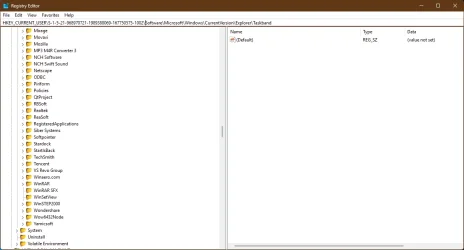
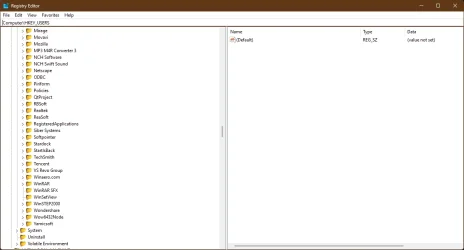
Brink, thx for the response. I get to step 5 and I have my SID but the path to insert the SID dowsnt exist I only have CurrentUser not Users. When I put the SID in its place image 32 and hit enter it foes to image 15 and nothing is accomplished.
 

Attachments

  • 2025-07-28_08-11-32.webp
    2025-07-28_08-11-32.webp
    41.7 KB · Views: 1
  • 2025-07-28_08-12-15.webp
    2025-07-28_08-12-15.webp
    36.3 KB · Views: 1

My Computer

System One

  • OS
    Windows 11 Home
    Computer type
    Laptop
    Manufacturer/Model
    Dell Inspiron 7445 2in1
    CPU
    AMD Ryzen 7 8840HS
    Motherboard
    0MT90K
    Memory
    Kingston FURY Impact 32GB (2x16GB) 5600MT/s DDR5
    Graphics Card(s)
    AMD Radeon 780M Graphics
    Sound Card
    AMD High Definition Audio Device
    Monitor(s) Displays
    Dell 27"
    Screen Resolution
    2560x1440
    Hard Drives
    EG6 KIOXIA 1TB (NVMe)
    PSU
    6-Cell 97WHr Integrated
    Case
    Platinum Silver
    Keyboard
    Arteck 5.1
    Mouse
    Logitech M650
    Internet Speed
    1000 | 25
    Browser
    Google Chrome
    Antivirus
    Windows Defender
    Other Info
    If you listen cartefully, you can hear me not caring.
Hello @izzyforeal, :alien:

You can try resetting and clearing your pinned taskbar items to remove it. You will have to manually pin items you want back to the taskbar afterwards though.

UPDATE:
Doing the first part of Brink's instructions did it!
Dude you're head must hurt as much info as you have up there. THANK YOU ALL!
 

My Computer

System One

  • OS
    Windows 11 Home
    Computer type
    Laptop
    Manufacturer/Model
    Dell Inspiron 7445 2in1
    CPU
    AMD Ryzen 7 8840HS
    Motherboard
    0MT90K
    Memory
    Kingston FURY Impact 32GB (2x16GB) 5600MT/s DDR5
    Graphics Card(s)
    AMD Radeon 780M Graphics
    Sound Card
    AMD High Definition Audio Device
    Monitor(s) Displays
    Dell 27"
    Screen Resolution
    2560x1440
    Hard Drives
    EG6 KIOXIA 1TB (NVMe)
    PSU
    6-Cell 97WHr Integrated
    Case
    Platinum Silver
    Keyboard
    Arteck 5.1
    Mouse
    Logitech M650
    Internet Speed
    1000 | 25
    Browser
    Google Chrome
    Antivirus
    Windows Defender
    Other Info
    If you listen cartefully, you can hear me not caring.
  • Like
Reactions: OAT
Great news. :shawn:
 

My Computers

System One System Two

  • OS
    Windows 11 Pro for Workstations
    Computer type
    PC/Desktop
    Manufacturer/Model
    Custom self build
    CPU
    Intel i7-8700K 5 GHz
    Motherboard
    ASUS ROG Maximus XI Formula Z390
    Memory
    64 GB (4x16GB) G.SKILL TridentZ RGB DDR4 3600 MHz (F4-3600C18D-32GTZR)
    Graphics Card(s)
    ASUS ROG-STRIX-GTX1080TI-O11G-GAMING (11GB GDDR5X)
    Sound Card
    Integrated Digital Audio (S/PDIF)
    Monitor(s) Displays
    2 x Samsung Odyssey G75 27"
    Screen Resolution
    2560x1440
    Hard Drives
    1TB Samsung 990 PRO M.2,
    4TB Samsung 990 PRO M.2,
    TerraMaster F8 SSD Plus NAS
    PSU
    Seasonic Prime Titanium 850W
    Case
    Thermaltake Core P3 wall mounted
    Cooling
    Corsair Hydro H115i
    Keyboard
    Amazon Basics Wired Full Keyboard MD005
    Mouse
    Logitech MX Master 4
    Internet Speed
    2 Gbps Download and 100 Mbps Upload
    Browser
    Chrome and Edge
    Antivirus
    Microsoft Defender
    Other Info
    Logitech Z625 speaker system,
    Logitech BRIO 4K Pro webcam,
    HP Color LaserJet Pro MFP M477fdn,
    CyberPower CP1500PFCLCD
    Galaxy S23 Plus phone
  • Operating System
    Windows 11 Pro
    Computer type
    Laptop
    Manufacturer/Model
    Surface Laptop 7 Copilot+ PC
    CPU
    Snapdragon X Elite (12 core) 3.42 GHz
    Memory
    16 GB LPDDR5x-7467 MHz
    Monitor(s) Displays
    15" HDR
    Screen Resolution
    2496 x 1664
    Hard Drives
    1 TB SSD
    Internet Speed
    Wi-Fi 7 and Bluetooth 5.4
    Browser
    Chrome and Edge
    Antivirus
    Microsoft Defender

My Computer

System One

  • OS
    Windows 11 Home
    Computer type
    Laptop
    Manufacturer/Model
    Dell Inspiron 7445 2in1
    CPU
    AMD Ryzen 7 8840HS
    Motherboard
    0MT90K
    Memory
    Kingston FURY Impact 32GB (2x16GB) 5600MT/s DDR5
    Graphics Card(s)
    AMD Radeon 780M Graphics
    Sound Card
    AMD High Definition Audio Device
    Monitor(s) Displays
    Dell 27"
    Screen Resolution
    2560x1440
    Hard Drives
    EG6 KIOXIA 1TB (NVMe)
    PSU
    6-Cell 97WHr Integrated
    Case
    Platinum Silver
    Keyboard
    Arteck 5.1
    Mouse
    Logitech M650
    Internet Speed
    1000 | 25
    Browser
    Google Chrome
    Antivirus
    Windows Defender
    Other Info
    If you listen cartefully, you can hear me not caring.
Back
Top Bottom