change where pagefil.sys is put during WinPE


Rbcc

Well-known member
Local time
11:41 PM
Posts
124
OS
Windows 11 pro
wmic pagefileset where name!="T:\\pagefile.sys" delete

wmic pagefileset create name="T:\\pagefile.sys"
wmic pagefileset where name="T:\\pagefile.sys" set InitialSize=64000,MaximumSize=64000
if I put this in a batch file and put the batch file in %WINDIR%\system32\ and a batch file having these two items will that change the location of pagefile.sys?

Now how do I put T:\temp in this screen in a batch file?temp.webp
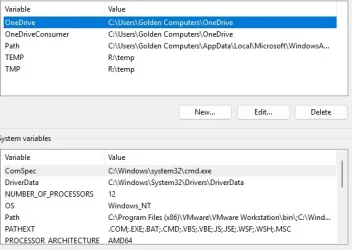
 
Windows Build/Version
windows 11 pro 26200.5742

My Computer My Computer

At a glance

Windows 11 proI-7 2gigaherz16Gig
OS
Windows 11 pro
Computer type
Laptop
Manufacturer/Model
Asus
CPU
I-7 2gigaherz
Motherboard
Asus
Memory
16Gig
Screen Resolution
1024x768
Hard Drives
512 SSD
Why would you bother as every pc is different?

The only common denominator is that all pcs have a C drive.

The pagefile can be so easily moved after installation.
 

My Computer My Computer

At a glance

Windows 11 Pro + Win11 Canary VM.I9 13th gen i9-13900H 2.60 GHZ16 GB solderedIntegrated Intel Iris XE
OS
Windows 11 Pro + Win11 Canary VM.
Computer type
Laptop
Manufacturer/Model
ASUS Zenbook 14
CPU
I9 13th gen i9-13900H 2.60 GHZ
Motherboard
Yep, Laptop has one.
Memory
16 GB soldered
Graphics Card(s)
Integrated Intel Iris XE
Sound Card
Realtek built in
Monitor(s) Displays
laptop OLED screen
Screen Resolution
2880x1800 touchscreen
Hard Drives
1 TB NVME SSD (only weakness is only one slot)
PSU
Internal + 65W thunderbolt USB4 charger
Case
Yep, got one
Cooling
Stella Artois (UK pint cans - 568 ml) - extra cost.
Keyboard
Built in UK keybd
Mouse
Bluetooth , wireless dongled, wired
Internet Speed
900 mbs (ethernet), wifi 6 typical 350-450 mb/s both up and down
Browser
Edge
Antivirus
Defender
Other Info
TPM 2.0, 2xUSB4 thunderbolt, 1xUsb3 (usb a), 1xUsb-c, hdmi out, 3.5 mm audio out/in combo, ASUS backlit trackpad (inc. switchable number pad)

Macrium Reflect Home V8
Office 365 Family (6 users each 1TB onedrive space)
Hyper-V (a vm runs almost as fast as my older laptop)
You haven't bean clear if you want to move virtual memory during installation or after.
I have a small SSD (128 G) for OS and programs and a HDD for data. I have moved C:\Users (SSD) to D:\Users (HDD) using Sysprep during installation. Also moved virtual memory and temp folders to D: and disabled hibernation after installation.
 

My Computers My Computers

  • At a glance

    Windows 11 Pro - Windows 7 HP 64 - Lubuntui5 6600K - 800MHz to 4400MHz4+4G GSkill DDR4 3000IG - Intel 530
    OS
    Windows 11 Pro - Windows 7 HP 64 - Lubuntu
    Computer type
    PC/Desktop
    Manufacturer/Model
    custom build
    CPU
    i5 6600K - 800MHz to 4400MHz
    Motherboard
    GA-Z170-HD3P
    Memory
    4+4G GSkill DDR4 3000
    Graphics Card(s)
    IG - Intel 530
    Monitor(s) Displays
    Samsung 226BW
    Screen Resolution
    1680x1050
    Hard Drives
    (1) -1 SM951 – 128GB M.2 AHCI PCIe SSD drive for Win 11
    (2) -1 WD SATA 3 - 1T for Data
    (3) -1 WD SATA 3 - 1T for backup
    (4) -1 BX500 SSD - 256G for Windows 7 and Lubuntu
    PSU
    Thermaltake 450W TR2 gold
    Keyboard
    Old and good Chicony mechanical keyboard
    Mouse
    Logitech mX performance - 9 buttons (had to disable some)
    Internet Speed
    500 Mb/s
    Browser
    Firefox 64
  • At a glance

    Windows 11 Proi7-4500U 800- 3000MHz(4+4)G DDR3 1600IG intel 4400 + NVIDIA GeForce GT 745M
    Operating System
    Windows 11 Pro
    Computer type
    Laptop
    Manufacturer/Model
    Asus Q550LF
    CPU
    i7-4500U 800- 3000MHz
    Motherboard
    Asus Q550LF
    Memory
    (4+4)G DDR3 1600
    Graphics card(s)
    IG intel 4400 + NVIDIA GeForce GT 745M
    Sound Card
    Realtek
    Monitor(s) Displays
    LG Display LP156WF4-SPH1
    Screen Resolution
    1920 x 1080
    Hard Drives
    BX500 120G SSD for Windows and programs
    & 1T HDD for data
    Internet Speed
    500 Mb/s
    Browser
    Firefox 64
You haven't bean clear if you want to move virtual memory during installation or after.
I would like to move it during installation after PE and before OOBE. So, when Windows is run for the first time it will be in the T:\temp drive.
 

My Computer My Computer

At a glance

Windows 11 proI-7 2gigaherz16Gig
OS
Windows 11 pro
Computer type
Laptop
Manufacturer/Model
Asus
CPU
I-7 2gigaherz
Motherboard
Asus
Memory
16Gig
Screen Resolution
1024x768
Hard Drives
512 SSD
WinPE is the wrong place to do this task. A scripted WinPE is normally used to gather machine data and to prepare the disks ahead of running Setup. Setup extracts an install image to a prepared disk, then exits into booting the freshly installed Windows.

To update the Windows page file setting as early as possible, requires one of two methods:

1. DISM mount an offline image, and modify the image's registry. TenForums has a tutorial: DISM - Edit Registry on an Offline Image

Code:
reg add "HKLM\OFFLINE\CurrentControlSet\Control\Session Manager\Memory Management" /v PagingFiles /t REG_MULT_SZ /d "T:\pagefile.sys 65536 65536" /f

When the machine boots for the first time (exiting WinPE), it will attempt to create a paging file on T:
Make sure you have a valid drive letter at that point.

2. Run a specialize pass command in the unattended file, which deletes the current page file and creates a new one.

Code:
        <settings pass="specialize">
                <component name="Microsoft-Windows-Deployment" processorArchitecture="amd64" publicKeyToken="31bf3856ad364e35" language="neutral" versionScope="nonSxS" xmlns:wcm="http://schemas.microsoft.com/WMIConfig/2002/State" xmlns:xsi="http://www.w3.org/2001/XMLSchema-instance">
                        <RunSynchronous>
                                <RunSynchronousCommand wcm:action="add">
                                        <Order>1</Order>
                                        <Path>wmic computersystem where name="%computername%" set AutomaticManagedPagefile=False</Path>
                                </RunSynchronousCommand>
                                <RunSynchronousCommand wcm:action="add">
                                        <Order>2</Order>
                                        <Path>wmic pagefileset where name="C:\pagefile.sys" delete</Path>
                                </RunSynchronousCommand>
                                        <Order>3</Order>
                                        <Path>wmic pagefileset where name="T:\pagefile.sys" set InitialSize=65536,MaximumSize=65536</Path>
                                </RunSynchronousCommand>
                        </RunSynchronous>
                </component>
        </settings

Don't use a rounded decimal number like 64000, pick a power of two (65536) or a multiple of a power of two (3 * 16384).

CORRECTION: Fix the path for "reg add".
 
Last edited:

My Computer My Computer

At a glance

Windows 7
OS
Windows 7
Thank you garlin!
 

My Computer My Computer

At a glance

Windows 11 proI-7 2gigaherz16Gig
OS
Windows 11 pro
Computer type
Laptop
Manufacturer/Model
Asus
CPU
I-7 2gigaherz
Motherboard
Asus
Memory
16Gig
Screen Resolution
1024x768
Hard Drives
512 SSD
As drive letters are assigned by the OS that is running, don't you need to assign letter T: to a drive partition before you move pagefile?
diskpart
sel disk n
sel part m
assign letter=T
exit
 

My Computers My Computers

  • At a glance

    Windows 11 Pro - Windows 7 HP 64 - Lubuntui5 6600K - 800MHz to 4400MHz4+4G GSkill DDR4 3000IG - Intel 530
    OS
    Windows 11 Pro - Windows 7 HP 64 - Lubuntu
    Computer type
    PC/Desktop
    Manufacturer/Model
    custom build
    CPU
    i5 6600K - 800MHz to 4400MHz
    Motherboard
    GA-Z170-HD3P
    Memory
    4+4G GSkill DDR4 3000
    Graphics Card(s)
    IG - Intel 530
    Monitor(s) Displays
    Samsung 226BW
    Screen Resolution
    1680x1050
    Hard Drives
    (1) -1 SM951 – 128GB M.2 AHCI PCIe SSD drive for Win 11
    (2) -1 WD SATA 3 - 1T for Data
    (3) -1 WD SATA 3 - 1T for backup
    (4) -1 BX500 SSD - 256G for Windows 7 and Lubuntu
    PSU
    Thermaltake 450W TR2 gold
    Keyboard
    Old and good Chicony mechanical keyboard
    Mouse
    Logitech mX performance - 9 buttons (had to disable some)
    Internet Speed
    500 Mb/s
    Browser
    Firefox 64
  • At a glance

    Windows 11 Proi7-4500U 800- 3000MHz(4+4)G DDR3 1600IG intel 4400 + NVIDIA GeForce GT 745M
    Operating System
    Windows 11 Pro
    Computer type
    Laptop
    Manufacturer/Model
    Asus Q550LF
    CPU
    i7-4500U 800- 3000MHz
    Motherboard
    Asus Q550LF
    Memory
    (4+4)G DDR3 1600
    Graphics card(s)
    IG intel 4400 + NVIDIA GeForce GT 745M
    Sound Card
    Realtek
    Monitor(s) Displays
    LG Display LP156WF4-SPH1
    Screen Resolution
    1920 x 1080
    Hard Drives
    BX500 120G SSD for Windows and programs
    & 1T HDD for data
    Internet Speed
    500 Mb/s
    Browser
    Firefox 64

My Computers My Computers

  • At a glance

    Windows 11 Pro - Windows 7 HP 64 - Lubuntui5 6600K - 800MHz to 4400MHz4+4G GSkill DDR4 3000IG - Intel 530
    OS
    Windows 11 Pro - Windows 7 HP 64 - Lubuntu
    Computer type
    PC/Desktop
    Manufacturer/Model
    custom build
    CPU
    i5 6600K - 800MHz to 4400MHz
    Motherboard
    GA-Z170-HD3P
    Memory
    4+4G GSkill DDR4 3000
    Graphics Card(s)
    IG - Intel 530
    Monitor(s) Displays
    Samsung 226BW
    Screen Resolution
    1680x1050
    Hard Drives
    (1) -1 SM951 – 128GB M.2 AHCI PCIe SSD drive for Win 11
    (2) -1 WD SATA 3 - 1T for Data
    (3) -1 WD SATA 3 - 1T for backup
    (4) -1 BX500 SSD - 256G for Windows 7 and Lubuntu
    PSU
    Thermaltake 450W TR2 gold
    Keyboard
    Old and good Chicony mechanical keyboard
    Mouse
    Logitech mX performance - 9 buttons (had to disable some)
    Internet Speed
    500 Mb/s
    Browser
    Firefox 64
  • At a glance

    Windows 11 Proi7-4500U 800- 3000MHz(4+4)G DDR3 1600IG intel 4400 + NVIDIA GeForce GT 745M
    Operating System
    Windows 11 Pro
    Computer type
    Laptop
    Manufacturer/Model
    Asus Q550LF
    CPU
    i7-4500U 800- 3000MHz
    Motherboard
    Asus Q550LF
    Memory
    (4+4)G DDR3 1600
    Graphics card(s)
    IG intel 4400 + NVIDIA GeForce GT 745M
    Sound Card
    Realtek
    Monitor(s) Displays
    LG Display LP156WF4-SPH1
    Screen Resolution
    1920 x 1080
    Hard Drives
    BX500 120G SSD for Windows and programs
    & 1T HDD for data
    Internet Speed
    500 Mb/s
    Browser
    Firefox 64
Back
Top Bottom