Windows Update Change Windows Insider Program Channel in Windows 11

  • Thread starter Thread starter Brink
  • Start date Published: Start date Updated Updated:
  • Tags Tags
    insider

Windows_Insiders_banner.png

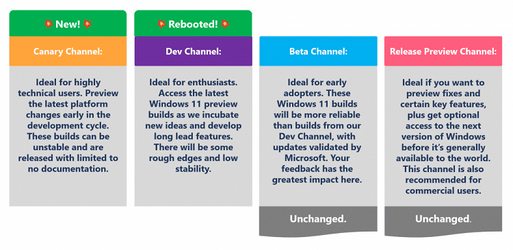
This tutorial will show you how to change your Windows Insider Program channel to the Canary Channel, Dev Channel, Beta Channel or Release Preview Channel to get Insider preview builds of Windows 11 on your PC.

Flighting is the process of running Windows Insider Preview Builds on your device. When you run these early versions of Windows and give Microsoft feedback, you can help Microsoft shape the future of Windows. Once you've registered for the Windows Insider Program, you can run Insider Preview builds on as many devices as you want, each in the channel of your choice.

Starting April 24, 2026, Microsoft is beginning to move to the new Experimental and Beta channels as announced earlier this month. As a reminder, most Insiders, those who are in the Dev and Beta channels today will transition to the new channels over time as follows:
  • Beta Channel > Beta
  • Dev Channel > Experimental
For those in the Canary Channel, you will also be transitioned to specific versions of the Experimental channel, depending on whether you are in the 28000 series Canary channel or took the optional 29500 series update. The transition takes place as follows:
  • Canary Channel 28000 series > Experimental (26H1)
  • Canary Channel 29500 series > Experimental (Future Platforms)
Based on your feedback to have clearer definitions between channels, Microsoft has committed to updating how they use the new Beta experience to reflect what is coming to retail in the following weeks. With this, there will be a realignment of experience when Beta Channel Insiders move to the new Beta experience.

While Beta Channel Insiders can generally expect a similar experience after this transition, some may notice feature changes. Although these feature differences will be minor, users who are looking for the best continuity of all existing features should consider moving from the existing Beta Channel to Dev Channel, in preparation for the move to Experimental. For most Insiders, picking the Beta or Experimental channel will be all you need to get set up, but for those who want to go further, we are adding an advanced option to pick your Windows core version compatible with your hardware. Most users will see these options as 25H2 or 26H1 builds. While users can still move from Beta to Experimental after the changes are implemented on your device, moving beforehand ensures the best continuity of experience for those features.

The Experimental channel will also contain a further Future Platforms option which is our earliest preview build for Windows and is not aligned to a retail version of Windows. This is aimed at users who are looking to be at the forefront of platform development. Insiders looking for the earliest access to features should remain on a version aligned to a retail build.

Release Preview will continue to be an advanced option aimed at commercial customers and Insiders who want early access to production builds in the days leading up to broad release. To select Release Preview, you will need to enable it in the ‘Advanced Options’ but the content remains unchanged. We’re actively talking with our commercial Insiders about how to make it better, and we want to hear from you.

Depending on your channel today, leaving the Windows Insider Program or even moving between channels can sometimes require wiping your device and doing a clean install of Windows. That can be a barrier both for people considering the program and for Insiders who want to leave. To make this a more streamlined and consistent experience, Microsoft is making some behind the scenes changes to enable Insider builds to use an in-place upgrade (IPU) to hop between versions. This will allow in most cases Insiders to move between Experimental, Beta, and Release Preview on the same Windows core version, or leave the program without a clean install. An IPU takes a bit more time than your normal update but migrates your apps, settings, and data in-place. As Experimental Future Platforms is our earliest preview build option and does not align to a retail production build of Windows, moving to a different channel or out of the WIP program will still require a clean install.

References:

This requires you have already set to get Windows Insider builds.

You must be signed in as an administrator to change the Insider channel.


Contents

  • Option One: Change Windows Insider Program Channel for Windows 11 in Settings
  • Option Two: Change Windows Insider Program Channel for Windows 11 using REG file
  • Option Three: Specify Windows Insider Program Channel for Windows 11 in Local Group Policy Editor
  • Option Four: Specify Windows Insider Program Channel for Windows 11 using REG file


Option One

Change Windows Insider Program Channel for Windows 11 in Settings


1 Open Settings (Win+I).

2 Click/tap on Windows Update on the left side, and click/tap on Windows Insider Program on the right side. (see screenshot below)


Change_Windows_Insider_channel-1.png

3 Do step 4 (Beta), step 5 (Experimental), step 6 (Experimental 26H1), step 7 (Experimental Future Platforms), or step 8 (Release Preview) below for what you want.

If Select your experience or Choose your Insider settings is missing from your Settings, then perform the following steps to restore it:

1) Open an elevated Windows Terminal, and select Command Prompt.
2) Copy and paste the bcdedit /set flightsigning on command into the elevated terminal, and press Enter.
3) Copy and paste the bcdedit /set {bootmgr} flightsigning on command into the elevated terminal, and press Enter.
4) Restart the computer to apply.


 4. Change to Beta Channel

A) Select (dot) Beta under the Select your experience section. (see screenshot below)​

B) Click/tap on Advanced Options to expand it open.​

C) Select (dot) Windows 11, version 25H2.​


Beta.webp


 5. Change to Experimental Channel

A) Select (dot) Experimental under the Select your experience section. (see screenshot below)​

B) Click/tap on Advanced Options to expand it open.​

C) Select (dot) Windows 11, version 25H2.​


Experimental.webp


 6. Change to Experimental 26H1 Channel

A) Select (dot) Experimental under the Select your experience section. (see screenshot below)​

B) Click/tap on Advanced Options to expand it open.​

C) Select (dot) Windows 11, version 26H1.​


Experimental_26H1.webp


 7. Change to Experimental Future Platforms

A) Select (dot) Experimental under the Select your experience section. (see screenshot below)​

B) Click/tap on Advanced Options to expand it open.​

C) Select (dot) Future Platforms.​


Experimentall_future_platforms.webp


 8. Change to Release Preview Channel

A) Click/tap on Advanced Options to expand it open. (see screenshot below)​

B) Turn on Show Release Preview.​

C) Select (dot) Release Preview under the Select your experience section.​

D) Under Advanced Options, select (dot) Windows 11, version 25H2 or Windows 11, version 26H1 for which one you want.​


Release_Preview.webp


Option Two

Change Windows Insider Program Channel for Windows 11 using REG file


This option makes the same changes in Settings like in Option One.


1 Do step 2 (Experimental), step 3 (Experimental 26H1), step 4 (Experimental Future-Platforms), step 5 (Beta), step 6 (Release Preview 25H2), or step 7 (Release Preview 26H1) below for which Insider channel you want.

2 Change to Experimental 25H2 Channel

A) Click/tap on the Download button below to download the REG file below, and go to step 8 below.​

Switch_to_Experimental_25H2_Channel.reg


(Contents of REG file for reference)
Code:
Windows Registry Editor Version 5.00

[HKEY_LOCAL_MACHINE\SOFTWARE\Microsoft\WindowsSelfHost\UI\Selection]
"AdvancedToggleState"=dword:00000000
"OptOutState"=dword:00000000
"UIBranch"="Dev"
"UIContentType"="Mainline"
"UIRing"="External"
"UITargetVersion"=dword:00006658

3 Change to Experimental 26H1 Channel

A) Click/tap on the Download button below to download the REG file below, and go to step 8 below.​

Switch_to_Experimental_26H1_Channel.reg


(Contents of REG file for reference)
Code:
Windows Registry Editor Version 5.00

[HKEY_LOCAL_MACHINE\SOFTWARE\Microsoft\WindowsSelfHost\UI\Selection]
"AdvancedToggleState"=dword:00000000
"OptOutState"=dword:00000000
"UIBranch"="Dev"
"UIContentType"="Mainline"
"UIRing"="External"
"UITargetVersion"=dword:00006d60

4 Change to Experimental Future Platforms Channel

A) Click/tap on the Download button below to download the REG file below, and go to step 8 below.​

Switch_to_Experimental_Future_Platforms_Channel.reg


(Contents of REG file for reference)
Code:
Windows Registry Editor Version 5.00

[HKEY_LOCAL_MACHINE\SOFTWARE\Microsoft\WindowsSelfHost\UI\Selection]
"AdvancedToggleState"=dword:00000000
"OptOutState"=dword:00000000
"UIBranch"="Dev"
"UIContentType"="Mainline"
"UIRing"="External"
"UITargetVersion"=dword:ffffffff

5 Change to Beta Channel

A) Click/tap on the Download button below to download the REG file below, and go to step 8 below.​

Switch_to_Beta_Channel.reg


(Contents of REG file for reference)
Code:
Windows Registry Editor Version 5.00

[HKEY_LOCAL_MACHINE\SOFTWARE\Microsoft\WindowsSelfHost\UI\Selection]
"AdvancedToggleState"=dword:00000000
"OptOutState"=dword:00000000
"UIBranch"="Beta"
"UIContentType"="Mainline"
"UIRing"="External"
"UITargetVersion"=dword:00006658

6 Change to Release Preview 25H2 Channel

A) Click/tap on the Download button below to download the REG file below, and go to step 8 below.​

Switch_to_Release_Preview_25H2_Channel.reg


(Contents of REG file for reference)
Code:
Windows Registry Editor Version 5.00

[HKEY_LOCAL_MACHINE\SOFTWARE\Microsoft\WindowsSelfHost\UI\Selection]
"AdvancedToggleState"=dword:00000000
"OptOutState"=dword:00000000
"ReleasePreviewSelectable"=dword:00000001
"UIBranch"="ReleasePreview"
"UIContentType"="Mainline"
"UIRing"="External"
"UITargetVersion"=dword:00006658

7 Change to Release Preview 26H1 Channel

A) Click/tap on the Download button below to download the REG file below, and go to step 8 below.​

Switch_to_Release_Preview_26H1_Channel.reg


(Contents of REG file for reference)
Code:
Windows Registry Editor Version 5.00

[HKEY_LOCAL_MACHINE\SOFTWARE\Microsoft\WindowsSelfHost\UI\Selection]
"AdvancedToggleState"=dword:00000000
"OptOutState"=dword:00000000
"ReleasePreviewSelectable"=dword:00000001
"UIBranch"="ReleasePreview"
"UIContentType"="Mainline"
"UIRing"="External"
"UITargetVersion"=dword:00006d60

8 Save the .reg file to your desktop.

9 If you have Smart App Control turned on, you will need to unblock the downloaded REG file.

10 Double click/tap on the downloaded .reg file to merge it.

11 When prompted, click/tap on Run, Yes (UAC), Yes, and OK to approve the merge.

12 You can now delete the downloaded .reg file if you like.

13 Check for updates.


Option Three

Specify Windows Insider Program Channel for Windows 11 in Local Group Policy Editor


The Local Group Policy Editor is only available in the Windows 11 Pro, Enterprise, and Education editions.

All editions can use Option Four to configure the same policy.


1 Open the Local Group Policy Editor (gpedit.msc).

2 Navigate to the policy location below in the left pane of the Local Group Policy Editor. (see screenshot below)

Computer Configuration > Administrative Templates > Windows Component > Windows Update > Manage update offered from Windows Update

Insider_Channel_gpedit-1.webp

3 In the right pane of Manage update offered from Windows Update in the Local Group Policy Editor, double click/tap on the Manage preview builds policy to edit it. (see screenshot above)

4 Do step 5 (default) or step 6 (specify) below for what you want.


 5. Default User Choice Insider Program Channel

This is the default setting to allow using Option One and Option Two.


A) Select (dot) Not Configured. (see screenshot below)​

B) Click/tap on OK, and go to step 7 below.​

Insider_Channel_gpedit-2.webp


 6. Specify Insider Program Channel

A) Select (dot) Enabled. (see screenshot below)​

B) Under Options, select Dev Channel (Experimental), Beta Channel, or Release Preview Channel in the drop menu for which Insider channel you want to specify.​

C) Click/tap on OK, and go to step 7 below.​

Insider_Channel_gpedit-3.webp

7 You can now close the Local Group Policy Editor if you like.

8 Check for updates.


Option Four

Specify Windows Insider Program Channel for Windows 11 using REG file


1 Do step 2 (default), step 3 (Dev), step 4 (Beta), or step 5 (Release Preview) below for what you want.


 2. Default User Choice Insider Program Channel

This is the default setting to allow using Option One and Option Two.


A) Click/tap on the Download button below to download the file below, and go to step 6 below.​

Default_user-choice_Insider_Channel.reg


(Contents of REG file for reference)
Code:
Windows Registry Editor Version 5.00

[HKEY_LOCAL_MACHINE\SOFTWARE\Policies\Microsoft\Windows\WindowsUpdate]
"ManagePreviewBuildsPolicyValue"=-
"BranchReadinessLevel"=-


 3. Specify Dev (Experimental) Channel

This will override and prevent using Option One and Option Two.


A) Click/tap on the Download button below to download the file below, and go to step 6 below.​

Specify_Dev_channel.reg


(Contents of REG file for reference)
Code:
Windows Registry Editor Version 5.00

[HKEY_LOCAL_MACHINE\SOFTWARE\Policies\Microsoft\Windows\WindowsUpdate]
"ManagePreviewBuildsPolicyValue"=dword:00000002
"BranchReadinessLevel"=dword:00000002


 4. Specify Beta Channel

This will override and prevent using Option One and Option Two.


A) Click/tap on the Download button below to download the file below, and go to step 6 below.​

Specify_Beta_channel.reg


(Contents of REG file for reference)
Code:
Windows Registry Editor Version 5.00

[HKEY_LOCAL_MACHINE\SOFTWARE\Policies\Microsoft\Windows\WindowsUpdate]
"ManagePreviewBuildsPolicyValue"=dword:00000004
"BranchReadinessLevel"=dword:00000002


 5. Specify Release Preview Channel

This will override and prevent using Option One and Option Two.


A) Click/tap on the Download button below to download the file below, and go to step 6 below.​

Specify_Release_Preview_channel.reg


(Contents of REG file for reference)
Code:
Windows Registry Editor Version 5.00

[HKEY_LOCAL_MACHINE\SOFTWARE\Policies\Microsoft\Windows\WindowsUpdate]
"ManagePreviewBuildsPolicyValue"=dword:00000002
"BranchReadinessLevel"=dword:00000008

6 Save the REG file to your desktop.

7 If you have Smart App Control turned on, you will need to unblock the downloaded REG file.

8 Double click/tap on the downloaded REG file to merge it.

9 When prompted, click/tap on Run, Yes (UAC), Yes, and OK to approve the merge.

10 You can now delete the downloaded REG file if you like.

11 Check for updates.


That's it,
Shawn Brink


Attachments

Last edited:
Currently, it would take a clean install of Windows 11 to go from the Dev channel to the Beta channel.

Any features in build 22509 would not be in the Beta channel yet.
and if I switch all the features would be lost because they are not in beta yet is this correct?
 

My Computer

System One

  • OS
    windows 11
According to this article on how to switch back, it has worked. But I guess only time will tell. Here are my settings now.
It is now saying that it is queued for unenrollment.

Windows Insider Program 2.png
 

My Computers

System One System Two

  • OS
    Windows 11 Pro
    Computer type
    PC/Desktop
    Manufacturer/Model
    Stigg's Build
    CPU
    Intel Core i9-10900X
    Motherboard
    GIGABYTE X299X DESIGNARE 10G
    Memory
    Corsair 64 GB (4 x 16 GB) CMW64GX4M4C3000C15 Vengeance RGB Pro 3000Mhz DDR4
    Graphics Card(s)
    GIGABYTE GeForce GTX 1660 Super Mini ITX 6 GB OC
    Sound Card
    Realtek ALC1220
    Monitor(s) Displays
    Samsung 27" FHD LED FreeSync Gaming Monitor (LS27F350FHEXXY)
    Screen Resolution
    1920 x 1080
    Hard Drives
    Samsung 970 Pro Series 1TB M.2 2280 NVMe SSD
    Western Digital Red Pro WD8003FFBX-68B9AN0 8 TB, 7200 RPM, SATA-III
    Western Digital Red Pro WD8003FFBX-68B9AN0 8 TB, 7200 RPM, SATA-III
    PSU
    Corsair HX1200 1200W 80 Plus Platinum
    Case
    Fractal Design Define 7 Black Solid Case
    Cooling
    Noctua NH-D15 Chromax Black
    Keyboard
    Razer Ornata V2
    Mouse
    Razer DeathAdder Essential
    Internet Speed
    FTTN 100Mbps / 40Mbps
    Browser
    Mozilla Firefox
    Antivirus
    N/A
    Other Info
    Logitech BRIO 4k Ultra HD USB-C Webcam
  • Operating System
    Windows 10 Pro
    Computer type
    Laptop
    Manufacturer/Model
    ASUS ROG Zephyrus M GM501GS
    CPU
    Core i7-8750H
    Motherboard
    Zephyrus M GM501GS
    Memory
    SK Hynix 32 GB (2 x 16 GB) HMA82GS6CJR8N-VK 16 GB DDR4-2666 DDR4 SDRAM
    Graphics card(s)
    NVIDIA GeForce GTX 1070
    Sound Card
    Realtek ALC294
    Monitor(s) Displays
    AU Optronics B156HAN07.1 [15.6" LCD]
    Screen Resolution
    1920 x 1080
    Hard Drives
    Samsung MZVKW512HMJP-00000 512 GB, PCI-E 3.0 x4
    Samsung SSD 860 QVO 4TB 4 TB, SATA-III
    PSU
    N/A
    Case
    N/A
    Cooling
    N/A
    Keyboard
    PC/AT Enhanced PS2 Keyboard (101/102-Key)
    Mouse
    Razer DeathAdder Essential
    Internet Speed
    FTTN 100Mbps / 40Mbps
    Browser
    Mozilla Firefox
    Antivirus
    N/A
    Other Info
    USB2.0 HD UVC Webcam
According to this article on how to switch back, it has worked. But I guess only time will tell. Here are my settings now.
It is now saying that it is queued for unenrollment.

View attachment 15463
if I did switch back I would stay in beta, I just don't want to lose any new features from 22059, its a good thing that i keep system images from before updating 22059.
 

My Computer

System One

  • OS
    windows 11
if I did switch back I would stay in beta, I just don't want to lose any new features from 22059, its a good thing that i keep system images from before updating 22059.
So, are you currently on the Dev Channel?
The features won't be lost forever.
I would think that eventually the Beta and Release Preview Channels will get those features.
Some stuff may get dropped if it is really bad.
 

My Computers

System One System Two

  • OS
    Windows 11 Pro
    Computer type
    PC/Desktop
    Manufacturer/Model
    Stigg's Build
    CPU
    Intel Core i9-10900X
    Motherboard
    GIGABYTE X299X DESIGNARE 10G
    Memory
    Corsair 64 GB (4 x 16 GB) CMW64GX4M4C3000C15 Vengeance RGB Pro 3000Mhz DDR4
    Graphics Card(s)
    GIGABYTE GeForce GTX 1660 Super Mini ITX 6 GB OC
    Sound Card
    Realtek ALC1220
    Monitor(s) Displays
    Samsung 27" FHD LED FreeSync Gaming Monitor (LS27F350FHEXXY)
    Screen Resolution
    1920 x 1080
    Hard Drives
    Samsung 970 Pro Series 1TB M.2 2280 NVMe SSD
    Western Digital Red Pro WD8003FFBX-68B9AN0 8 TB, 7200 RPM, SATA-III
    Western Digital Red Pro WD8003FFBX-68B9AN0 8 TB, 7200 RPM, SATA-III
    PSU
    Corsair HX1200 1200W 80 Plus Platinum
    Case
    Fractal Design Define 7 Black Solid Case
    Cooling
    Noctua NH-D15 Chromax Black
    Keyboard
    Razer Ornata V2
    Mouse
    Razer DeathAdder Essential
    Internet Speed
    FTTN 100Mbps / 40Mbps
    Browser
    Mozilla Firefox
    Antivirus
    N/A
    Other Info
    Logitech BRIO 4k Ultra HD USB-C Webcam
  • Operating System
    Windows 10 Pro
    Computer type
    Laptop
    Manufacturer/Model
    ASUS ROG Zephyrus M GM501GS
    CPU
    Core i7-8750H
    Motherboard
    Zephyrus M GM501GS
    Memory
    SK Hynix 32 GB (2 x 16 GB) HMA82GS6CJR8N-VK 16 GB DDR4-2666 DDR4 SDRAM
    Graphics card(s)
    NVIDIA GeForce GTX 1070
    Sound Card
    Realtek ALC294
    Monitor(s) Displays
    AU Optronics B156HAN07.1 [15.6" LCD]
    Screen Resolution
    1920 x 1080
    Hard Drives
    Samsung MZVKW512HMJP-00000 512 GB, PCI-E 3.0 x4
    Samsung SSD 860 QVO 4TB 4 TB, SATA-III
    PSU
    N/A
    Case
    N/A
    Cooling
    N/A
    Keyboard
    PC/AT Enhanced PS2 Keyboard (101/102-Key)
    Mouse
    Razer DeathAdder Essential
    Internet Speed
    FTTN 100Mbps / 40Mbps
    Browser
    Mozilla Firefox
    Antivirus
    N/A
    Other Info
    USB2.0 HD UVC Webcam
So, are you currently on the Dev Channel?
The features won't be lost forever.
I would think that eventually the Beta and Release Preview Channels will get those features.
Some stuff may get dropped if it is really bad.
it now makes more sense to me, all the current dev channel features will released in mid 2022 because looking at winver it states evaluation copy expires 16.09.2022, the beta channel is closer to the public releases, i'm glad that I have system images to able to go backwards or forwards.
 

My Computer

System One

  • OS
    windows 11
it now makes more sense to me, all the current dev channel features will released in mid 2022 because looking at winver it states evaluation copy expires 16.09.2022, the beta channel is closer to the public releases, i'm glad that I have system images to able to go backwards or forwards.
Knowing what I now know, I'd stay away from the Dev Channel unless you are planning to do a clean installation of Windows 11 or stay on the Dev permanently.

There is no way of being certain of the procedure that I posted above to switch from the Dev to the Beta Channel actually works until there is an update. But it appears that it does.
 

My Computers

System One System Two

  • OS
    Windows 11 Pro
    Computer type
    PC/Desktop
    Manufacturer/Model
    Stigg's Build
    CPU
    Intel Core i9-10900X
    Motherboard
    GIGABYTE X299X DESIGNARE 10G
    Memory
    Corsair 64 GB (4 x 16 GB) CMW64GX4M4C3000C15 Vengeance RGB Pro 3000Mhz DDR4
    Graphics Card(s)
    GIGABYTE GeForce GTX 1660 Super Mini ITX 6 GB OC
    Sound Card
    Realtek ALC1220
    Monitor(s) Displays
    Samsung 27" FHD LED FreeSync Gaming Monitor (LS27F350FHEXXY)
    Screen Resolution
    1920 x 1080
    Hard Drives
    Samsung 970 Pro Series 1TB M.2 2280 NVMe SSD
    Western Digital Red Pro WD8003FFBX-68B9AN0 8 TB, 7200 RPM, SATA-III
    Western Digital Red Pro WD8003FFBX-68B9AN0 8 TB, 7200 RPM, SATA-III
    PSU
    Corsair HX1200 1200W 80 Plus Platinum
    Case
    Fractal Design Define 7 Black Solid Case
    Cooling
    Noctua NH-D15 Chromax Black
    Keyboard
    Razer Ornata V2
    Mouse
    Razer DeathAdder Essential
    Internet Speed
    FTTN 100Mbps / 40Mbps
    Browser
    Mozilla Firefox
    Antivirus
    N/A
    Other Info
    Logitech BRIO 4k Ultra HD USB-C Webcam
  • Operating System
    Windows 10 Pro
    Computer type
    Laptop
    Manufacturer/Model
    ASUS ROG Zephyrus M GM501GS
    CPU
    Core i7-8750H
    Motherboard
    Zephyrus M GM501GS
    Memory
    SK Hynix 32 GB (2 x 16 GB) HMA82GS6CJR8N-VK 16 GB DDR4-2666 DDR4 SDRAM
    Graphics card(s)
    NVIDIA GeForce GTX 1070
    Sound Card
    Realtek ALC294
    Monitor(s) Displays
    AU Optronics B156HAN07.1 [15.6" LCD]
    Screen Resolution
    1920 x 1080
    Hard Drives
    Samsung MZVKW512HMJP-00000 512 GB, PCI-E 3.0 x4
    Samsung SSD 860 QVO 4TB 4 TB, SATA-III
    PSU
    N/A
    Case
    N/A
    Cooling
    N/A
    Keyboard
    PC/AT Enhanced PS2 Keyboard (101/102-Key)
    Mouse
    Razer DeathAdder Essential
    Internet Speed
    FTTN 100Mbps / 40Mbps
    Browser
    Mozilla Firefox
    Antivirus
    N/A
    Other Info
    USB2.0 HD UVC Webcam
Knowing what I now know, I'd stay away from the Dev Channel unless you are planning to do a clean installation of Windows 11 or stay on the Dev permanently.

There is no way of being certain of the procedure that I posted above to switch from the Dev to the Beta Channel actually works until there is an update. But it appears that it does.
that's a good valid point as its probably better to save the dev channel for a vm instead of a real machine
 

My Computer

System One

  • OS
    windows 11
that's a good valid point as its probably better to save the dev channel for a vm instead of a real machine
Yeah.

And by the way... I almost forgot something important.
Welcome to the forum. :D
:clap:
 

My Computers

System One System Two

  • OS
    Windows 11 Pro
    Computer type
    PC/Desktop
    Manufacturer/Model
    Stigg's Build
    CPU
    Intel Core i9-10900X
    Motherboard
    GIGABYTE X299X DESIGNARE 10G
    Memory
    Corsair 64 GB (4 x 16 GB) CMW64GX4M4C3000C15 Vengeance RGB Pro 3000Mhz DDR4
    Graphics Card(s)
    GIGABYTE GeForce GTX 1660 Super Mini ITX 6 GB OC
    Sound Card
    Realtek ALC1220
    Monitor(s) Displays
    Samsung 27" FHD LED FreeSync Gaming Monitor (LS27F350FHEXXY)
    Screen Resolution
    1920 x 1080
    Hard Drives
    Samsung 970 Pro Series 1TB M.2 2280 NVMe SSD
    Western Digital Red Pro WD8003FFBX-68B9AN0 8 TB, 7200 RPM, SATA-III
    Western Digital Red Pro WD8003FFBX-68B9AN0 8 TB, 7200 RPM, SATA-III
    PSU
    Corsair HX1200 1200W 80 Plus Platinum
    Case
    Fractal Design Define 7 Black Solid Case
    Cooling
    Noctua NH-D15 Chromax Black
    Keyboard
    Razer Ornata V2
    Mouse
    Razer DeathAdder Essential
    Internet Speed
    FTTN 100Mbps / 40Mbps
    Browser
    Mozilla Firefox
    Antivirus
    N/A
    Other Info
    Logitech BRIO 4k Ultra HD USB-C Webcam
  • Operating System
    Windows 10 Pro
    Computer type
    Laptop
    Manufacturer/Model
    ASUS ROG Zephyrus M GM501GS
    CPU
    Core i7-8750H
    Motherboard
    Zephyrus M GM501GS
    Memory
    SK Hynix 32 GB (2 x 16 GB) HMA82GS6CJR8N-VK 16 GB DDR4-2666 DDR4 SDRAM
    Graphics card(s)
    NVIDIA GeForce GTX 1070
    Sound Card
    Realtek ALC294
    Monitor(s) Displays
    AU Optronics B156HAN07.1 [15.6" LCD]
    Screen Resolution
    1920 x 1080
    Hard Drives
    Samsung MZVKW512HMJP-00000 512 GB, PCI-E 3.0 x4
    Samsung SSD 860 QVO 4TB 4 TB, SATA-III
    PSU
    N/A
    Case
    N/A
    Cooling
    N/A
    Keyboard
    PC/AT Enhanced PS2 Keyboard (101/102-Key)
    Mouse
    Razer DeathAdder Essential
    Internet Speed
    FTTN 100Mbps / 40Mbps
    Browser
    Mozilla Firefox
    Antivirus
    N/A
    Other Info
    USB2.0 HD UVC Webcam
This states it in a round about way and over numerous sentences and paragraphs, but if it was me, I'd be highlighting the fact in one simple sentence in bold and in red that if you choose the Dev Channel, it may not be easy to change it. ;)
If you've installed an Insider Preview build in the Beta Channel or Release Preview Channel, switching between channels is easy. But if you've installed a build in the Dev Channel, because it's not tied to a specific release, it will depend on your current build and the current flighting build in the channel you want to switch to, as to what steps you will need to perform.

Occasionally it may become possible to switch a device from the Dev Channel to another channel. To determine which process is needed to switch from the Dev Channel, you first need to find your current build number and compare it to the current build number in the channel you wish to switch to.

If your current build number is equal to, or lower than the build number in the channel you want to move to:

  1. Select the desired channel, either Beta Channel (Recommended), or Release Preview Channel.
  2. The next time you receive an update, it will be for your new channel.
It may take some time before updates are available in the new channel you selected.


If your current build number is higher than the build number in the channel you want to move to:

  1. Do a clean installation of Windows 11.
  2. Once you've reinstalled Windows, set up your device again, making sure you select the channel you'd like to move to.
 

My Computers

System One System Two

  • OS
    Windows 11 Pro
    Computer type
    PC/Desktop
    Manufacturer/Model
    Stigg's Build
    CPU
    Intel Core i9-10900X
    Motherboard
    GIGABYTE X299X DESIGNARE 10G
    Memory
    Corsair 64 GB (4 x 16 GB) CMW64GX4M4C3000C15 Vengeance RGB Pro 3000Mhz DDR4
    Graphics Card(s)
    GIGABYTE GeForce GTX 1660 Super Mini ITX 6 GB OC
    Sound Card
    Realtek ALC1220
    Monitor(s) Displays
    Samsung 27" FHD LED FreeSync Gaming Monitor (LS27F350FHEXXY)
    Screen Resolution
    1920 x 1080
    Hard Drives
    Samsung 970 Pro Series 1TB M.2 2280 NVMe SSD
    Western Digital Red Pro WD8003FFBX-68B9AN0 8 TB, 7200 RPM, SATA-III
    Western Digital Red Pro WD8003FFBX-68B9AN0 8 TB, 7200 RPM, SATA-III
    PSU
    Corsair HX1200 1200W 80 Plus Platinum
    Case
    Fractal Design Define 7 Black Solid Case
    Cooling
    Noctua NH-D15 Chromax Black
    Keyboard
    Razer Ornata V2
    Mouse
    Razer DeathAdder Essential
    Internet Speed
    FTTN 100Mbps / 40Mbps
    Browser
    Mozilla Firefox
    Antivirus
    N/A
    Other Info
    Logitech BRIO 4k Ultra HD USB-C Webcam
  • Operating System
    Windows 10 Pro
    Computer type
    Laptop
    Manufacturer/Model
    ASUS ROG Zephyrus M GM501GS
    CPU
    Core i7-8750H
    Motherboard
    Zephyrus M GM501GS
    Memory
    SK Hynix 32 GB (2 x 16 GB) HMA82GS6CJR8N-VK 16 GB DDR4-2666 DDR4 SDRAM
    Graphics card(s)
    NVIDIA GeForce GTX 1070
    Sound Card
    Realtek ALC294
    Monitor(s) Displays
    AU Optronics B156HAN07.1 [15.6" LCD]
    Screen Resolution
    1920 x 1080
    Hard Drives
    Samsung MZVKW512HMJP-00000 512 GB, PCI-E 3.0 x4
    Samsung SSD 860 QVO 4TB 4 TB, SATA-III
    PSU
    N/A
    Case
    N/A
    Cooling
    N/A
    Keyboard
    PC/AT Enhanced PS2 Keyboard (101/102-Key)
    Mouse
    Razer DeathAdder Essential
    Internet Speed
    FTTN 100Mbps / 40Mbps
    Browser
    Mozilla Firefox
    Antivirus
    N/A
    Other Info
    USB2.0 HD UVC Webcam
This states it in a round about way and over numerous sentences and paragraphs, but if it was me, I'd be highlighting the fact in one simple sentence in bold and in red that if you choose the Dev Channel, it may not be easy to change it. ;)
this also makes sense when you look at the build numbers on Wikipedia
 

My Computer

System One

  • OS
    windows 11
Tutorial updated for Windows Insider Program 2023. :alien:
 

My Computers

System One System Two

  • OS
    Windows 11 Pro for Workstations
    Computer type
    PC/Desktop
    Manufacturer/Model
    Custom self build
    CPU
    Intel i7-8700K 5 GHz
    Motherboard
    ASUS ROG Maximus XI Formula Z390
    Memory
    64 GB (4x16GB) G.SKILL TridentZ RGB DDR4 3600 MHz (F4-3600C18D-32GTZR)
    Graphics Card(s)
    ASUS ROG-STRIX-GTX1080TI-O11G-GAMING (11GB GDDR5X)
    Sound Card
    Integrated Digital Audio (S/PDIF)
    Monitor(s) Displays
    2 x Samsung Odyssey G75 27"
    Screen Resolution
    2560x1440
    Hard Drives
    1TB Samsung 990 PRO M.2,
    4TB Samsung 990 PRO M.2,
    TerraMaster F8 SSD Plus NAS
    PSU
    Seasonic Prime Titanium 850W
    Case
    Thermaltake Core P3 wall mounted
    Cooling
    Corsair Hydro H115i
    Keyboard
    Amazon Basics Wired Full Keyboard MD005
    Mouse
    Logitech MX Master 4
    Internet Speed
    2 Gbps Download and 100 Mbps Upload
    Browser
    Chrome and Edge
    Antivirus
    Microsoft Defender
    Other Info
    Logitech Z625 speaker system,
    Logitech BRIO 4K Pro webcam,
    HP Color LaserJet Pro MFP M477fdn,
    CyberPower CP1500PFCLCD
    Galaxy S23 Plus phone
  • Operating System
    Windows 11 Pro
    Computer type
    Laptop
    Manufacturer/Model
    Surface Laptop 7 Copilot+ PC
    CPU
    Snapdragon X Elite (12 core) 3.42 GHz
    Memory
    16 GB LPDDR5x-7467 MHz
    Monitor(s) Displays
    15" HDR
    Screen Resolution
    2496 x 1664
    Hard Drives
    1 TB SSD
    Internet Speed
    Wi-Fi 7 and Bluetooth 5.4
    Browser
    Chrome and Edge
    Antivirus
    Microsoft Defender
Screenshot 2024-03-09 191456.png
 

My Computer

System One

  • OS
    window 10 version 22H2 (OS Build 19045.6466
    Computer type
    Laptop
    Manufacturer/Model
    Dell/E6400
    CPU
    Intel Core i7 @2.80GHz 57 °C Sandy Bridge 32nm Tech
    Motherboard
    Dell Inc. 0K0DNP (CPU 1)
    Memory
    4.00GB Dual-Channel DDR3 @ 665MHz (9-9-9-24)
    Graphics Card(s)
    Intel HD Graphics 3000
    Sound Card
    High Definition Audio Device
    Monitor(s) Displays
    single
    Screen Resolution
    1366x768 pixels
    Hard Drives
    WDC WD2500BPVT-75JJ5T0
    Keyboard
    Device Name Standard PS/2 Keyboard
    Mouse
    PS/2 Compatible Mouse
    Internet Speed
    10mb
    Browser
    ms edge
    Antivirus
    win defender
How to disable IP channels?
 

My Computer

System One

  • OS
    26200.8037
    Computer type
    PC/Desktop
    CPU
    i5-11400F
    Motherboard
    Gigabyte
    Memory
    32GB
    Graphics Card(s)
    Geforce GT-1030
    Keyboard
    Logitech K400
    Mouse
    Logitech M720
    Internet Speed
    600 Mb
    Browser
    Edge

My Computer

System One

  • OS
    Windows 11 Pro + Win11 Canary VM.
    Computer type
    Laptop
    Manufacturer/Model
    ASUS Zenbook 14
    CPU
    I9 13th gen i9-13900H 2.60 GHZ
    Motherboard
    Yep, Laptop has one.
    Memory
    16 GB soldered
    Graphics Card(s)
    Integrated Intel Iris XE
    Sound Card
    Realtek built in
    Monitor(s) Displays
    laptop OLED screen
    Screen Resolution
    2880x1800 touchscreen
    Hard Drives
    1 TB NVME SSD (only weakness is only one slot)
    PSU
    Internal + 65W thunderbolt USB4 charger
    Case
    Yep, got one
    Cooling
    Stella Artois (UK pint cans - 568 ml) - extra cost.
    Keyboard
    Built in UK keybd
    Mouse
    Bluetooth , wireless dongled, wired
    Internet Speed
    900 mbs (ethernet), wifi 6 typical 350-450 mb/s both up and down
    Browser
    Edge
    Antivirus
    Defender
    Other Info
    TPM 2.0, 2xUSB4 thunderbolt, 1xUsb3 (usb a), 1xUsb-c, hdmi out, 3.5 mm audio out/in combo, ASUS backlit trackpad (inc. switchable number pad)

    Macrium Reflect Home V8
    Office 365 Family (6 users each 1TB onedrive space)
    Hyper-V (a vm runs almost as fast as my older laptop)
This is a good tutorial but people should remember that Insider versions should not be main OS (even MS strongly advise that).

My strategy is clone Host OS to a virtual hard drive, then create a native boot entry.

Then rejoin whichever Insider version I want.

If I want to change Insider Channel, just repeat above, choosing channel you want.

As your start point is the release versiom, you never have a problem going backwards.
 

My Computer

System One

  • OS
    Windows 11 Pro + Win11 Canary VM.
    Computer type
    Laptop
    Manufacturer/Model
    ASUS Zenbook 14
    CPU
    I9 13th gen i9-13900H 2.60 GHZ
    Motherboard
    Yep, Laptop has one.
    Memory
    16 GB soldered
    Graphics Card(s)
    Integrated Intel Iris XE
    Sound Card
    Realtek built in
    Monitor(s) Displays
    laptop OLED screen
    Screen Resolution
    2880x1800 touchscreen
    Hard Drives
    1 TB NVME SSD (only weakness is only one slot)
    PSU
    Internal + 65W thunderbolt USB4 charger
    Case
    Yep, got one
    Cooling
    Stella Artois (UK pint cans - 568 ml) - extra cost.
    Keyboard
    Built in UK keybd
    Mouse
    Bluetooth , wireless dongled, wired
    Internet Speed
    900 mbs (ethernet), wifi 6 typical 350-450 mb/s both up and down
    Browser
    Edge
    Antivirus
    Defender
    Other Info
    TPM 2.0, 2xUSB4 thunderbolt, 1xUsb3 (usb a), 1xUsb-c, hdmi out, 3.5 mm audio out/in combo, ASUS backlit trackpad (inc. switchable number pad)

    Macrium Reflect Home V8
    Office 365 Family (6 users each 1TB onedrive space)
    Hyper-V (a vm runs almost as fast as my older laptop)
Tutorial updated to add option 3 and 4 to specify an Insider channel using group policy. :alien:
 

My Computers

System One System Two

  • OS
    Windows 11 Pro for Workstations
    Computer type
    PC/Desktop
    Manufacturer/Model
    Custom self build
    CPU
    Intel i7-8700K 5 GHz
    Motherboard
    ASUS ROG Maximus XI Formula Z390
    Memory
    64 GB (4x16GB) G.SKILL TridentZ RGB DDR4 3600 MHz (F4-3600C18D-32GTZR)
    Graphics Card(s)
    ASUS ROG-STRIX-GTX1080TI-O11G-GAMING (11GB GDDR5X)
    Sound Card
    Integrated Digital Audio (S/PDIF)
    Monitor(s) Displays
    2 x Samsung Odyssey G75 27"
    Screen Resolution
    2560x1440
    Hard Drives
    1TB Samsung 990 PRO M.2,
    4TB Samsung 990 PRO M.2,
    TerraMaster F8 SSD Plus NAS
    PSU
    Seasonic Prime Titanium 850W
    Case
    Thermaltake Core P3 wall mounted
    Cooling
    Corsair Hydro H115i
    Keyboard
    Amazon Basics Wired Full Keyboard MD005
    Mouse
    Logitech MX Master 4
    Internet Speed
    2 Gbps Download and 100 Mbps Upload
    Browser
    Chrome and Edge
    Antivirus
    Microsoft Defender
    Other Info
    Logitech Z625 speaker system,
    Logitech BRIO 4K Pro webcam,
    HP Color LaserJet Pro MFP M477fdn,
    CyberPower CP1500PFCLCD
    Galaxy S23 Plus phone
  • Operating System
    Windows 11 Pro
    Computer type
    Laptop
    Manufacturer/Model
    Surface Laptop 7 Copilot+ PC
    CPU
    Snapdragon X Elite (12 core) 3.42 GHz
    Memory
    16 GB LPDDR5x-7467 MHz
    Monitor(s) Displays
    15" HDR
    Screen Resolution
    2496 x 1664
    Hard Drives
    1 TB SSD
    Internet Speed
    Wi-Fi 7 and Bluetooth 5.4
    Browser
    Chrome and Edge
    Antivirus
    Microsoft Defender
If you are an Insider in the Dev Channel, you now have a window to switch from the Dev Channel to the Beta Channel if you would like. This window will only be open for as long as we’re releasing the same 25H2-based updates across both the Dev and Beta Channels. After we move Dev Channel forward to a higher build number, the opportunity to switch between these channels will close. When the Dev Channel jumps ahead, things might not be as stable as the Dev Channel is today, so we highly encourage you to evaluate which channel you would like to be in during the time in which the window to switch is open.


My Computers

System One System Two

  • OS
    Windows 11 Pro for Workstations
    Computer type
    PC/Desktop
    Manufacturer/Model
    Custom self build
    CPU
    Intel i7-8700K 5 GHz
    Motherboard
    ASUS ROG Maximus XI Formula Z390
    Memory
    64 GB (4x16GB) G.SKILL TridentZ RGB DDR4 3600 MHz (F4-3600C18D-32GTZR)
    Graphics Card(s)
    ASUS ROG-STRIX-GTX1080TI-O11G-GAMING (11GB GDDR5X)
    Sound Card
    Integrated Digital Audio (S/PDIF)
    Monitor(s) Displays
    2 x Samsung Odyssey G75 27"
    Screen Resolution
    2560x1440
    Hard Drives
    1TB Samsung 990 PRO M.2,
    4TB Samsung 990 PRO M.2,
    TerraMaster F8 SSD Plus NAS
    PSU
    Seasonic Prime Titanium 850W
    Case
    Thermaltake Core P3 wall mounted
    Cooling
    Corsair Hydro H115i
    Keyboard
    Amazon Basics Wired Full Keyboard MD005
    Mouse
    Logitech MX Master 4
    Internet Speed
    2 Gbps Download and 100 Mbps Upload
    Browser
    Chrome and Edge
    Antivirus
    Microsoft Defender
    Other Info
    Logitech Z625 speaker system,
    Logitech BRIO 4K Pro webcam,
    HP Color LaserJet Pro MFP M477fdn,
    CyberPower CP1500PFCLCD
    Galaxy S23 Plus phone
  • Operating System
    Windows 11 Pro
    Computer type
    Laptop
    Manufacturer/Model
    Surface Laptop 7 Copilot+ PC
    CPU
    Snapdragon X Elite (12 core) 3.42 GHz
    Memory
    16 GB LPDDR5x-7467 MHz
    Monitor(s) Displays
    15" HDR
    Screen Resolution
    2496 x 1664
    Hard Drives
    1 TB SSD
    Internet Speed
    Wi-Fi 7 and Bluetooth 5.4
    Browser
    Chrome and Edge
    Antivirus
    Microsoft Defender
 

My Computers

System One System Two

  • OS
    Windows 11 Pro for Workstations
    Computer type
    PC/Desktop
    Manufacturer/Model
    Custom self build
    CPU
    Intel i7-8700K 5 GHz
    Motherboard
    ASUS ROG Maximus XI Formula Z390
    Memory
    64 GB (4x16GB) G.SKILL TridentZ RGB DDR4 3600 MHz (F4-3600C18D-32GTZR)
    Graphics Card(s)
    ASUS ROG-STRIX-GTX1080TI-O11G-GAMING (11GB GDDR5X)
    Sound Card
    Integrated Digital Audio (S/PDIF)
    Monitor(s) Displays
    2 x Samsung Odyssey G75 27"
    Screen Resolution
    2560x1440
    Hard Drives
    1TB Samsung 990 PRO M.2,
    4TB Samsung 990 PRO M.2,
    TerraMaster F8 SSD Plus NAS
    PSU
    Seasonic Prime Titanium 850W
    Case
    Thermaltake Core P3 wall mounted
    Cooling
    Corsair Hydro H115i
    Keyboard
    Amazon Basics Wired Full Keyboard MD005
    Mouse
    Logitech MX Master 4
    Internet Speed
    2 Gbps Download and 100 Mbps Upload
    Browser
    Chrome and Edge
    Antivirus
    Microsoft Defender
    Other Info
    Logitech Z625 speaker system,
    Logitech BRIO 4K Pro webcam,
    HP Color LaserJet Pro MFP M477fdn,
    CyberPower CP1500PFCLCD
    Galaxy S23 Plus phone
  • Operating System
    Windows 11 Pro
    Computer type
    Laptop
    Manufacturer/Model
    Surface Laptop 7 Copilot+ PC
    CPU
    Snapdragon X Elite (12 core) 3.42 GHz
    Memory
    16 GB LPDDR5x-7467 MHz
    Monitor(s) Displays
    15" HDR
    Screen Resolution
    2496 x 1664
    Hard Drives
    1 TB SSD
    Internet Speed
    Wi-Fi 7 and Bluetooth 5.4
    Browser
    Chrome and Edge
    Antivirus
    Microsoft Defender
Option Two REG files updated for new Insider Preview channels. :alien:
 

My Computers

System One System Two

  • OS
    Windows 11 Pro for Workstations
    Computer type
    PC/Desktop
    Manufacturer/Model
    Custom self build
    CPU
    Intel i7-8700K 5 GHz
    Motherboard
    ASUS ROG Maximus XI Formula Z390
    Memory
    64 GB (4x16GB) G.SKILL TridentZ RGB DDR4 3600 MHz (F4-3600C18D-32GTZR)
    Graphics Card(s)
    ASUS ROG-STRIX-GTX1080TI-O11G-GAMING (11GB GDDR5X)
    Sound Card
    Integrated Digital Audio (S/PDIF)
    Monitor(s) Displays
    2 x Samsung Odyssey G75 27"
    Screen Resolution
    2560x1440
    Hard Drives
    1TB Samsung 990 PRO M.2,
    4TB Samsung 990 PRO M.2,
    TerraMaster F8 SSD Plus NAS
    PSU
    Seasonic Prime Titanium 850W
    Case
    Thermaltake Core P3 wall mounted
    Cooling
    Corsair Hydro H115i
    Keyboard
    Amazon Basics Wired Full Keyboard MD005
    Mouse
    Logitech MX Master 4
    Internet Speed
    2 Gbps Download and 100 Mbps Upload
    Browser
    Chrome and Edge
    Antivirus
    Microsoft Defender
    Other Info
    Logitech Z625 speaker system,
    Logitech BRIO 4K Pro webcam,
    HP Color LaserJet Pro MFP M477fdn,
    CyberPower CP1500PFCLCD
    Galaxy S23 Plus phone
  • Operating System
    Windows 11 Pro
    Computer type
    Laptop
    Manufacturer/Model
    Surface Laptop 7 Copilot+ PC
    CPU
    Snapdragon X Elite (12 core) 3.42 GHz
    Memory
    16 GB LPDDR5x-7467 MHz
    Monitor(s) Displays
    15" HDR
    Screen Resolution
    2496 x 1664
    Hard Drives
    1 TB SSD
    Internet Speed
    Wi-Fi 7 and Bluetooth 5.4
    Browser
    Chrome and Edge
    Antivirus
    Microsoft Defender
Back
Top Bottom