Changed setting now can't change it back


mopardogg

New member
Local time
3:23 AM
Posts
1
OS
Windows 11 Home
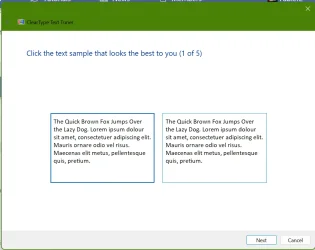
I inadvertently downloaded Windows 11 during an update (ugh). However, rather than try to undo it I decided to just live with it. While trying to make it usable I changed a setting. I believe it was something about reducing the quality of text to save memory. I am not really sure. For that reason, I haven't been able to do any research online. I have gone into every setting in the control panel to no avail. It is not screen resolution. It is not font. I know it had to do with saving memory. It is almost unusable now. And I almost had it working for me. I could scream!!! You can see from the photo. It is very faint and the lines are very thin. Awful. And I did it so surely I can undo it???
text.webp
 

Attachments

  • text.webp
    text.webp
    25 KB · Views: 1

My Computer My Computer

At a glance

Windows 11 Home11th Gen Intel(R) Core(TM) i5-1135G7 @ 2.40GH...8 GB
OS
Windows 11 Home
Computer type
Laptop
Manufacturer/Model
HP 15.3" HP-205CLMU8
CPU
11th Gen Intel(R) Core(TM) i5-1135G7 @ 2.40GHz 2.40 G
Memory
8 GB
The setting your speak of may be in settings>system>about>advanced system settings. Advanced tab. Under "Performance " click settings. For my screen I have found that "Let Windows choose what's best for my computer" works best.

When I first changed from 10 to 11, I used light mode and had a real problem with grainy pixelated fonts. Through a lot of trial and error, though not quite as good as it was in 10, I finally got graphics to where I can live with it. You might be interested to read my post #8 in this thread. Changing the system font made a big difference in readability. Readability is even better in dark mode.


Also, if you have the HP Support assistant app on your computer, run it to see if HP has an undated graphics driver for your system. If a newer graphics driver installs you will probably have to change your scale again. If you don't have HP Support Assistant, go to HP site, enter your serial number, and see if there are updated drivers for bios, graphics, and chipset.. You can manually download them from there.
 

My Computers My Computers

  • At a glance

    Windows 11 Pro 25H2 26200.9457i9-10900 10 core 20 threads32 gbnone-Intel UHD Graphics 630
    OS
    Windows 11 Pro 25H2 26200.9457
    Computer type
    PC/Desktop
    Manufacturer/Model
    Dell Optiplex 7080
    CPU
    i9-10900 10 core 20 threads
    Motherboard
    DELL 0J37VM
    Memory
    32 gb
    Graphics Card(s)
    none-Intel UHD Graphics 630
    Sound Card
    Integrated Realtek
    Monitor(s) Displays
    Benq 27
    Screen Resolution
    2560x1440
    Hard Drives
    2x1tb Solidigm m.2 nvme /External drives 512gb Samsung m.2 sata+2tb Kingston m2.nvme
    PSU
    500w
    Case
    MT
    Cooling
    Dell Premium
    Keyboard
    Logitech wired
    Mouse
    Logitech wireless
    Internet Speed
    so slow I'm too embarrassed to tell
    Browser
    #1 Edge #2 Firefox
    Antivirus
    Defender+MWB Premium
  • At a glance

    Windows 11 Pro 24H2 26200.9457AMD Ryzen 7 6800U32 gbintegrated
    Operating System
    Windows 11 Pro 24H2 26200.9457
    Computer type
    PC/Desktop
    Manufacturer/Model
    Beelink Mini PC SER5
    CPU
    AMD Ryzen 7 6800U
    Memory
    32 gb
    Graphics card(s)
    integrated
    Sound Card
    integrated
    Monitor(s) Displays
    Benq 27
    Screen Resolution
    2560x1440
    Hard Drives
    1TB Crucial nvme
    Keyboard
    Logitech wired
    Mouse
    Logitech wireless
    Internet Speed
    still too embarrassed to tell
    Browser
    Firefox
    Antivirus
    Defender
  • System 3 is non compliant Dell 9020 i7-4770/24gb ram Win11 PRO 26200.9457
Open Settings --> System -->About --> Advanced system settings and from System Properties click Settings button under Performance to change Visual affect for Windows 11.
 

My Computer My Computer

At a glance

Windows 11AMD Ryzen 7 5700GMicron Technology DDR4-3200 16GBNVIDIA GeForce RTX 3060
OS
Windows 11
Computer type
PC/Desktop
Manufacturer/Model
HP Pavilion
CPU
AMD Ryzen 7 5700G
Motherboard
Erica6
Memory
Micron Technology DDR4-3200 16GB
Graphics Card(s)
NVIDIA GeForce RTX 3060
Sound Card
Realtek ALC671
Monitor(s) Displays
Samsung SyncMaster U28E590
Screen Resolution
3840 x 2160
Hard Drives
SAMSUNG MZVLQ1T0HALB-000H1
Try settings -personalisation, fonts, Adjust ClearType text, the run through the setup.

ksnip_20241202-114250.webp

ksnip_20241202-114338.webp
 

My Computers My Computers

  • At a glance

    Win 11 ProAMD Ryzen™ 7 7730U24GB Dual-Channel DDR4 @ 1596MHz (22-22-22-52)512MB ATI AMD Radeon Graphics (ASUStek Comput...
    OS
    Win 11 Pro
    Computer type
    Laptop
    Manufacturer/Model
    ASUS Vivobook
    CPU
    AMD Ryzen™ 7 7730U
    Motherboard
    M1605YA
    Memory
    24GB Dual-Channel DDR4 @ 1596MHz (22-22-22-52)
    Graphics Card(s)
    512MB ATI AMD Radeon Graphics (ASUStek Computer Inc)
    Monitor(s) Displays
    Generic PnP Monitor (1920x1200@60Hz) - P1 PLUS (1920x1080@59Hz)
    Screen Resolution
    1920 X 1200
    Hard Drives
    953GB Western Digital WD
    PSU
    45 Watts
    Mouse
    Lenovo Bluetooth.
    Internet Speed
    500 Mbps
    Browser
    Edge
    Antivirus
    Defender
  • At a glance

    Windows 11AMD Ryzen 7 5800H / 3.2 GHz32 GB DDR4 SDRAM 3200 MHzNVIDIA GeForce RTX 3060 6 GB GDDR6 SDRAM
    Operating System
    Windows 11
    Computer type
    Laptop
    Manufacturer/Model
    ACER NITRO
    CPU
    AMD Ryzen 7 5800H / 3.2 GHz
    Motherboard
    CZ Scala_CAS (FP6)
    Memory
    32 GB DDR4 SDRAM 3200 MHz
    Graphics card(s)
    NVIDIA GeForce RTX 3060 6 GB GDDR6 SDRAM
    Sound Card
    Realtek Audio. NVIDIA High Definition Audio
    Monitor(s) Displays
    15.6" LED backlight 1920 x 1080 (Full HD) 144 Hz
    Screen Resolution
    1920 x 1080 (Full HD)
    Hard Drives
    Samsung 970 Evo Plus 2TB NVMe M.2
    PSU
    180 Watt, 19.5 V
    Mouse
    Lenovo Bluetooth
    Internet Speed
    500 Mbps
    Browser
    Edge
    Antivirus
    Defender

Latest Support Threads

Back
Top Bottom