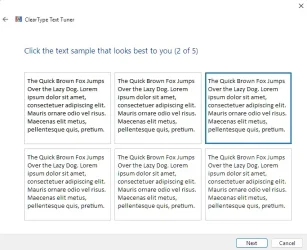
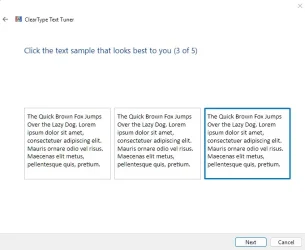
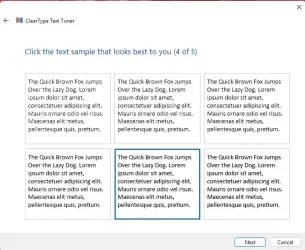
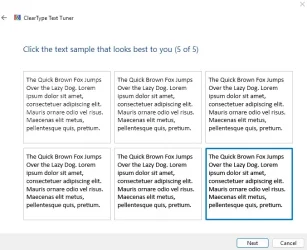
Changing the font type is not done through cleartype windows 11


losts80

Active member
Local time
10:17 PM
Posts
23
OS
SSD
hi

I select some font modifications through cleartype windows 11 but it does not happen


The video shows that the change that is selected via the image does not take place after restarting the computer. The new options are not changed. Only the old options are present and appear.

----------------------------------------------------------------------------------------------------------------------------------------------------------------------------------------------------------


Please help me
 

Attachments

  • Screenshot 2025-01-09 151010.webp
    Screenshot 2025-01-09 151010.webp
    24 KB · Views: 1
  • Screenshot 2025-01-09 151039.webp
    Screenshot 2025-01-09 151039.webp
    55.5 KB · Views: 1
  • Screenshot 2025-01-09 151109.webp
    Screenshot 2025-01-09 151109.webp
    28.1 KB · Views: 1
  • Screenshot 2025-01-09 151143.webp
    Screenshot 2025-01-09 151143.webp
    48.9 KB · Views: 1
  • Screenshot 2025-01-09 151212.webp
    Screenshot 2025-01-09 151212.webp
    47.4 KB · Views: 1

My Computer My Computer

At a glance

SSD
OS
SSD
ClearType is Microsoft's implementation of subpixel rendering technology in rendering text in a font system. ClearType attempts to improve the appearance of text on certain types of computer display screens by sacrificing color fidelity for additional intensity variation.


My Computer My Computer

At a glance

Windows 11AMD Ryzen 7 5700GMicron Technology DDR4-3200 16GBNVIDIA GeForce RTX 3060
OS
Windows 11
Computer type
PC/Desktop
Manufacturer/Model
HP Pavilion
CPU
AMD Ryzen 7 5700G
Motherboard
Erica6
Memory
Micron Technology DDR4-3200 16GB
Graphics Card(s)
NVIDIA GeForce RTX 3060
Sound Card
Realtek ALC671
Monitor(s) Displays
Samsung SyncMaster U28E590
Screen Resolution
3840 x 2160
Hard Drives
SAMSUNG MZVLQ1T0HALB-000H1
ClearType doesn't change fonts, but may make text appear sharper.

The options in the ClearType Text Tuner always remain the same.
 

My Computer My Computer

At a glance

Windows 11
OS
Windows 11
Computer type
Laptop
You can change the default Windows font from Segoe UI to anything you want. Here are the steps to change the default system font in Windows 10 and Windows 11.


Attachments

My Computer My Computer

At a glance

Windows 11AMD Ryzen 7 5700GMicron Technology DDR4-3200 16GBNVIDIA GeForce RTX 3060
OS
Windows 11
Computer type
PC/Desktop
Manufacturer/Model
HP Pavilion
CPU
AMD Ryzen 7 5700G
Motherboard
Erica6
Memory
Micron Technology DDR4-3200 16GB
Graphics Card(s)
NVIDIA GeForce RTX 3060
Sound Card
Realtek ALC671
Monitor(s) Displays
Samsung SyncMaster U28E590
Screen Resolution
3840 x 2160
Hard Drives
SAMSUNG MZVLQ1T0HALB-000H1
Hello

FreeBooter


I followed the steps in the lesson explanation, but

Here is the result. No choice changes. I make choices and then restart the computer

But to no avail.

Is there a problem with the system at work? I did a full cmd scan

There was no system error either, which is good.

Font change I chose a font type but it did not change on the system after following the steps of the lesson on YouTube


I think I have a problem but I don't know what it is yet
 

My Computer My Computer

At a glance

SSD
OS
SSD
What happens when you enable Arial Bold font, like i did in the video?
 

My Computer My Computer

At a glance

Windows 11AMD Ryzen 7 5700GMicron Technology DDR4-3200 16GBNVIDIA GeForce RTX 3060
OS
Windows 11
Computer type
PC/Desktop
Manufacturer/Model
HP Pavilion
CPU
AMD Ryzen 7 5700G
Motherboard
Erica6
Memory
Micron Technology DDR4-3200 16GB
Graphics Card(s)
NVIDIA GeForce RTX 3060
Sound Card
Realtek ALC671
Monitor(s) Displays
Samsung SyncMaster U28E590
Screen Resolution
3840 x 2160
Hard Drives
SAMSUNG MZVLQ1T0HALB-000H1
 

My Computer My Computer

At a glance

Windows 11AMD Ryzen 7 5700GMicron Technology DDR4-3200 16GBNVIDIA GeForce RTX 3060
OS
Windows 11
Computer type
PC/Desktop
Manufacturer/Model
HP Pavilion
CPU
AMD Ryzen 7 5700G
Motherboard
Erica6
Memory
Micron Technology DDR4-3200 16GB
Graphics Card(s)
NVIDIA GeForce RTX 3060
Sound Card
Realtek ALC671
Monitor(s) Displays
Samsung SyncMaster U28E590
Screen Resolution
3840 x 2160
Hard Drives
SAMSUNG MZVLQ1T0HALB-000H1
Hello dear, when I follow the steps to change the font I write the font type Arial Bold The computer is restarted via Change_Default_System_Font.bat Nothing changes at all and I don't know why?
 

My Computer My Computer

At a glance

SSD
OS
SSD
I have no clue why no system font changes as you can see script works at my video.
 

My Computer My Computer

At a glance

Windows 11AMD Ryzen 7 5700GMicron Technology DDR4-3200 16GBNVIDIA GeForce RTX 3060
OS
Windows 11
Computer type
PC/Desktop
Manufacturer/Model
HP Pavilion
CPU
AMD Ryzen 7 5700G
Motherboard
Erica6
Memory
Micron Technology DDR4-3200 16GB
Graphics Card(s)
NVIDIA GeForce RTX 3060
Sound Card
Realtek ALC671
Monitor(s) Displays
Samsung SyncMaster U28E590
Screen Resolution
3840 x 2160
Hard Drives
SAMSUNG MZVLQ1T0HALB-000H1

Latest Support Threads

Back
Top Bottom