Not Windows 11 related but I hope experts on here can help. I am ignorant regarding how electric devices draw power from chargers and I don’t want to damage my devices hence my query.
We have two smartphones. A Xiaomi model with a charger (22.5W maximum) and a Motorola with a charger (68.2W maximum). Both chargers and phones have USB-C 2.0 connection.
To save space and reduce cable clutter I was hoping to use only the Motorola charger for both phones in the hope that the device will only draw charge at a rate that it demands instead of the charger pushing more charge than the phone can take.
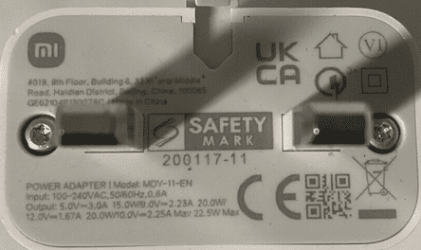
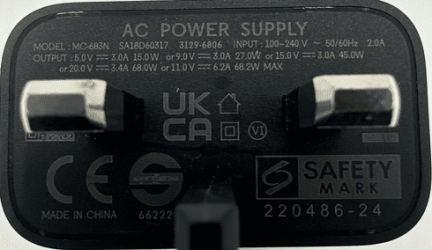
I see that charger output has several V x A output ‘modes’ as shown on photos. The Xiaomi charger has four modes and the Motorola charger has 5 modes but the two chargers only have the 5V 3A output mode in common.
Xiaomi charger supports wattage outputs of 5V 3A ¦ 9V 2.3A ¦ 12V 1.67A ¦ 10V 2.25A so maximum output is 22.5W
Motorola charger supports wattage outputs of 5V 3A ¦ 9V 3.0A ¦ 15V 3.0A ¦ 20V 3.4A ¦ 11V 6.2A so maximum output is 68.2W.
Question 1: Does this mean I can safely use the Motorola charger with the Xiaomi phone and it will auto-select the 5V 3A (15W) mode as the only compatible option?
Question 2: If the answer is ‘Yes’ then am I right that the only downside of a 15W output is a slower charge than using the 20W Xiaomi charger could deliver?
If it is not safe to do this then I am able to keep both chargers. It is just a preference if I could manage with just one charger for both phones.
We have two smartphones. A Xiaomi model with a charger (22.5W maximum) and a Motorola with a charger (68.2W maximum). Both chargers and phones have USB-C 2.0 connection.
To save space and reduce cable clutter I was hoping to use only the Motorola charger for both phones in the hope that the device will only draw charge at a rate that it demands instead of the charger pushing more charge than the phone can take.
I see that charger output has several V x A output ‘modes’ as shown on photos. The Xiaomi charger has four modes and the Motorola charger has 5 modes but the two chargers only have the 5V 3A output mode in common.
Xiaomi charger supports wattage outputs of 5V 3A ¦ 9V 2.3A ¦ 12V 1.67A ¦ 10V 2.25A so maximum output is 22.5W
Motorola charger supports wattage outputs of 5V 3A ¦ 9V 3.0A ¦ 15V 3.0A ¦ 20V 3.4A ¦ 11V 6.2A so maximum output is 68.2W.
Question 1: Does this mean I can safely use the Motorola charger with the Xiaomi phone and it will auto-select the 5V 3A (15W) mode as the only compatible option?
Question 2: If the answer is ‘Yes’ then am I right that the only downside of a 15W output is a slower charge than using the 20W Xiaomi charger could deliver?
If it is not safe to do this then I am able to keep both chargers. It is just a preference if I could manage with just one charger for both phones.
My Computers
-
At a glance
Windows 11 ProAMD Ryzen 9 8945HS32GB DDR5 SO-DIMMIntegrated AMD Radeon 780M (4.00 GHz)- OS
- Windows 11 Pro
- Computer type
- PC/Desktop
- Manufacturer/Model
- GMKtec K11
- CPU
- AMD Ryzen 9 8945HS
- Memory
- 32GB DDR5 SO-DIMM
- Graphics Card(s)
- Integrated AMD Radeon 780M (4.00 GHz)
- Monitor(s) Displays
- Benq 2250HM
- Screen Resolution
- 1920 x 1080
- Hard Drives
- 1 TB PCIe 4.0 NVMe M.2 SSD
- Antivirus
- Bit Defender Total Security
-
At a glance
Windows 11 HomeIntel® Core™ Ultra 7 - 255H processor16 GB LPDDR5 SDRAMIntel Arc 140T onboard graphics- Operating System
- Windows 11 Home
- Computer type
- Laptop
- Manufacturer/Model
- ASUS Zenbook 14 OLED 14" Laptop - UX3405CA-QL192W
- CPU
- Intel® Core™ Ultra 7 - 255H processor
- Memory
- 16 GB LPDDR5 SDRAM
- Graphics card(s)
- Intel Arc 140T onboard graphics
- Screen Resolution
- 1920 x 1200 (16:10 WUXGA resolution) OLED Touchscreen
- Hard Drives
- 1TB SSD
- Antivirus
- Bit Defender Total Security