clean install reactivation


hAx0R

Well-known member
Local time
8:31 PM
Posts
5
OS
Windows 11 Pro 25H2
hi, I recently upgraded windows 11 home to pro using a key I bought from PC World (stacksocial).

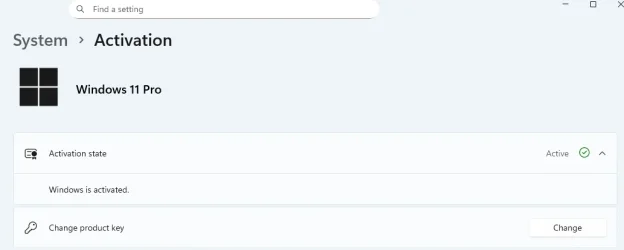
After faffing with telephone activation, I've finally got it activated. The activation screen looks like:
1762333576204.webp

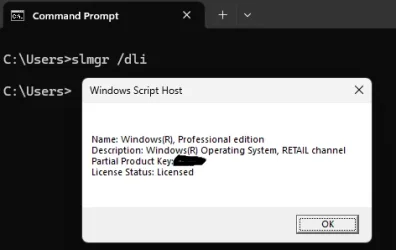
I believe the key is RETAIL:

1762333999471.webp


If I do a clean install of windows 11 pro on this computer in the future, will I have to go through the activation process again?
Is the key now saved in EUFI similar to the digital licence that came with this dell laptop and that the previous version, 11 HOME was using?

-thanks
 

My Computers

System One System Two

  • OS
    Windows 11 Pro 25H2
    Computer type
    Laptop
    Manufacturer/Model
    Dell XPS 13 9380
    CPU
    Intel Core i5-8265U
    Memory
    8GB
    Graphics Card(s)
    Intel UHD Graphics 620
    Hard Drives
    500GB
  • Operating System
    Windows 11 Pro 25H2 / Debian 13 Trixie
    Computer type
    PC/Desktop
    Manufacturer/Model
    Beelink SER6 Pro Refresh
    CPU
    AMD Ryzen 7 7735HS
    Motherboard
    AZW
    Memory
    Crucial 2 x 16GB DDR5
    Graphics card(s)
    AMD Radeon 680M
    Monitor(s) Displays
    2 x HP Z24
    Screen Resolution
    1920 x 1200 @ 60 Hz
    Hard Drives
    Kingston 500GB M.2 NVMe Gen 4.
    Crucial MX500 2TB 2.5"
    Case
    mini
Please run:


a) the V2 log collector > post a share link


b) https://github.com/Superfly-Inc/Win...nload/1.0.6101/Activation.Diagnostic.Tool.zip


c) https://github.com/Superfly-Inc/Windows-Diagnostic-Tool/releases/download/1.0.6101/LicensingDiag.ps1
 

My Computer

System One

  • OS
    Windows 10
    Computer type
    Laptop
    Manufacturer/Model
    HP
    CPU
    Intel(R) Core(TM) i7-4800MQ CPU @ 2.70GHz
    Motherboard
    Product : 190A Version : KBC Version 94.56
    Memory
    16 GB Total: Manufacturer : Samsung MemoryType : DDR3 FormFactor : SODIMM Capacity : 8GB Speed : 1600
    Graphics Card(s)
    NVIDIA Quadro K3100M; Intel(R) HD Graphics 4600
    Sound Card
    IDT High Definition Audio CODEC; PNP Device ID HDAUDIO\FUNC_01&VEN_111D&DEV_76E0
    Hard Drives
    Model Hitachi HTS727575A9E364
    Antivirus
    Microsoft Defender
    Other Info
    Mobile Workstation
Your Dell computer has a Win 10 Home license engraved on BIOS.
When you do a Win 10 or Win 11 Clean install it will see the license on BIOS and won't ask witch version you want to install and will install Home.
To install Pro, you have two options: Install Home and then upgrade to Pro using a generic Pro key or create a ei.cfg file (defining Pro) and put on the \Sources folder of Win 11 USB installation drive so it will install Pro and not Home. On both situations it will activate as soon as you have internet access as you have now a Digital License.

ei.cfg
Code:
[EditionID]
Pro
[Channel]
_Default
[VL]
0
 

My Computers

System One System Two

  • OS
    Windows 11 Pro - Windows 7 HP 64 - Lubuntu
    Computer type
    PC/Desktop
    Manufacturer/Model
    custom build
    CPU
    i5 6600K - 800MHz to 4400MHz
    Motherboard
    GA-Z170-HD3P
    Memory
    4+4G GSkill DDR4 3000
    Graphics Card(s)
    IG - Intel 530
    Monitor(s) Displays
    Samsung 226BW
    Screen Resolution
    1680x1050
    Hard Drives
    (1) -1 SM951 – 128GB M.2 AHCI PCIe SSD drive for Win 11
    (2) -1 WD SATA 3 - 1T for Data
    (3) -1 WD SATA 3 - 1T for backup
    (4) -1 BX500 SSD - 256G for Windows 7 and Lubuntu
    PSU
    Thermaltake 450W TR2 gold
    Keyboard
    Old and good Chicony mechanical keyboard
    Mouse
    Logitech mX performance - 9 buttons (had to disable some)
    Internet Speed
    500 Mb/s
    Browser
    Firefox 64
  • Operating System
    Windows 11 Pro
    Computer type
    Laptop
    Manufacturer/Model
    Asus Q550LF
    CPU
    i7-4500U 800- 3000MHz
    Motherboard
    Asus Q550LF
    Memory
    (4+4)G DDR3 1600
    Graphics card(s)
    IG intel 4400 + NVIDIA GeForce GT 745M
    Sound Card
    Realtek
    Monitor(s) Displays
    LG Display LP156WF4-SPH1
    Screen Resolution
    1920 x 1080
    Hard Drives
    BX500 120G SSD for Windows and programs
    & 1T HDD for data
    Internet Speed
    500 Mb/s
    Browser
    Firefox 64
When you do a Win 10 or Win 11 Clean install it will see the license on BIOS and won't ask witch version you want to install and will install Home.
thanks for your comment.

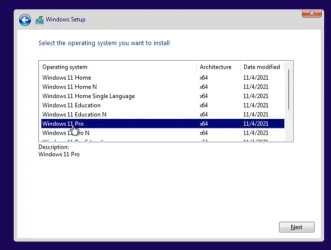
I recently clean installed windows 11 home on this dell laptop and I could choose the version of windows. I believe the window looked like so:

1762350351115.webp
 

My Computers

System One System Two

  • OS
    Windows 11 Pro 25H2
    Computer type
    Laptop
    Manufacturer/Model
    Dell XPS 13 9380
    CPU
    Intel Core i5-8265U
    Memory
    8GB
    Graphics Card(s)
    Intel UHD Graphics 620
    Hard Drives
    500GB
  • Operating System
    Windows 11 Pro 25H2 / Debian 13 Trixie
    Computer type
    PC/Desktop
    Manufacturer/Model
    Beelink SER6 Pro Refresh
    CPU
    AMD Ryzen 7 7735HS
    Motherboard
    AZW
    Memory
    Crucial 2 x 16GB DDR5
    Graphics card(s)
    AMD Radeon 680M
    Monitor(s) Displays
    2 x HP Z24
    Screen Resolution
    1920 x 1200 @ 60 Hz
    Hard Drives
    Kingston 500GB M.2 NVMe Gen 4.
    Crucial MX500 2TB 2.5"
    Case
    mini
thanks for your comment.

I recently clean installed windows 11 home on this dell laptop and I could choose the version of windows.
The laptop is quite old. Did you buy it new? Did it originally came with Win 10?
Some computers are sold without an OS so they don't have a license engraved on BIOS. Big corporations buy them and install Enterprise version on it. They clean the drive when they sell them.
Who buy them install the OS with or without a license and re sell them.
 

My Computers

System One System Two

  • OS
    Windows 11 Pro - Windows 7 HP 64 - Lubuntu
    Computer type
    PC/Desktop
    Manufacturer/Model
    custom build
    CPU
    i5 6600K - 800MHz to 4400MHz
    Motherboard
    GA-Z170-HD3P
    Memory
    4+4G GSkill DDR4 3000
    Graphics Card(s)
    IG - Intel 530
    Monitor(s) Displays
    Samsung 226BW
    Screen Resolution
    1680x1050
    Hard Drives
    (1) -1 SM951 – 128GB M.2 AHCI PCIe SSD drive for Win 11
    (2) -1 WD SATA 3 - 1T for Data
    (3) -1 WD SATA 3 - 1T for backup
    (4) -1 BX500 SSD - 256G for Windows 7 and Lubuntu
    PSU
    Thermaltake 450W TR2 gold
    Keyboard
    Old and good Chicony mechanical keyboard
    Mouse
    Logitech mX performance - 9 buttons (had to disable some)
    Internet Speed
    500 Mb/s
    Browser
    Firefox 64
  • Operating System
    Windows 11 Pro
    Computer type
    Laptop
    Manufacturer/Model
    Asus Q550LF
    CPU
    i7-4500U 800- 3000MHz
    Motherboard
    Asus Q550LF
    Memory
    (4+4)G DDR3 1600
    Graphics card(s)
    IG intel 4400 + NVIDIA GeForce GT 745M
    Sound Card
    Realtek
    Monitor(s) Displays
    LG Display LP156WF4-SPH1
    Screen Resolution
    1920 x 1080
    Hard Drives
    BX500 120G SSD for Windows and programs
    & 1T HDD for data
    Internet Speed
    500 Mb/s
    Browser
    Firefox 64

My Computers

System One System Two

  • OS
    Windows 11 Pro - Windows 7 HP 64 - Lubuntu
    Computer type
    PC/Desktop
    Manufacturer/Model
    custom build
    CPU
    i5 6600K - 800MHz to 4400MHz
    Motherboard
    GA-Z170-HD3P
    Memory
    4+4G GSkill DDR4 3000
    Graphics Card(s)
    IG - Intel 530
    Monitor(s) Displays
    Samsung 226BW
    Screen Resolution
    1680x1050
    Hard Drives
    (1) -1 SM951 – 128GB M.2 AHCI PCIe SSD drive for Win 11
    (2) -1 WD SATA 3 - 1T for Data
    (3) -1 WD SATA 3 - 1T for backup
    (4) -1 BX500 SSD - 256G for Windows 7 and Lubuntu
    PSU
    Thermaltake 450W TR2 gold
    Keyboard
    Old and good Chicony mechanical keyboard
    Mouse
    Logitech mX performance - 9 buttons (had to disable some)
    Internet Speed
    500 Mb/s
    Browser
    Firefox 64
  • Operating System
    Windows 11 Pro
    Computer type
    Laptop
    Manufacturer/Model
    Asus Q550LF
    CPU
    i7-4500U 800- 3000MHz
    Motherboard
    Asus Q550LF
    Memory
    (4+4)G DDR3 1600
    Graphics card(s)
    IG intel 4400 + NVIDIA GeForce GT 745M
    Sound Card
    Realtek
    Monitor(s) Displays
    LG Display LP156WF4-SPH1
    Screen Resolution
    1920 x 1080
    Hard Drives
    BX500 120G SSD for Windows and programs
    & 1T HDD for data
    Internet Speed
    500 Mb/s
    Browser
    Firefox 64
I recently clean installed windows 11 home on this dell laptop and I could choose the version of windows. I believe the window looked like so:
How did you make the InstallUSB?
Did you add the ei.cfg file [mentioned by Megahertz in post #3] to it beforehand? That is one way of getting the multi-Edition choice dialog you saw.


Denis
 

My Computer

System One

  • OS
    Windows 11 Home x64 Version 25H2 Build 26200.8037
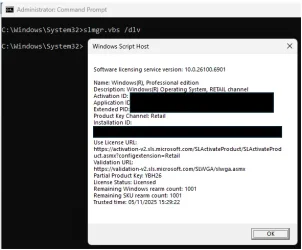
I suggest you run this cmd in an Admin terminal window
slmgr.vbs /dlv
and post the results [which get displayed in a separate dialog that opens in response to the cmd].
The important lines are:
Name
Description
Product key channel
Partial product key

Since you bought the key at PCWorld, I'd be amazed if there was anything wrong with your licence.

Sorry about all the questions from me & the others but the info is needed in order to answer your question -
If I do a clean install of windows 11 pro on this computer in the future, will I have to go through the activation process again?


All the best,
Denis
 

My Computer

System One

  • OS
    Windows 11 Home x64 Version 25H2 Build 26200.8037
So the laptop in question is a dell xps 13 9380 I bought brand new in mid 2019. It came with windows 10 home.

About a week ago, I created a windows 11 25H2 installation usb drive using the media creation tool. This was done on another windows 11 machine as there was a bug in the MCT tool on windows 10 that would cause it to crash. This was a stock installer. I didn't make any changes to it.

I installed windows 11 home and it was automatically activated (digital license like in the second picture of post #5).

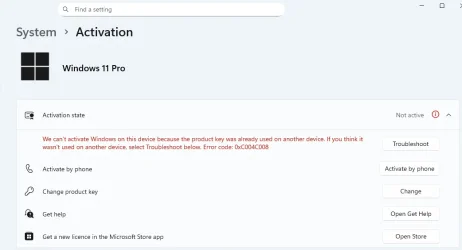
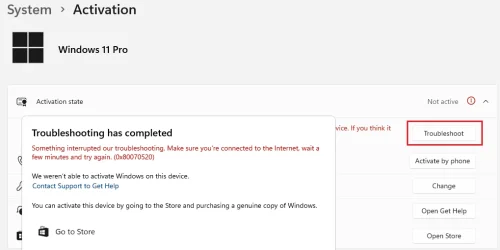
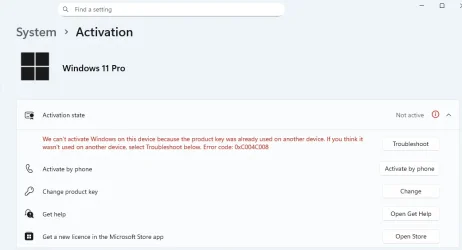
I then upgraded to pro using the key from pc world. I encountered the following errors when trying to activate it and troubleshoot:

1762356290898.webp


1762356329442.webp


Stacksocial support advised to activate by phone:- apparently an unreliable internet connection can cause the error i encountered.
Phone activation worked as per the screen shot in my first post.

The output of slmgr.vbs /dlv is:

1762356840649.webp
 

My Computers

System One System Two

  • OS
    Windows 11 Pro 25H2
    Computer type
    Laptop
    Manufacturer/Model
    Dell XPS 13 9380
    CPU
    Intel Core i5-8265U
    Memory
    8GB
    Graphics Card(s)
    Intel UHD Graphics 620
    Hard Drives
    500GB
  • Operating System
    Windows 11 Pro 25H2 / Debian 13 Trixie
    Computer type
    PC/Desktop
    Manufacturer/Model
    Beelink SER6 Pro Refresh
    CPU
    AMD Ryzen 7 7735HS
    Motherboard
    AZW
    Memory
    Crucial 2 x 16GB DDR5
    Graphics card(s)
    AMD Radeon 680M
    Monitor(s) Displays
    2 x HP Z24
    Screen Resolution
    1920 x 1200 @ 60 Hz
    Hard Drives
    Kingston 500GB M.2 NVMe Gen 4.
    Crucial MX500 2TB 2.5"
    Case
    mini

My Computers

System One System Two

  • OS
    Windows 11 Pro - Windows 7 HP 64 - Lubuntu
    Computer type
    PC/Desktop
    Manufacturer/Model
    custom build
    CPU
    i5 6600K - 800MHz to 4400MHz
    Motherboard
    GA-Z170-HD3P
    Memory
    4+4G GSkill DDR4 3000
    Graphics Card(s)
    IG - Intel 530
    Monitor(s) Displays
    Samsung 226BW
    Screen Resolution
    1680x1050
    Hard Drives
    (1) -1 SM951 – 128GB M.2 AHCI PCIe SSD drive for Win 11
    (2) -1 WD SATA 3 - 1T for Data
    (3) -1 WD SATA 3 - 1T for backup
    (4) -1 BX500 SSD - 256G for Windows 7 and Lubuntu
    PSU
    Thermaltake 450W TR2 gold
    Keyboard
    Old and good Chicony mechanical keyboard
    Mouse
    Logitech mX performance - 9 buttons (had to disable some)
    Internet Speed
    500 Mb/s
    Browser
    Firefox 64
  • Operating System
    Windows 11 Pro
    Computer type
    Laptop
    Manufacturer/Model
    Asus Q550LF
    CPU
    i7-4500U 800- 3000MHz
    Motherboard
    Asus Q550LF
    Memory
    (4+4)G DDR3 1600
    Graphics card(s)
    IG intel 4400 + NVIDIA GeForce GT 745M
    Sound Card
    Realtek
    Monitor(s) Displays
    LG Display LP156WF4-SPH1
    Screen Resolution
    1920 x 1080
    Hard Drives
    BX500 120G SSD for Windows and programs
    & 1T HDD for data
    Internet Speed
    500 Mb/s
    Browser
    Firefox 64

My Computer

System One

  • OS
    Win 11 Insider Release Preview and Beta channels.
    Computer type
    Laptop
    Manufacturer/Model
    HP ENVY Bought: March 2017
    CPU
    i5 Core [email protected] (Unsupported for Win 11)
    Motherboard
    HP 81AD (U3E1)
    Memory
    12GB
    Graphics Card(s)
    Generic PnP Monitor (1920x1080@60Hz) Intel HD Graphics 620 (HP)
    Sound Card
    Conexant ISST audio
    Monitor(s) Displays
    Generic PnP Monitor
    Screen Resolution
    1536x864 pixels
    Hard Drives
    HGST HTS721010A9E630
    PSU
    Well...PSU you too!! What's this mean?
    Case
    HP ENVY SILVER
    Cooling
    A fan.
    Keyboard
    USA
    Mouse
    Logitec Anywhere 2
    Internet Speed
    Good enough for me! Fast!
    Browser
    Edge/Waterfox
    Antivirus
    Windows Defender
    Other Info
    No 'mo.
Stacksocial support advised to activate by phone:- apparently an unreliable internet connection can cause the error i encountered.

@Bree,

You know lots more than I do about activation.
Does the answer the OP was given make sense - poor internet connections can cause online activation to fail? I would have expected it just to take longer [for repeated signals] unless the connection was so bad that the OP would have noticed anyway.

As far as I can see, the OP will otherwise be limited to phone re-activation after any later clean install since the current activation is not identified as being with a digital licence.


All the best,
Denis
 

My Computer

System One

  • OS
    Windows 11 Home x64 Version 25H2 Build 26200.8037
When you activate the Pro license, you got a digital entitlement to Pro, but the key that stored in the ACPI MSDM table is still the Home key. So if you re-install Windows and take no other action, Windows Home will be the one activated. You could avoid that by doing one of these...
  • Using a PID.txt to force a Pro installation.
  • Creating the ei.cfg file as outlined above.
  • Selecting Pro during setup and entering your purchased key.
  • Manually upgrade to Pro after Home is installed, like you've already done.
 

My Computer

System One

  • OS
    Windows 11 Pro 25H2
    Computer type
    PC/Desktop
    Manufacturer/Model
    Intel NUC12WSHi7
    CPU
    12th Gen Core i7-1260P
    Motherboard
    NUC12WSBi7
    Memory
    64 GB Micron PC4-25600
    Graphics Card(s)
    Intel Iris Xe Graphics
    Sound Card
    on-board Realtek HD Audio
    Monitor(s) Displays
    Dell U3219Q
    Screen Resolution
    3840 x 2160
    Hard Drives
    Samsung SSD 990 PRO 1TB
    Crucial MX500 2 TB
    Antivirus
    Microsoft Defender
@Bree,

You know lots more than I do about activation.
Does the answer the OP was given make sense - poor internet connections can cause online activation to fail? I would have expected it just to take longer [for repeated signals] unless the connection was so bad that the OP would have noticed anyway.

As far as I can see, the OP will otherwise be limited to phone re-activation after any later clean install since the current activation is not identified as being with a digital licence.


All the best,
Denis
I agree. Internet connections can cause online activation to fail as it doesn't reach the MS servers. But that isn't the case.
See the remark in red. Apparently the key was already used on another activation.
1762365908529.webp
 

My Computers

System One System Two

  • OS
    Windows 11 Pro - Windows 7 HP 64 - Lubuntu
    Computer type
    PC/Desktop
    Manufacturer/Model
    custom build
    CPU
    i5 6600K - 800MHz to 4400MHz
    Motherboard
    GA-Z170-HD3P
    Memory
    4+4G GSkill DDR4 3000
    Graphics Card(s)
    IG - Intel 530
    Monitor(s) Displays
    Samsung 226BW
    Screen Resolution
    1680x1050
    Hard Drives
    (1) -1 SM951 – 128GB M.2 AHCI PCIe SSD drive for Win 11
    (2) -1 WD SATA 3 - 1T for Data
    (3) -1 WD SATA 3 - 1T for backup
    (4) -1 BX500 SSD - 256G for Windows 7 and Lubuntu
    PSU
    Thermaltake 450W TR2 gold
    Keyboard
    Old and good Chicony mechanical keyboard
    Mouse
    Logitech mX performance - 9 buttons (had to disable some)
    Internet Speed
    500 Mb/s
    Browser
    Firefox 64
  • Operating System
    Windows 11 Pro
    Computer type
    Laptop
    Manufacturer/Model
    Asus Q550LF
    CPU
    i7-4500U 800- 3000MHz
    Motherboard
    Asus Q550LF
    Memory
    (4+4)G DDR3 1600
    Graphics card(s)
    IG intel 4400 + NVIDIA GeForce GT 745M
    Sound Card
    Realtek
    Monitor(s) Displays
    LG Display LP156WF4-SPH1
    Screen Resolution
    1920 x 1080
    Hard Drives
    BX500 120G SSD for Windows and programs
    & 1T HDD for data
    Internet Speed
    500 Mb/s
    Browser
    Firefox 64
I agree. Internet connections can cause online activation to fail as it doesn't reach the MS servers. But that isn't the case.
See the remark in red. Apparently the key was already used on another activation.
View attachment 151678
Try this key: VK7JG-NPHTM-C97JM-9MPGT-3V66T
 

My Computer

System One

  • OS
    Win 11 Insider Release Preview and Beta channels.
    Computer type
    Laptop
    Manufacturer/Model
    HP ENVY Bought: March 2017
    CPU
    i5 Core [email protected] (Unsupported for Win 11)
    Motherboard
    HP 81AD (U3E1)
    Memory
    12GB
    Graphics Card(s)
    Generic PnP Monitor (1920x1080@60Hz) Intel HD Graphics 620 (HP)
    Sound Card
    Conexant ISST audio
    Monitor(s) Displays
    Generic PnP Monitor
    Screen Resolution
    1536x864 pixels
    Hard Drives
    HGST HTS721010A9E630
    PSU
    Well...PSU you too!! What's this mean?
    Case
    HP ENVY SILVER
    Cooling
    A fan.
    Keyboard
    USA
    Mouse
    Logitec Anywhere 2
    Internet Speed
    Good enough for me! Fast!
    Browser
    Edge/Waterfox
    Antivirus
    Windows Defender
    Other Info
    No 'mo.
Try this key: VK7JG-NPHTM-C97JM-9MPGT-3V66T
A generic key will never activate if the computer doesn't have a Digital license.
OP has his installation activated. He did it by phone
 
Last edited:

My Computers

System One System Two

  • OS
    Windows 11 Pro - Windows 7 HP 64 - Lubuntu
    Computer type
    PC/Desktop
    Manufacturer/Model
    custom build
    CPU
    i5 6600K - 800MHz to 4400MHz
    Motherboard
    GA-Z170-HD3P
    Memory
    4+4G GSkill DDR4 3000
    Graphics Card(s)
    IG - Intel 530
    Monitor(s) Displays
    Samsung 226BW
    Screen Resolution
    1680x1050
    Hard Drives
    (1) -1 SM951 – 128GB M.2 AHCI PCIe SSD drive for Win 11
    (2) -1 WD SATA 3 - 1T for Data
    (3) -1 WD SATA 3 - 1T for backup
    (4) -1 BX500 SSD - 256G for Windows 7 and Lubuntu
    PSU
    Thermaltake 450W TR2 gold
    Keyboard
    Old and good Chicony mechanical keyboard
    Mouse
    Logitech mX performance - 9 buttons (had to disable some)
    Internet Speed
    500 Mb/s
    Browser
    Firefox 64
  • Operating System
    Windows 11 Pro
    Computer type
    Laptop
    Manufacturer/Model
    Asus Q550LF
    CPU
    i7-4500U 800- 3000MHz
    Motherboard
    Asus Q550LF
    Memory
    (4+4)G DDR3 1600
    Graphics card(s)
    IG intel 4400 + NVIDIA GeForce GT 745M
    Sound Card
    Realtek
    Monitor(s) Displays
    LG Display LP156WF4-SPH1
    Screen Resolution
    1920 x 1080
    Hard Drives
    BX500 120G SSD for Windows and programs
    & 1T HDD for data
    Internet Speed
    500 Mb/s
    Browser
    Firefox 64
Apparently the key was already used on another activation.

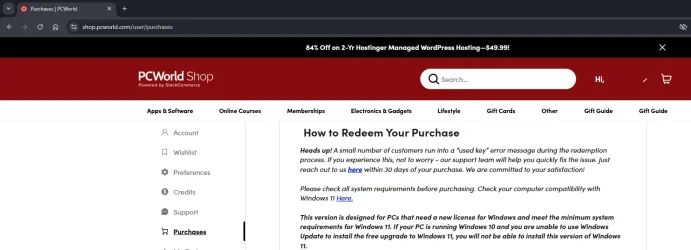
Just wanted to add a couple of points regarding the above. Firstly, I think it happens quite frequently. PCworld even have a notice about it when they deliver the key:

1762368400493.webp

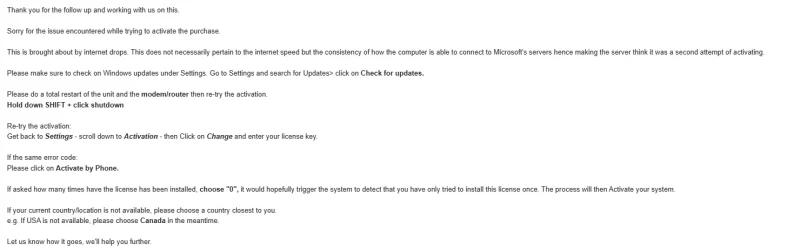
Secondly, support described the issue and solution as follows:

1762368570483.webp
 

My Computers

System One System Two

  • OS
    Windows 11 Pro 25H2
    Computer type
    Laptop
    Manufacturer/Model
    Dell XPS 13 9380
    CPU
    Intel Core i5-8265U
    Memory
    8GB
    Graphics Card(s)
    Intel UHD Graphics 620
    Hard Drives
    500GB
  • Operating System
    Windows 11 Pro 25H2 / Debian 13 Trixie
    Computer type
    PC/Desktop
    Manufacturer/Model
    Beelink SER6 Pro Refresh
    CPU
    AMD Ryzen 7 7735HS
    Motherboard
    AZW
    Memory
    Crucial 2 x 16GB DDR5
    Graphics card(s)
    AMD Radeon 680M
    Monitor(s) Displays
    2 x HP Z24
    Screen Resolution
    1920 x 1200 @ 60 Hz
    Hard Drives
    Kingston 500GB M.2 NVMe Gen 4.
    Crucial MX500 2TB 2.5"
    Case
    mini

Latest Support Threads

Back
Top Bottom