Solved Cloud storage for Macrium backups.


ElizabethW

Active member
Local time
2:30 PM
Posts
31
OS
Windows 11
Does Macrium offer cloud storage for backups and if so can you restore directly from the cloud?
 
Windows Build/Version
Windows 11 22H2

My Computer My Computer

At a glance

Windows 1116 GB
OS
Windows 11
Computer type
PC/Desktop
Manufacturer/Model
HP
Memory
16 GB
Hard Drives
SSD
No, they do not directly offer that... you'd have to create your backup and store it on Dropbox, Google Drive, OneDrive, etc. on your own. You can not restore direct from the cloud either, you have to have direct access to the files, via recovery drive, network drive, etc.
 

My Computers My Computers

  • At a glance

    Windows 11 Pro βIntel® Core™ i7-1165G732 GB DDR4-3200 SDRAMIntel® Iris® Xᵉ Graphics
    OS
    Windows 11 Pro β
    Computer type
    Laptop
    Manufacturer/Model
    HP Pavilion Laptop 15-eg0070wm
    CPU
    Intel® Core™ i7-1165G7
    Memory
    32 GB DDR4-3200 SDRAM
    Graphics Card(s)
    Intel® Iris® Xᵉ Graphics
    Screen Resolution
    1920x1080
    Hard Drives
    2TB PCIe® NVMe™ M.2 SSD
  • At a glance

    macOS Ventura3.4 GHz Quad-Core Intel Core i540 GB 2400 MHz DDR4Radeon Pro 570 4 GB
    Operating System
    macOS Ventura
    Computer type
    PC/Desktop
    Manufacturer/Model
    Apple iMac 27" 5K (2017)
    CPU
    3.4 GHz Quad-Core Intel Core i5
    Memory
    40 GB 2400 MHz DDR4
    Graphics card(s)
    Radeon Pro 570 4 GB
    Monitor(s) Displays
    27" 5K, 34" UW
    Screen Resolution
    Mon 1: 5120 × 2880 Mon 2: 2560 x 1080
    Hard Drives
    32GB NVME, 1TB SSD
Does Macrium offer cloud storage for backups and if so can you restore directly from the cloud?

I doubt it -- but plenty of cheap cloud storage available -- I think Ms offers around 1TB of cloud storage for private users quite cheaply as does Google Drive --If you have Office/365 theres also a reasonable amount of cloud storage offered free as part of your subscription.

100GB for around 1.85 EUR a month (for non Office/365 subscribers) seems a good deal -- typical backup of a Windows system with Macrium is around 40 GB -- always keep data and OS separate,

Of course to recover a backup image stored on the cloud you'd need a working computer with Internet access to retrieve the data.

I use cloud as well as local off line storage. That way you are doubly covered.

Ms cloud storage ((One Drive) seems to be super resilient and secure (backed by the Military Strength security of it's Azure commercial cloud service). Google Drive is also pretty reasonable and resilient too.

Cheers

jimbo
 

My Computer My Computer

At a glance

Windows XP,11 Linux Fedora Rawhide pre-releas...2 X Intel i7
OS
Windows XP,11 Linux Fedora Rawhide pre-release 45
Computer type
PC/Desktop
CPU
2 X Intel i7
Screen Resolution
4KUHD X 2
Storing Macrium images in the cloud may not be advantageous unless you have a very large upload pipe. Backups can get very large.

As Jimbo says, with a Microsoft/Office 365 subscription, each account gets 1TB of space.
 

My Computers My Computers

  • At a glance

    Windows 11 ProIntel Core i5-8279u32GB DDR4 2666MhzIntel Iris Plus 655
    OS
    Windows 11 Pro
    Computer type
    PC/Desktop
    Manufacturer/Model
    Beelink SEI8
    CPU
    Intel Core i5-8279u
    Motherboard
    AZW SEI
    Memory
    32GB DDR4 2666Mhz
    Graphics Card(s)
    Intel Iris Plus 655
    Sound Card
    Intel SST
    Monitor(s) Displays
    Asus ProArt PA278QV
    Screen Resolution
    2560x1440
    Hard Drives
    512GB NVMe
    PSU
    NA
    Case
    NA
    Cooling
    NA
    Keyboard
    NA
    Mouse
    NA
    Internet Speed
    500/50
    Browser
    Edge
    Antivirus
    Defender
    Other Info
    Mini PC used for testing Windows 11.
  • At a glance

    Windows 10 ProRyzen 9 5900x64GB DDR4-3600EVGA GeForce 3080 FT3 Ultra
    Operating System
    Windows 10 Pro
    Computer type
    PC/Desktop
    Manufacturer/Model
    Custom
    CPU
    Ryzen 9 5900x
    Motherboard
    Asus Rog Strix X570-E Gaming
    Memory
    64GB DDR4-3600
    Graphics card(s)
    EVGA GeForce 3080 FT3 Ultra
    Sound Card
    Onboard
    Monitor(s) Displays
    ASUS TUF Gaming VG27AQ. ASUS ProArt Display PA278QV 27” WQHD
    Screen Resolution
    2560x1440
    Hard Drives
    2TB WD SN850 PCI-E Gen 4 NVMe
    2TB Sandisk Ultra 2.5" SATA SSD
    PSU
    Seasonic Focus 850
    Case
    Fractal Meshify S2 in White
    Cooling
    Dark Rock Pro CPU cooler, 3 x 140mm case fans
    Keyboard
    Corsiar K65 RGB Lux
    Mouse
    Logitech G9 Laser Mouse
    Internet Speed
    500/50
    Browser
    Chrome
    Antivirus
    Defender.
Macrium not offering recovery directly from the cloud is the game-decider for me.

I have done this several times with Acronis cleanly and efficiently using only the emergency thumb drive. That means that if my local drives where I also store backups are ever compromised then I have a fallback.

Acronis costs me more than Macrium would but it is restoration, not backing up, that is what should IMHO be the deciding factor.

Thanks for all your help and suggestions.
 

My Computer My Computer

At a glance

Windows 1116 GB
OS
Windows 11
Computer type
PC/Desktop
Manufacturer/Model
HP
Memory
16 GB
Hard Drives
SSD
@ElizabethW


To me... storing backups in the cloud is like storing your money in your mailbox.

I understand what you say about backing up your backups, but I do it a bit differently.
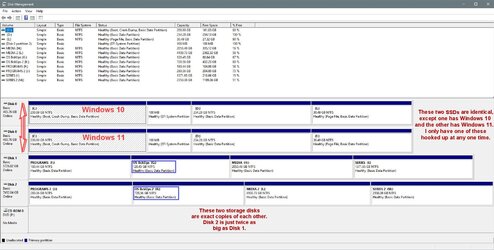
I literally make copies of my backups on yet another drive.

Some people copy their backups to external drives also.

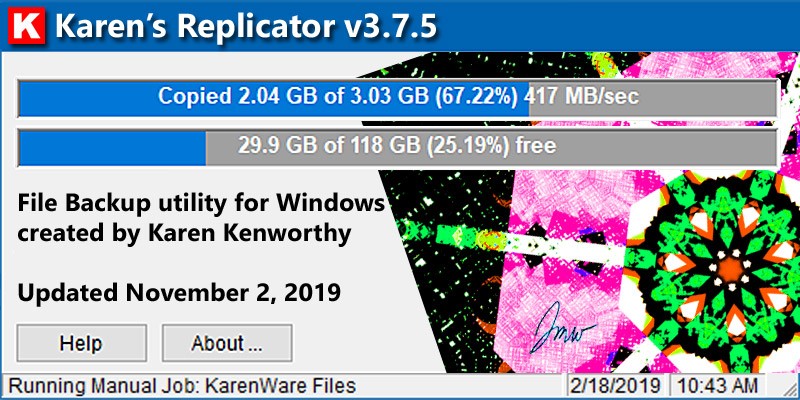
I just use a free program called Karen's Replicator to copy one storage drive to another.
Karen's Replicator has it's own scheduler too. So you don't even have to do it manually.


000000 Disk Management.jpg


In case you can't tell... I don't really trust the cloud. ^^
 
Last edited:

My Computers My Computers

  • At a glance

    Win 11 Home ♦♦♦26200.8655 ♦♦♦♦♦♦♦25H2AMD Ryzen 7 3700XG.Skill (F4-3200C14D-16GTZKW)EVGA RTX 2070 (08G-P4-2171-KR)
    OS
    Win 11 Home ♦♦♦26200.8655 ♦♦♦♦♦♦♦25H2
    Computer type
    PC/Desktop
    Manufacturer/Model
    Built by Ghot® [May 2020]
    CPU
    AMD Ryzen 7 3700X
    Motherboard
    Asus Pro WS X570-ACE (BIOS 5302)
    Memory
    G.Skill (F4-3200C14D-16GTZKW)
    Graphics Card(s)
    EVGA RTX 2070 (08G-P4-2171-KR)
    Sound Card
    Realtek ALC1220P / ALC S1220A
    Monitor(s) Displays
    Dell U3011 30"
    Screen Resolution
    2560 x 1600
    Hard Drives
    2x Samsung 860 EVO 500GB,
    WD 4TB Black FZBX - SATA III,
    WD 8TB Black FZBX - SATA III,
    DRW-24B1ST CD/DVD Burner
    PSU
    PC Power & Cooling 750W Quad EPS12V
    Case
    Cooler Master ATCS 840 Tower
    Cooling
    CM Hyper 212 EVO (push/pull)
    Keyboard
    Ducky DK9008 Shine II Blue LED
    Mouse
    Logitech Optical M-100
    Internet Speed
    300/300
    Browser
    Firefox (latest)
    Antivirus
    Bitdefender Total Security
    Other Info
    Speakers: Klipsch Pro Media 2.1
  • At a glance

    Windows XP Pro 32bit w/SP3AMD Athlon 64 X2 5000+ (OC'd @ 3.2Ghz)TWIN2X2048-6400C4DHX (2 x 1GB, DDR2 800)EVGA 256-P2-N758-TR GeForce 8600GT SSC
    Operating System
    Windows XP Pro 32bit w/SP3
    Computer type
    PC/Desktop
    Manufacturer/Model
    Built by Ghot® (not in use)
    CPU
    AMD Athlon 64 X2 5000+ (OC'd @ 3.2Ghz)
    Motherboard
    ASUS M2N32-SLI Deluxe Wireless Edition
    Memory
    TWIN2X2048-6400C4DHX (2 x 1GB, DDR2 800)
    Graphics card(s)
    EVGA 256-P2-N758-TR GeForce 8600GT SSC
    Sound Card
    Onboard
    Monitor(s) Displays
    ViewSonic G90FB Black 19" Professional (CRT)
    Screen Resolution
    up to 2048 x 1536
    Hard Drives
    WD 36GB 10,000rpm Raptor SATA
    Seagate 80GB 7200rpm SATA
    Lite-On LTR-52246S CD/RW
    Lite-On LH-18A1P CD/DVD Burner
    PSU
    PC Power & Cooling Silencer 750 Quad EPS12V
    Case
    Generic Beige case, 80mm fans
    Cooling
    ZALMAN 9500A 92mm CPU Cooler
    Keyboard
    Logitech Classic Keybooard 200
    Mouse
    Logitech Optical M-BT96a
    Internet Speed
    300/300
    Browser
    Firefox 3.x ??
    Antivirus
    Symantec (Norton)
    Other Info
    Still assembled, still runs. Haven't turned it on for 15 years?
Like Ghot, I don't really trust the cloud. And apart from that, my upload speeds make cloud storage impractical.

Most of my machines have a separate data partition where its monthly Macrium Full image is stored, for the others the image is created directly onto an external HDD. Each image is then copied to two other external drives. At any one time I have at least three copies of the latest image, and as a backup I keep at least one Full image from the previous two months.
 
Last edited:

My Computers My Computers

  • At a glance

    Windows 11 HomeAMD Athlon Silver 3050U8GBRadeon Graphics
    OS
    Windows 11 Home
    Computer type
    Laptop
    Manufacturer/Model
    Acer Aspire 3 A315-23-R9VY
    CPU
    AMD Athlon Silver 3050U
    Memory
    8GB
    Graphics Card(s)
    Radeon Graphics
    Monitor(s) Displays
    laptop screen
    Screen Resolution
    1366x768 native resolution, up to 2560x1440 with Radeon Virtual Super Resolution
    Hard Drives
    1TB Samsung EVO 870 SSD (from April 2026: 250GB EVO 850)
    Internet Speed
    150 Mbps
    Browser
    Edge, Firefox
    Antivirus
    Defender
    Other Info
    fully 'Windows 11 ready' laptop. Windows 10 C: partition migrated from my old unsupported 'main machine' then upgraded to 11. A test migration ran Insider builds for 2 months. When 11 was released on 5th October 2021 it was re-imaged back to 10 and was offered the upgrade in Windows Update on 20th October. Windows Update offered the 22H2 Feature Update on 20th September 2022. It got the 23H2 Feature Update on 4th November 2023 through Windows Update, 24H2 on 3rd October 2024 through Windows Update by setting the Target Release Version for 24H2, and 25H2 on 30th September 2025 through Windows Update by setting the Target Release Version for 25H2.

    UPDATE - 11 April 2026: due to mechanical deterioration this PC has been retired from active duty. The OS with all software and files has been migrated to my System Seven in 'Other systems' to carry on as my general purpose 'main machine'.
  • At a glance

    Windows 11 ProIntel® Core™ i5-520M8GB(integrated graphics) Intel HD Graphics
    Operating System
    Windows 11 Pro
    Computer type
    Laptop
    Manufacturer/Model
    Dell Latitude E4310
    CPU
    Intel® Core™ i5-520M
    Motherboard
    0T6M8G
    Memory
    8GB
    Graphics card(s)
    (integrated graphics) Intel HD Graphics
    Screen Resolution
    1366x768
    Hard Drives
    500GB Crucial MX500 SSD
    Browser
    Firefox, Edge
    Antivirus
    Defender
    Other Info
    unsupported machine: Legacy bios, MBR, TPM 1.2, upgraded from W10 to W11 using W10/W11 hybrid install media workaround.

    In-place upgrade to 22H2 using ISO and a workaround.
    Feature Update to 23H2 by manually installing the Enablement Package.
    In-place upgrade to 24H2 using hybrid 23H2/24H2 install media.
    Upgraded to 25H2 by Enablement Package.

    Also running Insider Dev, and Canary builds and Windows 10 as native boot .vhdx.
  • My SYSTEM THREE is a Dell Latitude 5410, i7-10610U, 32GB RAM, 512GB NVMe ssd, supported device running Windows 11 Pro.

    My SYSTEM FOUR is a 2-in-1 convertible Lenovo Yoga 11e 20DA, Celeron N2930, 8GB RAM, 256GB ssd. Unsupported device: currently running Win10 Pro, plus Win11 Pro RTM and Insider Dev, Beta, and RP 24H2 as native boot vhdx.

    My SYSTEM FIVE is a Dell Latitude 3190 2-in-1, Pentium Silver N5030, 8GB RAM, 1TB NVMe ssd, supported device running Windows 11 Pro, plus Insider Beta, Dev, and Canary builds (and a few others) as a native boot .vhdx.

    My SYSTEM SIX is a Dell Latitude 5550, Core Ultra 7 165H, 64GB RAM, 1TB NVMe SSD, supported device, Windows 11 Pro 24H2, Hyper-V host machine. Updated to 25H2 on 30th September 2025.

    My SYSTEM SEVEN is a Lenovo Thinkpad T580, Intel Core i7-8650U, 16GB RAM, 512GB NVMe SSD + 2nd 512GB NVMe SSD, a supported device for Windows 11. This is my current general purpose 'main machine'. The installed Windows 11 Home from my System One has been migrated to this machine.
I store mine on my local network using a Synology DS218 NAS, nice an safe under the desk!
 

My Computer My Computer

At a glance

Windows 11 Pro 25H2Intel Alder lake i7 12700K32 Gb Corsair Vengeance LPX DDR4 3200 XMP2EVGA 3070ti FTW3 Ultra Gaming & Intel Arc
OS
Windows 11 Pro 25H2
Computer type
PC/Desktop
Manufacturer/Model
My Self
CPU
Intel Alder lake i7 12700K
Motherboard
Asus z690 Gaming WiFi D4, Bios Ver 4505
Memory
32 Gb Corsair Vengeance LPX DDR4 3200 XMP2
Graphics Card(s)
EVGA 3070ti FTW3 Ultra Gaming & Intel Arc
Sound Card
Via Display port
Monitor(s) Displays
Dell AW2723DF
Screen Resolution
2560 x 1440 @ 280Hz G-Sync mode
Hard Drives
WD Black SN850 1Tb NVME (Boot Drive)
WD BLACK SN850X + Heatsink 1Tb NVME
Samsung 870 Qvo 1Tb SSD,
Pioneer DVD-RW DVR-219L
WD Black SN850x NVME 2Tb x3
PSU
Corsair RM850
Case
Phanteks Enthoo Pro M Tempered Glass
Cooling
Be Quiet Shadow Rock 3
Keyboard
Logitech G Pro
Mouse
Logitech G903, Lightspeed + Powerplay Mat
Internet Speed
900Mb/900Mb Fritz!Box 7590ax v2
Browser
Firefox
Antivirus
MS Defender
Other Info
Logitech C930e webcam
Synology DS218 play 2 x 4Tb Synology HAT3300-4T
Like Ghot, I don't really trust the cloud. And apart from that, my upload speeds make cloud storage impractical.
If I was going to store my macrium backup in the cloud, it would certainly be an encrypted backup.

my upload speeds also make storing backups in the cloud impractical
 

My Computers My Computers

  • At a glance

    Windows 11 ProIntel Core i5-8279u32GB DDR4 2666MhzIntel Iris Plus 655
    OS
    Windows 11 Pro
    Computer type
    PC/Desktop
    Manufacturer/Model
    Beelink SEI8
    CPU
    Intel Core i5-8279u
    Motherboard
    AZW SEI
    Memory
    32GB DDR4 2666Mhz
    Graphics Card(s)
    Intel Iris Plus 655
    Sound Card
    Intel SST
    Monitor(s) Displays
    Asus ProArt PA278QV
    Screen Resolution
    2560x1440
    Hard Drives
    512GB NVMe
    PSU
    NA
    Case
    NA
    Cooling
    NA
    Keyboard
    NA
    Mouse
    NA
    Internet Speed
    500/50
    Browser
    Edge
    Antivirus
    Defender
    Other Info
    Mini PC used for testing Windows 11.
  • At a glance

    Windows 10 ProRyzen 9 5900x64GB DDR4-3600EVGA GeForce 3080 FT3 Ultra
    Operating System
    Windows 10 Pro
    Computer type
    PC/Desktop
    Manufacturer/Model
    Custom
    CPU
    Ryzen 9 5900x
    Motherboard
    Asus Rog Strix X570-E Gaming
    Memory
    64GB DDR4-3600
    Graphics card(s)
    EVGA GeForce 3080 FT3 Ultra
    Sound Card
    Onboard
    Monitor(s) Displays
    ASUS TUF Gaming VG27AQ. ASUS ProArt Display PA278QV 27” WQHD
    Screen Resolution
    2560x1440
    Hard Drives
    2TB WD SN850 PCI-E Gen 4 NVMe
    2TB Sandisk Ultra 2.5" SATA SSD
    PSU
    Seasonic Focus 850
    Case
    Fractal Meshify S2 in White
    Cooling
    Dark Rock Pro CPU cooler, 3 x 140mm case fans
    Keyboard
    Corsiar K65 RGB Lux
    Mouse
    Logitech G9 Laser Mouse
    Internet Speed
    500/50
    Browser
    Chrome
    Antivirus
    Defender.
I encrypt all my Macrium backups - don't want a hacker being able to browse through my system at their leisure. My backups are to a fast local nvme drive. I make copies to an external hard drive that are normally offline.

If you encrypt, use a strong password and cypher strength in Macrium, especially if you are going to store it on a removable drive or in the cloud (which, as oothers, I would not do myself). I use a 16 character password and AES-256 (yoiu need 15 characters for this). With medium compression. This takes me about a minute to backup my C: partition.
 

My Computers My Computers

  • At a glance

    Windows 11 Pro x64i9 14900K P/E 5.8/4.5 GHz, cache 5.0 GHz96GB (2x48) G.skill Ripjaws 6800 MT/sAsus ROG Strix 4070 Ti OC
    OS
    Windows 11 Pro x64
    Computer type
    PC/Desktop
    Manufacturer/Model
    📷🔈🎧 🪛 DIY Photoshop/Audio/Game/tinker
    CPU
    i9 14900K P/E 5.8/4.5 GHz, cache 5.0 GHz
    Motherboard
    Asus ROG Maximus Z790 Dark Hero
    Memory
    🐏 96GB (2x48) G.skill Ripjaws 6800 MT/s
    Graphics Card(s)
    Asus ROG Strix 4070 Ti OC
    Sound Card
    🔊Bowers & Wilkins 606 S3 speakers; Audiolabs 7000a integrated amp; RSL 10S Mk2 sub; Creative Pebble Pro Minimilist
    Monitor(s) Displays
    🖥️🖥️ Eizo CG2730 ColorEdge, ViewSonic VP2768
    Screen Resolution
    🖥️🖥️ 2560 x 1440p x 2
    Hard Drives
    💾 WDC SN850X 4TB nvme, SN850 1TB nvme, SK-Hynix 2 TB P41 nvme,. Sabrent USB-C DS-SC5B 5-bay docking station: 6TB WDC Black, 6TB Ironwolf Pro; 2x 2TB WDC Black HDD
    PSU
    ⚡️ 850W Seasonic Vertex PX-850 ATX 3.0/PCI-E 5.0
    Case
    Fractal Design North XL Mesh, Black Walnut
    Cooling
    ❄️ EK Nucleus black 360 AIO w/Phanteks T30-120 fans, 2 Noctua NF-A14 Chromax case fan, 1 T30-120 fan cooling memory
    Keyboard
    ⌨️ Keychron Q3 Max TKL with custom GMK Redsuns Red Samuri keycaps, TX Stabs
    Mouse
    🖱️ Logitech G305 wireless gaming
    Internet Speed
    ⬇️ 500 Mb/s ⬆️ 12 Mb/s
    Browser
    🔥🦊 Firefox
    Antivirus
    🦺 Defender, Macrium Reflect X 🏆
    Other Info
    Phangkey Amaterasu V2 Desk Mat
  • At a glance

    Apple M1
    Computer type
    Laptop
    Manufacturer/Model
    💻 Apple 13" Macbook Pro 2020 (m1)

    CPU
    Apple M1
    Screen Resolution
    2560x1600
    Browser
    Firefox

Latest Support Threads

Back
Top Bottom