cmd.exe is getting being launched+closing itself automatically __4-5 times every Hour & also minimize full-screen game while this happens


PratikUnleashed

Gaming 365
Local time
12:31 PM
Posts
16
Location
Amravati,India
OS
Windows 11 Pro 25H2
cmd.exe is getting being launched+also_closing itself automatically __4-5 times in every Hour___
1--cmd.exe launch remain open for less than a second and unable to read
2--also it minimizes full-screen game whenever this happens like ( RainbowSixSiege ,etc)

tried
-
1--Norton 360 Deluxe full scan and reboots
2--also scanned with Malwarebytes and clean bitorentUpdate malware and reboots
3--keep only important and verified apps in taskbar startup

still facing the same issue
 
Windows Build/Version
26200.7019/ 25H2

My Computer

System One

  • OS
    Windows 11 Pro 25H2
    Computer type
    PC/Desktop
    Manufacturer/Model
    Custom
    CPU
    Core Ultra 7 265K
    Motherboard
    MAG Z890 TOMAHAWK WIFI
    Memory
    64 GB XPG Lancer RGB
    Graphics Card(s)
    MSI RTX 3070 8GB GDDR6
    Sound Card
    SteelSeries Arctic Wireless Pro Dock
    Monitor(s) Displays
    1x LG 4K 27UL550 __&__ 2x AOC FHD I2757FH
    Screen Resolution
    3840*2160
    Hard Drives
    WD_BLACK SN7100 1TB
    Samsung NVME 970 EVO Plus 250 GB
    Samsung SSD 860 EVO

    1x + 1x WD 1 TB HDD in RAID0 7200 RPM Each
    2x 3 TB Seagate HDD 7200RPM
    2x Seagate 4TB Backup Plus Red-&-Black
    2x Seagate Backup Plus 1TB each
    PSU
    ASUS ROG STRIX 750W
    Case
    Antec Ultra
    Cooling
    DeepCool Assasin
    Keyboard
    Logitech G Prodigy G213 RGB Gaming Keyboard
    Mouse
    Steel Series Rival 500
    Internet Speed
    200 MB//Sec Fiber Optic
    Browser
    EDGE MS Chrome Based
    Antivirus
    Norton 360 Deluxe
Use your phone to video your computer screen then read the mystery window in slow time from there.

Perhaps the times match something in Task scheduler.

TS task ocurrences are also listed in Event viewer
Log - Microsoft-Windows-TaskScheduler/Operational
Source - TaskScheduler
EventID - several


Denis
 
Last edited:

My Computer

System One

  • OS
    Windows 11 Home x64 Version 25H2 Build 26200.8037
using phone recording is hard bz the cmd.exe scene happens every fast and went off very fast too
and its not guaranteed when the CMD-Flash screen will apear-and go away

in Pic-
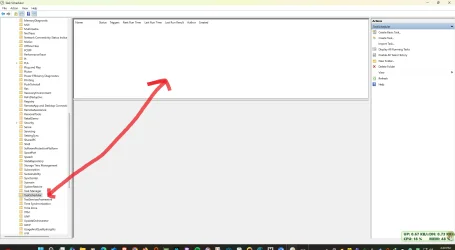
Log - Microsoft-Windows-TaskScheduler/Operational______________Its empty (pic attached)
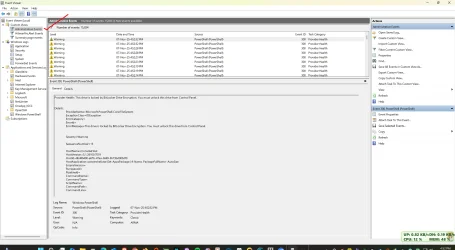
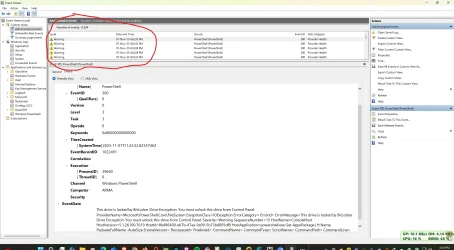
Event viewer pic attached

Screenshot 2025-11-07 164101.webpScreenshot 2025-11-07 165319.webpScreenshot 2025-11-07 165440.webp
 

My Computer

System One

  • OS
    Windows 11 Pro 25H2
    Computer type
    PC/Desktop
    Manufacturer/Model
    Custom
    CPU
    Core Ultra 7 265K
    Motherboard
    MAG Z890 TOMAHAWK WIFI
    Memory
    64 GB XPG Lancer RGB
    Graphics Card(s)
    MSI RTX 3070 8GB GDDR6
    Sound Card
    SteelSeries Arctic Wireless Pro Dock
    Monitor(s) Displays
    1x LG 4K 27UL550 __&__ 2x AOC FHD I2757FH
    Screen Resolution
    3840*2160
    Hard Drives
    WD_BLACK SN7100 1TB
    Samsung NVME 970 EVO Plus 250 GB
    Samsung SSD 860 EVO

    1x + 1x WD 1 TB HDD in RAID0 7200 RPM Each
    2x 3 TB Seagate HDD 7200RPM
    2x Seagate 4TB Backup Plus Red-&-Black
    2x Seagate Backup Plus 1TB each
    PSU
    ASUS ROG STRIX 750W
    Case
    Antec Ultra
    Cooling
    DeepCool Assasin
    Keyboard
    Logitech G Prodigy G213 RGB Gaming Keyboard
    Mouse
    Steel Series Rival 500
    Internet Speed
    200 MB//Sec Fiber Optic
    Browser
    EDGE MS Chrome Based
    Antivirus
    Norton 360 Deluxe
I know phone recording is awkward. If you can find a way of propping up your phone so it can see the computer screen then it is likely to be a good way of finding out what is going on even if you have to leave it running for half an hour waiting for the next ocurrence.

Click on Enable all tasks history on the right-hand side of Task scheduler.

Your first diagram is of Task scheduler not Event viewer.

I have no idea why you are focussing on Powershell records. It might just as easily be a batch script running.

And posting whole-screen screenshots is awkward because they cannot easilly be read. When you want to post a diagram, adjust the column widths so relevant text is shown & adjust the window size so the smallest possible area is being captured.
And the only entries in TS / Event viewer of interest are ones that you have matched to the times the cmd windows appear.


Denis
 

My Computer

System One

  • OS
    Windows 11 Home x64 Version 25H2 Build 26200.8037
STARTED -- Enable all tasks history on the right-hand side of Task scheduler.
and now directly screen recording via Bandicam now ON

will update as soon as mystery object found


sure
 

My Computer

System One

  • OS
    Windows 11 Pro 25H2
    Computer type
    PC/Desktop
    Manufacturer/Model
    Custom
    CPU
    Core Ultra 7 265K
    Motherboard
    MAG Z890 TOMAHAWK WIFI
    Memory
    64 GB XPG Lancer RGB
    Graphics Card(s)
    MSI RTX 3070 8GB GDDR6
    Sound Card
    SteelSeries Arctic Wireless Pro Dock
    Monitor(s) Displays
    1x LG 4K 27UL550 __&__ 2x AOC FHD I2757FH
    Screen Resolution
    3840*2160
    Hard Drives
    WD_BLACK SN7100 1TB
    Samsung NVME 970 EVO Plus 250 GB
    Samsung SSD 860 EVO

    1x + 1x WD 1 TB HDD in RAID0 7200 RPM Each
    2x 3 TB Seagate HDD 7200RPM
    2x Seagate 4TB Backup Plus Red-&-Black
    2x Seagate Backup Plus 1TB each
    PSU
    ASUS ROG STRIX 750W
    Case
    Antec Ultra
    Cooling
    DeepCool Assasin
    Keyboard
    Logitech G Prodigy G213 RGB Gaming Keyboard
    Mouse
    Steel Series Rival 500
    Internet Speed
    200 MB//Sec Fiber Optic
    Browser
    EDGE MS Chrome Based
    Antivirus
    Norton 360 Deluxe
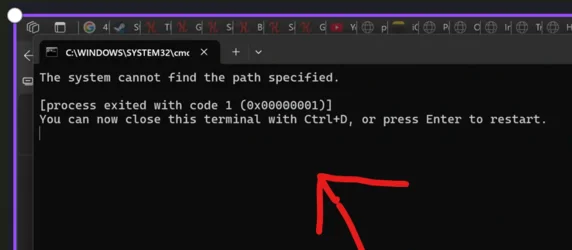
I catch it Finally __ Thanks alot Try3

c:\windows\system32\cmd___________________
[process exited with code 1 (0x000000010]
You can now close this terminal with ctrl+D, or press Enter to resart.

thats the fish

Screenshot 2025-11-07 172620.webp
 

My Computer

System One

  • OS
    Windows 11 Pro 25H2
    Computer type
    PC/Desktop
    Manufacturer/Model
    Custom
    CPU
    Core Ultra 7 265K
    Motherboard
    MAG Z890 TOMAHAWK WIFI
    Memory
    64 GB XPG Lancer RGB
    Graphics Card(s)
    MSI RTX 3070 8GB GDDR6
    Sound Card
    SteelSeries Arctic Wireless Pro Dock
    Monitor(s) Displays
    1x LG 4K 27UL550 __&__ 2x AOC FHD I2757FH
    Screen Resolution
    3840*2160
    Hard Drives
    WD_BLACK SN7100 1TB
    Samsung NVME 970 EVO Plus 250 GB
    Samsung SSD 860 EVO

    1x + 1x WD 1 TB HDD in RAID0 7200 RPM Each
    2x 3 TB Seagate HDD 7200RPM
    2x Seagate 4TB Backup Plus Red-&-Black
    2x Seagate Backup Plus 1TB each
    PSU
    ASUS ROG STRIX 750W
    Case
    Antec Ultra
    Cooling
    DeepCool Assasin
    Keyboard
    Logitech G Prodigy G213 RGB Gaming Keyboard
    Mouse
    Steel Series Rival 500
    Internet Speed
    200 MB//Sec Fiber Optic
    Browser
    EDGE MS Chrome Based
    Antivirus
    Norton 360 Deluxe
Good.

When you have some time records and can read the window contents you will be much better placed to solve the mystery.

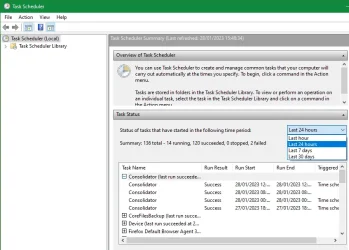
Now that you have enabled Task scheduler, All task history here is one further place worth looking for task records in once you have some time records.
Task scheduler (Local), Task status section
Task scheduler (Local), Task status section.webp
You will always have to adjust its column widths to read the entries [and they reset once you close TS so you have to set them up again the next time you want to look at them].


Denis
 

My Computer

System One

  • OS
    Windows 11 Home x64 Version 25H2 Build 26200.8037
no activity in Event viewer nor Task schedular

again, same cmd pop-up with same msg in it
 

My Computer

System One

  • OS
    Windows 11 Pro 25H2
    Computer type
    PC/Desktop
    Manufacturer/Model
    Custom
    CPU
    Core Ultra 7 265K
    Motherboard
    MAG Z890 TOMAHAWK WIFI
    Memory
    64 GB XPG Lancer RGB
    Graphics Card(s)
    MSI RTX 3070 8GB GDDR6
    Sound Card
    SteelSeries Arctic Wireless Pro Dock
    Monitor(s) Displays
    1x LG 4K 27UL550 __&__ 2x AOC FHD I2757FH
    Screen Resolution
    3840*2160
    Hard Drives
    WD_BLACK SN7100 1TB
    Samsung NVME 970 EVO Plus 250 GB
    Samsung SSD 860 EVO

    1x + 1x WD 1 TB HDD in RAID0 7200 RPM Each
    2x 3 TB Seagate HDD 7200RPM
    2x Seagate 4TB Backup Plus Red-&-Black
    2x Seagate Backup Plus 1TB each
    PSU
    ASUS ROG STRIX 750W
    Case
    Antec Ultra
    Cooling
    DeepCool Assasin
    Keyboard
    Logitech G Prodigy G213 RGB Gaming Keyboard
    Mouse
    Steel Series Rival 500
    Internet Speed
    200 MB//Sec Fiber Optic
    Browser
    EDGE MS Chrome Based
    Antivirus
    Norton 360 Deluxe
I assume you refreshed the view in both of them to make sure they were not simply being slow to display the new item.

I think you'll need to get Task mgr, Processes tab, Apps section up on screen to see if it shows a new process being launched when that window happens.


Denis
 
Last edited:

My Computer

System One

  • OS
    Windows 11 Home x64 Version 25H2 Build 26200.8037
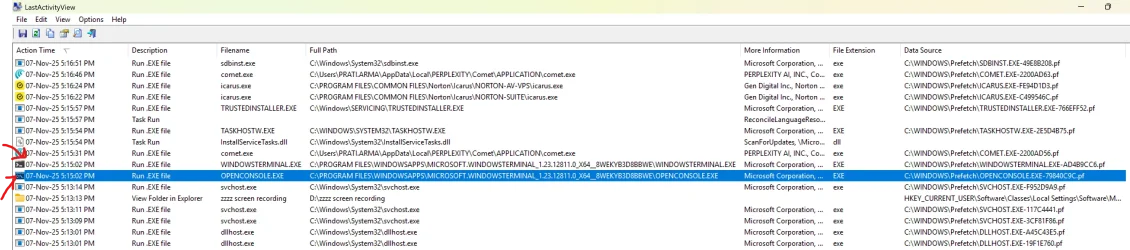
GOT IT using LastActivityView from Nirsoft
pic below
Screenshot 2025-11-07 183608.webp
Action Time Description Filename Full Path More Information File Extension Data Source
07-Nov-25 5:15:02 PM Run .EXE file WINDOWSTERMINAL.EXE C:\PROGRAM FILES\WINDOWSAPPS\MICROSOFT.WINDOWSTERMINAL_1.23.12811.0_X64__8WEKYB3D8BBWE\WINDOWSTERMINAL.EXE Microsoft Corporation, Windows Terminal, Windows Terminal Host, 1.23.2510.08001 EXE C:\WINDOWS\Prefetch\WINDOWSTERMINAL.EXE-AD4B9CC6.pf

Action Time Description Filename Full Path More Information File Extension Data Source
07-Nov-25 5:15:02 PM Run .EXE file OPENCONSOLE.EXE C:\PROGRAM FILES\WINDOWSAPPS\MICROSOFT.WINDOWSTERMINAL_1.23.12811.0_X64__8WEKYB3D8BBWE\OPENCONSOLE.EXE Microsoft Corporation, Windows Terminal, Console Window and PTY Host (Open Source), 1.23.2510.08001 EXE C:\WINDOWS\Prefetch\OPENCONSOLE.EXE-79840C9C.pf
 

My Computer

System One

  • OS
    Windows 11 Pro 25H2
    Computer type
    PC/Desktop
    Manufacturer/Model
    Custom
    CPU
    Core Ultra 7 265K
    Motherboard
    MAG Z890 TOMAHAWK WIFI
    Memory
    64 GB XPG Lancer RGB
    Graphics Card(s)
    MSI RTX 3070 8GB GDDR6
    Sound Card
    SteelSeries Arctic Wireless Pro Dock
    Monitor(s) Displays
    1x LG 4K 27UL550 __&__ 2x AOC FHD I2757FH
    Screen Resolution
    3840*2160
    Hard Drives
    WD_BLACK SN7100 1TB
    Samsung NVME 970 EVO Plus 250 GB
    Samsung SSD 860 EVO

    1x + 1x WD 1 TB HDD in RAID0 7200 RPM Each
    2x 3 TB Seagate HDD 7200RPM
    2x Seagate 4TB Backup Plus Red-&-Black
    2x Seagate Backup Plus 1TB each
    PSU
    ASUS ROG STRIX 750W
    Case
    Antec Ultra
    Cooling
    DeepCool Assasin
    Keyboard
    Logitech G Prodigy G213 RGB Gaming Keyboard
    Mouse
    Steel Series Rival 500
    Internet Speed
    200 MB//Sec Fiber Optic
    Browser
    EDGE MS Chrome Based
    Antivirus
    Norton 360 Deluxe
See any script or cmd.exe runs on startup or scheduled to run using Autoruns utility.

In this video, i will show you how to use a powerful application like Autoruns to manage your Windows start up programs, processes and other entries.


My Computer

System One

  • OS
    Windows 11
    Computer type
    PC/Desktop
    Manufacturer/Model
    HP Pavilion
    CPU
    AMD Ryzen 7 5700G
    Motherboard
    Erica6
    Memory
    Micron Technology DDR4-3200 16GB
    Graphics Card(s)
    NVIDIA GeForce RTX 3060
    Sound Card
    Realtek ALC671
    Monitor(s) Displays
    Samsung SyncMaster U28E590
    Screen Resolution
    3840 x 2160
    Hard Drives
    SAMSUNG MZVLQ1T0HALB-000H1
Ok. That shows indeed the window, but not wat is triggering it.

I will upload a program i wrote myself in that records all exe's that are launced and from what parents.
It even records exes that are launching so fast, that taskmanager or other taskmanger programs won't even show that that have run.
But first i have to go to dr appoinment now.
 

My Computer

System One

  • OS
    Windows 11
    Computer type
    PC/Desktop
GOT IT using LastActivityView
So I suggest that you look at entries a few seconds either side of that time [because logs can take different times to add entries] for anything that might be the launching act.
Event viewer & Task scheduler records might also help you.

I assume you know your Comet browser well enough to know if comet.exe is anything to do with these cmd windows. If they have a support desk or user forums then try asking there.


Best of luck,
Denis
 

My Computer

System One

  • OS
    Windows 11 Home x64 Version 25H2 Build 26200.8037
comet browser uninstalled

issue still there
 

My Computer

System One

  • OS
    Windows 11 Pro 25H2
    Computer type
    PC/Desktop
    Manufacturer/Model
    Custom
    CPU
    Core Ultra 7 265K
    Motherboard
    MAG Z890 TOMAHAWK WIFI
    Memory
    64 GB XPG Lancer RGB
    Graphics Card(s)
    MSI RTX 3070 8GB GDDR6
    Sound Card
    SteelSeries Arctic Wireless Pro Dock
    Monitor(s) Displays
    1x LG 4K 27UL550 __&__ 2x AOC FHD I2757FH
    Screen Resolution
    3840*2160
    Hard Drives
    WD_BLACK SN7100 1TB
    Samsung NVME 970 EVO Plus 250 GB
    Samsung SSD 860 EVO

    1x + 1x WD 1 TB HDD in RAID0 7200 RPM Each
    2x 3 TB Seagate HDD 7200RPM
    2x Seagate 4TB Backup Plus Red-&-Black
    2x Seagate Backup Plus 1TB each
    PSU
    ASUS ROG STRIX 750W
    Case
    Antec Ultra
    Cooling
    DeepCool Assasin
    Keyboard
    Logitech G Prodigy G213 RGB Gaming Keyboard
    Mouse
    Steel Series Rival 500
    Internet Speed
    200 MB//Sec Fiber Optic
    Browser
    EDGE MS Chrome Based
    Antivirus
    Norton 360 Deluxe
Here is the Process Logger i made. (Early Beta Version)
Extract it, run the exe.
Application will run in TaskTray, icon shows WoodLogs.
When you see the cmd screen.
Right click on icon in tasktray, and "Open Processes Log"
That will open the log file in the folder with all recorded processes that where started + with there parents.
If it happens PM me the log file
--
No installation needed.
Logrotation max 72 hours.
Will also show exe files that are run so fast, taskmanger won't see them running. (As some exe closes so fast between refreshes, for example: CompPkgSrv.exe that runs when firefox/chrome video's are played for example on youtube )
 

Attachments

My Computer

System One

  • OS
    Windows 11
    Computer type
    PC/Desktop
is there a String Value named "Autorun" under

HKEY_CURRENT_USER\Software\Microsoft\Command Processor

? if so, delete it and reboot
 

My Computer

System One

  • OS
    Windows 11 Pro
is there a String Value named "Autorun" under

HKEY_CURRENT_USER\Software\Microsoft\Command Processor

? if so, delete it and reboot
it is not present in the system
 

My Computer

System One

  • OS
    Windows 11 Pro 25H2
    Computer type
    PC/Desktop
    Manufacturer/Model
    Custom
    CPU
    Core Ultra 7 265K
    Motherboard
    MAG Z890 TOMAHAWK WIFI
    Memory
    64 GB XPG Lancer RGB
    Graphics Card(s)
    MSI RTX 3070 8GB GDDR6
    Sound Card
    SteelSeries Arctic Wireless Pro Dock
    Monitor(s) Displays
    1x LG 4K 27UL550 __&__ 2x AOC FHD I2757FH
    Screen Resolution
    3840*2160
    Hard Drives
    WD_BLACK SN7100 1TB
    Samsung NVME 970 EVO Plus 250 GB
    Samsung SSD 860 EVO

    1x + 1x WD 1 TB HDD in RAID0 7200 RPM Each
    2x 3 TB Seagate HDD 7200RPM
    2x Seagate 4TB Backup Plus Red-&-Black
    2x Seagate Backup Plus 1TB each
    PSU
    ASUS ROG STRIX 750W
    Case
    Antec Ultra
    Cooling
    DeepCool Assasin
    Keyboard
    Logitech G Prodigy G213 RGB Gaming Keyboard
    Mouse
    Steel Series Rival 500
    Internet Speed
    200 MB//Sec Fiber Optic
    Browser
    EDGE MS Chrome Based
    Antivirus
    Norton 360 Deluxe
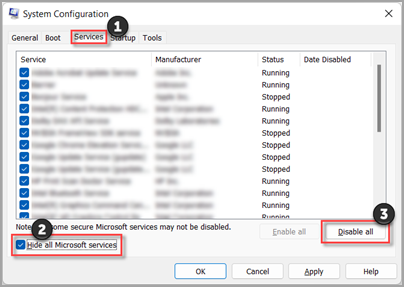
msconfig >Services > Hide all Microsoft services > Disable all > Apply

The Services tab in System Configuration in Windows 11.


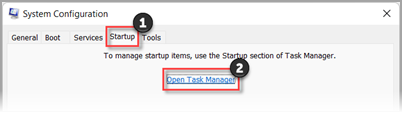
Startup tab > Open Task Manager

The Startup tab in System Configuration in Windows 11.


Task Manager > Disable all Enabled startup programs/apps

Reboot


this clean boot will narrow down if it is a running program/service that is causing this. you can then (if you really want to track it down), enable them one by one and see when it starts again.
 

My Computer

System One

  • OS
    Windows 11 Pro

Latest Support Threads

Back
Top Bottom