Coming soon: Quality updates during out-of-box experience (OOBE) for Windows 11


 Windows IT Pro Blog:

Soon, you'll be able to enable quality updates for your organization during the out-of-box experience (OOBE) of new Windows 11 devices.

You are in control over Windows updates​

Thanks to your feedback, in mid-2025, we'll be releasing a new policy to manage whether devices in your organization receive quality updates during OOBE. This policy will allow you to choose if new Windows 11 devices on version 22H2 and higher get the latest applicable quality update during setup. You'll be able to configure the setting via Windows Autopilot and Windows Autopilot device preparation, so you can have seamless control over updates in OOBE.

Additionally, your existing quality update settings will be synced to the device, including Windows quality update deferrals and pause policies. That way, only the latest approved security update is offered, enabling you to keep your entire fleet on the same approved version.

If you don't use Autopilot through Microsoft Intune, you can still disable quality updates during OOBE by setting the Group Policy to disabled. This policy will be available as a mobile device management (MDM) policy and a Group Policy.

Note: Please note this policy does not apply to the OOBE Zero Day Package (ZDP) updates and there are no changes to this experience.

User out-of-box experience​

This change will help ensure devices in your organization are secure out of the box by getting the quality update at the end of their out-of-box experience. can take an average of 20 minutes though the download and installation time will depend on the size of the update, the user's network conditions, and the hardware capabilities of the device.
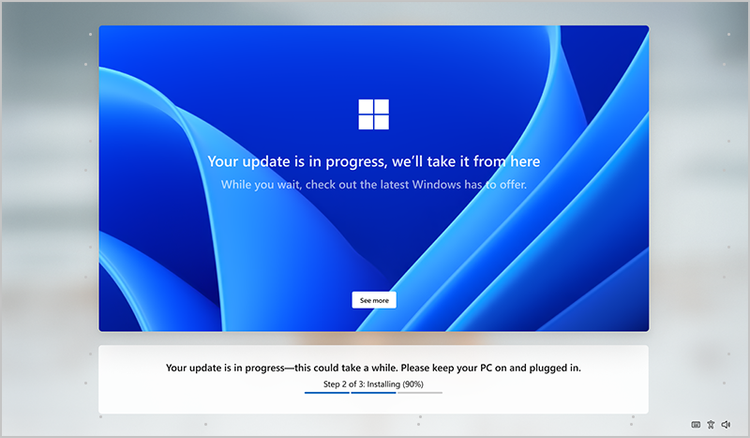
Mockup of the Windows screen during OOBE. Text notes that update is in progress. Background is the varied blues of the Windows bloom.

A mockup of the screen that a user will get when taking a Windows quality update during the OOBE. This design is not final.

How to prepare​

There is no action you need to take at this time. Watch for an update in mid-2025 when the policy becomes available, and Autopilot changes go live. Subscribe to the Windows IT Pro Blog or keep checking the Microsoft 365 admin center to get the news and configure the new policy as appropriate for your organization's needs.

Thank you again for your feedback and helping us make Windows better!


 Source:

 
It's weird this says coming soon, because I have been seeing these out of box experience updates for the last 2 months....
 

My Computers My Computers

  • At a glance

    Windows 11 ProRyzen 7 5700 X3D64 GB DDR4 3600mhz Gskill Ripjaws VRTX 4070 Super , 12GB VRAM Asus EVO Overclock
    OS
    Windows 11 Pro
    Computer type
    PC/Desktop
    Manufacturer/Model
    Custom Built
    CPU
    Ryzen 7 5700 X3D
    Motherboard
    MSI MPG B550 GAMING PLUS
    Memory
    64 GB DDR4 3600mhz Gskill Ripjaws V
    Graphics Card(s)
    RTX 4070 Super , 12GB VRAM Asus EVO Overclock
    Monitor(s) Displays
    Gigabyte M27Q (rev. 2.0) 2560 x 1440 @ 170hz HDR
    Hard Drives
    2TB Samsung nvme ssd
    4TB Western Digital nvme ssd
    PSU
    CORSAIR RMx SHIFT Series™ RM750x 80 PLUS Gold Fully Modular ATX Power Supply
    Case
    CORSAIR 3500X ARGB Mid-Tower ATX PC Case – Black
    Cooling
    ID-COOLING FROSTFLOW X 240 CPU Water Cooler
    Keyboard
    Logitech G213
    Mouse
    Logitech G203
    Internet Speed
    1.2gbps Fiber 😎
  • At a glance

    Chrome OSIntel Pentium Quad Core4GB LPDDR4
    Operating System
    Chrome OS
    Computer type
    Laptop
    Manufacturer/Model
    HP Chromebook
    CPU
    Intel Pentium Quad Core
    Memory
    4GB LPDDR4
    Monitor(s) Displays
    14 Inch HD SVA anti glare micro edge display
    Hard Drives
    64 GB emmc
It's weird this says coming soon, because I have been seeing these out of box experience updates for the last 2 months....
Yeah and what a blooming disaster they are, ridiculously slowing down oobe.

Obviously commercial Enterprise users are kicking back as IT departments like to control which updates are made (usually testing them before releasing to users).

For normal users, the only way I know that is guaranteed to work to avoid this bs on a clean install is to install as a local account using oobe\bypassnro or similar with internet turned off.

Then version installed is as per base iso. Then one can image backup installation and then use WU at ones leisure.

Yet again MS forced a unilateral change to 24H2 without informing or testing it via Insider versions. Problem is Insider isos are rarely produced for Dev and Canary, and cumulative updates are rare as well (usually just a new build upgrade).

However, it could have been tested by RP Channel which does have regular cumulative updates.

What pathetic MS numpty decided it would be a great idea to slow down oobe and force the updates. A simple yes/no question would have been adequate!

Note - at one time, one could select the older installation method and it would not update during oobe but I am not sure this works anymore.
EDIT - if you setup using MS account, it forces oobe updates using old installer as well.

Thus repeating above - For normal users, the only way I know that is guaranteed to work on a clean install is to install as a local account using oobe\bypassnro or similar with internet turned off (I am not sure if latter is essential but I havre not tested with internet on).
 
Last edited:

My Computer My Computer

At a glance

Windows 11 Pro + Win11 Canary VM.I9 13th gen i9-13900H 2.60 GHZ16 GB solderedIntegrated Intel Iris XE
OS
Windows 11 Pro + Win11 Canary VM.
Computer type
Laptop
Manufacturer/Model
ASUS Zenbook 14
CPU
I9 13th gen i9-13900H 2.60 GHZ
Motherboard
Yep, Laptop has one.
Memory
16 GB soldered
Graphics Card(s)
Integrated Intel Iris XE
Sound Card
Realtek built in
Monitor(s) Displays
laptop OLED screen
Screen Resolution
2880x1800 touchscreen
Hard Drives
1 TB NVME SSD (only weakness is only one slot)
PSU
Internal + 65W thunderbolt USB4 charger
Case
Yep, got one
Cooling
Stella Artois (UK pint cans - 568 ml) - extra cost.
Keyboard
Built in UK keybd
Mouse
Bluetooth , wireless dongled, wired
Internet Speed
900 mbs (ethernet), wifi 6 typical 350-450 mb/s both up and down
Browser
Edge
Antivirus
Defender
Other Info
TPM 2.0, 2xUSB4 thunderbolt, 1xUsb3 (usb a), 1xUsb-c, hdmi out, 3.5 mm audio out/in combo, ASUS backlit trackpad (inc. switchable number pad)

Macrium Reflect Home V8
Office 365 Family (6 users each 1TB onedrive space)
Hyper-V (a vm runs almost as fast as my older laptop)
OOBE Updates supposedly only affect Autopilot-managed PC's, and that's a big lie. I've been randomly selected a number of times.

Secret tip for bypassing OOBE Updates (integrate this to your install image, or apply during specialize):
Code:
[HKEY_LOCAL_MACHINE\SOFTWARE\Policies\Microsoft\Windows\CloudContent]
"DisableCloudOptimizedContent"=dword:00000001

If you're a fan of Spotlight and all that content, immediately change it back after OOBE's completed.
Code:
"DisableCloudOptimizedContent"=dword:00000000
 

My Computer My Computer

At a glance

Windows 7
OS
Windows 7
What pathetic MS numpty decided it would be a great idea to slow down oobe and force the updates. A simple yes/no question would have been adequate!

Note - at one time, one could select the older installation method and it would not update during oobe but I am not sure this works anymore.
EDIT - if you setup using MS account, it forces oobe updates using old installer as well.

Thus repeating above - For normal users, the only way I know that is guaranteed to work on a clean install is to install as a local account using oobe\bypassnro or similar with internet turned off (I am not sure if latter is essential but I havre not tested with internet on).
Your status as a Local Account has no bearing on OOBE Updates.

The real motivation behind this is not all orgs take advantage of Setup Dynamic Update. So MS decided to add another checkpoint by forcing OOBE to push Monthly Updates before your first logon. Originally we were promised OOBE only handed out OOBE and Servicing updates.

Forced quality updates obviously helps for groups that have a strict security policy that no user can touch a PC that's isn't fully patched. But having this 24H2 feature rolled out before the promised GPO was released, is unacceptable.
 

My Computer My Computer

At a glance

Windows 7
OS
Windows 7
Your status as a Local Account has no bearing on OOBE Updates.

The real motivation behind this is not all orgs take advantage of Setup Dynamic Update. So MS decided to add another checkpoint by forcing OOBE to push Monthly Updates before your first logon. Originally we were promised OOBE only handed out OOBE and Servicing updates.

Forced quality updates obviously helps for groups that have a strict security policy that no user can touch a PC that's isn't fully patched. But having this 24H2 feature rolled out before the promised GPO was released, is unacceptable.
You are twisting my words.

If a domestic user uses an MS account, you have to be online for oobe to continue, and then it automatically does the updates.

If you create a local account with no internet, the updates are not done (as no internet to download them.

So yes, a local account is one guaranteed solution I know to avoid the updates.

OK resorting to registry updates might be a solution but it is more complicated than the oobe\bypassnro method.

My gripe is MS are introducing a easy way to avoid the forced updates for corporate IT depts but not for ordinary consumers. We are forced to hack a solution.
 

My Computer My Computer

At a glance

Windows 11 Pro + Win11 Canary VM.I9 13th gen i9-13900H 2.60 GHZ16 GB solderedIntegrated Intel Iris XE
OS
Windows 11 Pro + Win11 Canary VM.
Computer type
Laptop
Manufacturer/Model
ASUS Zenbook 14
CPU
I9 13th gen i9-13900H 2.60 GHZ
Motherboard
Yep, Laptop has one.
Memory
16 GB soldered
Graphics Card(s)
Integrated Intel Iris XE
Sound Card
Realtek built in
Monitor(s) Displays
laptop OLED screen
Screen Resolution
2880x1800 touchscreen
Hard Drives
1 TB NVME SSD (only weakness is only one slot)
PSU
Internal + 65W thunderbolt USB4 charger
Case
Yep, got one
Cooling
Stella Artois (UK pint cans - 568 ml) - extra cost.
Keyboard
Built in UK keybd
Mouse
Bluetooth , wireless dongled, wired
Internet Speed
900 mbs (ethernet), wifi 6 typical 350-450 mb/s both up and down
Browser
Edge
Antivirus
Defender
Other Info
TPM 2.0, 2xUSB4 thunderbolt, 1xUsb3 (usb a), 1xUsb-c, hdmi out, 3.5 mm audio out/in combo, ASUS backlit trackpad (inc. switchable number pad)

Macrium Reflect Home V8
Office 365 Family (6 users each 1TB onedrive space)
Hyper-V (a vm runs almost as fast as my older laptop)
My gripe is MS are introducing a easy way to avoid the forced updates for corporate IT depts but not for ordinary consumers.

I stopped reading right at that point and thought about how ridiculously unfair and backward that was.
 

My Computers My Computers

  • At a glance

    Windows 11 Pro 25H2 Build 26200.9168Intel(R) Core(TM) i7-4770K CPU @ 3.50GHz32.0 GB of I forget and the box is in storage.Gigabyte nVidia GeForce GTX 1660 Super OC 6GB
    OS
    Windows 11 Pro 25H2 Build 26200.9168
    Computer type
    PC/Desktop
    Manufacturer/Model
    Sin-built 2013
    CPU
    Intel(R) Core(TM) i7-4770K CPU @ 3.50GHz
    Motherboard
    ASUS ROG Maximus VI Formula
    Memory
    32.0 GB of I forget and the box is in storage.
    Graphics Card(s)
    Gigabyte nVidia GeForce GTX 1660 Super OC 6GB
    Sound Card
    ROG SupremeFX Formula 8-Channel High Definition Audio
    Monitor(s) Displays
    5 x LG 25MS500-B - 1 x 24MK430H-B - 1 x Wacom Pro 22" Touch Screen Tablet
    Screen Resolution
    All over the place
    Hard Drives
    Too many to list. OS on Samsung 1TB 870 QVO SATA
    PSU
    Silverstone 1500
    Case
    NZXT Phantom 820 Full-Tower Case
    Cooling
    Noctua NH-D15 Elite Class Dual Tower CPU Cooler / 6 x EziDIY 120mm / 2 x Corsair 140mm somethings / 1 x 140mm Thermaltake something / 2 x 200mm Corsair.
    Keyboard
    Corsair K95 / Logitech diNovo Edge Wireless
    Mouse
    Logitech: G402 / G502 / Mx Masters / Mx Air Cordless
    Internet Speed
    2000/500Mbps
    Browser
    All sorts
    Antivirus
    Kaspersky Premium
    Other Info
    ㅤㅤㅤㅤㅤㅤㅤㅤㅤㅤㅤㅤㅤㅤㅤㅤㅤㅤㅤㅤㅤㅤㅤㅤㅤㅤㅤㅤㅤㅤㅤㅤㅤㅤㅤㅤㅤㅤㅤㅤ⠀⠀⠀⠀⠀⠀⠀⠀⠀⠀
    TP-Link BE9300 WiFi 7 Bluetooth 5.4 (Archer TBE550E)
    TP-Link TX201 V1 2.5GB Lan

    Grandstream HT812 - VoIP
    ASUS DSL-AX82U - Mesh
    ASUS RT-AC68U - Mesh
    ASUS RT-BE88U Router

    Brother MFC-L2880DW Printer

    I’m on a horse.
  • At a glance

    Windows 11 Pro 25H2 Build 26200.9168 (Wifes)13th Generation Intel® Core™ i5-1340P Process...16GB LPDDR5-52001x Intel® Iris® Xe Graphics
    Operating System
    Windows 11 Pro 25H2 Build 26200.9168 (Wifes)
    Computer type
    Laptop
    Manufacturer/Model
    LENOVO Yoga 7 14IRL8 - Type 82YL
    CPU
    13th Generation Intel® Core™ i5-1340P Processor(Core™ i5-1340P)
    Memory
    16GB LPDDR5-5200
    Graphics card(s)
    1x Intel® Iris® Xe Graphics
    Sound Card
    Optimized with Dolby Atmos®
    Screen Resolution
    QHD 2880 x 1800 OLED
    Hard Drives
    M.2 512 GB SSD PCIe
    Mouse
    Logiteck MX Master 3S
    Internet Speed
    2000/500
    Antivirus
    Defender / Malwarebytes
    Other Info
    …still on a horse.


    Wireless Network: Wi-Fi 6E 2x2 AX; Bluetooth® 5.1 or above
    Ports: 1x 1 Novo button; 2 in 1 Audio Combo jack; Micro SD Card Reader; HDMI 1.4b; 2 x USB Type-C (TBT4)
    USB 3.2 Gen 2 DP 1.4a
    PD 3.0); 1 x USB 3.2 Gen1 Type A
    Camera
    1x 1080P FHD IR/RGB Hybrid with Privacy Shutter and Dual Array Microphone
    Graphics
    1x Intel® Iris® Xe Graphics
    Monitor
    14" WUXGA
    Form Factor
    Convertible Notebook
  • Windows 11 Pro 25H2 Build 26200.9168 (Wifes)

    Yoga 7 2-in-1 14IML9 - Type 83DJ

    Processor: Intel® Core™ Ultra 7 155H Processor(Core™ Ultra 7 155H)

    Memory: 32GB LPD5X-7467

    Hard Drive: 1 TB SSD PCIe

    Wireless Network: 1x Wi-Fi 6E 2x2 AX; Bluetooth® 5.1 or above

    Ports: 1 x HDMI 2.1 TMDS; 1 x Novo Button; 1 x Combo Audio Jack
    2 x USB-C (USB 4.0)
    1 x USB-A 3.2 Gen 1

    Camera: 1080P FHD IR Hybrid with Dual Microphone

    Graphics: Intel® Arc™ Graphics

    Monitor: 14" 2.8K

    ...Where's my horse?
I stopped reading right at that point and thought about how ridiculously unfair and backward that was.
Coming from a security standpoint, I understand why. But microsoft update for 24h2 has been having issues and I don't think microsoft should push it out when so many issues exist for it.
 

My Computers My Computers

  • At a glance

    Windows 11 ProRyzen 7 5700 X3D64 GB DDR4 3600mhz Gskill Ripjaws VRTX 4070 Super , 12GB VRAM Asus EVO Overclock
    OS
    Windows 11 Pro
    Computer type
    PC/Desktop
    Manufacturer/Model
    Custom Built
    CPU
    Ryzen 7 5700 X3D
    Motherboard
    MSI MPG B550 GAMING PLUS
    Memory
    64 GB DDR4 3600mhz Gskill Ripjaws V
    Graphics Card(s)
    RTX 4070 Super , 12GB VRAM Asus EVO Overclock
    Monitor(s) Displays
    Gigabyte M27Q (rev. 2.0) 2560 x 1440 @ 170hz HDR
    Hard Drives
    2TB Samsung nvme ssd
    4TB Western Digital nvme ssd
    PSU
    CORSAIR RMx SHIFT Series™ RM750x 80 PLUS Gold Fully Modular ATX Power Supply
    Case
    CORSAIR 3500X ARGB Mid-Tower ATX PC Case – Black
    Cooling
    ID-COOLING FROSTFLOW X 240 CPU Water Cooler
    Keyboard
    Logitech G213
    Mouse
    Logitech G203
    Internet Speed
    1.2gbps Fiber 😎
  • At a glance

    Chrome OSIntel Pentium Quad Core4GB LPDDR4
    Operating System
    Chrome OS
    Computer type
    Laptop
    Manufacturer/Model
    HP Chromebook
    CPU
    Intel Pentium Quad Core
    Memory
    4GB LPDDR4
    Monitor(s) Displays
    14 Inch HD SVA anti glare micro edge display
    Hard Drives
    64 GB emmc
Windows Dev team (Redmond, WA).

Principal Dev: Forcing OOBE Updates could take around 30 minutes, to download and install.
Product Manager: That's too long! NeoWin will write a terrible review of 24H2.
Dev Lead: Well... OOBE User Experience is built on Edge. Don't they have some Easter egg game or something?
Windows PM: How long does it take to embed it?
(College Intern for the Summer) Dev: Think I can do that in about a day or two. Maybe another day for QA since we don't have QA any more...
Windows PM: We've fixed all the critical 24H2 issues. Ship it!


GNKS1UyWwAAWzuX.webp
 

My Computer My Computer

At a glance

Windows 7
OS
Windows 7
The current OOBE is way too long, compare this to Windows 10. Its irritating having to click all these idiotic options.
 

My Computers My Computers

  • At a glance

    Windows 11 26H2Intel i9 14900KF64GB Corsair Vengeance RGBMSI 4090 Suprim X
    OS
    Windows 11 26H2
    Computer type
    PC/Desktop
    Manufacturer/Model
    Custom Built
    CPU
    Intel i9 14900KF
    Motherboard
    ASUS Z790 ProArt Creator WiFi
    Memory
    64GB Corsair Vengeance RGB
    Graphics Card(s)
    MSI 4090 Suprim X
    Sound Card
    Onboard
    Monitor(s) Displays
    1 x Asus 24". 1 x Asus 32"
    Screen Resolution
    1920 x 1080 & 2560 x 1440 (4K DSR)
    Hard Drives
    Multiple
    PSU
    Corsair 1200HX
    Case
    Corsair 7000D RGB
    Cooling
    Corsair H150I Capellix XT
    Keyboard
    Corsair K70 RGB PRO
    Mouse
    Corsair M55 RGB Pro
    Internet Speed
    1000Mbps
    Browser
    Edge
    Antivirus
    Windows Default
  • At a glance

    Windows 11 25H2Intel i7 6800K32GB DDR4 (Corsair)ASUS GTX 1080ti
    Operating System
    Windows 11 25H2
    Computer type
    PC/Desktop
    Manufacturer/Model
    Custom Built
    CPU
    Intel i7 6800K
    Motherboard
    ASUS Z99 Deluxe
    Memory
    32GB DDR4 (Corsair)
    Graphics card(s)
    ASUS GTX 1080ti
    Sound Card
    Onboard
    Monitor(s) Displays
    1x Viewsonic 24" 1x LG 19"
    Screen Resolution
    1920 x 1080 & 1600 x 900
    Hard Drives
    3 x SATA SSD
    PSU
    650W Gigabyte Bronze
    Case
    Coolermaster HAF-X
    Cooling
    Noctua NH-15 Chroma black
    Keyboard
    Generic RGB
    Mouse
    Microsoft Basic
    Internet Speed
    1000Mbps
    Browser
    Edge
    Antivirus
    Windows Default
Current OOBE is really a candy-colored shell to hide Autopilot features for the enterprise. I'm not kidding.
 

My Computer My Computer

At a glance

Windows 7
OS
Windows 7
This isn't really "listening to the customer", sorry "listening to the non-Autopilot customer".
Get ready to manage updates in OOBE, but only with Autopilot v1?

The consensus hack from security researchers is to block sdx.microsoft.com from the HOSTS file. I checked, and it's used for some obscure Family Security and outdated Windows Phone pairing portal outside of AutoPilot hosting duties. Acceptable damage.

If you're using an unattended file, appending a new line from the specialize pass should be a no-brainer.
 

My Computer My Computer

At a glance

Windows 7
OS
Windows 7

My Computer My Computer

At a glance

Windows 11 Enterprise 25H2
OS
Windows 11 Enterprise 25H2

Latest Support Threads

Back
Top Bottom