Compatibility Mode lock-up


Batuche

Member
Local time
1:52 PM
Posts
28
OS
25H2
Just curious. Not long ago I tried loading a Photoshop Elements WIN10 disk program into our WIN11 computer using the compatibility mode, which resulted in a BSOD with the computer locking itself into a self-repair loop which it couldn’t get out of, which in turn resulted in my paying good money having the PC diagnosed, then wiping it clean with a fresh install of WIN11 including data backed up. Our computer is almost a year out of warranty. I didn’t save any images nor run a V2 log as at the time I knew nothing of it.

Also, I didn’t find the following website at that time, so I never attempted starting it in safe mode:

How to fix windows 11 automatic repair - Microsoft Q&A

My question to the tech who diagnosed and reinstalled WIN11 was, "Why did WIN11 lock up?" He couldn’t answer specifically other than to say there may have been something previously corrupted in WIN11 causing this. I’m wondering if there isn’t something wrong with WIN11 compatibility mode itself, therefore my question:

Is this a common occurrence using WIN11 compatibility mode? Have others experienced this?

I’m asking because I don’t dare try to load the old Photoshop Elements program again without more information. My only other option is to consider purchasing a new PSE program for photo editing and Adobe licenses it for 3 years now which really burns me.
 

My Computers

System One System Two

  • OS
    25H2
    Computer type
    PC/Desktop
    Manufacturer/Model
    Powerspec G235 (Micro Center)
    CPU
    Intel Core i5 12400F 2.5GHz, Alder Lake
    Motherboard
    ASUS PRIME B66oM-A AC D4
    Memory
    16GB
    Graphics Card(s)
    NVIDIA GeForce RTX 4060
    Sound Card
    Realtek ALC897
    Monitor(s) Displays
    28" Samsung (hand me down from son's friend)
    PSU
    650 Watt
    Case
    Powerspec
    Keyboard
    Standard
    Mouse
    Logitech
    Other Info
    Has an LG ODD USB connected
  • Operating System
    Win10 22H2
    Computer type
    PC/Desktop
    Manufacturer/Model
    Silverstone Sugo SG-05BB-Lite
    CPU
    Intel Core i5-4590S
    Motherboard
    ASRock H97M-ITX/AC Mini
    Memory
    8GB
    Graphics card(s)
    EVGA GeGorce GTX 960 2GB
    Sound Card
    Realtek
    Monitor(s) Displays
    ASUS VS239
    Screen Resolution
    1970 x 1080
    Hard Drives
    WD Black 2TB
    PSU
    Silverstone Strider Gold 450W
    Case
    Silverstone Sugo SG-05BB-Lite
    Cooling
    Single front case fan
    Keyboard
    Logitech K800/Logitech K360
    Mouse
    Logitech M510
    Internet Speed
    900 Mbps
    Other Info
    ODD: LG BT30N
    SSD: Samsung 850 EVO 250GB 2.5"
If you make backup images you can restore an image.

Having the ability to restore images enables the computer to perform trial and error steps.


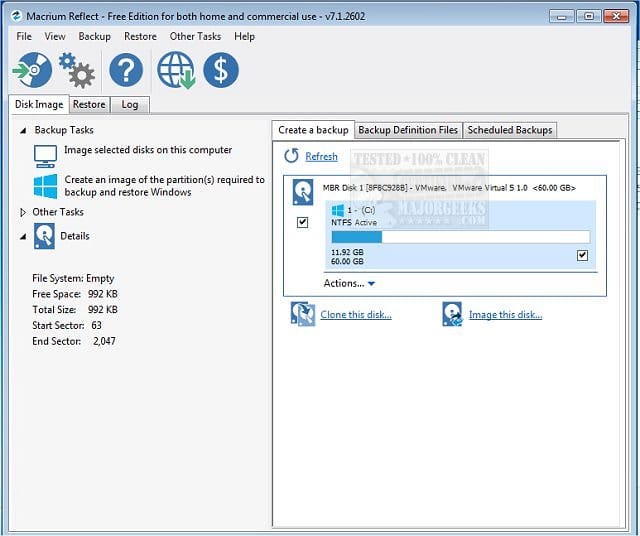
Consider making a free backup image.
Save the backup image to another disk drive or to the cloud.

If there is malware, ransomware, registry or operating system corruption, failure to boot, BSODs, drive failure, etc. you then have the option to restore an image.

(Acronis, Aoemi, EaseUS, Hasleo, Macrium, Paragon, etc.)


Macrium is widely used in Ten Forums.

Macrium Software | Your Image is Everything


Backup and Restore with Macrium Reflect
 

My Computer

System One

  • OS
    Windows 10
    Computer type
    Laptop
    Manufacturer/Model
    HP
    CPU
    Intel(R) Core(TM) i7-4800MQ CPU @ 2.70GHz
    Motherboard
    Product : 190A Version : KBC Version 94.56
    Memory
    16 GB Total: Manufacturer : Samsung MemoryType : DDR3 FormFactor : SODIMM Capacity : 8GB Speed : 1600
    Graphics Card(s)
    NVIDIA Quadro K3100M; Intel(R) HD Graphics 4600
    Sound Card
    IDT High Definition Audio CODEC; PNP Device ID HDAUDIO\FUNC_01&VEN_111D&DEV_76E0
    Hard Drives
    Model Hitachi HTS727575A9E364
    Antivirus
    Microsoft Defender
    Other Info
    Mobile Workstation
zbook,

Thank you for your prompt response. I know nothing about restoring images. Is restoring an image the same thing as restoring an operating system, WIN11 in this case, and/or the computer data included?

What is the difference between backing up images as you describe and using something like a WD EasyStore remote drive? Aren't these separate methods to accomplish the same thing? Further, if the computer is locked in a self-repair loop, as happened to us, how could we access the image software?

We do have an older internal HDD in a case which I think we could use, or could we just use a large USB drive?
 

My Computers

System One System Two

  • OS
    25H2
    Computer type
    PC/Desktop
    Manufacturer/Model
    Powerspec G235 (Micro Center)
    CPU
    Intel Core i5 12400F 2.5GHz, Alder Lake
    Motherboard
    ASUS PRIME B66oM-A AC D4
    Memory
    16GB
    Graphics Card(s)
    NVIDIA GeForce RTX 4060
    Sound Card
    Realtek ALC897
    Monitor(s) Displays
    28" Samsung (hand me down from son's friend)
    PSU
    650 Watt
    Case
    Powerspec
    Keyboard
    Standard
    Mouse
    Logitech
    Other Info
    Has an LG ODD USB connected
  • Operating System
    Win10 22H2
    Computer type
    PC/Desktop
    Manufacturer/Model
    Silverstone Sugo SG-05BB-Lite
    CPU
    Intel Core i5-4590S
    Motherboard
    ASRock H97M-ITX/AC Mini
    Memory
    8GB
    Graphics card(s)
    EVGA GeGorce GTX 960 2GB
    Sound Card
    Realtek
    Monitor(s) Displays
    ASUS VS239
    Screen Resolution
    1970 x 1080
    Hard Drives
    WD Black 2TB
    PSU
    Silverstone Strider Gold 450W
    Case
    Silverstone Sugo SG-05BB-Lite
    Cooling
    Single front case fan
    Keyboard
    Logitech K800/Logitech K360
    Mouse
    Logitech M510
    Internet Speed
    900 Mbps
    Other Info
    ODD: LG BT30N
    SSD: Samsung 850 EVO 250GB 2.5"
Some computers come with an extra partition for a factory reset.

If a factory reset were to be performed it restores the image to that moment in time.


Using third party software you can create images that include your files.

At a later time an image can be restored to that moment in time.


Depending upon the importance of the data images can be saved to both an external drive and / or the cloud.

Having both improves protection for acts of mother nature (fire, flood, etc.)
 

My Computer

System One

  • OS
    Windows 10
    Computer type
    Laptop
    Manufacturer/Model
    HP
    CPU
    Intel(R) Core(TM) i7-4800MQ CPU @ 2.70GHz
    Motherboard
    Product : 190A Version : KBC Version 94.56
    Memory
    16 GB Total: Manufacturer : Samsung MemoryType : DDR3 FormFactor : SODIMM Capacity : 8GB Speed : 1600
    Graphics Card(s)
    NVIDIA Quadro K3100M; Intel(R) HD Graphics 4600
    Sound Card
    IDT High Definition Audio CODEC; PNP Device ID HDAUDIO\FUNC_01&VEN_111D&DEV_76E0
    Hard Drives
    Model Hitachi HTS727575A9E364
    Antivirus
    Microsoft Defender
    Other Info
    Mobile Workstation
Our computer didn’t come with an extra partition for a factory reset as far as I know, and at this time we are not using any cloud-based services for data/file storage.

Just so I understand correctly. Creating an image is basically taking a snapshot of the computer (the WIN11 OS along with other stored programs) at a given moment in time, either to include files or not, which can be fully restored in the event of a problem, correct?

Is there any difference between a factory reset or using a program like Macrium to restore an image?

In the example of our computer freezing in a self-repair loop, had we used Macrium, how could we have initiated a restoration of the image since we couldn’t even get out of the self-repair loop? Same question goes for using a factory reset.

Finally, is there any inherent risk associated with trying to load older WIN10 software into a WIN11 computer using compatibility mode?
 

My Computers

System One System Two

  • OS
    25H2
    Computer type
    PC/Desktop
    Manufacturer/Model
    Powerspec G235 (Micro Center)
    CPU
    Intel Core i5 12400F 2.5GHz, Alder Lake
    Motherboard
    ASUS PRIME B66oM-A AC D4
    Memory
    16GB
    Graphics Card(s)
    NVIDIA GeForce RTX 4060
    Sound Card
    Realtek ALC897
    Monitor(s) Displays
    28" Samsung (hand me down from son's friend)
    PSU
    650 Watt
    Case
    Powerspec
    Keyboard
    Standard
    Mouse
    Logitech
    Other Info
    Has an LG ODD USB connected
  • Operating System
    Win10 22H2
    Computer type
    PC/Desktop
    Manufacturer/Model
    Silverstone Sugo SG-05BB-Lite
    CPU
    Intel Core i5-4590S
    Motherboard
    ASRock H97M-ITX/AC Mini
    Memory
    8GB
    Graphics card(s)
    EVGA GeGorce GTX 960 2GB
    Sound Card
    Realtek
    Monitor(s) Displays
    ASUS VS239
    Screen Resolution
    1970 x 1080
    Hard Drives
    WD Black 2TB
    PSU
    Silverstone Strider Gold 450W
    Case
    Silverstone Sugo SG-05BB-Lite
    Cooling
    Single front case fan
    Keyboard
    Logitech K800/Logitech K360
    Mouse
    Logitech M510
    Internet Speed
    900 Mbps
    Other Info
    ODD: LG BT30N
    SSD: Samsung 850 EVO 250GB 2.5"
Is there any difference between a factory reset or using a program like Macrium to restore an image?
Yes, a factory image puts the computer in the state it was in when you took it out of the box.
A Macrium(or other 3rd party app) image puts the system in the state it was in when you created the image, preserving the OS and all files, applications and settings.

how could we have initiated a restoration of the image since we couldn’t even get out of the self-repair loop? Same question goes for using a factory reset.
You could have gotten out of the self repair loop by booting into a Macrium rescue disk which you make when you install Macrium and recover the image you made.

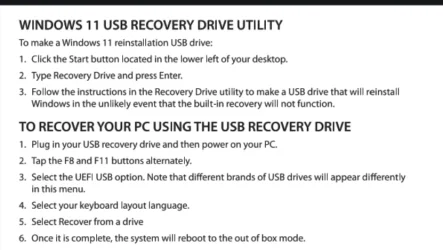
As far as recovering a factory image to out of box state, you also could have booted from a recovery usb created using the recovery drive utility and booted from it.
This is directly from Powerspec guide, I'm calling it a guide loosely. It's only 2 pages.

Screenshot 2025-12-08 202736.webp
 

My Computers

System One System Two

  • OS
    Windows 11 Pro 25H2
    Computer type
    PC/Desktop
    Manufacturer/Model
    Dell Optiplex 7080
    CPU
    i9-10900 10 core 20 threads
    Motherboard
    DELL 0J37VM
    Memory
    32 gb
    Graphics Card(s)
    none-Intel UHD Graphics 630
    Sound Card
    Integrated Realtek
    Monitor(s) Displays
    Benq 27
    Screen Resolution
    2560x1440
    Hard Drives
    2x1tb Solidigm m.2 nvme /External drives 512gb Samsung m.2 sata+2tb Kingston m2.nvme
    PSU
    500w
    Case
    MT
    Cooling
    Dell Premium
    Keyboard
    Logitech wired
    Mouse
    Logitech wireless
    Internet Speed
    so slow I'm too embarrassed to tell
    Browser
    #1 Edge #2 Firefox
    Antivirus
    Defender+MWB Premium
  • Operating System
    Windows 11 Pro 24H2 26200.8457
    Computer type
    PC/Desktop
    Manufacturer/Model
    Beelink Mini PC SER5
    CPU
    AMD Ryzen 7 6800U
    Memory
    32 gb
    Graphics card(s)
    integrated
    Sound Card
    integrated
    Monitor(s) Displays
    Benq 27
    Screen Resolution
    2560x1440
    Hard Drives
    1TB Crucial nvme
    Keyboard
    Logitech wired
    Mouse
    Logitech wireless
    Internet Speed
    still too embarrassed to tell
    Browser
    Firefox
    Antivirus
    Defender
    Other Info
    System 3 is non compliant Dell 9020 i7-4770/24gb ram Win11 PRO 26200.8457
A computer running Windows 11 can clean install Windows 10.

The licensing information is stored in Microsoft servers.


Third party software can be used to create images at any moment manually.

Or third party software can be used to create automatic backup images.


Computer users can then decide which backup image they want to restore.

If there is unlimited storage then you could make images every month, week, day or hour.


If there is a power outage and the drive fails you could choose any of the backup images to restore onto the new drive.

At anytime you want a larger drive an image could be restored onto a larger drive.


If you purchase a brand new laptop that has never been connected to the internet a backup image can be made and this will be extremely close to a backup image with its preinstalled operating system, drivers, and applications.

If the computer "freezes in a self-repair loop" then you could:
a) attempt to troubleshoot by preventing the loop without macrium by booting to Windows RE and running a command
b) not troubleshoot then clean install then restore only C:
c) not troubleshoot then format the drive then restore any of the backup images
d) if its a likely boot problem and not an operating system or registry problem then attempt a macrium boot repair
 
Last edited:

My Computer

System One

  • OS
    Windows 10
    Computer type
    Laptop
    Manufacturer/Model
    HP
    CPU
    Intel(R) Core(TM) i7-4800MQ CPU @ 2.70GHz
    Motherboard
    Product : 190A Version : KBC Version 94.56
    Memory
    16 GB Total: Manufacturer : Samsung MemoryType : DDR3 FormFactor : SODIMM Capacity : 8GB Speed : 1600
    Graphics Card(s)
    NVIDIA Quadro K3100M; Intel(R) HD Graphics 4600
    Sound Card
    IDT High Definition Audio CODEC; PNP Device ID HDAUDIO\FUNC_01&VEN_111D&DEV_76E0
    Hard Drives
    Model Hitachi HTS727575A9E364
    Antivirus
    Microsoft Defender
    Other Info
    Mobile Workstation
Many thanks glasskuter and zbook for your prompt replies. I'm out and about (holiday and other stuff) so haven't fully digested all your info, but it looks like you covered everything. Looks like Macrium is the solution.
 

My Computers

System One System Two

  • OS
    25H2
    Computer type
    PC/Desktop
    Manufacturer/Model
    Powerspec G235 (Micro Center)
    CPU
    Intel Core i5 12400F 2.5GHz, Alder Lake
    Motherboard
    ASUS PRIME B66oM-A AC D4
    Memory
    16GB
    Graphics Card(s)
    NVIDIA GeForce RTX 4060
    Sound Card
    Realtek ALC897
    Monitor(s) Displays
    28" Samsung (hand me down from son's friend)
    PSU
    650 Watt
    Case
    Powerspec
    Keyboard
    Standard
    Mouse
    Logitech
    Other Info
    Has an LG ODD USB connected
  • Operating System
    Win10 22H2
    Computer type
    PC/Desktop
    Manufacturer/Model
    Silverstone Sugo SG-05BB-Lite
    CPU
    Intel Core i5-4590S
    Motherboard
    ASRock H97M-ITX/AC Mini
    Memory
    8GB
    Graphics card(s)
    EVGA GeGorce GTX 960 2GB
    Sound Card
    Realtek
    Monitor(s) Displays
    ASUS VS239
    Screen Resolution
    1970 x 1080
    Hard Drives
    WD Black 2TB
    PSU
    Silverstone Strider Gold 450W
    Case
    Silverstone Sugo SG-05BB-Lite
    Cooling
    Single front case fan
    Keyboard
    Logitech K800/Logitech K360
    Mouse
    Logitech M510
    Internet Speed
    900 Mbps
    Other Info
    ODD: LG BT30N
    SSD: Samsung 850 EVO 250GB 2.5"

Back
Top Bottom