Computer Crash After Latest Win11 Update


kheldar

Member
Local time
2:27 AM
Posts
4
OS
11
Hello,

after the latest updates, when I turn on the computer first for the day and launch a game. I get a crash after a little while. However, after the initial crash it doesn't happen anymore or if I restart the computer once before even crash occurs. It's really strange. First time it happened, I checked the minidump file, it stated a graphic card timeout error, however now it fails to create a dmp file as well.

I've tried sfc scannow and all the dism commands
Uninstalled gpu drivers using DDU in safe mode.
my drivers all are up to date.

Specs:

MSI 3070
i9 10900k
meg z490 godlike
32gb 4000 MHZ corsair rams

Edit: I've managed to get a minidump as well.
Logs: KHELDAR-PC-(2025-05-09_13-45-03).zip

VIDEO_TDR_FAILURE (116)
Attempt to reset the display driver and recover from timeout failed.
Arguments:
Arg1: ffff8083920ac010, Optional pointer to internal TDR recovery context (TDR_RECOVERY_CONTEXT).
Arg2: fffff80276ca7a10, The pointer into responsible device driver module (e.g. owner tag).
Arg3: ffffffffc000009a, Optional error code (NTSTATUS) of the last failed operation.
Arg4: 0000000000000004, Optional internal context dependent data.VIDEO_TDR_FAILURE (116)
 
Windows Build/Version
24H2 Build 26100.3915
Last edited:

My Computer

System One

  • OS
    11
    Computer type
    PC/Desktop
please check the reliability monitor
control panel > security & maintenance > maintenance > reliability monitor

that should give you details to track down the problem.
best of luck, Steve ..
 

My Computers

System One System Two

  • OS
    Debian 13 Trixie .. Windows 11 Home
    Computer type
    PC/Desktop
    Manufacturer/Model
    HP 24" AiO
    CPU
    Ryzen 7 5825u
    Motherboard
    HP
    Memory
    64GB DDR4 3200
    Graphics Card(s)
    Ryzen 7 5825u
    Sound Card
    RealTek
    Monitor(s) Displays
    24" HP AiO
    Screen Resolution
    1920 x 1080 @60 Hz
    Hard Drives
    1TB WD Blue SN580 M2 SSD Partitioned.
    2x 1TB USB HDD External Backup/Storage.
    PSU
    90W external power brick
    Case
    24" All in One
    Cooling
    Default Air Cooling
    Keyboard
    HP WiFi UK extended
    Mouse
    HP WiFi 3 Button
    Internet Speed
    1GB full fibre
    Browser
    Edge & Firefox
    Antivirus
    AVG Internet Security/Windows Defender
    Other Info
    Mainly Open Source Software
  • Operating System
    Ubuntu 22.04.5 LTS
    Computer type
    Laptop
    Manufacturer/Model
    Dell 13" Latitude 2017
    CPU
    i5 7200u
    Motherboard
    Dell
    Memory
    16GB DDR4
    Graphics card(s)
    Intel
    Sound Card
    Intel
    Monitor(s) Displays
    13" Dell Laptop
    Hard Drives
    250GB Crucial 2.5" SSD
    Mouse
    Generic WiFi 3 button
    Internet Speed
    WiFi only
    Browser
    Firefox
    Antivirus
    ClamAV TK
    Other Info
    Mainly Open Source Software
please check the reliability monitor
control panel > security & maintenance > maintenance > reliability monitor

that should give you details to track down the problem.
best of luck, Steve ..
Thank you for your response, Steve. Correct me if I'm wrong please, this page seems to summarize the events described in my logs.

For example, listed one of the crashes:

Description
A problem with your hardware caused Windows to stop working correctly.

Problem signature
Problem Event Name: LiveKernelEvent
Code: 141
Parameter 1: ffffc28a770ce460
Parameter 2: fffff80260c07660
Parameter 3: 0
Parameter 4: ffffc28a8bbca080
OS version: 10_0_26100
Service Pack: 0_0
Product: 256_1
OS Version: 10.0.26100.2.0.0.256.48
Locale ID: 2057

Files that help describe the problem
WATCHDOG-20250509-1310.dmp
sysdata.xml
WERInternalMetadata.xml
memory.csv
sysinfo.txt
WERInternalRequest.xml
 

My Computer

System One

  • OS
    11
    Computer type
    PC/Desktop
Hi @kheldar
Have you tried completely uninstalling the GPU drivers using DDU (run in Safe Mode) then installing the latest drivers/software?
 

My Computers

System One System Two

  • OS
    Windows 11 Pro 25H2
    Computer type
    PC/Desktop
    Manufacturer/Model
    Homebuilt
    CPU
    Intel Core i9 13900K
    Motherboard
    Asus ProArt Z790 Creator WiFi - Bios 3107
    Memory
    Corsair Dominator Platinum 64gb 5600MT/s DDR5 Dual Channel
    Graphics Card(s)
    Sapphire NITRO+ AMD Radeon RX 7900 XTX Vapor-X 24GB
    Sound Card
    External DAC: Cambridge Audio DACMagic200M - Headphone Amp: Topping L50
    Monitor(s) Displays
    Panasonic MX950 Mini LED 55" TV 120hz
    Screen Resolution
    3840 x 2160 120hz
    Hard Drives
    Samsung 980 Pro 2TB (OS)
    Samsung 980 Pro 1TB (Files)
    Lexar NZ790 4TB
    LaCie d2 Professional 6TB external - USB 3.1
    Seagate Expansion 16TB external - USB 3.2
    Seagate One Touch 18TB external HD - USB 3.0
    PSU
    Corsair RM1200x Shift
    Case
    Corsair RGB Smart Case 5000x (white)
    Cooling
    Corsair iCue H150i Elite Capellix XT
    Keyboard
    Incase Ergonomic USB (Microsoft clone)
    Mouse
    Logitech MX Master 3S
    Internet Speed
    Fibre 900/500 Mbps
    Browser
    Microsoft Edge Chromium
    Antivirus
    Bitdefender Total Security
    Other Info
    AMD Radeon Software & Drivers 26.1.1
    Hasleo Backup Suite
    Dashlane password manager
    Kensington Verimark fingerprint reader
    Logitech Brio 4K webcam
    Orico 10-port powered USB 3.0 hub
  • Operating System
    Windows 11 Pro 25H2
    Computer type
    Laptop
    Manufacturer/Model
    Asus Vivobook X1605VA
    CPU
    Intel® Core™ i9-13900H
    Motherboard
    Asus X1605VA bios 309
    Memory
    32GB DDR4-3200 Dual channel
    Graphics card(s)
    *Intel Iris Xᵉ Graphics G7
    Sound Card
    Realtek | Intel SST Bluetooth & USB
    Monitor(s) Displays
    16.0-inch, WUXGA 16:10 aspect ratio, IPS-level Panel
    Screen Resolution
    1920 x 1200 60hz
    Hard Drives
    512GB M.2 NVMe™ PCIe® 3.0 SSD
    Mouse
    Logitech MX Ergo Trackball
    Antivirus
    Bitdefender Total Security
    Other Info
    720p Webcam
    WiFi & USB to ethernet
Windows Build/Version 24H2 Build 26100.3915? This is a preview build and may have more bugs than the stable builds.
Are you able to uninstall the preview build or use a restore point to roll back to stable build 3775?

I never install preview builds since I don't wish to be a tester for MS benefit.
 

My Computers

System One System Two

  • OS
    Windows 11 Pro
    Computer type
    PC/Desktop
    Manufacturer/Model
    GMKtec K11
    CPU
    AMD Ryzen 9 8945HS
    Memory
    32GB DDR5 SO-DIMM
    Graphics Card(s)
    Integrated AMD Radeon 780M (4.00 GHz)
    Monitor(s) Displays
    Benq 2250HM
    Screen Resolution
    1920 x 1080
    Hard Drives
    1 TB PCIe 4.0 NVMe M.2 SSD
  • Operating System
    Windows 11 Home
    Computer type
    Laptop
    Manufacturer/Model
    ASUS Zenbook 14 OLED 14" Laptop - UX3405CA-QL192W
    CPU
    Intel® Core™ Ultra 7 - 255H processor
    Memory
    16 GB LPDDR5 SDRAM
    Graphics card(s)
    Intel Arc 140T onboard graphics
    Screen Resolution
    1920 x 1200 (16:10 WUXGA resolution) OLED Touchscreen
    Hard Drives
    1TB SSD
Please perform the following steps: (in sequence)


1) Page file D:

During the troubleshooting move the virtual memory paging file from D: > C:


2) Reboot


3) C: free space 13.9 GB

Free up > 30 GB free space on C:


4) Open administrative command prompt and copy and paste:

DISM /Online /Add-Capability /CapabilityName:WMIC~~~~

Post a share link.


5) Run Tuneup plus > post a share link


Post a share link.


6) Create a new restore point:


7) BIOS Version/Date American Megatrends Inc. 1.C0, Wed 22/06/2022

Upgrade the BIOS: 1C > 1E


8) Uninstall the Nvidia GPU driver nvlddmkm.sys using DDU > reinstall from Nvidia > make sure that the driver is different from 32.0.15.7628


9) For new BSODs > post a new V2 share link into the newest post


Name NVIDIA GeForce RTX 3070
PNP Device ID PCI\VEN_10DE&DEV_2484&SUBSYS_39081462&REV_A1\4&6990AE7&0&0008
Adapter Type NVIDIA GeForce RTX 3070, NVIDIA compatible
Adapter Description NVIDIA GeForce RTX 3070
Adapter RAM (1,048,576) bytes
Installed Drivers C:\WINDOWS\System32\DriverStore\FileRepository\nvmdi.inf_amd64_845fc316023c1865\nvldumdx.dll,C:\WINDOWS\System32\DriverStore\FileRepository\nvmdi.inf_amd64_845fc316023c1865\nvldumdx.dll,C:\WINDOWS\System32\DriverStore\FileRepository\nvmdi.inf_amd64_845fc316023c1865\nvldumdx.dll,C:\WINDOWS\System32\DriverStore\FileRepository\nvmdi.inf_amd64_845fc316023c1865\nvldumdx.dll
Driver Version 32.0.15.7628
INF File oem11.inf (Section029 section)
Driver C:\WINDOWS\SYSTEM32\DRIVERSTORE\FILEREPOSITORY\NVMDI.INF_AMD64_845FC316023C1865\NVLDDMKM.SYS (32.0.15.7628, 106.17 MB (111,331,464 bytes), Fri 09/05/2025 00:27)


nvlddmkm.sys Sun Apr 27 12:23:47 2025 (680E6823)
 

My Computer

System One

  • OS
    Windows 10
    Computer type
    Laptop
    Manufacturer/Model
    HP
    CPU
    Intel(R) Core(TM) i7-4800MQ CPU @ 2.70GHz
    Motherboard
    Product : 190A Version : KBC Version 94.56
    Memory
    16 GB Total: Manufacturer : Samsung MemoryType : DDR3 FormFactor : SODIMM Capacity : 8GB Speed : 1600
    Graphics Card(s)
    NVIDIA Quadro K3100M; Intel(R) HD Graphics 4600
    Sound Card
    IDT High Definition Audio CODEC; PNP Device ID HDAUDIO\FUNC_01&VEN_111D&DEV_76E0
    Hard Drives
    Model Hitachi HTS727575A9E364
    Antivirus
    Microsoft Defender
    Other Info
    Mobile Workstation
Windows Build/Version 24H2 Build 26100.3915? This is a preview build and may have more bugs than the stable builds.
Are you able to uninstall the preview build or use a restore point to roll back to stable build 3775?

I never install preview builds since I don't wish to be a tester for MS benefit.
Honestly, I didn't realize it was a beta update. It's can't be uninstalled. I'll try zbook's suggestions.


1746823057474.webp
 

My Computer

System One

  • OS
    11
    Computer type
    PC/Desktop
I'll try zbook's suggestions.

I think that is a very wise move. In the least you should be able to eliminate some possible causes of the problems you're having before going down the reinstall Windows track.
 

My Computers

System One System Two

  • OS
    Windows 11 Pro 25H2
    Computer type
    PC/Desktop
    Manufacturer/Model
    Homebuilt
    CPU
    Intel Core i9 13900K
    Motherboard
    Asus ProArt Z790 Creator WiFi - Bios 3107
    Memory
    Corsair Dominator Platinum 64gb 5600MT/s DDR5 Dual Channel
    Graphics Card(s)
    Sapphire NITRO+ AMD Radeon RX 7900 XTX Vapor-X 24GB
    Sound Card
    External DAC: Cambridge Audio DACMagic200M - Headphone Amp: Topping L50
    Monitor(s) Displays
    Panasonic MX950 Mini LED 55" TV 120hz
    Screen Resolution
    3840 x 2160 120hz
    Hard Drives
    Samsung 980 Pro 2TB (OS)
    Samsung 980 Pro 1TB (Files)
    Lexar NZ790 4TB
    LaCie d2 Professional 6TB external - USB 3.1
    Seagate Expansion 16TB external - USB 3.2
    Seagate One Touch 18TB external HD - USB 3.0
    PSU
    Corsair RM1200x Shift
    Case
    Corsair RGB Smart Case 5000x (white)
    Cooling
    Corsair iCue H150i Elite Capellix XT
    Keyboard
    Incase Ergonomic USB (Microsoft clone)
    Mouse
    Logitech MX Master 3S
    Internet Speed
    Fibre 900/500 Mbps
    Browser
    Microsoft Edge Chromium
    Antivirus
    Bitdefender Total Security
    Other Info
    AMD Radeon Software & Drivers 26.1.1
    Hasleo Backup Suite
    Dashlane password manager
    Kensington Verimark fingerprint reader
    Logitech Brio 4K webcam
    Orico 10-port powered USB 3.0 hub
  • Operating System
    Windows 11 Pro 25H2
    Computer type
    Laptop
    Manufacturer/Model
    Asus Vivobook X1605VA
    CPU
    Intel® Core™ i9-13900H
    Motherboard
    Asus X1605VA bios 309
    Memory
    32GB DDR4-3200 Dual channel
    Graphics card(s)
    *Intel Iris Xᵉ Graphics G7
    Sound Card
    Realtek | Intel SST Bluetooth & USB
    Monitor(s) Displays
    16.0-inch, WUXGA 16:10 aspect ratio, IPS-level Panel
    Screen Resolution
    1920 x 1200 60hz
    Hard Drives
    512GB M.2 NVMe™ PCIe® 3.0 SSD
    Mouse
    Logitech MX Ergo Trackball
    Antivirus
    Bitdefender Total Security
    Other Info
    720p Webcam
    WiFi & USB to ethernet
I didn't realize it was a beta update
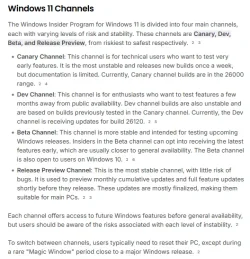
FYI - It's not a beta update. It's a Release Preview. I don't install any of the channels. I stick to stable releases only on Patch Tuesdays (The second Tuesday every month). It may be that next Tuesday's update will fix the issue?

See photo for Windows channel types: -

Windows channels.webp
 
Last edited:

My Computers

System One System Two

  • OS
    Windows 11 Pro
    Computer type
    PC/Desktop
    Manufacturer/Model
    GMKtec K11
    CPU
    AMD Ryzen 9 8945HS
    Memory
    32GB DDR5 SO-DIMM
    Graphics Card(s)
    Integrated AMD Radeon 780M (4.00 GHz)
    Monitor(s) Displays
    Benq 2250HM
    Screen Resolution
    1920 x 1080
    Hard Drives
    1 TB PCIe 4.0 NVMe M.2 SSD
  • Operating System
    Windows 11 Home
    Computer type
    Laptop
    Manufacturer/Model
    ASUS Zenbook 14 OLED 14" Laptop - UX3405CA-QL192W
    CPU
    Intel® Core™ Ultra 7 - 255H processor
    Memory
    16 GB LPDDR5 SDRAM
    Graphics card(s)
    Intel Arc 140T onboard graphics
    Screen Resolution
    1920 x 1200 (16:10 WUXGA resolution) OLED Touchscreen
    Hard Drives
    1TB SSD
Back
Top Bottom