Computer reboots with dxgkrnl.sys as the culprit


Svartie

Member
Local time
12:56 AM
Posts
3
OS
Windows 11 Pro 25H2 - Build 26200.6899
Hello there.

Since last day (15/10), my computer started rebooting out of nowhere, while playing games. Issue started while playing a recently released game,
Battlefield 6 (which requires Secure Boot).

Game stopped responding, just a black screen, and computer auto reboot. Wiped GPU drivers via both AMD Cleanup Utility, reinstalled new ones, same. Black screen and dxgkrnl.sys issue.

Cleaned again via DDU, reinstalled drivers, dx12, same. Reinstalled entire Windows 11 from the start, as fresh installation,

Only software at the moment i have installed: Open Shell, Steam, Ubisoft Launcher, WizTree, Realtek+Sonic Audio Suite, AMD Adrenalin & a download manager.

Again, after a while, a different game this time (
Avatar: Frontiers of Pandora) stopped responding, and computer went into reboot state after a black screen with dxgkrnl.sys as the culprit, as usual.

Even minidumps (
and the folder) are not created at all within, (virtual memory set to automatic / both complete or automatic memory dumps not creating anything) and event viewer shows the following message:

"Dump file creation failed due to error during dump creation. BugCheckProgress was: 0x00040049".

So, tried to see if i can solve it by my self, and i see the following:


VIDEO_MINIPORT_BLACK_SCREEN_LIVEDUMP (1b8) <- was 1a8 previously
PROCESS_NAME: dwm.exe
IMAGE_NAME:
dxgkrnl.sys

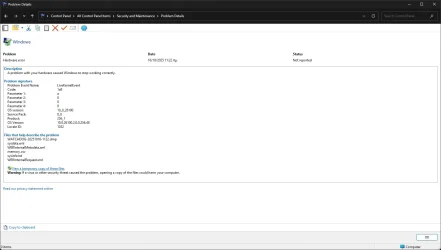
Checked reliability history, and here two (2) images with details:
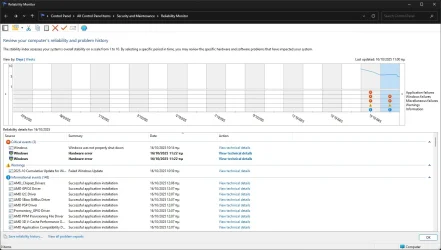
1.webp2.webp

Also, V2 Log Collector was unable to get crash dumps, since there's no minidumps folder created at all within "C:\Windows". Instead, i found the last two (2) reports inside "C:\Windows\LiveKernelReports", and i attached it here, along with Gather_additional_dump_files log + Tuneup_plus_log (not sure if last ones needed).

Please, if any help. Computer keeps rebooting while gaming, and I don't know what else to do, and/or where to ask for advice(s), and I don't have another Computer for testing purposes, or the financial state to buy again new parts.
Entire computer parts are brand new (expect GPU, bought back at 2023), from a month ago. Thanks in advance for any help.


* I'm using Windows 11 24H2 - 26100.6899. All updates are installed.
* Using Adrenalin 25.9.1 (25.9.2 are not WHQL Microsoft Certified, and i avoid non WHQL drivers. But tried with 25.10.1 since are Battlefield 6 game ready, and again computer reboots).
* I'm with latest BIOS firmware version 3279 (2025/08/05), downloaded directly from ROG STRIX B650E-F GAMING WIFI | ROG Strix | Gaming Motherboards|ROG - Republic of Gamers|ROG Global.
* And latest AMD Chipset drivers v7.06.24.2226 (2025/09/01), downloaded directly from ROG STRIX B650E-F GAMING WIFI | ROG Strix | Gaming Motherboards|ROG - Republic of Gamers|ROG Global.

*Not using any kind of over/underclock both at CPU/GPU, nor EXPO. I keep everything at their default settings, except Secure Boot is Enabled. Also tried Memory Integrity On/Off, same.
*Temperatures are really good, both CPU (around 55c) & GPU (around 50c).
*Tested GPU (Radeon RX 7900 XT) via OCCT for one hour (1h), no errors at all.
 
Windows Build/Version
Windows 11 24H2 26100.6899

Attachments

My Computer

System One

  • OS
    Windows 11 Pro 25H2 - Build 26200.6899
    Computer type
    PC/Desktop
    CPU
    AMD Ryzen 7800X3D
    Motherboard
    Asus Rog Strix B650E-F
    Memory
    G.Skill Trident Z5 Neo DDR5 32GB
    Graphics Card(s)
    Radeon Sapphire Pulse RX 7900 XT
    Sound Card
    Realtek
    Monitor(s) Displays
    Samsung Odyssey G5 Ultrawide
    Screen Resolution
    3440x1440
    Hard Drives
    Samsung 980 / 970
    PSU
    Corsair RM850x Shift 850W
    Case
    Coolermaster Cosmos S
    Cooling
    Thermalright Aqua Elite 360
    Keyboard
    Mechanical
    Mouse
    Razer Viper v3
    Internet Speed
    1Gbps
    Browser
    Google Chrome
    Antivirus
    Microsoft Defender
Welcome to the forum. I want to commend you for your very thorough, detailed and organized post. One of the best I've seen. All that information is a real help to those who try to assist you in your troubleshooting.
I'm not one able to give any real help as I'm not much of a hardware person but wanted to say I have noticed a sudden influx recently about restarts and crashes and most involved Asus boards.

Other more appropriate responders will step in to help you soon.
 

My Computers

System One System Two

  • OS
    Windows 11 Pro 25H2
    Computer type
    PC/Desktop
    Manufacturer/Model
    Dell Optiplex 7080
    CPU
    i9-10900 10 core 20 threads
    Motherboard
    DELL 0J37VM
    Memory
    32 gb
    Graphics Card(s)
    none-Intel UHD Graphics 630
    Sound Card
    Integrated Realtek
    Monitor(s) Displays
    Benq 27
    Screen Resolution
    2560x1440
    Hard Drives
    2x1tb Solidigm m.2 nvme /External drives 512gb Samsung m.2 sata+2tb Kingston m2.nvme
    PSU
    500w
    Case
    MT
    Cooling
    Dell Premium
    Keyboard
    Logitech wired
    Mouse
    Logitech wireless
    Internet Speed
    so slow I'm too embarrassed to tell
    Browser
    #1 Edge #2 Firefox
    Antivirus
    Defender+MWB Premium
  • Operating System
    Windows 11 Pro 24H2 26200.8457
    Computer type
    PC/Desktop
    Manufacturer/Model
    Beelink Mini PC SER5
    CPU
    AMD Ryzen 7 6800U
    Memory
    32 gb
    Graphics card(s)
    integrated
    Sound Card
    integrated
    Monitor(s) Displays
    Benq 27
    Screen Resolution
    2560x1440
    Hard Drives
    1TB Crucial nvme
    Keyboard
    Logitech wired
    Mouse
    Logitech wireless
    Internet Speed
    still too embarrassed to tell
    Browser
    Firefox
    Antivirus
    Defender
    Other Info
    System 3 is non compliant Dell 9020 i7-4770/24gb ram Win11 PRO 26200.8457
Thank you very much for your kind words. I just wanted to add as much as possible information i could, regarding my issue. I really hope someone will manage to find out what is going on.

*Couldn't edit my post for some reason, so, i want to add that i updated to 25H2 26200.6899. If need to re-collect information(s), please let me know.
 

My Computer

System One

  • OS
    Windows 11 Pro 25H2 - Build 26200.6899
    Computer type
    PC/Desktop
    CPU
    AMD Ryzen 7800X3D
    Motherboard
    Asus Rog Strix B650E-F
    Memory
    G.Skill Trident Z5 Neo DDR5 32GB
    Graphics Card(s)
    Radeon Sapphire Pulse RX 7900 XT
    Sound Card
    Realtek
    Monitor(s) Displays
    Samsung Odyssey G5 Ultrawide
    Screen Resolution
    3440x1440
    Hard Drives
    Samsung 980 / 970
    PSU
    Corsair RM850x Shift 850W
    Case
    Coolermaster Cosmos S
    Cooling
    Thermalright Aqua Elite 360
    Keyboard
    Mechanical
    Mouse
    Razer Viper v3
    Internet Speed
    1Gbps
    Browser
    Google Chrome
    Antivirus
    Microsoft Defender
Please perform the following steps:


1) Add WMIC:

Code:
DISM /Online /Add-Capability /CapabilityName:WMIC~~~~


2) Rerun Tuneup plus > post a share link


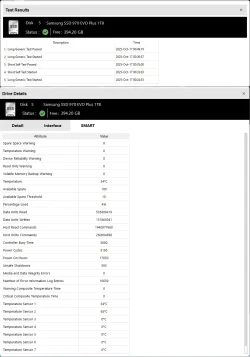
3) Run Sea Tools Long generic test (all drives) > post images or share links


4) Run Memtest86+ for 8 or more passes > take pictures > post images or share links

Memtest86+ | The Open-Source Memory Testing Tool

Just 1 error is a test fail and testing can be aborted.

The more the passes the better the testing conditions.

It sometimes takes passes into the 20's to detect malfunctioning RAM.

The RAM can be tested all at one time or one at a time in the same DIMM.

Memtest86+ | The Open-Source Memory Testing Tool

MemTest86+ - Test RAM
 

My Computer

System One

  • OS
    Windows 10
    Computer type
    Laptop
    Manufacturer/Model
    HP
    CPU
    Intel(R) Core(TM) i7-4800MQ CPU @ 2.70GHz
    Motherboard
    Product : 190A Version : KBC Version 94.56
    Memory
    16 GB Total: Manufacturer : Samsung MemoryType : DDR3 FormFactor : SODIMM Capacity : 8GB Speed : 1600
    Graphics Card(s)
    NVIDIA Quadro K3100M; Intel(R) HD Graphics 4600
    Sound Card
    IDT High Definition Audio CODEC; PNP Device ID HDAUDIO\FUNC_01&VEN_111D&DEV_76E0
    Hard Drives
    Model Hitachi HTS727575A9E364
    Antivirus
    Microsoft Defender
    Other Info
    Mobile Workstation
Please perform the following steps:


1) Add WMIC:
2) Rerun Tuneup plus > post a share link
3) Run Sea Tools Long generic test (all drives) > post images or share links
4) Run Memtest86+ for 8 or more passes > take pictures > post images or share links

1) Added WMIC (via CMD. If need to do anything else, please let me know.)

2) Adden newest Tuneup log attachment, as requested.

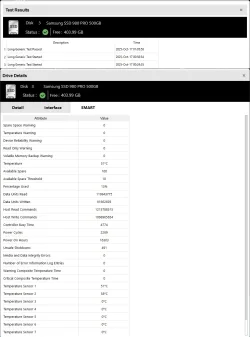
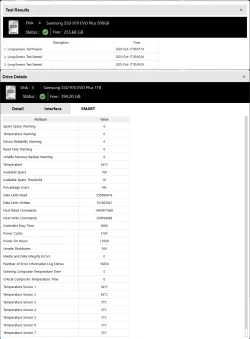
3) Seatools crashing for some reason while doing Long Generic with more than 2 disks checked, so, i had to add+check disks 1-by-1.
So far, tested only the three (3) nvme m2's, since it's my main disks with OS & games (the other 3 are old sata ssd's. I will test in the morning.)
Added Seatools zipped logs archive + images as attachments.
*ST Logs, seems confusing, because contains possible logging while program crashed.


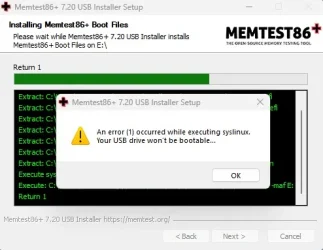
4) Memtest86+, encountering an error while trying to burn into usb stick.
Tried two (2) different sticks (both empty/formated exFat), and both same error.
No idea if error is harmless, so i need your advice here please.

m86.webp


PS: I'm very sorry about my slow responses. It's nearly 02:00 am here, and need to go to bed soon. I will keep you posted later in the morning, as soon as i finish with my work. My apologies.
 

Attachments

My Computer

System One

  • OS
    Windows 11 Pro 25H2 - Build 26200.6899
    Computer type
    PC/Desktop
    CPU
    AMD Ryzen 7800X3D
    Motherboard
    Asus Rog Strix B650E-F
    Memory
    G.Skill Trident Z5 Neo DDR5 32GB
    Graphics Card(s)
    Radeon Sapphire Pulse RX 7900 XT
    Sound Card
    Realtek
    Monitor(s) Displays
    Samsung Odyssey G5 Ultrawide
    Screen Resolution
    3440x1440
    Hard Drives
    Samsung 980 / 970
    PSU
    Corsair RM850x Shift 850W
    Case
    Coolermaster Cosmos S
    Cooling
    Thermalright Aqua Elite 360
    Keyboard
    Mechanical
    Mouse
    Razer Viper v3
    Internet Speed
    1Gbps
    Browser
    Google Chrome
    Antivirus
    Microsoft Defender
Please open a second thread to see if a member knows this failure for Memtest86+.

Also open a customer support with the website.

If nobody knows I'll provide another software.

However this is the optimal free software.
 

My Computer

System One

  • OS
    Windows 10
    Computer type
    Laptop
    Manufacturer/Model
    HP
    CPU
    Intel(R) Core(TM) i7-4800MQ CPU @ 2.70GHz
    Motherboard
    Product : 190A Version : KBC Version 94.56
    Memory
    16 GB Total: Manufacturer : Samsung MemoryType : DDR3 FormFactor : SODIMM Capacity : 8GB Speed : 1600
    Graphics Card(s)
    NVIDIA Quadro K3100M; Intel(R) HD Graphics 4600
    Sound Card
    IDT High Definition Audio CODEC; PNP Device ID HDAUDIO\FUNC_01&VEN_111D&DEV_76E0
    Hard Drives
    Model Hitachi HTS727575A9E364
    Antivirus
    Microsoft Defender
    Other Info
    Mobile Workstation
I believe it indicates a problem with the usb drive or its files are corrupted. I don't know how you created the drive but the best way is to download
memtest iso file free version HERE and use Rufus to make a bootable drive rather than using the memtest imaging tool to create your boot media. Make sure Rufus is set to boot GPT..
Rather than changing boot order, I believe you can get into the boot menu on Asus boards using either ESC or F8. Select your usb drive in the menu.

Note Rufus will wipe the drive but if there is a problem with the drive, you may have to use another usb drive.
 

My Computers

System One System Two

  • OS
    Windows 11 Pro 25H2
    Computer type
    PC/Desktop
    Manufacturer/Model
    Dell Optiplex 7080
    CPU
    i9-10900 10 core 20 threads
    Motherboard
    DELL 0J37VM
    Memory
    32 gb
    Graphics Card(s)
    none-Intel UHD Graphics 630
    Sound Card
    Integrated Realtek
    Monitor(s) Displays
    Benq 27
    Screen Resolution
    2560x1440
    Hard Drives
    2x1tb Solidigm m.2 nvme /External drives 512gb Samsung m.2 sata+2tb Kingston m2.nvme
    PSU
    500w
    Case
    MT
    Cooling
    Dell Premium
    Keyboard
    Logitech wired
    Mouse
    Logitech wireless
    Internet Speed
    so slow I'm too embarrassed to tell
    Browser
    #1 Edge #2 Firefox
    Antivirus
    Defender+MWB Premium
  • Operating System
    Windows 11 Pro 24H2 26200.8457
    Computer type
    PC/Desktop
    Manufacturer/Model
    Beelink Mini PC SER5
    CPU
    AMD Ryzen 7 6800U
    Memory
    32 gb
    Graphics card(s)
    integrated
    Sound Card
    integrated
    Monitor(s) Displays
    Benq 27
    Screen Resolution
    2560x1440
    Hard Drives
    1TB Crucial nvme
    Keyboard
    Logitech wired
    Mouse
    Logitech wireless
    Internet Speed
    still too embarrassed to tell
    Browser
    Firefox
    Antivirus
    Defender
    Other Info
    System 3 is non compliant Dell 9020 i7-4770/24gb ram Win11 PRO 26200.8457
I believe it indicates a problem with the usb drive or its files are corrupted. I don't know how you created the drive but the best way is to download
memtest iso file free version HERE and use Rufus to make a bootable drive rather than using the memtest imaging tool to create your boot media. Make sure Rufus is set to boot GPT..
Rather than changing boot order, I believe you can get into the boot menu on Asus boards using either ESC or F8. Select your usb drive in the menu.
There are different software that can be used to test RAM.

This is the software: Memtest86+ | The Open-Source Memory Testing Tool

The link that you posted is for fee based software.

Their software free option has fewer tests and will not make 8 passes without a fee.

Windows has memory testing but almost always reports pass (even with known malfunctioning RAM). (false negatives)
 

My Computer

System One

  • OS
    Windows 10
    Computer type
    Laptop
    Manufacturer/Model
    HP
    CPU
    Intel(R) Core(TM) i7-4800MQ CPU @ 2.70GHz
    Motherboard
    Product : 190A Version : KBC Version 94.56
    Memory
    16 GB Total: Manufacturer : Samsung MemoryType : DDR3 FormFactor : SODIMM Capacity : 8GB Speed : 1600
    Graphics Card(s)
    NVIDIA Quadro K3100M; Intel(R) HD Graphics 4600
    Sound Card
    IDT High Definition Audio CODEC; PNP Device ID HDAUDIO\FUNC_01&VEN_111D&DEV_76E0
    Hard Drives
    Model Hitachi HTS727575A9E364
    Antivirus
    Microsoft Defender
    Other Info
    Mobile Workstation
@zbook the result is an official Memtest86 iso no matter which web site you use. They are both official Memtest86 sites. The one I gave is for version 11.5 dated 9/18/25 and the download is front and center. No ads at all. The download will be in the unzipped folder along with instructions.

The one you gave is for old version 7.20 dated 11/11/24. The site has so many ads it's easy to not even know where to click.
 

My Computers

System One System Two

  • OS
    Windows 11 Pro 25H2
    Computer type
    PC/Desktop
    Manufacturer/Model
    Dell Optiplex 7080
    CPU
    i9-10900 10 core 20 threads
    Motherboard
    DELL 0J37VM
    Memory
    32 gb
    Graphics Card(s)
    none-Intel UHD Graphics 630
    Sound Card
    Integrated Realtek
    Monitor(s) Displays
    Benq 27
    Screen Resolution
    2560x1440
    Hard Drives
    2x1tb Solidigm m.2 nvme /External drives 512gb Samsung m.2 sata+2tb Kingston m2.nvme
    PSU
    500w
    Case
    MT
    Cooling
    Dell Premium
    Keyboard
    Logitech wired
    Mouse
    Logitech wireless
    Internet Speed
    so slow I'm too embarrassed to tell
    Browser
    #1 Edge #2 Firefox
    Antivirus
    Defender+MWB Premium
  • Operating System
    Windows 11 Pro 24H2 26200.8457
    Computer type
    PC/Desktop
    Manufacturer/Model
    Beelink Mini PC SER5
    CPU
    AMD Ryzen 7 6800U
    Memory
    32 gb
    Graphics card(s)
    integrated
    Sound Card
    integrated
    Monitor(s) Displays
    Benq 27
    Screen Resolution
    2560x1440
    Hard Drives
    1TB Crucial nvme
    Keyboard
    Logitech wired
    Mouse
    Logitech wireless
    Internet Speed
    still too embarrassed to tell
    Browser
    Firefox
    Antivirus
    Defender
    Other Info
    System 3 is non compliant Dell 9020 i7-4770/24gb ram Win11 PRO 26200.8457
They are different software companies and have different software,

One has + in the software name.
 

My Computer

System One

  • OS
    Windows 10
    Computer type
    Laptop
    Manufacturer/Model
    HP
    CPU
    Intel(R) Core(TM) i7-4800MQ CPU @ 2.70GHz
    Motherboard
    Product : 190A Version : KBC Version 94.56
    Memory
    16 GB Total: Manufacturer : Samsung MemoryType : DDR3 FormFactor : SODIMM Capacity : 8GB Speed : 1600
    Graphics Card(s)
    NVIDIA Quadro K3100M; Intel(R) HD Graphics 4600
    Sound Card
    IDT High Definition Audio CODEC; PNP Device ID HDAUDIO\FUNC_01&VEN_111D&DEV_76E0
    Hard Drives
    Model Hitachi HTS727575A9E364
    Antivirus
    Microsoft Defender
    Other Info
    Mobile Workstation
Check your DirectX is functioning normally because it is an essential component for gaming.
To access the diagnostic tool,type ---dxdiag ---in the Search box.
In the Systems page,ensure WHQL box is ticked and that the DirectX version in use is the latest,v12.
In the Display page,carefully check ALL the boxes,in particular the Drivers one,for upto date drivers etcetera.
Look through all the other pages for any comments.
Then in Terminal [admin ],type in ---dism /online /cleanup-image /restorehealth ---and run it.
When completed,type in ---sfc /scannow ---and run it until a clean report is given.
See if that has any effect.
 

My Computer

System One

  • OS
    win 10
    Computer type
    PC/Desktop
    Manufacturer/Model
    home built
    CPU
    amd ryzen 5-2600
    Motherboard
    gigabyte b450m-ds3h
    Memory
    ng skill sniper x 16gb
    Graphics Card(s)
    nvidea gtx 1050
    Monitor(s) Displays
    benq fp 92
    Hard Drives
    samsung 860 evo 500gb m2 ssd
    PSU
    antec ea550g
    Case
    nzxt noctis 450
    Browser
    edge
Back
Top Bottom