Hello there.
Since last day (15/10), my computer started rebooting out of nowhere, while playing games. Issue started while playing a recently released game, Battlefield 6 (which requires Secure Boot).
Game stopped responding, just a black screen, and computer auto reboot. Wiped GPU drivers via both AMD Cleanup Utility, reinstalled new ones, same. Black screen and dxgkrnl.sys issue.
Cleaned again via DDU, reinstalled drivers, dx12, same. Reinstalled entire Windows 11 from the start, as fresh installation,
Only software at the moment i have installed: Open Shell, Steam, Ubisoft Launcher, WizTree, Realtek+Sonic Audio Suite, AMD Adrenalin & a download manager.
Again, after a while, a different game this time (Avatar: Frontiers of Pandora) stopped responding, and computer went into reboot state after a black screen with dxgkrnl.sys as the culprit, as usual.
Even minidumps (and the folder) are not created at all within, (virtual memory set to automatic / both complete or automatic memory dumps not creating anything) and event viewer shows the following message:
"Dump file creation failed due to error during dump creation. BugCheckProgress was: 0x00040049".
So, tried to see if i can solve it by my self, and i see the following:
VIDEO_MINIPORT_BLACK_SCREEN_LIVEDUMP (1b8) <- was 1a8 previously
PROCESS_NAME: dwm.exe
IMAGE_NAME: dxgkrnl.sys
Checked reliability history, and here two (2) images with details:
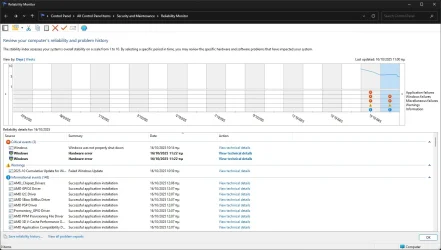
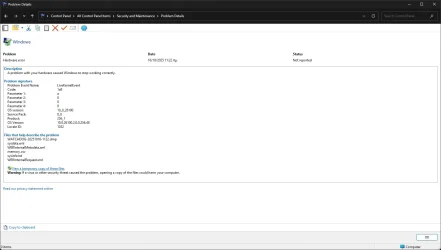
Also, V2 Log Collector was unable to get crash dumps, since there's no minidumps folder created at all within "C:\Windows". Instead, i found the last two (2) reports inside "C:\Windows\LiveKernelReports", and i attached it here, along with Gather_additional_dump_files log + Tuneup_plus_log (not sure if last ones needed).
Please, if any help. Computer keeps rebooting while gaming, and I don't know what else to do, and/or where to ask for advice(s), and I don't have another Computer for testing purposes, or the financial state to buy again new parts.
Entire computer parts are brand new (expect GPU, bought back at 2023), from a month ago. Thanks in advance for any help.
* I'm using Windows 11 24H2 - 26100.6899. All updates are installed.
* Using Adrenalin 25.9.1 (25.9.2 are not WHQL Microsoft Certified, and i avoid non WHQL drivers. But tried with 25.10.1 since are Battlefield 6 game ready, and again computer reboots).
* I'm with latest BIOS firmware version 3279 (2025/08/05), downloaded directly from ROG STRIX B650E-F GAMING WIFI | ROG Strix | Gaming Motherboards|ROG - Republic of Gamers|ROG Global.
* And latest AMD Chipset drivers v7.06.24.2226 (2025/09/01), downloaded directly from ROG STRIX B650E-F GAMING WIFI | ROG Strix | Gaming Motherboards|ROG - Republic of Gamers|ROG Global.
*Not using any kind of over/underclock both at CPU/GPU, nor EXPO. I keep everything at their default settings, except Secure Boot is Enabled. Also tried Memory Integrity On/Off, same.
*Temperatures are really good, both CPU (around 55c) & GPU (around 50c).
*Tested GPU (Radeon RX 7900 XT) via OCCT for one hour (1h), no errors at all.
Since last day (15/10), my computer started rebooting out of nowhere, while playing games. Issue started while playing a recently released game, Battlefield 6 (which requires Secure Boot).
Game stopped responding, just a black screen, and computer auto reboot. Wiped GPU drivers via both AMD Cleanup Utility, reinstalled new ones, same. Black screen and dxgkrnl.sys issue.
Cleaned again via DDU, reinstalled drivers, dx12, same. Reinstalled entire Windows 11 from the start, as fresh installation,
Only software at the moment i have installed: Open Shell, Steam, Ubisoft Launcher, WizTree, Realtek+Sonic Audio Suite, AMD Adrenalin & a download manager.
Again, after a while, a different game this time (Avatar: Frontiers of Pandora) stopped responding, and computer went into reboot state after a black screen with dxgkrnl.sys as the culprit, as usual.
Even minidumps (and the folder) are not created at all within, (virtual memory set to automatic / both complete or automatic memory dumps not creating anything) and event viewer shows the following message:
"Dump file creation failed due to error during dump creation. BugCheckProgress was: 0x00040049".
So, tried to see if i can solve it by my self, and i see the following:
VIDEO_MINIPORT_BLACK_SCREEN_LIVEDUMP (1b8) <- was 1a8 previously
PROCESS_NAME: dwm.exe
IMAGE_NAME: dxgkrnl.sys
Checked reliability history, and here two (2) images with details:
Also, V2 Log Collector was unable to get crash dumps, since there's no minidumps folder created at all within "C:\Windows". Instead, i found the last two (2) reports inside "C:\Windows\LiveKernelReports", and i attached it here, along with Gather_additional_dump_files log + Tuneup_plus_log (not sure if last ones needed).
Please, if any help. Computer keeps rebooting while gaming, and I don't know what else to do, and/or where to ask for advice(s), and I don't have another Computer for testing purposes, or the financial state to buy again new parts.
Entire computer parts are brand new (expect GPU, bought back at 2023), from a month ago. Thanks in advance for any help.
* I'm using Windows 11 24H2 - 26100.6899. All updates are installed.
* Using Adrenalin 25.9.1 (25.9.2 are not WHQL Microsoft Certified, and i avoid non WHQL drivers. But tried with 25.10.1 since are Battlefield 6 game ready, and again computer reboots).
* I'm with latest BIOS firmware version 3279 (2025/08/05), downloaded directly from ROG STRIX B650E-F GAMING WIFI | ROG Strix | Gaming Motherboards|ROG - Republic of Gamers|ROG Global.
* And latest AMD Chipset drivers v7.06.24.2226 (2025/09/01), downloaded directly from ROG STRIX B650E-F GAMING WIFI | ROG Strix | Gaming Motherboards|ROG - Republic of Gamers|ROG Global.
*Not using any kind of over/underclock both at CPU/GPU, nor EXPO. I keep everything at their default settings, except Secure Boot is Enabled. Also tried Memory Integrity On/Off, same.
*Temperatures are really good, both CPU (around 55c) & GPU (around 50c).
*Tested GPU (Radeon RX 7900 XT) via OCCT for one hour (1h), no errors at all.
- Windows Build/Version
- Windows 11 24H2 26100.6899
Attachments
My Computer
At a glance
Windows 11 Pro 25H2 - Build 26200.6899AMD Ryzen 7800X3DG.Skill Trident Z5 Neo DDR5 32GBRadeon Sapphire Pulse RX 7900 XT
- OS
- Windows 11 Pro 25H2 - Build 26200.6899
- Computer type
- PC/Desktop
- CPU
- AMD Ryzen 7800X3D
- Motherboard
- Asus Rog Strix B650E-F
- Memory
- G.Skill Trident Z5 Neo DDR5 32GB
- Graphics Card(s)
- Radeon Sapphire Pulse RX 7900 XT
- Sound Card
- Realtek
- Monitor(s) Displays
- Samsung Odyssey G5 Ultrawide
- Screen Resolution
- 3440x1440
- Hard Drives
- Samsung 980 / 970
- PSU
- Corsair RM850x Shift 850W
- Case
- Coolermaster Cosmos S
- Cooling
- Thermalright Aqua Elite 360
- Keyboard
- Mechanical
- Mouse
- Razer Viper v3
- Internet Speed
- 1Gbps
- Browser
- Google Chrome
- Antivirus
- Microsoft Defender