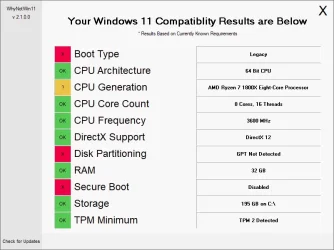
computer still running Version 23H2 (os build 22631.6199)


I did the updates as suggested by win11raider and I did a complete backup after each one - just in case. I got through all of them now and that is up to date. I then did the upgrade on the bios and that all went well. Thank You.

So now, I need to restart my pc and press delete to get into the BIOS again and change the setting for secure boot back to enabled again. The steps for doing the BIOS update had me disable that prior to doing the BIOS update.

After I do that, is there a reason that I should update to the newest version of windows or leave it set at 23H2 vs updating my Windows to 24H2 or 25H2?

I am guessing that I do have a Windows 11 compliant installation since the pc came with Windows 11 pro installed on it when I purchased it.
I am guessing that since spapakons stated about the pc having UEFI boot, TPM 2.0 and Secure Boot enabled, I need to make sure that my pc has all of that. I know how to turn the secure boot back to enabled since I just did the disable in order to upgrade the BIOS. Not sure how to make sure I have UEFI boot and TPM 2.0 - but will search for info on finding out about that.

Off to switch my secure boot back to enabled on the pc first.
 

My Computers My Computers

  • At a glance

    windows 11 Pro11th Gen Intel Core i7-11390H (4 Cores, 8 Thr...32GB dual channel (DDR4)Intel® Iris® Xe
    OS
    windows 11 Pro
    Computer type
    PC/Desktop
    Manufacturer/Model
    geekom mini IT11
    CPU
    11th Gen Intel Core i7-11390H (4 Cores, 8 Threads, 12M
    Memory
    32GB dual channel (DDR4)
    Graphics Card(s)
    Intel® Iris® Xe
    Monitor(s) Displays
    HP S2031
    Hard Drives
    1TB SSD
  • At a glance

    Windows 11 ProIntel Core i7-13620HDDR4: SO-DIMM 32GB
    Operating System
    Windows 11 Pro
    Computer type
    PC/Desktop
    Manufacturer/Model
    Geekom Mini PC XT13 Pro
    CPU
    Intel Core i7-13620H
    Memory
    DDR4: SO-DIMM 32GB
    Monitor(s) Displays
    HPS2031
    Hard Drives
    M.2 1TB
On compliant systems, either there is a TPM 2.0 hardware module which can be enabled/disabled in BIOS (security section), or a software equivalent, such as Intel PTT (Platform Trust Technology) or AMD fTPM (Firmware Trusted Platform Module). Also is you have disabled UEFI boot mode (boot section) or you have enabled both CSM (Compatibility Support Module aka Legacy BIOS boot mode) and UEFI, then you might not be able to enable Secure Boot as some motherboards need to specify UEFI only to enable Secure Boot. In any case, if you cannot make your PC compliant, it is not the end of the World, just disable compatibility check to install/upgrade Windows 11. For the time being there is no difference in performance or compatibility if you run 23H2 vs 25H2. Windows Defender is regularly updated through Windows Update, so Microsoft's own antivirus is updated and if you are a little careful what you do online you are secure. What you don't receive are feature updates (such as Wi-Fi 7 support or other modern features). There are no applications or games yet that demand 24H2 or higher and refuse to work in 23H2, similarly for device drivers. So compatibility-wise you have no issues yet. You might start having issues at least 2-3 years later, not right now.
 

My Computers My Computers

  • At a glance

    Windows 11 Pro 23H2 (5699), 25H2 (8655)Mobile DualCore Intel Core 2 Duo T7250, 2000 MHz4GBMobile Intel(R) GMA 4500M (Mobile 4 series)
    OS
    Windows 11 Pro 23H2 (5699), 25H2 (8655)
    Computer type
    Laptop
    Manufacturer/Model
    Acer Extensa 5630EZ
    CPU
    Mobile DualCore Intel Core 2 Duo T7250, 2000 MHz
    Motherboard
    Acer Extensa 5630
    Memory
    4GB
    Graphics Card(s)
    Mobile Intel(R) GMA 4500M (Mobile 4 series)
    Sound Card
    Realtek ALC268 @ Intel 82801IB ICH9 - High Definition Audio Controller
    Monitor(s) Displays
    1
    Screen Resolution
    1280x800
    Hard Drives
    Samsung SSD 850 EVO 250GB SATA Device (250 GB, SATA-III)
    Internet Speed
    VDSL 50 Mbps
    Browser
    MICROSOFT EDGE
    Antivirus
    WINDOWS DEFENDER
    Other Info
    Legacy MBR installation, no TPM, no Secure Boot, no WDDM 2.0 graphics drivers, no SSE4.2, cannot get more unsupported ;) This is only my test laptop. I had installed Windows 11 here before upgrading my main PC. For my main PC I use everyday see my 2nd system specs.
  • At a glance

    Windows 11 Pro v25H2 (build 26200.8655)Intel Core-i7 3770 3.40GHz s1155 (3rd generat...2x Kingston Hyper-X Blu 8GB DDR3-1600GIGABYTE GeForce RTX 3050 WINDFORCE OC V2 6GB...
    Operating System
    Windows 11 Pro v25H2 (build 26200.8655)
    Computer type
    PC/Desktop
    Manufacturer/Model
    Custom-built PC
    CPU
    Intel Core-i7 3770 3.40GHz s1155 (3rd generation)
    Motherboard
    Asus P8H61 s1155 ATX
    Memory
    2x Kingston Hyper-X Blu 8GB DDR3-1600
    Graphics card(s)
    GIGABYTE GeForce RTX 3050 WINDFORCE OC V2 6GB (GV-N3050WF2OCV2-6GD)
    Sound Card
    Realtek HD audio (ALC887)
    Monitor(s) Displays
    Sony Bravia KDL-19L4000 19" LCD TV via VGA
    Screen Resolution
    1440x900 32-bit 60Hz
    Hard Drives
    WD Blue SA510 2.5 1000GB SSD as system disk, Western Digital Caviar Purple 4TB SATA III (WD40PURZ) as second
    PSU
    Thermaltake Litepower RGB 550W Full Wired
    Case
    SUPERCASE MIDI-TOWER
    Cooling
    Deepcool Gamma Archer CPU cooler, 1x 8cm fan at the back
    Keyboard
    Mitsumi 101-key PS/2
    Mouse
    Sunnyline OptiEye PS/2
    Internet Speed
    100Mbps
    Browser
    Microsoft Edge, Mozilla Firefox
    Antivirus
    Microsoft Windows Defender
    Other Info
    Legacy BIOS (MBR) installation, no TPM, no Secure Boot, WDDM 3.0 graphics drivers, WEI score 7.4
After I do that, is there a reason that I should update to the newest version of windows or leave it set at 23H2 vs updating my Windows to 24H2 or 25H2?

23H2 will receive updates (security updates, not feature updates) through November 2026. Of course, you must download them manually as you have done now. So if your system is running smoothly and everything is working properly, you can stay with that version until then. That is what I am doing for now. After November 2026, when there will no longer be any type of updates for 23H2, it will be a good idea to upgrade to at least 25H2, or even 26H2 (which will be released around that time).

That said, the actual decision to stay on 23H2 and not upgrade to a newer version is up to each user. In my case, I use my computer mainly for work and gaming, so I want the system to be as stable as possible. I don’t want to be a free beta tester for Microsoft.

Of course, 24H2 and 25H2 include many interesting new features, but many of them focus on artificial intelligence and changes to the user interface that not everyone has been happy with. But most importantly, starting with 24H2, Windows security has been modified so radically that certain programs, and even drivers, may not work properly. Another important point: if you use a virtual reality headset, stay on 23H2, because starting with 24H2, they won’t officially work.

I am guessing that I do have a Windows 11 compliant installation since the pc came with Windows 11 pro installed on it when I purchased it.
I am guessing that since spapakons stated about the pc having UEFI boot, TPM 2.0 and Secure Boot enabled, I need to make sure that my pc has all of that. I know how to turn the secure boot back to enabled since I just did the disable in order to upgrade the BIOS. Not sure how to make sure I have UEFI boot and TPM 2.0 - but will search for info on finding out about that.

Based on your computer's specifications, I'm almost certain it has TPM 2.0 and UEFI boot. These features have been standard for quite a few years now. In any case, there are free programs, such as OCCT, that provide all that information in a very user-friendly way.
 

My Computer My Computer

At a glance

Win 11 Pro 23H213700K32GB DDR5 Kingston Fury Renegade @6400MSI GeForce RTX 4070 Ti Gaming X Slim White 12G
OS
Win 11 Pro 23H2
Computer type
PC/Desktop
CPU
13700K
Motherboard
MAG Z790 TOMAHAWK WIFI (7D91vHH - 0x12F)
Memory
32GB DDR5 Kingston Fury Renegade @6400
Graphics Card(s)
MSI GeForce RTX 4070 Ti Gaming X Slim White 12G
Sound Card
Creative Sound Blaster Z SE
Monitor(s) Displays
ASUS VA24DQ
Hard Drives
WD Black SN850X 2TB (main)
SAMSUNG SSD 990 Pro 2TB
WD Blue 1TB 7200rpm
PSU
Corsair RM1000x SHIFT
Case
DeepCool CH560 WH
Cooling
Noctua NH-D15S
Keyboard
Ducky One 3 Pro Nazca Line
Mouse
Logitech G403 HERO
Back
Top Bottom