
Configure or Delete the startup info screens


PJH

Active member
Local time
1:36 AM
Posts
19
OS
Windows 11
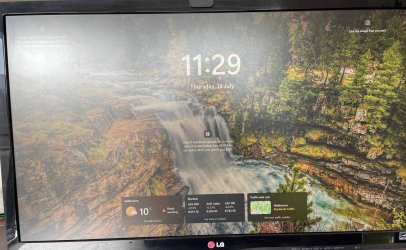
A recent upgrade to Windows 11 added a bunch of info screens on startup (see attached screenshot). I don't recognise them in the startup apps setting. How do I configure and/or delete them?
 
Windows Build/Version
23H2 (OS Build 22631.3880)

Attachments

  • screenshot.jpg
    screenshot.jpg
    152.3 KB · Views: 3

My Computer My Computer

At a glance

Windows 1111th Gen Intel(R) Core(TM) i5-11500 @ 2.70GHz32GB Kingston FuryNVIDIA GeForce GTX 1080
OS
Windows 11
Computer type
PC/Desktop
Manufacturer/Model
Home build 2021
CPU
11th Gen Intel(R) Core(TM) i5-11500 @ 2.70GHz
Motherboard
Gigabyte H510M H
Memory
32GB Kingston Fury
Graphics Card(s)
NVIDIA GeForce GTX 1080
Sound Card
On Motherboard
Monitor(s) Displays
LG IPS LED 27EA53
Screen Resolution
1920 x 1080 x 59 Hz
Hard Drives
Model SAMSUNG MZFLV512HCJH-000MV
Model ST2000DX001-1CM164
Model Seagate BarraCuda 120 SSD ZA1000CM10003
Model WD Elements 2620 USB Device
Model SAMSUNG HD103UJ
PSU
a-power Black Label P4-A270 Total Output Max 720W
Case
Cooler Master Silencio S400 Silent mAX with Glass Side Panel
Keyboard
Topmate
Mouse
Logitech MX Vertical
Internet Speed
100+
Browser
Edge
Antivirus
Acronis Cyber Protect Home Office
Thanks. For some reason, clicking Weather in the Lock Screen Status has no effect. It does not respond to the mouse click. The options provided are Dev Home, Thorium Reader, Weather and more. Clicking on any of them does nothing. I've selected None and will check back after the next software upgrade.

Thanks for your help.
 

My Computer My Computer

At a glance

Windows 1111th Gen Intel(R) Core(TM) i5-11500 @ 2.70GHz32GB Kingston FuryNVIDIA GeForce GTX 1080
OS
Windows 11
Computer type
PC/Desktop
Manufacturer/Model
Home build 2021
CPU
11th Gen Intel(R) Core(TM) i5-11500 @ 2.70GHz
Motherboard
Gigabyte H510M H
Memory
32GB Kingston Fury
Graphics Card(s)
NVIDIA GeForce GTX 1080
Sound Card
On Motherboard
Monitor(s) Displays
LG IPS LED 27EA53
Screen Resolution
1920 x 1080 x 59 Hz
Hard Drives
Model SAMSUNG MZFLV512HCJH-000MV
Model ST2000DX001-1CM164
Model Seagate BarraCuda 120 SSD ZA1000CM10003
Model WD Elements 2620 USB Device
Model SAMSUNG HD103UJ
PSU
a-power Black Label P4-A270 Total Output Max 720W
Case
Cooler Master Silencio S400 Silent mAX with Glass Side Panel
Keyboard
Topmate
Mouse
Logitech MX Vertical
Internet Speed
100+
Browser
Edge
Antivirus
Acronis Cyber Protect Home Office

Latest Support Threads

Back
Top Bottom




