Constant Max TurboBoost Frequency Without BIOS


shoober420

Well-known member
Member
VIP
Local time
11:06 AM
Posts
231
OS
Windows 11 27965
I currently have a Dell machine with Dells limited BIOS. It doesnt let me choose CPU OC settings. It only allows me to enable TurboBoost. Is there a way I can force the max TurboBoost frequency constantly on the CPU via software or registry?

Windows 11 27774
i7 7700
Radeon 5500 XT
 
Last edited:

My Computer

System One

  • OS
    Windows 11 27965
    Computer type
    PC/Desktop
    CPU
    Intel i7 7700 @4.0ghz
    Memory
    64gb DDR4
    Graphics Card(s)
    Radeon RX 5500 XT
    Sound Card
    Topping D50s
    Hard Drives
    NVMe
    PSU
    Corsair
    Keyboard
    Stelseries G6v2
    Mouse
    Zowie EC2
    Other Info
    https://www.youtube.com/shoober420

this link and registry setting will enable the settings in advanced power management so you can enable or disable CPU Turbo Boost.
the setting takes affect immediately.

then open the control panel > power options > change plan settings > change advanced power settings
then within advanced power settings > processor power management > processor performance mode
you can set your required Turbo Boost settings there.

best of luck, Steve ..
 

My Computers

System One System Two

  • OS
    Windows 11 Home
    Computer type
    PC/Desktop
    Manufacturer/Model
    HP 24" AiO
    CPU
    Ryzen 7 5825u
    Motherboard
    HP
    Memory
    64GB DDR4 3200
    Graphics Card(s)
    Ryzen 7 5825u
    Sound Card
    RealTek
    Monitor(s) Displays
    24" HP AiO
    Screen Resolution
    1920 x 1080 @60 Hz
    Hard Drives
    1TB WD Blue SN580 M2 SSD Partitioned.
    2x 1TB USB HDD External Backup/Storage.
    PSU
    90W external power brick
    Case
    24" All in One
    Cooling
    Default Air Cooling
    Keyboard
    HP WiFi UK extended
    Mouse
    HP WiFi 3 Button
    Internet Speed
    1GB full fibre
    Browser
    Edge & Firefox
    Antivirus
    AVG Internet Security/Windows Defender
    Other Info
    Mainly Open Source Software
  • Operating System
    Ubuntu 22.04.5 LTS
    Computer type
    Laptop
    Manufacturer/Model
    Dell 13" Latitude 2017
    CPU
    i5 7200u
    Motherboard
    Dell
    Memory
    16GB DDR4
    Graphics card(s)
    Intel
    Sound Card
    Intel
    Monitor(s) Displays
    13" Dell Laptop
    Hard Drives
    250GB Crucial 2.5" SSD
    Mouse
    Generic WiFi 3 button
    Internet Speed
    WiFi only
    Browser
    Firefox
    Antivirus
    ClamAV TK
    Other Info
    Mainly Open Source Software
Im using the "Ultimate Performance" power plan. I found out i needed to enable SpeedStep for the TurboBoost frequencies to kick in. my i7 7700 now runs at 4ghz compared to 3.6ghz like before. its rated to run up too 4.2ghz and im trying to figure out how to get it at 4.2ghz max TurboBoost frequency.
 

My Computer

System One

  • OS
    Windows 11 27965
    Computer type
    PC/Desktop
    CPU
    Intel i7 7700 @4.0ghz
    Memory
    64gb DDR4
    Graphics Card(s)
    Radeon RX 5500 XT
    Sound Card
    Topping D50s
    Hard Drives
    NVMe
    PSU
    Corsair
    Keyboard
    Stelseries G6v2
    Mouse
    Zowie EC2
    Other Info
    https://www.youtube.com/shoober420

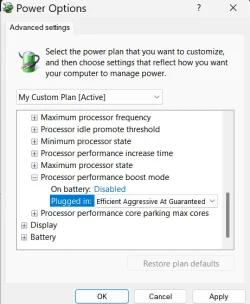
Add the following line in Terminal (as Admin)

powercfg -attributes sub_processor perfboostmode -attrib_hide

Then go to Power Plan and set the Processor Boost Mode to the flowing:

2025-01-28_120014.webp
 

My Computer

System One

  • OS
    WinDOS 25H2
    Computer type
    Laptop
    CPU
    Intel & AMD
    Memory
    SO-DIMM SK Hynix 15.8 GB Dual-Channel DDR4-2666 (2 x 8 GB) 1329MHz (19-19-19-43)
    Graphics Card(s)
    nVidia RTX 2060 6GB Mobile GPU (TU106M)
    Sound Card
    Onbord Realtek ALC1220
    Screen Resolution
    1920 x 1080
    Hard Drives
    1x Samsung PM981 NVMe PCIe M.2 512GB / 1x Seagate Expansion ST1000LM035 1TB
both "efficient aggressive at guarenteed" and "aggressive at guarenteed" keep me locked at 4ghz. it was on "aggresive" prior to changing the setting. could it be a bios limitation?
 

My Computer

System One

  • OS
    Windows 11 27965
    Computer type
    PC/Desktop
    CPU
    Intel i7 7700 @4.0ghz
    Memory
    64gb DDR4
    Graphics Card(s)
    Radeon RX 5500 XT
    Sound Card
    Topping D50s
    Hard Drives
    NVMe
    PSU
    Corsair
    Keyboard
    Stelseries G6v2
    Mouse
    Zowie EC2
    Other Info
    https://www.youtube.com/shoober420

Hey, guys can you check please about the maximum processor frequencies that you can configure in this menu. When I put values i.g. 3800 MHz it is saved but after some time, or after a reboot those values are reset again to "0", so no limitiation is applied. This thing happened always after update to 24H2 and it was not reseting on previouos version. I wonder how can I make it to not reset this settings?
 

My Computer

System One

  • OS
    Windows 11 Pro 24H2
If you unhide the Ultimate Performance power plan and use it as default, Turbo Boost is always enabled even when the PC is idle. It will drain a laptop's battery sooner and make it hotter, but for a desktop PC you shouldn't care, unless you have overheating issues. My 3rd generation Intel Core-i7 3770 has standard frequency of 3.4GHz and with the Turbo Boost enabled is constantly at 3.7GHz. This is not the theoretical maximum of 3.9GHz, but a welcome improvement in performance compared to the standard speed. The Ultimate Performance power plan is hidden by default in Windows 10/11 Home and Pro. To unhide it and use it open a PowerShell as Administrator and execute this code:

powercfg -duplicatescheme e9a42b02-d5df-448d-aa00-03f14749eb61
 

My Computers

System One System Two

  • OS
    Windows 11 Pro 23H2 (5699), 25H2 (8457)
    Computer type
    Laptop
    Manufacturer/Model
    Acer Extensa 5630EZ
    CPU
    Mobile DualCore Intel Core 2 Duo T7250, 2000 MHz
    Motherboard
    Acer Extensa 5630
    Memory
    4GB
    Graphics Card(s)
    Mobile Intel(R) GMA 4500M (Mobile 4 series)
    Sound Card
    Realtek ALC268 @ Intel 82801IB ICH9 - High Definition Audio Controller
    Monitor(s) Displays
    1
    Screen Resolution
    1280x800
    Hard Drives
    Samsung SSD 850 EVO 250GB SATA Device (250 GB, SATA-III)
    Internet Speed
    VDSL 50 Mbps
    Browser
    MICROSOFT EDGE
    Antivirus
    WINDOWS DEFENDER
    Other Info
    Legacy MBR installation, no TPM, no Secure Boot, no WDDM 2.0 graphics drivers, no SSE4.2, cannot get more unsupported ;) This is only my test laptop. I had installed Windows 11 here before upgrading my main PC. For my main PC I use everyday see my 2nd system specs.
  • Operating System
    Windows 11 Pro v25H2 (build 26200.8457)
    Computer type
    PC/Desktop
    Manufacturer/Model
    Custom-built PC
    CPU
    Intel Core-i7 3770 3.40GHz s1155 (3rd generation)
    Motherboard
    Asus P8H61 s1155 ATX
    Memory
    2x Kingston Hyper-X Blu 8GB DDR3-1600
    Graphics card(s)
    GIGABYTE GeForce RTX 3050 WINDFORCE OC V2 6GB (GV-N3050WF2OCV2-6GD)
    Sound Card
    Realtek HD audio (ALC887)
    Monitor(s) Displays
    Sony Bravia KDL-19L4000 19" LCD TV via VGA
    Screen Resolution
    1440x900 32-bit 60Hz
    Hard Drives
    WD Blue SA510 2.5 1000GB SSD as system disk, Western Digital Caviar Purple 4TB SATA III (WD40PURZ) as second
    PSU
    Thermaltake Litepower RGB 550W Full Wired
    Case
    SUPERCASE MIDI-TOWER
    Cooling
    Deepcool Gamma Archer CPU cooler, 1x 8cm fan at the back
    Keyboard
    Mitsumi 101-key PS/2
    Mouse
    Sunnyline OptiEye PS/2
    Internet Speed
    100Mbps
    Browser
    Microsoft Edge, Mozilla Firefox
    Antivirus
    Microsoft Windows Defender
    Other Info
    Legacy BIOS (MBR) installation, no TPM, no Secure Boot, WDDM 3.0 graphics drivers, WEI score 7.4
Thanks a lot, but I use those settings to lower frequencies and not for increasing. My CPU works at 4.2 HGz while in Turbo Boost, so I used to limit it to 3.8 HGz before and to make the temperature lower somehow. Now I can't use these settings as Windows resets them every time after sleep mode/restart and this is really annoying.
 

My Computer

System One

  • OS
    Windows 11 Pro 24H2

Latest Support Threads

Back
Top Bottom