Microsoft 365 Insider Blog:
Hi, Insiders! We’re Samer Sawaya and Jeet Mukeshkumar Patel, Product Managers on the Apple Experiences and Microsoft 365 Copilot app team. We’re excited to share some changes we’re making to the Microsoft 365 Copilot app for iOS that will give you easier access to start your work with the power of Copilot Chat.
Copilot-powered file previews coming to Microsoft 365 Copilot app for iOS
The Microsoft 365 Copilot mobile app on iPhone and iPad is getting an experience update that puts key AI-driven capabilities and experiences front and center. (NOTE: These features are available to Microsoft 365 Copilot app users with access to Copilot Chat.)With this update, anyone using the Microsoft 365 Copilot app can:
- Create any Word, Excel, or PowerPoint file in no time by simply sharing their thoughts or text from other files or webpages with Copilot Chat.
- Get answers to questions, understand more about a topic, or review a full file summary with a seamless previewing experience and intelligent suggestions.
- Share any file with the Microsoft 365 Copilot app to get instant summaries or answers through an interactive chat, perfect for quickly understanding key points.
- Find what they need fast by searching for any of their content using natural, conversational language. (NOTE: This feature is only available to Enterprise customers with a Premium Copilot license.)
We’re making these changes to evolve the Microsoft 365 Copilot app as your go-to AI productivity app, and to bring AI-first, chat-driven scenarios front and center in the experience. Since Word, Excel, and PowerPoint have dedicated apps with a first-rate editing experience, app-specific Copilot capabilities, and fast performance, with this change, we will direct users who would like to edit documents to the standalone Word, Excel, and PowerPoint mobile apps.
Users can search to find files and content they care about, but file browsing actions and OneDrive library management will be moved into the OneDrive app.
As part of this change, the Outlook, OneDrive, and Teams apps for both iPhone and iPad will no longer open Word, Excel, and PowerPoint files in Microsoft 365 Copilot. Those apps will provide optimized previews of documents but launch Word, Excel, or PowerPoint, or ask you to download those apps from the App Store if they are not installed, when you try to open those file types.
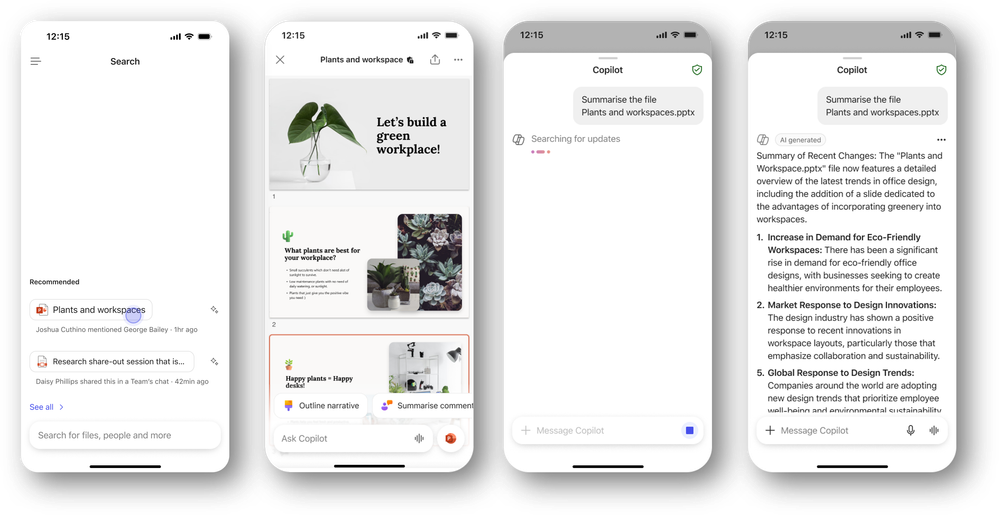
How it works
A series of updates will automatically go into effect for Microsoft 365 Copilot for iOS users when they update the app. To download the app on your iOS device:- Go to the Apple App Store, search for the Microsoft 365 Copilot app, and sign in with your Microsoft account.
Availability
This update is slowly rolling out to Microsoft 365 Copilot app users on iOS.The first phase of this change is in-product notifications in the Microsoft 365 Copilot app shown to users who are editing documents to notify them that Word, PowerPoint, Excel, and OneDrive apps are available. Users will still be able to work with documents and dismiss the notification without taking action during this time. This in-app notification rolled out to TestFlight users at the end of August, and is becoming generally available mid-September for iPad and iPhone users.
The second phase of this change updates the Word, PowerPoint, and Excel functionality in the Microsoft 365 Copilot app with previewers that will be made available to TestFlight users only in October, and progress to general availability later in the month, starting with iPhone. With this part of the change, users will no longer be able to edit files in the Microsoft 365 Copilot app. Teams, OneDrive, and Outlook apps will stop opening these files in the Microsoft 365 Copilot app and instead prompt users to install the respective standalone apps. While we are starting with iPhone, the iPad will see similar changes rolling out before the end of the calendar year.
Our team is working diligently to ensure a smooth and seamless experience for all users, and we thank you for your patience!
A similar change will be coming to Android devices in the future, so stay tuned!
Feedback
We’d love to hear what you think of the updated Microsoft 365 Copilot app! To provide feedback, select the Settings gear in the app, then navigate to Help & Feedback.Thank you for being a valued member of the Microsoft 365 community!
Source:
Copilot-powered file previews coming to Microsoft 365 Copilot app for iOS
We’re making changes to the Microsoft 365 Copilot app for iOS that put key AI-driven capabilities and experiences front and center.
 techcommunity.microsoft.com