Solved Copilot Search cannot be removed from Edge in Windows 11 25H2


halfhearted

New member
Local time
7:49 PM
Posts
5
OS
Windows 11 Home 25H2
I'm using Windows 11 Home 25H2 and Edge Version 141.0.3537.85 (Official build) (64-bit). It seems that since the upgrade to Win11 24H2 it has been impossible to remove the Copilot search box from the front page of Edge. The "Sidebar" menu item has been removed from Edge Settings. If I do Settings>Appearance>Copilot and Sidebar>Copilot>Manage Copilot Settings there is no control that allows you to turn it off. Could someone confirm that the Copilot search box cannot be removed please? The default search engine can be changed of course, operating from the address bar, but Copilot cannot be removed as far as I can see. Thanks for any assistance.
 

My Computer

System One

  • OS
    Windows 11 Home 25H2
    Computer type
    Laptop
    Manufacturer/Model
    Asus S 14 UX5406
    Memory
    32 GB
you can change settings for the start and home page in
settings > start, home and new tab

i also us an extension called 'custom new tab'

and another called 'tabs to the front v2'

also if you wish more control over copilot
in the address bar put >> edge://flags
then press enter, a new page will appear. in the search box put >> copilot

a list will then show all copilot flags available to Edge
you can disable any or all that you want. i disable all of them.

best of luck Steve ..
 

My Computers

System One System Two

  • OS
    Windows 11 Home
    Computer type
    PC/Desktop
    Manufacturer/Model
    HP 24" AiO
    CPU
    Ryzen 7 5825u
    Motherboard
    HP
    Memory
    64GB DDR4 3200
    Graphics Card(s)
    Ryzen 7 5825u
    Sound Card
    RealTek
    Monitor(s) Displays
    24" HP AiO
    Screen Resolution
    1920 x 1080 @60 Hz
    Hard Drives
    1TB WD Blue SN580 M2 SSD Partitioned.
    2x 1TB USB HDD External Backup/Storage.
    PSU
    90W external power brick
    Case
    24" All in One
    Cooling
    Default Air Cooling
    Keyboard
    HP WiFi UK extended
    Mouse
    HP WiFi 3 Button
    Internet Speed
    1GB full fibre
    Browser
    Edge & Firefox
    Antivirus
    AVG Internet Security/Windows Defender
    Other Info
    Mainly Open Source Software
  • Operating System
    Ubuntu 22.04.5 LTS
    Computer type
    Laptop
    Manufacturer/Model
    Dell 13" Latitude 2017
    CPU
    i5 7200u
    Motherboard
    Dell
    Memory
    16GB DDR4
    Graphics card(s)
    Intel
    Sound Card
    Intel
    Monitor(s) Displays
    13" Dell Laptop
    Hard Drives
    250GB Crucial 2.5" SSD
    Mouse
    Generic WiFi 3 button
    Internet Speed
    WiFi only
    Browser
    Firefox
    Antivirus
    ClamAV TK
    Other Info
    Mainly Open Source Software
you can change settings for the start and home page in
settings > start, home and new tab.....
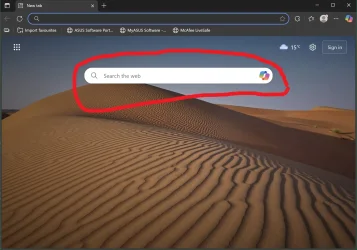
Thanks for your reply. I know about changing the start page & the flags. My question is can someone confirm that it is not possible to remove the Copilot search box from the default Edge start page, circled in red on the attached screen shot. Thanks for any help with this.EDGE.webp
 

My Computer

System One

  • OS
    Windows 11 Home 25H2
    Computer type
    Laptop
    Manufacturer/Model
    Asus S 14 UX5406
    Memory
    32 GB
Thanks for your reply. I know about changing the start page & the flags. My question is can someone confirm that it is not possible to remove the Copilot search box from the default Edge start page, circled in red on the attached screen shot. Thanks for any help with this.
You are looking at a proprietary web page with an embedded link to Copilot.
That link therefore has to be there if you feel you have to use that page as your home page.
 

My Computers

System One System Two

  • OS
    All Branches but Release
    Computer type
    Laptop
    Manufacturer/Model
    Acer Nitro ANV15-51
    CPU
    AMD Ryzen 7 7735HS 3200-4500 Mhz 8 cores x 2
    Motherboard
    Sportage_RBH
    Memory
    32 GB DDR5
    Graphics Card(s)
    Radeon Graphic / NVIDIA GeForce RTX 4060 8 GB GDDR6
    Sound Card
    AMD/Realtek(R) Audio
    Monitor(s) Displays
    Integrated Monitor (15.3"vis)
    Screen Resolution
    FHD 1920X1080 16:9 144Hz
    Hard Drives
    KINGSTON OM8SEP4512Q-AA 1TB
    Western Digital 256GB
    PSU
    19V DC 6.32 A 120 W
    Cooling
    Dual Fans
    Mouse
    MS Bluetooth
    Internet Speed
    Fiber 1GB Cox -us & 1GB Orange-fr
    Browser
    Edge Canary- Firefox Nightly-Chrome Dev-Chrome Dev
    Antivirus
    Windows Defender
  • Operating System
    Windows 11 Beta
    Computer type
    Laptop
    Manufacturer/Model
    Asus X751BP
    CPU
    AMD A9-9420
    Memory
    8 GB of DDR4
    Graphics card(s)
    AMD Radeon R5
    Screen Resolution
    1600x900
    Hard Drives
    Seagate 1 TB
AI is not only a tool, its a companion. Its transformed how we live our lives and help to simplify them.
 

My Computers

System One System Two

  • OS
    Windows 11 Education For 25H2
    Computer type
    Laptop
    Manufacturer/Model
    HP ZBook G2
    CPU
    Intel® Core i7 5500u
    Motherboard
    HP
    Memory
    8 GB
    Graphics Card(s)
    Intel HD Family Graphics 5500 AMD Firepro 4150M
    Sound Card
    Realtek High Audio
    Hard Drives
    1 TB SSD
    Mouse
    HP USB Mouse
    Antivirus
    Windows Defender
  • Operating System
    Windows 11 Pro For Workstations 25H2
    Computer type
    Laptop
    Manufacturer/Model
    HP Zbook G4
    CPU
    Xeon 1535m v6
    Motherboard
    HP
    Memory
    32 GB
    Graphics card(s)
    AMD Quadro Pro 4100
    Sound Card
    Bang and Olufson Audio
    Hard Drives
    1TB SSD
    Mouse
    HP USB Mouse
    Antivirus
    Windows Defender
AI is not only a tool, its a companion.
The news have been quite dreadful lately but that might be the saddest thing I have read in a very long time.
 

My Computers

System One System Two

  • OS
    All Branches but Release
    Computer type
    Laptop
    Manufacturer/Model
    Acer Nitro ANV15-51
    CPU
    AMD Ryzen 7 7735HS 3200-4500 Mhz 8 cores x 2
    Motherboard
    Sportage_RBH
    Memory
    32 GB DDR5
    Graphics Card(s)
    Radeon Graphic / NVIDIA GeForce RTX 4060 8 GB GDDR6
    Sound Card
    AMD/Realtek(R) Audio
    Monitor(s) Displays
    Integrated Monitor (15.3"vis)
    Screen Resolution
    FHD 1920X1080 16:9 144Hz
    Hard Drives
    KINGSTON OM8SEP4512Q-AA 1TB
    Western Digital 256GB
    PSU
    19V DC 6.32 A 120 W
    Cooling
    Dual Fans
    Mouse
    MS Bluetooth
    Internet Speed
    Fiber 1GB Cox -us & 1GB Orange-fr
    Browser
    Edge Canary- Firefox Nightly-Chrome Dev-Chrome Dev
    Antivirus
    Windows Defender
  • Operating System
    Windows 11 Beta
    Computer type
    Laptop
    Manufacturer/Model
    Asus X751BP
    CPU
    AMD A9-9420
    Memory
    8 GB of DDR4
    Graphics card(s)
    AMD Radeon R5
    Screen Resolution
    1600x900
    Hard Drives
    Seagate 1 TB
Thanks for your reply. I know about changing the start page & the flags. My question is can someone confirm that it is not possible to remove the Copilot search box from the default Edge start page, circled in red on the attached screen shot. Thanks for any help with this.View attachment 149740
Try:
edge://settings/newTabPage

switch to Focused, Inspirational, or Informational layout to revert to the classic look.
 

My Computer

System One

  • OS
    Windows 11 Pro
Try:
edge://settings/newTabPage

switch to Focused, Inspirational, or Informational layout to revert to the classic look.
Thanks very much for your reply. As I said in my first post, I'm using Windows 11 Home 25H2. I notice that you are using Windows Pro. For me the URL edge://settings/newTabPage takes me to the "Start, home, and new tab page" where the options "Focused, Inspirational, or Informational" are not available. I assume this is a difference between Home & pro.
 

My Computer

System One

  • OS
    Windows 11 Home 25H2
    Computer type
    Laptop
    Manufacturer/Model
    Asus S 14 UX5406
    Memory
    32 GB
No, it’s Edge. Edge flags have nothing to do with the OS version. If that flag is no longer available it may be on its way to actual implementation in coming edge builds
 

My Computer

System One

  • OS
    Windows 11 Pro
Check these flags:

It cannot be disabled. No flags, no reg will change that. Even if you use CustomNewTab extension and set it to search.bing.com, it will still have the copilot button to the right of the search bar. you can set your address bar to search with the provider of your choice and just use that extension to set your new tab page to about:blank or search.brave.com or something else...
 
Last edited:

My Computer

System One

  • OS
    Windows 11 Pro
Check these flags:

It cannot be disabled. No flags, no reg will change that. Even if you use CustomNewTab extension and set it to search.bing.com, it will still have the copilot button to the right of the search bar. you can set your address bar to search with the provider of your choice and just use that extension to set your new tab page to about:blank or search.brave.com or something else...
Thanks very much for all the replies. I will take this as confirmation that the Copilot search box cannot be removed from Edge in Windows 11 Home 25H2.
 

My Computer

System One

  • OS
    Windows 11 Home 25H2
    Computer type
    Laptop
    Manufacturer/Model
    Asus S 14 UX5406
    Memory
    32 GB
Thanks very much for all the replies. I will take this as confirmation that the Copilot search box cannot be removed from Edge in Windows 11 Home 25H2.
Nothing to do with the OS version. It is the browser and the home page you have selected that display the link to Copilot.
 

My Computers

System One System Two

  • OS
    All Branches but Release
    Computer type
    Laptop
    Manufacturer/Model
    Acer Nitro ANV15-51
    CPU
    AMD Ryzen 7 7735HS 3200-4500 Mhz 8 cores x 2
    Motherboard
    Sportage_RBH
    Memory
    32 GB DDR5
    Graphics Card(s)
    Radeon Graphic / NVIDIA GeForce RTX 4060 8 GB GDDR6
    Sound Card
    AMD/Realtek(R) Audio
    Monitor(s) Displays
    Integrated Monitor (15.3"vis)
    Screen Resolution
    FHD 1920X1080 16:9 144Hz
    Hard Drives
    KINGSTON OM8SEP4512Q-AA 1TB
    Western Digital 256GB
    PSU
    19V DC 6.32 A 120 W
    Cooling
    Dual Fans
    Mouse
    MS Bluetooth
    Internet Speed
    Fiber 1GB Cox -us & 1GB Orange-fr
    Browser
    Edge Canary- Firefox Nightly-Chrome Dev-Chrome Dev
    Antivirus
    Windows Defender
  • Operating System
    Windows 11 Beta
    Computer type
    Laptop
    Manufacturer/Model
    Asus X751BP
    CPU
    AMD A9-9420
    Memory
    8 GB of DDR4
    Graphics card(s)
    AMD Radeon R5
    Screen Resolution
    1600x900
    Hard Drives
    Seagate 1 TB
I guess I can understand why the clueless masses might like Edge and CoPilot, but IMO they're a hole in windows security caused by Microsoft having absolutely no respect for the privacy and property of their customers. Anything that ends up in 'the cloud" can be hacked and compromised, and it's NONE of anyone's business what files people have on their computers. The solution is to completely remove edge and copilot.
 

My Computer

System One

  • OS
    Windows 11 22H2 Pro (X-lite Micro 11 version)
    Computer type
    Laptop
    Manufacturer/Model
    Dell/ Precision 7680
    CPU
    i7 13850HX (20 cores, 28 threads)
    Motherboard
    Dell
    Memory
    32GB DDR5
    Graphics Card(s)
    Intel UHD/ RTX 1000 ADA
    Sound Card
    Realtek
    Monitor(s) Displays
    4K UHD Touchscreen
    Screen Resolution
    3840 x 2400
    Hard Drives
    Samsung 512GB system drive
    WD Blue 1TB game drive
    PSU
    240W AC adapter, 1800W when docked
    Internet Speed
    1 gigabit symmetrical
    Browser
    Firefox, Librewolf
    Antivirus
    None. Manully configured so nobody except me can change any critical system files. (Don't ask how, it's probably against some rule somewhere)

Latest Support Threads

Back
Top Bottom