Solved CPU Speed remain always High even at IDLE!


PressF5

Active member
Member
Local time
3:53 AM
Posts
17
OS
Windows 11 Pro
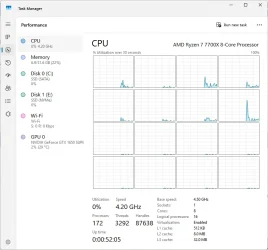
Hey guys, I Hope you are doing well, I built this PC about 6 months ago, It is running pretty well, but one thing i can't do about no matter what i do which is CPU Clock always remain High which is over 4GHZ for no reason, even at idle, it is always high.
Things i have done is:
1. read the Motherboard Manual(Which is crap and does not contain any Info)
2. Watched Videos and configured Bios Multiple times already.
3. There is an advance Option in Bios which is similar to "OC Settings" but i am not sure how both work. I assume Advance overtake "OC Settings" if they both are same but with my experiment, even there is same option in both places, one remain different than other.
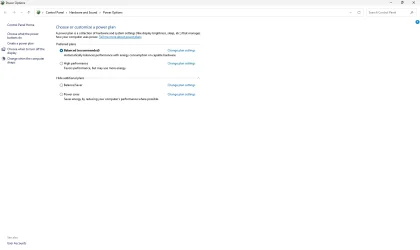
4. Nothing works, except if i reduce CPU usage from Control Panel\Hardware and Sound\Power Options\Advance options and setting CPU % to 50% etc.
Anyhelp is appreaciated. I am not overclocking anything except XMP is enabled. Other than that, all stuff are default.

Thank you for you time for reading this.
 
Windows Build/Version
24H2 (OS Build 26100.6899)

My Computer

System One

  • OS
    Windows 11 Pro
    Computer type
    PC/Desktop
    Manufacturer/Model
    MSI
    CPU
    AMD Ryzen 7 7700x
    Motherboard
    MSI Pro b650m-p
    Memory
    Micron Technology 32GB
    Graphics Card(s)
    GTX 1650 Super
    Sound Card
    Windows Default
    Monitor(s) Displays
    1
    Screen Resolution
    1080p
    Hard Drives
    1 SSD and 1 NVMe
    PSU
    600W
    Internet Speed
    500 mbps down / 24 mbps up
If you are overclocking (pushing the components beyond their design) you should revert to default at least until the CPU high usage is solved. If you don't know what it is you probably are not overclocking.

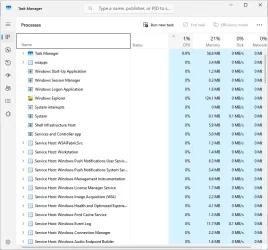
Have you checked Task Manager for which processes causing high CPU usage?

Make sure the power plan is set to Standard power plan.
 

My Computer

System One

  • OS
    Windows 11
    Computer type
    PC/Desktop
    Manufacturer/Model
    HP Pavilion
    CPU
    AMD Ryzen 7 5700G
    Motherboard
    Erica6
    Memory
    Micron Technology DDR4-3200 16GB
    Graphics Card(s)
    NVIDIA GeForce RTX 3060
    Sound Card
    Realtek ALC671
    Monitor(s) Displays
    Samsung SyncMaster U28E590
    Screen Resolution
    3840 x 2160
    Hard Drives
    SAMSUNG MZVLQ1T0HALB-000H1
Here are the
If you are overclocking (pushing the components beyond their design) you should revert to default at least until the CPU high usage is solved. If you don't know what it is you probably are not overclocking.

Have you checked Task Manager for which processes causing high CPU usage?

Make sure the power plan is set to Standard power plan.

Here are the screenshot of both

1763668889411.webp1763668910033.webp
1763669001994.webp
 

My Computer

System One

  • OS
    Windows 11 Pro
    Computer type
    PC/Desktop
    Manufacturer/Model
    MSI
    CPU
    AMD Ryzen 7 7700x
    Motherboard
    MSI Pro b650m-p
    Memory
    Micron Technology 32GB
    Graphics Card(s)
    GTX 1650 Super
    Sound Card
    Windows Default
    Monitor(s) Displays
    1
    Screen Resolution
    1080p
    Hard Drives
    1 SSD and 1 NVMe
    PSU
    600W
    Internet Speed
    500 mbps down / 24 mbps up
over 4GHZ for no reason, even at idle, it is always high.
I'm no system builder but I know to try a few things to test that can eliminate certain things being the issue.

1. Monitor temps. If high, reapply thermal paste.
2. with all overclocking off, boot into safe boot. If CPU is normal, look toward 3rd party drivers
3. Use a clean boot to eliminate software conflict. If it doesn't happen in clean boot it's software.
 

My Computers

System One System Two

  • OS
    Windows 11 Pro 25H2 26200.8655
    Computer type
    PC/Desktop
    Manufacturer/Model
    Dell Optiplex 7080
    CPU
    i9-10900 10 core 20 threads
    Motherboard
    DELL 0J37VM
    Memory
    32 gb
    Graphics Card(s)
    none-Intel UHD Graphics 630
    Sound Card
    Integrated Realtek
    Monitor(s) Displays
    Benq 27
    Screen Resolution
    2560x1440
    Hard Drives
    2x1tb Solidigm m.2 nvme /External drives 512gb Samsung m.2 sata+2tb Kingston m2.nvme
    PSU
    500w
    Case
    MT
    Cooling
    Dell Premium
    Keyboard
    Logitech wired
    Mouse
    Logitech wireless
    Internet Speed
    so slow I'm too embarrassed to tell
    Browser
    #1 Edge #2 Firefox
    Antivirus
    Defender+MWB Premium
  • Operating System
    Windows 11 Pro 24H2 26200.8457
    Computer type
    PC/Desktop
    Manufacturer/Model
    Beelink Mini PC SER5
    CPU
    AMD Ryzen 7 6800U
    Memory
    32 gb
    Graphics card(s)
    integrated
    Sound Card
    integrated
    Monitor(s) Displays
    Benq 27
    Screen Resolution
    2560x1440
    Hard Drives
    1TB Crucial nvme
    Keyboard
    Logitech wired
    Mouse
    Logitech wireless
    Internet Speed
    still too embarrassed to tell
    Browser
    Firefox
    Antivirus
    Defender
    Other Info
    System 3 is non compliant Dell 9020 i7-4770/24gb ram Win11 PRO 26200.8457
Your CPU usage looks normal from Task Manager you posted, this means that a process is not utilizing high CPU usage so next time CPU working hard check the Task Manager again to find out which process utilizing high CPU usage.
 

My Computer

System One

  • OS
    Windows 11
    Computer type
    PC/Desktop
    Manufacturer/Model
    HP Pavilion
    CPU
    AMD Ryzen 7 5700G
    Motherboard
    Erica6
    Memory
    Micron Technology DDR4-3200 16GB
    Graphics Card(s)
    NVIDIA GeForce RTX 3060
    Sound Card
    Realtek ALC671
    Monitor(s) Displays
    Samsung SyncMaster U28E590
    Screen Resolution
    3840 x 2160
    Hard Drives
    SAMSUNG MZVLQ1T0HALB-000H1
Also scan your computer for malware infections.
 

My Computer

System One

  • OS
    Windows 11
    Computer type
    PC/Desktop
    Manufacturer/Model
    HP Pavilion
    CPU
    AMD Ryzen 7 5700G
    Motherboard
    Erica6
    Memory
    Micron Technology DDR4-3200 16GB
    Graphics Card(s)
    NVIDIA GeForce RTX 3060
    Sound Card
    Realtek ALC671
    Monitor(s) Displays
    Samsung SyncMaster U28E590
    Screen Resolution
    3840 x 2160
    Hard Drives
    SAMSUNG MZVLQ1T0HALB-000H1
Well i forget to mention that, I am pretty expert myself. I have built 2 PCs before this one. I am also work in Tech. But i just cannot pin point the issue myself. I have tested booting in Safe mode, Still same thing. All Settings are default in bios. I have Clean Install and up to date drives etc. I never ran Antivirus Scan because I have Real Time Scanning at High and I have Home Server which also keep in check + i have chrome enhance protection. Even with Scanning i don't find anything. The only think i can do i lower the Clock in Bios but i will stuck on that lower CPU speed or mess with Voltages etc. If i make changes alot in bios, My bios bugged out and I have to reset bios by taking out Coin battery.
 

My Computer

System One

  • OS
    Windows 11 Pro
    Computer type
    PC/Desktop
    Manufacturer/Model
    MSI
    CPU
    AMD Ryzen 7 7700x
    Motherboard
    MSI Pro b650m-p
    Memory
    Micron Technology 32GB
    Graphics Card(s)
    GTX 1650 Super
    Sound Card
    Windows Default
    Monitor(s) Displays
    1
    Screen Resolution
    1080p
    Hard Drives
    1 SSD and 1 NVMe
    PSU
    600W
    Internet Speed
    500 mbps down / 24 mbps up
Problem is that you claim that the CPU usage high all the time but looking at your posted screenshot picture of Task Manager the CPU usage looks normal are we missing anything?
 

My Computer

System One

  • OS
    Windows 11
    Computer type
    PC/Desktop
    Manufacturer/Model
    HP Pavilion
    CPU
    AMD Ryzen 7 5700G
    Motherboard
    Erica6
    Memory
    Micron Technology DDR4-3200 16GB
    Graphics Card(s)
    NVIDIA GeForce RTX 3060
    Sound Card
    Realtek ALC671
    Monitor(s) Displays
    Samsung SyncMaster U28E590
    Screen Resolution
    3840 x 2160
    Hard Drives
    SAMSUNG MZVLQ1T0HALB-000H1
The base frequency of your CPU is 4.5 GHz. Task manager shows 0% usage with speed of 4.2 GHz so it's normal.
 

My Computer

System One

  • OS
    Windows 11 Pro 25H2
    Computer type
    Laptop
    Manufacturer/Model
    ASUS ROG STRIX G513RC
    CPU
    AMD Ryzen™ 7 6800H 3.2-4.7 GHz
    Memory
    32 GB DDR5 4800MHz Dual Channel Crucial
    Graphics Card(s)
    NVIDIA GeForce RTX™ 3050
    Monitor(s) Displays
    15.6 inches FHD (1920 x 1080) IPS Display
    Hard Drives
    Crucial T500 2TB
    Western Digital Black SN770 2TB
    Keyboard
    RGB Keyboard
The base frequency of your CPU is 4.5 GHz. Task manager shows 0% usage with speed of 4.2 GHz so it's normal.
True, Base is 4.2 GHz which is normal. But i am pretty sure that CPU does not run at base speed at Idle. It should go down around 2Ghz or something, As i have seen in many computers when they are idle their Speed go down. Even my previous built were not had this issue. But i guess it is what it is.
 

My Computer

System One

  • OS
    Windows 11 Pro
    Computer type
    PC/Desktop
    Manufacturer/Model
    MSI
    CPU
    AMD Ryzen 7 7700x
    Motherboard
    MSI Pro b650m-p
    Memory
    Micron Technology 32GB
    Graphics Card(s)
    GTX 1650 Super
    Sound Card
    Windows Default
    Monitor(s) Displays
    1
    Screen Resolution
    1080p
    Hard Drives
    1 SSD and 1 NVMe
    PSU
    600W
    Internet Speed
    500 mbps down / 24 mbps up
Have you set bios to default as well as checked for bios update?
 

My Computers

System One System Two

  • OS
    Windows 11 Pro 25H2 26200.8655
    Computer type
    PC/Desktop
    Manufacturer/Model
    Dell Optiplex 7080
    CPU
    i9-10900 10 core 20 threads
    Motherboard
    DELL 0J37VM
    Memory
    32 gb
    Graphics Card(s)
    none-Intel UHD Graphics 630
    Sound Card
    Integrated Realtek
    Monitor(s) Displays
    Benq 27
    Screen Resolution
    2560x1440
    Hard Drives
    2x1tb Solidigm m.2 nvme /External drives 512gb Samsung m.2 sata+2tb Kingston m2.nvme
    PSU
    500w
    Case
    MT
    Cooling
    Dell Premium
    Keyboard
    Logitech wired
    Mouse
    Logitech wireless
    Internet Speed
    so slow I'm too embarrassed to tell
    Browser
    #1 Edge #2 Firefox
    Antivirus
    Defender+MWB Premium
  • Operating System
    Windows 11 Pro 24H2 26200.8457
    Computer type
    PC/Desktop
    Manufacturer/Model
    Beelink Mini PC SER5
    CPU
    AMD Ryzen 7 6800U
    Memory
    32 gb
    Graphics card(s)
    integrated
    Sound Card
    integrated
    Monitor(s) Displays
    Benq 27
    Screen Resolution
    2560x1440
    Hard Drives
    1TB Crucial nvme
    Keyboard
    Logitech wired
    Mouse
    Logitech wireless
    Internet Speed
    still too embarrassed to tell
    Browser
    Firefox
    Antivirus
    Defender
    Other Info
    System 3 is non compliant Dell 9020 i7-4770/24gb ram Win11 PRO 26200.8457
Have you set bios to default as well as checked for bios update?
Yes i have, Like i said earlier, nothings works no matter what i try except lower CPU % in Power management. Either Motherboard is goofy or MSI don't no how to code motherboard. Because it does not make sense CPU running at idle doing nothing and increasing my bill and producing heat for no reason.
 

My Computer

System One

  • OS
    Windows 11 Pro
    Computer type
    PC/Desktop
    Manufacturer/Model
    MSI
    CPU
    AMD Ryzen 7 7700x
    Motherboard
    MSI Pro b650m-p
    Memory
    Micron Technology 32GB
    Graphics Card(s)
    GTX 1650 Super
    Sound Card
    Windows Default
    Monitor(s) Displays
    1
    Screen Resolution
    1080p
    Hard Drives
    1 SSD and 1 NVMe
    PSU
    600W
    Internet Speed
    500 mbps down / 24 mbps up
Better question would be what are the temps and vcore at idle?
 

My Computer

System One

  • OS
    Windows 11
    Computer type
    PC/Desktop
    CPU
    Ryzen 5 5600
    Motherboard
    MSI B550 Tomahawk
    Memory
    T-Force Vulcan Z - 32 GB (2x16) @ 3600 MHz
    Graphics Card(s)
    Sapphire RX 7600
    Monitor(s) Displays
    Sansui ES-G27F2Q
    Screen Resolution
    2560 x 1440P
    Hard Drives
    XPG SX8200 240GB M.2 PCIe Gen3x4 NVMe
    Samsung 850 EVO 250 GB
    Adata SU800 1 TB
    WD Black SN750 500GB
    PSU
    EVGA SuperNOVA 650 G3
    Case
    Deepcool CK500WH
    Cooling
    Thermalright Frozen Warframe 240 SE, plus 3 140 MM case fans (2 in front, 1 in rear)
    Keyboard
    Logitech G213 Prodigy
    Mouse
    Logitech ERGO M575
Yes i have, Like i said earlier, nothings works no matter what i try except lower CPU % in Power management. Either Motherboard is goofy or MSI don't no how to code motherboard. Because it does not make sense CPU running at idle doing nothing and increasing my bill and producing heat for no reason.


The 7700X is a 4.5Ghz processor. Turbo Boost is 5.4Ghz
4Ghz is slow for that CPU.

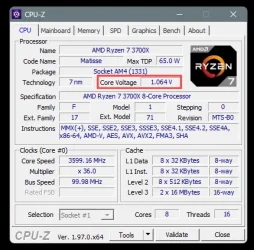
I have a 3700X and it runs between 3.6 and 4.4Ghz (with no overclock)

On a side note: Here's ten points just for filling out your computer specs. :-)


As @stormy13 said... worry about the temps and core voltage.

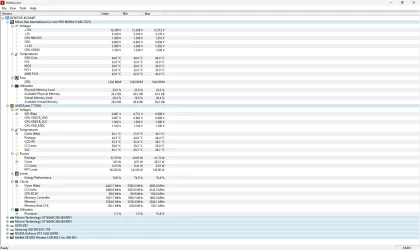
CPU-Z will show you the core voltage, and a program like HWMonitor will show you the temps.
The core voltage and temps will vary... even at idle.


My core voltage varies between .7 and 1.4 volts.

Image1.webp
 
Last edited:

My Computers

System One System Two

  • OS
    Win 11 Home ♦♦♦26200.8655 ♦♦♦♦♦♦♦25H2
    Computer type
    PC/Desktop
    Manufacturer/Model
    Built by Ghot® [May 2020]
    CPU
    AMD Ryzen 7 3700X
    Motherboard
    Asus Pro WS X570-ACE (BIOS 5302)
    Memory
    G.Skill (F4-3200C14D-16GTZKW)
    Graphics Card(s)
    EVGA RTX 2070 (08G-P4-2171-KR)
    Sound Card
    Realtek ALC1220P / ALC S1220A
    Monitor(s) Displays
    Dell U3011 30"
    Screen Resolution
    2560 x 1600
    Hard Drives
    2x Samsung 860 EVO 500GB,
    WD 4TB Black FZBX - SATA III,
    WD 8TB Black FZBX - SATA III,
    DRW-24B1ST CD/DVD Burner
    PSU
    PC Power & Cooling 750W Quad EPS12V
    Case
    Cooler Master ATCS 840 Tower
    Cooling
    CM Hyper 212 EVO (push/pull)
    Keyboard
    Ducky DK9008 Shine II Blue LED
    Mouse
    Logitech Optical M-100
    Internet Speed
    300/300
    Browser
    Firefox (latest)
    Antivirus
    Bitdefender Total Security
    Other Info
    Speakers: Klipsch Pro Media 2.1
  • Operating System
    Windows XP Pro 32bit w/SP3
    Computer type
    PC/Desktop
    Manufacturer/Model
    Built by Ghot® (not in use)
    CPU
    AMD Athlon 64 X2 5000+ (OC'd @ 3.2Ghz)
    Motherboard
    ASUS M2N32-SLI Deluxe Wireless Edition
    Memory
    TWIN2X2048-6400C4DHX (2 x 1GB, DDR2 800)
    Graphics card(s)
    EVGA 256-P2-N758-TR GeForce 8600GT SSC
    Sound Card
    Onboard
    Monitor(s) Displays
    ViewSonic G90FB Black 19" Professional (CRT)
    Screen Resolution
    up to 2048 x 1536
    Hard Drives
    WD 36GB 10,000rpm Raptor SATA
    Seagate 80GB 7200rpm SATA
    Lite-On LTR-52246S CD/RW
    Lite-On LH-18A1P CD/DVD Burner
    PSU
    PC Power & Cooling Silencer 750 Quad EPS12V
    Case
    Generic Beige case, 80mm fans
    Cooling
    ZALMAN 9500A 92mm CPU Cooler
    Keyboard
    Logitech Classic Keybooard 200
    Mouse
    Logitech Optical M-BT96a
    Internet Speed
    300/300
    Browser
    Firefox 3.x ??
    Antivirus
    Symantec (Norton)
    Other Info
    Still assembled, still runs. Haven't turned it on for 15 years?
Process Explorer (part of SysInternals) is better than the Task Manager for analyzing CPU usage and performance.
Resource Monitor which is in Windows 11 might be worth investigating.

I haven't tried any of this from MS but it may be useful. It says for Windows Server but it should work with Windows 11.


My Computers

System One System Two

  • OS
    Windows 11 Pro 25H2
    Computer type
    PC/Desktop
    Manufacturer/Model
    Homebuilt
    CPU
    Intel Core i9 13900K
    Motherboard
    Asus ProArt Z790 Creator WiFi - Bios 3107
    Memory
    Corsair Dominator Platinum 64gb 5600MT/s DDR5 Dual Channel
    Graphics Card(s)
    Sapphire NITRO+ AMD Radeon RX 7900 XTX Vapor-X 24GB
    Sound Card
    External DAC: Cambridge Audio DACMagic200M - Headphone Amp: Topping L50
    Monitor(s) Displays
    Panasonic MX950 Mini LED 55" TV 120hz
    Screen Resolution
    3840 x 2160 120hz
    Hard Drives
    Samsung 980 Pro 2TB (OS)
    Samsung 980 Pro 1TB (Files)
    Lexar NZ790 4TB
    LaCie d2 Professional 6TB external - USB 3.1
    Seagate Expansion 16TB external - USB 3.2
    Seagate One Touch 18TB external HD - USB 3.0
    PSU
    Corsair RM1200x Shift
    Case
    Corsair RGB Smart Case 5000x (white)
    Cooling
    Corsair iCue H150i Elite Capellix XT
    Keyboard
    Incase Ergonomic USB (Microsoft clone)
    Mouse
    Logitech MX Master 3S
    Internet Speed
    Fibre 900/500 Mbps
    Browser
    Microsoft Edge Chromium
    Antivirus
    Bitdefender Total Security
    Other Info
    AMD Radeon Software & Drivers 26.1.1
    Hasleo Backup Suite
    Dashlane password manager
    Kensington Verimark fingerprint reader
    Logitech Brio 4K webcam
    Orico 10-port powered USB 3.0 hub
  • Operating System
    Windows 11 Pro 25H2
    Computer type
    Laptop
    Manufacturer/Model
    Asus Vivobook X1605VA
    CPU
    Intel® Core™ i9-13900H
    Motherboard
    Asus X1605VA bios 309
    Memory
    32GB DDR4-3200 Dual channel
    Graphics card(s)
    *Intel Iris Xᵉ Graphics G7
    Sound Card
    Realtek | Intel SST Bluetooth & USB
    Monitor(s) Displays
    16.0-inch, WUXGA 16:10 aspect ratio, IPS-level Panel
    Screen Resolution
    1920 x 1200 60hz
    Hard Drives
    512GB M.2 NVMe™ PCIe® 3.0 SSD
    Mouse
    Logitech MX Ergo Trackball
    Antivirus
    Bitdefender Total Security
    Other Info
    720p Webcam
    WiFi & USB to ethernet

My Computer

System One

  • OS
    Windows 11 Pro
    Computer type
    PC/Desktop
    Manufacturer/Model
    MSI
    CPU
    AMD Ryzen 7 7700x
    Motherboard
    MSI Pro b650m-p
    Memory
    Micron Technology 32GB
    Graphics Card(s)
    GTX 1650 Super
    Sound Card
    Windows Default
    Monitor(s) Displays
    1
    Screen Resolution
    1080p
    Hard Drives
    1 SSD and 1 NVMe
    PSU
    600W
    Internet Speed
    500 mbps down / 24 mbps up
The 7700X is a 4.5Ghz processor. Turbo Boost is 5.4Ghz
4Ghz is slow for that CPU.

I have a 3700X and it runs between 3.6 and 4.4Ghz (with no overclock)

On a side note: Here's ten points just for filling out your computer specs. :-)


As @stormy13 said... worry about the temps and core voltage.

CPU-Z will show you the core voltage, and a program like HWMonitor will show you the temps.
The core voltage and temps will vary... even at idle.


My core voltage varies between .7 and 1.4 volts.

View attachment 153716
Hmm I see, Appreciated. I was concerned that some Company force Overclock CPU to give best performance, but most of time i don't need that much performance for normal use.
 

My Computer

System One

  • OS
    Windows 11 Pro
    Computer type
    PC/Desktop
    Manufacturer/Model
    MSI
    CPU
    AMD Ryzen 7 7700x
    Motherboard
    MSI Pro b650m-p
    Memory
    Micron Technology 32GB
    Graphics Card(s)
    GTX 1650 Super
    Sound Card
    Windows Default
    Monitor(s) Displays
    1
    Screen Resolution
    1080p
    Hard Drives
    1 SSD and 1 NVMe
    PSU
    600W
    Internet Speed
    500 mbps down / 24 mbps up
Hmm I see, Appreciated. I was concerned that some Company force Overclock CPU to give best performance, but most of time i don't need that much performance for normal use.


Nope. That's just a fast CPU. ^^
As long as your temps are OK and the core voltage doesn't get too high... you'll be fine. :-)

Those 2.xGhz speeds are mainly Intel processors.
That's their Efficiency clock.
 

My Computers

System One System Two

  • OS
    Win 11 Home ♦♦♦26200.8655 ♦♦♦♦♦♦♦25H2
    Computer type
    PC/Desktop
    Manufacturer/Model
    Built by Ghot® [May 2020]
    CPU
    AMD Ryzen 7 3700X
    Motherboard
    Asus Pro WS X570-ACE (BIOS 5302)
    Memory
    G.Skill (F4-3200C14D-16GTZKW)
    Graphics Card(s)
    EVGA RTX 2070 (08G-P4-2171-KR)
    Sound Card
    Realtek ALC1220P / ALC S1220A
    Monitor(s) Displays
    Dell U3011 30"
    Screen Resolution
    2560 x 1600
    Hard Drives
    2x Samsung 860 EVO 500GB,
    WD 4TB Black FZBX - SATA III,
    WD 8TB Black FZBX - SATA III,
    DRW-24B1ST CD/DVD Burner
    PSU
    PC Power & Cooling 750W Quad EPS12V
    Case
    Cooler Master ATCS 840 Tower
    Cooling
    CM Hyper 212 EVO (push/pull)
    Keyboard
    Ducky DK9008 Shine II Blue LED
    Mouse
    Logitech Optical M-100
    Internet Speed
    300/300
    Browser
    Firefox (latest)
    Antivirus
    Bitdefender Total Security
    Other Info
    Speakers: Klipsch Pro Media 2.1
  • Operating System
    Windows XP Pro 32bit w/SP3
    Computer type
    PC/Desktop
    Manufacturer/Model
    Built by Ghot® (not in use)
    CPU
    AMD Athlon 64 X2 5000+ (OC'd @ 3.2Ghz)
    Motherboard
    ASUS M2N32-SLI Deluxe Wireless Edition
    Memory
    TWIN2X2048-6400C4DHX (2 x 1GB, DDR2 800)
    Graphics card(s)
    EVGA 256-P2-N758-TR GeForce 8600GT SSC
    Sound Card
    Onboard
    Monitor(s) Displays
    ViewSonic G90FB Black 19" Professional (CRT)
    Screen Resolution
    up to 2048 x 1536
    Hard Drives
    WD 36GB 10,000rpm Raptor SATA
    Seagate 80GB 7200rpm SATA
    Lite-On LTR-52246S CD/RW
    Lite-On LH-18A1P CD/DVD Burner
    PSU
    PC Power & Cooling Silencer 750 Quad EPS12V
    Case
    Generic Beige case, 80mm fans
    Cooling
    ZALMAN 9500A 92mm CPU Cooler
    Keyboard
    Logitech Classic Keybooard 200
    Mouse
    Logitech Optical M-BT96a
    Internet Speed
    300/300
    Browser
    Firefox 3.x ??
    Antivirus
    Symantec (Norton)
    Other Info
    Still assembled, still runs. Haven't turned it on for 15 years?
On MSI Intel boards there is a bios setting called Enhanced Turbo that can be enabled to boost the cpu.
I have this disabled and my 14600k drops down to 2 GHz or less at low usage or when at idle.

On MSI AMD boards it "looks" to me (I am not familiar with AMD) like this is called Precision Boost Overdrive.
I'm not sure how all this works on AMD boards but you could see if have this setting and what is it set to.

You could also post your question In the MSI forum. The users on there have been very helpful to me.

peace
wanna
 

My Computers

System One System Two

  • OS
    Windows 11 Pro 64 bit
    Computer type
    PC/Desktop
    Manufacturer/Model
    Acme Mail Order (meep meep)
    CPU
    Intel® Core™ i5-14600K
    Motherboard
    MSI PRO Z790-A MAX WiFi bios 7E07vMA
    Memory
    G.SKILL Ripjaws S5 Series DDR5 (2x16GB) 6400MT/s CL32
    Graphics Card(s)
    PNY RTX 5060 Ti OC 16GB
    Sound Card
    Onboard Realtek® ALC4080 Codec
    Monitor(s) Displays
    2 x Dell - S3222DGM 32" LED Curved QHD FreeSync Gaming Monitor
    Screen Resolution
    2560x1440
    Hard Drives
    990 PRO PCIe 4.0 NVMe®1TB OS
    970 EVO PCIe 3.0 NVMe® SSD 500GB Games
    860 EVO SATA 2.5" SSD 1TB Storage
    PSU
    RMx Series™ RM850x — 80 PLUS® Gold
    Case
    LIAN LI PC-G70B Black Aluminum Full Tower
    Cooling
    Custom loop Optimus Foundation Block, MCP655-PWM D5 pump, MCR320 QP rad
    Keyboard
    Razer Black Widow Ultimate
    Mouse
    Razer Death Adder Elite
    Internet Speed
    500 down 20 up
    Browser
    Edge / Chrome
    Antivirus
    Microsoft Defender
    Other Info
    Always switching installs testing out the latest and greatest.
  • Operating System
    Windows 11 Pro 64 bit latest public release
    Computer type
    PC/Desktop
    Manufacturer/Model
    Acme Mail Order (meep meep) Wife's PC Edition
    CPU
    Intel® Core™ i5-11600K
    Motherboard
    MSI - Z590 A Pro - bios 7D09v1A
    Memory
    G.SKILL Ripjaws V Series 16GB DDR4 3600 (16-16-16-36)
    Graphics card(s)
    EVGA GeForce RTX 3060 XC GAMING 12GB
    Sound Card
    Onboard Realtek® ALC897 Codec
    Monitor(s) Displays
    2 x 27'' ACER S271HL
    Screen Resolution
    1920x1080
    Hard Drives
    980 PRO PCIe 4.0 NVMe® SSD 250GB OS
    Samsung 128GB 850 PRO SATA III for Storage
    PSU
    CORSAIR - CX-M Series 650W
    Case
    LIAN LI PC-A16B Black Aluminum ATX Mid Tower
    Cooling
    Thermalright Phantom Spirit 120SE Air Cooler
    Keyboard
    Logitech - K740 Illuminated
    Mouse
    Razer Death Adder Elite
    Internet Speed
    500 down 20 up
    Browser
    Chrome
    Antivirus
    Windows Defender
    Other Info
    Stock clocked, over cooled, and unmolested for a rock solid, whisper quiet, Wifey approved user experience.
There is nothing unusual in those screenshots. Roughly what would be expected, as other have mentioned.
Base is 4.2 GHz which is normal. But i am pretty sure that CPU does not run at base speed at Idle. It should go down around 2Ghz or something
The base frequency is 4.5 GHz, it will not go down to 2 GHz with desktop processors. It seems to be a minimum of 2.7 GHz from the specs.
The Task Manager normal sampling rate is quite slow so might not display it.

Another app like CPUID HWMonitor may catch the lowest as it stores the Min/Max clocks over the time it is run, might be educational.
You have not displayed the cores in your screenshot.
It is not like a Laptop processor which have a very wide range of clock speeds for power saving/reducing heat dissipation requirements.
 

My Computer

System One

  • OS
    Windows 11

Latest Support Threads

Back
Top Bottom