northern_man
New member
- Local time
- 1:57 PM
- Posts
- 1
- OS
- Windows 11
Problem: I would like to create a custom keyboard layout / language.
Long explanation:
Laptop. I have a physical US keyboard layout. I type 90% in english, occasionally in German and Russian, grew up on a QWERTZ. I would like the option to have a custom keyboard layout where Z and Y is switched, the $ is moved from "4" to "|" and where Alt+: shortcut gives out Ä (and Ö and Ü respectively with " and {).
This would allow me to type in English on QWERTZ how I'm used to, and easily type in Germany using Ä, Ö, Ü withouth needing to switch layout. For Russian I'd still need to switch.
Attempted fixes:
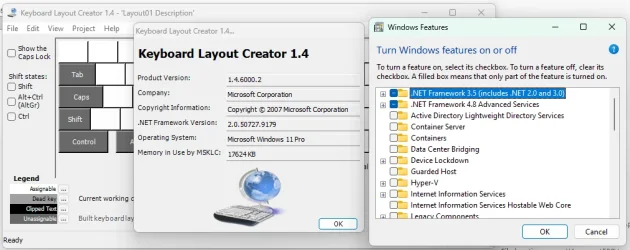
MSCKLC v1.4: Doesn't work on WIN11 natively. Needs .NET3.5. I install .NET3.5 which gets blocked by WIN installer. I put a script in powershell to enable the .NET3.5 installation but it doesn't work.
PowerToys: Doesn't allow to create a custom keyboard layout. If I remap the keys to how I want to, the Ä shortcut still doesn't work on US layout furthermore due to the Y <-> Z switch, if I switch to Russian it's all messed up.
-
I'd like to have one custom keyboard layout personalized for me with the optionality to switch to standard RU layout and standard US layout (to let someone else type).
(I'm not too comfortable with the PowerShell route...)
Long explanation:
Laptop. I have a physical US keyboard layout. I type 90% in english, occasionally in German and Russian, grew up on a QWERTZ. I would like the option to have a custom keyboard layout where Z and Y is switched, the $ is moved from "4" to "|" and where Alt+: shortcut gives out Ä (and Ö and Ü respectively with " and {).
This would allow me to type in English on QWERTZ how I'm used to, and easily type in Germany using Ä, Ö, Ü withouth needing to switch layout. For Russian I'd still need to switch.
Attempted fixes:
MSCKLC v1.4: Doesn't work on WIN11 natively. Needs .NET3.5. I install .NET3.5 which gets blocked by WIN installer. I put a script in powershell to enable the .NET3.5 installation but it doesn't work.
PowerToys: Doesn't allow to create a custom keyboard layout. If I remap the keys to how I want to, the Ä shortcut still doesn't work on US layout furthermore due to the Y <-> Z switch, if I switch to Russian it's all messed up.
-
I'd like to have one custom keyboard layout personalized for me with the optionality to switch to standard RU layout and standard US layout (to let someone else type).
(I'm not too comfortable with the PowerShell route...)
- Windows Build/Version
- Windows 11
My Computer
At a glance
Windows 11
- OS
- Windows 11
- Computer type
- Laptop
- Manufacturer/Model
- Samsung Galaxy Book 6 Pro