

- Local time
- 10:26 AM
- Posts
- 5,980
- Location
- Hafnarfjörður IS
- OS
- Windows XP,11 Linux Fedora Rawhide pre-release 46
For people running W11 VM's from Linux hosts using KVM/QEMU this is the EASY way of making a Physical; W11 Windows to Go machine that runs off external USB / NVME or whatever device.
This is actually quite simple and provided it's on the same hardware you should preserver activations.
1) First on any W11 system you have save the Windows/system32/driverstore to a file that you can access later.
2) boot your Virtual machine
3) ensure the Windows Virtual drivers have been installed (download from Fedora site - and execute within the VM)
4) reboot the Windows VM
5)Run Macrium (even the free edition works for this) and clone the VM to the USB device.
6)Shut down the VM and Host.
7) boot the USB -- should work without issue
8) now update drivers - use the driverstore file you saved to search for special ones you may have installed from manufacturer etc hardware and for the rest if any missing Windows update itself is pretty good now.
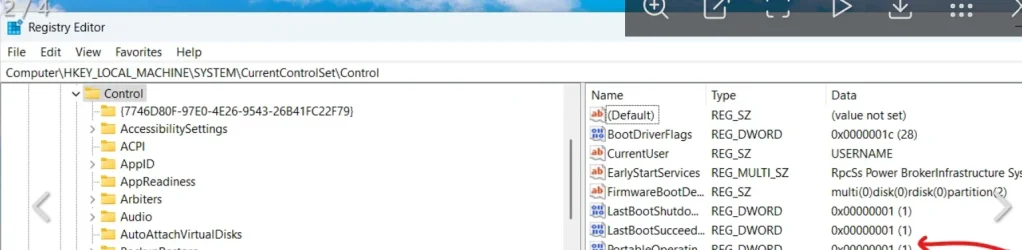
9) finally you need to set the PortableOperatingSystem field in the registry to '0' otherwise you can't update to newer builds to an external device -- also if you clone this to an internal device and don't change the flag your system will pester you with "don't unplug the device" and also updates /new builds won't work.
the registry key is shown in the screenshot
No need for complex / paid for stuff.
OK this is for Linux Hosts but it probably can work for Windows Hosting Windows VM's -- not tried that :
Also I don't have Bitlocker, secure boot, or device encryption enabled as these in any case are a pain on a HOME computer when you want to do loads of testing.
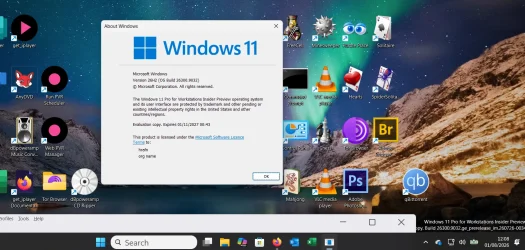
here's the WindowstoGo Physical system :
Have Fun !!!
(Advantage of this is you can have all sorts of different Physical W11 WindowstoGo versions - different languages, different apps etc and all are active since it's the same hardware) - You can't run them concurrently though !!!)
Exercise for those interested -- if you actually do this to Physical vhdx files then you can have loads on the same external device and the boot menu will give you a choice of what to boot up. This is a bit more complex and you might have to mess around with re-installing the bootloader (bcdboot.exe).
Cheers
jimbo
This is actually quite simple and provided it's on the same hardware you should preserver activations.
1) First on any W11 system you have save the Windows/system32/driverstore to a file that you can access later.
2) boot your Virtual machine
3) ensure the Windows Virtual drivers have been installed (download from Fedora site - and execute within the VM)
4) reboot the Windows VM
5)Run Macrium (even the free edition works for this) and clone the VM to the USB device.
6)Shut down the VM and Host.
7) boot the USB -- should work without issue
8) now update drivers - use the driverstore file you saved to search for special ones you may have installed from manufacturer etc hardware and for the rest if any missing Windows update itself is pretty good now.
9) finally you need to set the PortableOperatingSystem field in the registry to '0' otherwise you can't update to newer builds to an external device -- also if you clone this to an internal device and don't change the flag your system will pester you with "don't unplug the device" and also updates /new builds won't work.
the registry key is shown in the screenshot
No need for complex / paid for stuff.
OK this is for Linux Hosts but it probably can work for Windows Hosting Windows VM's -- not tried that :
Also I don't have Bitlocker, secure boot, or device encryption enabled as these in any case are a pain on a HOME computer when you want to do loads of testing.
here's the WindowstoGo Physical system :
Have Fun !!!
(Advantage of this is you can have all sorts of different Physical W11 WindowstoGo versions - different languages, different apps etc and all are active since it's the same hardware) - You can't run them concurrently though !!!)
Exercise for those interested -- if you actually do this to Physical vhdx files then you can have loads on the same external device and the boot menu will give you a choice of what to boot up. This is a bit more complex and you might have to mess around with re-installing the bootloader (bcdboot.exe).
Cheers
jimbo
My Computer
At a glance
Windows XP,11 Linux Fedora Rawhide pre-releas...2 X Intel i7
- OS
- Windows XP,11 Linux Fedora Rawhide pre-release 46
- Computer type
- PC/Desktop
- CPU
- 2 X Intel i7
- Screen Resolution
- 4KUHD X 2






