Solved Create recovery usb for another computer


Thanks. It will be a little while before I can reply with results. My day will start in less than 6 hours tomorrow.

regards,
caffeine
 

My Computer My Computer

At a glance

windows 11 home 64bit 24H2 (OS Build 26100.7992)AMD RYZEN 5 8645HS, base 4.3GHz- up tp 5 GHz16GB DDR5
OS
windows 11 home 64bit 24H2 (OS Build 26100.7992)
Computer type
Laptop
Manufacturer/Model
Lenovo ideapad 5
CPU
AMD RYZEN 5 8645HS, base 4.3GHz- up tp 5 GHz
Memory
16GB DDR5
Monitor(s) Displays
2
Screen Resolution
1920x1200
Hard Drives
512 GB SSD
PSU
65W
Case
military grade (mil-std 810h), color-abyss blue
Keyboard
backlit, light blue
Mouse
Logitech M100
Internet Speed
SLOOOOOOOW
Antivirus
Windows Defender & MBAM
Other Info
novabench score 2443
If you cannot get into the boot menu F2 OR FN+F2 should get you straight into bios where you can set your usb as first boot device.
 

My Computers My Computers

  • At a glance

    Windows 11 Pro 25H2 26200.8655i9-10900 10 core 20 threads32 gbnone-Intel UHD Graphics 630
    OS
    Windows 11 Pro 25H2 26200.8655
    Computer type
    PC/Desktop
    Manufacturer/Model
    Dell Optiplex 7080
    CPU
    i9-10900 10 core 20 threads
    Motherboard
    DELL 0J37VM
    Memory
    32 gb
    Graphics Card(s)
    none-Intel UHD Graphics 630
    Sound Card
    Integrated Realtek
    Monitor(s) Displays
    Benq 27
    Screen Resolution
    2560x1440
    Hard Drives
    2x1tb Solidigm m.2 nvme /External drives 512gb Samsung m.2 sata+2tb Kingston m2.nvme
    PSU
    500w
    Case
    MT
    Cooling
    Dell Premium
    Keyboard
    Logitech wired
    Mouse
    Logitech wireless
    Internet Speed
    so slow I'm too embarrassed to tell
    Browser
    #1 Edge #2 Firefox
    Antivirus
    Defender+MWB Premium
  • At a glance

    Windows 11 Pro 24H2 26200.8457AMD Ryzen 7 6800U32 gbintegrated
    Operating System
    Windows 11 Pro 24H2 26200.8457
    Computer type
    PC/Desktop
    Manufacturer/Model
    Beelink Mini PC SER5
    CPU
    AMD Ryzen 7 6800U
    Memory
    32 gb
    Graphics card(s)
    integrated
    Sound Card
    integrated
    Monitor(s) Displays
    Benq 27
    Screen Resolution
    2560x1440
    Hard Drives
    1TB Crucial nvme
    Keyboard
    Logitech wired
    Mouse
    Logitech wireless
    Internet Speed
    still too embarrassed to tell
    Browser
    Firefox
    Antivirus
    Defender
    Other Info
    System 3 is non compliant Dell 9020 i7-4770/24gb ram Win11 PRO 26200.8457
The post by SIW2 ia about a Dell. The problem computer is not a Dell machine
Dell is just a source.
There is nothing Dell-specific about the procedure suggested.

Denis
 

My Computer My Computer

At a glance

Windows 11 Home x64 Version 25H2 Build 26200....
OS
Windows 11 Home x64 Version 25H2 Build 26200.8037
The first link you included, (How to select boot device from BIOS (Boot Menu) - ideapad, ThinkPad, ThinkStation, ThinkCentre, ideacentre - Lenovo Support US), won't work with my computer according to Lenovo. X This content is not compatible with the product you selected (IdeaPad Flex 5 14ALC7 Laptop - Type 82R9. Serial Number:*******). What should I do from here for another solutions?
Search the Lenovo site for
Boot menu
or similar. You might well find
How to select boot device from BIOS (Boot Menu) - Lenovo Support
How to boot from USB disk in the BIOS (Boot Menu) - Lenovo Support
If you search externally, you might also find
How to Enter Lenovo Boot Menu & How to Boot Lenovo Computer
When reviewing all such answers, if your keyboard has a blue-lettered Fn key you need to try using the specified key with & without the Fn at the same time.

That This content is not compatible with the product you selected might be red herring anyway. The article might well still confirm the correct key for your Lenovo to boot into its Boot menu because the same key is likely to apply to all Lenovo computers.


Denis
 

My Computer My Computer

At a glance

Windows 11 Home x64 Version 25H2 Build 26200....
OS
Windows 11 Home x64 Version 25H2 Build 26200.8037
Thank you for your time, effort, and diligence in follow up. In this post I will reply to each of you first and then give a progress report under

blue text header . I'm not positive about the blue because I am color blind.

glasskuter F2 gets me into BIOS. F12 gets me into a one time BIOS boot order. My options in BIOS UEFI boot order are as follows:
1st -- boot mode, which is greyed out -- I have no access
2nd -- USB boot, which is enabled.

Try3 Regarding red herring: I have atempted the two Lenovo instructions unsuccessfully. The MiniTool link is legacy not supporting UEFI, Windows 10, or 11. The Lenovo ESC key toggles FN similar toCaps Lock. For entering BIOS the default FN key works fine.


the continuing adventures of repairing Lenovo
I have been using Brink's linked tutorial "Clean install Windows 11" as recommended in a previous post in this thread.
failed attempts not resulting starting the clean install process:
  • Media Creator Tool
  • Command Prompt

I will try Rufus next, and use a fresh USB drive to eliminate any doubt about whether or not USB hardware issues were contributing factors in the previous failures.

regards,
caffeine
 

My Computer My Computer

At a glance

windows 11 home 64bit 24H2 (OS Build 26100.7992)AMD RYZEN 5 8645HS, base 4.3GHz- up tp 5 GHz16GB DDR5
OS
windows 11 home 64bit 24H2 (OS Build 26100.7992)
Computer type
Laptop
Manufacturer/Model
Lenovo ideapad 5
CPU
AMD RYZEN 5 8645HS, base 4.3GHz- up tp 5 GHz
Memory
16GB DDR5
Monitor(s) Displays
2
Screen Resolution
1920x1200
Hard Drives
512 GB SSD
PSU
65W
Case
military grade (mil-std 810h), color-abyss blue
Keyboard
backlit, light blue
Mouse
Logitech M100
Internet Speed
SLOOOOOOOW
Antivirus
Windows Defender & MBAM
Other Info
novabench score 2443
SUCCESS!!!!
glasskuter, your link to the tutorial was the key. many thanks

The road to success had hiccups along the way:
  • Media Creator Tool bootable flash drive failed to boot.
  • Command Prompt bootable flash drive failed to boot.
  • Rufus bootable flash drive booted properly.
  • The installation stalled where an internet connection is needed to continue.
  • I had to go to Lenovo's website to download the wifi driver to a flash drive on my Windows 10 machine.
  • I "sneeker-netted" the flash drive to the Windows 11 machine and loaded the wifi driver successfully.
  • After completing the install, I got the Lenovo Vantage app from the Windows Store and installed and updated all the drivers for the Windows 11 machine. Then I removed the Lenovo Vantage app.
  • I created a recovery drive for the 11 machine and am creating a full image backup.
Thanks again to all who contributed to this thread. I am going to mark this as solved.

regards,
caffeine
 

My Computer My Computer

At a glance

windows 11 home 64bit 24H2 (OS Build 26100.7992)AMD RYZEN 5 8645HS, base 4.3GHz- up tp 5 GHz16GB DDR5
OS
windows 11 home 64bit 24H2 (OS Build 26100.7992)
Computer type
Laptop
Manufacturer/Model
Lenovo ideapad 5
CPU
AMD RYZEN 5 8645HS, base 4.3GHz- up tp 5 GHz
Memory
16GB DDR5
Monitor(s) Displays
2
Screen Resolution
1920x1200
Hard Drives
512 GB SSD
PSU
65W
Case
military grade (mil-std 810h), color-abyss blue
Keyboard
backlit, light blue
Mouse
Logitech M100
Internet Speed
SLOOOOOOOW
Antivirus
Windows Defender & MBAM
Other Info
novabench score 2443
Good job! Thanks for posting back.
 

My Computers My Computers

  • At a glance

    Windows 11 Pro 25H2 26200.8655i9-10900 10 core 20 threads32 gbnone-Intel UHD Graphics 630
    OS
    Windows 11 Pro 25H2 26200.8655
    Computer type
    PC/Desktop
    Manufacturer/Model
    Dell Optiplex 7080
    CPU
    i9-10900 10 core 20 threads
    Motherboard
    DELL 0J37VM
    Memory
    32 gb
    Graphics Card(s)
    none-Intel UHD Graphics 630
    Sound Card
    Integrated Realtek
    Monitor(s) Displays
    Benq 27
    Screen Resolution
    2560x1440
    Hard Drives
    2x1tb Solidigm m.2 nvme /External drives 512gb Samsung m.2 sata+2tb Kingston m2.nvme
    PSU
    500w
    Case
    MT
    Cooling
    Dell Premium
    Keyboard
    Logitech wired
    Mouse
    Logitech wireless
    Internet Speed
    so slow I'm too embarrassed to tell
    Browser
    #1 Edge #2 Firefox
    Antivirus
    Defender+MWB Premium
  • At a glance

    Windows 11 Pro 24H2 26200.8457AMD Ryzen 7 6800U32 gbintegrated
    Operating System
    Windows 11 Pro 24H2 26200.8457
    Computer type
    PC/Desktop
    Manufacturer/Model
    Beelink Mini PC SER5
    CPU
    AMD Ryzen 7 6800U
    Memory
    32 gb
    Graphics card(s)
    integrated
    Sound Card
    integrated
    Monitor(s) Displays
    Benq 27
    Screen Resolution
    2560x1440
    Hard Drives
    1TB Crucial nvme
    Keyboard
    Logitech wired
    Mouse
    Logitech wireless
    Internet Speed
    still too embarrassed to tell
    Browser
    Firefox
    Antivirus
    Defender
    Other Info
    System 3 is non compliant Dell 9020 i7-4770/24gb ram Win11 PRO 26200.8457
glasskuter,
I attempted to like your post which included the link to brink's tutorial. Being new to this forum, I am unsure if the like was successful. Please update me. Thanks.

regards,
caffeine
 

My Computer My Computer

At a glance

windows 11 home 64bit 24H2 (OS Build 26100.7992)AMD RYZEN 5 8645HS, base 4.3GHz- up tp 5 GHz16GB DDR5
OS
windows 11 home 64bit 24H2 (OS Build 26100.7992)
Computer type
Laptop
Manufacturer/Model
Lenovo ideapad 5
CPU
AMD RYZEN 5 8645HS, base 4.3GHz- up tp 5 GHz
Memory
16GB DDR5
Monitor(s) Displays
2
Screen Resolution
1920x1200
Hard Drives
512 GB SSD
PSU
65W
Case
military grade (mil-std 810h), color-abyss blue
Keyboard
backlit, light blue
Mouse
Logitech M100
Internet Speed
SLOOOOOOOW
Antivirus
Windows Defender & MBAM
Other Info
novabench score 2443
No worries about the like. Just glad we got you going again.
 

My Computers My Computers

  • At a glance

    Windows 11 Pro 25H2 26200.8655i9-10900 10 core 20 threads32 gbnone-Intel UHD Graphics 630
    OS
    Windows 11 Pro 25H2 26200.8655
    Computer type
    PC/Desktop
    Manufacturer/Model
    Dell Optiplex 7080
    CPU
    i9-10900 10 core 20 threads
    Motherboard
    DELL 0J37VM
    Memory
    32 gb
    Graphics Card(s)
    none-Intel UHD Graphics 630
    Sound Card
    Integrated Realtek
    Monitor(s) Displays
    Benq 27
    Screen Resolution
    2560x1440
    Hard Drives
    2x1tb Solidigm m.2 nvme /External drives 512gb Samsung m.2 sata+2tb Kingston m2.nvme
    PSU
    500w
    Case
    MT
    Cooling
    Dell Premium
    Keyboard
    Logitech wired
    Mouse
    Logitech wireless
    Internet Speed
    so slow I'm too embarrassed to tell
    Browser
    #1 Edge #2 Firefox
    Antivirus
    Defender+MWB Premium
  • At a glance

    Windows 11 Pro 24H2 26200.8457AMD Ryzen 7 6800U32 gbintegrated
    Operating System
    Windows 11 Pro 24H2 26200.8457
    Computer type
    PC/Desktop
    Manufacturer/Model
    Beelink Mini PC SER5
    CPU
    AMD Ryzen 7 6800U
    Memory
    32 gb
    Graphics card(s)
    integrated
    Sound Card
    integrated
    Monitor(s) Displays
    Benq 27
    Screen Resolution
    2560x1440
    Hard Drives
    1TB Crucial nvme
    Keyboard
    Logitech wired
    Mouse
    Logitech wireless
    Internet Speed
    still too embarrassed to tell
    Browser
    Firefox
    Antivirus
    Defender
    Other Info
    System 3 is non compliant Dell 9020 i7-4770/24gb ram Win11 PRO 26200.8457
I created a recovery drive for the 11 machine and am creating a full image backup.
And do consider
Backup and Restore Device Drivers - ElevenForumTutorials
If you were ever to get driver problems then it's less disruption to restore a driver than it is to restore an entire system image.
I make a new driver backup every time any driver gets changed whereas I make new system images monthly.

All the best,
Denis
 

My Computer My Computer

At a glance

Windows 11 Home x64 Version 25H2 Build 26200....
OS
Windows 11 Home x64 Version 25H2 Build 26200.8037
Try3,
Thanks for the heads up on backing up drivers. I have completed that task.

It is now time for me to mark this as solved.
Once again thanks to all who have contributed to my solution and a working computer.

regards,
caffeine
 

My Computer My Computer

At a glance

windows 11 home 64bit 24H2 (OS Build 26100.7992)AMD RYZEN 5 8645HS, base 4.3GHz- up tp 5 GHz16GB DDR5
OS
windows 11 home 64bit 24H2 (OS Build 26100.7992)
Computer type
Laptop
Manufacturer/Model
Lenovo ideapad 5
CPU
AMD RYZEN 5 8645HS, base 4.3GHz- up tp 5 GHz
Memory
16GB DDR5
Monitor(s) Displays
2
Screen Resolution
1920x1200
Hard Drives
512 GB SSD
PSU
65W
Case
military grade (mil-std 810h), color-abyss blue
Keyboard
backlit, light blue
Mouse
Logitech M100
Internet Speed
SLOOOOOOOW
Antivirus
Windows Defender & MBAM
Other Info
novabench score 2443
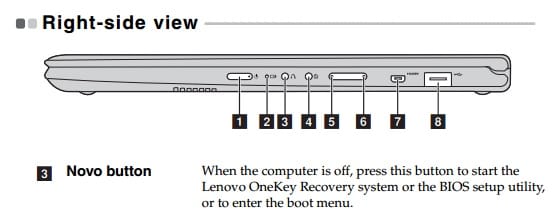
Does your laptop have the Novo button?

bb1cf971823a4a1f9fb2a4f937208ce3.jpg
 

My Computers My Computers

  • At a glance

    Windows 11 Pro 25H2 26200.8655AMD Ryzen 7 5825U with Radeon Graphics16GB
    OS
    Windows 11 Pro 25H2 26200.8655
    Computer type
    Laptop
    Manufacturer/Model
    Acemagic LX15PRO
    CPU
    AMD Ryzen 7 5825U with Radeon Graphics
    Memory
    16GB
    Screen Resolution
    1920 x 1080
    Hard Drives
    SSD 2TB
    Internet Speed
    30 Mbps
    Browser
    Brave
    Antivirus
    Webroot Secure Anywhere
    Other Info
    System 3

    Acer Swift SF114-34 laptop
    OS Windows 11 Pro 26200.8524
    CPU Pentium Silver N6000
    RAM 4GB
    SSD Samsung 970 EVO Plus SSD 2TB (an upgrade)
  • At a glance

    Windows 11 Pro 23H2 22631.2506Atom N450 1.66GHz2GB
    Operating System
    Windows 11 Pro 23H2 22631.2506
    Computer type
    Laptop
    Manufacturer/Model
    HP Mini 210-1090NR PC (bought in late 2009!)
    CPU
    Atom N450 1.66GHz
    Memory
    2GB
    Browser
    Brave
    Antivirus
    Webroot
No it does not. It may have been helpful at some point in my repair.

regards,
caffeine
 

My Computer My Computer

At a glance

windows 11 home 64bit 24H2 (OS Build 26100.7992)AMD RYZEN 5 8645HS, base 4.3GHz- up tp 5 GHz16GB DDR5
OS
windows 11 home 64bit 24H2 (OS Build 26100.7992)
Computer type
Laptop
Manufacturer/Model
Lenovo ideapad 5
CPU
AMD RYZEN 5 8645HS, base 4.3GHz- up tp 5 GHz
Memory
16GB DDR5
Monitor(s) Displays
2
Screen Resolution
1920x1200
Hard Drives
512 GB SSD
PSU
65W
Case
military grade (mil-std 810h), color-abyss blue
Keyboard
backlit, light blue
Mouse
Logitech M100
Internet Speed
SLOOOOOOOW
Antivirus
Windows Defender & MBAM
Other Info
novabench score 2443
Back
Top Bottom