
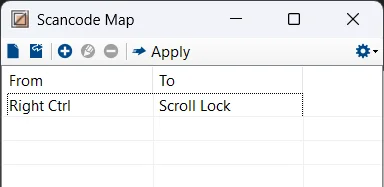
I stole my neighbor's laptop, which also doesn't have a Scroll Lock key. I used Scancode Map to map the right Ctrl key to scroll lock.

My Computer
At a glance
I'm off Windows at home.
- OS
- I'm off Windows at home.
Follow along with the video below to see how to install our site as a web app on your home screen.
Note: This feature may not be available in some browsers.

Oh your right, I didn't see that. It's such an unusual location for a pause button. I was looking at my home, end, pg up, pg dn keys. Thanks for letting me know.So you have Pause, but it's on the right Shift key. So Fn-RightShift would give you pause, not scroll lock. Bummer.
I suppose that might work. What are the odds a game or program would require a huge combination of keys being pressed like the ones you suggested. The CTRL + ALT+ F12 might be useful, especially if you include the SHIFT, so a SHIFT +CTRL + ALT +F12 would be better.Just use any combination unlikely to be used by the application, such as CTRL+SHIFT+F12 or CTRL+ALT+F12. Why it has to be the Scroll Lock key?
No I need a key combination that no program would ever think to use. The point is to communicate to an emulator, not the game. Some games have keys and key combinations that the emulator uses to perform actions and I need the scroll lock to tell the emulator "I'm talking to the game, not you". If the key combination for the scroll lock is a key combination I would use in the game I would activate the emulator during game play.I stole my neighbor's laptop, which also doesn't have a Scroll Lock key. I used Scancode Map to map the right Ctrl key to scroll lock.
View attachment 176917
View attachment 176914 View attachment 176916 scroll lock off scroll lock on





