Credential Guard blocking RDP saved credentials


jctech2025

Member
Local time
3:40 AM
Posts
25
OS
Windows 11
Hi All,

I'm trying to which specific settings is actually blocking saving a users credentials from being saved in their RDP connection. They have had a shortcut which they have used for a while on Windows 10. She double clicks the icon and it connects her. After upgrading to 11 I'm getting bickered at with the defender credential guard block. I referenced this article "Windows 11 - Disable Windows Credential Guard - Microsoft Q&A" on a machine which RDP creds are saving and for instance "EnableVirtualizationBasedSecurity is set to "1". I do see Secure boot in the BIOS and it's set to Enabled.

This just came up after upgrading and no other users are having this issue. So I'm not sure which specific setting actually blocks the RDP connection from saving? Or possibly I'm looking at the wrong settings.

Thanks again,
 

My Computer

System One

  • OS
    Windows 11
    Computer type
    Laptop
    Manufacturer/Model
    HP
I'm trying to figure out what changed from Windows 10, what setting was changed in Windows11?
 

My Computer

System One

  • OS
    Windows 11
    Computer type
    Laptop
    Manufacturer/Model
    HP
You can save credentials but Credential Guard will prevent the transmission of them to a remote system.
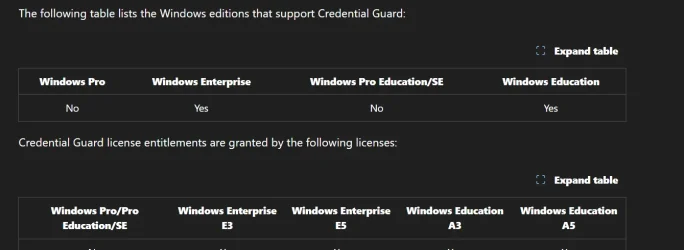
According to this only certain versions of Windows have credential guard. All of my systems are Pro and have virtualization based security running, but my credentials are accepted with RDP. Credential Guard overview
Screenshot 2025-11-21 153209.webp
 

My Computers

System One System Two

  • OS
    Windows 11 Pro 25H2
    Computer type
    PC/Desktop
    Manufacturer/Model
    Dell Optiplex 7080
    CPU
    i9-10900 10 core 20 threads
    Motherboard
    DELL 0J37VM
    Memory
    32 gb
    Graphics Card(s)
    none-Intel UHD Graphics 630
    Sound Card
    Integrated Realtek
    Monitor(s) Displays
    Benq 27
    Screen Resolution
    2560x1440
    Hard Drives
    2x1tb Solidigm m.2 nvme /External drives 512gb Samsung m.2 sata+2tb Kingston m2.nvme
    PSU
    500w
    Case
    MT
    Cooling
    Dell Premium
    Keyboard
    Logitech wired
    Mouse
    Logitech wireless
    Internet Speed
    so slow I'm too embarrassed to tell
    Browser
    #1 Edge #2 Firefox
    Antivirus
    Defender+MWB Premium
  • Operating System
    Windows 11 Pro 24H2 26200.8457
    Computer type
    PC/Desktop
    Manufacturer/Model
    Beelink Mini PC SER5
    CPU
    AMD Ryzen 7 6800U
    Memory
    32 gb
    Graphics card(s)
    integrated
    Sound Card
    integrated
    Monitor(s) Displays
    Benq 27
    Screen Resolution
    2560x1440
    Hard Drives
    1TB Crucial nvme
    Keyboard
    Logitech wired
    Mouse
    Logitech wireless
    Internet Speed
    still too embarrassed to tell
    Browser
    Firefox
    Antivirus
    Defender
    Other Info
    System 3 is non compliant Dell 9020 i7-4770/24gb ram Win11 PRO 26200.8457
Stored credentials are not transmitted. You can manually enter creds for RDP
 

My Computer

System One

  • OS
    Linux Mint
    Computer type
    Laptop
    Manufacturer/Model
    System76 Lemur Pro
Stored credentials are not transmitted.
🤷‍♀️ I don't know why mine are accepted then. I never have to enter them. That be true, I'm not looking a gift horse in the mouth.
 

My Computers

System One System Two

  • OS
    Windows 11 Pro 25H2
    Computer type
    PC/Desktop
    Manufacturer/Model
    Dell Optiplex 7080
    CPU
    i9-10900 10 core 20 threads
    Motherboard
    DELL 0J37VM
    Memory
    32 gb
    Graphics Card(s)
    none-Intel UHD Graphics 630
    Sound Card
    Integrated Realtek
    Monitor(s) Displays
    Benq 27
    Screen Resolution
    2560x1440
    Hard Drives
    2x1tb Solidigm m.2 nvme /External drives 512gb Samsung m.2 sata+2tb Kingston m2.nvme
    PSU
    500w
    Case
    MT
    Cooling
    Dell Premium
    Keyboard
    Logitech wired
    Mouse
    Logitech wireless
    Internet Speed
    so slow I'm too embarrassed to tell
    Browser
    #1 Edge #2 Firefox
    Antivirus
    Defender+MWB Premium
  • Operating System
    Windows 11 Pro 24H2 26200.8457
    Computer type
    PC/Desktop
    Manufacturer/Model
    Beelink Mini PC SER5
    CPU
    AMD Ryzen 7 6800U
    Memory
    32 gb
    Graphics card(s)
    integrated
    Sound Card
    integrated
    Monitor(s) Displays
    Benq 27
    Screen Resolution
    2560x1440
    Hard Drives
    1TB Crucial nvme
    Keyboard
    Logitech wired
    Mouse
    Logitech wireless
    Internet Speed
    still too embarrassed to tell
    Browser
    Firefox
    Antivirus
    Defender
    Other Info
    System 3 is non compliant Dell 9020 i7-4770/24gb ram Win11 PRO 26200.8457
Hi All,
I did some testing and once I enabled Secure Boot in the BIOS with the GPO settings in place it blocked my saved credentials. As soon as I removed the GPO I was able to revert the reg key changes and I was able to save credentials again. So it looks like the GPO will change the keys needed and it seems to be a hit a miss on what machines will get the change.
 

My Computer

System One

  • OS
    Windows 11
    Computer type
    Laptop
    Manufacturer/Model
    HP
Not sure if anyone has tried this recently, however now with the GPO in place and secure boot enabled, it's still taking my saved creds in RDP. Bummer....
 

My Computer

System One

  • OS
    Windows 11
    Computer type
    Laptop
    Manufacturer/Model
    HP
Back
Top Bottom