Crucial P5 Plus NVMe SSD - Windows 11 - Driver?


ut131313

Well-known member
Local time
11:26 PM
Posts
41
Location
Czech Republic
OS
Windows 11
Hi.
I have this 1TB SSD: PCIe 4.0 NVMe M.2 SSD | Crucial P5 Plus
Q: Should I install the Crucial SSD driver even though I won't use its additional features? Is it faster or somehow better than the standard Microsoft SSD controller?
This is NVMe SSD driver for Windows OS: P5 Plus SSD Support
Can it be used without data loss? Thanks!
 
Windows Build/Version
Windows 11 - 22H2 - 22621.819

My Computer My Computer

At a glance

Windows 11
OS
Windows 11
Computer type
PC/Desktop
On the very page that you linked to it states:

"Installation of this optional driver is primarily useful for troubleshooting SSD performance, or for certain Storage Executive functions."

Bottom line is that this is totally optional.
 

My Computers My Computers

  • At a glance

    Win11 Pro 25H2 (RTM+)Intel i7-14650HX32 GBNo GPU - Built-in Intel Graphics
    OS
    Win11 Pro 25H2 (RTM+)
    Computer type
    PC/Desktop
    Manufacturer/Model
    Acemagic
    CPU
    Intel i7-14650HX
    Memory
    32 GB
    Graphics Card(s)
    No GPU - Built-in Intel Graphics
    Sound Card
    Integrated
    Monitor(s) Displays
    Varies as machine will often be moved to locations with different monitors
    Screen Resolution
    Varies
    Hard Drives
    1 x 1TB Gen 4 NVMe SSD
    PSU
    120W Power Brick
    Keyboard
    Corsair K70 Max RGB Magnetic Keyboard
    Mouse
    Logitech MX Master 3
    Internet Speed
    1Gb Up / 1 Gb Down
    Browser
    Edge
    Antivirus
    Windows Defender
  • At a glance

    Win11 Pro 25H2 (RTM+)Intel i7-1255U16 GBIntel Iris Xe Graphics
    Operating System
    Win11 Pro 25H2 (RTM+)
    Computer type
    Laptop
    Manufacturer/Model
    Lenovo ThinkBook 13x Gen 2
    CPU
    Intel i7-1255U
    Memory
    16 GB
    Graphics card(s)
    Intel Iris Xe Graphics
    Sound Card
    Realtek® ALC3306-CG codec
    Monitor(s) Displays
    13.3-inch IPS Display
    Screen Resolution
    WQXGA (2560 x 1600)
    Hard Drives
    2 TB 4 x 4 NVMe SSD
    PSU
    USB-C / Thunderbolt 4 Power / Charging
    Keyboard
    Backlit, spill resistant keyboard
    Mouse
    Buttonless Glass Precision Touchpad
    Internet Speed
    1Gb Up / 1Gb Down
    Browser
    Edge
    Antivirus
    Windows Defender
    Other Info
    WiFi 6e / Bluetooth 5.1 / Facial Recognition / Fingerprint Sensor / ToF (Time of Flight) Human Presence Sensor
On the very page that you linked to it states:

"Installation of this optional driver is primarily useful for troubleshooting SSD performance, or for certain Storage Executive functions."

Bottom line is that this is totally optional.
Yes I know that. But I'm interested in the difference in performance. And unfortunately I couldn't find anything about that. So if someone has tested and compared, which is better?

Otherwise, I have Storage Executive installed, and those special functions did not appeal to me. Nor MOMENTUM CACHE (up to 4GB in RAM).

But thanks for the reply. Dan
 

My Computer My Computer

At a glance

Windows 11
OS
Windows 11
Computer type
PC/Desktop
Yes I know that. But I'm interested in the difference in performance. And unfortunately I couldn't find anything about that. So if someone has tested and compared, which is better?

Otherwise, I have Storage Executive installed, and those special functions did not appeal to me. Nor MOMENTUM CACHE (up to 4GB in RAM).

But thanks for the reply. Dan
Well, you could make an image backup, testing both combinations and check performance (and tell us).

NVMEs are that fast, I doubt you will notice any significant
performance impact. I suppose if you only has 4 GB Ram and were pagefiling a lot, you might see a significant difference but adding more RAM would have a mich greater impact.
 

My Computer My Computer

At a glance

Windows 11 Pro + Win11 Canary VM.I9 13th gen i9-13900H 2.60 GHZ16 GB solderedIntegrated Intel Iris XE
OS
Windows 11 Pro + Win11 Canary VM.
Computer type
Laptop
Manufacturer/Model
ASUS Zenbook 14
CPU
I9 13th gen i9-13900H 2.60 GHZ
Motherboard
Yep, Laptop has one.
Memory
16 GB soldered
Graphics Card(s)
Integrated Intel Iris XE
Sound Card
Realtek built in
Monitor(s) Displays
laptop OLED screen
Screen Resolution
2880x1800 touchscreen
Hard Drives
1 TB NVME SSD (only weakness is only one slot)
PSU
Internal + 65W thunderbolt USB4 charger
Case
Yep, got one
Cooling
Stella Artois (UK pint cans - 568 ml) - extra cost.
Keyboard
Built in UK keybd
Mouse
Bluetooth , wireless dongled, wired
Internet Speed
900 mbs (ethernet), wifi 6 typical 350-450 mb/s both up and down
Browser
Edge
Antivirus
Defender
Other Info
TPM 2.0, 2xUSB4 thunderbolt, 1xUsb3 (usb a), 1xUsb-c, hdmi out, 3.5 mm audio out/in combo, ASUS backlit trackpad (inc. switchable number pad)

Macrium Reflect Home V8
Office 365 Family (6 users each 1TB onedrive space)
Hyper-V (a vm runs almost as fast as my older laptop)
Well, you could make an image backup, testing both combinations and check performance (and tell us).

NVMEs are that fast, I doubt you will notice any significant
performance impact. I suppose if you only has 4 GB Ram and were pagefiling a lot, you might see a significant difference but adding more RAM would have a mich greater impact.
I don't understand much about the testing. That's why I'm asking if anyone has already compared.

Exactly, if it even matters? But why would Micron provide a downloadable driver?

Otherwise, I have 32 GB of RAM, see my pc.

Edit: Additional info: Crucial Storage Executive Tool | Firmware Download and Storage Executive - Frequently Asked Questions
 
Last edited:

My Computer My Computer

At a glance

Windows 11
OS
Windows 11
Computer type
PC/Desktop
Bought 2 of them the performance boost was not worth the effort also they run hot not worth the money took them both out and put my 2.5 ssd back in
 

My Computer My Computer

At a glance

windows 11 Proi7 11700KCorsair DDR5 Vengeance 5200 MhzGigabyte RTX 3080ti Gaming OC 12GB GDDR6X
OS
windows 11 Pro
Computer type
PC/Desktop
Manufacturer/Model
Home built
CPU
i7 11700K
Motherboard
Gigabyte Z690 Aorus Master
Memory
Corsair DDR5 Vengeance 5200 Mhz
Graphics Card(s)
Gigabyte RTX 3080ti Gaming OC 12GB GDDR6X
Sound Card
nil
Monitor(s) Displays
Gigabyte Aorus F132Q X
Screen Resolution
2560X1440
Hard Drives
3X 1TB Crucial MX 500 SSD
1x 1tb crucial P5 Plus m.2 NvMe
PSU
Corsair HX 1000
Case
Thermaltake Level 20XT
Cooling
Noctua NH-D15 PWM CPU Cooler
Keyboard
Microsoft STD
Mouse
Microsoft STD
Internet Speed
very slow
Browser
Firefox
Antivirus
Inbuilt W11
Bought 2 of them the performance boost was not worth the effort also they run hot not worth the money took them both out and put my 2.5 ssd back in
I removed the sticker and put cooler from the motherboard. And my temperature is 39 °C.
 

Attachments

  • SSD Crucial P5 Plus - CrystalDiskInfo 2022-11-19.png
    SSD Crucial P5 Plus - CrystalDiskInfo 2022-11-19.png
    21.7 KB · Views: 6

My Computer My Computer

At a glance

Windows 11
OS
Windows 11
Computer type
PC/Desktop
I don't understand much about the testing. That's why I'm asking if anyone has already compared.

Exactly, if it even matters? But why would Micron provide a downloadable driver?

Otherwise, I have 32 GB of RAM, see my pc.

Edit: Additional info: Crucial Storage Executive Tool | Firmware Download and Storage Executive - Frequently Asked Questions
Whats to understand?

Install passmark - run it, save results.

Change driver, run it again,,compare results.

I recommend making an image backup first. If you do not know how to do this, then now is time to learn. This is an essential skill.

Re MS providing a driver - they supply lots of generic ones so a user can use pc even if they have not got vendor specific drivers. Whether they are as good as vendor drivers can only truly be ascertained by testing.
 

My Computer My Computer

At a glance

Windows 11 Pro + Win11 Canary VM.I9 13th gen i9-13900H 2.60 GHZ16 GB solderedIntegrated Intel Iris XE
OS
Windows 11 Pro + Win11 Canary VM.
Computer type
Laptop
Manufacturer/Model
ASUS Zenbook 14
CPU
I9 13th gen i9-13900H 2.60 GHZ
Motherboard
Yep, Laptop has one.
Memory
16 GB soldered
Graphics Card(s)
Integrated Intel Iris XE
Sound Card
Realtek built in
Monitor(s) Displays
laptop OLED screen
Screen Resolution
2880x1800 touchscreen
Hard Drives
1 TB NVME SSD (only weakness is only one slot)
PSU
Internal + 65W thunderbolt USB4 charger
Case
Yep, got one
Cooling
Stella Artois (UK pint cans - 568 ml) - extra cost.
Keyboard
Built in UK keybd
Mouse
Bluetooth , wireless dongled, wired
Internet Speed
900 mbs (ethernet), wifi 6 typical 350-450 mb/s both up and down
Browser
Edge
Antivirus
Defender
Other Info
TPM 2.0, 2xUSB4 thunderbolt, 1xUsb3 (usb a), 1xUsb-c, hdmi out, 3.5 mm audio out/in combo, ASUS backlit trackpad (inc. switchable number pad)

Macrium Reflect Home V8
Office 365 Family (6 users each 1TB onedrive space)
Hyper-V (a vm runs almost as fast as my older laptop)
Whats to understand?

Install passmark - run it, save results.

Change driver, run it again,,compare results.

I recommend making an image backup first. If you do not know how to do this, then now is time to learn. This is an essential skill.

Re MS providing a driver - they supply lots of generic ones so a user can use pc even if they have not got vendor specific drivers. Whether they are as good as vendor drivers can only truly be ascertained by testing.
OK. But I don't have room for a clone 1TB SSD yet. I have to free up or buy about 1TB HDD.
Here is the SW: Acronis True Image for Crucial
 

My Computer My Computer

At a glance

Windows 11
OS
Windows 11
Computer type
PC/Desktop
Most of the time vendor drivers are more specific to their device. They are usually a better choice.
 

My Computers My Computers

  • At a glance

    Windows 11 25H2 26200.7705Intel core I7 670032gbytes DDR4 1066mhz dualnvidia GT730
    OS
    Windows 11 25H2 26200.7705
    Computer type
    PC/Desktop
    Manufacturer/Model
    Dell xps8910
    CPU
    Intel core I7 6700
    Motherboard
    OWPMFG Z170 Skylake
    Memory
    32gbytes DDR4 1066mhz dual
    Graphics Card(s)
    nvidia GT730
    Sound Card
    Nvidia GK 208
    Monitor(s) Displays
    Dell del40e8
    Screen Resolution
    1920X1080
    Hard Drives
    Intel M.2 512G NVME / Samsung SSD 850 250G / Toshiba 1TB / WD 1TB
    PSU
    450W
    Case
    Mid
    Cooling
    Standard
    Keyboard
    Wired Perixx
    Mouse
    Logitech wireless MX Master
    Internet Speed
    150 Mbs Starlink
    Browser
    Firefox and Edge
    Antivirus
    Windows defender
  • At a glance

    Windows 11 Pro 25H2 26200.6584Intel Celeron N4500 @ 1.10 GHz4.00 GBOn board
    Operating System
    Windows 11 Pro 25H2 26200.6584
    Computer type
    Laptop
    Manufacturer/Model
    Asus BR1100CKA
    CPU
    Intel Celeron N4500 @ 1.10 GHz
    Motherboard
    Asustek
    Memory
    4.00 GB
    Graphics card(s)
    On board
    Sound Card
    On board
    Monitor(s) Displays
    standard
    Screen Resolution
    1366x768
    Hard Drives
    Crucial 500Gb NVME M.2 SSD / 58GB Factory SSD
    Case
    Laptop
    Cooling
    Heatsink
    Keyboard
    Builtin
    Mouse
    Touchpad
    Internet Speed
    25mbs/Viasat
    Browser
    Edge/Firefox
    Antivirus
    Windows
I removed the sticker and put cooler from the motherboard. And my temperature is 39 °C.
Thanks for the info I just removed the stickers from the top and the bottom and reinstalled the m.2 the temp is sitting on 39°C now BTW on my motherboard there is a heat sink on the bottom as well as the top had to edit post temp is 39 not 25
 

My Computer My Computer

At a glance

windows 11 Proi7 11700KCorsair DDR5 Vengeance 5200 MhzGigabyte RTX 3080ti Gaming OC 12GB GDDR6X
OS
windows 11 Pro
Computer type
PC/Desktop
Manufacturer/Model
Home built
CPU
i7 11700K
Motherboard
Gigabyte Z690 Aorus Master
Memory
Corsair DDR5 Vengeance 5200 Mhz
Graphics Card(s)
Gigabyte RTX 3080ti Gaming OC 12GB GDDR6X
Sound Card
nil
Monitor(s) Displays
Gigabyte Aorus F132Q X
Screen Resolution
2560X1440
Hard Drives
3X 1TB Crucial MX 500 SSD
1x 1tb crucial P5 Plus m.2 NvMe
PSU
Corsair HX 1000
Case
Thermaltake Level 20XT
Cooling
Noctua NH-D15 PWM CPU Cooler
Keyboard
Microsoft STD
Mouse
Microsoft STD
Internet Speed
very slow
Browser
Firefox
Antivirus
Inbuilt W11
Thanks for the info I just removed the stickers from the top and the bottom and reinstalled the m.2 the temp is sitting on 39°C now BTW on my motherboard there is a heat sink on the bottom as well as the top had to edit post temp is 39 not 25
So deterioration? :rolleyes:
 

My Computer My Computer

At a glance

Windows 11
OS
Windows 11
Computer type
PC/Desktop

My Computer My Computer

At a glance

windows 11 Proi7 11700KCorsair DDR5 Vengeance 5200 MhzGigabyte RTX 3080ti Gaming OC 12GB GDDR6X
OS
windows 11 Pro
Computer type
PC/Desktop
Manufacturer/Model
Home built
CPU
i7 11700K
Motherboard
Gigabyte Z690 Aorus Master
Memory
Corsair DDR5 Vengeance 5200 Mhz
Graphics Card(s)
Gigabyte RTX 3080ti Gaming OC 12GB GDDR6X
Sound Card
nil
Monitor(s) Displays
Gigabyte Aorus F132Q X
Screen Resolution
2560X1440
Hard Drives
3X 1TB Crucial MX 500 SSD
1x 1tb crucial P5 Plus m.2 NvMe
PSU
Corsair HX 1000
Case
Thermaltake Level 20XT
Cooling
Noctua NH-D15 PWM CPU Cooler
Keyboard
Microsoft STD
Mouse
Microsoft STD
Internet Speed
very slow
Browser
Firefox
Antivirus
Inbuilt W11

My Computer My Computer

At a glance

windows 11 Proi7 11700KCorsair DDR5 Vengeance 5200 MhzGigabyte RTX 3080ti Gaming OC 12GB GDDR6X
OS
windows 11 Pro
Computer type
PC/Desktop
Manufacturer/Model
Home built
CPU
i7 11700K
Motherboard
Gigabyte Z690 Aorus Master
Memory
Corsair DDR5 Vengeance 5200 Mhz
Graphics Card(s)
Gigabyte RTX 3080ti Gaming OC 12GB GDDR6X
Sound Card
nil
Monitor(s) Displays
Gigabyte Aorus F132Q X
Screen Resolution
2560X1440
Hard Drives
3X 1TB Crucial MX 500 SSD
1x 1tb crucial P5 Plus m.2 NvMe
PSU
Corsair HX 1000
Case
Thermaltake Level 20XT
Cooling
Noctua NH-D15 PWM CPU Cooler
Keyboard
Microsoft STD
Mouse
Microsoft STD
Internet Speed
very slow
Browser
Firefox
Antivirus
Inbuilt W11
Yes I know that. But I'm interested in the difference in performance. And unfortunately I couldn't find anything about that. So if someone has tested and compared, which is better?

Otherwise, I have Storage Executive installed, and those special functions did not appeal to me. Nor MOMENTUM CACHE (up to 4GB in RAM).

But thanks for the reply. Dan
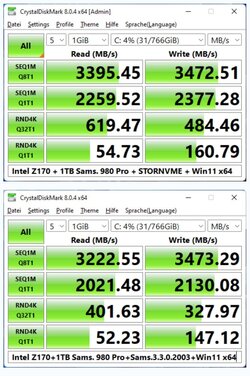
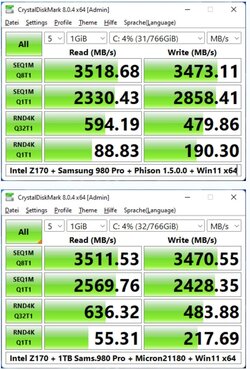
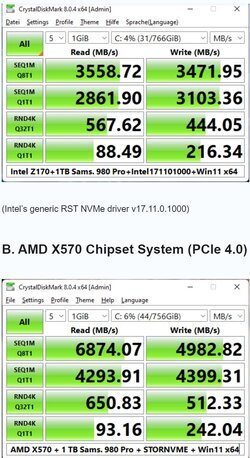
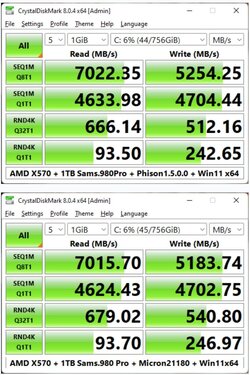
In my previous experience with Samsung SSDs, I found Microsoft storage driver performed slightly better than Samsung drivers, the difference was very small and unnoticeable, have a look at this link for more tests done by someone else.
 

My Computers My Computers

  • At a glance

    Windows 11 Home ((26100.2894)Intel Core Ultra 5 226VLPDDR5X16GBIntel Arc Graphics
    OS
    Windows 11 Home ((26100.2894)
    Computer type
    Laptop
    Manufacturer/Model
    Acer Swift SF14-51
    CPU
    Intel Core Ultra 5 226V
    Motherboard
    Icefresh_LNV
    Memory
    LPDDR5X16GB
    Graphics Card(s)
    Intel Arc Graphics
    Sound Card
    Realtek
    Monitor(s) Displays
    Samsung ATNA40YK11-0
    Screen Resolution
    2880x1800
    Hard Drives
    512GB NVMe Gen 4 M.2 SSD
    Keyboard
    Generic
    Browser
    Edge
    Antivirus
    Windows Defender
  • At a glance

    Windows 11Home(26120.3073)24H2i7-155hLPDDR5X 32GBIntel Arc Graphics
    Operating System
    Windows 11Home(26120.3073)24H2
    Computer type
    Laptop
    Manufacturer/Model
    Acer Swift SFG14-72
    CPU
    i7-155h
    Motherboard
    Coral_MTH
    Memory
    LPDDR5X 32GB
    Graphics card(s)
    Intel Arc Graphics
    Sound Card
    Realtek
    Monitor(s) Displays
    SamsungATNA40YK 11-0
    Screen Resolution
    2880x1800
    Hard Drives
    1TB NVMe Gen 4 M.2 SSD
    Browser
    Edge, Google Chrome
    Antivirus
    Windows Defender
In my previous experience with Samsung SSDs, I found Microsoft storage driver performed slightly better than Samsung drivers, the difference was very small and unnoticeable, have a look at this link for more tests done by someone else.
Thanks, but:
Riskware - Malware activity.png
 

Attachments

  • Riskware - Malware activity.png
    Riskware - Malware activity.png
    23 KB · Views: 2

My Computer My Computer

At a glance

Windows 11
OS
Windows 11
Computer type
PC/Desktop

Attachments

  • Screenshot 2022-11-20 111910.jpg
    Screenshot 2022-11-20 111910.jpg
    128 KB · Views: 7
  • Screenshot 2022-11-20 111935.jpg
    Screenshot 2022-11-20 111935.jpg
    130.1 KB · Views: 7
  • Screenshot 2022-11-20 112016.jpg
    Screenshot 2022-11-20 112016.jpg
    137.8 KB · Views: 6
  • Screenshot 2022-11-20 112048.jpg
    Screenshot 2022-11-20 112048.jpg
    124.6 KB · Views: 6

My Computers My Computers

  • At a glance

    Windows 11 Home ((26100.2894)Intel Core Ultra 5 226VLPDDR5X16GBIntel Arc Graphics
    OS
    Windows 11 Home ((26100.2894)
    Computer type
    Laptop
    Manufacturer/Model
    Acer Swift SF14-51
    CPU
    Intel Core Ultra 5 226V
    Motherboard
    Icefresh_LNV
    Memory
    LPDDR5X16GB
    Graphics Card(s)
    Intel Arc Graphics
    Sound Card
    Realtek
    Monitor(s) Displays
    Samsung ATNA40YK11-0
    Screen Resolution
    2880x1800
    Hard Drives
    512GB NVMe Gen 4 M.2 SSD
    Keyboard
    Generic
    Browser
    Edge
    Antivirus
    Windows Defender
  • At a glance

    Windows 11Home(26120.3073)24H2i7-155hLPDDR5X 32GBIntel Arc Graphics
    Operating System
    Windows 11Home(26120.3073)24H2
    Computer type
    Laptop
    Manufacturer/Model
    Acer Swift SFG14-72
    CPU
    i7-155h
    Motherboard
    Coral_MTH
    Memory
    LPDDR5X 32GB
    Graphics card(s)
    Intel Arc Graphics
    Sound Card
    Realtek
    Monitor(s) Displays
    SamsungATNA40YK 11-0
    Screen Resolution
    2880x1800
    Hard Drives
    1TB NVMe Gen 4 M.2 SSD
    Browser
    Edge, Google Chrome
    Antivirus
    Windows Defender
OK, I have attached few comparrison pictures for you from the link:
Hmm, interesting...

Here I attach my result:
CrystalDiskMark-SSD Crucial P5 Plus-Intel B660-MS Std NVMe-2022-11-20.png
It is OK? (SSD more than 33% capacity) - (all default)
 

My Computer My Computer

At a glance

Windows 11
OS
Windows 11
Computer type
PC/Desktop

Latest Support Threads

Back
Top Bottom