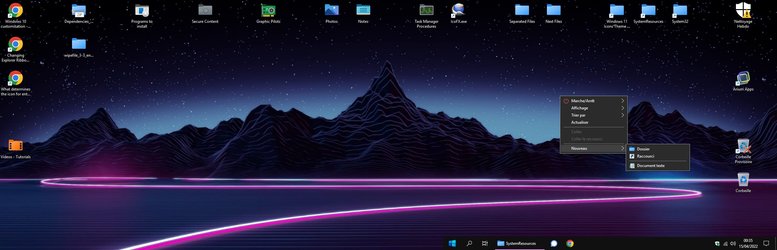
Custom Icons for Windows 11 Thread (Folders, Dropbox, Google Drive, Podcasts, NVME Drive, Steam, Adobe)


@TizianoMad Thank you. You and Mr4Mike4 have created something really awesome. This is how the default Windows 11 icons should've looked like. BTW, how do you correctly apply the "Thumbnail Fluent Blue - Short Front.ico"? I applied it to ID: #6 icon in CustomizerGod but it didn't have any effect. When I applied the "Thumbnail Fluent Blue - Front.ico" it worked fine.
It would be awesome if someone post a guide step by step and also post photos of Windows 11 with the blue icons
 

My Computer My Computer

At a glance

Windows 11 Pro x64
OS
Windows 11 Pro x64
Computer type
PC/Desktop
Fluent Blue Desktop.jpg
(open in a new tab & zoom in for better view)​

Hi Guys ! - @ParisBridge & @CostasChal


No problem, I'm used to change manually system icons.

You'll need Resource Hacker (portable) or a similar app.
Make sure "Files names extensions" is ticked in your Explorer display.

First you have to take ownership of the 2 DLL files containing the system icon set.

Since Windows 10 version 1903, these files are located in C:\Windows\SystemResources instead of C:\Windows\System32,
and have an extra ".mun" extension :
imageres.dll.mun
zipfldr.dll.mun


Taking Ownership can easily be done thanks to an extra context menu command (also in TenForums),
or else can be done manually :
  • Select file, right click and choose [Properties], in the "Security" tab, go to [Advanced].
  • At the top of the new window, to the right of "Owner: System", click on [Modify],
    then type "users" and press [Enter] key twice, click on [Apply] then [OK] .
  • In the "Properties / Security" window, click the [Edit] button .
  • In the permissions window, and in the names pane, select [Users (computer-name\Users)], then under "Authorize", check the "Total control" box, and finally confirm with [OK].
Owner permissions are now assigned to you.


> Make a copy of these 2 files in a new folder, that you could name "Fluent Blue DLL" on your Desktop.


Delete the ".mun" extension of your new copied DLL files.

Run "Resource Hacker" as Administrator.
Go to "File > Open..." ...one of the new copied DLL files.

Open "Icon Group"
Select the icons to replace. (right click > Replace Icon)

> imageres :
3 : Fluent Blue - Default Generic.ico
4 : Fluent Blue - Default Generic.ico
5 : Fluent Blue - Thumbnail. Back.ico
6 : Fluent Blue - Thumbnail. Front.ico
162 : Fluent Blue - With Content.ico
174 : Fluent Blue - Archive.ico

> zipfldr :
101 : Fluent Blue - Archive.ico
123 : Fluent Blue - Archive.ico

Attention : Some Icon Group #numbers may be slightly different, according to the version you are using.
Please make sure the icons to replace are the correct ones.

Save (Ctrl + S).
A "*name*old.dll" will automatically be created as well, in the same location.
Close "Resource Hacker".


> Now add the ".mun" extension to your new DLL files names.


Go back to C:\Windows\SystemResources to replace these 2 files. (or C:\Windows\System32 in Windows 10 v.1809)
Careful : The original files will keep running and you will not be able to delete them until the next reboot.
It is important not to close the 2 Explorer windows you are using until the copies are done.

First, rename the 2 original files, simply adding "2" or "Old" at the end, before ".dll.mun"
Now copy your 2 new files.

Restart your computer.

Your new icons are applied.

Go back to C:\Windows\SystemResources and delete the old "****2.dll.mun" files, if you like.
Or else, you can keep them as a backup.

Use the same last procedure to apply the old DLL files, if one day you want you original icons back.

 

My Computers My Computers

  • At a glance

    Windows 10 & 11 LTSC 3xBoot 1809 21H2 24H2Intel Core i5-2550K8 GBNVIDIA GeForce GTS 450
    OS
    Windows 10 & 11 LTSC 3xBoot 1809 21H2 24H2
    Computer type
    PC/Desktop
    Manufacturer/Model
    Self-made 2013
    CPU
    Intel Core i5-2550K
    Motherboard
    Intel DH67CL
    Memory
    8 GB
    Graphics Card(s)
    NVIDIA GeForce GTS 450
    Sound Card
    EmuPMX
    Monitor(s) Displays
    16/9 Samsung + 4/3 iiyama
    Screen Resolution
    1360 x 768 + 1024 x 768
    Hard Drives
    Main SSD: Samsung 250 Gb
    Secondary HDDs: Western Digital
    (Purple 4 Tb + Blue 2 Tb) x2
    + Green 0.5 Tb
    Case
    Antec
    Keyboard
    Dell
    Mouse
    Advance
    Browser
    Brave
    Antivirus
    Windows Security
    Other Info
    + Portable Cleanup Utilities :

    AdwCleaner
    ZHP Cleaner (+Diag)
    Kaspersky Virus Removal Tool
    CCleaner
  • At a glance

    Windows 11 Home
    Operating System
    Windows 11 Home
    Computer type
    Laptop
    Manufacturer/Model
    HP
    Other Info
    Using W11 OS on customers' computers more and more often, and sometimes on my mum's new laptop.
@TizianoMad Thank you. You and Mr4Mike4 have created something really awesome. This is how the default Windows 11 icons should've looked like. BTW, how do you correctly apply the "Thumbnail Fluent Blue - Short Front.ico"? I applied it to ID: #6 icon in CustomizerGod but it didn't have any effect. When I applied the "Thumbnail Fluent Blue - Front.ico" it worked fine.

This is maybe my fault because the file is too big.

The reason is that the IcoFX 1.6.4 app I'm working with, makes heavy files, with a 307 Kb standard with the 8 sizes, which is a lot ! (and useless).
It is 4 to 7 times the weight of a ordinary 8 size icon.

I just discovered that ResourceHacker makes completely normal weight ICO files.
The trick is to load it in a DLL icon group, and then extract it as an .ico file.
(No quality loss, just useless data dropped, pixel references all unmodified).

Tell me if this new lighter icon (52 Kb) has solved the problem in CustomizatorGod.
 

Attachments

My Computers My Computers

  • At a glance

    Windows 10 & 11 LTSC 3xBoot 1809 21H2 24H2Intel Core i5-2550K8 GBNVIDIA GeForce GTS 450
    OS
    Windows 10 & 11 LTSC 3xBoot 1809 21H2 24H2
    Computer type
    PC/Desktop
    Manufacturer/Model
    Self-made 2013
    CPU
    Intel Core i5-2550K
    Motherboard
    Intel DH67CL
    Memory
    8 GB
    Graphics Card(s)
    NVIDIA GeForce GTS 450
    Sound Card
    EmuPMX
    Monitor(s) Displays
    16/9 Samsung + 4/3 iiyama
    Screen Resolution
    1360 x 768 + 1024 x 768
    Hard Drives
    Main SSD: Samsung 250 Gb
    Secondary HDDs: Western Digital
    (Purple 4 Tb + Blue 2 Tb) x2
    + Green 0.5 Tb
    Case
    Antec
    Keyboard
    Dell
    Mouse
    Advance
    Browser
    Brave
    Antivirus
    Windows Security
    Other Info
    + Portable Cleanup Utilities :

    AdwCleaner
    ZHP Cleaner (+Diag)
    Kaspersky Virus Removal Tool
    CCleaner
  • At a glance

    Windows 11 Home
    Operating System
    Windows 11 Home
    Computer type
    Laptop
    Manufacturer/Model
    HP
    Other Info
    Using W11 OS on customers' computers more and more often, and sometimes on my mum's new laptop.
@CostasChal
/ Edit :

I apologize for giving some wrong information above, the trick is a bit different depending on the OS.

In fact, .mun files in SystemResource cannot be changed, but .dll files still can in System32.
(and Taking Ownership in context menu is no longer operational -with reg files from the forum- the version I personally have is ok).

In Windows 11 and late Windows 10 versions, the imageres.dll is supposed to be empty, BUT icons can still be integrated and will be displayed instead of the ones from SystemResource.
So "manually Taking Ownership" is working ok for replacing the main DLL files in System32, but as they have no icon yet, you will have to add the icons as ".res" files extracted from the 1rst .mun files you tweaked.

I admit all these manipulations are a bit complicated, and I think CustomisatorGod does the job in a much easier way,
but for the time being, the app works with only one W11 Build.
Unluckily, the ones using different versions will have to find another way out.
I don't know either if major updates could cancel the DLL file you replaced, so I think it's good to keep a copy near by.

In the past, I used iPack 2.2 or 7tsp for later OS to modify system icons. I guess it still works.
I don't think of other ways. Maybe users here have more ideas.
 

My Computers My Computers

  • At a glance

    Windows 10 & 11 LTSC 3xBoot 1809 21H2 24H2Intel Core i5-2550K8 GBNVIDIA GeForce GTS 450
    OS
    Windows 10 & 11 LTSC 3xBoot 1809 21H2 24H2
    Computer type
    PC/Desktop
    Manufacturer/Model
    Self-made 2013
    CPU
    Intel Core i5-2550K
    Motherboard
    Intel DH67CL
    Memory
    8 GB
    Graphics Card(s)
    NVIDIA GeForce GTS 450
    Sound Card
    EmuPMX
    Monitor(s) Displays
    16/9 Samsung + 4/3 iiyama
    Screen Resolution
    1360 x 768 + 1024 x 768
    Hard Drives
    Main SSD: Samsung 250 Gb
    Secondary HDDs: Western Digital
    (Purple 4 Tb + Blue 2 Tb) x2
    + Green 0.5 Tb
    Case
    Antec
    Keyboard
    Dell
    Mouse
    Advance
    Browser
    Brave
    Antivirus
    Windows Security
    Other Info
    + Portable Cleanup Utilities :

    AdwCleaner
    ZHP Cleaner (+Diag)
    Kaspersky Virus Removal Tool
    CCleaner
  • At a glance

    Windows 11 Home
    Operating System
    Windows 11 Home
    Computer type
    Laptop
    Manufacturer/Model
    HP
    Other Info
    Using W11 OS on customers' computers more and more often, and sometimes on my mum's new laptop.
A revision of the Peke Peke and Movie Collectorz icons I made previously and a few icons I've made recently for my own use.

PekePekeV2-Preview.pngMovieCollectorzV2-Preview-01.pngAudioBooksV1-Preview-01.pngCDResAudioV1-Preview-01.pngGardeningV1-Preview-01.pngHiResAudioV1-Preview-01.pngMP3AudioV1-Preview-01.png

All feedback welcome.
 

Attachments

My Computer My Computer

At a glance

Windows 10AMD Ryzen 7 3700XTeam Group Vulcan Z T-Force 16GBPowerColor Radeon RX 5600 XT
OS
Windows 10
Computer type
PC/Desktop
Manufacturer/Model
Custom
CPU
AMD Ryzen 7 3700X
Motherboard
Gigabyte B450 AORUS ELITE
Memory
Team Group Vulcan Z T-Force 16GB
Graphics Card(s)
PowerColor Radeon RX 5600 XT
Sound Card
Onboard
Monitor(s) Displays
MSI AG32CV
Screen Resolution
1920x1080 @ 165Hz
Hard Drives
Samsung 2TB 860 EVO SSD
Seagate BarraCuda 1TB 7200RPM
PSU
Kolink Classic Power 700W 80 Plus Bronze Power Supply
Case
Kolink Void
Cooling
AMD Wraith Prism + 3x Aerocool Duo 12 Pro & 1x Kolink Branded Fan
I have a modest request for a few Windows 11-style folder icons.

1) Icons for ZIP, RAR, 7Z and TAR.GZ archives (ideally different in color from regular folders).

2) Icon of a folder with a typewriter for storing articles (I'm a journalist). Ideally classic yellow color icon.

Would anyone be so kind? 🙂
 

My Computer My Computer

At a glance

Windows 11 ProIntel Core i7-9750H16 GB RAM (DDR4)nVidia GeForce GTX 1660 Ti (6 GB GDDR6)
OS
Windows 11 Pro
Computer type
Laptop
Manufacturer/Model
Dell G7 17 (7790-68886)
CPU
Intel Core i7-9750H
Memory
16 GB RAM (DDR4)
Graphics Card(s)
nVidia GeForce GTX 1660 Ti (6 GB GDDR6)
Antivirus
Microsoft Defender
I have a modest request for a few Windows 11-style folder icons.

1) Icons for ZIP, RAR, 7Z and TAR.GZ archives (ideally different in color from regular folders).

2) Icon of a folder with a typewriter for storing articles (I'm a journalist). Ideally classic yellow color icon.

Would anyone be so kind? 🙂
I'll have a go, should have something for you later today.
 

My Computer My Computer

At a glance

Windows 10AMD Ryzen 7 3700XTeam Group Vulcan Z T-Force 16GBPowerColor Radeon RX 5600 XT
OS
Windows 10
Computer type
PC/Desktop
Manufacturer/Model
Custom
CPU
AMD Ryzen 7 3700X
Motherboard
Gigabyte B450 AORUS ELITE
Memory
Team Group Vulcan Z T-Force 16GB
Graphics Card(s)
PowerColor Radeon RX 5600 XT
Sound Card
Onboard
Monitor(s) Displays
MSI AG32CV
Screen Resolution
1920x1080 @ 165Hz
Hard Drives
Samsung 2TB 860 EVO SSD
Seagate BarraCuda 1TB 7200RPM
PSU
Kolink Classic Power 700W 80 Plus Bronze Power Supply
Case
Kolink Void
Cooling
AMD Wraith Prism + 3x Aerocool Duo 12 Pro & 1x Kolink Branded Fan
I have a modest request for a few Windows 11-style folder icons.

1) Icons for ZIP, RAR, 7Z and TAR.GZ archives (ideally different in color from regular folders).

2) Icon of a folder with a typewriter for storing articles (I'm a journalist). Ideally classic yellow color icon.

Would anyone be so kind? 🙂

Here you go @jirkaxxl , hope you like them.

ZipFileV1-Preview-01.pngRarFileV1-Preview-01.png7ZipFileV1-Preview-01.pngTarFileV1-Preview-01.pngArticlesV1-Preview-01.png
 

Attachments

My Computer My Computer

At a glance

Windows 10AMD Ryzen 7 3700XTeam Group Vulcan Z T-Force 16GBPowerColor Radeon RX 5600 XT
OS
Windows 10
Computer type
PC/Desktop
Manufacturer/Model
Custom
CPU
AMD Ryzen 7 3700X
Motherboard
Gigabyte B450 AORUS ELITE
Memory
Team Group Vulcan Z T-Force 16GB
Graphics Card(s)
PowerColor Radeon RX 5600 XT
Sound Card
Onboard
Monitor(s) Displays
MSI AG32CV
Screen Resolution
1920x1080 @ 165Hz
Hard Drives
Samsung 2TB 860 EVO SSD
Seagate BarraCuda 1TB 7200RPM
PSU
Kolink Classic Power 700W 80 Plus Bronze Power Supply
Case
Kolink Void
Cooling
AMD Wraith Prism + 3x Aerocool Duo 12 Pro & 1x Kolink Branded Fan

Attachments

  • folder_plain.jpg-01.jpeg
    folder_plain.jpg-01.jpeg
    341.5 KB · Views: 75

My Computer My Computer

At a glance

Windows 11 ProIntel Core i7-9750H16 GB RAM (DDR4)nVidia GeForce GTX 1660 Ti (6 GB GDDR6)
OS
Windows 11 Pro
Computer type
Laptop
Manufacturer/Model
Dell G7 17 (7790-68886)
CPU
Intel Core i7-9750H
Memory
16 GB RAM (DDR4)
Graphics Card(s)
nVidia GeForce GTX 1660 Ti (6 GB GDDR6)
Antivirus
Microsoft Defender
Thank you, but I meant a rather simpler style of icons. As in this beautiful set:

Something more like this ? If so I can make those too.
 

Attachments

  • Test-01.png
    Test-01.png
    48.8 KB · Views: 23

My Computer My Computer

At a glance

Windows 10AMD Ryzen 7 3700XTeam Group Vulcan Z T-Force 16GBPowerColor Radeon RX 5600 XT
OS
Windows 10
Computer type
PC/Desktop
Manufacturer/Model
Custom
CPU
AMD Ryzen 7 3700X
Motherboard
Gigabyte B450 AORUS ELITE
Memory
Team Group Vulcan Z T-Force 16GB
Graphics Card(s)
PowerColor Radeon RX 5600 XT
Sound Card
Onboard
Monitor(s) Displays
MSI AG32CV
Screen Resolution
1920x1080 @ 165Hz
Hard Drives
Samsung 2TB 860 EVO SSD
Seagate BarraCuda 1TB 7200RPM
PSU
Kolink Classic Power 700W 80 Plus Bronze Power Supply
Case
Kolink Void
Cooling
AMD Wraith Prism + 3x Aerocool Duo 12 Pro & 1x Kolink Branded Fan

My Computer My Computer

At a glance

Windows 11 ProIntel Core i7-9750H16 GB RAM (DDR4)nVidia GeForce GTX 1660 Ti (6 GB GDDR6)
OS
Windows 11 Pro
Computer type
Laptop
Manufacturer/Model
Dell G7 17 (7790-68886)
CPU
Intel Core i7-9750H
Memory
16 GB RAM (DDR4)
Graphics Card(s)
nVidia GeForce GTX 1660 Ti (6 GB GDDR6)
Antivirus
Microsoft Defender
Hi there !

I know there are quite a lot of icons by now in this thread, you have to take a bit of time to check them all out (!)
There are already few "Archive" folders, simple & designed ones.

Archive Folders.PNG
PeaZip Folders.PNG


If you are a 7zip user, remember you can directly apply different folder types to archive ones, with 7-zip installed.
Mr4Mike4 made "Generic Yellow & Fluent Blue" set (you probably spot not far earlier),
or else, in addition here's another set "in the style of the PeaZip ones", all in Generic Yellow. (Attached File)
It was part of a box set of special apps, the author was unfortunately not mentioned, though he's maybe the one of PeaZip (?)
You just have to copy and replace the DLL file in C:\Program Files\7-Zip (for the latest 21.7 version only).

If you like, you can also switch the buttons in app with ones looking like Windows 11 ribbon.
Though, they are Bitmap icons to replace in 7zFM.exe
I extracted them as ".res" files with ResourceHacker, because Bitmap files didn't display properly.

7Zip Buttons.PNG

As I'm not sure I'm allowed to share the tweaked 7zFM "EXE" file, I'm just sharing the icons alone.


Not bad @Papa Spiritus.

My feedback & little tips:
Make Icons/Logos on folders a bit smaller (it doesn't matter too much leaving less space on horizontal edges).
Back folder color should match - top & bottom.
Make front top right border gradient if you can.

More Tips & Tuto still in progress for small sizes.
Will arrive soon, coming with a 1st set from system original & custom System folders.
I apologize for the delay, I had to edit the lot 2 or 3 times readjusting things I gradually learned.


See you guys
 

Attachments

Last edited:

My Computers My Computers

  • At a glance

    Windows 10 & 11 LTSC 3xBoot 1809 21H2 24H2Intel Core i5-2550K8 GBNVIDIA GeForce GTS 450
    OS
    Windows 10 & 11 LTSC 3xBoot 1809 21H2 24H2
    Computer type
    PC/Desktop
    Manufacturer/Model
    Self-made 2013
    CPU
    Intel Core i5-2550K
    Motherboard
    Intel DH67CL
    Memory
    8 GB
    Graphics Card(s)
    NVIDIA GeForce GTS 450
    Sound Card
    EmuPMX
    Monitor(s) Displays
    16/9 Samsung + 4/3 iiyama
    Screen Resolution
    1360 x 768 + 1024 x 768
    Hard Drives
    Main SSD: Samsung 250 Gb
    Secondary HDDs: Western Digital
    (Purple 4 Tb + Blue 2 Tb) x2
    + Green 0.5 Tb
    Case
    Antec
    Keyboard
    Dell
    Mouse
    Advance
    Browser
    Brave
    Antivirus
    Windows Security
    Other Info
    + Portable Cleanup Utilities :

    AdwCleaner
    ZHP Cleaner (+Diag)
    Kaspersky Virus Removal Tool
    CCleaner
  • At a glance

    Windows 11 Home
    Operating System
    Windows 11 Home
    Computer type
    Laptop
    Manufacturer/Model
    HP
    Other Info
    Using W11 OS on customers' computers more and more often, and sometimes on my mum's new laptop.
Not bad @Papa Spiritus.

My feedback & little tips:
Make Icons/Logos on folders a bit smaller (it doesn't matter too much leaving less space on horizontal edges).
Back folder color should match - top & bottom.
Make front top right border gradient if you can.

Hey @TizianoMad, thanks for the feedback.

Maybe something like this is more what you mean ?

IconTest-01.png

Perhaps this thread is not the best place to discuss this, I don't want to clutter the thread if mods would prefer such discussion elsewhere.
 

My Computer My Computer

At a glance

Windows 10AMD Ryzen 7 3700XTeam Group Vulcan Z T-Force 16GBPowerColor Radeon RX 5600 XT
OS
Windows 10
Computer type
PC/Desktop
Manufacturer/Model
Custom
CPU
AMD Ryzen 7 3700X
Motherboard
Gigabyte B450 AORUS ELITE
Memory
Team Group Vulcan Z T-Force 16GB
Graphics Card(s)
PowerColor Radeon RX 5600 XT
Sound Card
Onboard
Monitor(s) Displays
MSI AG32CV
Screen Resolution
1920x1080 @ 165Hz
Hard Drives
Samsung 2TB 860 EVO SSD
Seagate BarraCuda 1TB 7200RPM
PSU
Kolink Classic Power 700W 80 Plus Bronze Power Supply
Case
Kolink Void
Cooling
AMD Wraith Prism + 3x Aerocool Duo 12 Pro & 1x Kolink Branded Fan

My Computer My Computer

At a glance

Windows 11 ProIntel Core i7-9750H16 GB RAM (DDR4)nVidia GeForce GTX 1660 Ti (6 GB GDDR6)
OS
Windows 11 Pro
Computer type
Laptop
Manufacturer/Model
Dell G7 17 (7790-68886)
CPU
Intel Core i7-9750H
Memory
16 GB RAM (DDR4)
Graphics Card(s)
nVidia GeForce GTX 1660 Ti (6 GB GDDR6)
Antivirus
Microsoft Defender
Hey @TizianoMad, thanks for the feedback.

Maybe something like this is more what you mean ?

View attachment 27373

Perhaps this thread is not the best place to discuss this, I don't want to clutter the thread if mods would prefer such discussion elsewhere.
Not bad. This will include on my PC's new icons if I want to upgrade to 11. or even I will install a latest RP of 10.
 

My Computers My Computers

  • At a glance

    Windows 11 HomeCore i5-12450HX20GB DDR5-4800iGPU + RTX 3050 Mobile (6GB)
    OS
    Windows 11 Home
    Computer type
    Laptop
    Manufacturer/Model
    Lenovo
    CPU
    Core i5-12450HX
    Memory
    20GB DDR5-4800
    Graphics Card(s)
    iGPU + RTX 3050 Mobile (6GB)
    Sound Card
    Realtek
    Monitor(s) Displays
    the built-in laptop screen, and a generic monitor
    Screen Resolution
    1080p * 2
    Hard Drives
    GIGABYTE NVMe SSD 256GB (GP-GSM2NE3256GNTD)
    Micron NVMe SSD 512GB (MTFDKCD512QFM-1BDIAABLA)
    Browser
    Firefox
    Antivirus
    WD
  • At a glance

    Windows 10 ProCore i3-21004GB DDR3-2133iGPU
    Operating System
    Windows 10 Pro
    Computer type
    PC/Desktop
    Manufacturer/Model
    Dell
    CPU
    Core i3-2100
    Memory
    4GB DDR3-2133
    Graphics card(s)
    iGPU
    Screen Resolution
    1080p
    Antivirus
    WD
Tell me if this new lighter icon (52 Kb) has solved the problem in CustomizatorGod.
Yes, it has! Everything is starting to look really nice now.
When you get some free time, please try to make a game folder icon.
Just the regular fluent blue folder but with a controller image on top.
 

Attachments

  • 1214.jpg
    1214.jpg
    2.2 KB · Views: 16

My Computer My Computer

At a glance

Windows 11
OS
Windows 11
.../ When you get some free time, please try to make a game folder icon. /...
Actually, I was expecting some new requests from you concerning Fluent Blue folders for its theme, that I like a lot too.
So I asked Mr4Mike4 if he was willing to provide the whole (originally yellow) system folders + @davidvkimball 's yellow folders (games, links, settings, software... /I also tweaked in small sizes/ and of course would be mentioned in the credits). This way, he could provide the complete theme on his DeviantArt's page - (and why not also here, as his work is part of this thread now).

You both sent me a message at the same time.
This is his answer : "Yes, I'm sure, I can take it."

That's really cool from him, as he knows there are nearly 40 folders to work on !
I'm now preparing all the icons to send him, and will update you as soon as the theme's ready.
 

My Computers My Computers

  • At a glance

    Windows 10 & 11 LTSC 3xBoot 1809 21H2 24H2Intel Core i5-2550K8 GBNVIDIA GeForce GTS 450
    OS
    Windows 10 & 11 LTSC 3xBoot 1809 21H2 24H2
    Computer type
    PC/Desktop
    Manufacturer/Model
    Self-made 2013
    CPU
    Intel Core i5-2550K
    Motherboard
    Intel DH67CL
    Memory
    8 GB
    Graphics Card(s)
    NVIDIA GeForce GTS 450
    Sound Card
    EmuPMX
    Monitor(s) Displays
    16/9 Samsung + 4/3 iiyama
    Screen Resolution
    1360 x 768 + 1024 x 768
    Hard Drives
    Main SSD: Samsung 250 Gb
    Secondary HDDs: Western Digital
    (Purple 4 Tb + Blue 2 Tb) x2
    + Green 0.5 Tb
    Case
    Antec
    Keyboard
    Dell
    Mouse
    Advance
    Browser
    Brave
    Antivirus
    Windows Security
    Other Info
    + Portable Cleanup Utilities :

    AdwCleaner
    ZHP Cleaner (+Diag)
    Kaspersky Virus Removal Tool
    CCleaner
  • At a glance

    Windows 11 Home
    Operating System
    Windows 11 Home
    Computer type
    Laptop
    Manufacturer/Model
    HP
    Other Info
    Using W11 OS on customers' computers more and more often, and sometimes on my mum's new laptop.
Hey,

Is it somehow possible to extract this Windows Update icon to set it as an icon for a shortcut?

Schermafbeelding 2022-04-29 001438.png
 

My Computer My Computer

At a glance

Windows Pro 11 23H2 Build 22631.3737i5-12600KTranscend 16GBZotac 4070Ti Trinity
OS
Windows Pro 11 23H2 Build 22631.3737
Computer type
PC/Desktop
Manufacturer/Model
Custom built
CPU
i5-12600K
Motherboard
Gigabyte Z690 UD DDR4
Memory
Transcend 16GB
Graphics Card(s)
Zotac 4070Ti Trinity
Sound Card
Internal: Realtek® ALC892 codec
Monitor(s) Displays
Asus VZ239-H
Screen Resolution
1080p
Hard Drives
Kingston 500GB nVME
Case
Fractal Focus 2 RGB White
Cooling
Xilence LQ240PRO Watercooling
Browser
Edge Chromium

Attachments

My Computers My Computers

  • At a glance

    Windows 10 & 11 LTSC 3xBoot 1809 21H2 24H2Intel Core i5-2550K8 GBNVIDIA GeForce GTS 450
    OS
    Windows 10 & 11 LTSC 3xBoot 1809 21H2 24H2
    Computer type
    PC/Desktop
    Manufacturer/Model
    Self-made 2013
    CPU
    Intel Core i5-2550K
    Motherboard
    Intel DH67CL
    Memory
    8 GB
    Graphics Card(s)
    NVIDIA GeForce GTS 450
    Sound Card
    EmuPMX
    Monitor(s) Displays
    16/9 Samsung + 4/3 iiyama
    Screen Resolution
    1360 x 768 + 1024 x 768
    Hard Drives
    Main SSD: Samsung 250 Gb
    Secondary HDDs: Western Digital
    (Purple 4 Tb + Blue 2 Tb) x2
    + Green 0.5 Tb
    Case
    Antec
    Keyboard
    Dell
    Mouse
    Advance
    Browser
    Brave
    Antivirus
    Windows Security
    Other Info
    + Portable Cleanup Utilities :

    AdwCleaner
    ZHP Cleaner (+Diag)
    Kaspersky Virus Removal Tool
    CCleaner
  • At a glance

    Windows 11 Home
    Operating System
    Windows 11 Home
    Computer type
    Laptop
    Manufacturer/Model
    HP
    Other Info
    Using W11 OS on customers' computers more and more often, and sometimes on my mum's new laptop.
Hi,
Try this URI command Shortcut, and tell me if it works.

It works, thanks. But I specifically wanted the icon shown in my post. Not sure if it's possible to extract that somehow.
 

My Computer My Computer

At a glance

Windows Pro 11 23H2 Build 22631.3737i5-12600KTranscend 16GBZotac 4070Ti Trinity
OS
Windows Pro 11 23H2 Build 22631.3737
Computer type
PC/Desktop
Manufacturer/Model
Custom built
CPU
i5-12600K
Motherboard
Gigabyte Z690 UD DDR4
Memory
Transcend 16GB
Graphics Card(s)
Zotac 4070Ti Trinity
Sound Card
Internal: Realtek® ALC892 codec
Monitor(s) Displays
Asus VZ239-H
Screen Resolution
1080p
Hard Drives
Kingston 500GB nVME
Case
Fractal Focus 2 RGB White
Cooling
Xilence LQ240PRO Watercooling
Browser
Edge Chromium

Latest Support Threads

Back
Top Bottom