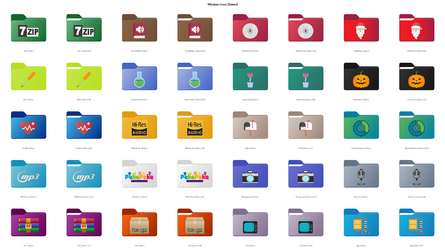
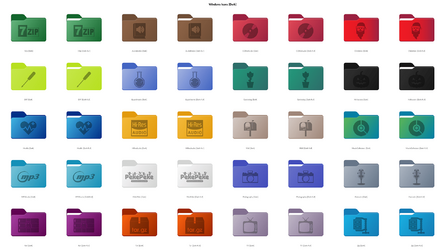
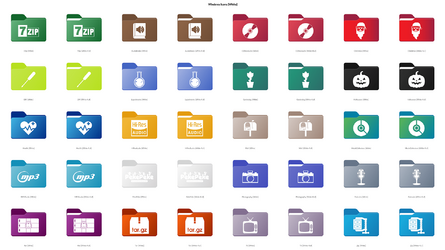
Custom Icons for Windows 11 Thread (Folders, Dropbox, Google Drive, Podcasts, NVME Drive, Steam, Adobe)


Cliché de w11-glass.jpg


Cliché de yellow.jpg


My Computer My Computer

At a glance

Linux Fedora, Windows 11I516 GB
OS
Linux Fedora, Windows 11
Computer type
PC/Desktop
Manufacturer/Model
Dell
CPU
I5
Motherboard
Dell
Memory
16 GB
Screen Resolution
1080p
Hard Drives
2x1 To SSD

My Computer My Computer

At a glance

Windows 11ci78GBIntel HD Graphics
OS
Windows 11
Computer type
Laptop
Manufacturer/Model
Toshiba
CPU
ci7
Memory
8GB
Graphics Card(s)
Intel HD Graphics
Screen Resolution
1080p
Hard Drives
500GB
Internet Speed
10MBPS
Browser
Chrome
@Lucas North

YOU THE MAN!!!!!!
you nailed it.. Superb combination...

Will I be getting these in 16, 20 24 32, 40, 48, 64 & 256 sizes.

Really sorry If I am asking too much from you.
@Lucas North ,
I am not able to download these Iconsets, could you please repost it here.

thanks in advance.
 

My Computer My Computer

At a glance

Windows 11
OS
Windows 11
Computer type
PC/Desktop
Hi all,

I've made a few more icons and re-made the ones I've posted here previously with more to come hopefully.

So far it's 20 icons in 3 different styles, colour, white and dark.

They're available on my dropbox, feedback and requests welcome.

Colour.pngDark.pngWhite.png
 

My Computer My Computer

At a glance

Windows 10AMD Ryzen 7 3700XTeam Group Vulcan Z T-Force 16GBPowerColor Radeon RX 5600 XT
OS
Windows 10
Computer type
PC/Desktop
Manufacturer/Model
Custom
CPU
AMD Ryzen 7 3700X
Motherboard
Gigabyte B450 AORUS ELITE
Memory
Team Group Vulcan Z T-Force 16GB
Graphics Card(s)
PowerColor Radeon RX 5600 XT
Sound Card
Onboard
Monitor(s) Displays
MSI AG32CV
Screen Resolution
1920x1080 @ 165Hz
Hard Drives
Samsung 2TB 860 EVO SSD
Seagate BarraCuda 1TB 7200RPM
PSU
Kolink Classic Power 700W 80 Plus Bronze Power Supply
Case
Kolink Void
Cooling
AMD Wraith Prism + 3x Aerocool Duo 12 Pro & 1x Kolink Branded Fan
y estoy creando estos iconos
 

Attachments

  • Icono_1494.png
    Icono_1494.png
    6.8 KB · Views: 31
  • Icono_956.png
    Icono_956.png
    8.2 KB · Views: 24
  • Icono_948.png
    Icono_948.png
    4.8 KB · Views: 24
  • Icono_940.png
    Icono_940.png
    6.9 KB · Views: 24
  • Icono_908.png
    Icono_908.png
    5.8 KB · Views: 27

My Computer My Computer

At a glance

windows 11
OS
windows 11
Windows 11 Ultimate Icon Pack - May 2022 Update
  • renamed
    • folder_plain
      • Default (with files 01).ico -> Default (with files) 01.ico
      • Default (with files 02).ico -> Default (with files) 02.ico
    • folder_colored
      • Grey.ico -> Gray.ico
      • Pictures.ico -> Pictures 01.ico
      • Screenshots.ico -> Screenshots 01.ico
      • Status (Closed).ico -> Status (Closed) 01.ico
  • new & replaced icons
    • folder_colored
      • 1652390896692.png
    • folder_plain
      • 1652390951985.png
    • folder11
      • 1652390969585.png
    • shell
      • 1652390987157.png
 

My Computer My Computer

At a glance

Windows 11 (Beta)Intel Core i5-8250U @1.60GHz [Kaby Lake-U/Y 1...8.00GB Single-Channel Unknown @ 1197MHz (17-1...Intel UHD Graphics 620 (Dell), 4095MB NVIDIA ...
OS
Windows 11 (Beta)
Computer type
Laptop
Manufacturer/Model
Dell Inspiron 15-7572
CPU
Intel Core i5-8250U @1.60GHz [Kaby Lake-U/Y 14nm]
Motherboard
Dell Inc. 04GC61 (U3E1)
Memory
8.00GB Single-Channel Unknown @ 1197MHz (17-17-17-39)
Graphics Card(s)
Intel UHD Graphics 620 (Dell), 4095MB NVIDIA GeForce MX150 (Dell)
Sound Card
Realtek Audio with Waves MaxxAudioPro
Monitor(s) Displays
Built-in Laptop Monitor (60hz)
Screen Resolution
1920x1080
Hard Drives
931GB Seagate ST1000LM035-1RK172 (SATA)
119GB SK hynix SC311 SATA 128GB (SATA (SSD))
Cooling
Dyazo Laptop Riser Stand & Superfast Cooling Pad with Adjustable Height & 6 Mute Fans for Silent Cooling | for Laptop & Notebooks Upto 15.6 inches, Black (Q 26)
Keyboard
Dell Wired Keyboard KB216p
Mouse
Logitech Wired Mouse M100r
Browser
Microsoft Edge (Dev)
Antivirus
Windows Defender

My Computer My Computer

At a glance

Windows 11 (Beta)Intel Core i5-8250U @1.60GHz [Kaby Lake-U/Y 1...8.00GB Single-Channel Unknown @ 1197MHz (17-1...Intel UHD Graphics 620 (Dell), 4095MB NVIDIA ...
OS
Windows 11 (Beta)
Computer type
Laptop
Manufacturer/Model
Dell Inspiron 15-7572
CPU
Intel Core i5-8250U @1.60GHz [Kaby Lake-U/Y 14nm]
Motherboard
Dell Inc. 04GC61 (U3E1)
Memory
8.00GB Single-Channel Unknown @ 1197MHz (17-17-17-39)
Graphics Card(s)
Intel UHD Graphics 620 (Dell), 4095MB NVIDIA GeForce MX150 (Dell)
Sound Card
Realtek Audio with Waves MaxxAudioPro
Monitor(s) Displays
Built-in Laptop Monitor (60hz)
Screen Resolution
1920x1080
Hard Drives
931GB Seagate ST1000LM035-1RK172 (SATA)
119GB SK hynix SC311 SATA 128GB (SATA (SSD))
Cooling
Dyazo Laptop Riser Stand & Superfast Cooling Pad with Adjustable Height & 6 Mute Fans for Silent Cooling | for Laptop & Notebooks Upto 15.6 inches, Black (Q 26)
Keyboard
Dell Wired Keyboard KB216p
Mouse
Logitech Wired Mouse M100r
Browser
Microsoft Edge (Dev)
Antivirus
Windows Defender
Actually, I was expecting some new requests from you concerning Fluent Blue folders for its theme, that I like a lot too.
So I asked Mr4Mike4 if he was willing to provide the whole (originally yellow) system folders + @davidvkimball 's yellow folders (games, links, settings, software... /I also tweaked in small sizes/ and of course would be mentioned in the credits). This way, he could provide the complete theme on his DeviantArt's page - (and why not also here, as his work is part of this thread now).

You both sent me a message at the same time.
This is his answer : "Yes, I'm sure, I can take it."

That's really cool from him, as he knows there are nearly 40 folders to work on !
I'm now preparing all the icons to send him, and will update you as soon as the theme's ready.
Thank you. You and Mr4Mike4 have done a really excellent job. It looks really good and goes well with Windows 11. I'm looking forward to the whole Fluent Blue theme.
 

My Computer My Computer

At a glance

Windows 11
OS
Windows 11

My Computer My Computer

At a glance

Windows 11ci78GBIntel HD Graphics
OS
Windows 11
Computer type
Laptop
Manufacturer/Model
Toshiba
CPU
ci7
Memory
8GB
Graphics Card(s)
Intel HD Graphics
Screen Resolution
1080p
Hard Drives
500GB
Internet Speed
10MBPS
Browser
Chrome
Hey guys, a question regarding the standard Windows 11 folder icons.

In the Personal folder, is anyone else just seeing the standard empty folder icons for Contacts, Saved Games, Favorites, Links and Search when the view is set to "Normal" size?

When viewing them as Large size, the mentioned folders show fitting icons on their folders.
 

My Computer My Computer

At a glance

Windows Pro 11 23H2 Build 22631.3737i5-12600KTranscend 16GBZotac 4070Ti Trinity
OS
Windows Pro 11 23H2 Build 22631.3737
Computer type
PC/Desktop
Manufacturer/Model
Custom built
CPU
i5-12600K
Motherboard
Gigabyte Z690 UD DDR4
Memory
Transcend 16GB
Graphics Card(s)
Zotac 4070Ti Trinity
Sound Card
Internal: Realtek® ALC892 codec
Monitor(s) Displays
Asus VZ239-H
Screen Resolution
1080p
Hard Drives
Kingston 500GB nVME
Case
Fractal Focus 2 RGB White
Cooling
Xilence LQ240PRO Watercooling
Browser
Edge Chromium
In the Personal folder, is anyone else just seeing the standard empty folder icons for Contacts, Saved Games, Favorites, Links and Search when the view is set to "Normal" size?


Hi @JohnnyGui,


In fact, only the biggest size of a User folder shows up, this is how Microsoft chose to display them, and I admit it is a bit disappointing.
Obviously, the reason is because very small logos may not appear very clear, but I had a try and I think it looks Ok.

As you can see, I also reworked the 8 "Shell" folders, in order to use them as Secondary or Backup folders, and not get confused with the original ones when you browse, transfer or copy their content.


Small Folders Rework.PNG
(open in new tab for better view)


This is the first part of the Small sizes rework from the thread's collection I've been on for a while.
I finished this set not very long ago (which was also used for the coming soon "Fluent Blue" theme), so there you are.


System Folder Icons :

I also included the set in a DLL file, you can place in C:\Windows\System32 (next to imageres.dll, for example).
If you intend to use these icons for your main System Drive, this method is the best.
In case you make some changes (such as renaming), the applied icon will stay unchanged (which is not the case when you apply an ICO file).


Portable Folder Icons :

If you need to use the icons on other drives (secondary or external), I recommend making the icon portable.
  • Place the icon inside the folder you want to customize.
  • In that folder, create a TXT file you will name "desktop.txt", and copy this :
    Code:
    [.ShellClassInfo]
    IconFile=folder.ico
    IconIndex=0
  • Replace /folder.ico with the name of the ICO file (or else rename the ICO file "folder.ico").
  • Close and save the file.
  • Rename the ".txt" extension as ".ini"
  • Then, in the properties, tick Read Only and Hidden (also to do in the icon file properties).

A DLL library can also be portable.
If it is located in a different folder, the path must respected :
..\ for parent folder, and \FolderName\ before the Icon File (\FileName.ico or .dll)

Path example, going back 2 parent folders and then into 2 folders (line #2) :
IconResource=..\..\Backup\Icons\FileName.dll

If the icon is in a DLL library, specify its number (line #3) :
IconIndex=6


Icons may not always display straight away.

If ever you have any issues, follow this weird method :
Go to : Properties > Customize (tab) > Change Icon... > Restore Defaults > Cancel.


User Folder Icons
Small Sizes Rework
Original icons by Microsoft & @davidvkimball
 
Last edited:

My Computers My Computers

  • At a glance

    Windows 10 & 11 LTSC 3xBoot 1809 21H2 24H2Intel Core i5-2550K8 GBNVIDIA GeForce GTS 450
    OS
    Windows 10 & 11 LTSC 3xBoot 1809 21H2 24H2
    Computer type
    PC/Desktop
    Manufacturer/Model
    Self-made 2013
    CPU
    Intel Core i5-2550K
    Motherboard
    Intel DH67CL
    Memory
    8 GB
    Graphics Card(s)
    NVIDIA GeForce GTS 450
    Sound Card
    EmuPMX
    Monitor(s) Displays
    16/9 Samsung + 4/3 iiyama
    Screen Resolution
    1360 x 768 + 1024 x 768
    Hard Drives
    Main SSD: Samsung 250 Gb
    Secondary HDDs: Western Digital
    (Purple 4 Tb + Blue 2 Tb) x2
    + Green 0.5 Tb
    Case
    Antec
    Keyboard
    Dell
    Mouse
    Advance
    Browser
    Brave
    Antivirus
    Windows Security
    Other Info
    + Portable Cleanup Utilities :

    AdwCleaner
    ZHP Cleaner (+Diag)
    Kaspersky Virus Removal Tool
    CCleaner
  • At a glance

    Windows 11 Home
    Operating System
    Windows 11 Home
    Computer type
    Laptop
    Manufacturer/Model
    HP
    Other Info
    Using W11 OS on customers' computers more and more often, and sometimes on my mum's new laptop.
- Direct download -
(in case the Mega link breaks one day).

User Folder Icons
 

Attachments

My Computers My Computers

  • At a glance

    Windows 10 & 11 LTSC 3xBoot 1809 21H2 24H2Intel Core i5-2550K8 GBNVIDIA GeForce GTS 450
    OS
    Windows 10 & 11 LTSC 3xBoot 1809 21H2 24H2
    Computer type
    PC/Desktop
    Manufacturer/Model
    Self-made 2013
    CPU
    Intel Core i5-2550K
    Motherboard
    Intel DH67CL
    Memory
    8 GB
    Graphics Card(s)
    NVIDIA GeForce GTS 450
    Sound Card
    EmuPMX
    Monitor(s) Displays
    16/9 Samsung + 4/3 iiyama
    Screen Resolution
    1360 x 768 + 1024 x 768
    Hard Drives
    Main SSD: Samsung 250 Gb
    Secondary HDDs: Western Digital
    (Purple 4 Tb + Blue 2 Tb) x2
    + Green 0.5 Tb
    Case
    Antec
    Keyboard
    Dell
    Mouse
    Advance
    Browser
    Brave
    Antivirus
    Windows Security
    Other Info
    + Portable Cleanup Utilities :

    AdwCleaner
    ZHP Cleaner (+Diag)
    Kaspersky Virus Removal Tool
    CCleaner
  • At a glance

    Windows 11 Home
    Operating System
    Windows 11 Home
    Computer type
    Laptop
    Manufacturer/Model
    HP
    Other Info
    Using W11 OS on customers' computers more and more often, and sometimes on my mum's new laptop.
I'm Joining In Now... So I Turned Some Icons Into Fluent Ones, Right? Here's The Picture.
1653260162621.png

I Don't Know What This "Storage Green-Display Kind Of Thingy" Is? But Sorry For The Small Colored Edges On Some Icons, I Created This With Paint 3D & Colorized It With Paint.NET. This Is Still Based Off From A Fluent UI Monochrome Icons Font, Windows 10 Icons, And Apple For The iPod Classic Device. Although, The File Sizes Like 16 Bits, Etc. Was A Little Goofed Up, And It Looks Kind Of Bad But It's Good. :)
 

Attachments

My Computer My Computer

At a glance

Windows 11Intel Core i5-8250U8.00 GBIntel(R) UHD Graphics 620
OS
Windows 11
Computer type
Laptop
Manufacturer/Model
Lenovo YOGA 730-15IKB
CPU
Intel Core i5-8250U
Motherboard
Lenovo LNVNB161216
Memory
8.00 GB
Graphics Card(s)
Intel(R) UHD Graphics 620
Sound Card
Realtek ALC236 @ Intel Sunrise Point-LP PCH - High Definition Audio Controller, Intel Kaby Lake HDMI @ Intel Sunrise Point-LP PCH - High Definition Audio Controller [C1] PCI[C1] PCI,
Monitor(s) Displays
CMN N156HCE-EN1
Screen Resolution
1920x1080
Hard Drives
G-TECH ArmorATD SCSI Disk Device
HFS256GD9TNG-62A0A
PSU
OEM Define 1
Case
Unknown Case
Cooling
Intel Sunrise Point-LP PCH - Thermal Management Controller [C1]
Keyboard
Standard PS/2 Keyboard
Mouse
HID-compliant mouse
Internet Speed
292500 kbps
Browser
Microsoft Edge, Google Chrome, Etc.
Antivirus
Trend Micro Internet Security
Other Info
Computer Type: ACPI x64-based PC
Computer Name: DESKTOP-JGTBO6N
Printer: Canon MG5300 series Printer (Copy 1)
Printer: Canon MG5300 series Printer WS
Printer: Canon MG5300 series Printer
DMI BIOS: Lenovo BIOS 7KCN33WW(V1.14)
Total Bluescreens: 4
Secure Boot
Trusted Platform Module 2.0
Hi @JohnnyGui,


In fact, only the biggest size of a User folder shows up, this is how Microsoft chose to display them, and I admit it is a bit disappointing.
Obviously, the reason is because very small logos may not appear very clear, but I had a try and I think it looks Ok.

As you can see, I also reworked the 8 "Shell" folders, in order to use them as Secondary or Backup folders, and not get confused with the original ones when you browse, transfer or copy their content.


View attachment 29756
(open in new tab for better view)


This is the first part of the Small sizes rework from the thread's collection I've been on for a while.
I finished this set not very long ago (which was also used for the coming soon "Fluent Blue" theme), so there you are.


System Folder Icons :

I also included the set in a DLL file, you can place in C:\Windows\System32 (next to imageres.dll, for example).
If you intend to use these icons for your main System Drive, this method is the best.
In case you make some changes (such as renaming), the applied icon will stay unchanged (which is not the case when you apply an ICO file).


Portable Folder Icons :

If you need to use the icons on other drives (secondary or external), I recommend making the icon portable.
  • Place the icon inside the folder you want to customize.
  • In that folder, create a TXT file you will name "desktop.txt", and copy this :
    Code:
    [.ShellClassInfo]
    IconFile=folder.ico
    IconIndex=0
  • Replace /folder.ico with the name of the ICO file (or else rename the ICO file "folder.ico").
  • Close and save the file.
  • Rename the ".txt" extension as ".ini"
  • Then, in the properties, tick Read Only and Hidden (also to do in the icon file properties).

A DLL library can also be portable.
If it is located in a different folder, the path must respected :
..\ for parent folder, and \FolderName\ before the Icon File (\FileName.ico or .dll)

Path example, going back 2 parent folders and then into 2 folders (line #2) :
IconResource=..\..\Backup\Icons\FileName.dll

If the icon is in a DLL library, specify its number (line #3) :
IconIndex=6


Icons may not always display straight away.

If ever you have any issues, follow this weird method :
Go to : Properties > Customize (tab) > Change Icon... > Restore Defaults > Cancel.


User Folder Icons
Small Sizes Rework
Original icons by Microsoft & @davidvkimball
Wow, this is awesome. Thanks a lot! Hopefully MS will notice these icons look perfectly fine even on Normal or Small size.

For some reason, there is no "Change icon" in the Properties menu of the mentioned folders.
The personal folder on the Desktop doesn't even have a Properties option in the right-click menu to change its icon.

How can I otherwise change their icons using the .dll file?
 

My Computer My Computer

At a glance

Windows Pro 11 23H2 Build 22631.3737i5-12600KTranscend 16GBZotac 4070Ti Trinity
OS
Windows Pro 11 23H2 Build 22631.3737
Computer type
PC/Desktop
Manufacturer/Model
Custom built
CPU
i5-12600K
Motherboard
Gigabyte Z690 UD DDR4
Memory
Transcend 16GB
Graphics Card(s)
Zotac 4070Ti Trinity
Sound Card
Internal: Realtek® ALC892 codec
Monitor(s) Displays
Asus VZ239-H
Screen Resolution
1080p
Hard Drives
Kingston 500GB nVME
Case
Fractal Focus 2 RGB White
Cooling
Xilence LQ240PRO Watercooling
Browser
Edge Chromium
Wow, this is awesome. Thanks a lot! Hopefully MS will notice these icons look perfectly fine even on Normal or Small size.

For some reason, there is no "Change icon" in the Properties menu of the mentioned folders.
The personal folder on the Desktop doesn't even have a Properties option in the right-click menu to change its icon.

How can I otherwise change their icons using the .dll file?
Thank you.

As I have a few sets finished, and now that I start feeling better, you encouraged me to move on sharing them.
Applying an icon is pretty basic, that's why I didn't make a tutorial, and it's been explained about 40 pages ago (!)

So the way to do it is not to select the icon file first but directly the folder you want to customize.
(note that folder icons are not "folders" but ".ico" files)

Go to : Properties > Customize (tab) > Change Icon... > Browse > 
> in the explorer windows, Select the .ico or .dll file where you placed it > Apply.
 

My Computers My Computers

  • At a glance

    Windows 10 & 11 LTSC 3xBoot 1809 21H2 24H2Intel Core i5-2550K8 GBNVIDIA GeForce GTS 450
    OS
    Windows 10 & 11 LTSC 3xBoot 1809 21H2 24H2
    Computer type
    PC/Desktop
    Manufacturer/Model
    Self-made 2013
    CPU
    Intel Core i5-2550K
    Motherboard
    Intel DH67CL
    Memory
    8 GB
    Graphics Card(s)
    NVIDIA GeForce GTS 450
    Sound Card
    EmuPMX
    Monitor(s) Displays
    16/9 Samsung + 4/3 iiyama
    Screen Resolution
    1360 x 768 + 1024 x 768
    Hard Drives
    Main SSD: Samsung 250 Gb
    Secondary HDDs: Western Digital
    (Purple 4 Tb + Blue 2 Tb) x2
    + Green 0.5 Tb
    Case
    Antec
    Keyboard
    Dell
    Mouse
    Advance
    Browser
    Brave
    Antivirus
    Windows Security
    Other Info
    + Portable Cleanup Utilities :

    AdwCleaner
    ZHP Cleaner (+Diag)
    Kaspersky Virus Removal Tool
    CCleaner
  • At a glance

    Windows 11 Home
    Operating System
    Windows 11 Home
    Computer type
    Laptop
    Manufacturer/Model
    HP
    Other Info
    Using W11 OS on customers' computers more and more often, and sometimes on my mum's new laptop.
Hi all,

I've made another 20 icons in 3 different styles, colour, white and dark.

They're available on my dropbox, with others I've made previously. As always, feedback and requests welcome.

New-Colour.png New-Dark.png New-White.png
 
Last edited:

My Computer My Computer

At a glance

Windows 10AMD Ryzen 7 3700XTeam Group Vulcan Z T-Force 16GBPowerColor Radeon RX 5600 XT
OS
Windows 10
Computer type
PC/Desktop
Manufacturer/Model
Custom
CPU
AMD Ryzen 7 3700X
Motherboard
Gigabyte B450 AORUS ELITE
Memory
Team Group Vulcan Z T-Force 16GB
Graphics Card(s)
PowerColor Radeon RX 5600 XT
Sound Card
Onboard
Monitor(s) Displays
MSI AG32CV
Screen Resolution
1920x1080 @ 165Hz
Hard Drives
Samsung 2TB 860 EVO SSD
Seagate BarraCuda 1TB 7200RPM
PSU
Kolink Classic Power 700W 80 Plus Bronze Power Supply
Case
Kolink Void
Cooling
AMD Wraith Prism + 3x Aerocool Duo 12 Pro & 1x Kolink Branded Fan
.../Windows Update icon for Shortcut use.

  
schermafbeelding-2022-04-29-001438-png.27883
  >>>  Windows Update Orb.png

Hi Johnny,

Here's something a bit closer of what you are looking for.
I imagine you would prefer the original transparent one :
RWIrMa
That PNG comes from Microsoft.com but the quality isn't great, like my skills, so I didn't manage to make it clean enough.

This orb icon is actually a reversed one from shell32, probably synchronisation, but as you can see it's petty similar. Slightly thicker lines ensures a nice display in small views.

I'm not sure dynamic notifications (such as the green tick down the icon) can be displayed on desktop or explorer shortcuts, like widgets.
In a way, the recycle bin is dynamic. But to be honest, WU shows you green for a whole week till you haven't made a check up, and does notifie when any updates are taking place.

Remember to use this shortcut, and in the properties, apply the icon.
 

Attachments

My Computers My Computers

  • At a glance

    Windows 10 & 11 LTSC 3xBoot 1809 21H2 24H2Intel Core i5-2550K8 GBNVIDIA GeForce GTS 450
    OS
    Windows 10 & 11 LTSC 3xBoot 1809 21H2 24H2
    Computer type
    PC/Desktop
    Manufacturer/Model
    Self-made 2013
    CPU
    Intel Core i5-2550K
    Motherboard
    Intel DH67CL
    Memory
    8 GB
    Graphics Card(s)
    NVIDIA GeForce GTS 450
    Sound Card
    EmuPMX
    Monitor(s) Displays
    16/9 Samsung + 4/3 iiyama
    Screen Resolution
    1360 x 768 + 1024 x 768
    Hard Drives
    Main SSD: Samsung 250 Gb
    Secondary HDDs: Western Digital
    (Purple 4 Tb + Blue 2 Tb) x2
    + Green 0.5 Tb
    Case
    Antec
    Keyboard
    Dell
    Mouse
    Advance
    Browser
    Brave
    Antivirus
    Windows Security
    Other Info
    + Portable Cleanup Utilities :

    AdwCleaner
    ZHP Cleaner (+Diag)
    Kaspersky Virus Removal Tool
    CCleaner
  • At a glance

    Windows 11 Home
    Operating System
    Windows 11 Home
    Computer type
    Laptop
    Manufacturer/Model
    HP
    Other Info
    Using W11 OS on customers' computers more and more often, and sometimes on my mum's new laptop.
Quick question,

I'm working on more icons and just wondering how many people would actually want the dark/white versions as some designs are a little more difficult to make variations of and so may require different images for those versions. I've posted an example below.

Not sure if anyone is even using my icons but I didn't want to stop making the non-colour versions if people wanted them.

WIP Icon-01.png
 

My Computer My Computer

At a glance

Windows 10AMD Ryzen 7 3700XTeam Group Vulcan Z T-Force 16GBPowerColor Radeon RX 5600 XT
OS
Windows 10
Computer type
PC/Desktop
Manufacturer/Model
Custom
CPU
AMD Ryzen 7 3700X
Motherboard
Gigabyte B450 AORUS ELITE
Memory
Team Group Vulcan Z T-Force 16GB
Graphics Card(s)
PowerColor Radeon RX 5600 XT
Sound Card
Onboard
Monitor(s) Displays
MSI AG32CV
Screen Resolution
1920x1080 @ 165Hz
Hard Drives
Samsung 2TB 860 EVO SSD
Seagate BarraCuda 1TB 7200RPM
PSU
Kolink Classic Power 700W 80 Plus Bronze Power Supply
Case
Kolink Void
Cooling
AMD Wraith Prism + 3x Aerocool Duo 12 Pro & 1x Kolink Branded Fan
  
schermafbeelding-2022-04-29-001438-png.27883
  >>>  View attachment 30430

Hi Johnny,

Here's something a bit closer of what you are looking for.
I imagine you would prefer the original transparent one :
RWIrMa
That PNG comes from Microsoft.com but the quality isn't great, like my skills, so I didn't manage to make it clean enough.

This orb icon is actually a reversed one from shell32, probably synchronisation, but as you can see it's petty similar. Slightly thicker lines ensures a nice display in small views.

I'm not sure dynamic notifications (such as the green tick down the icon) can be displayed on desktop or explorer shortcuts, like widgets.
In a way, the recycle bin is dynamic. But to be honest, WU shows you green for a whole week till you haven't made a check up, and does notifie when any updates are taking place.

Remember to use this shortcut, and in the properties, apply the icon.

Thanks a lot for your trouble doing this! I am indeed using the orb icon atm in the Start Menu. Now knowing that it's actually a sync icon, my OCD now kicked in to find a better fitting icon :LOL:

The arrows of the transparant one from the website is a bit too thin to my taste. It's no problem if the icon isn't dynamic. If you could somehow clean the one with the green tick to make it transparent, I'd be very grateful. I noticed the light grayish background of that icon has the same hue at each pixel, maybe that'd make it easier?
 

My Computer My Computer

At a glance

Windows Pro 11 23H2 Build 22631.3737i5-12600KTranscend 16GBZotac 4070Ti Trinity
OS
Windows Pro 11 23H2 Build 22631.3737
Computer type
PC/Desktop
Manufacturer/Model
Custom built
CPU
i5-12600K
Motherboard
Gigabyte Z690 UD DDR4
Memory
Transcend 16GB
Graphics Card(s)
Zotac 4070Ti Trinity
Sound Card
Internal: Realtek® ALC892 codec
Monitor(s) Displays
Asus VZ239-H
Screen Resolution
1080p
Hard Drives
Kingston 500GB nVME
Case
Fractal Focus 2 RGB White
Cooling
Xilence LQ240PRO Watercooling
Browser
Edge Chromium

Latest Support Threads

Back
Top Bottom