Custom Icons for Windows 11 Thread (Folders, Dropbox, Google Drive, Podcasts, NVME Drive, Steam, Adobe)


My Computer

System One

  • OS
    Windows 11
    Computer type
    PC/Desktop
    Manufacturer/Model
    MM-Vision build
    CPU
    AMD Ryzen 7 3700X 8-Core Processor
    Motherboard
    ASUS Prime B450-Plus
    Memory
    16
    Graphics Card(s)
    Radeon RX 5500 XT
    Sound Card
    Onboard
    Monitor(s) Displays
    2 x AOC 27"
    Screen Resolution
    1920x1080 144mhz
    Hard Drives
    1TB - Kingston NVME M.2
    1TB - WDC WD10EZEZ-21M2NA0
    1TB - WDC WD10EZRX-00A8LB0
    2TB - WDC WD20EARX-00PASB0
    4TB - Hitachi HDS5C4040ALE630
    PSU
    Corsair
    Case
    Vision
    Cooling
    Be Quiet!
    Keyboard
    Logitech G213
    Mouse
    Logitech G502 Hero
    Internet Speed
    1000/1000 MB/S
    Browser
    Brave/Chrome/FireFox
    Antivirus
    Windows Defender

My Computers

System One System Two

  • OS
    Windows 11
    Computer type
    PC/Desktop
    CPU
    Intel Core i7-8700
    Motherboard
    LGA1151 Z370 ATX
    Memory
    Kingston HyperX Fury DDR4 8GB (x4 for 32GB)
    Graphics Card(s)
    NVIDIA - GeForce RTX 4080
    Sound Card
    NVIDIA High Definition Audio
    Monitor(s) Displays
    Monitor 1: ASUS VG248QE 24” (1920x1080 144Hz 1ms), Monitor 2: Dell P2715Q 27” (3840x2160 60Hz), Monitor 3: Dell U2412M (1920x1200 60Hz)
    Screen Resolution
    1920 x 1080, 3840 x 2160, and 1920 x 1200 respesctively.
    Hard Drives
    NVME: HP EX920 M.2 1TB
    SSD: Samsung 680 EVO 4TB
    HDD 1: Hitachi HGST HUH728080ALE600 8TB
    HDD 2: Hitachi HGST HUH728080ALE600 8TB
    PSU
    CORSAIR RM1000x (1000W)
    Case
    Cooler Master HAF 912
    Keyboard
    Ultimate Hacking Keybord 60 V2
    Mouse
    Logitech MX Vertical
    Internet Speed
    1,200 Mbps download, 40 Mbps upload
    Browser
    Mozilla Firefox
    Antivirus
    MalwareBytes
    Other Info
    View full equipment here: http://davidvkimball.com/setup
  • Operating System
    Windows 11 Pro
    Computer type
    Tablet
    Manufacturer/Model
    Microsoft Surface Pro 3
    CPU
    Intel Core i5
    Memory
    4GB
    Monitor(s) Displays
    10.8” ClearType Full HD Plus Display
    Screen Resolution
    1920 x 1280
    Hard Drives
    128GB SSD
    Browser
    Firefox
    Antivirus
    MalwareBytes
    Other Info
    Originally shipped with Windows 8.1 Pro in 2014, upgraded to 10, and now Windows 11.

My Computer

System One

  • OS
    Windows 11
    Computer type
    PC/Desktop
    Manufacturer/Model
    MM-Vision build
    CPU
    AMD Ryzen 7 3700X 8-Core Processor
    Motherboard
    ASUS Prime B450-Plus
    Memory
    16
    Graphics Card(s)
    Radeon RX 5500 XT
    Sound Card
    Onboard
    Monitor(s) Displays
    2 x AOC 27"
    Screen Resolution
    1920x1080 144mhz
    Hard Drives
    1TB - Kingston NVME M.2
    1TB - WDC WD10EZEZ-21M2NA0
    1TB - WDC WD10EZRX-00A8LB0
    2TB - WDC WD20EARX-00PASB0
    4TB - Hitachi HDS5C4040ALE630
    PSU
    Corsair
    Case
    Vision
    Cooling
    Be Quiet!
    Keyboard
    Logitech G213
    Mouse
    Logitech G502 Hero
    Internet Speed
    1000/1000 MB/S
    Browser
    Brave/Chrome/FireFox
    Antivirus
    Windows Defender

David, most suitable would probably be the USB icon you used above or something similar on a folder color of your choice.
That for me would probably signify 'Portable Programs' more than anything.
I'll leave it up to you though.

Many thanks Sir for once again undertaking all these requests. 🙏🏼
This is helpful direction, thanks!

Try this:

USB.png
 

Attachments

My Computers

System One System Two

  • OS
    Windows 11
    Computer type
    PC/Desktop
    CPU
    Intel Core i7-8700
    Motherboard
    LGA1151 Z370 ATX
    Memory
    Kingston HyperX Fury DDR4 8GB (x4 for 32GB)
    Graphics Card(s)
    NVIDIA - GeForce RTX 4080
    Sound Card
    NVIDIA High Definition Audio
    Monitor(s) Displays
    Monitor 1: ASUS VG248QE 24” (1920x1080 144Hz 1ms), Monitor 2: Dell P2715Q 27” (3840x2160 60Hz), Monitor 3: Dell U2412M (1920x1200 60Hz)
    Screen Resolution
    1920 x 1080, 3840 x 2160, and 1920 x 1200 respesctively.
    Hard Drives
    NVME: HP EX920 M.2 1TB
    SSD: Samsung 680 EVO 4TB
    HDD 1: Hitachi HGST HUH728080ALE600 8TB
    HDD 2: Hitachi HGST HUH728080ALE600 8TB
    PSU
    CORSAIR RM1000x (1000W)
    Case
    Cooler Master HAF 912
    Keyboard
    Ultimate Hacking Keybord 60 V2
    Mouse
    Logitech MX Vertical
    Internet Speed
    1,200 Mbps download, 40 Mbps upload
    Browser
    Mozilla Firefox
    Antivirus
    MalwareBytes
    Other Info
    View full equipment here: http://davidvkimball.com/setup
  • Operating System
    Windows 11 Pro
    Computer type
    Tablet
    Manufacturer/Model
    Microsoft Surface Pro 3
    CPU
    Intel Core i5
    Memory
    4GB
    Monitor(s) Displays
    10.8” ClearType Full HD Plus Display
    Screen Resolution
    1920 x 1280
    Hard Drives
    128GB SSD
    Browser
    Firefox
    Antivirus
    MalwareBytes
    Other Info
    Originally shipped with Windows 8.1 Pro in 2014, upgraded to 10, and now Windows 11.
Thanks, man. Do you have these in 512x512 png? I'm trying to make my own icons, but when I blow them up from 256, they get a bit blurry.
 

My Computer

System One

  • OS
    Windows 11 Pro 21H2 22000.51
Thanks, man. Do you have these in 512x512 png? I'm trying to make my own icons, but when I blow them up from 256, they get a bit blurry.
Nope, these match the sizing conventions of the Windows 11 iconset, so the max resolution is 256. Sorry!
 

My Computers

System One System Two

  • OS
    Windows 11
    Computer type
    PC/Desktop
    CPU
    Intel Core i7-8700
    Motherboard
    LGA1151 Z370 ATX
    Memory
    Kingston HyperX Fury DDR4 8GB (x4 for 32GB)
    Graphics Card(s)
    NVIDIA - GeForce RTX 4080
    Sound Card
    NVIDIA High Definition Audio
    Monitor(s) Displays
    Monitor 1: ASUS VG248QE 24” (1920x1080 144Hz 1ms), Monitor 2: Dell P2715Q 27” (3840x2160 60Hz), Monitor 3: Dell U2412M (1920x1200 60Hz)
    Screen Resolution
    1920 x 1080, 3840 x 2160, and 1920 x 1200 respesctively.
    Hard Drives
    NVME: HP EX920 M.2 1TB
    SSD: Samsung 680 EVO 4TB
    HDD 1: Hitachi HGST HUH728080ALE600 8TB
    HDD 2: Hitachi HGST HUH728080ALE600 8TB
    PSU
    CORSAIR RM1000x (1000W)
    Case
    Cooler Master HAF 912
    Keyboard
    Ultimate Hacking Keybord 60 V2
    Mouse
    Logitech MX Vertical
    Internet Speed
    1,200 Mbps download, 40 Mbps upload
    Browser
    Mozilla Firefox
    Antivirus
    MalwareBytes
    Other Info
    View full equipment here: http://davidvkimball.com/setup
  • Operating System
    Windows 11 Pro
    Computer type
    Tablet
    Manufacturer/Model
    Microsoft Surface Pro 3
    CPU
    Intel Core i5
    Memory
    4GB
    Monitor(s) Displays
    10.8” ClearType Full HD Plus Display
    Screen Resolution
    1920 x 1280
    Hard Drives
    128GB SSD
    Browser
    Firefox
    Antivirus
    MalwareBytes
    Other Info
    Originally shipped with Windows 8.1 Pro in 2014, upgraded to 10, and now Windows 11.
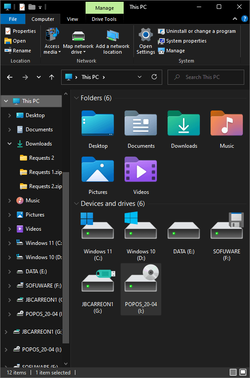
This is now my This PC:
(Win11 Leaked Build [currently updating to 22000.71])
1626836233496.png
 
Last edited:

My Computers

System One System Two

  • OS
    Windows 11 Home
    Computer type
    Laptop
    Manufacturer/Model
    Lenovo
    CPU
    Core i5-12450HX
    Memory
    20GB DDR5-4800
    Graphics Card(s)
    iGPU + RTX 3050 Mobile (6GB)
    Sound Card
    Realtek
    Monitor(s) Displays
    the built-in laptop screen, and a generic monitor
    Screen Resolution
    1080p * 2
    Hard Drives
    GIGABYTE NVMe SSD 256GB (GP-GSM2NE3256GNTD)
    Micron NVMe SSD 512GB (MTFDKCD512QFM-1BDIAABLA)
    Browser
    Firefox
    Antivirus
    WD
  • Operating System
    Windows 10 Pro
    Computer type
    PC/Desktop
    Manufacturer/Model
    Dell
    CPU
    Core i3-2100
    Memory
    4GB DDR3-2133
    Graphics card(s)
    iGPU
    Screen Resolution
    1080p
    Antivirus
    WD
David, one thing:
If I dual-booting Windows 10 and 11 and I have Windows 10 icon on Windows 11, what is the equivalent in Windows 10? (Windows 10 drive icon with an Windows 11 logo on it)
 

My Computers

System One System Two

  • OS
    Windows 11 Home
    Computer type
    Laptop
    Manufacturer/Model
    Lenovo
    CPU
    Core i5-12450HX
    Memory
    20GB DDR5-4800
    Graphics Card(s)
    iGPU + RTX 3050 Mobile (6GB)
    Sound Card
    Realtek
    Monitor(s) Displays
    the built-in laptop screen, and a generic monitor
    Screen Resolution
    1080p * 2
    Hard Drives
    GIGABYTE NVMe SSD 256GB (GP-GSM2NE3256GNTD)
    Micron NVMe SSD 512GB (MTFDKCD512QFM-1BDIAABLA)
    Browser
    Firefox
    Antivirus
    WD
  • Operating System
    Windows 10 Pro
    Computer type
    PC/Desktop
    Manufacturer/Model
    Dell
    CPU
    Core i3-2100
    Memory
    4GB DDR3-2133
    Graphics card(s)
    iGPU
    Screen Resolution
    1080p
    Antivirus
    WD
David, one thing:
If I dual-booting Windows 10 and 11 and I have Windows 10 icon on Windows 11, what is the equivalent in Windows 10? (Windows 10 drive icon with an Windows 11 logo on it)
I'm sticking to just making Windows 11 icons for now. :) But conceptually you could just do a swap. If I ever make a tutorial you could take a stab at it.
 

My Computers

System One System Two

  • OS
    Windows 11
    Computer type
    PC/Desktop
    CPU
    Intel Core i7-8700
    Motherboard
    LGA1151 Z370 ATX
    Memory
    Kingston HyperX Fury DDR4 8GB (x4 for 32GB)
    Graphics Card(s)
    NVIDIA - GeForce RTX 4080
    Sound Card
    NVIDIA High Definition Audio
    Monitor(s) Displays
    Monitor 1: ASUS VG248QE 24” (1920x1080 144Hz 1ms), Monitor 2: Dell P2715Q 27” (3840x2160 60Hz), Monitor 3: Dell U2412M (1920x1200 60Hz)
    Screen Resolution
    1920 x 1080, 3840 x 2160, and 1920 x 1200 respesctively.
    Hard Drives
    NVME: HP EX920 M.2 1TB
    SSD: Samsung 680 EVO 4TB
    HDD 1: Hitachi HGST HUH728080ALE600 8TB
    HDD 2: Hitachi HGST HUH728080ALE600 8TB
    PSU
    CORSAIR RM1000x (1000W)
    Case
    Cooler Master HAF 912
    Keyboard
    Ultimate Hacking Keybord 60 V2
    Mouse
    Logitech MX Vertical
    Internet Speed
    1,200 Mbps download, 40 Mbps upload
    Browser
    Mozilla Firefox
    Antivirus
    MalwareBytes
    Other Info
    View full equipment here: http://davidvkimball.com/setup
  • Operating System
    Windows 11 Pro
    Computer type
    Tablet
    Manufacturer/Model
    Microsoft Surface Pro 3
    CPU
    Intel Core i5
    Memory
    4GB
    Monitor(s) Displays
    10.8” ClearType Full HD Plus Display
    Screen Resolution
    1920 x 1280
    Hard Drives
    128GB SSD
    Browser
    Firefox
    Antivirus
    MalwareBytes
    Other Info
    Originally shipped with Windows 8.1 Pro in 2014, upgraded to 10, and now Windows 11.
I'm sticking to just making Windows 11 icons for now. :) But conceptually you could just do a swap. If I ever make a tutorial you could take a stab at it.
Thanks. I'm joining my Windows 10 to the latest Beta build so it will be equivalent on Windows 11 icons.
 

My Computers

System One System Two

  • OS
    Windows 11 Home
    Computer type
    Laptop
    Manufacturer/Model
    Lenovo
    CPU
    Core i5-12450HX
    Memory
    20GB DDR5-4800
    Graphics Card(s)
    iGPU + RTX 3050 Mobile (6GB)
    Sound Card
    Realtek
    Monitor(s) Displays
    the built-in laptop screen, and a generic monitor
    Screen Resolution
    1080p * 2
    Hard Drives
    GIGABYTE NVMe SSD 256GB (GP-GSM2NE3256GNTD)
    Micron NVMe SSD 512GB (MTFDKCD512QFM-1BDIAABLA)
    Browser
    Firefox
    Antivirus
    WD
  • Operating System
    Windows 10 Pro
    Computer type
    PC/Desktop
    Manufacturer/Model
    Dell
    CPU
    Core i3-2100
    Memory
    4GB DDR3-2133
    Graphics card(s)
    iGPU
    Screen Resolution
    1080p
    Antivirus
    WD
Made two new drive icons.

USB Drive Icon OS.png

Linux Drive Icon.png
 

Attachments

My Computers

System One System Two

  • OS
    Windows 11
    Computer type
    PC/Desktop
    CPU
    Intel Core i7-8700
    Motherboard
    LGA1151 Z370 ATX
    Memory
    Kingston HyperX Fury DDR4 8GB (x4 for 32GB)
    Graphics Card(s)
    NVIDIA - GeForce RTX 4080
    Sound Card
    NVIDIA High Definition Audio
    Monitor(s) Displays
    Monitor 1: ASUS VG248QE 24” (1920x1080 144Hz 1ms), Monitor 2: Dell P2715Q 27” (3840x2160 60Hz), Monitor 3: Dell U2412M (1920x1200 60Hz)
    Screen Resolution
    1920 x 1080, 3840 x 2160, and 1920 x 1200 respesctively.
    Hard Drives
    NVME: HP EX920 M.2 1TB
    SSD: Samsung 680 EVO 4TB
    HDD 1: Hitachi HGST HUH728080ALE600 8TB
    HDD 2: Hitachi HGST HUH728080ALE600 8TB
    PSU
    CORSAIR RM1000x (1000W)
    Case
    Cooler Master HAF 912
    Keyboard
    Ultimate Hacking Keybord 60 V2
    Mouse
    Logitech MX Vertical
    Internet Speed
    1,200 Mbps download, 40 Mbps upload
    Browser
    Mozilla Firefox
    Antivirus
    MalwareBytes
    Other Info
    View full equipment here: http://davidvkimball.com/setup
  • Operating System
    Windows 11 Pro
    Computer type
    Tablet
    Manufacturer/Model
    Microsoft Surface Pro 3
    CPU
    Intel Core i5
    Memory
    4GB
    Monitor(s) Displays
    10.8” ClearType Full HD Plus Display
    Screen Resolution
    1920 x 1280
    Hard Drives
    128GB SSD
    Browser
    Firefox
    Antivirus
    MalwareBytes
    Other Info
    Originally shipped with Windows 8.1 Pro in 2014, upgraded to 10, and now Windows 11.
If anyone knows how to change these icons, please help.
1.jpg
 

My Computer

System One

  • OS
    Microsoft Windows 11 Home
    Computer type
    PC/Desktop
    Manufacturer/Model
    MSI MS-7D98
    CPU
    Intel Core i5-13490F
    Motherboard
    MSI B760 GAMING PLUS WIFI
    Memory
    2 x 16 Patriot Memory (PDP Systems) PSD516G560081 6400MT (32-37-37-74); 1.35V)
    Graphics Card(s)
    GIGABYTE GeForce RTX 4070 WINDFORCE OC 12G (GV-N4070WF3OC-12GD)
    Sound Card
    Bluetooth Аудио
    Monitor(s) Displays
    INNOCN 15K1F
    Screen Resolution
    1920 x 1080
    Hard Drives
    WD_BLACK SN770 250GB
    KINGSTON SNV2S1000G (ELFK0S.6)
    PSU
    Thermaltake Toughpower GF3 1000W
    Case
    CG560 - DeepCool
    Cooling
    ID-COOLING SE-224-XTS / 2 x 140Mm Fan - rear and top; 3 x 120Mm - front
    Keyboard
    Corsair K70 RGB TKL
    Mouse
    Corsair KATAR PRO XT
    Internet Speed
    100 Mbps
    Browser
    Firefox
    Antivirus
    Microsoft Defender Antivirus
    Other Info
    https://www.userbenchmark.com/UserRun/66553205
Hi. I'm looking for Windows 10 drive icon with an Windows 11 logo on it. I'm stuck on Release Preview Insider type. I can't change to Beta.
 

My Computers

System One System Two

  • OS
    Windows 11 Home
    Computer type
    Laptop
    Manufacturer/Model
    Lenovo
    CPU
    Core i5-12450HX
    Memory
    20GB DDR5-4800
    Graphics Card(s)
    iGPU + RTX 3050 Mobile (6GB)
    Sound Card
    Realtek
    Monitor(s) Displays
    the built-in laptop screen, and a generic monitor
    Screen Resolution
    1080p * 2
    Hard Drives
    GIGABYTE NVMe SSD 256GB (GP-GSM2NE3256GNTD)
    Micron NVMe SSD 512GB (MTFDKCD512QFM-1BDIAABLA)
    Browser
    Firefox
    Antivirus
    WD
  • Operating System
    Windows 10 Pro
    Computer type
    PC/Desktop
    Manufacturer/Model
    Dell
    CPU
    Core i3-2100
    Memory
    4GB DDR3-2133
    Graphics card(s)
    iGPU
    Screen Resolution
    1080p
    Antivirus
    WD
And here's a link to all of the default Windows 11 icons as of 7/7/2021.

Is that possible to provide the original Win 11 dll file download link (imageres.dll, not the PNGs)?

I have not installed it (11) and I am googling the web but there is just some modified icons for 11 and some res packages to change the whole Win 10 theme.
 

My Computer

System One

  • OS
    Win 11 Enterprise
    Computer type
    Laptop
    CPU
    i7
    Hard Drives
    SSD

My Computers

System One System Two

  • OS
    Windows 11
    Computer type
    PC/Desktop
    CPU
    Intel Core i7-8700
    Motherboard
    LGA1151 Z370 ATX
    Memory
    Kingston HyperX Fury DDR4 8GB (x4 for 32GB)
    Graphics Card(s)
    NVIDIA - GeForce RTX 4080
    Sound Card
    NVIDIA High Definition Audio
    Monitor(s) Displays
    Monitor 1: ASUS VG248QE 24” (1920x1080 144Hz 1ms), Monitor 2: Dell P2715Q 27” (3840x2160 60Hz), Monitor 3: Dell U2412M (1920x1200 60Hz)
    Screen Resolution
    1920 x 1080, 3840 x 2160, and 1920 x 1200 respesctively.
    Hard Drives
    NVME: HP EX920 M.2 1TB
    SSD: Samsung 680 EVO 4TB
    HDD 1: Hitachi HGST HUH728080ALE600 8TB
    HDD 2: Hitachi HGST HUH728080ALE600 8TB
    PSU
    CORSAIR RM1000x (1000W)
    Case
    Cooler Master HAF 912
    Keyboard
    Ultimate Hacking Keybord 60 V2
    Mouse
    Logitech MX Vertical
    Internet Speed
    1,200 Mbps download, 40 Mbps upload
    Browser
    Mozilla Firefox
    Antivirus
    MalwareBytes
    Other Info
    View full equipment here: http://davidvkimball.com/setup
  • Operating System
    Windows 11 Pro
    Computer type
    Tablet
    Manufacturer/Model
    Microsoft Surface Pro 3
    CPU
    Intel Core i5
    Memory
    4GB
    Monitor(s) Displays
    10.8” ClearType Full HD Plus Display
    Screen Resolution
    1920 x 1280
    Hard Drives
    128GB SSD
    Browser
    Firefox
    Antivirus
    MalwareBytes
    Other Info
    Originally shipped with Windows 8.1 Pro in 2014, upgraded to 10, and now Windows 11.
Is that possible to provide the original Win 11 dll file download link (imageres.dll, not the PNGs)?

I have not installed it (11) and I am googling the web but there is just some modified icons for 11 and some res packages to change the whole Win 10 theme.
This post might be helpful for you - if you can tell me which files to nab, I can grab them from Windows 11 and upload them for you.


My Computers

System One System Two

  • OS
    Windows 11
    Computer type
    PC/Desktop
    CPU
    Intel Core i7-8700
    Motherboard
    LGA1151 Z370 ATX
    Memory
    Kingston HyperX Fury DDR4 8GB (x4 for 32GB)
    Graphics Card(s)
    NVIDIA - GeForce RTX 4080
    Sound Card
    NVIDIA High Definition Audio
    Monitor(s) Displays
    Monitor 1: ASUS VG248QE 24” (1920x1080 144Hz 1ms), Monitor 2: Dell P2715Q 27” (3840x2160 60Hz), Monitor 3: Dell U2412M (1920x1200 60Hz)
    Screen Resolution
    1920 x 1080, 3840 x 2160, and 1920 x 1200 respesctively.
    Hard Drives
    NVME: HP EX920 M.2 1TB
    SSD: Samsung 680 EVO 4TB
    HDD 1: Hitachi HGST HUH728080ALE600 8TB
    HDD 2: Hitachi HGST HUH728080ALE600 8TB
    PSU
    CORSAIR RM1000x (1000W)
    Case
    Cooler Master HAF 912
    Keyboard
    Ultimate Hacking Keybord 60 V2
    Mouse
    Logitech MX Vertical
    Internet Speed
    1,200 Mbps download, 40 Mbps upload
    Browser
    Mozilla Firefox
    Antivirus
    MalwareBytes
    Other Info
    View full equipment here: http://davidvkimball.com/setup
  • Operating System
    Windows 11 Pro
    Computer type
    Tablet
    Manufacturer/Model
    Microsoft Surface Pro 3
    CPU
    Intel Core i5
    Memory
    4GB
    Monitor(s) Displays
    10.8” ClearType Full HD Plus Display
    Screen Resolution
    1920 x 1280
    Hard Drives
    128GB SSD
    Browser
    Firefox
    Antivirus
    MalwareBytes
    Other Info
    Originally shipped with Windows 8.1 Pro in 2014, upgraded to 10, and now Windows 11.
This post might be helpful for you - if you can tell me which files to nab, I can grab them from Windows 11 and upload them for you.

Thanks... It was helpful. I found it.
 

My Computer

System One

  • OS
    Win 11 Enterprise
    Computer type
    Laptop
    CPU
    i7
    Hard Drives
    SSD

My Computer

System One

  • OS
    Microsoft Windows 11 Home
    Computer type
    PC/Desktop
    Manufacturer/Model
    MSI MS-7D98
    CPU
    Intel Core i5-13490F
    Motherboard
    MSI B760 GAMING PLUS WIFI
    Memory
    2 x 16 Patriot Memory (PDP Systems) PSD516G560081 6400MT (32-37-37-74); 1.35V)
    Graphics Card(s)
    GIGABYTE GeForce RTX 4070 WINDFORCE OC 12G (GV-N4070WF3OC-12GD)
    Sound Card
    Bluetooth Аудио
    Monitor(s) Displays
    INNOCN 15K1F
    Screen Resolution
    1920 x 1080
    Hard Drives
    WD_BLACK SN770 250GB
    KINGSTON SNV2S1000G (ELFK0S.6)
    PSU
    Thermaltake Toughpower GF3 1000W
    Case
    CG560 - DeepCool
    Cooling
    ID-COOLING SE-224-XTS / 2 x 140Mm Fan - rear and top; 3 x 120Mm - front
    Keyboard
    Corsair K70 RGB TKL
    Mouse
    Corsair KATAR PRO XT
    Internet Speed
    100 Mbps
    Browser
    Firefox
    Antivirus
    Microsoft Defender Antivirus
    Other Info
    https://www.userbenchmark.com/UserRun/66553205
Back
Top Bottom