D-LINK DNS323


Memnon

Member
Local time
3:59 AM
Posts
13
OS
W11
Desktop PC running W11 Pro 25H2

I have a D-Link DSN-323 2 bay NAS storage device

Connected by Ethernet to my home hub, I use it for backups.
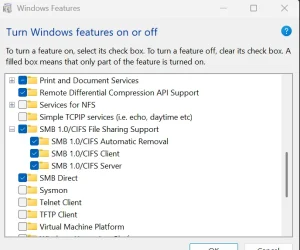
(I had to enable SMB in W11 Optional Features to be discoverable)

It maps the 2 drives as Vol 1 = Z and Vol2 = Y (Pic attached)
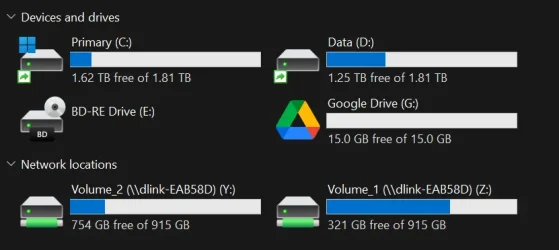
Screenshot 2026-03-01 194627.webp


But if I click on drive to open it just opens a blank screen
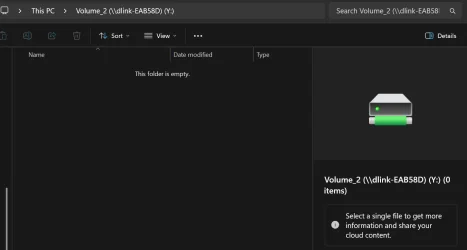
volume view.webp
They show as 'green' and is I click on volume the properties show data is there ...
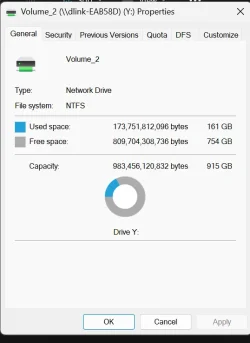
properties.webp

What do I need to add/enable to view the files
 
Windows Build/Version
25H2

My Computer My Computer

At a glance

W11AMD Ryzen 9 7900X 4.7 GHz 12-CoreCORSAIR VENGEANCE DDR5 64GB (2x32GB) DDR5 600...Gigabyte Radeon RX 7800 XT GAMING OC 16GB
OS
W11
Computer type
PC/Desktop
Manufacturer/Model
Home Build
CPU
AMD Ryzen 9 7900X 4.7 GHz 12-Core
Motherboard
Gigabyte Aorus Master X670e
Memory
CORSAIR VENGEANCE DDR5 64GB (2x32GB) DDR5 6000MHz
Graphics Card(s)
Gigabyte Radeon RX 7800 XT GAMING OC 16GB
Monitor(s) Displays
1 x Alienware AW2725QF 27" 1 x Dell P2422HD 23"
Screen Resolution
4K
Hard Drives
2 x 2TB Crucial T700 2TB SSD PCIe Gen5 NVMe M.2 I
PSU
Thermaltake TOUGHPOWER GF A3 1050W Modular
Case
Fractal Define 7 Mid Tower Gaming Case
Cooling
Thermalright Phantom Spirit 1230 EVO
Internet Speed
8GB full fibre
If that NAS is truly using SMBv1, then you might need to turn off SMB signing also, which is on by default in 25H2. From an administrative PowerShell session:
Powershell:
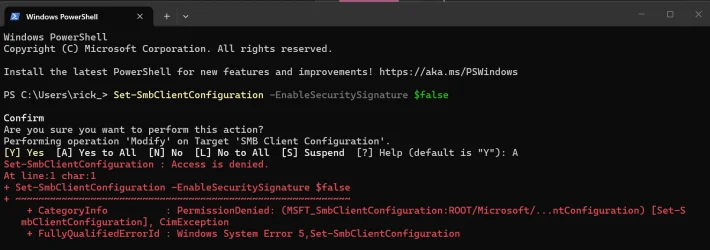
Set-SmbClientConfiguration -EnableSecuritySignature $false
 

My Computer My Computer

At a glance

Windows 11 Enterprise 25H2
OS
Windows 11 Enterprise 25H2
There is a discovery programme, from previous issues I know it cannot discover the DNS 323 until you turn on SMB 1.0.
Seems MS disabled this in one of their updates.
I used W11 ‘optionalfeatures’ to enable SMB 1.0
Should Inturn off one of the SMB 1.0 options ?
 

My Computer My Computer

At a glance

W11AMD Ryzen 9 7900X 4.7 GHz 12-CoreCORSAIR VENGEANCE DDR5 64GB (2x32GB) DDR5 600...Gigabyte Radeon RX 7800 XT GAMING OC 16GB
OS
W11
Computer type
PC/Desktop
Manufacturer/Model
Home Build
CPU
AMD Ryzen 9 7900X 4.7 GHz 12-Core
Motherboard
Gigabyte Aorus Master X670e
Memory
CORSAIR VENGEANCE DDR5 64GB (2x32GB) DDR5 6000MHz
Graphics Card(s)
Gigabyte Radeon RX 7800 XT GAMING OC 16GB
Monitor(s) Displays
1 x Alienware AW2725QF 27" 1 x Dell P2422HD 23"
Screen Resolution
4K
Hard Drives
2 x 2TB Crucial T700 2TB SSD PCIe Gen5 NVMe M.2 I
PSU
Thermaltake TOUGHPOWER GF A3 1050W Modular
Case
Fractal Define 7 Mid Tower Gaming Case
Cooling
Thermalright Phantom Spirit 1230 EVO
Internet Speed
8GB full fibre
You probably only need the SMB 1 client, but leave that alone for now. Disable SMB signing with the command I posted, and re-test.
 

My Computer My Computer

At a glance

Windows 11 Enterprise 25H2
OS
Windows 11 Enterprise 25H2
Will do
 

My Computer My Computer

At a glance

W11AMD Ryzen 9 7900X 4.7 GHz 12-CoreCORSAIR VENGEANCE DDR5 64GB (2x32GB) DDR5 600...Gigabyte Radeon RX 7800 XT GAMING OC 16GB
OS
W11
Computer type
PC/Desktop
Manufacturer/Model
Home Build
CPU
AMD Ryzen 9 7900X 4.7 GHz 12-Core
Motherboard
Gigabyte Aorus Master X670e
Memory
CORSAIR VENGEANCE DDR5 64GB (2x32GB) DDR5 6000MHz
Graphics Card(s)
Gigabyte Radeon RX 7800 XT GAMING OC 16GB
Monitor(s) Displays
1 x Alienware AW2725QF 27" 1 x Dell P2422HD 23"
Screen Resolution
4K
Hard Drives
2 x 2TB Crucial T700 2TB SSD PCIe Gen5 NVMe M.2 I
PSU
Thermaltake TOUGHPOWER GF A3 1050W Modular
Case
Fractal Define 7 Mid Tower Gaming Case
Cooling
Thermalright Phantom Spirit 1230 EVO
Internet Speed
8GB full fibre
OK ... opened Powershell entered command
If that NAS is truly using SMBv1, then you might need to turn off SMB signing also, which is on by default in 25H2. From an administrative PowerShell session:
Powershell:
Set-SmbClientConfiguration -EnableSecuritySignature $false
I opened a Powershell - runn command .. but it fails with permissions. .... pic shows what was on screen:

permissions.webp


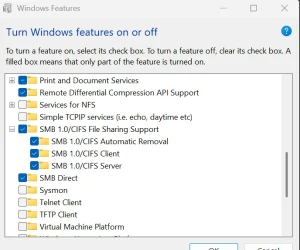
I also attach pic of SMB optionalfeatures and what I turned ON :

optional features.webp
 

My Computer My Computer

At a glance

W11AMD Ryzen 9 7900X 4.7 GHz 12-CoreCORSAIR VENGEANCE DDR5 64GB (2x32GB) DDR5 600...Gigabyte Radeon RX 7800 XT GAMING OC 16GB
OS
W11
Computer type
PC/Desktop
Manufacturer/Model
Home Build
CPU
AMD Ryzen 9 7900X 4.7 GHz 12-Core
Motherboard
Gigabyte Aorus Master X670e
Memory
CORSAIR VENGEANCE DDR5 64GB (2x32GB) DDR5 6000MHz
Graphics Card(s)
Gigabyte Radeon RX 7800 XT GAMING OC 16GB
Monitor(s) Displays
1 x Alienware AW2725QF 27" 1 x Dell P2422HD 23"
Screen Resolution
4K
Hard Drives
2 x 2TB Crucial T700 2TB SSD PCIe Gen5 NVMe M.2 I
PSU
Thermaltake TOUGHPOWER GF A3 1050W Modular
Case
Fractal Define 7 Mid Tower Gaming Case
Cooling
Thermalright Phantom Spirit 1230 EVO
Internet Speed
8GB full fibre
If that NAS is truly using SMBv1, then you might need to turn off SMB signing also, which is on by default in 25H2. From an administrative PowerShell session:
Powershell:
Set-SmbClientConfiguration -EnableSecuritySignature $false
 

My Computer My Computer

At a glance

Windows 11 Enterprise 25H2
OS
Windows 11 Enterprise 25H2
OK .... cmd then worked ... iniailly no joy, but remapped drive again and it worked.
Thankyou
 

My Computer My Computer

At a glance

W11AMD Ryzen 9 7900X 4.7 GHz 12-CoreCORSAIR VENGEANCE DDR5 64GB (2x32GB) DDR5 600...Gigabyte Radeon RX 7800 XT GAMING OC 16GB
OS
W11
Computer type
PC/Desktop
Manufacturer/Model
Home Build
CPU
AMD Ryzen 9 7900X 4.7 GHz 12-Core
Motherboard
Gigabyte Aorus Master X670e
Memory
CORSAIR VENGEANCE DDR5 64GB (2x32GB) DDR5 6000MHz
Graphics Card(s)
Gigabyte Radeon RX 7800 XT GAMING OC 16GB
Monitor(s) Displays
1 x Alienware AW2725QF 27" 1 x Dell P2422HD 23"
Screen Resolution
4K
Hard Drives
2 x 2TB Crucial T700 2TB SSD PCIe Gen5 NVMe M.2 I
PSU
Thermaltake TOUGHPOWER GF A3 1050W Modular
Case
Fractal Define 7 Mid Tower Gaming Case
Cooling
Thermalright Phantom Spirit 1230 EVO
Internet Speed
8GB full fibre
That's a real oldie! :lmao: I have one of those under my steps, but it hasn't seen power in years!
 

My Computers My Computers

  • At a glance

    Win 11 Pro 25H2, Build 26200.9278Intel Core i5 14500, 14th Generation64GB DDR4GeForce RTX 4060
    OS
    Win 11 Pro 25H2, Build 26200.9278
    Computer type
    PC/Desktop
    Manufacturer/Model
    Home Brew
    CPU
    Intel Core i5 14500, 14th Generation
    Motherboard
    Gigabyte B760M G P WIFI
    Memory
    64GB DDR4
    Graphics Card(s)
    GeForce RTX 4060
    Sound Card
    Chipset Realtek
    Monitor(s) Displays
    LG 45" Ultragear & Acer 24" 1080p
    Screen Resolution
    5120x1440 & 1920x1080
    Hard Drives
    Crucial P310 2TB 2280 PCIe Gen4 3D NAND NVMe M.2 SSD (O/S)
    Silicon Power 2TB US75 NVMe PCIe Gen4 M.2 2280 SSD (backup)
    Crucial BX500 2TB 3D NAND (2nd backup)
    Seagate 4TB Ironwolf, rotating HDD secondary backup
    External off-line backup Drives: 2 NVMe 4TB drives in external enclosures
    PSU
    Thermaltake Toughpower GF3 750W
    Case
    LIAN LI LANCOOL 216 E-ATX PC Case
    Cooling
    Lots of fans!
    Keyboard
    Microsoft Comfort Curve 2000
    Mouse
    Logitech G305
    Internet Speed
    Verizon FiOS 1GB
    Browser
    Firefox
    Antivirus
    Malware Bytes & Windows Defender Security
  • At a glance

    Win 11 Pro 25H2, Build 26200.9168Intel Core i5 1440032GB DDR5Intel 700 Embedded GPU
    Operating System
    Win 11 Pro 25H2, Build 26200.9168
    Computer type
    PC/Desktop
    Manufacturer/Model
    Home Brew
    CPU
    Intel Core i5 14400
    Motherboard
    Gigabyte B760M DS3H AX
    Memory
    32GB DDR5
    Graphics card(s)
    Intel 700 Embedded GPU
    Sound Card
    Realtek Embedded
    Monitor(s) Displays
    27" HP 1080p
    Screen Resolution
    1920x1080
    Hard Drives
    Crucial P310 2TB NVMe Gen4 SSD
    Samsung EVO 990 2TB NVMe Gen4 SSD
    Samsung 2TB SATA SSD
    Seagate 4TB Ironwolf, rotating HDD secondary backup
    PSU
    Thermaltake Smart BM3 650W
    Case
    Okinos Micro ATX Case
    Cooling
    Fans
    Keyboard
    Microsoft Comfort Curve 2000
    Mouse
    Logitech G305
    Internet Speed
    Verizon FiOS 1GB
    Browser
    Firefox
    Antivirus
    Malware Bytes & Windows Defender Security
  • Nimo N171 17" Laptop, (Intel i3-1215U, 16GB RAM, 2TB NVMe, Win11 Pro)
    Acemagic Vista Mini PC V1 (Intel N150, 16GB RAM, 1TB NVMe, Win11 Pro)
    HP ENVY h8-1540t, (24GB RAM, 2TB SSD, 2TB HDD, Win11 Pro)
For future reference if I have to rebuild PC for example.
Foe the SMB options ..... which should I select ?
 

Attachments

  • optional features.webp
    optional features.webp
    42.8 KB · Views: 1

My Computer My Computer

At a glance

W11AMD Ryzen 9 7900X 4.7 GHz 12-CoreCORSAIR VENGEANCE DDR5 64GB (2x32GB) DDR5 600...Gigabyte Radeon RX 7800 XT GAMING OC 16GB
OS
W11
Computer type
PC/Desktop
Manufacturer/Model
Home Build
CPU
AMD Ryzen 9 7900X 4.7 GHz 12-Core
Motherboard
Gigabyte Aorus Master X670e
Memory
CORSAIR VENGEANCE DDR5 64GB (2x32GB) DDR5 6000MHz
Graphics Card(s)
Gigabyte Radeon RX 7800 XT GAMING OC 16GB
Monitor(s) Displays
1 x Alienware AW2725QF 27" 1 x Dell P2422HD 23"
Screen Resolution
4K
Hard Drives
2 x 2TB Crucial T700 2TB SSD PCIe Gen5 NVMe M.2 I
PSU
Thermaltake TOUGHPOWER GF A3 1050W Modular
Case
Fractal Define 7 Mid Tower Gaming Case
Cooling
Thermalright Phantom Spirit 1230 EVO
Internet Speed
8GB full fibre
Back
Top Bottom