Solved Defender - Is this normal behaviour?


thecaretaker

Well-known member
Member
VIP
Local time
4:22 PM
Posts
372
Location
1066 Country
OS
Windows 11 Pro 25H2 26200.7922
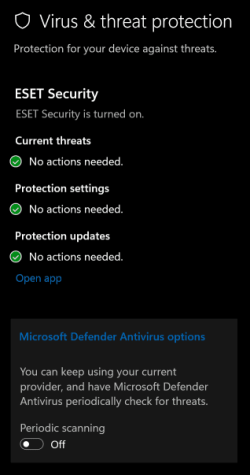
I run Eset Nod32 antivirus and I have the option to use Microsoft Defender turned off. However, I regularly get a pop-up notification above the clock to say Defender found no viruses or suspicious files. I also get regular "Security Intelligence Updates for Microsoft Defender Antivirus KBxxxxxxx" every few hours. (See attachments).

Is this normal behaviour for Microsoft Defender when not activated?
Screenshot 2024-08-11 205931.pngScreenshot 2024-08-11 210006.png
 

My Computer My Computer

At a glance

Windows 11 Pro 25H2 26200.7922Intel Core i9 13900F2 x Kingston Fury 32gb DDR5 5600 BeastGigabyte Eagle (Nvidia) RTX 3060
OS
Windows 11 Pro 25H2 26200.7922
Computer type
PC/Desktop
Manufacturer/Model
Local shop built (KC Computers Ltd)
CPU
Intel Core i9 13900F
Motherboard
Gigabyte Z690 Gaming X (rev. 1.0/1.1) - (BIOS: F32 09 18 2025)
Memory
2 x Kingston Fury 32gb DDR5 5600 Beast
Graphics Card(s)
Gigabyte Eagle (Nvidia) RTX 3060
Sound Card
Chord Async USB 44.1kHz - 384kHz 2Qute DAC
Monitor(s) Displays
Gigabyte AORUS FO32U2 32” OLED Flat Gaming Monitor, 0.03ms, KVM, 250 cd/m2, FreeSync Premium Pro, HDR True Black 400
Screen Resolution
3840 x 2160 (UHD), 240Hz
Hard Drives
1 x KINGSTON NVMe M.2 SSDSKC3000D2048G 2TB
1 x Samsung SSD 870 EVO 250GB
2 x Crucial CT4000MX500SSD1 4TB
2 x Crucial CT2000MX500SSD1 2TB
1 x Crucial CT250MX500SSD1 250.0 GB
PSU
Gigabyte 750w
Case
Fractal Torrent
Cooling
Stock Intel CPU, 2 x Fractal 180mm PWM (front), 3 x Fractal 140mm PWM (bottom)
Keyboard
Logitech MX Mechanical Wireless Illuminated Performance Keyboard
Mouse
Logitech MX Master 3S Wireless Performance Mouse
Internet Speed
900 Mbps/900 Mbps Trooli FTTP
Browser
Firefox
Antivirus
Eset Nod32
Is this normal behaviour for Microsoft Defender when not activated?
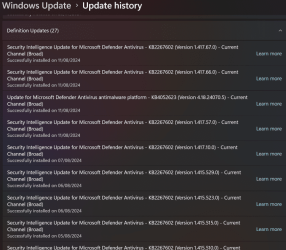
Yes. Even when Defender is no longer the active AV protection, by default it will still perform limited periodic scans. A scan with Defender (or anything else for that matter, eg Malwarebytes) is safe to perform as it does not clash with the active AV protection. And of course if Defender is to make periodic scans it will also need to keep its AV definitions up to date.

More about this here:


My Computers My Computers

  • At a glance

    Windows 11 HomeAMD Athlon Silver 3050U8GBRadeon Graphics
    OS
    Windows 11 Home
    Computer type
    Laptop
    Manufacturer/Model
    Acer Aspire 3 A315-23-R9VY
    CPU
    AMD Athlon Silver 3050U
    Memory
    8GB
    Graphics Card(s)
    Radeon Graphics
    Monitor(s) Displays
    laptop screen
    Screen Resolution
    1366x768 native resolution, up to 2560x1440 with Radeon Virtual Super Resolution
    Hard Drives
    1TB Samsung EVO 870 SSD (from April 2026: 250GB EVO 850)
    Internet Speed
    150 Mbps
    Browser
    Edge, Firefox
    Antivirus
    Defender
    Other Info
    fully 'Windows 11 ready' laptop. Windows 10 C: partition migrated from my old unsupported 'main machine' then upgraded to 11. A test migration ran Insider builds for 2 months. When 11 was released on 5th October 2021 it was re-imaged back to 10 and was offered the upgrade in Windows Update on 20th October. Windows Update offered the 22H2 Feature Update on 20th September 2022. It got the 23H2 Feature Update on 4th November 2023 through Windows Update, 24H2 on 3rd October 2024 through Windows Update by setting the Target Release Version for 24H2, and 25H2 on 30th September 2025 through Windows Update by setting the Target Release Version for 25H2.

    UPDATE - 11 April 2026: due to mechanical deterioration this PC has been retired from active duty. The OS with all software and files has been migrated to my System Seven in 'Other systems' to carry on as my general purpose 'main machine'.
  • At a glance

    Windows 11 ProIntel® Core™ i5-520M8GB(integrated graphics) Intel HD Graphics
    Operating System
    Windows 11 Pro
    Computer type
    Laptop
    Manufacturer/Model
    Dell Latitude E4310
    CPU
    Intel® Core™ i5-520M
    Motherboard
    0T6M8G
    Memory
    8GB
    Graphics card(s)
    (integrated graphics) Intel HD Graphics
    Screen Resolution
    1366x768
    Hard Drives
    500GB Crucial MX500 SSD
    Browser
    Firefox, Edge
    Antivirus
    Defender
    Other Info
    unsupported machine: Legacy bios, MBR, TPM 1.2, upgraded from W10 to W11 using W10/W11 hybrid install media workaround.

    In-place upgrade to 22H2 using ISO and a workaround.
    Feature Update to 23H2 by manually installing the Enablement Package.
    In-place upgrade to 24H2 using hybrid 23H2/24H2 install media.
    Upgraded to 25H2 by Enablement Package.

    Also running Insider Dev, and Canary builds and Windows 10 as native boot .vhdx.
  • My SYSTEM THREE is a Dell Latitude 5410, i7-10610U, 32GB RAM, 512GB NVMe ssd, supported device running Windows 11 Pro.

    My SYSTEM FOUR is a 2-in-1 convertible Lenovo Yoga 11e 20DA, Celeron N2930, 8GB RAM, 256GB ssd. Unsupported device: currently running Win10 Pro, plus Win11 Pro RTM and Insider Dev, Beta, and RP 24H2 as native boot vhdx.

    My SYSTEM FIVE is a Dell Latitude 3190 2-in-1, Pentium Silver N5030, 8GB RAM, 1TB NVMe ssd, supported device running Windows 11 Pro, plus Insider Beta, Dev, and Canary builds (and a few others) as a native boot .vhdx.

    My SYSTEM SIX is a Dell Latitude 5550, Core Ultra 7 165H, 64GB RAM, 1TB NVMe SSD, supported device, Windows 11 Pro 24H2, Hyper-V host machine. Updated to 25H2 on 30th September 2025.

    My SYSTEM SEVEN is a Lenovo Thinkpad T580, Intel Core i7-8650U, 16GB RAM, 512GB NVMe SSD + 2nd 512GB NVMe SSD, a supported device for Windows 11. This is my current general purpose 'main machine'. The installed Windows 11 Home from my System One has been migrated to this machine.
Thanks Bree. I didn't know Defender still performed periodic scans even if that switch was turned off. You live and learn (y)
 

My Computer My Computer

At a glance

Windows 11 Pro 25H2 26200.7922Intel Core i9 13900F2 x Kingston Fury 32gb DDR5 5600 BeastGigabyte Eagle (Nvidia) RTX 3060
OS
Windows 11 Pro 25H2 26200.7922
Computer type
PC/Desktop
Manufacturer/Model
Local shop built (KC Computers Ltd)
CPU
Intel Core i9 13900F
Motherboard
Gigabyte Z690 Gaming X (rev. 1.0/1.1) - (BIOS: F32 09 18 2025)
Memory
2 x Kingston Fury 32gb DDR5 5600 Beast
Graphics Card(s)
Gigabyte Eagle (Nvidia) RTX 3060
Sound Card
Chord Async USB 44.1kHz - 384kHz 2Qute DAC
Monitor(s) Displays
Gigabyte AORUS FO32U2 32” OLED Flat Gaming Monitor, 0.03ms, KVM, 250 cd/m2, FreeSync Premium Pro, HDR True Black 400
Screen Resolution
3840 x 2160 (UHD), 240Hz
Hard Drives
1 x KINGSTON NVMe M.2 SSDSKC3000D2048G 2TB
1 x Samsung SSD 870 EVO 250GB
2 x Crucial CT4000MX500SSD1 4TB
2 x Crucial CT2000MX500SSD1 2TB
1 x Crucial CT250MX500SSD1 250.0 GB
PSU
Gigabyte 750w
Case
Fractal Torrent
Cooling
Stock Intel CPU, 2 x Fractal 180mm PWM (front), 3 x Fractal 140mm PWM (bottom)
Keyboard
Logitech MX Mechanical Wireless Illuminated Performance Keyboard
Mouse
Logitech MX Master 3S Wireless Performance Mouse
Internet Speed
900 Mbps/900 Mbps Trooli FTTP
Browser
Firefox
Antivirus
Eset Nod32

Latest Support Threads

Back
Top Bottom