
Quovadisuk
New member
- Local time
- 8:24 AM
- Posts
- 2
- OS
- 11
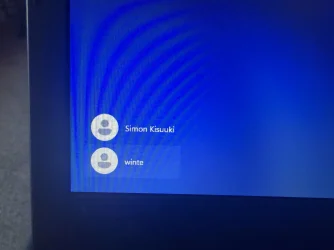
Hi all Newbie here …. I have created a new user as I am giving the laptop to a friend . That all went well , but when I start windows (11) I see two user names and it always chooses the user name I don’t want anyway .
I have studied a load of methods to delete this user name, and tried many methods but when trying I don’t see the user name shown anywhere to delete it? The user I want to remove is winte.
How Can I stop this odd user name appearing on start up , and only show the true one I want to use with a password and nothing else ?
The new user log in works fine and it does have administrator rights .
I have attached a screen shot
Ps I have read that this could be a the main user default but not sure why I would be seeing this ?
I have studied a load of methods to delete this user name, and tried many methods but when trying I don’t see the user name shown anywhere to delete it? The user I want to remove is winte.
How Can I stop this odd user name appearing on start up , and only show the true one I want to use with a password and nothing else ?
The new user log in works fine and it does have administrator rights .
I have attached a screen shot
Ps I have read that this could be a the main user default but not sure why I would be seeing this ?
Attachments
My Computer
At a glance
11
- OS
- 11
- Computer type
- Laptop
- Manufacturer/Model
- acer






