Deleting"Windows.old"


Nod

Well-known member
Member
Local time
9:39 PM
Posts
13
OS
windows 11
I have tried All the normal methods, no luck.
Now I am trying CMD.
In C dir Windows.old is shown, 10/9/2022 @ 12:24 pm.
if I type takeown /F "windows.old" /A /R /D Y
I get ERROR: The system cannot find the file specified.

next I try RD /Q /S windows.old
and get the same answer as above.

Is this a hidden file

how can I remove it (29.3GB)
 

My Computer My Computer

At a glance

windows 11AMD Ryzen 5 5600XCorsair Vengeance LPX16GB DDR4, 3200MHzSapphire Pulse Radeon RX 5700XT BE 8GB GDDR6
OS
windows 11
Computer type
PC/Desktop
Manufacturer/Model
OWN Build
CPU
AMD Ryzen 5 5600X
Motherboard
ASUS Strix X570-F Gaming
Memory
Corsair Vengeance LPX16GB DDR4, 3200MHz
Graphics Card(s)
Sapphire Pulse Radeon RX 5700XT BE 8GB GDDR6
Monitor(s) Displays
x2, AOC Q27T1G5, C24FG70
Hard Drives
Disk 0 C: M.2 NVMe 500GB 980PRO, Disk 1 1TB 860 EVO
You can delete the Windows upgrade folder from Settings --> Storage --> Temporary files.
 

My Computer My Computer

At a glance

Windows 11AMD Ryzen 7 5700GMicron Technology DDR4-3200 16GBNVIDIA GeForce RTX 3060
OS
Windows 11
Computer type
PC/Desktop
Manufacturer/Model
HP Pavilion
CPU
AMD Ryzen 7 5700G
Motherboard
Erica6
Memory
Micron Technology DDR4-3200 16GB
Graphics Card(s)
NVIDIA GeForce RTX 3060
Sound Card
Realtek ALC671
Monitor(s) Displays
Samsung SyncMaster U28E590
Screen Resolution
3840 x 2160
Hard Drives
SAMSUNG MZVLQ1T0HALB-000H1
Temporary files Shows
Thumbnails 5.01MB
DirectX Shader Cache 650 KB
Temporary Internet Files 528KB
Delivery Optimization Files 64.0KB

NO windows .old/ upgrade etc.
 

My Computer My Computer

At a glance

windows 11AMD Ryzen 5 5600XCorsair Vengeance LPX16GB DDR4, 3200MHzSapphire Pulse Radeon RX 5700XT BE 8GB GDDR6
OS
windows 11
Computer type
PC/Desktop
Manufacturer/Model
OWN Build
CPU
AMD Ryzen 5 5600X
Motherboard
ASUS Strix X570-F Gaming
Memory
Corsair Vengeance LPX16GB DDR4, 3200MHz
Graphics Card(s)
Sapphire Pulse Radeon RX 5700XT BE 8GB GDDR6
Monitor(s) Displays
x2, AOC Q27T1G5, C24FG70
Hard Drives
Disk 0 C: M.2 NVMe 500GB 980PRO, Disk 1 1TB 860 EVO
Temporary files Shows
Thumbnails 5.01MB
DirectX Shader Cache 650 KB
Temporary Internet Files 528KB
Delivery Optimization Files 64.0KB

NO windows .old/ upgrade etc.
Did you go into the temp section bc on mine "Previous installation files" are there but I haven't bothered to remove
 

My Computers My Computers

  • At a glance

    WiN11 ProXeon E5450 3.0GHZ (OC 3.6GHZ)8GB (2GBX4)NVIDIA Quadro K2200 4GB
    OS
    WiN11 Pro
    Computer type
    PC/Desktop
    Manufacturer/Model
    Custom 775 System
    CPU
    Xeon E5450 3.0GHZ (OC 3.6GHZ)
    Motherboard
    ASUS PQ5-EM
    Memory
    8GB (2GBX4)
    Graphics Card(s)
    NVIDIA Quadro K2200 4GB
    Sound Card
    Onboard
    Monitor(s) Displays
    ASUS 24"
    Screen Resolution
    1080p
    Hard Drives
    1TB|750GB USB, 3 SSDs 2 240GB 1 128GB, 750GB HDD
    PSU
    650WATT Rosewill
    Case
    Rosewill with side Window
    Cooling
    5 Fans and a big HSK for cpu
    Keyboard
    Rosewill RGB
    Mouse
    Rosewill RGB
    Internet Speed
    AT&T 150MB DL\UP
    Browser
    FireFox
    Antivirus
    None
    Other Info
    I'm lucky to even be here after 6yrs from my car accident
  • At a glance

    WiN10 LTSCi7 2670QM 2.20GHZ8GB (2X4GB) DUAL ChannelIntel HD Graphics 3000
    Operating System
    WiN10 LTSC
    Computer type
    Laptop
    Manufacturer/Model
    Hp 8460p
    CPU
    i7 2670QM 2.20GHZ
    Motherboard
    Hp 161C
    Memory
    8GB (2X4GB) DUAL Channel
    Graphics card(s)
    Intel HD Graphics 3000
    Sound Card
    Intel high Def (basically onboard)
    Screen Resolution
    1366x768
    Hard Drives
    OS 128GB l Storage (caddy) 320GB
    PSU
    AC (IDK the watts)
    Browser
    Firefox
    Antivirus
    Defender
    Other Info
    A USB 3.0 in the Express Card Slot
Image1.png

I know I've forgotten Disk Cleanup > Clean up system files, a few times.
 

My Computers My Computers

  • At a glance

    Win 11 Home ♦♦♦26200.9278 ♦♦♦♦♦♦♦25H2AMD Ryzen 7 3700XG.Skill (F4-3200C14D-16GTZKW)EVGA RTX 2070 (08G-P4-2171-KR)
    OS
    Win 11 Home ♦♦♦26200.9278 ♦♦♦♦♦♦♦25H2
    Computer type
    PC/Desktop
    Manufacturer/Model
    Built by Ghot® [May 2020]
    CPU
    AMD Ryzen 7 3700X
    Motherboard
    Asus Pro WS X570-ACE (BIOS 5302)
    Memory
    G.Skill (F4-3200C14D-16GTZKW)
    Graphics Card(s)
    EVGA RTX 2070 (08G-P4-2171-KR)
    Sound Card
    Realtek ALC1220P / ALC S1220A
    Monitor(s) Displays
    Dell U3011 30"
    Screen Resolution
    2560 x 1600
    Hard Drives
    2x Samsung 860 EVO 500GB,
    WD 4TB Black FZBX - SATA III,
    WD 8TB Black FZBX - SATA III,
    DRW-24B1ST CD/DVD Burner
    PSU
    PC Power & Cooling 750W Quad EPS12V
    Case
    Cooler Master ATCS 840 Tower
    Cooling
    CM Hyper 212 EVO (push/pull)
    Keyboard
    Ducky DK9008 Shine II Blue LED
    Mouse
    Logitech Optical M-100
    Internet Speed
    300/300
    Browser
    Firefox (latest)
    Antivirus
    Bitdefender Total Security
    Other Info
    Speakers: Klipsch Pro Media 2.1
  • At a glance

    Windows XP Pro 32bit w/SP3AMD Athlon 64 X2 5000+ (OC'd @ 3.2Ghz)TWIN2X2048-6400C4DHX (2 x 1GB, DDR2 800)EVGA 256-P2-N758-TR GeForce 8600GT SSC
    Operating System
    Windows XP Pro 32bit w/SP3
    Computer type
    PC/Desktop
    Manufacturer/Model
    Built by Ghot® (not in use)
    CPU
    AMD Athlon 64 X2 5000+ (OC'd @ 3.2Ghz)
    Motherboard
    ASUS M2N32-SLI Deluxe Wireless Edition
    Memory
    TWIN2X2048-6400C4DHX (2 x 1GB, DDR2 800)
    Graphics card(s)
    EVGA 256-P2-N758-TR GeForce 8600GT SSC
    Sound Card
    Onboard
    Monitor(s) Displays
    ViewSonic G90FB Black 19" Professional (CRT)
    Screen Resolution
    up to 2048 x 1536
    Hard Drives
    WD 36GB 10,000rpm Raptor SATA
    Seagate 80GB 7200rpm SATA
    Lite-On LTR-52246S CD/RW
    Lite-On LH-18A1P CD/DVD Burner
    PSU
    PC Power & Cooling Silencer 750 Quad EPS12V
    Case
    Generic Beige case, 80mm fans
    Cooling
    ZALMAN 9500A 92mm CPU Cooler
    Keyboard
    Logitech Classic Keybooard 200
    Mouse
    Logitech Optical M-BT96a
    Internet Speed
    300/300
    Browser
    Firefox 3.x ??
    Antivirus
    Symantec (Norton)
    Other Info
    Still assembled, still runs. Haven't turned it on for 15 years?
Please download and install:
Everything: voidtools

Enter: Windows.old

Take pictures > post images or share links into this thread using one drive, drop box, or google drive
 

My Computer My Computer

At a glance

Windows 10Intel(R) Core(TM) i7-4800MQ CPU @ 2.70GHz16 GB Total: Manufacturer : Samsung MemoryTyp...NVIDIA Quadro K3100M; Intel(R) HD Graphics 4600
OS
Windows 10
Computer type
Laptop
Manufacturer/Model
HP
CPU
Intel(R) Core(TM) i7-4800MQ CPU @ 2.70GHz
Motherboard
Product : 190A Version : KBC Version 94.56
Memory
16 GB Total: Manufacturer : Samsung MemoryType : DDR3 FormFactor : SODIMM Capacity : 8GB Speed : 1600
Graphics Card(s)
NVIDIA Quadro K3100M; Intel(R) HD Graphics 4600
Sound Card
IDT High Definition Audio CODEC; PNP Device ID HDAUDIO\FUNC_01&VEN_111D&DEV_76E0
Hard Drives
Model Hitachi HTS727575A9E364
Antivirus
Microsoft Defender
Other Info
Mobile Workstation
View attachment 42543

I know I've forgotten Disk Cleanup > Clean up system files, a few times.
Windows 11 Pro Ver 22H2 OS build 22621.674, Yes Disk cleanup has changed-NO clean up system files- always ues to use it, not mow
 

My Computer My Computer

At a glance

windows 11AMD Ryzen 5 5600XCorsair Vengeance LPX16GB DDR4, 3200MHzSapphire Pulse Radeon RX 5700XT BE 8GB GDDR6
OS
windows 11
Computer type
PC/Desktop
Manufacturer/Model
OWN Build
CPU
AMD Ryzen 5 5600X
Motherboard
ASUS Strix X570-F Gaming
Memory
Corsair Vengeance LPX16GB DDR4, 3200MHz
Graphics Card(s)
Sapphire Pulse Radeon RX 5700XT BE 8GB GDDR6
Monitor(s) Displays
x2, AOC Q27T1G5, C24FG70
Hard Drives
Disk 0 C: M.2 NVMe 500GB 980PRO, Disk 1 1TB 860 EVO
When the takeown command was used was it used with or without the quotes?

takeown /F "windows.old" /A /R /D Y
or
takeown /F windows.old /A /R /D Y


When available please post results from everything.
 

My Computer My Computer

At a glance

Windows 10Intel(R) Core(TM) i7-4800MQ CPU @ 2.70GHz16 GB Total: Manufacturer : Samsung MemoryTyp...NVIDIA Quadro K3100M; Intel(R) HD Graphics 4600
OS
Windows 10
Computer type
Laptop
Manufacturer/Model
HP
CPU
Intel(R) Core(TM) i7-4800MQ CPU @ 2.70GHz
Motherboard
Product : 190A Version : KBC Version 94.56
Memory
16 GB Total: Manufacturer : Samsung MemoryType : DDR3 FormFactor : SODIMM Capacity : 8GB Speed : 1600
Graphics Card(s)
NVIDIA Quadro K3100M; Intel(R) HD Graphics 4600
Sound Card
IDT High Definition Audio CODEC; PNP Device ID HDAUDIO\FUNC_01&VEN_111D&DEV_76E0
Hard Drives
Model Hitachi HTS727575A9E364
Antivirus
Microsoft Defender
Other Info
Mobile Workstation
Windows 11 Pro Ver 22H2 OS build 22621.674, Yes Disk cleanup has changed-NO clean up system files- always ues to use it, not mow


I just used it on Win 11 Home 22H2 to remove Windows.old about a week ago.
 

My Computers My Computers

  • At a glance

    Win 11 Home ♦♦♦26200.9278 ♦♦♦♦♦♦♦25H2AMD Ryzen 7 3700XG.Skill (F4-3200C14D-16GTZKW)EVGA RTX 2070 (08G-P4-2171-KR)
    OS
    Win 11 Home ♦♦♦26200.9278 ♦♦♦♦♦♦♦25H2
    Computer type
    PC/Desktop
    Manufacturer/Model
    Built by Ghot® [May 2020]
    CPU
    AMD Ryzen 7 3700X
    Motherboard
    Asus Pro WS X570-ACE (BIOS 5302)
    Memory
    G.Skill (F4-3200C14D-16GTZKW)
    Graphics Card(s)
    EVGA RTX 2070 (08G-P4-2171-KR)
    Sound Card
    Realtek ALC1220P / ALC S1220A
    Monitor(s) Displays
    Dell U3011 30"
    Screen Resolution
    2560 x 1600
    Hard Drives
    2x Samsung 860 EVO 500GB,
    WD 4TB Black FZBX - SATA III,
    WD 8TB Black FZBX - SATA III,
    DRW-24B1ST CD/DVD Burner
    PSU
    PC Power & Cooling 750W Quad EPS12V
    Case
    Cooler Master ATCS 840 Tower
    Cooling
    CM Hyper 212 EVO (push/pull)
    Keyboard
    Ducky DK9008 Shine II Blue LED
    Mouse
    Logitech Optical M-100
    Internet Speed
    300/300
    Browser
    Firefox (latest)
    Antivirus
    Bitdefender Total Security
    Other Info
    Speakers: Klipsch Pro Media 2.1
  • At a glance

    Windows XP Pro 32bit w/SP3AMD Athlon 64 X2 5000+ (OC'd @ 3.2Ghz)TWIN2X2048-6400C4DHX (2 x 1GB, DDR2 800)EVGA 256-P2-N758-TR GeForce 8600GT SSC
    Operating System
    Windows XP Pro 32bit w/SP3
    Computer type
    PC/Desktop
    Manufacturer/Model
    Built by Ghot® (not in use)
    CPU
    AMD Athlon 64 X2 5000+ (OC'd @ 3.2Ghz)
    Motherboard
    ASUS M2N32-SLI Deluxe Wireless Edition
    Memory
    TWIN2X2048-6400C4DHX (2 x 1GB, DDR2 800)
    Graphics card(s)
    EVGA 256-P2-N758-TR GeForce 8600GT SSC
    Sound Card
    Onboard
    Monitor(s) Displays
    ViewSonic G90FB Black 19" Professional (CRT)
    Screen Resolution
    up to 2048 x 1536
    Hard Drives
    WD 36GB 10,000rpm Raptor SATA
    Seagate 80GB 7200rpm SATA
    Lite-On LTR-52246S CD/RW
    Lite-On LH-18A1P CD/DVD Burner
    PSU
    PC Power & Cooling Silencer 750 Quad EPS12V
    Case
    Generic Beige case, 80mm fans
    Cooling
    ZALMAN 9500A 92mm CPU Cooler
    Keyboard
    Logitech Classic Keybooard 200
    Mouse
    Logitech Optical M-BT96a
    Internet Speed
    300/300
    Browser
    Firefox 3.x ??
    Antivirus
    Symantec (Norton)
    Other Info
    Still assembled, still runs. Haven't turned it on for 15 years?

My Computers My Computers

  • At a glance

    Windows 11 26300.9278Amd Threadripper 7970X128GB (4 X 32) G.Skill DDR5 6400 (RDIMM)Gigabyte RTX 4090 OC
    OS
    Windows 11 26300.9278
    Computer type
    PC/Desktop
    Manufacturer/Model
    homebuilt
    CPU
    Amd Threadripper 7970X
    Motherboard
    Gigabyte TRX50 Aero D Rev. 1.0
    Memory
    128GB (4 X 32) G.Skill DDR5 6400 (RDIMM)
    Graphics Card(s)
    Gigabyte RTX 4090 OC
    Sound Card
    none (USB to speakers), Realtek
    Monitor(s) Displays
    Innocn 32" OLED
    Screen Resolution
    3840 X 2160 @ 60Hz
    Hard Drives
    Crucial T700 2TB M.2 NVME SSD
    WD 4TB Blue SATA SSD
    Seagate 18TB IronWolf Pro
    PSU
    BeQuiet! Straight Power 12 1500W
    Case
    Lian Li 011 Dynamic Evo XL
    Cooling
    SilverStone Technology XE360-TR5, with 3 Phanteks T30 fans
    Keyboard
    Cherry KC 500 MX LP (mechanical)
    Mouse
    Logitech M500s (wired)
    Internet Speed
    2000/250 Mbps (down/up)
    Other Info
    xFinity gateway
  • At a glance

    windows 11 26300.9278Intel I9-13900K64GB G.Skill DDR5-6000Gigabyte RTX 3090 ti
    Operating System
    windows 11 26300.9278
    Computer type
    PC/Desktop
    Manufacturer/Model
    homebuilt
    CPU
    Intel I9-13900K
    Motherboard
    Asus RoG Strix Z690-E
    Memory
    64GB G.Skill DDR5-6000
    Graphics card(s)
    Gigabyte RTX 3090 ti
    Sound Card
    built in Realtek
    Monitor(s) Displays
    Philips 27E1N8900 27" OLED
    Screen Resolution
    3840 X 2160 @60Hz
    Hard Drives
    WDC SN850 1TB
    8TB Seagate Ironwolf
    4TB Seagate Ironwolf
    PSU
    eVGA SuperNOVA 1300 GT
    Case
    Lian Li 011 Dynamic Evo
    Cooling
    Corsair iCUE H150i ELITE CAPELLIX Liquid CPU Cooler
    Keyboard
    Cherry Streaming (wired)
    Mouse
    Logitech M500s (wired)

My Computer My Computer

At a glance

Windows 10Intel(R) Core(TM) i7-4800MQ CPU @ 2.70GHz16 GB Total: Manufacturer : Samsung MemoryTyp...NVIDIA Quadro K3100M; Intel(R) HD Graphics 4600
OS
Windows 10
Computer type
Laptop
Manufacturer/Model
HP
CPU
Intel(R) Core(TM) i7-4800MQ CPU @ 2.70GHz
Motherboard
Product : 190A Version : KBC Version 94.56
Memory
16 GB Total: Manufacturer : Samsung MemoryType : DDR3 FormFactor : SODIMM Capacity : 8GB Speed : 1600
Graphics Card(s)
NVIDIA Quadro K3100M; Intel(R) HD Graphics 4600
Sound Card
IDT High Definition Audio CODEC; PNP Device ID HDAUDIO\FUNC_01&VEN_111D&DEV_76E0
Hard Drives
Model Hitachi HTS727575A9E364
Antivirus
Microsoft Defender
Other Info
Mobile Workstation
I have tried All the normal methods, no luck.
Now I am trying CMD.
In C dir Windows.old is shown, 10/9/2022 @ 12:24 pm.
if I type takeown /F "windows.old" /A /R /D Y
I get ERROR: The system cannot find the file specified.

next I try RD /Q /S windows.old
and get the same answer as above.

Is this a hidden file

how can I remove it (29.3GB)
Press "Win+R" and Type "%SystemRoot%\System32\Cmd.exe /c Cleanmgr /sageset:65535 & Cleanmgr /sagerun:65535" and hit enter Select "Previous Windows installation(s)"
2022-10-17_07-03-40.png
or Use This Batch file (Also Work in 22H2)
2022-10-17_07-08-54.png
 

My Computers My Computers

  • At a glance

    10BMW
    OS
    10
    Computer type
    Tablet
    Graphics Card(s)
    BMW
    Sound Card
    BMW
  • At a glance

    BMW
    Computer type
    Tablet
    Graphics card(s)
    BMW
    Sound Card
    BMW
Windows 11 Pro Ver 22H2 OS build 22621.674, Yes Disk cleanup has changed-NO clean up system files- always ues to use it, not mow
I have Cleanup system files in Disk Cleanup. Win 11 Pro 22621.675. I always Run as Administrator so it doesn't always show this.
 

Attachments

  • Screenshot_20221017_051148.png
    Screenshot_20221017_051148.png
    15.9 KB · Views: 2

My Computer My Computer

At a glance

Windows 11 Pro 25H2 (RP channel)AMD Ryzen 7 9800X3D 8-core64GB Corsair Titanium 6000/CL30MSI Suprim 5080 SOC
OS
Windows 11 Pro 25H2 (RP channel)
Computer type
PC/Desktop
Manufacturer/Model
MSI
CPU
AMD Ryzen 7 9800X3D 8-core
Motherboard
MEG X870E Godlike
Memory
64GB Corsair Titanium 6000/CL30
Graphics Card(s)
MSI Suprim 5080 SOC
Sound Card
Soundblaster AE-9
Monitor(s) Displays
ASUS TUF Gaming VG289Q
Screen Resolution
3840x2160
Hard Drives
Samsung 9100 Pro 4TB (gen 5 x4, system drive/games)
Samsung 990 Pro 2TB
Samsung 980 Pro 2TB
Samsung 870 Evo 4TB
Samsung 870 Evo 2TB
Samsung T9 4TB
PSU
Seasonic PX-2200
Case
Bequiet! Dark Base Pro 901
Cooling
Noctua NH-D15S Chromax black
Keyboard
Logitech G915 X (wired)
Mouse
Logitech G903 with PowerPlay charger
Internet Speed
900Mb/sec
Browser
Microsoft Edge
Antivirus
Windows Defender
BOOT from a Live Linux distro ad then you can remove anything.
 

My Computer My Computer

At a glance

W11 Pro and Insider DevAMD Ryzen 9 7900x2x16GB Kingston 6000MHz, Cl 32 @ 6200MHz Cl30Gigabyte Rx 6600XT Gaming OC 8G Pro
OS
W11 Pro and Insider Dev
Computer type
PC/Desktop
Manufacturer/Model
Home brewed
CPU
AMD Ryzen 9 7900x
Motherboard
ASROCK b650 PRO RS
Memory
2x16GB Kingston 6000MHz, Cl 32 @ 6200MHz Cl30
Graphics Card(s)
Gigabyte Rx 6600XT Gaming OC 8G Pro
Sound Card
MB, Realtek Ac1220p
Monitor(s) Displays
3 x 27"
Screen Resolution
1080p
Hard Drives
Kingston KC3000. 1TBSamsung 970 evo Plus 500GB, Crucial P1 NVMe 1TB, Lexar NVMe 2 TB, Silicon Power M.2 SATA 500GB
PSU
Seasonic 750W
Case
Custom Raidmax
Cooling
Arctic Liquid Freezer III 360mm
Internet Speed
20/19 mbps
  • Like
Reactions: WAI

My Computer My Computer

At a glance

windows 11AMD Ryzen 5 5600XCorsair Vengeance LPX16GB DDR4, 3200MHzSapphire Pulse Radeon RX 5700XT BE 8GB GDDR6
OS
windows 11
Computer type
PC/Desktop
Manufacturer/Model
OWN Build
CPU
AMD Ryzen 5 5600X
Motherboard
ASUS Strix X570-F Gaming
Memory
Corsair Vengeance LPX16GB DDR4, 3200MHz
Graphics Card(s)
Sapphire Pulse Radeon RX 5700XT BE 8GB GDDR6
Monitor(s) Displays
x2, AOC Q27T1G5, C24FG70
Hard Drives
Disk 0 C: M.2 NVMe 500GB 980PRO, Disk 1 1TB 860 EVO
Press "Win+R" and Type "%SystemRoot%\System32\Cmd.exe /c Cleanmgr /sageset:65535 & Cleanmgr /sagerun:65535" and hit enter Select "Previous Windows installation(s)"
View attachment 42547
or Use This Batch file (Also Work in 22H2)
View attachment 42548
I have tried Both of these. The batch file - could not find file. The first one "previous Windows installation" was NOT listed.
BUT I know that the file IS there - listed in C: with Dir, seen during an antivirus scan, Windows.old Properties shows it as 29.3GB Read-only. Dated 29/8/2022. thanks for ALL the Different methods to fix this, But at this stage none of them work.
 

My Computer My Computer

At a glance

windows 11AMD Ryzen 5 5600XCorsair Vengeance LPX16GB DDR4, 3200MHzSapphire Pulse Radeon RX 5700XT BE 8GB GDDR6
OS
windows 11
Computer type
PC/Desktop
Manufacturer/Model
OWN Build
CPU
AMD Ryzen 5 5600X
Motherboard
ASUS Strix X570-F Gaming
Memory
Corsair Vengeance LPX16GB DDR4, 3200MHz
Graphics Card(s)
Sapphire Pulse Radeon RX 5700XT BE 8GB GDDR6
Monitor(s) Displays
x2, AOC Q27T1G5, C24FG70
Hard Drives
Disk 0 C: M.2 NVMe 500GB 980PRO, Disk 1 1TB 860 EVO
I upgraded to win 11 22H2 on September 21, 2022, and never delete windows. old folder. Now I just checked the C drive, the windows.old folder doesn't exist anymore. Has it been automatically deleted after so many days?
 

My Computer My Computer

At a glance

Win 11 ProIntel Core i7-12650H
OS
Win 11 Pro
Computer type
Laptop
CPU
Intel Core i7-12650H
When the takeown command was used was it used with or without the quotes?

takeown /F "windows.old" /A /R /D Y
or
takeown /F windows.old /A /R /D Y


When available please post results from everything.
With ""
 

My Computer My Computer

At a glance

windows 11AMD Ryzen 5 5600XCorsair Vengeance LPX16GB DDR4, 3200MHzSapphire Pulse Radeon RX 5700XT BE 8GB GDDR6
OS
windows 11
Computer type
PC/Desktop
Manufacturer/Model
OWN Build
CPU
AMD Ryzen 5 5600X
Motherboard
ASUS Strix X570-F Gaming
Memory
Corsair Vengeance LPX16GB DDR4, 3200MHz
Graphics Card(s)
Sapphire Pulse Radeon RX 5700XT BE 8GB GDDR6
Monitor(s) Displays
x2, AOC Q27T1G5, C24FG70
Hard Drives
Disk 0 C: M.2 NVMe 500GB 980PRO, Disk 1 1TB 860 EVO
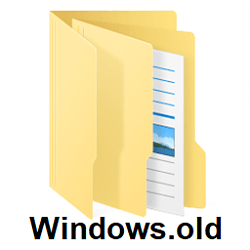
I just used it on Win 11 Home 22H2 to remove Windows.old about a week ago.
Same here. Nothing changed. I used Disk Cleanup
 

My Computers My Computers

  • At a glance

    Windows 11 HomeAMD Ryzen 5 5600X16 GB Corsair Vengeance LPX DDR4-3200PowerColor Red Devil Radeon RX 6600XT with 8G...
    OS
    Windows 11 Home
    Computer type
    PC/Desktop
    Manufacturer/Model
    Custom built
    CPU
    AMD Ryzen 5 5600X
    Motherboard
    MSI B550-A Pro
    Memory
    16 GB Corsair Vengeance LPX DDR4-3200
    Graphics Card(s)
    PowerColor Red Devil Radeon RX 6600XT with 8GB GDDR6
    Sound Card
    Realtek integrated
    Monitor(s) Displays
    Acer Nitro 24" RG241Y 144hz refresh rate
    Screen Resolution
    1920 X 1080
    Hard Drives
    Western Digital Black SN770 1 TB NVMe SSD
    Samsung 860 QVO 1 TB SATA SSD
    Seagate Barracuda 1 TB HDD
    PSU
    LEPA B650 650 watt
    Case
    Enermax Coenus
    Cooling
    Cooler Master Hyper T4 air
    Keyboard
    CM Storm Devastator
    Mouse
    E-Blue Cobra Jr.
    Internet Speed
    100mbs
    Browser
    Microsoft Edge Chromium
    Antivirus
    Microsoft Defender
    Other Info
    Optical Drives: LG DVD-RW and Pioneer BluRay/ DVD burner
  • At a glance

    Windows 11 HomeAMD Ryzen 9 6900HS16 GB Samsung DDR5-4800Integrated Radeon 680M and discrete Radeon RX...
    Operating System
    Windows 11 Home
    Computer type
    Laptop
    Manufacturer/Model
    Asus ROG Zephyrus G14
    CPU
    AMD Ryzen 9 6900HS
    Motherboard
    Asus board (GA402RK)
    Memory
    16 GB Samsung DDR5-4800
    Graphics card(s)
    Integrated Radeon 680M and discrete Radeon RX 6800S with 8GB GDDR6
    Sound Card
    Integrated Realtek with Dolby Atmos
    Monitor(s) Displays
    Laptop screen 14" WQXGA, IPS, 120hz refresh rate
    Screen Resolution
    2560 X 1600
    Hard Drives
    1TB PCIe Gen 4 SSD (WD Black SN850)
    PSU
    Battery power and Asus power brick/adapter. Also has USB-C charging
    Case
    Laptop
    Cooling
    Laptop fans in vapor chamber
    Keyboard
    Built in RGB backlit
    Mouse
    Touchpad and Omoton bluetooth mouse
    Internet Speed
    100mbps
    Browser
    Edge Chromium
    Antivirus
    Microsoft Defender
I upgraded to win 11 22H2 on September 21, 2022, and never delete windows. old folder. Now I just checked the C drive, the windows.old folder doesn't exist anymore. Has it been automatically deleted after so many days?
It gets deleted automatically after 10 days.
 

My Computers My Computers

  • At a glance

    Windows 11 HomeAMD Ryzen 5 5600X16 GB Corsair Vengeance LPX DDR4-3200PowerColor Red Devil Radeon RX 6600XT with 8G...
    OS
    Windows 11 Home
    Computer type
    PC/Desktop
    Manufacturer/Model
    Custom built
    CPU
    AMD Ryzen 5 5600X
    Motherboard
    MSI B550-A Pro
    Memory
    16 GB Corsair Vengeance LPX DDR4-3200
    Graphics Card(s)
    PowerColor Red Devil Radeon RX 6600XT with 8GB GDDR6
    Sound Card
    Realtek integrated
    Monitor(s) Displays
    Acer Nitro 24" RG241Y 144hz refresh rate
    Screen Resolution
    1920 X 1080
    Hard Drives
    Western Digital Black SN770 1 TB NVMe SSD
    Samsung 860 QVO 1 TB SATA SSD
    Seagate Barracuda 1 TB HDD
    PSU
    LEPA B650 650 watt
    Case
    Enermax Coenus
    Cooling
    Cooler Master Hyper T4 air
    Keyboard
    CM Storm Devastator
    Mouse
    E-Blue Cobra Jr.
    Internet Speed
    100mbs
    Browser
    Microsoft Edge Chromium
    Antivirus
    Microsoft Defender
    Other Info
    Optical Drives: LG DVD-RW and Pioneer BluRay/ DVD burner
  • At a glance

    Windows 11 HomeAMD Ryzen 9 6900HS16 GB Samsung DDR5-4800Integrated Radeon 680M and discrete Radeon RX...
    Operating System
    Windows 11 Home
    Computer type
    Laptop
    Manufacturer/Model
    Asus ROG Zephyrus G14
    CPU
    AMD Ryzen 9 6900HS
    Motherboard
    Asus board (GA402RK)
    Memory
    16 GB Samsung DDR5-4800
    Graphics card(s)
    Integrated Radeon 680M and discrete Radeon RX 6800S with 8GB GDDR6
    Sound Card
    Integrated Realtek with Dolby Atmos
    Monitor(s) Displays
    Laptop screen 14" WQXGA, IPS, 120hz refresh rate
    Screen Resolution
    2560 X 1600
    Hard Drives
    1TB PCIe Gen 4 SSD (WD Black SN850)
    PSU
    Battery power and Asus power brick/adapter. Also has USB-C charging
    Case
    Laptop
    Cooling
    Laptop fans in vapor chamber
    Keyboard
    Built in RGB backlit
    Mouse
    Touchpad and Omoton bluetooth mouse
    Internet Speed
    100mbps
    Browser
    Edge Chromium
    Antivirus
    Microsoft Defender

Latest Support Threads

Back
Top Bottom