Dell 14 Plus BSODs


riverofwind

Member
Local time
2:53 PM
Posts
30
OS
Windows 11
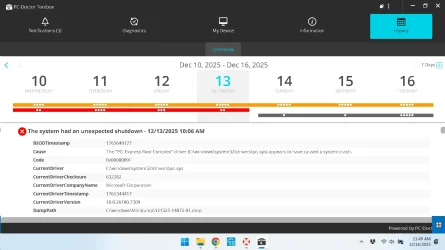
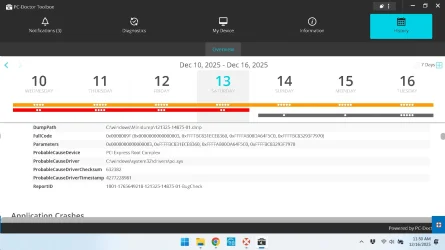
Hi I am seeking help diagnosing issues with a Dell 14 Plus. Since Nov 19 or so I've been getting BSODs about once a day on average. They seem to happen spontaneously. Also sometimes the computer partially freezes for ~5 minutes or so and the only thing that responds is mouse movement but after the freeze passes the computer becomes responsive again. Also sometimes I cannot visit certain websites, the loading indicator keeps spinning indefinitely and I have to try again later. I ran PC Doctor Toolbox and it says I'm getting BSOD code 0x09f with parameter 1 as 0x003. The faulting driver is pci.sys and PCI Express Root Complex. All the BSOD's appear to be the same. I have attached a screenshot of the PC Doctor Toolbox BSOD description. Also I ran a hardware diagnostic using PC Doctor Toolbox and Dell Support Assistant and both passed. Any ideas what's up? Is it hardware or software? And of course here is the V2 log zip. Here are the specs:
Dell 14 Plus Laptop
Intel Core Ultra 7 256V
16 GB RAM
BM9C1 Samsung 1024 GB SSD
kimm7.webp

kimm8.webp
 

My Computer My Computer

At a glance

Windows 11
OS
Windows 11
Computer type
PC/Desktop
Please perform the following steps:


1) Run Tuneup plus > post a share link


2) Uninstall Avast AV using the applicable uninstall tool:
Avast Free Antivirus 25.11.10580.3242 Gen Digital Inc.


3) Uninstall and reinstall:

Acronis True Image 29.4.42072 Acronis


4) Uninstall and reinstall:

netwaw18.sys

Intel(R) Wireless Adapter Driver for Windows


5) The BIOS Version/Date Dell Inc. 1.6.0, 8/6/2025

Upgrade the BIOS: 1.6 > 1.8


6) After completing BSOD troubleshooting consider updating secure boot (multiple active EF threads)


7) Avast AV can be reinstalled after a week of computer stability


Code:
snapman    Acronis Snapshots Manager    c:\windows\system32\drivers\snapman.sys
Code:
tib_mounter    Acronis TIB Mounter    c:\windows\system32\drivers\tib_mounter.sys
Code:
file_tracker    Acronis File Tracker Driver    c:\windows\system32\drivers\file_tracker.sys
Code:
volume_tracker    Acronis Volume Tracker    c:\windows\system32\drivers\volume_tracker.sys
Code:
virtual_file    Acronis Virtual File Driver    c:\windows\system32\drivers\virtual_file.sys
Code:
netwaw18    ___ Intel(R) Wireless Adapter Driver for Windows 10 - 64 Bit    c:\windows\system32\driverstore\filerepository\netwtw6e.inf_amd64_d488480304e1f365\netwaw18.sys
Code:
aswvmm    aswVmm    c:\windows\system32\drivers\aswvmm.sys


Code:
Name    [00000002] netwaw18.sys 7 BE201 320MHz
Adapter Type    Ethernet 802.3
Product Type    Intel(R) Wi-Fi 7 BE201 320MHz
Installed    Yes
PNP Device ID    PCI\VEN_8086&DEV_A840&SUBSYS_40E08086&REV_10\3&11583659&1&A3
Last Reset    12/13/2025 10:06 AM
Index    2
Service Name    Netwtw18.
Driver    C:\WINDOWS\SYSTEM32\DRIVERSTORE\FILEREPOSITORY\NETWTW6E.INF_AMD64_D488480304E1F365\NETWAW18.SYS (23.160.0.4, 5.69 MB (5,965,216 bytes), 11/28/2025 4:29 PM)


Code:
Event[37339]
  Log Name: System
  Source: Microsoft-Windows-TPM-WMI
  Date: 2025-12-13T10:12:02.1570000Z
  Event ID: 1801
  Task: N/A
  Level: Error
  Opcode: Info 
  Keyword: N/A
  User: S-1-5-18
  User Name: NT AUTHORITY\SYSTEM
  Computer: KimInspiron2025
  Description:
Secure Boot certificates have been updated but are not yet applied to the device firmware. Review the published guidance to complete the update and ensure full protection. This device signature information is included here.
DeviceAttributes: FirmwareManufacturer:Dell Inc.;FirmwareVersion:1.6.0;OEMManufacturerName:Dell Inc.;OEMModelSKU:0D30;OSArchitecture:amd64;
BucketId: 511e91bdff659408ad9b5a39bbb469e2d60d6adf9c49de6c338cfcd71f3dece3
BucketConfidenceLevel:
UpdateType:
For more information, please see https://go.microsoft.com/fwlink/?linkid=2301018.
 

My Computer My Computer

At a glance

Windows 10Intel(R) Core(TM) i7-4800MQ CPU @ 2.70GHz16 GB Total: Manufacturer : Samsung MemoryTyp...NVIDIA Quadro K3100M; Intel(R) HD Graphics 4600
OS
Windows 10
Computer type
Laptop
Manufacturer/Model
HP
CPU
Intel(R) Core(TM) i7-4800MQ CPU @ 2.70GHz
Motherboard
Product : 190A Version : KBC Version 94.56
Memory
16 GB Total: Manufacturer : Samsung MemoryType : DDR3 FormFactor : SODIMM Capacity : 8GB Speed : 1600
Graphics Card(s)
NVIDIA Quadro K3100M; Intel(R) HD Graphics 4600
Sound Card
IDT High Definition Audio CODEC; PNP Device ID HDAUDIO\FUNC_01&VEN_111D&DEV_76E0
Hard Drives
Model Hitachi HTS727575A9E364
Antivirus
Microsoft Defender
Other Info
Mobile Workstation
Excellent thanks for the response! Will do when time permits. Do you think it's software then? Or could go either way? Also the code excerpts you posted are all drivers, could any of them be at fault?
 

My Computer My Computer

At a glance

Windows 11
OS
Windows 11
Computer type
PC/Desktop

My Computers My Computers

  • At a glance

    All Branches but StableAMD Ryzen 7 7735HS 3200-4500 Mhz 8 cores x 232 GB DDR5Radeon Graphic / NVIDIA GeForce RTX 4060 8 GB...
    OS
    All Branches but Stable
    Computer type
    Laptop
    Manufacturer/Model
    Acer Nitro ANV15-51
    CPU
    AMD Ryzen 7 7735HS 3200-4500 Mhz 8 cores x 2
    Motherboard
    Sportage_RBH
    Memory
    32 GB DDR5
    Graphics Card(s)
    Radeon Graphic / NVIDIA GeForce RTX 4060 8 GB GDDR6
    Sound Card
    AMD/Realtek(R) Audio
    Monitor(s) Displays
    Integrated Monitor (15.3"vis)
    Screen Resolution
    FHD 1920X1080 16:9 144Hz
    Hard Drives
    KINGSTON OM8SEP4512Q-AA 1TB
    Western Digital 256GB
    PSU
    19V DC 6.32 A 120 W
    Cooling
    Dual Fans
    Mouse
    MS Bluetooth
    Internet Speed
    Fiber 1GB Cox -us & 1GB Orange-fr
    Browser
    Edge Canary- Firefox Nightly-Chrome Dev-Chrome Dev
    Antivirus
    Windows Defender
  • At a glance

    Windows 11 BetaAMD A9-94208 GB of DDR4AMD Radeon R5
    Operating System
    Windows 11 Beta
    Computer type
    Laptop
    Manufacturer/Model
    Asus X751BP
    CPU
    AMD A9-9420
    Memory
    8 GB of DDR4
    Graphics card(s)
    AMD Radeon R5
    Screen Resolution
    1600x900
    Hard Drives
    Seagate 1 TB
@OAT Definitely going to do in the next couple days. I appreciate the time and effort.
 

My Computer My Computer

At a glance

Windows 11
OS
Windows 11
Computer type
PC/Desktop
  • Like
Reactions: OAT
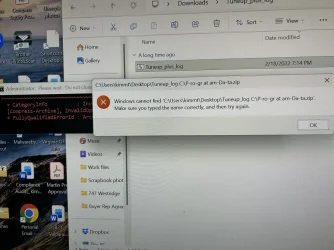
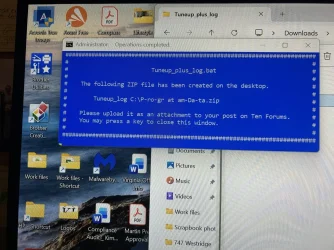
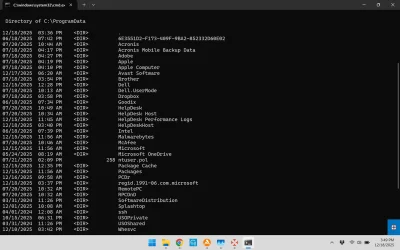
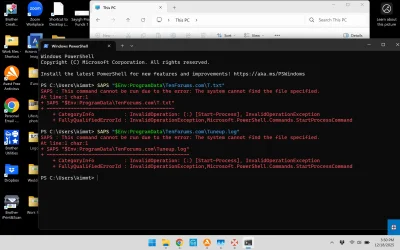
Hi I ran the batch file today and it stalled for a while at 62.3% on step 3 dism restore health but completed not long after. The log file was not generated and the powershell commands didn't help. See the below screenshots. Is the batch file broken or should I run it again? Thanks.

IMG_3653.webp

IMG_3654.webp

pic1.webp

pic2.webpw
 

My Computer My Computer

At a glance

Windows 11
OS
Windows 11
Computer type
PC/Desktop
1) Please uninstall Avast software in post #2 step #2


2) Reboot


3) Add WMIC:

DISM /Online /Add-Capability /CapabilityName:WMIC~~~~


4) Run Tuneup plus > post a share link


5) Perform post #2 steps #3 - #5


6) Create a new restore point:


My Computer My Computer

At a glance

Windows 10Intel(R) Core(TM) i7-4800MQ CPU @ 2.70GHz16 GB Total: Manufacturer : Samsung MemoryTyp...NVIDIA Quadro K3100M; Intel(R) HD Graphics 4600
OS
Windows 10
Computer type
Laptop
Manufacturer/Model
HP
CPU
Intel(R) Core(TM) i7-4800MQ CPU @ 2.70GHz
Motherboard
Product : 190A Version : KBC Version 94.56
Memory
16 GB Total: Manufacturer : Samsung MemoryType : DDR3 FormFactor : SODIMM Capacity : 8GB Speed : 1600
Graphics Card(s)
NVIDIA Quadro K3100M; Intel(R) HD Graphics 4600
Sound Card
IDT High Definition Audio CODEC; PNP Device ID HDAUDIO\FUNC_01&VEN_111D&DEV_76E0
Hard Drives
Model Hitachi HTS727575A9E364
Antivirus
Microsoft Defender
Other Info
Mobile Workstation
On vacation back in a week with no computer. Just keeping you guys posted.
 

My Computer My Computer

At a glance

Windows 11
OS
Windows 11
Computer type
PC/Desktop
Sorry for being MIA between holidays, new year, and getting sick, the blue screens went away after updating: intel serial io driver, intel management engine interface driver, intel chipset device software, and intel proset/wireless wifi software. Thanks for the help.
@zbook I hope I didn't take too much of your time with the V2 logs and everything I was more looking for assistance instead of a set of explicit instructions. But definitely appreciate the help! And if the driver updates didn't solve things I'd be doing everything you said. Thanks again.
 

My Computer My Computer

At a glance

Windows 11
OS
Windows 11
Computer type
PC/Desktop
Nice.

Thx. for the follow up.

You're welcome.


See the active EF threads on secure boot > update


Please enable regback:


Consider making free or pay backup images:

Save the backup image to another disk drive or to the cloud.

If there is malware, ransomware, registry or operating system corruption, failure to boot, etc. you then have the option to restore the image.

(Acronis, Aoemi, EaseUS, Hasleo, Macrium, Paragon, etc.)

Macrium is widely used in Ten Forums.

Macrium Software | Your Image is Everything


Backup and Restore with Macrium Reflect
 

My Computer My Computer

At a glance

Windows 10Intel(R) Core(TM) i7-4800MQ CPU @ 2.70GHz16 GB Total: Manufacturer : Samsung MemoryTyp...NVIDIA Quadro K3100M; Intel(R) HD Graphics 4600
OS
Windows 10
Computer type
Laptop
Manufacturer/Model
HP
CPU
Intel(R) Core(TM) i7-4800MQ CPU @ 2.70GHz
Motherboard
Product : 190A Version : KBC Version 94.56
Memory
16 GB Total: Manufacturer : Samsung MemoryType : DDR3 FormFactor : SODIMM Capacity : 8GB Speed : 1600
Graphics Card(s)
NVIDIA Quadro K3100M; Intel(R) HD Graphics 4600
Sound Card
IDT High Definition Audio CODEC; PNP Device ID HDAUDIO\FUNC_01&VEN_111D&DEV_76E0
Hard Drives
Model Hitachi HTS727575A9E364
Antivirus
Microsoft Defender
Other Info
Mobile Workstation

Latest Support Threads

Back
Top Bottom