Dell Laptop Shuts Down Spontaneously


Ed McCauley

Well-known member
Member
Local time
6:34 AM
Posts
147
OS
Windows 11 Pro 25H2
Win ver: 25H2

Without warning, and following no discernable pattern, my Laptop shuts itself down. It's as if it losing all power. It usually requires several reboot attempts before a complete restart is achieved. At all times, my Battery shows a 100% charge. The Wall Plug and Power Supply connections are solid and the Power Lite stays on at all times. When I pull the power plug out of the power jack, the computer remains running. The Battery then shows a normal discharge rate. When the Power Plug is re-inserted the Battery recharges itself without issues.

The program "Event Look" which is supposed to provide more - and easer to interpret - debug information... What I get is: "EventID41 Critical The System has rebooted without cleanly shutting down first. This error could be caused if the System stopped responding, crashed, or lost power unexpectedly."

I have no idea what to do. Any suggestions are greatly appreciated.
 

My Computers

System One System Two

  • OS
    Windows 11 Pro 25H2
    Computer type
    Laptop
    Manufacturer/Model
    Dell/Precision 351
    CPU
    Intel i7 2.60Ghz
    Motherboard
    Dell 0y8h01
    Memory
    16GB
    Graphics Card(s)
    Nvidia Quadro P620 + Intel UHD Graphics 630
    Sound Card
    Realtek
    Monitor(s) Displays
    Laptop screen only
    Screen Resolution
    1920x1080p
    Hard Drives
    PC SN730 NVMe WDC 512GB
    Mouse
    Logitech Gaming Mouse G600
    Browser
    DuckDuckGo
    Antivirus
    BitDefender
  • Operating System
    Win 11
    Computer type
    PC/Desktop
    CPU
    AMD Ryzen 9950X3D
    Motherboard
    Asus ROG Crosshair X870E
    Memory
    Corsair Dominator DDR5 32GB
    Graphics card(s)
    nVidia RTX 5080
    Hard Drives
    2 Samsung NVMe M.2 SSD 9100 4TB
    PSU
    Seasonic GX-1200W
    Case
    LanCool 216
    Keyboard
    Steelseries Apex Pro Gen 3
Here is what AI says:
Windows Event ID 41 indicates your system rebooted or shut down unexpectedly. It is a "symptom" rather than a root cause. Because the PC lost power before it could finish saving logs, this event simply means "the PC didn't shut down cleanly". [1, 2, 3]

Common Causes
  • Power Supply Unit (PSU): Insufficient wattage or faulty hardware dropping power.
  • Overheating: Thermal throttling or unsafe temps causing an emergency shutdown.
  • Unstable Overclocking: Corrupt settings or voltages causing immediate crashes.
  • Faulty Drivers / BSODs: A Stop Error (Blue Screen) that reboots the PC instantly.
  • Defective RAM: Memory errors causing immediate system failure. [1, 2, 3, 4, 5, 6]

Troubleshooting Steps

Since Event ID 41 is generic, you should examine other logs to find the true culprit:
  1. Check the Memory Dumps: Navigate to C:\Windows\Minidump to look for crash logs that could indicate a specific driver or hardware failure.
  2. Review Other Logs: Right-click Start > Event Viewer > Windows Logs > System. Filter the events by critical and error levels leading up to the ID 41 error.
  3. Turn Off "Fast Startup": This Windows feature can sometimes cause unclean shutdown states. Go to Control Panel > Power Options > Choose what the power buttons do, unlock the settings, and uncheck Turn on fast startup.
  4. Run a System Scan: Open Command Prompt as administrator and run sfc /scannow to fix corrupted core system files.
  5. Test Your Hardware: Ensure your PC's temperatures are safe and run diagnostic tests on your Power Supply Unit and RAM. [1, 2, 3, 4, 5]
For a deeper dive into the technical details and advanced diagnostics, refer to the official Microsoft Event ID 41 Troubleshooter.
 

My Computers

System One System Two

  • OS
    Windows 11 Pro
    Computer type
    PC/Desktop
    Manufacturer/Model
    Dell 8940 XPS
    CPU
    10th Gen Intel(R) Core(TM) i7-10700, 2.90GHz
    Motherboard
    Dell 0KV3RP (U3E1)
    Memory
    32GB, 2x16GB, DDR4, 2933Mhz
    Graphics Card(s)
    NVIDIA(R) GeForce(R) RTX 2060 SUPER(TM) 8GB GDDR6
    Sound Card
    Onboard, Realtek Codec, NVIDIA Hi Def Audio, Intel Display Audio
    Monitor(s) Displays
    Dell UltraSharp U3415W
    Screen Resolution
    3440x1440
    Hard Drives
    2TB M.2 PCIe NVMe SSD; 2TB Samsung SSD 860 EVO; 2TB Samsung SSD 860 EVO 2
    PSU
    500 W Dell
    Case
    Night Sky Bezel Chassis
    Cooling
    Dell
    Keyboard
    Logi Wireless
    Mouse
    Logi Wireless
    Internet Speed
    111 Mbps Download, 132 Mbps Upload
    Browser
    Edge, Chrome
    Antivirus
    Windows Defender, MalwareBytes
  • Operating System
    Windows 11 Pro
    Computer type
    PC/Desktop
    Manufacturer/Model
    Falcon Northwest Talon
    CPU
    Intel 13900K Core I9 24 Core LGA 1700
    Motherboard
    Asus ROG Z970 Maximus Hero
    Memory
    32GB (2x16) Kingston Fury Beast 6000MHZ DDR5
    Graphics card(s)
    nVidia 4090 Founders Edition
    Sound Card
    Motherboard
    Monitor(s) Displays
    Alienware 34” Curved OLED
    Screen Resolution
    4K
    Hard Drives
    SSD M.2 Kingston Renegade Fury 4 TB x 2; Western Digital Red Pro 8 TB SATA III
    PSU
    1000W ECGA Platinum Modular ATX
    Case
    Falcon NW Custom
    Cooling
    AIO Falcon NW 280mm Liquid Cooler
    Keyboard
    Logitech Pro Gamer
    Mouse
    Logitech G502
    Internet Speed
    111 Mbps Download, 132 Mbps Upload
    Browser
    Edge, Chrome
    Antivirus
    Windows Defender, MalwareBytes
    Other Info
    Noise Blocker Fans
Follow these instructions. Gather the files necessary for analysis. Put them all into a folder. Zip the folder. Then upload the zipped folder to any cloud provider. Post a SHARE link to the zipped folder here. @zbook will analyze them when he comes online.

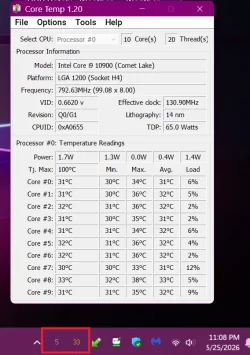
It wouldn't be a bad idea for you to monitor your temperatures as overheating can also cause a sudden shutdown.
Coretemp is a small app that runs in the background. In its options you can set it to show the amount of load and the highest temp across all cores in your system tray. Core Temp
Screenshot 2026-05-25 231050.webp
 

My Computers

System One System Two

  • OS
    Windows 11 Pro 25H2
    Computer type
    PC/Desktop
    Manufacturer/Model
    Dell Optiplex 7080
    CPU
    i9-10900 10 core 20 threads
    Motherboard
    DELL 0J37VM
    Memory
    32 gb
    Graphics Card(s)
    none-Intel UHD Graphics 630
    Sound Card
    Integrated Realtek
    Monitor(s) Displays
    Benq 27
    Screen Resolution
    2560x1440
    Hard Drives
    2x1tb Solidigm m.2 nvme /External drives 512gb Samsung m.2 sata+2tb Kingston m2.nvme
    PSU
    500w
    Case
    MT
    Cooling
    Dell Premium
    Keyboard
    Logitech wired
    Mouse
    Logitech wireless
    Internet Speed
    so slow I'm too embarrassed to tell
    Browser
    #1 Edge #2 Firefox
    Antivirus
    Defender+MWB Premium
  • Operating System
    Windows 11 Pro 24H2 26200.8457
    Computer type
    PC/Desktop
    Manufacturer/Model
    Beelink Mini PC SER5
    CPU
    AMD Ryzen 7 6800U
    Memory
    32 gb
    Graphics card(s)
    integrated
    Sound Card
    integrated
    Monitor(s) Displays
    Benq 27
    Screen Resolution
    2560x1440
    Hard Drives
    1TB Crucial nvme
    Keyboard
    Logitech wired
    Mouse
    Logitech wireless
    Internet Speed
    still too embarrassed to tell
    Browser
    Firefox
    Antivirus
    Defender
    Other Info
    System 3 is non compliant Dell 9020 i7-4770/24gb ram Win11 PRO 26200.8457
Back
Top Bottom