Desktop icon spacing help


CompuGeekCasey

Active member
Member
Local time
3:48 PM
Posts
55
OS
Windows 11 Home 25H2 (OS Build: 26200.7849)
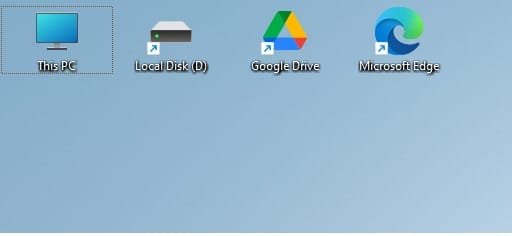
I have recently reset laptop as I was having issues, and I noticed that there is a big space between my desktop icons. I tried this tutorial, but I there is no change even after restarting explorer. I'm not sure what I'm doing wrong, I followed the mentioned tutorial exactly as written, so any help is appreciated
 
Windows Build/Version
203H2 (Build: 22631.2861)

Attachments

  • Desktop Spacing Issue.jpg
    Desktop Spacing Issue.jpg
    7.5 KB · Views: 1

My Computer My Computer

At a glance

Windows 11 Home 25H2 (OS Build: 26200.7849)AMD Athlon Silver 7120U 2.40 gigahertz8GB with 7.25 Gigabytes Usable Installed Memory512MB ATI AMD Radeon Graphics (HP)
OS
Windows 11 Home 25H2 (OS Build: 26200.7849)
Computer type
Laptop
Manufacturer/Model
HP Laptop 15-fc0xxx
CPU
AMD Athlon Silver 7120U 2.40 gigahertz
Motherboard
HP 8DC9 52.52
Memory
8GB with 7.25 Gigabytes Usable Installed Memory
Graphics Card(s)
512MB ATI AMD Radeon Graphics (HP)
Sound Card
Realtek High Definition Audio
Monitor(s) Displays
Integrated Monitor (15.3"vis, May 2021)
Screen Resolution
1366 X 768
Hard Drives
SAMSUNG MZVL8256HEJD-00BH1 NVMe SSD
Keyboard
Standard PS/2 Keyboard
Mouse
USB HID-compliant mouse
Internet Speed
103.67Mbps (Up) and 11.22 Mbps (Down)
Browser
Microsoft Edge
Antivirus
Windows Security
Did you try the logoff and relogin windows?

You can also try application -> Winaero Tweaker.
After opening, go to Advanced Appearance Settins, then Icons. There use the sliders to increase/decrease the spacing.
 

My Computer My Computer

At a glance

Windows 11
OS
Windows 11
Computer type
PC/Desktop
And don't forget the right-click of the Desktop and Display setting and/or Personalize settings that may help. I use the Recommended value for the Resolution of the screen then make other changes.
 

My Computers My Computers

  • At a glance

    Win11 Pro RTM Version 24H2 Build 26100.4202Intel Core i5 11th Gen. 2.40GHz12GB
    OS
    Win11 Pro RTM Version 24H2 Build 26100.4202
    Computer type
    Laptop
    Manufacturer/Model
    Dell Vostro 3400
    CPU
    Intel Core i5 11th Gen. 2.40GHz
    Memory
    12GB
    Hard Drives
    256GB SSD NVMe M.2
  • At a glance

    Win11 Pro RTM Version 24H2 Build 26100.4202Intel Core i5 10th Gen. 2.90GHz16GBOnboard, no VGA, using a DisplayPort-to-VGA a...
    Operating System
    Win11 Pro RTM Version 24H2 Build 26100.4202
    Computer type
    PC/Desktop
    Manufacturer/Model
    Dell Vostro 5890
    CPU
    Intel Core i5 10th Gen. 2.90GHz
    Memory
    16GB
    Graphics card(s)
    Onboard, no VGA, using a DisplayPort-to-VGA adapter
    Monitor(s) Displays
    24" Dell
    Hard Drives
    512GB SSD NVMe, 4TB Seagate HDD
    Browser
    Firefox, Edge
    Antivirus
    Windows Defender/Microsoft Security
Did you try the logoff and relogin windows?

You can also try application -> Winaero Tweaker.
After opening, go to Advanced Appearance Settins, then Icons. There use the sliders to increase/decrease the spacing.
I just did and it worked, the icon spacing changed!
And don't forget the right-click of the Desktop and Display setting and/or Personalize settings that may help. I use the Recommended value for the Resolution of the screen then make other changes.
Thanks for the advice!
 

My Computer My Computer

At a glance

Windows 11 Home 25H2 (OS Build: 26200.7849)AMD Athlon Silver 7120U 2.40 gigahertz8GB with 7.25 Gigabytes Usable Installed Memory512MB ATI AMD Radeon Graphics (HP)
OS
Windows 11 Home 25H2 (OS Build: 26200.7849)
Computer type
Laptop
Manufacturer/Model
HP Laptop 15-fc0xxx
CPU
AMD Athlon Silver 7120U 2.40 gigahertz
Motherboard
HP 8DC9 52.52
Memory
8GB with 7.25 Gigabytes Usable Installed Memory
Graphics Card(s)
512MB ATI AMD Radeon Graphics (HP)
Sound Card
Realtek High Definition Audio
Monitor(s) Displays
Integrated Monitor (15.3"vis, May 2021)
Screen Resolution
1366 X 768
Hard Drives
SAMSUNG MZVL8256HEJD-00BH1 NVMe SSD
Keyboard
Standard PS/2 Keyboard
Mouse
USB HID-compliant mouse
Internet Speed
103.67Mbps (Up) and 11.22 Mbps (Down)
Browser
Microsoft Edge
Antivirus
Windows Security

Latest Support Threads

Back
Top Bottom