
Navigation
Install the app
How to install the app on iOS
Follow along with the video below to see how to install our site as a web app on your home screen.
Note: This feature may not be available in some browsers.
More options
Style variation
System
Light
Dark
You are using an out of date browser. It may not display this or other websites correctly.
You should upgrade or use an alternative browser.
You should upgrade or use an alternative browser.
Did you manually update your Secure Boot Keys ?
- Thread starter suatcini54
- Start date
Here's a Mosby-compatible version of my script, which does a plain string match.
It's not 100% authoritative, since someone could create a single cert named:
UPDATE 2025-09-25: Removed script. The reported failure of the original script was traced back to an user misunderstanding on how to properly use the Mosby tool.
It's not 100% authoritative, since someone could create a single cert named:
Code:
Microsoft Corporation UEFI CA 2011 Microsoft Windows Production PCA 2011 Microsoft UEFI CA 2023 Windows UEFI CA 2023 MosbyUPDATE 2025-09-25: Removed script. The reported failure of the original script was traced back to an user misunderstanding on how to properly use the Mosby tool.
Last edited:
My Computer
At a glance
Windows 7
- OS
- Windows 7
You shouldn't say the script is misbehaving... The script uses a 3rd-party GitHub function that's been published and referenced in UEFI circles. It's never failed me until encountering this PC's output.IDK I used Mosby v2.3 release from Jun 11 2025. Everything works fine on my system, it is the Check_EFIBootFile.ps1 script that is misbehaving.

My Computer
At a glance
Windows 7
- OS
- Windows 7
Glad I just used Microsoft instruction instead of Mosby.
Did you go into bios and make sure secure boot set to UEFI and CSM is disabled?
Yes, secure boot is set to to UEFI and CSM is disabled. It does secure boot to Win10 no problem.
Mosby has an option to insert new private platform key certificates unique to your system when updating the standard cert's.
You can enable it or not. I enabled it, so it overwrote the standard manufacturer BIOS resident key certificates.
That is what the 'MosbyKey' is that is causing the Check_EFIBootFile.ps1 script to go sideways.
There is also the option in Mosby to leave the current system BIOS certificates alone (maybe that would have been a better choice IDK).
If I get up enough energy and courage to (possibly) brick my system (IDK) I may try resetting the BIOS to default keys and rerun Mosby
to not generate new keys but use the existing BIOS keys. We;ll see,
My Computers
-
At a glance
Win11 26H2 26300.9550Intel XEON W-2245 8c/16t128GB DDR4-2933 ECCNvidia Quadro K4200- OS
- Win11 26H2 26300.9550
- Computer type
- PC/Desktop
- Manufacturer/Model
- Lenovo P520
- CPU
- Intel XEON W-2245 8c/16t
- Memory
- 128GB DDR4-2933 ECC
- Graphics Card(s)
- Nvidia Quadro K4200
- Sound Card
- Bultin
- Monitor(s) Displays
- LCD 24in
- Screen Resolution
- 1920x1200
- Hard Drives
- 1TB SSD system, 16TB data 3.5in HDD, 16TB backup 3.5in HDD
- PSU
- 900W
- Cooling
- Air
- Internet Speed
- 1Gb
- Browser
- Firefox & Chrome
- Antivirus
- MalwareBytes
-
At a glance
Win10 22H2Intel Core i7-3520m16GBintegrated CPU graphics- Operating System
- Win10 22H2
- Computer type
- Laptop
- Manufacturer/Model
- Lenovo T530
- CPU
- Intel Core i7-3520m
- Memory
- 16GB
- Graphics card(s)
- integrated CPU graphics
- Hard Drives
- 1TB SSD
- Internet Speed
- 1Gb
- Browser
- Fiefox & Chrome
- Antivirus
- Malwarebytes
Here's a Mosby-compatible version of my script, which does a plain string match.
It's not 100% authoritative, since someone could create a single cert named:
Code:Microsoft Corporation UEFI CA 2011 Microsoft Windows Production PCA 2011 Microsoft UEFI CA 2023 Windows UEFI CA 2023 Mosby
Well, it is not generating what I would expect to see. Here is the original output I saw from your original script (left),
and the output just now from your revised Mosby-compatible script.
Originally I saw 2xKEK 4xDB 0xDBX entries (left). Now I see 0xKEK 4xDB 4xDBX entries (right). DB and DBX entries are the same. KEK entries are gone.
Code:
C:\WINDOWS\system32>powershell -nop -ep bypass -f D:\Check_EFIBootFile\CheckCertificates.ps1

DEBUG:    3+  >>>> [System.Text.Encoding]::ASCII.GetString((Get-SecureBootUEFI kek).bytes) -match 'Microsoft Corporation KEK CA 2011'
True
DEBUG:    4+  >>>> [System.Text.Encoding]::ASCII.GetString((Get-SecureBootUEFI kek).bytes) -match 'Microsoft Corporation KEK 2K CA 2023'
True
DEBUG:    5+  >>>> [System.Text.Encoding]::ASCII.GetString((Get-SecureBootUEFI kek).bytes) -match 'Mosby'
False

DEBUG:    7+  >>>> [System.Text.Encoding]::ASCII.GetString((Get-SecureBootUEFI db).bytes) -match 'Microsoft Corporation UEFI CA 2011'
True
DEBUG:    8+  >>>> [System.Text.Encoding]::ASCII.GetString((Get-SecureBootUEFI db).bytes) -match 'Microsoft Windows Production PCA 2011'
True
DEBUG:    9+  >>>> [System.Text.Encoding]::ASCII.GetString((Get-SecureBootUEFI db).bytes) -match 'Microsoft UEFI CA 2023'
True
DEBUG:   10+  >>>> [System.Text.Encoding]::ASCII.GetString((Get-SecureBootUEFI db).bytes) -match 'Windows UEFI CA 2023'
True
DEBUG:   11+  >>>> [System.Text.Encoding]::ASCII.GetString((Get-SecureBootUEFI db).bytes) -match 'Mosby'
True

DEBUG:   13+  >>>> [System.Text.Encoding]::ASCII.GetString((Get-SecureBootUEFI dbx).bytes) -match 'Microsoft Corporation UEFI CA 2011'
False
DEBUG:   14+  >>>> [System.Text.Encoding]::ASCII.GetString((Get-SecureBootUEFI dbx).bytes) -match 'Microsoft Windows Production PCA 2011'
False
DEBUG:   15+  >>>> [System.Text.Encoding]::ASCII.GetString((Get-SecureBootUEFI dbx).bytes) -match 'Microsoft UEFI CA 2023'
False
DEBUG:   16+  >>>> [System.Text.Encoding]::ASCII.GetString((Get-SecureBootUEFI dbx).bytes) -match 'Windows UEFI CA 2023'
False
DEBUG:   17+  >>>> [System.Text.Encoding]::ASCII.GetString((Get-SecureBootUEFI dbx).bytes) -match 'Mosby'
False

C:\WINDOWS\system32>pause done
Press any key to continue . . .
My Computers
-
At a glance
Win11 26H2 26300.9550Intel XEON W-2245 8c/16t128GB DDR4-2933 ECCNvidia Quadro K4200- OS
- Win11 26H2 26300.9550
- Computer type
- PC/Desktop
- Manufacturer/Model
- Lenovo P520
- CPU
- Intel XEON W-2245 8c/16t
- Memory
- 128GB DDR4-2933 ECC
- Graphics Card(s)
- Nvidia Quadro K4200
- Sound Card
- Bultin
- Monitor(s) Displays
- LCD 24in
- Screen Resolution
- 1920x1200
- Hard Drives
- 1TB SSD system, 16TB data 3.5in HDD, 16TB backup 3.5in HDD
- PSU
- 900W
- Cooling
- Air
- Internet Speed
- 1Gb
- Browser
- Firefox & Chrome
- Antivirus
- MalwareBytes
-
At a glance
Win10 22H2Intel Core i7-3520m16GBintegrated CPU graphics- Operating System
- Win10 22H2
- Computer type
- Laptop
- Manufacturer/Model
- Lenovo T530
- CPU
- Intel Core i7-3520m
- Memory
- 16GB
- Graphics card(s)
- integrated CPU graphics
- Hard Drives
- 1TB SSD
- Internet Speed
- 1Gb
- Browser
- Fiefox & Chrome
- Antivirus
- Malwarebytes
Ok, lets try again ... here is what the updated script produces ... exact same as your original script produced for me yesterday,Oops. My bad, copy & paste error. Re-download the script again.
but now with the addition of the 'Mosby' DB certificate entry.
IDK why after using Mosby and rebooting the system yesterday and running your original script there was no Mosby entry.
But today for some reason IDK why there is now a Mosby entry in DB. Why it magically appeared overnight IDK.
Thanks for all your help in getting this resolved.
Code:
C:\WINDOWS\system32>powershell -nop -ep bypass -f D:\Check_EFIBootFile\Check_Mosby_EFIBootFile.ps1

Secure Boot: ON
BitLocker on (C:) OFF

UEFI KEK Certs
--------------
    Microsoft Corporation KEK CA 2011
    Microsoft Corporation KEK 2K CA 2023

UEFI DB Certs
-------------
    Microsoft Corporation UEFI CA 2011
    Microsoft Windows Production PCA 2011
    Microsoft UEFI CA 2023
    Windows UEFI CA 2023
    Mosby

UEFI DBX Certs
--------------

EFI Files
---------
    Disk 1: Boot Manager [Production PCA 2011] is ALLOWED.

    Registry: WindowsUEFICA2023Capable = 1
        [Windows UEFI CA 2023] is in UEFI DB.

C:\WINDOWS\system32>pause done
My Computers
-
At a glance
Win11 26H2 26300.9550Intel XEON W-2245 8c/16t128GB DDR4-2933 ECCNvidia Quadro K4200- OS
- Win11 26H2 26300.9550
- Computer type
- PC/Desktop
- Manufacturer/Model
- Lenovo P520
- CPU
- Intel XEON W-2245 8c/16t
- Memory
- 128GB DDR4-2933 ECC
- Graphics Card(s)
- Nvidia Quadro K4200
- Sound Card
- Bultin
- Monitor(s) Displays
- LCD 24in
- Screen Resolution
- 1920x1200
- Hard Drives
- 1TB SSD system, 16TB data 3.5in HDD, 16TB backup 3.5in HDD
- PSU
- 900W
- Cooling
- Air
- Internet Speed
- 1Gb
- Browser
- Firefox & Chrome
- Antivirus
- MalwareBytes
-
At a glance
Win10 22H2Intel Core i7-3520m16GBintegrated CPU graphics- Operating System
- Win10 22H2
- Computer type
- Laptop
- Manufacturer/Model
- Lenovo T530
- CPU
- Intel Core i7-3520m
- Memory
- 16GB
- Graphics card(s)
- integrated CPU graphics
- Hard Drives
- 1TB SSD
- Internet Speed
- 1Gb
- Browser
- Fiefox & Chrome
- Antivirus
- Malwarebytes
This is a provisional workaround, it's not a fix. I can't read the full name of the Mosby cert until the parsing issue gets resolved.
Checking a raw binary object for expected substrings is very security challenged.
Checking a raw binary object for expected substrings is very security challenged.
My Computer
At a glance
Windows 7
- OS
- Windows 7

- Local time
- 6:03 AM
- Posts
- 3,637
- Location
- San Francisco, California USA
- OS
- WindowsXP/7/8/8.1/10/11,Linux,Android,FreeBSD Unix
Speaking about Mosby, anyone here actually using a Dell machine because on my Dell XPS 15 9570 which has the following layout:


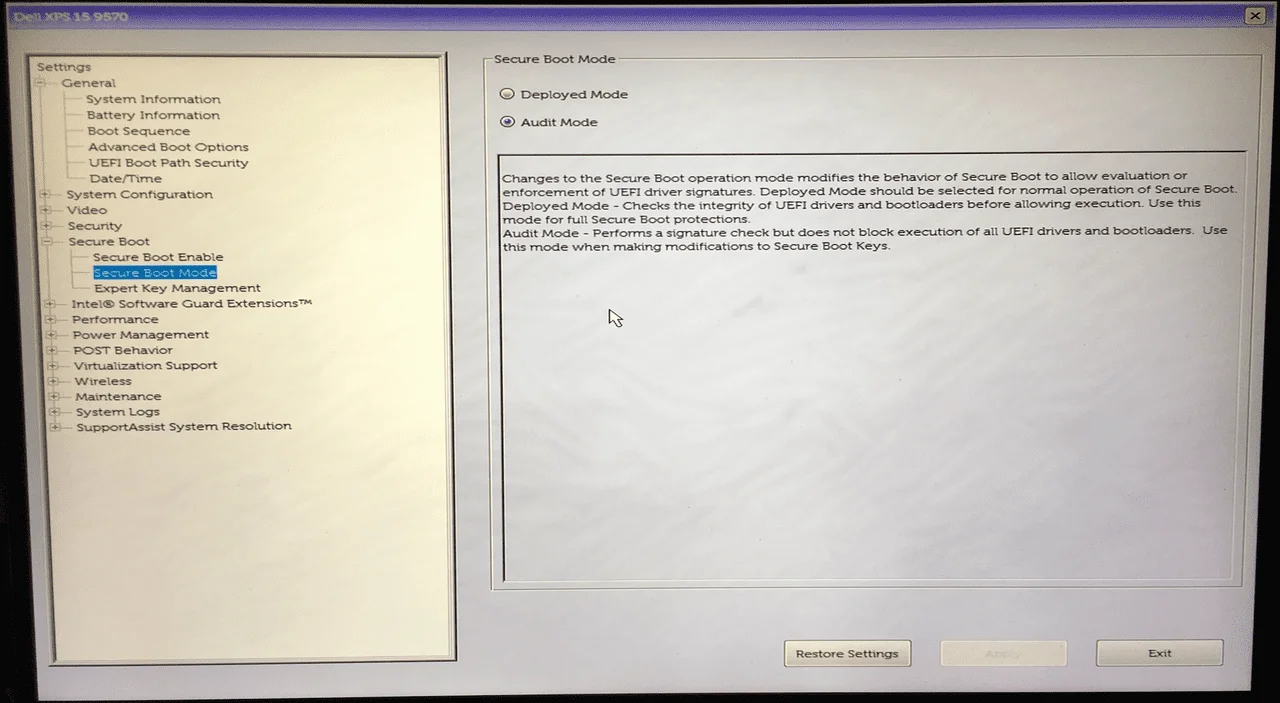
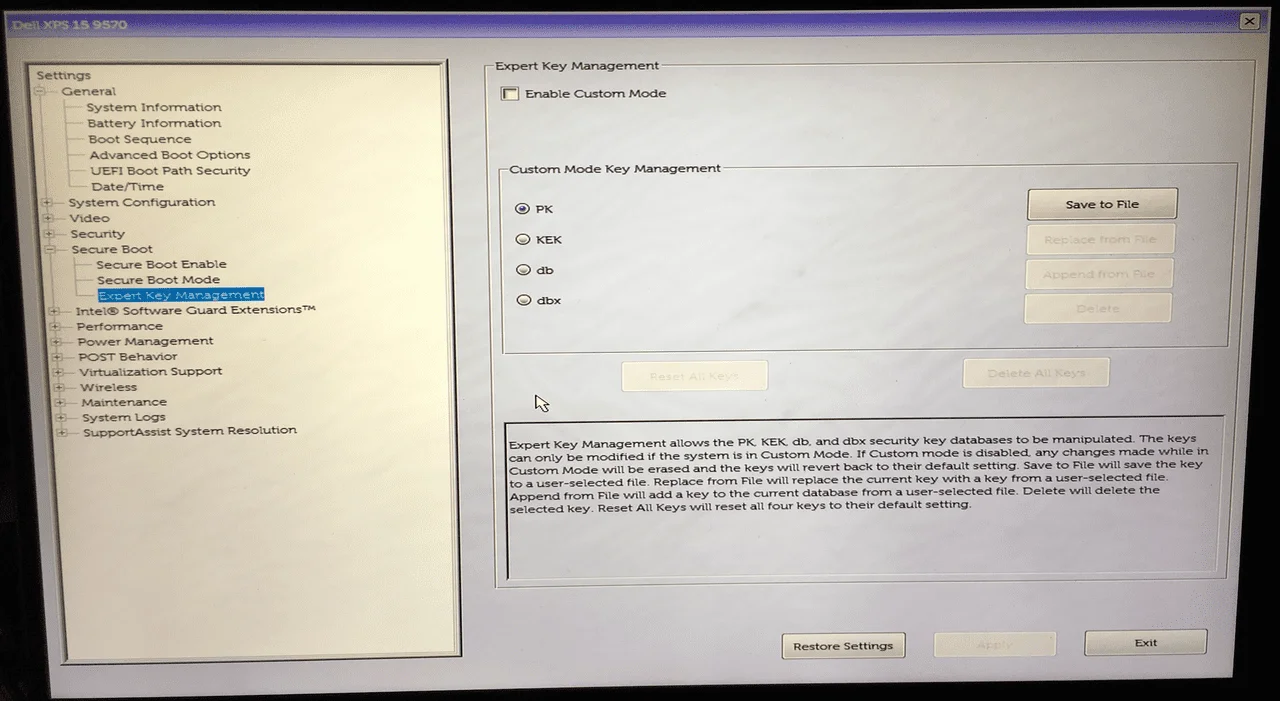
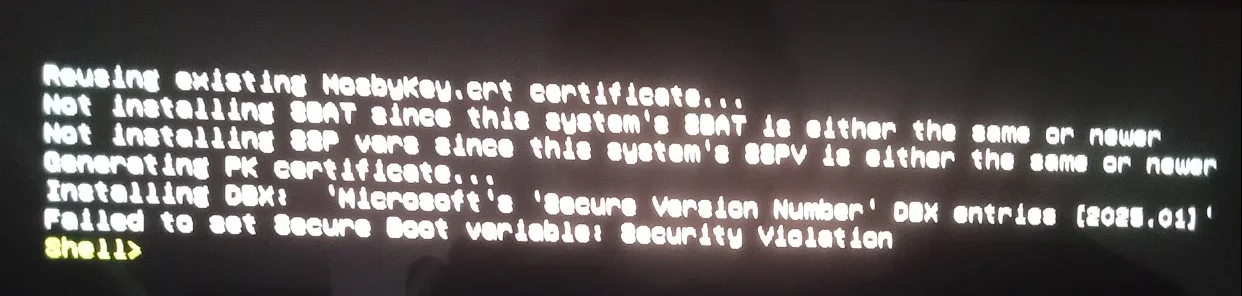
I had it on Audit Mode and I tried both Enable Custom Mode enabled and disabled under Expert Key Management and in all instances, all I get is:
"Failed to set Secure Boot variable: Security Boot violation" even after setting Secure Boot Enable to off:
@KevTech - What exactly is CSM as I had been seeing that when I search on Google but I am not sure if my bios setup even has that option.
I had it on Audit Mode and I tried both Enable Custom Mode enabled and disabled under Expert Key Management and in all instances, all I get is:
"Failed to set Secure Boot variable: Security Boot violation" even after setting Secure Boot Enable to off:
@KevTech - What exactly is CSM as I had been seeing that when I search on Google but I am not sure if my bios setup even has that option.
My Computer
At a glance
WindowsXP/7/8/8.1/10/11,Linux,Android,FreeBSD...Intel® Core™ i7-8750H 8th Gen 2.2Ghz up to 4....64GB using 2x32GB CL16 Mushkin redLine modulesIntel UHD 630 & NVIDIA GeForce GTX 1050 Ti wi...
- OS
- WindowsXP/7/8/8.1/10/11,Linux,Android,FreeBSD Unix
- Computer type
- Laptop
- Manufacturer/Model
- Dell XPS 15 9570
- CPU
- Intel® Core™ i7-8750H 8th Gen 2.2Ghz up to 4.1Ghz
- Motherboard
- Dell XPS 15 9570
- Memory
- 64GB using 2x32GB CL16 Mushkin redLine modules
- Graphics Card(s)
- Intel UHD 630 & NVIDIA GeForce GTX 1050 Ti with 4GB DDR5
- Sound Card
- Realtek ALC3266-CG
- Monitor(s) Displays
- 15.6" 4K Touch UltraHD 3840x2160 made by Sharp
- Screen Resolution
- 3840x2160 4K UltraHD
- Hard Drives
- Samsung MZ-V9P4T0B/AM 990 PRO 4TB PCIe®4.0 NVMe™ M.2 SSD was Toshiba KXG60ZNV1T02 NVMe 1TB SSD
- PSU
- Dell XPS 15 9570
- Case
- Dell XPS 15 9570
- Cooling
- Stock
- Keyboard
- Stock
- Mouse
- SwitftPoint ProPoint
- Internet Speed
- Comcast/XFinity 1.44Gbps/42.5Mbps
- Browser
- Microsoft EDGE (Chromium based) & Google Chrome
- Antivirus
- Windows Defender that came with Windows

@Almighty1

I also read that on Dell systems CSM is called Legacy Option ROMs, maybe under General>Advanced boot options.
I also read that on Dell systems CSM is called Legacy Option ROMs, maybe under General>Advanced boot options.
My Computers
-
At a glance
Win 11 Pro 26H2 26300.9711Intel® Core™ i7-14700KG.SKILL Ripjaws S5 Series 64GB (2 x 32GB) DDR5ASUS GeForce RTX 4070 Super 12GB- OS
- Win 11 Pro 26H2 26300.9711
- Computer type
- PC/Desktop
- Manufacturer/Model
- Self Built
- CPU
- Intel® Core™ i7-14700K
- Motherboard
- ASUS TUF Z690-PLUS WIFI (BIOS 4601)
- Memory
- G.SKILL Ripjaws S5 Series 64GB (2 x 32GB) DDR5
- Graphics Card(s)
- ASUS GeForce RTX 4070 Super 12GB
- Sound Card
- Sound Blaster AE-5 Plus
- Monitor(s) Displays
- ASUS TUF Gaming 27" 2K HDR Gaming
- Screen Resolution
- 2560 x 1440
- Hard Drives
- Samsung 990 Pro 1TB NVMe (Win 11 25H2)
SK hynix P41 500GB NVMe
SK hynix P41 2TB NVMe (x3)
Crucial P3 Plus 4TB
- PSU
- Corsair RM850x Shift
- Case
- Antec Dark Phantom DP502 FLUX
- Cooling
- Corsair Nautilus 360 RS AIO
- Keyboard
- Logitech MK 320
- Mouse
- Razer Basilisk V3
- Internet Speed
- 750Mbs
- Browser
- Firefox
- Antivirus
- Winows Security
- Other Info
- MR 8.1 Home
-
At a glance
Win 11 Pro 25H2 26300.9711Intel Core i5-1140064 GB DDR4MSI GeForce RTX 3060 Ventus 2X 12GB- Operating System
- Win 11 Pro 25H2 26300.9711
- Computer type
- PC/Desktop
- Manufacturer/Model
- Self Built
- CPU
- Intel Core i5-11400
- Motherboard
- Asus TUF Gaming Z590 Plus WiFi (BIOS 2803)
- Memory
- 64 GB DDR4
- Graphics card(s)
- MSI GeForce RTX 3060 Ventus 2X 12GB
- Sound Card
- SoundBlaster Audigy Fx V2
- Monitor(s) Displays
- Samsung F27T350
- Screen Resolution
- 1920x1080
- Hard Drives
- Samsung 980 Pro 1TB
Samsung 970 EVO Plus 2TB
Samsung 870 EVO 500GB SSD
- PSU
- Corsair HX750
- Case
- Cougar MX330-G Window
- Cooling
- Thermalright Frozen Edge 240 Black AIO
- Internet Speed
- 350Mbps
- Browser
- Firefox
- Antivirus
- Windows Security
-
System Three
Win 11 Pro 25H2 26300.9711
ASUS PRIME Z370-P II BIOS 3004 7/12/21
Intel Core i7-8700 CPU @ 3.20GHz
32GB DDR4 RAM (4x8)
Samsung 980 Pro 500 GB
SK hynix P41 1 TB
EVGA RTX 2060 (used)
iGPU Intel UHD Graphics 630 (backup)
Cooler Master Hyper 212
Mid-Tower Desktop
- Local time
- 6:03 AM
- Posts
- 3,637
- Location
- San Francisco, California USA
- OS
- WindowsXP/7/8/8.1/10/11,Linux,Android,FreeBSD Unix
Thanks, that is unchecked already.@Almighty1
View attachment 145668
I also read that on Dell systems CSM is called Legacy Option ROMs, maybe under General>Advanced boot options.
My Computer
At a glance
WindowsXP/7/8/8.1/10/11,Linux,Android,FreeBSD...Intel® Core™ i7-8750H 8th Gen 2.2Ghz up to 4....64GB using 2x32GB CL16 Mushkin redLine modulesIntel UHD 630 & NVIDIA GeForce GTX 1050 Ti wi...
- OS
- WindowsXP/7/8/8.1/10/11,Linux,Android,FreeBSD Unix
- Computer type
- Laptop
- Manufacturer/Model
- Dell XPS 15 9570
- CPU
- Intel® Core™ i7-8750H 8th Gen 2.2Ghz up to 4.1Ghz
- Motherboard
- Dell XPS 15 9570
- Memory
- 64GB using 2x32GB CL16 Mushkin redLine modules
- Graphics Card(s)
- Intel UHD 630 & NVIDIA GeForce GTX 1050 Ti with 4GB DDR5
- Sound Card
- Realtek ALC3266-CG
- Monitor(s) Displays
- 15.6" 4K Touch UltraHD 3840x2160 made by Sharp
- Screen Resolution
- 3840x2160 4K UltraHD
- Hard Drives
- Samsung MZ-V9P4T0B/AM 990 PRO 4TB PCIe®4.0 NVMe™ M.2 SSD was Toshiba KXG60ZNV1T02 NVMe 1TB SSD
- PSU
- Dell XPS 15 9570
- Case
- Dell XPS 15 9570
- Cooling
- Stock
- Keyboard
- Stock
- Mouse
- SwitftPoint ProPoint
- Internet Speed
- Comcast/XFinity 1.44Gbps/42.5Mbps
- Browser
- Microsoft EDGE (Chromium based) & Google Chrome
- Antivirus
- Windows Defender that came with Windows

Yeah, on ASRock B550 PG Velocita, that bull pucky is enabled by default!Thanks, that is unchecked already.

OTOH, on Asus ROG Strix B550-F Gaming, CSM is not enabled by default.

My Computers
-
At a glance
Windows 11 Pro x64 25H2Ryzen 9 5900X64 GB G.Skill RipJaws V F4-3200C16D-64GVKASRock Steel Legend Arc B580 12 GB- OS
- Windows 11 Pro x64 25H2
- Computer type
- PC/Desktop
- CPU
- Ryzen 9 5900X
- Motherboard
- ASRock B550 PG Velocita (UEFI-BIOS 3.90)
- Memory
- 64 GB G.Skill RipJaws V F4-3200C16D-64GVK
- Graphics Card(s)
- ASRock Steel Legend Arc B580 12 GB
- Monitor(s) Displays
- Alienware AW3423DWF OLED ultrawide
- Hard Drives
- Samsung 990 Pro 1 TB NVMe SSD
- PSU
- eVGA Supernova 750 G3
- Case
- Corsair 275R
- Internet Speed
- VTel FTTH 1 Gb down and 1 Gb up
-
At a glance
Windows 11 Home x64 25H2Ryzen 7 5800X3D32 GB (2x16 GB G.Skill TridentZ Neo)Sapphire Nitro+ Radeon RX 6750 XT- Operating System
- Windows 11 Home x64 25H2
- Computer type
- PC/Desktop
- CPU
- Ryzen 7 5800X3D
- Motherboard
- Asus ROG Strix B550-F Gaming (UEFI-BIOS version 3644)
- Memory
- 32 GB (2x16 GB G.Skill TridentZ Neo)
- Graphics card(s)
- Sapphire Nitro+ Radeon RX 6750 XT
- Hard Drives
- Samsung 970 Pro 512 GB NVMe SSD
- PSU
- Corsair RM850x
- Case
- Fractal Focus G

- Local time
- 11:03 PM
- Posts
- 17,860
- Location
- Gold Coast, Australia
- OS
- Windows 11 Pro 26H2 Build 26300.9711
So yesterday I used the microsoft corporation kek 2k ca 2023.der Garlin provided and loaded it in my BIOS. I could only do it via BLOB (Whatever that is, as the other secure (whatever) option failed
And now I see this from Microsoft, what is it and should it be added as I cannot see it in the UEFI KEK Certs above?
Microsoft Corporation KEK 2K CA 2023
Code:
Secure Boot: ON
BitLocker on (C:) OFF

UEFI KEK Certs
--------------
    Microsoft Corporation KEK CA 2011

UEFI DB Certs
-------------
    Microsoft Corporation UEFI CA 2011
    Microsoft Windows Production PCA 2011
    Windows UEFI CA 2023

UEFI DBX Certs
--------------

EFI Files
---------
    Disk 4: Boot Manager [Windows UEFI CA 2023] is ALLOWED.

    Registry: WindowsUEFICA2023Capable = 2
        [Windows UEFI CA 2023] is in UEFI DB, and Windows is starting from CA 2023 Boot Manager.
And now I see this from Microsoft, what is it and should it be added as I cannot see it in the UEFI KEK Certs above?
Microsoft Corporation KEK 2K CA 2023
microsoft corporation kek 2k ca 2023.crt- SHA-1 cert hash: 459AB6FB5E284D272D5E3E6ABC8ED663829D632B.
- SignatureOwner GUID: {77fa9abd-0359-4d32-bd60-28f4e78f784b}.
- Microsoft will provide the certificate to partners and it can be added either as an EFI_CERT_X509_GUID or an EFI_CERT_RSA2048_GUID type signature.
- The Microsoft KEK certificate can be downloaded from:
[URL]https://go.microsoft.com/fwlink/?linkid=2239775[/URL]
My Computers
-
At a glance
Windows 11 Pro 26H2 Build 26300.9711Intel(R) Core(TM) i7-4770K CPU @ 3.50GHz32.0 GB of I forget and the box is in storage.Gigabyte nVidia GeForce GTX 1660 Super OC 6GB- OS
- Windows 11 Pro 26H2 Build 26300.9711
- Computer type
- PC/Desktop
- Manufacturer/Model
- Sin-built 2013
- CPU
- Intel(R) Core(TM) i7-4770K CPU @ 3.50GHz
- Motherboard
- ASUS ROG Maximus VI Formula
- Memory
- 32.0 GB of I forget and the box is in storage.
- Graphics Card(s)
- Gigabyte nVidia GeForce GTX 1660 Super OC 6GB
- Sound Card
- ROG SupremeFX Formula 8-Channel High Definition Audio
- Monitor(s) Displays
- 5 x LG 25MS500-B - 1 x 24MK430H-B - 1 x Wacom Pro 22" Touch Screen Tablet
- Screen Resolution
- All over the place
- Hard Drives
- Too many to list. OS on Samsung 1TB 870 QVO SATA
- PSU
- Silverstone 1500
- Case
- NZXT Phantom 820 Full-Tower Case
- Cooling
- Noctua NH-D15 Elite Class Dual Tower CPU Cooler / 6 x EziDIY 120mm / 2 x Corsair 140mm somethings / 1 x 140mm Thermaltake something / 2 x 200mm Corsair.
- Keyboard
- Corsair K95 / Logitech diNovo Edge Wireless
- Mouse
- Logitech: G402 / G502 / Mx Masters / Mx Air Cordless
- Internet Speed
- 2000/500Mbps
- Browser
- All sorts
- Antivirus
- Kaspersky Premium
- Other Info
- ㅤㅤㅤㅤㅤㅤㅤㅤㅤㅤㅤㅤㅤㅤㅤㅤㅤㅤㅤㅤㅤㅤㅤㅤㅤㅤㅤㅤㅤㅤㅤㅤㅤㅤㅤㅤㅤㅤㅤㅤ⠀⠀⠀⠀⠀⠀⠀⠀⠀⠀
TP-Link BE9300 WiFi 7 Bluetooth 5.4 (Archer TBE550E)
TP-Link TX201 V1 2.5GB Lan
Grandstream HT812 - VoIP
ASUS DSL-AX82U - Mesh
ASUS RT-AC68U - Mesh
ASUS RT-BE88U Router
Brother MFC-L2880DW Printer
I’m on a horse.
-
At a glance
Windows 11 Pro 26H2 Build 26300.971113th Generation Intel® Core™ i5-1340P Process...16GB LPDDR5-52001x Intel® Iris® Xe Graphics- Operating System
- Windows 11 Pro 26H2 Build 26300.9711
- Computer type
- Laptop
- Manufacturer/Model
- LENOVO Yoga 7 14IRL8 - Type 82YL
- CPU
- 13th Generation Intel® Core™ i5-1340P Processor(Core™ i5-1340P)
- Memory
- 16GB LPDDR5-5200
- Graphics card(s)
- 1x Intel® Iris® Xe Graphics
- Sound Card
- Optimized with Dolby Atmos®
- Screen Resolution
- QHD 2880 x 1800 OLED
- Hard Drives
- M.2 512 GB SSD PCIe
- Mouse
- Logiteck MX Master 3S
- Internet Speed
- 2000/500
- Antivirus
- Defender / Malwarebytes
- Other Info
- …still on a horse.
Wireless Network: Wi-Fi 6E 2x2 AX; Bluetooth® 5.1 or above
Ports: 1x 1 Novo button; 2 in 1 Audio Combo jack; Micro SD Card Reader; HDMI 1.4b; 2 x USB Type-C (TBT4)
USB 3.2 Gen 2 DP 1.4a
PD 3.0); 1 x USB 3.2 Gen1 Type A
Camera
1x 1080P FHD IR/RGB Hybrid with Privacy Shutter and Dual Array Microphone
Graphics
1x Intel® Iris® Xe Graphics
Monitor
14" WUXGA
Form Factor
Convertible Notebook
-
Windows 11 Pro 25H2 Build 26200.9168 (Wifes)
Yoga 7 2-in-1 14IML9 - Type 83DJ
Processor: Intel® Core™ Ultra 7 155H Processor(Core™ Ultra 7 155H)
Memory: 32GB LPD5X-7467
Hard Drive: 1 TB SSD PCIe
Wireless Network: 1x Wi-Fi 6E 2x2 AX; Bluetooth® 5.1 or above
Ports: 1 x HDMI 2.1 TMDS; 1 x Novo Button; 1 x Combo Audio Jack
2 x USB-C (USB 4.0)
1 x USB-A 3.2 Gen 1
Camera: 1080P FHD IR Hybrid with Dual Microphone
Graphics: Intel® Arc™ Graphics
Monitor: 14" 2.8K
...Where's my horse?
- Local time
- 11:03 PM
- Posts
- 17,860
- Location
- Gold Coast, Australia
- OS
- Windows 11 Pro 26H2 Build 26300.9711
My check cert output looks just like yours after running the script at the beginning of this thread. I assume I need the 2023 cert under KEK as well? If so, what is the safe way/commands/script to do that? Thanks.
It’s just a query on my part, it maybe should be ignored and will sort itself out by a Windows Updat or load of an ISO with the correct Cert.
But yeah, I’d like to know. also.
My Computers
-
At a glance
Windows 11 Pro 26H2 Build 26300.9711Intel(R) Core(TM) i7-4770K CPU @ 3.50GHz32.0 GB of I forget and the box is in storage.Gigabyte nVidia GeForce GTX 1660 Super OC 6GB- OS
- Windows 11 Pro 26H2 Build 26300.9711
- Computer type
- PC/Desktop
- Manufacturer/Model
- Sin-built 2013
- CPU
- Intel(R) Core(TM) i7-4770K CPU @ 3.50GHz
- Motherboard
- ASUS ROG Maximus VI Formula
- Memory
- 32.0 GB of I forget and the box is in storage.
- Graphics Card(s)
- Gigabyte nVidia GeForce GTX 1660 Super OC 6GB
- Sound Card
- ROG SupremeFX Formula 8-Channel High Definition Audio
- Monitor(s) Displays
- 5 x LG 25MS500-B - 1 x 24MK430H-B - 1 x Wacom Pro 22" Touch Screen Tablet
- Screen Resolution
- All over the place
- Hard Drives
- Too many to list. OS on Samsung 1TB 870 QVO SATA
- PSU
- Silverstone 1500
- Case
- NZXT Phantom 820 Full-Tower Case
- Cooling
- Noctua NH-D15 Elite Class Dual Tower CPU Cooler / 6 x EziDIY 120mm / 2 x Corsair 140mm somethings / 1 x 140mm Thermaltake something / 2 x 200mm Corsair.
- Keyboard
- Corsair K95 / Logitech diNovo Edge Wireless
- Mouse
- Logitech: G402 / G502 / Mx Masters / Mx Air Cordless
- Internet Speed
- 2000/500Mbps
- Browser
- All sorts
- Antivirus
- Kaspersky Premium
- Other Info
- ㅤㅤㅤㅤㅤㅤㅤㅤㅤㅤㅤㅤㅤㅤㅤㅤㅤㅤㅤㅤㅤㅤㅤㅤㅤㅤㅤㅤㅤㅤㅤㅤㅤㅤㅤㅤㅤㅤㅤㅤ⠀⠀⠀⠀⠀⠀⠀⠀⠀⠀
TP-Link BE9300 WiFi 7 Bluetooth 5.4 (Archer TBE550E)
TP-Link TX201 V1 2.5GB Lan
Grandstream HT812 - VoIP
ASUS DSL-AX82U - Mesh
ASUS RT-AC68U - Mesh
ASUS RT-BE88U Router
Brother MFC-L2880DW Printer
I’m on a horse.
-
At a glance
Windows 11 Pro 26H2 Build 26300.971113th Generation Intel® Core™ i5-1340P Process...16GB LPDDR5-52001x Intel® Iris® Xe Graphics- Operating System
- Windows 11 Pro 26H2 Build 26300.9711
- Computer type
- Laptop
- Manufacturer/Model
- LENOVO Yoga 7 14IRL8 - Type 82YL
- CPU
- 13th Generation Intel® Core™ i5-1340P Processor(Core™ i5-1340P)
- Memory
- 16GB LPDDR5-5200
- Graphics card(s)
- 1x Intel® Iris® Xe Graphics
- Sound Card
- Optimized with Dolby Atmos®
- Screen Resolution
- QHD 2880 x 1800 OLED
- Hard Drives
- M.2 512 GB SSD PCIe
- Mouse
- Logiteck MX Master 3S
- Internet Speed
- 2000/500
- Antivirus
- Defender / Malwarebytes
- Other Info
- …still on a horse.
Wireless Network: Wi-Fi 6E 2x2 AX; Bluetooth® 5.1 or above
Ports: 1x 1 Novo button; 2 in 1 Audio Combo jack; Micro SD Card Reader; HDMI 1.4b; 2 x USB Type-C (TBT4)
USB 3.2 Gen 2 DP 1.4a
PD 3.0); 1 x USB 3.2 Gen1 Type A
Camera
1x 1080P FHD IR/RGB Hybrid with Privacy Shutter and Dual Array Microphone
Graphics
1x Intel® Iris® Xe Graphics
Monitor
14" WUXGA
Form Factor
Convertible Notebook
-
Windows 11 Pro 25H2 Build 26200.9168 (Wifes)
Yoga 7 2-in-1 14IML9 - Type 83DJ
Processor: Intel® Core™ Ultra 7 155H Processor(Core™ Ultra 7 155H)
Memory: 32GB LPD5X-7467
Hard Drive: 1 TB SSD PCIe
Wireless Network: 1x Wi-Fi 6E 2x2 AX; Bluetooth® 5.1 or above
Ports: 1 x HDMI 2.1 TMDS; 1 x Novo Button; 1 x Combo Audio Jack
2 x USB-C (USB 4.0)
1 x USB-A 3.2 Gen 1
Camera: 1080P FHD IR Hybrid with Dual Microphone
Graphics: Intel® Arc™ Graphics
Monitor: 14" 2.8K
...Where's my horse?
- Local time
- 11:03 PM
- Posts
- 17,860
- Location
- Gold Coast, Australia
- OS
- Windows 11 Pro 26H2 Build 26300.9711
Microsoft will provide the certificate to partners and it can be added either as an EFI_CERT_X509_GUID or an EFI_CERT_RSA2048_GUID type signature.
I’m guessing it’s for vendors and the likes, for inclusion in BIOS updates and what not.
My Computers
-
At a glance
Windows 11 Pro 26H2 Build 26300.9711Intel(R) Core(TM) i7-4770K CPU @ 3.50GHz32.0 GB of I forget and the box is in storage.Gigabyte nVidia GeForce GTX 1660 Super OC 6GB- OS
- Windows 11 Pro 26H2 Build 26300.9711
- Computer type
- PC/Desktop
- Manufacturer/Model
- Sin-built 2013
- CPU
- Intel(R) Core(TM) i7-4770K CPU @ 3.50GHz
- Motherboard
- ASUS ROG Maximus VI Formula
- Memory
- 32.0 GB of I forget and the box is in storage.
- Graphics Card(s)
- Gigabyte nVidia GeForce GTX 1660 Super OC 6GB
- Sound Card
- ROG SupremeFX Formula 8-Channel High Definition Audio
- Monitor(s) Displays
- 5 x LG 25MS500-B - 1 x 24MK430H-B - 1 x Wacom Pro 22" Touch Screen Tablet
- Screen Resolution
- All over the place
- Hard Drives
- Too many to list. OS on Samsung 1TB 870 QVO SATA
- PSU
- Silverstone 1500
- Case
- NZXT Phantom 820 Full-Tower Case
- Cooling
- Noctua NH-D15 Elite Class Dual Tower CPU Cooler / 6 x EziDIY 120mm / 2 x Corsair 140mm somethings / 1 x 140mm Thermaltake something / 2 x 200mm Corsair.
- Keyboard
- Corsair K95 / Logitech diNovo Edge Wireless
- Mouse
- Logitech: G402 / G502 / Mx Masters / Mx Air Cordless
- Internet Speed
- 2000/500Mbps
- Browser
- All sorts
- Antivirus
- Kaspersky Premium
- Other Info
- ㅤㅤㅤㅤㅤㅤㅤㅤㅤㅤㅤㅤㅤㅤㅤㅤㅤㅤㅤㅤㅤㅤㅤㅤㅤㅤㅤㅤㅤㅤㅤㅤㅤㅤㅤㅤㅤㅤㅤㅤ⠀⠀⠀⠀⠀⠀⠀⠀⠀⠀
TP-Link BE9300 WiFi 7 Bluetooth 5.4 (Archer TBE550E)
TP-Link TX201 V1 2.5GB Lan
Grandstream HT812 - VoIP
ASUS DSL-AX82U - Mesh
ASUS RT-AC68U - Mesh
ASUS RT-BE88U Router
Brother MFC-L2880DW Printer
I’m on a horse.
-
At a glance
Windows 11 Pro 26H2 Build 26300.971113th Generation Intel® Core™ i5-1340P Process...16GB LPDDR5-52001x Intel® Iris® Xe Graphics- Operating System
- Windows 11 Pro 26H2 Build 26300.9711
- Computer type
- Laptop
- Manufacturer/Model
- LENOVO Yoga 7 14IRL8 - Type 82YL
- CPU
- 13th Generation Intel® Core™ i5-1340P Processor(Core™ i5-1340P)
- Memory
- 16GB LPDDR5-5200
- Graphics card(s)
- 1x Intel® Iris® Xe Graphics
- Sound Card
- Optimized with Dolby Atmos®
- Screen Resolution
- QHD 2880 x 1800 OLED
- Hard Drives
- M.2 512 GB SSD PCIe
- Mouse
- Logiteck MX Master 3S
- Internet Speed
- 2000/500
- Antivirus
- Defender / Malwarebytes
- Other Info
- …still on a horse.
Wireless Network: Wi-Fi 6E 2x2 AX; Bluetooth® 5.1 or above
Ports: 1x 1 Novo button; 2 in 1 Audio Combo jack; Micro SD Card Reader; HDMI 1.4b; 2 x USB Type-C (TBT4)
USB 3.2 Gen 2 DP 1.4a
PD 3.0); 1 x USB 3.2 Gen1 Type A
Camera
1x 1080P FHD IR/RGB Hybrid with Privacy Shutter and Dual Array Microphone
Graphics
1x Intel® Iris® Xe Graphics
Monitor
14" WUXGA
Form Factor
Convertible Notebook
-
Windows 11 Pro 25H2 Build 26200.9168 (Wifes)
Yoga 7 2-in-1 14IML9 - Type 83DJ
Processor: Intel® Core™ Ultra 7 155H Processor(Core™ Ultra 7 155H)
Memory: 32GB LPD5X-7467
Hard Drive: 1 TB SSD PCIe
Wireless Network: 1x Wi-Fi 6E 2x2 AX; Bluetooth® 5.1 or above
Ports: 1 x HDMI 2.1 TMDS; 1 x Novo Button; 1 x Combo Audio Jack
2 x USB-C (USB 4.0)
1 x USB-A 3.2 Gen 1
Camera: 1080P FHD IR Hybrid with Dual Microphone
Graphics: Intel® Arc™ Graphics
Monitor: 14" 2.8K
...Where's my horse?

- Local time
- 8:03 AM
- Posts
- 520
- OS
- Windows 11
Here is my output:
D:\Downloads>powershell -nop -ep bypass -f Check_EFIBootFile.ps1
Secure Boot: ON
BitLocker on (C:) OFF
UEFI KEK Certs
--------------
Microsoft Corporation KEK CA 2011
UEFI DB Certs
-------------
Microsoft Corporation UEFI CA 2011
Microsoft Windows Production PCA 2011
Windows UEFI CA 2023
UEFI DBX Certs
--------------
EFI Files
---------
Disk 0: Boot Manager [Production PCA 2011] is ALLOWED.
Registry: WindowsUEFICA2023Capable = 1
[Windows UEFI CA 2023] is in UEFI DB.
Do I need to take any further action? I noticed earlier that someone also had a Microsoft UEFI CA 2023 certificate, and there is a KEK as well. Are those necessary and, if so, what are the commands to install/update those? Much appreciated to everyone helping out in this thread.
D:\Downloads>powershell -nop -ep bypass -f Check_EFIBootFile.ps1
Secure Boot: ON
BitLocker on (C:) OFF
UEFI KEK Certs
--------------
Microsoft Corporation KEK CA 2011
UEFI DB Certs
-------------
Microsoft Corporation UEFI CA 2011
Microsoft Windows Production PCA 2011
Windows UEFI CA 2023
UEFI DBX Certs
--------------
EFI Files
---------
Disk 0: Boot Manager [Production PCA 2011] is ALLOWED.
Registry: WindowsUEFICA2023Capable = 1
[Windows UEFI CA 2023] is in UEFI DB.
Do I need to take any further action? I noticed earlier that someone also had a Microsoft UEFI CA 2023 certificate, and there is a KEK as well. Are those necessary and, if so, what are the commands to install/update those? Much appreciated to everyone helping out in this thread.
My Computers
-
At a glance
Windows 11Intel i7-7700K32GB 2666Mhz (Kingston Hyper X Fury)Powercolor RX6600XT- OS
- Windows 11
- Computer type
- PC/Desktop
- Manufacturer/Model
- Custom
- CPU
- Intel i7-7700K
- Motherboard
- Asus Prime Z-270A
- Memory
- 32GB 2666Mhz (Kingston Hyper X Fury)
- Graphics Card(s)
- Powercolor RX6600XT
- Sound Card
- N/A
- Monitor(s) Displays
- KTC
- Screen Resolution
- 2560 x 1440
- Hard Drives
- 1TB Western Digital SN770 (System) and 2TB Western Digital SN770 (Storage)
- Antivirus
- Windows Security
-
At a glance
Windows 11 Homei9-11900H32GBIntegrated Intel and Nvidia 3050Ti- Operating System
- Windows 11 Home
- Computer type
- Laptop
- Manufacturer/Model
- Dell/XPS 15 9510
- CPU
- i9-11900H
- Motherboard
- Unknown
- Memory
- 32GB
- Graphics card(s)
- Integrated Intel and Nvidia 3050Ti
- Sound Card
- Integrated (Realtek)
- Monitor(s) Displays
- None
- Screen Resolution
- 1920 x 1200 (non-Touch)
- Hard Drives
- 2TB SK Hynix P41 Platinum
- Antivirus
- Windows Security
- Local time
- 6:03 AM
- Posts
- 3,637
- Location
- San Francisco, California USA
- OS
- WindowsXP/7/8/8.1/10/11,Linux,Android,FreeBSD Unix
I got it working thanks to someone answering my question on reddit at:Speaking about Mosby, anyone here actually using a Dell machine because on my Dell XPS 15 9570 which has the following layout:
View attachment 145642
View attachment 145643
View attachment 145644
View attachment 145645
I had it on Audit Mode and I tried both Enable Custom Mode enabled and disabled under Expert Key Management and in all instances, all I get is:
"Failed to set Secure Boot variable: Security Boot violation" even after setting Secure Boot Enable to off:
View attachment 145646
@KevTech - What exactly is CSM as I had been seeing that when I search on Google but I am not sure if my bios setup even has that option.
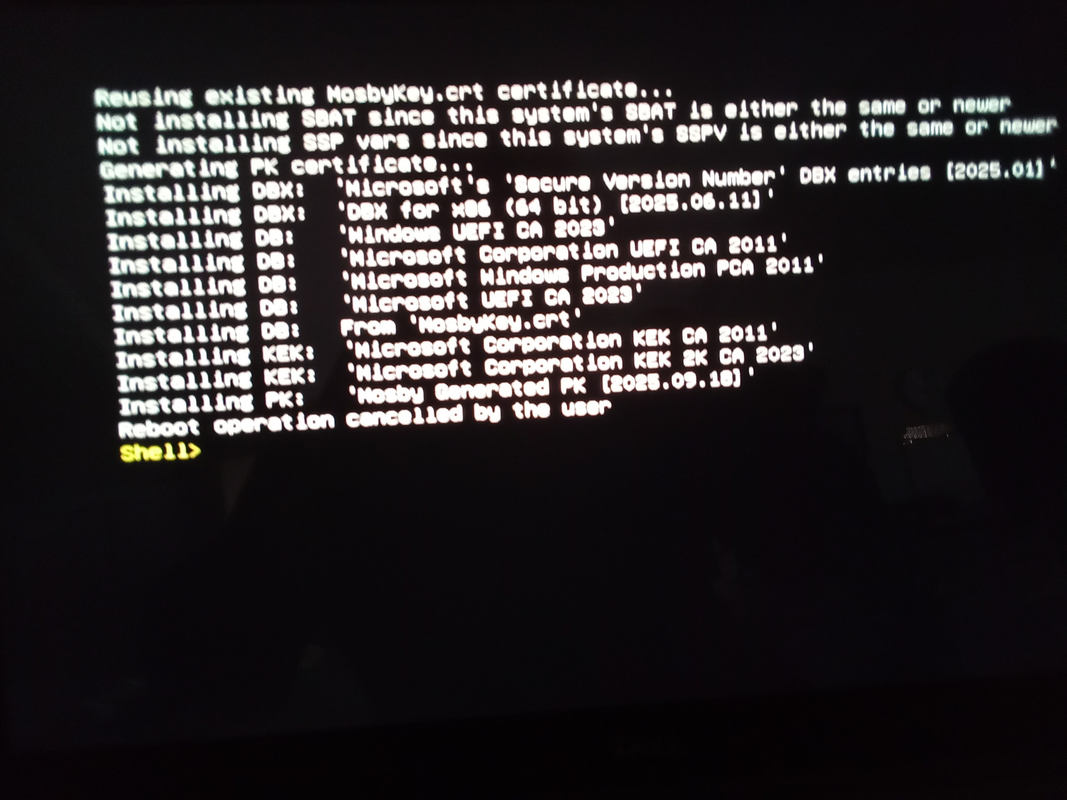
Basically, Setup Mode on the Dell is basically:
Secure Boot Enabled = off, Audit Mode, Delete All keys in Expert Key Management after enabling Custom Mode.
However, I ran into a different issue when I did:
Secure Boot Enabled = on, Deployment Mode which is needed so system boots with Secure Boot Mode = On, Expert Key Management after enabling Custom Mode:
Anyone have a script to check what Platform Keys is actually on the system?
Script provided by @garlin in post here:

Act now: Secure Boot certificates expire in June 2026
UPDATE: https://www.elevenforum.com/t/updating-microsoft-secure-boot-keys-before-expiration-in-june-2026.22477/ Windows IT Pro Blog: Prepare for the first global large-scale certificate update to Secure Boot. The Microsoft certificates used in Secure Boot are the basis of trust for operating...
 www.elevenforum.com
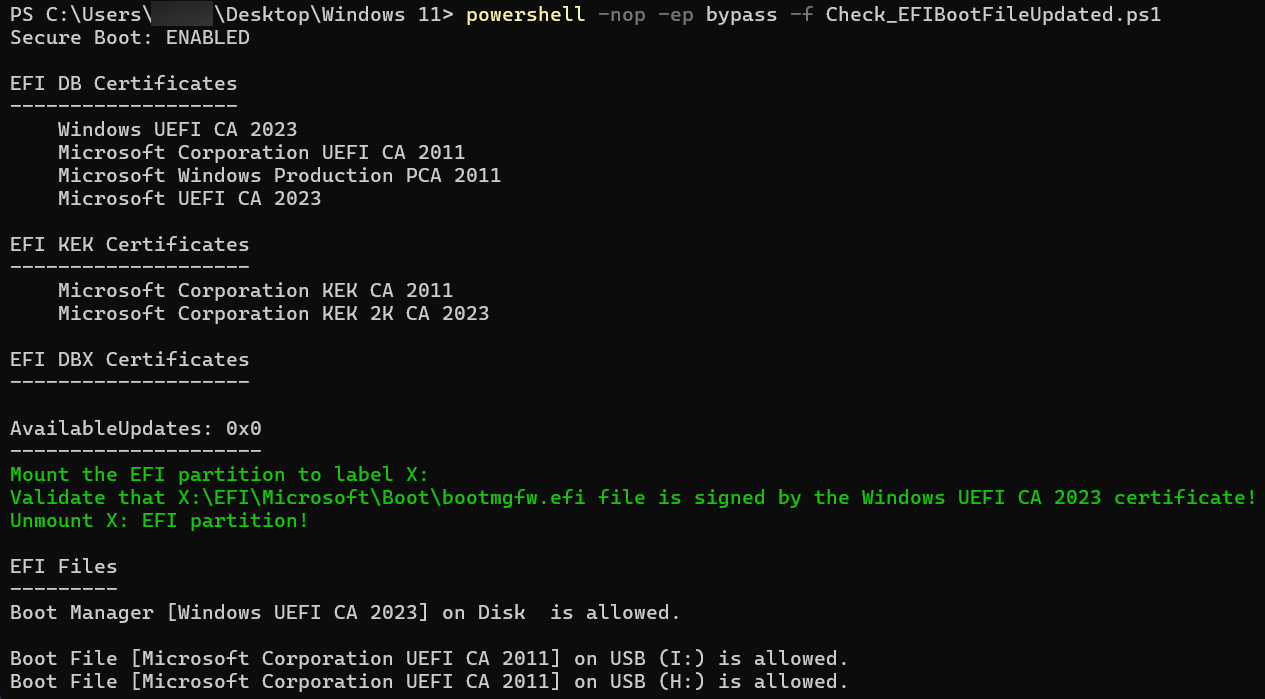
Mosby works but I am still missing the Microsoft Option ROM UEFI CA 2023
Update:
I used secureboot_objects/PostSignedObjects/Optional/DB/amd64/DBUpdateOROM2023.bin at main · microsoft/secureboot_objects and amended db from file in Custom Keys in the UEFI BIOS Setup to get the Microsoft Option ROM UEFI CA 2023 installed.
Last edited:
My Computer
At a glance
WindowsXP/7/8/8.1/10/11,Linux,Android,FreeBSD...Intel® Core™ i7-8750H 8th Gen 2.2Ghz up to 4....64GB using 2x32GB CL16 Mushkin redLine modulesIntel UHD 630 & NVIDIA GeForce GTX 1050 Ti wi...
- OS
- WindowsXP/7/8/8.1/10/11,Linux,Android,FreeBSD Unix
- Computer type
- Laptop
- Manufacturer/Model
- Dell XPS 15 9570
- CPU
- Intel® Core™ i7-8750H 8th Gen 2.2Ghz up to 4.1Ghz
- Motherboard
- Dell XPS 15 9570
- Memory
- 64GB using 2x32GB CL16 Mushkin redLine modules
- Graphics Card(s)
- Intel UHD 630 & NVIDIA GeForce GTX 1050 Ti with 4GB DDR5
- Sound Card
- Realtek ALC3266-CG
- Monitor(s) Displays
- 15.6" 4K Touch UltraHD 3840x2160 made by Sharp
- Screen Resolution
- 3840x2160 4K UltraHD
- Hard Drives
- Samsung MZ-V9P4T0B/AM 990 PRO 4TB PCIe®4.0 NVMe™ M.2 SSD was Toshiba KXG60ZNV1T02 NVMe 1TB SSD
- PSU
- Dell XPS 15 9570
- Case
- Dell XPS 15 9570
- Cooling
- Stock
- Keyboard
- Stock
- Mouse
- SwitftPoint ProPoint
- Internet Speed
- Comcast/XFinity 1.44Gbps/42.5Mbps
- Browser
- Microsoft EDGE (Chromium based) & Google Chrome
- Antivirus
- Windows Defender that came with Windows
OK. I found a possible explanation for the "exactly 16 bytes" error:
That leads me to believe possibly the wrong file got pushed.
If you get the error:
Cannot convert value "System.Byte[]" to type "System.Guid". Error: "Byte array for GUID must be exactly 16 bytes long."
...it's because your passing the wrong '.bin' file, like 'x64_DBXUpdate.bin'.
That leads me to believe possibly the wrong file got pushed.
My Computer
At a glance
Windows 7
- OS
- Windows 7
- Local time
- 11:03 PM
- Posts
- 17,860
- Location
- Gold Coast, Australia
- OS
- Windows 11 Pro 26H2 Build 26300.9711
 I have no idea if I am progressing...
Code:
Secure Boot: ON
BitLocker on (C:) OFF

UEFI KEK Certs
--------------
    Microsoft Corporation KEK CA 2011
    Microsoft Corporation KEK 2K CA 2023

UEFI DB Certs
-------------
    Microsoft Corporation UEFI CA 2011
    Microsoft Windows Production PCA 2011
    Windows UEFI CA 2023

UEFI DBX Certs
--------------

EFI Files
---------
    Disk 4: Boot Manager [Windows UEFI CA 2023] is ALLOWED.

    Registry: WindowsUEFICA2023Capable = 2
        [Windows UEFI CA 2023] is in UEFI DB, and Windows is starting from CA 2023 Boot Manager.

Bootable Media
--------------
    USB J: ""
My Computers
-
At a glance
Windows 11 Pro 26H2 Build 26300.9711Intel(R) Core(TM) i7-4770K CPU @ 3.50GHz32.0 GB of I forget and the box is in storage.Gigabyte nVidia GeForce GTX 1660 Super OC 6GB- OS
- Windows 11 Pro 26H2 Build 26300.9711
- Computer type
- PC/Desktop
- Manufacturer/Model
- Sin-built 2013
- CPU
- Intel(R) Core(TM) i7-4770K CPU @ 3.50GHz
- Motherboard
- ASUS ROG Maximus VI Formula
- Memory
- 32.0 GB of I forget and the box is in storage.
- Graphics Card(s)
- Gigabyte nVidia GeForce GTX 1660 Super OC 6GB
- Sound Card
- ROG SupremeFX Formula 8-Channel High Definition Audio
- Monitor(s) Displays
- 5 x LG 25MS500-B - 1 x 24MK430H-B - 1 x Wacom Pro 22" Touch Screen Tablet
- Screen Resolution
- All over the place
- Hard Drives
- Too many to list. OS on Samsung 1TB 870 QVO SATA
- PSU
- Silverstone 1500
- Case
- NZXT Phantom 820 Full-Tower Case
- Cooling
- Noctua NH-D15 Elite Class Dual Tower CPU Cooler / 6 x EziDIY 120mm / 2 x Corsair 140mm somethings / 1 x 140mm Thermaltake something / 2 x 200mm Corsair.
- Keyboard
- Corsair K95 / Logitech diNovo Edge Wireless
- Mouse
- Logitech: G402 / G502 / Mx Masters / Mx Air Cordless
- Internet Speed
- 2000/500Mbps
- Browser
- All sorts
- Antivirus
- Kaspersky Premium
- Other Info
- ㅤㅤㅤㅤㅤㅤㅤㅤㅤㅤㅤㅤㅤㅤㅤㅤㅤㅤㅤㅤㅤㅤㅤㅤㅤㅤㅤㅤㅤㅤㅤㅤㅤㅤㅤㅤㅤㅤㅤㅤ⠀⠀⠀⠀⠀⠀⠀⠀⠀⠀
TP-Link BE9300 WiFi 7 Bluetooth 5.4 (Archer TBE550E)
TP-Link TX201 V1 2.5GB Lan
Grandstream HT812 - VoIP
ASUS DSL-AX82U - Mesh
ASUS RT-AC68U - Mesh
ASUS RT-BE88U Router
Brother MFC-L2880DW Printer
I’m on a horse.
-
At a glance
Windows 11 Pro 26H2 Build 26300.971113th Generation Intel® Core™ i5-1340P Process...16GB LPDDR5-52001x Intel® Iris® Xe Graphics- Operating System
- Windows 11 Pro 26H2 Build 26300.9711
- Computer type
- Laptop
- Manufacturer/Model
- LENOVO Yoga 7 14IRL8 - Type 82YL
- CPU
- 13th Generation Intel® Core™ i5-1340P Processor(Core™ i5-1340P)
- Memory
- 16GB LPDDR5-5200
- Graphics card(s)
- 1x Intel® Iris® Xe Graphics
- Sound Card
- Optimized with Dolby Atmos®
- Screen Resolution
- QHD 2880 x 1800 OLED
- Hard Drives
- M.2 512 GB SSD PCIe
- Mouse
- Logiteck MX Master 3S
- Internet Speed
- 2000/500
- Antivirus
- Defender / Malwarebytes
- Other Info
- …still on a horse.
Wireless Network: Wi-Fi 6E 2x2 AX; Bluetooth® 5.1 or above
Ports: 1x 1 Novo button; 2 in 1 Audio Combo jack; Micro SD Card Reader; HDMI 1.4b; 2 x USB Type-C (TBT4)
USB 3.2 Gen 2 DP 1.4a
PD 3.0); 1 x USB 3.2 Gen1 Type A
Camera
1x 1080P FHD IR/RGB Hybrid with Privacy Shutter and Dual Array Microphone
Graphics
1x Intel® Iris® Xe Graphics
Monitor
14" WUXGA
Form Factor
Convertible Notebook
-
Windows 11 Pro 25H2 Build 26200.9168 (Wifes)
Yoga 7 2-in-1 14IML9 - Type 83DJ
Processor: Intel® Core™ Ultra 7 155H Processor(Core™ Ultra 7 155H)
Memory: 32GB LPD5X-7467
Hard Drive: 1 TB SSD PCIe
Wireless Network: 1x Wi-Fi 6E 2x2 AX; Bluetooth® 5.1 or above
Ports: 1 x HDMI 2.1 TMDS; 1 x Novo Button; 1 x Combo Audio Jack
2 x USB-C (USB 4.0)
1 x USB-A 3.2 Gen 1
Camera: 1080P FHD IR Hybrid with Dual Microphone
Graphics: Intel® Arc™ Graphics
Monitor: 14" 2.8K
...Where's my horse?
- Local time
- 11:03 PM
- Posts
- 17,860
- Location
- Gold Coast, Australia
- OS
- Windows 11 Pro 26H2 Build 26300.9711
[Windows UEFI CA 2023] is in UEFI DB, and Windows is starting from CA 2023 Boot Manager.No boot manager repair needed
My Computers
-
At a glance
Windows 11 Pro 26H2 Build 26300.9711Intel(R) Core(TM) i7-4770K CPU @ 3.50GHz32.0 GB of I forget and the box is in storage.Gigabyte nVidia GeForce GTX 1660 Super OC 6GB- OS
- Windows 11 Pro 26H2 Build 26300.9711
- Computer type
- PC/Desktop
- Manufacturer/Model
- Sin-built 2013
- CPU
- Intel(R) Core(TM) i7-4770K CPU @ 3.50GHz
- Motherboard
- ASUS ROG Maximus VI Formula
- Memory
- 32.0 GB of I forget and the box is in storage.
- Graphics Card(s)
- Gigabyte nVidia GeForce GTX 1660 Super OC 6GB
- Sound Card
- ROG SupremeFX Formula 8-Channel High Definition Audio
- Monitor(s) Displays
- 5 x LG 25MS500-B - 1 x 24MK430H-B - 1 x Wacom Pro 22" Touch Screen Tablet
- Screen Resolution
- All over the place
- Hard Drives
- Too many to list. OS on Samsung 1TB 870 QVO SATA
- PSU
- Silverstone 1500
- Case
- NZXT Phantom 820 Full-Tower Case
- Cooling
- Noctua NH-D15 Elite Class Dual Tower CPU Cooler / 6 x EziDIY 120mm / 2 x Corsair 140mm somethings / 1 x 140mm Thermaltake something / 2 x 200mm Corsair.
- Keyboard
- Corsair K95 / Logitech diNovo Edge Wireless
- Mouse
- Logitech: G402 / G502 / Mx Masters / Mx Air Cordless
- Internet Speed
- 2000/500Mbps
- Browser
- All sorts
- Antivirus
- Kaspersky Premium
- Other Info
- ㅤㅤㅤㅤㅤㅤㅤㅤㅤㅤㅤㅤㅤㅤㅤㅤㅤㅤㅤㅤㅤㅤㅤㅤㅤㅤㅤㅤㅤㅤㅤㅤㅤㅤㅤㅤㅤㅤㅤㅤ⠀⠀⠀⠀⠀⠀⠀⠀⠀⠀
TP-Link BE9300 WiFi 7 Bluetooth 5.4 (Archer TBE550E)
TP-Link TX201 V1 2.5GB Lan
Grandstream HT812 - VoIP
ASUS DSL-AX82U - Mesh
ASUS RT-AC68U - Mesh
ASUS RT-BE88U Router
Brother MFC-L2880DW Printer
I’m on a horse.
-
At a glance
Windows 11 Pro 26H2 Build 26300.971113th Generation Intel® Core™ i5-1340P Process...16GB LPDDR5-52001x Intel® Iris® Xe Graphics- Operating System
- Windows 11 Pro 26H2 Build 26300.9711
- Computer type
- Laptop
- Manufacturer/Model
- LENOVO Yoga 7 14IRL8 - Type 82YL
- CPU
- 13th Generation Intel® Core™ i5-1340P Processor(Core™ i5-1340P)
- Memory
- 16GB LPDDR5-5200
- Graphics card(s)
- 1x Intel® Iris® Xe Graphics
- Sound Card
- Optimized with Dolby Atmos®
- Screen Resolution
- QHD 2880 x 1800 OLED
- Hard Drives
- M.2 512 GB SSD PCIe
- Mouse
- Logiteck MX Master 3S
- Internet Speed
- 2000/500
- Antivirus
- Defender / Malwarebytes
- Other Info
- …still on a horse.
Wireless Network: Wi-Fi 6E 2x2 AX; Bluetooth® 5.1 or above
Ports: 1x 1 Novo button; 2 in 1 Audio Combo jack; Micro SD Card Reader; HDMI 1.4b; 2 x USB Type-C (TBT4)
USB 3.2 Gen 2 DP 1.4a
PD 3.0); 1 x USB 3.2 Gen1 Type A
Camera
1x 1080P FHD IR/RGB Hybrid with Privacy Shutter and Dual Array Microphone
Graphics
1x Intel® Iris® Xe Graphics
Monitor
14" WUXGA
Form Factor
Convertible Notebook
-
Windows 11 Pro 25H2 Build 26200.9168 (Wifes)
Yoga 7 2-in-1 14IML9 - Type 83DJ
Processor: Intel® Core™ Ultra 7 155H Processor(Core™ Ultra 7 155H)
Memory: 32GB LPD5X-7467
Hard Drive: 1 TB SSD PCIe
Wireless Network: 1x Wi-Fi 6E 2x2 AX; Bluetooth® 5.1 or above
Ports: 1 x HDMI 2.1 TMDS; 1 x Novo Button; 1 x Combo Audio Jack
2 x USB-C (USB 4.0)
1 x USB-A 3.2 Gen 1
Camera: 1080P FHD IR Hybrid with Dual Microphone
Graphics: Intel® Arc™ Graphics
Monitor: 14" 2.8K
...Where's my horse?
Similar threads

- Replies
- 7
- Views
- 927


- Sticky
- Article
- Replies
- 559
- Views
- 134K

Latest Support Threads
-
-
-
Certain 3rd-party apps can't login to web services
- Started by SlicEnDicE
- Replies: 5
-
Problem Installing A Software Program- Tech Support Has Given Up
- Started by Toughbook
- Replies: 12
-

Latest Tutorials
-
 Apps Enable or Disable Energy Saver for Copilot Web Browsing in Windows 11
- Started by Brink
- Replies: 0
-
 Accessibility Enable or Disable Magnifier Win + Plus Keyboard Shortcut in Windows 11
- Started by Brink
- Replies: 2
-
 Apps Enable or Disable Preload Pages for Faster Browsing and Searching in Copilot on Windows 11
- Started by Brink
- Replies: 0
-
 Apps Enable or Disable Graphics Hardware Acceleration in Copilot Web Browsing on Windows 11
- Started by Brink
- Replies: 0
-
 Browsers and Mail Enable or Disable Import Edge Browsing Data in Copilot on Windows 11
- Started by Brink
- Replies: 0