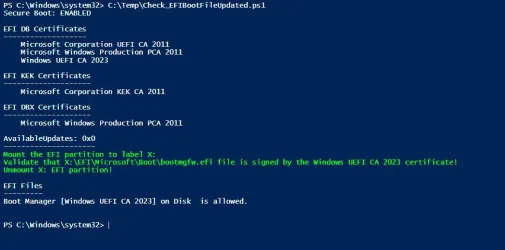
Did you manually update your Secure Boot Keys ?


I boot sometime from Macrium rescue disk..does that rewrite the certificates?
Well if you could boot from some device and it rewrote the certificates that would make the whole UEFI/certificate concept pointless.
Any rogue image that you could boot from could effectively bypass UEFI secure boot if it was allowed to rewrite the certificates.
My understanding is the certificates are not stored on disk but rather in EEPROM memory on the motherboard, controlled by the BIOS.

Booting from a Macrium rescue disk with UEFI secure boot enabled means the boot files on the Macrium disk need to be signed
by certificates that are resident in the DB database (and not in the DBX database). So probably the 2021 variation for older Macrium
rescue disks, and possibly the 2023 variation for newly generated Macrium images (assuming you have installed the 2023 variations
in your motherboard BIOS database).
 

My Computers

System One System Two

  • OS
    Win11 25H2 26200.7623
    Computer type
    PC/Desktop
    Manufacturer/Model
    Lenovo P520
    CPU
    Intel XEON W-2245 8c/16t
    Memory
    128GB DDR4-2933 ECC
    Graphics Card(s)
    Nvidia Quadro K4200
    Sound Card
    Bultin
    Monitor(s) Displays
    LCD 24in
    Screen Resolution
    1920x1200
    Hard Drives
    1TB SSD system, 16TB data 3.5in HDD, 16TB backup 3.5in HDD
    PSU
    900W
    Cooling
    Air
    Internet Speed
    1Gb
    Browser
    Firefox & Chrome
    Antivirus
    MalwareBytes
  • Operating System
    Win10 22H2
    Computer type
    Laptop
    Manufacturer/Model
    Lenovo T530
    CPU
    Intel Core i7-3520m
    Memory
    16GB
    Graphics card(s)
    integrated CPU graphics
    Hard Drives
    1TB SSD
    Internet Speed
    1Gb
    Browser
    Fiefox & Chrome
    Antivirus
    Malwarebytes
In the future I plan on going the Mosby route on an unsupported machine...i.e. it isn't going to get Asus BIOS update. What are the risks or consequences? If something doesn't go right does your machine get rendered as unbootable...at least with secure boot enabled? If that happens, would you just go in to the BOS, delete all certificates (if the option exists), and run Mosby again?
I have that exact situation with one of my systems.... a DIY build with an old 2012 era AM3+, 990FX motherboard. It does have a 2014 UEFI BIOS with Secure Boot, but there's no likelihood Gigabyte will update it further with new keys. I'm a bit concerned Microsoft won't do anything for it either since it's not supposed to be running Win11 anyway (unsupported).

Before doing anything, de-crypt drives and disable bit-locker.

If anything goes wrong just disable Secure Boot to go into Windows to "fix" anything wrong there. Also go into BIOS and Restore Default Keys and it should boot in secure boot again, but that only works so long as Windows is still using 2011 boot files. Currently, if you force a change to 2023 boot files you have to delete all keys (putting it in SETUP MODE) and run MOSBY again. I did force the change to 2023 boot files on my unsupported system and had to do this once (experimenting with how this works).

At some point (after Microsoft starts the Enforcement phase, I assume) the experts are telling us Microsoft could do something like pushing the necessary 2023 Microsoft keys into BIOS if it boots with Secure Boot disabled and can't find it there. After that, you can shut down, re-enable Secure Boot and it works again. Hopefully MS doesn't limit that to "supported" systems only.

It probably can't recover this way if in SETUP MODE since it needs a PK in place (ALL keys are deleted in SETUP MODE). But then that's when you'd run MOSBY anyway, to generate a new PK in addition to re-populating all the other secure boot variables.

Another thing to be aware of is should you revoke trust in the 2011 certificate (the -x option in MOSBY). Then you HAVE to be starting Windows with 2023 signed boot files AND have the 2023 Windows PCA key at a minimum loaded in DB. I chose not to revoke since I'm not at risk from Black Lotus which currently seems the only good reason to do so.

I was pretty nervous experimenting with all this, but I have found out that currently at least it's all perfectly recoverable (without needing anything third party, just me and Microsoft) since the 2011 certificates are still valid. After MS starts the Enforcement Phase, it depends on how they "support" our "unsupported" motherboards; worst case is we may REQUIRE something like MOSBY to keep using Secure Boot in Win11. Just do your experimenting with BitLocker disabled and drives de-crypted; once you're 100% comfortable with a process to recover then re-enable and encrypt again.
 
Last edited:

My Computers

System One System Two

  • OS
    Windows 11 Pro
    Computer type
    PC/Desktop
    Manufacturer/Model
    DIY
    CPU
    Ryzen 7 5800X
    Motherboard
    Gigabyte B550M Aorus Pro
    Memory
    GSkill 3200, 2x8GB
    Graphics Card(s)
    MSI RX 6800 XT Gaming Z
    Sound Card
    on-board Realtek
    Monitor(s) Displays
    MSI 180hz
    Screen Resolution
    1440p
    Hard Drives
    Samsung 980 Pro, Samsung 870 Evo, generic PCIe NVME, WD 1TB 2.5" laptop spinner
    PSU
    Corsair RM 650
    Case
    mATX
    Cooling
    BeQuiet 240mm AIO and a bunch of case fans
    Keyboard
    one that clacks softly
    Mouse
    logitech
    Internet Speed
    bunches of bps
    Browser
    Firefox
    Antivirus
    Windows' own
  • Operating System
    Win11 Pro
    Computer type
    PC/Desktop
    Manufacturer/Model
    DIY
    CPU
    Ryzen 7 1700
    Motherboard
    GA-AB350M G-3
    Memory
    16GB DDR4
    Graphics card(s)
    RX-480
    Sound Card
    In-Built Realtek
    Monitor(s) Displays
    Samsung
    Screen Resolution
    1440p
    Hard Drives
    NVME/SSD's
    PSU
    Thermaltake BX1 550W
    Case
    Some junky thing
    Cooling
    ThermalTake Assassin(?)
    Browser
    FF/Edge
    Antivirus
    Whatever Windows does
    Other Info
    Secure Boot enabled updated to 2023 CA keys, TPM2.0 enabled with system drive Bitlocker'd.
List of Dell computers that will not have a bios update to have 2023 certificates (mine is in it):


"Note: This does not mean that these systems will not boot after June 2026 nor does it mean that these systems cannot get certificate updates from Windows Update. You should not reset the Secure Boot Certificates if they are updated by Windows Update as the BIOS cannot restore the new certificates."
 

My Computer

System One

  • OS
    windows 11
You can disable Secure Boot in the BIOS and then boot normally until you sort things out.
 

My Computers

System One System Two

  • OS
    Win 11 Pro 25H2, Build 26200.8524
    Computer type
    PC/Desktop
    Manufacturer/Model
    Home Brew
    CPU
    Intel Core i5 14500
    Motherboard
    Gigabyte B760M G P WIFI
    Memory
    64GB DDR4
    Graphics Card(s)
    GeForce RTX 4060
    Sound Card
    Chipset Realtek
    Monitor(s) Displays
    LG 45" Ultragear, Acer 24" 1080p
    Screen Resolution
    5120x1440, 1920x1080
    Hard Drives
    Crucial P310 2TB 2280 PCIe Gen4 3D NAND NVMe M.2 SSD (O/S)
    Silicon Power 2TB US75 NVMe PCIe Gen4 M.2 2280 SSD (backup)
    Crucial BX500 2TB 3D NAND (2nd backup)
    Seagate 4TB Ironwolf, rotating HDD archive files
    External off-line backup Drives: 2 NVMe 4TB drives in external enclosures
    PSU
    Thermaltake Toughpower GF3 750W
    Case
    LIAN LI LANCOOL 216 E-ATX PC Case
    Cooling
    Lots of fans!
    Keyboard
    Microsoft Comfort Curve 2000
    Mouse
    Logitech G305
    Internet Speed
    Verizon FiOS 1GB
    Browser
    Firefox
    Antivirus
    Malware Bytes & Windows Defender Security
  • Operating System
    Win 11 Pro 25H2, Build 26200.8524
    Computer type
    PC/Desktop
    Manufacturer/Model
    Home Brew
    CPU
    Intel Core i5 14400
    Motherboard
    Gigabyte B760M DS3H AX
    Memory
    32GB DDR5
    Graphics card(s)
    Intel 700 Embedded GPU
    Sound Card
    Realtek Embedded
    Monitor(s) Displays
    27" HP 1080p
    Screen Resolution
    1920x1080
    Hard Drives
    Crucial P310 2TB 2280 PCIe Gen4 eD NAND PCIe SSD
    Samsung EVO 990 2TB NVMe Gen4 SSD
    Samsung 2TB SATA SSD
    PSU
    Thermaltake Smart BM3 650W
    Case
    Okinos Micro ATX Case
    Cooling
    Fans
    Keyboard
    Microsoft Comfort Curve 2000
    Mouse
    Logitech G305
    Internet Speed
    Verizon FiOS 1GB
    Browser
    Firefox
    Antivirus
    Malware Bytes & Windows Defender Security
I went ahead and Mosby'ed all of my systems.

LenovoS30 desktop running Win10 22H2.
LenovoS30 desktop running Ubuntu Linux 22.04.
LenovoT530 laptop running Win10 22H2.
LenovoT530 laptop running Ubuntu Linux 22.04.
LenovoM83 desktop running Win10 22H2.

All are running with UEFI secure boot enabled and with the latest Mosby v2.4 used to rewrite all the certificates (including private PK).
So far so good, all systems go.
I don't believe the boot files have been updated from older 2011 to the newer signed 2023 cert's yet (or so the scripts say).
But all the cert's are there.

At some point I think it will be appropriate to nominate the creator of Mosby for the Nobel Peace prize of 2026 for bringing order to the world. :-)
 

My Computers

System One System Two

  • OS
    Win11 25H2 26200.7623
    Computer type
    PC/Desktop
    Manufacturer/Model
    Lenovo P520
    CPU
    Intel XEON W-2245 8c/16t
    Memory
    128GB DDR4-2933 ECC
    Graphics Card(s)
    Nvidia Quadro K4200
    Sound Card
    Bultin
    Monitor(s) Displays
    LCD 24in
    Screen Resolution
    1920x1200
    Hard Drives
    1TB SSD system, 16TB data 3.5in HDD, 16TB backup 3.5in HDD
    PSU
    900W
    Cooling
    Air
    Internet Speed
    1Gb
    Browser
    Firefox & Chrome
    Antivirus
    MalwareBytes
  • Operating System
    Win10 22H2
    Computer type
    Laptop
    Manufacturer/Model
    Lenovo T530
    CPU
    Intel Core i7-3520m
    Memory
    16GB
    Graphics card(s)
    integrated CPU graphics
    Hard Drives
    1TB SSD
    Internet Speed
    1Gb
    Browser
    Fiefox & Chrome
    Antivirus
    Malwarebytes
@gunrunnerjohn If your comment applies to me, yes, I'll do that and see if I wait for Windows Update or use Mosby
I jumped the gun and used Mosby and revoked the 2011 Windows certificate. This is with Secure Boot enabled.

1760467576709.webp

All is well and I used the simple script posted here by @garlin to update the boot of my USB recovery disks and the Acronis TI Recovery disk. I attached his script as well. After running this, all the USB drives booted fine using the 2023 certs.

Code:
set /p id=Enter Drive Letter with a colon:
echo %id%
pause

COPY %id%\EFI\MICROSOFT\BOOT\BCD %id%\EFI\MICROSOFT\BOOT\BCD.BAK
pause

bcdboot c:\windows /f UEFI /s %id% /bootex
pause

COPY %id%\EFI\MICROSOFT\BOOT\BCD.BAK %id%\EFI\MICROSOFT\BOOT\BCD
pause
 

Attachments

My Computers

System One System Two

  • OS
    Win 11 Pro 25H2, Build 26200.8524
    Computer type
    PC/Desktop
    Manufacturer/Model
    Home Brew
    CPU
    Intel Core i5 14500
    Motherboard
    Gigabyte B760M G P WIFI
    Memory
    64GB DDR4
    Graphics Card(s)
    GeForce RTX 4060
    Sound Card
    Chipset Realtek
    Monitor(s) Displays
    LG 45" Ultragear, Acer 24" 1080p
    Screen Resolution
    5120x1440, 1920x1080
    Hard Drives
    Crucial P310 2TB 2280 PCIe Gen4 3D NAND NVMe M.2 SSD (O/S)
    Silicon Power 2TB US75 NVMe PCIe Gen4 M.2 2280 SSD (backup)
    Crucial BX500 2TB 3D NAND (2nd backup)
    Seagate 4TB Ironwolf, rotating HDD archive files
    External off-line backup Drives: 2 NVMe 4TB drives in external enclosures
    PSU
    Thermaltake Toughpower GF3 750W
    Case
    LIAN LI LANCOOL 216 E-ATX PC Case
    Cooling
    Lots of fans!
    Keyboard
    Microsoft Comfort Curve 2000
    Mouse
    Logitech G305
    Internet Speed
    Verizon FiOS 1GB
    Browser
    Firefox
    Antivirus
    Malware Bytes & Windows Defender Security
  • Operating System
    Win 11 Pro 25H2, Build 26200.8524
    Computer type
    PC/Desktop
    Manufacturer/Model
    Home Brew
    CPU
    Intel Core i5 14400
    Motherboard
    Gigabyte B760M DS3H AX
    Memory
    32GB DDR5
    Graphics card(s)
    Intel 700 Embedded GPU
    Sound Card
    Realtek Embedded
    Monitor(s) Displays
    27" HP 1080p
    Screen Resolution
    1920x1080
    Hard Drives
    Crucial P310 2TB 2280 PCIe Gen4 eD NAND PCIe SSD
    Samsung EVO 990 2TB NVMe Gen4 SSD
    Samsung 2TB SATA SSD
    PSU
    Thermaltake Smart BM3 650W
    Case
    Okinos Micro ATX Case
    Cooling
    Fans
    Keyboard
    Microsoft Comfort Curve 2000
    Mouse
    Logitech G305
    Internet Speed
    Verizon FiOS 1GB
    Browser
    Firefox
    Antivirus
    Malware Bytes & Windows Defender Security
I jumped the gun and used Mosby and revoked the 2011 Windows certificate. This is with Secure Boot enabled.

View attachment 148908

All is well and I used the simple script posted here by @garlin to update the boot of my USB recovery disks and the Acronis TI Recovery disk. I attached his script as well. After running this, all the USB drives booted fine using the 2023 certs.

Code:
set /p id=Enter Drive Letter with a colon:
echo %id%
pause

COPY %id%\EFI\MICROSOFT\BOOT\BCD %id%\EFI\MICROSOFT\BOOT\BCD.BAK
pause

bcdboot c:\windows /f UEFI /s %id% /bootex
pause

COPY %id%\EFI\MICROSOFT\BOOT\BCD.BAK %id%\EFI\MICROSOFT\BOOT\BCD
pause
Thanks for the Garlin script, I'll use it if I do it with Mosby, but I haven't decided yet...
 

My Computer

System One

  • OS
    windows 11
A note about possible issues on some Lenovo notebooks:

My 9 year old system #2 seems to be working OK after applying Mosby. There was no other way to do it because the ancient BIOS had no way I could find for manipulating individual keys or enrolling certificates. It is EOL according to Lenovo and there will be no further updates. My only worry is that several Lenovo certs were eliminated in the process. I'm not sure of their purpose.

My 2.5 year old system #1 did not work out very well. Mosby applied the certificates, but the last line of output said something about failing to set a secure boot key. This happened with repeated attempts. The certs were there and the BIOS said secure boot was on -- but remained in setup mode instead of user mode. Windows said secure boot was off.

So I restored the factory keys (which include 3 Lenovo certs), then enrolled the needed MS certs manually from USB. BTW, when enrolling certs, the signature owner GUID comes up all zeros and has to be entered manually. Lenovo says this is by design. Whatever. All is working now and USB drives for Macrium and MiniTool are booting OK on 2023 credentials.

And thanks to @garlin for his various helpful scripts.
 

My Computers

System One System Two

  • OS
    Windows 11 Pro 24H2
    Computer type
    Laptop
    Manufacturer/Model
    Lenovo P16s Workstation
    CPU
    Intel i7-1260P 12th Gen 4.7GHz
    Memory
    32GB DDR4-3200
    Graphics Card(s)
    NVIDIA T550 Laptop GPU
    Sound Card
    Realtek Audio
    Monitor(s) Displays
    16" Laptop Display
    Screen Resolution
    2560x1600
    Hard Drives
    2TB Samsung M.2 2280 SSD PCIe 4.0 x 4 NVMe
    Mouse
    Logitech MX Anywhere 2s
    Internet Speed
    1000 Mb
    Browser
    Firefox
    Antivirus
    Avast
  • Operating System
    Windows 11 Pro 24H2
    Computer type
    Laptop
    Manufacturer/Model
    Lenovo P50 Workstation
    CPU
    i7-6820HQ 6th Gen 3.6 GHz
    Memory
    32GB DDR4-2133
    Graphics card(s)
    NVIDIA Quadro M2000M Laptop GPU
    Sound Card
    Realtek Audio
    Monitor(s) Displays
    15.6" Laptop Display
    Screen Resolution
    1920x1080
    Hard Drives
    2 x 1TB Samsung M.2 2280 SSD PCIe 3.0 x 4 NVMe
    Cooling
    Dual Fan System
    Mouse
    Logitech MX Anywhere 2s
    Internet Speed
    1000 Mb
    Browser
    Firefox
    Antivirus
    Avast
Hello ladies, gentlemen!
I have attached a photo, please let me know:
1, Is my system normal?
2, Do I need to add any additional certificates? I noticed that my system is missing some certificates as some people have posted in the pictures, for example: microsoft corporation kek 2k ca 2023+microsoft uefi ca 2023.
Please help me, Thank you
 

Attachments

  • Capture.webp
    Capture.webp
    47.6 KB · Views: 8

My Computer

System One

  • OS
    Windows 10
Update:
I was able modify this "CopyKEK2023_to_EFI" script provided by Garlin previously in this thread, and copied "microsoft corporation kek 2k ca 2023.crt", "microsoft uefi ca 2023.crt" and "microsoft option rom uefi ca 2023.crt" downloaded from Windows Secure Boot Key Creation and Management Guidance to the EFI. Thereafter, booted into the BIOS and enrolled the KEK cert and also added the other 2 certs to the DB. And the final output is shown below. Thank you so much to garlin for the script.

View attachment 148701

Final output:
View attachment 148702
Can you be more specific? I also have crt files like yours (not ,der files)
How did you edit Garlin's file? Can you share specifically?
 

My Computer

System One

  • OS
    Windows 10
Hello ladies, gentlemen!
I have attached a photo, please let me know:
1, Is my system normal?
2, Do I need to add any additional certificates? I noticed that my system is missing some certificates as some people have posted in the pictures, for example: microsoft corporation kek 2k ca 2023+microsoft uefi ca 2023.
Please help me, Thank you
You're ready to start booting Windows with 2023 signed bootfiles, but you do need the KEK certificate and the Microsoft UEFI certificate. Hopefully Microsoft will eventually push them into BIOS for you... or so the experts have been telling us.

But check the manufacturer's support website for your motherboard or system (you didn't fill out your system specs) since the best option is to get an updated BIOS for it which includes all the certificates needed. Updates dated in September of '25 (or later) have a good chance of having them.

If it's un-supported by the manufacturer and Microsoft doesn't push the other certificates into BIOS for you then MOSBY is a very easy to use tool for doing it. Just download RUFUS 4.11 or later to make a bootable USB with UEFI Shell 2.2, then put it into SETUP mode, boot to it and run MOSBY.
 

My Computers

System One System Two

  • OS
    Windows 11 Pro
    Computer type
    PC/Desktop
    Manufacturer/Model
    DIY
    CPU
    Ryzen 7 5800X
    Motherboard
    Gigabyte B550M Aorus Pro
    Memory
    GSkill 3200, 2x8GB
    Graphics Card(s)
    MSI RX 6800 XT Gaming Z
    Sound Card
    on-board Realtek
    Monitor(s) Displays
    MSI 180hz
    Screen Resolution
    1440p
    Hard Drives
    Samsung 980 Pro, Samsung 870 Evo, generic PCIe NVME, WD 1TB 2.5" laptop spinner
    PSU
    Corsair RM 650
    Case
    mATX
    Cooling
    BeQuiet 240mm AIO and a bunch of case fans
    Keyboard
    one that clacks softly
    Mouse
    logitech
    Internet Speed
    bunches of bps
    Browser
    Firefox
    Antivirus
    Windows' own
  • Operating System
    Win11 Pro
    Computer type
    PC/Desktop
    Manufacturer/Model
    DIY
    CPU
    Ryzen 7 1700
    Motherboard
    GA-AB350M G-3
    Memory
    16GB DDR4
    Graphics card(s)
    RX-480
    Sound Card
    In-Built Realtek
    Monitor(s) Displays
    Samsung
    Screen Resolution
    1440p
    Hard Drives
    NVME/SSD's
    PSU
    Thermaltake BX1 550W
    Case
    Some junky thing
    Cooling
    ThermalTake Assassin(?)
    Browser
    FF/Edge
    Antivirus
    Whatever Windows does
    Other Info
    Secure Boot enabled updated to 2023 CA keys, TPM2.0 enabled with system drive Bitlocker'd.
Microsoft will eventually push them into BIOS for you... or so the experts have been telling us
I don't think anybody has been saying that MS will produce the changes.
MS will get involved in distributing changes produced by the computer / motherboard maker. Otherwise, nothing will be done.

My conclusion is that unsupported Bioses will need to disable Secure boot ahead of the June 2026 threshold.

@Brink - Do you agree?


All the best,
Denis
 

My Computer

System One

  • OS
    Windows 11 Home x64 Version 25H2 Build 26200.8037
My conclusion is that unsupported Bioses will need to disable Secure boot ahead of the June 2026 threshold.

@Brink - Do you agree?

All the best,
Denis

Most likely if it has issues.


My Computers

System One System Two

  • OS
    Windows 11 Pro for Workstations
    Computer type
    PC/Desktop
    Manufacturer/Model
    Custom self build
    CPU
    Intel i7-8700K 5 GHz
    Motherboard
    ASUS ROG Maximus XI Formula Z390
    Memory
    64 GB (4x16GB) G.SKILL TridentZ RGB DDR4 3600 MHz (F4-3600C18D-32GTZR)
    Graphics Card(s)
    ASUS ROG-STRIX-GTX1080TI-O11G-GAMING (11GB GDDR5X)
    Sound Card
    Integrated Digital Audio (S/PDIF)
    Monitor(s) Displays
    2 x Samsung Odyssey G75 27"
    Screen Resolution
    2560x1440
    Hard Drives
    1TB Samsung 990 PRO M.2,
    4TB Samsung 990 PRO M.2,
    TerraMaster F8 SSD Plus NAS
    PSU
    Seasonic Prime Titanium 850W
    Case
    Thermaltake Core P3 wall mounted
    Cooling
    Corsair Hydro H115i
    Keyboard
    Amazon Basics Wired Full Keyboard MD005
    Mouse
    Logitech MX Master 4
    Internet Speed
    2 Gbps Download and 100 Mbps Upload
    Browser
    Chrome and Edge
    Antivirus
    Microsoft Defender
    Other Info
    Logitech Z625 speaker system,
    Logitech BRIO 4K Pro webcam,
    HP Color LaserJet Pro MFP M477fdn,
    CyberPower CP1500PFCLCD
    Galaxy S23 Plus phone
  • Operating System
    Windows 11 Pro
    Computer type
    Laptop
    Manufacturer/Model
    Surface Laptop 7 Copilot+ PC
    CPU
    Snapdragon X Elite (12 core) 3.42 GHz
    Memory
    16 GB LPDDR5x-7467 MHz
    Monitor(s) Displays
    15" HDR
    Screen Resolution
    2496 x 1664
    Hard Drives
    1 TB SSD
    Internet Speed
    Wi-Fi 7 and Bluetooth 5.4
    Browser
    Chrome and Edge
    Antivirus
    Microsoft Defender
I don't think anybody has been saying that MS will produce the changes.
MS will get involved in distributing changes produced by the computer / motherboard maker. Otherwise, nothing will be done.
...
I have read this in several posts here in this forum that at the least suggest it and on other forums too: taking the approach "don't worry, MS will figure it out". Perhaps these "experts" are just being as hopeful as I am! Perhaps I'm being a bit being over-optimist in reading it... but even @Brink 's response to your question quibbles a bit, at least hinting they'll try.

I do admit I'm quite skeptical they will succeed though. And quite possibly the figured-out solution is exactly what you say: disable secure boot.

The best answer in my opinion is go look for an updated BIOS now, then learn how to use MOSBY if there isn't any (orphaned/unsupported) but also understand the limitations inherent in not having 2023 keys as defaults in BIOS.
 
Last edited:

My Computers

System One System Two

  • OS
    Windows 11 Pro
    Computer type
    PC/Desktop
    Manufacturer/Model
    DIY
    CPU
    Ryzen 7 5800X
    Motherboard
    Gigabyte B550M Aorus Pro
    Memory
    GSkill 3200, 2x8GB
    Graphics Card(s)
    MSI RX 6800 XT Gaming Z
    Sound Card
    on-board Realtek
    Monitor(s) Displays
    MSI 180hz
    Screen Resolution
    1440p
    Hard Drives
    Samsung 980 Pro, Samsung 870 Evo, generic PCIe NVME, WD 1TB 2.5" laptop spinner
    PSU
    Corsair RM 650
    Case
    mATX
    Cooling
    BeQuiet 240mm AIO and a bunch of case fans
    Keyboard
    one that clacks softly
    Mouse
    logitech
    Internet Speed
    bunches of bps
    Browser
    Firefox
    Antivirus
    Windows' own
  • Operating System
    Win11 Pro
    Computer type
    PC/Desktop
    Manufacturer/Model
    DIY
    CPU
    Ryzen 7 1700
    Motherboard
    GA-AB350M G-3
    Memory
    16GB DDR4
    Graphics card(s)
    RX-480
    Sound Card
    In-Built Realtek
    Monitor(s) Displays
    Samsung
    Screen Resolution
    1440p
    Hard Drives
    NVME/SSD's
    PSU
    Thermaltake BX1 550W
    Case
    Some junky thing
    Cooling
    ThermalTake Assassin(?)
    Browser
    FF/Edge
    Antivirus
    Whatever Windows does
    Other Info
    Secure Boot enabled updated to 2023 CA keys, TPM2.0 enabled with system drive Bitlocker'd.
I have read this in several posts here in this forum ... "don't worry, MS will figure it out"

"this"
But I did not say, "Don't worry.", or anything of that sort.


Denis
 

My Computer

System One

  • OS
    Windows 11 Home x64 Version 25H2 Build 26200.8037
Just FYI, Acer released a new BIOS for my laptop and this includes updated Secure Boot keys. It might be worth checking your computer or motherboard manufacturer's website.
 

My Computers

System One System Two

  • OS
    Windows 11 Pro 25H2 26200.8524
    Computer type
    Laptop
    Manufacturer/Model
    Acemagic LX15PRO
    CPU
    AMD Ryzen 7 5825U with Radeon Graphics
    Memory
    16GB
    Screen Resolution
    1920 x 1080
    Hard Drives
    SSD 2TB
    Internet Speed
    30 Mbps
    Browser
    Brave
    Antivirus
    Webroot Secure Anywhere
    Other Info
    System 3

    Acer Swift SF114-34 laptop
    OS Windows 11 Pro 26200.8524
    CPU Pentium Silver N6000
    RAM 4GB
    SSD Samsung 970 EVO Plus SSD 2TB (an upgrade)
  • Operating System
    Windows 11 Pro 23H2 22631.2506
    Computer type
    Laptop
    Manufacturer/Model
    HP Mini 210-1090NR PC (bought in late 2009!)
    CPU
    Atom N450 1.66GHz
    Memory
    2GB
    Browser
    Brave
    Antivirus
    Webroot
"this"
But I did not say, "Don't worry.", or anything of that sort.


Denis
Yeah, well, actually those posts were on some other forums and they were the onces that made me start to worry. It's like hearing "we're from the government and we're here to help".
 
Last edited:

My Computers

System One System Two

  • OS
    Windows 11 Pro
    Computer type
    PC/Desktop
    Manufacturer/Model
    DIY
    CPU
    Ryzen 7 5800X
    Motherboard
    Gigabyte B550M Aorus Pro
    Memory
    GSkill 3200, 2x8GB
    Graphics Card(s)
    MSI RX 6800 XT Gaming Z
    Sound Card
    on-board Realtek
    Monitor(s) Displays
    MSI 180hz
    Screen Resolution
    1440p
    Hard Drives
    Samsung 980 Pro, Samsung 870 Evo, generic PCIe NVME, WD 1TB 2.5" laptop spinner
    PSU
    Corsair RM 650
    Case
    mATX
    Cooling
    BeQuiet 240mm AIO and a bunch of case fans
    Keyboard
    one that clacks softly
    Mouse
    logitech
    Internet Speed
    bunches of bps
    Browser
    Firefox
    Antivirus
    Windows' own
  • Operating System
    Win11 Pro
    Computer type
    PC/Desktop
    Manufacturer/Model
    DIY
    CPU
    Ryzen 7 1700
    Motherboard
    GA-AB350M G-3
    Memory
    16GB DDR4
    Graphics card(s)
    RX-480
    Sound Card
    In-Built Realtek
    Monitor(s) Displays
    Samsung
    Screen Resolution
    1440p
    Hard Drives
    NVME/SSD's
    PSU
    Thermaltake BX1 550W
    Case
    Some junky thing
    Cooling
    ThermalTake Assassin(?)
    Browser
    FF/Edge
    Antivirus
    Whatever Windows does
    Other Info
    Secure Boot enabled updated to 2023 CA keys, TPM2.0 enabled with system drive Bitlocker'd.
Is there any problem if we don't upgrade the UEFI Secure Boot keys? We can disable Secure Boot before installation and re-enable it after installing Windows.

As long as the Windows ISO is downloaded from Microsoft, I believe it's safe. However, using a custom ISO or unknown bootable software can be risky with this approach.
 

My Computers

System One System Two

  • OS
    Windows 11 Pro 25H2
    Computer type
    Laptop
    Manufacturer/Model
    Huawei MateBook D15
    CPU
    Ryzen 5 3500U
    Memory
    8GB
    Graphics Card(s)
    Vega 8
    Screen Resolution
    FHD
    Hard Drives
    256GB Samsung SSD + 1TB HDD
    Browser
    Microsoft Edge
    Antivirus
    ESET Smart Security Premium
  • Operating System
    Windows 10 Enterprise LTSC 21H2
    Computer type
    Laptop
    Manufacturer/Model
    MSI GS73 6RF Stealth Pro
    CPU
    intel core i7 6700HQ
    Memory
    16GB
    Graphics card(s)
    Nvidia Geforce GTX1060 (6GB)
    Screen Resolution
    FHD
    Hard Drives
    128GB SSD + 1TB HDD
    Browser
    Microsoft Edge
    Antivirus
    Windows Defender
Is there any problem if we don't upgrade the UEFI Secure Boot keys? We can disable Secure Boot before installation and re-enable it after installing Windows.

As long as the Windows ISO is downloaded from Microsoft, I believe it's safe. However, using a custom ISO or unknown bootable software can be risky with this approach.
Doesn't the current default install of Windows 11 REQUIRE secure boot be enabled?

I really don't know since I use the same RUFUS created USB installation drive with all supportability checks disabled to work with my "antique" system; but done that way it will install. I don't really feel RUFUS is risky, it's open-sourced on GIThub and would be called out in a flash if it was. And it uses only Microsoft's source files for building the ISO.

Otherwise, you can build your own ISO but that would indeed be risky if I tried to do it!
 

My Computers

System One System Two

  • OS
    Windows 11 Pro
    Computer type
    PC/Desktop
    Manufacturer/Model
    DIY
    CPU
    Ryzen 7 5800X
    Motherboard
    Gigabyte B550M Aorus Pro
    Memory
    GSkill 3200, 2x8GB
    Graphics Card(s)
    MSI RX 6800 XT Gaming Z
    Sound Card
    on-board Realtek
    Monitor(s) Displays
    MSI 180hz
    Screen Resolution
    1440p
    Hard Drives
    Samsung 980 Pro, Samsung 870 Evo, generic PCIe NVME, WD 1TB 2.5" laptop spinner
    PSU
    Corsair RM 650
    Case
    mATX
    Cooling
    BeQuiet 240mm AIO and a bunch of case fans
    Keyboard
    one that clacks softly
    Mouse
    logitech
    Internet Speed
    bunches of bps
    Browser
    Firefox
    Antivirus
    Windows' own
  • Operating System
    Win11 Pro
    Computer type
    PC/Desktop
    Manufacturer/Model
    DIY
    CPU
    Ryzen 7 1700
    Motherboard
    GA-AB350M G-3
    Memory
    16GB DDR4
    Graphics card(s)
    RX-480
    Sound Card
    In-Built Realtek
    Monitor(s) Displays
    Samsung
    Screen Resolution
    1440p
    Hard Drives
    NVME/SSD's
    PSU
    Thermaltake BX1 550W
    Case
    Some junky thing
    Cooling
    ThermalTake Assassin(?)
    Browser
    FF/Edge
    Antivirus
    Whatever Windows does
    Other Info
    Secure Boot enabled updated to 2023 CA keys, TPM2.0 enabled with system drive Bitlocker'd.

Latest Support Threads

Back
Top Bottom