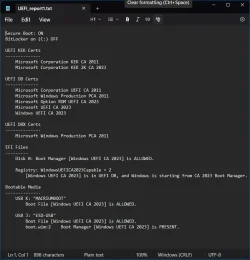
Did you manually update your Secure Boot Keys ?


I ran those MoKiChU scripts. and now i have all 2023 CAs and eventviewer has Information (not Error anymore) event-ID 1808 which starts with This device has updated Secure Boot CA/keys.
 

My Computer

System One

  • OS
    Windows 11 Pro 64bit (release preview channel)
    Computer type
    PC/Desktop
    Manufacturer/Model
    Asus
    CPU
    i5 8400
    Motherboard
    ROG STRIX Z370-H GAMING
    Memory
    16 GB DDR4
    Graphics Card(s)
    RTX 3060 Ti
    Sound Card
    On Board
    Monitor(s) Displays
    Acer VG242Y P
    Screen Resolution
    1080p
    Hard Drives
    Intel 660p SSD
    PSU
    800w
    Internet Speed
    1000 Mbps
I ran those MoKiChU scripts. and now i have all 2023 CAs and eventviewer has Information (not Error anymore) event-ID 1808 which starts with This device has updated Secure Boot CA/keys.
It's good to know that whether manually (official kb)/windows update and manually mosby/MoKiChU scripts, windows detects it and displays it in the event viewer.

Edit: rather later via windows update or manually official it will be detected by the event viewer, for now no.
 
Last edited:

My Computer

System One

  • OS
    windows 11
The instructions in post #1 gave me problems but it worked using the MoKiChU scripts.
 

My Computer

System One

  • OS
    Win 11 Pro
    Computer type
    PC/Desktop
    Manufacturer/Model
    N/A
    CPU
    AMD Ryzen 7 9700X
    Motherboard
    ASUS Crosshair Viii Hero Wi Fi
    Memory
    G.Skill Trident Z5 Neo RGB 64GB Kit (2x32GB) DDR5-6000 C30
    Graphics Card(s)
    PowerColor Radeon RX 9060 XT Reaper GDDR6 16GB
    Sound Card
    USB Out NAD M51 DAC with Adams A8 powered speakers
    Monitor(s) Displays
    Dell 3219Q
    Screen Resolution
    3840 x 2160
    Hard Drives
    5 x WD_BLACK SN850x PCIe Gen4 NVMe M.2 SSD - 4TB
    PSU
    be quiet! DARK POWER 13 1000W Titanium PCIe 5.0 ATX Modular PSU
    Case
    Fractal Design Define 7 Full Tower Case (Black)
    Cooling
    Noctua NH-D15 G2 LBC - High Performance Multi-Socket PWM CPU Cooler
    Keyboard
    Razer Huntsman V2
    Mouse
    Razer Viper Ultimate
    Internet Speed
    Starlink 94Mbps down 20Mbps up
    Browser
    Brave
    Antivirus
    ESET
Last edited:

My Computers

System One System Two

  • OS
    Win 11 Pro 25H2 26200.8524
    Computer type
    PC/Desktop
    Manufacturer/Model
    Self Built
    CPU
    Intel® Core™ i7-14700K
    Motherboard
    ASUS TUF Z690-PLUS WIFI BIOS 4505 11/29/25
    Memory
    G.SKILL Ripjaws S5 Series 64GB (2 x 32GB) DDR5
    Graphics Card(s)
    ASUS GeForce RTX 4070 Super 12GB
    Sound Card
    Sound Blaster AE-5 Plus
    Monitor(s) Displays
    ASUS TUF Gaming 27" 2K HDR Gaming
    Screen Resolution
    2560 x 1440
    Hard Drives
    Samsung 990 Pro 1TB NVMe (Win 11 25H2)
    SK hynix P41 500GB NVMe 25H2 DEV/Games
    SK hynix P41 2TB NVMe (x3)
    Crucial P3 Plus 4TB
    PSU
    Corsair RM850x Shift
    Case
    Antec Dark Phantom DP502 FLUX
    Cooling
    Corsair Nautilus 360 RS AIO
    Keyboard
    Logitech MK 320
    Mouse
    Razer Basilisk V3
    Internet Speed
    350Mbs
    Browser
    Firefox
    Antivirus
    Winows Security
    Other Info
    MR 8.1 Home

    System 3 Specs
    Win 11 Pro 25H2 26200.8524
    ASUS PRIME Z370-P II BIOS 3004 7/12/21
    Intel Core i7-8700 CPU @ 3.20GHz
    32GB DDR4 RAM (4x8)
    iGPU Intel UHD Graphics 630
  • Operating System
    Win 11 Pro 25H2 26200.8524
    Computer type
    PC/Desktop
    Manufacturer/Model
    Self Built
    CPU
    Intel Core i7-11700F
    Motherboard
    Asus TUF Gaming Z590 Plus WiFi (BIOS 2803)
    Memory
    64 GB DDR4
    Graphics card(s)
    MSI GeForce RTX 3060 Ventus 2X 12GB
    Sound Card
    SoundBlaster Audigy Fx V2
    Monitor(s) Displays
    Samsung F27T350
    Screen Resolution
    1920x1080
    Hard Drives
    Samsung 980 Pro 1TB
    Samsung 970 EVO Plus 2TB
    Samsung 870 EVO 500GB SSD
    PSU
    Corsair HX750
    Case
    Cougar MX330-G Window
    Cooling
    Thermalright Frozen Edge 240 Black AIO
    Internet Speed
    350Mbps
    Browser
    Firefox
    Antivirus
    Windows Security
I have the 2023 certs installed as my system is recent... but it's booting off the 2011 cert:

Code:
c:\temp>".\Check_Mosby_EFIBootFile2.ps1"
Secure Boot: ON
BitLocker on (C:) OFF

UEFI KEK Certs
--------------
    Microsoft Corporation KEK CA 2011
    Microsoft Corporation KEK 2K CA 2023

UEFI DB Certs
-------------
    Microsoft Corporation UEFI CA 2011
    Microsoft Windows Production PCA 2011
    Microsoft UEFI CA 2023
    Windows UEFI CA 2023

UEFI DBX Certs
--------------

EFI Files
---------
    Disk 0: Boot Manager [Production PCA 2011] is ALLOWED.

    Registry: WindowsUEFICA2023Capable = 1
        [Windows UEFI CA 2023] is in UEFI DB.

How do I move to using the 2023 certificate and moving the 2011 cert to the DBX list?
 

My Computer

System One

  • OS
    Windows 11 Pro 24H2
    Computer type
    Laptop
    Manufacturer/Model
    HP
    CPU
    Intel Ultra 7 155H
    Memory
    16gb
    Graphics Card(s)
    Intel Arc integrated
    Hard Drives
    SSD
I have the 2023 certs installed as my system is recent... but it's booting off the 2011 cert:

Code:
c:\temp>".\Check_Mosby_EFIBootFile2.ps1"
Secure Boot: ON
BitLocker on (C:) OFF

UEFI KEK Certs
--------------
    Microsoft Corporation KEK CA 2011
    Microsoft Corporation KEK 2K CA 2023

UEFI DB Certs
-------------
    Microsoft Corporation UEFI CA 2011
    Microsoft Windows Production PCA 2011
    Microsoft UEFI CA 2023
    Windows UEFI CA 2023

UEFI DBX Certs
--------------

EFI Files
---------
    Disk 0: Boot Manager [Production PCA 2011] is ALLOWED.

    Registry: WindowsUEFICA2023Capable = 1
        [Windows UEFI CA 2023] is in UEFI DB.

How do I move to using the 2023 certificate and moving the 2011 cert to the DBX list?
See here:

How to manage the Windows Boot Manager revocations for Secure Boot changes associated with CVE-2023-24932

The steps in #2 will verify what you have. Be VERY sure everything looks right and is working properly before revoking the 2011 CA. Check all bootable flash drives, etc,
 

My Computers

System One System Two

  • OS
    Windows 11 Pro 24H2
    Computer type
    Laptop
    Manufacturer/Model
    Lenovo P16s Workstation
    CPU
    Intel i7-1260P 12th Gen 4.7GHz
    Memory
    32GB DDR4-3200
    Graphics Card(s)
    NVIDIA T550 Laptop GPU
    Sound Card
    Realtek Audio
    Monitor(s) Displays
    16" Laptop Display
    Screen Resolution
    2560x1600
    Hard Drives
    2TB Samsung M.2 2280 SSD PCIe 4.0 x 4 NVMe
    Mouse
    Logitech MX Anywhere 2s
    Internet Speed
    1000 Mb
    Browser
    Firefox
    Antivirus
    Avast
  • Operating System
    Windows 11 Pro 24H2
    Computer type
    Laptop
    Manufacturer/Model
    Lenovo P50 Workstation
    CPU
    i7-6820HQ 6th Gen 3.6 GHz
    Memory
    32GB DDR4-2133
    Graphics card(s)
    NVIDIA Quadro M2000M Laptop GPU
    Sound Card
    Realtek Audio
    Monitor(s) Displays
    15.6" Laptop Display
    Screen Resolution
    1920x1080
    Hard Drives
    2 x 1TB Samsung M.2 2280 SSD PCIe 3.0 x 4 NVMe
    Cooling
    Dual Fan System
    Mouse
    Logitech MX Anywhere 2s
    Internet Speed
    1000 Mb
    Browser
    Firefox
    Antivirus
    Avast
These two commands gave me the missing Option ROM

Admin CMD Pormpt
reg add HKEY_LOCAL_MACHINE\SYSTEM\CurrentControlSet\Control\Secureboot /v AvailableUpdates /t REG_DWORD /d 0x5944 /f

Admin Powershell
Start-ScheduledTask -TaskName "\Microsoft\Windows\PI\Secure-Boot-Update"

Source

View attachment 150004

And gave me Event 1808

View attachment 150006
We are running servers using VMware. The KEK cert we enrolled manually (because the windows task scheduled failed to do so), while the other 3 certs are added successfully after running the task schedule. However we still getting Event ID 1801 instead of Event ID 1808, similar to what some people are also facing here in this forum.

1761104430282.webp

1761104565656.webp
 

My Computer

System One

  • OS
    Windows 11
We are running servers using VMware. The KEK cert we enrolled manually (because the windows task scheduled failed to do so), while the other 3 certs are added successfully after running the task schedule. However we still getting Event ID 1801 instead of Event ID 1808, similar to what some people are also facing here in this forum.

View attachment 150044

View attachment 150045
got this myself but at least my stuff is updated
 

My Computer

System One

  • OS
    11
    Computer type
    PC/Desktop
    Manufacturer/Model
    to be filled by o.e.m
    CPU
    amd ryzen 5 5600x
    Motherboard
    asrock
    Memory
    ddr4
    Graphics Card(s)
    nvidia
    Monitor(s) Displays
    lg
    Screen Resolution
    1920x1080
    Hard Drives
    wd blue sa510 2.5 2tb
    wd blue sa510 2.5 1tb
    Keyboard
    razor
    Antivirus
    windows defender
There are now > 1108 posts in this thread.

In the EF and TF threads where log files are scanned > 90% report: SecureBoot : Not Enabled

What benefits are there in updating if secure boot is not enabled?
 

My Computer

System One

  • OS
    Windows 10
    Computer type
    Laptop
    Manufacturer/Model
    HP
    CPU
    Intel(R) Core(TM) i7-4800MQ CPU @ 2.70GHz
    Motherboard
    Product : 190A Version : KBC Version 94.56
    Memory
    16 GB Total: Manufacturer : Samsung MemoryType : DDR3 FormFactor : SODIMM Capacity : 8GB Speed : 1600
    Graphics Card(s)
    NVIDIA Quadro K3100M; Intel(R) HD Graphics 4600
    Sound Card
    IDT High Definition Audio CODEC; PNP Device ID HDAUDIO\FUNC_01&VEN_111D&DEV_76E0
    Hard Drives
    Model Hitachi HTS727575A9E364
    Antivirus
    Microsoft Defender
    Other Info
    Mobile Workstation
There are now > 1108 posts in this thread.

In the EF and TF threads where log files are scanned > 90% report: SecureBoot : Not Enabled

What benefits are there in updating if secure boot is not enabled?
After over 1000 posts I still intend to do nothing and expect MS to provide the updates needed!
 

My Computer

System One

  • OS
    Windows 11 Pro
    Computer type
    PC/Desktop
    Manufacturer/Model
    Self build
    CPU
    Core i7-13700K
    Motherboard
    Asus TUF Gaming Plus WiFi Z790
    Memory
    64 GB Kingston Fury Beast DDR5
    Graphics Card(s)
    Gigabyte GeForce RTX 2060 Super Gaming OC 8G
    Sound Card
    Realtek S1200A
    Monitor(s) Displays
    Viewsonic VP2770 & Dell (secondary)
    Screen Resolution
    2560 x 1440
    Hard Drives
    Kingston KC3000 2TB NVME SSD & SATA HDDs & SSD
    PSU
    EVGA SuperNova G2 850W
    Case
    Nanoxia Deep Silence 1
    Cooling
    Noctua NH-D14
    Keyboard
    Microsoft Digital Media Pro
    Mouse
    Logitech Wireless
    Internet Speed
    80 Mb / s
    Browser
    Chrome
    Antivirus
    Defender, Malwarebytes Free & AdwCleaner
I got this new BIOS update notice from Dell this morning that contains the new 2023 Secure Boot Certificates. So, it looks like Dell, at least, is starting to push these certificates out. This update is for my System One, I have not checked for my System Two machine yet.

I have not downloaded and installed this BIOS yet; I normally wait a week after Dell releases a new BIOS before I download and install it.

Screenshot 2025-10-22.webp
 

My Computers

System One System Two

  • OS
    Windows 11 Pro 25H2 26200.8457
    Computer type
    PC/Desktop
    Manufacturer/Model
    Dell Tower Plus EBT2250, DOB: 06/15/2025
    CPU
    Intel® Core™ Ultra 7 265 1.8GHz to 5.3GHz (Arrow Lake)
    Motherboard
    Dell Inc. 02D3NT A00 (U3E1)
    Memory
    SK Hynix 32GB DDR5 5600 Desktop RAM UDIMM Non-ECC PC5-5600B
    Graphics Card(s)
    Dell NVIDIA® GeForce RTX™ 4060 8GB GDDR6 & (iGPU) Integrated Intel® UHD Graphics
    Sound Card
    Chipset Realtek High-Definition Audio with Dolby Atmos
    Monitor(s) Displays
    Dell Ultra Sharp U2515H 25-Inch Screen LED-Lit
    Screen Resolution
    2560 X 1440
    Hard Drives
    Samsung (NVMe PM9C1a 1024GB) M.2 PCIe NVMe Solid State Drive (OS), with Samsung Piccolo (S4LY022) 6-Core 4 Channel Controller.

    Samsung T7 500GB SSD, USB-C External Drive
    PSU
    Dell 460W
    Case
    Dell Tower Plus EBT 2250
    Cooling
    Fan
    Keyboard
    Dell Wired Keyboard - KB216
    Mouse
    Logitech M510
    Internet Speed
    Intel Killer E3100G 2.5 Gigabit Ethernet Controller
    Browser
    Microsoft Edge
    Antivirus
    Microsoft Windows Security
    Other Info
    The Samsung NVMe PM9C1a 1024GB SSD does not use a Phison NAND controller. Instead, it uses Samsung's in-house developed Piccolo (S4LY022) 6-Core 4 Channel Controller. The PM9C1a utilizes a controller built using Samsung's 5-nanometer process and seventh-generation V-NAND technology. 🤔
  • Operating System
    Windows 11 Pro 25H2 26200.8457
    Computer type
    Laptop
    Manufacturer/Model
    Dell Inspiron 15 7000 (7591) 2-in-1, DOB: 11/30/2019
    CPU
    10th Generation Intel Core i7-10510U Processor (8MB Cache, up to 4.9 GHz) Comet Lake
    Motherboard
    Dell 0NNW5N
    Memory
    16GB DDR4 RAM
    Graphics card(s)
    NVIDIA® GeForce® MX250 with 2GB GDDR5 graphics memory
    Sound Card
    Chipset Realtek ALC3254 🤔🤣
    Monitor(s) Displays
    Dell 15.6-inch UHD Truelife Touch Narrow Border WVA Display with Active Pen support
    Screen Resolution
    3840 x 2160
    Hard Drives
    Intel NVME 512GB SSD with 32GB Intel Optane Memory, M.2 80mm PCIe 3.0 RAID

    SanDisk 256GB Extreme microSDXC UHS-I Memory Card
    PSU
    Dell 4-Cell Battery, 68 Whr (Integrated), 90 Watt AC Adapter
    Case
    Dell Inspiron 15 7000 2-in-1 (7591)
    Cooling
    Standard Dell Case Fan & Havit HV-F2056 USB Powered (3 Fans) Laptop Cooling Pad.
    Keyboard
    Dell
    Mouse
    Logitech Wireless Mouse M650L
    Internet Speed
    Wireless/Wired connectivity (WiFi 6 - 802.11 ax)
    Browser
    Microsoft Edge
    Antivirus
    Microsoft Windows Security
    Other Info
    From Dell: 512GB NVME Solid State Drive accelerated by 32GB Intel Optane Memory are the fastest as compared to NAND SSDs. Intel Optane H10 with SSD offers speedy storage and accelerates opening your programs.
See here:

How to manage the Windows Boot Manager revocations for Secure Boot changes associated with CVE-2023-24932

The steps in #2 will verify what you have. Be VERY sure everything looks right and is working properly before revoking the 2011 CA. Check all bootable flash drives, etc,
It's easy to update the USB bootable drives after the fact. You should, obviously, do that right away and not wait until you need them. :giggle:

@garlin posted a convenient script to update bootable USB UEFI drives with Secure Boot, see contents below and file attached.

Code:
set /p id=Enter Destination Drive Letter with a colon:
echo %id%
pause

COPY %id%\EFI\MICROSOFT\BOOT\BCD %id%\EFI\MICROSOFT\BOOT\BCD.BAK
pause

bcdboot c:\windows /f UEFI /s %id% /bootex
pause

COPY %id%\EFI\MICROSOFT\BOOT\BCD.BAK %id%\EFI\MICROSOFT\BOOT\BCD
pause
 

Attachments

My Computers

System One System Two

  • OS
    Win 11 Pro 25H2, Build 26200.8524
    Computer type
    PC/Desktop
    Manufacturer/Model
    Home Brew
    CPU
    Intel Core i5 14500
    Motherboard
    Gigabyte B760M G P WIFI
    Memory
    64GB DDR4
    Graphics Card(s)
    GeForce RTX 4060
    Sound Card
    Chipset Realtek
    Monitor(s) Displays
    LG 45" Ultragear, Acer 24" 1080p
    Screen Resolution
    5120x1440, 1920x1080
    Hard Drives
    Crucial P310 2TB 2280 PCIe Gen4 3D NAND NVMe M.2 SSD (O/S)
    Silicon Power 2TB US75 NVMe PCIe Gen4 M.2 2280 SSD (backup)
    Crucial BX500 2TB 3D NAND (2nd backup)
    Seagate 4TB Ironwolf, rotating HDD archive files
    External off-line backup Drives: 2 NVMe 4TB drives in external enclosures
    PSU
    Thermaltake Toughpower GF3 750W
    Case
    LIAN LI LANCOOL 216 E-ATX PC Case
    Cooling
    Lots of fans!
    Keyboard
    Microsoft Comfort Curve 2000
    Mouse
    Logitech G305
    Internet Speed
    Verizon FiOS 1GB
    Browser
    Firefox
    Antivirus
    Malware Bytes & Windows Defender Security
  • Operating System
    Win 11 Pro 25H2, Build 26200.8524
    Computer type
    PC/Desktop
    Manufacturer/Model
    Home Brew
    CPU
    Intel Core i5 14400
    Motherboard
    Gigabyte B760M DS3H AX
    Memory
    32GB DDR5
    Graphics card(s)
    Intel 700 Embedded GPU
    Sound Card
    Realtek Embedded
    Monitor(s) Displays
    27" HP 1080p
    Screen Resolution
    1920x1080
    Hard Drives
    Crucial P310 2TB 2280 PCIe Gen4 eD NAND PCIe SSD
    Samsung EVO 990 2TB NVMe Gen4 SSD
    Samsung 2TB SATA SSD
    PSU
    Thermaltake Smart BM3 650W
    Case
    Okinos Micro ATX Case
    Cooling
    Fans
    Keyboard
    Microsoft Comfort Curve 2000
    Mouse
    Logitech G305
    Internet Speed
    Verizon FiOS 1GB
    Browser
    Firefox
    Antivirus
    Malware Bytes & Windows Defender Security
It's easy to update the USB bootable drives after the fact. You should, obviously, do that right away and not wait until you need them. :giggle:

@garlin posted a convenient script to update bootable USB UEFI drives with Secure Boot, see contents below and file attached.

Code:
set /p id=Enter Destination Drive Letter with a colon:
echo %id%
pause

COPY %id%\EFI\MICROSOFT\BOOT\BCD %id%\EFI\MICROSOFT\BOOT\BCD.BAK
pause

bcdboot c:\windows /f UEFI /s %id% /bootex
pause

COPY %id%\EFI\MICROSOFT\BOOT\BCD.BAK %id%\EFI\MICROSOFT\BOOT\BCD
pause
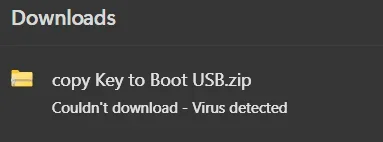
Defender blocks this as a Severe threat
 

Attachments

  • Screenshot 2025-10-22 141500.webp
    Screenshot 2025-10-22 141500.webp
    5 KB · Views: 5

My Computer

System One

  • OS
    Windows 11 Pro 25H2 (RP channel)
    Computer type
    PC/Desktop
    Manufacturer/Model
    MSI
    CPU
    AMD Ryzen 7 9800X3D 8-core
    Motherboard
    MEG X870E Godlike
    Memory
    64GB Corsair Titanium 6000/CL30
    Graphics Card(s)
    MSI Suprim 5080 SOC
    Sound Card
    Soundblaster AE-9
    Monitor(s) Displays
    ASUS TUF Gaming VG289Q
    Screen Resolution
    3840x2160
    Hard Drives
    Samsung 9100 Pro 4TB (gen 5 x4, system drive/games)
    Samsung 990 Pro 2TB
    Samsung 980 Pro 2TB
    Samsung 870 Evo 4TB
    Samsung 870 Evo 2TB
    Samsung T9 4TB
    PSU
    Seasonic PX-2200
    Case
    Bequiet! Dark Base Pro 901
    Cooling
    Noctua NH-D15S Chromax black
    Keyboard
    Logitech G915 X (wired)
    Mouse
    Logitech G903 with PowerPlay charger
    Internet Speed
    900Mb/sec
    Browser
    Microsoft Edge
    Antivirus
    Windows Defender
Defender blocks this as a Severe threat
Oddly, I have Defender enabled and have never bypassed anything, I updated probably half a dozen USB drives with that script on two different machines, never saw any errors or complaints from Defender.

FWIW, I can see why Defender would cast a suspicious eye at the script, it is messing with boot files. I just checked Defender's log on this machine, no actions at all, and I've run it a few times here.
 
Last edited:

My Computers

System One System Two

  • OS
    Win 11 Pro 25H2, Build 26200.8524
    Computer type
    PC/Desktop
    Manufacturer/Model
    Home Brew
    CPU
    Intel Core i5 14500
    Motherboard
    Gigabyte B760M G P WIFI
    Memory
    64GB DDR4
    Graphics Card(s)
    GeForce RTX 4060
    Sound Card
    Chipset Realtek
    Monitor(s) Displays
    LG 45" Ultragear, Acer 24" 1080p
    Screen Resolution
    5120x1440, 1920x1080
    Hard Drives
    Crucial P310 2TB 2280 PCIe Gen4 3D NAND NVMe M.2 SSD (O/S)
    Silicon Power 2TB US75 NVMe PCIe Gen4 M.2 2280 SSD (backup)
    Crucial BX500 2TB 3D NAND (2nd backup)
    Seagate 4TB Ironwolf, rotating HDD archive files
    External off-line backup Drives: 2 NVMe 4TB drives in external enclosures
    PSU
    Thermaltake Toughpower GF3 750W
    Case
    LIAN LI LANCOOL 216 E-ATX PC Case
    Cooling
    Lots of fans!
    Keyboard
    Microsoft Comfort Curve 2000
    Mouse
    Logitech G305
    Internet Speed
    Verizon FiOS 1GB
    Browser
    Firefox
    Antivirus
    Malware Bytes & Windows Defender Security
  • Operating System
    Win 11 Pro 25H2, Build 26200.8524
    Computer type
    PC/Desktop
    Manufacturer/Model
    Home Brew
    CPU
    Intel Core i5 14400
    Motherboard
    Gigabyte B760M DS3H AX
    Memory
    32GB DDR5
    Graphics card(s)
    Intel 700 Embedded GPU
    Sound Card
    Realtek Embedded
    Monitor(s) Displays
    27" HP 1080p
    Screen Resolution
    1920x1080
    Hard Drives
    Crucial P310 2TB 2280 PCIe Gen4 eD NAND PCIe SSD
    Samsung EVO 990 2TB NVMe Gen4 SSD
    Samsung 2TB SATA SSD
    PSU
    Thermaltake Smart BM3 650W
    Case
    Okinos Micro ATX Case
    Cooling
    Fans
    Keyboard
    Microsoft Comfort Curve 2000
    Mouse
    Logitech G305
    Internet Speed
    Verizon FiOS 1GB
    Browser
    Firefox
    Antivirus
    Malware Bytes & Windows Defender Security
These two commands gave me the missing Option ROM

Admin CMD Pormpt
reg add HKEY_LOCAL_MACHINE\SYSTEM\CurrentControlSet\Control\Secureboot /v AvailableUpdates /t REG_DWORD /d 0x5944 /f

Admin Powershell
Start-ScheduledTask -TaskName "\Microsoft\Windows\PI\Secure-Boot-Update"

Source
...
And gave me Event 1808
Not very much commented on but this seems to be the easiest/quickest way to update all the keys (not just the OpROM key) and as well put in place boot files signed with the 2023 certificate and enable use of them, all in two easy commands. All that's left is to revoke the 2011 key if you need that before Microsoft does it for us.

BUT with a somewhat modern system I still think it a good idea to update BIOS (if one's available) to get all the 2023 keys as defaults. That way there's no possibility for problems after doing a CMOS reset or anything else which could revert all the keys to defaults.
 
Last edited:

My Computers

System One System Two

  • OS
    Windows 11 Pro
    Computer type
    PC/Desktop
    Manufacturer/Model
    DIY
    CPU
    Ryzen 7 5800X
    Motherboard
    Gigabyte B550M Aorus Pro
    Memory
    GSkill 3200, 2x8GB
    Graphics Card(s)
    MSI RX 6800 XT Gaming Z
    Sound Card
    on-board Realtek
    Monitor(s) Displays
    MSI 180hz
    Screen Resolution
    1440p
    Hard Drives
    Samsung 980 Pro, Samsung 870 Evo, generic PCIe NVME, WD 1TB 2.5" laptop spinner
    PSU
    Corsair RM 650
    Case
    mATX
    Cooling
    BeQuiet 240mm AIO and a bunch of case fans
    Keyboard
    one that clacks softly
    Mouse
    logitech
    Internet Speed
    bunches of bps
    Browser
    Firefox
    Antivirus
    Windows' own
  • Operating System
    Win11 Pro
    Computer type
    PC/Desktop
    Manufacturer/Model
    DIY
    CPU
    Ryzen 7 1700
    Motherboard
    GA-AB350M G-3
    Memory
    16GB DDR4
    Graphics card(s)
    RX-480
    Sound Card
    In-Built Realtek
    Monitor(s) Displays
    Samsung
    Screen Resolution
    1440p
    Hard Drives
    NVME/SSD's
    PSU
    Thermaltake BX1 550W
    Case
    Some junky thing
    Cooling
    ThermalTake Assassin(?)
    Browser
    FF/Edge
    Antivirus
    Whatever Windows does
    Other Info
    Secure Boot enabled updated to 2023 CA keys, TPM2.0 enabled with system drive Bitlocker'd.
I got this new BIOS update notice from Dell this morning that contains the new 2023 Secure Boot Certificates. So, it looks like Dell, at least, is starting to push these certificates out. This update is for my System One, I have not checked for my System Two machine yet.

I have not downloaded and installed this BIOS yet; I normally wait a week after Dell releases a new BIOS before I download and install it.

View attachment 150057

I got a Bios update for my HP a couple days ago, but I can't find any info on what it contains. Quick googling around try to find in seems the only
thing I can find is HP covers up any info for security so no one can spoof the BIOS into something else.

So I have no idea if the CA's in the BIOS are updated. The BIOS installed was:
HP Inc. Driver Update (15.54.0.0) Device Manager shows date of: 8/15/2025 This update came through WU.
 

My Computer

System One

  • OS
    Windows 11 Intel i5 10400 HD630 graphics chip
    Computer type
    PC/Desktop
    Manufacturer/Model
    HP
    CPU
    i5-10400
    Memory
    12 gb
    Graphics Card(s)
    HD630 chipset
    Monitor(s) Displays
    LG 24inch
    Hard Drives
    SSD, external usb drive 1tb for files/backups
    Keyboard
    wireless Logi
    Mouse
    ms 4000 wireless mouse
    Internet Speed
    10meg
    Browser
    Firefox
    Antivirus
    Defender
    Other Info
    Win11 Home 25h2 26200.8524 05/26/2026
I got a Bios update for my HP a couple days ago, but I can't find any info on what it contains. Quick googling around try to find in seems the only
thing I can find is HP covers up any info for security so no one can spoof the BIOS into something else.

So I have no idea if the CA's in the BIOS are updated. The BIOS installed was:
HP Inc. Driver Update (15.54.0.0) Device Manager shows date of: 8/15/2025 This update came through WU.
I have the same situation with my HP laptop... no visibility into what updates actually do, not even half way useful release notes.

If it has updated to this new BIOS (probably a good idea regardless) then run the powershell script that looks into BIOS for the secure boot keys and reports on what is found. It works regardless of the method used to put them in the secure boot variables. It linked through the post below.

 
Last edited:

My Computers

System One System Two

  • OS
    Windows 11 Pro
    Computer type
    PC/Desktop
    Manufacturer/Model
    DIY
    CPU
    Ryzen 7 5800X
    Motherboard
    Gigabyte B550M Aorus Pro
    Memory
    GSkill 3200, 2x8GB
    Graphics Card(s)
    MSI RX 6800 XT Gaming Z
    Sound Card
    on-board Realtek
    Monitor(s) Displays
    MSI 180hz
    Screen Resolution
    1440p
    Hard Drives
    Samsung 980 Pro, Samsung 870 Evo, generic PCIe NVME, WD 1TB 2.5" laptop spinner
    PSU
    Corsair RM 650
    Case
    mATX
    Cooling
    BeQuiet 240mm AIO and a bunch of case fans
    Keyboard
    one that clacks softly
    Mouse
    logitech
    Internet Speed
    bunches of bps
    Browser
    Firefox
    Antivirus
    Windows' own
  • Operating System
    Win11 Pro
    Computer type
    PC/Desktop
    Manufacturer/Model
    DIY
    CPU
    Ryzen 7 1700
    Motherboard
    GA-AB350M G-3
    Memory
    16GB DDR4
    Graphics card(s)
    RX-480
    Sound Card
    In-Built Realtek
    Monitor(s) Displays
    Samsung
    Screen Resolution
    1440p
    Hard Drives
    NVME/SSD's
    PSU
    Thermaltake BX1 550W
    Case
    Some junky thing
    Cooling
    ThermalTake Assassin(?)
    Browser
    FF/Edge
    Antivirus
    Whatever Windows does
    Other Info
    Secure Boot enabled updated to 2023 CA keys, TPM2.0 enabled with system drive Bitlocker'd.
"as far as I know there hasn't been any further communications from HP on what to do to prepare, other than "update BIOS and hope everything goes well in the future". Compare that with Dell, who has articles specifying what BIOS versions their computers need to be at for compliance."

🤷‍♀️
 

My Computers

System One System Two

  • OS
    windows 11 home 23H2 22631.6199
    Computer type
    Laptop
    Manufacturer/Model
    HP
    CPU
    Intel core i7 (2nd gen) Turbo 3.10 ghz
    Memory
    6gb
    Graphics Card(s)
    Amd Radeon HD 7400m 1GB & Intel hd graphics
    Sound Card
    BeatsAudio
    Hard Drives
    128gb SSD
  • Operating System
    macOS Sequoia
    Computer type
    PC/Desktop
    Manufacturer/Model
    iMac 24"
    CPU
    M1 3.2 ghz
    Memory
    8gb onboard
    Graphics card(s)
    igpu
    Monitor(s) Displays
    Retina 4.5K
    Screen Resolution
    4480x2520
    Hard Drives
    512gb SSD
I got a Bios update for my HP a couple days ago, but I can't find any info on what it contains. Quick googling around try to find in seems the only
thing I can find is HP covers up any info for security so no one can spoof the BIOS into something else.

So I have no idea if the CA's in the BIOS are updated. The BIOS installed was:
HP Inc. Driver Update (15.54.0.0) Device Manager shows date of: 8/15/2025 This update came through WU.
That's a tough one where you received no information. Somewhere, back in this thread, there is a PowerShell script that when run can tell you about the status of your Secure Boot Certificates. I would point you to it, but I don't know where it is now... this thread is so long. Maybe someone else knows just where it is.
 

My Computers

System One System Two

  • OS
    Windows 11 Pro 25H2 26200.8457
    Computer type
    PC/Desktop
    Manufacturer/Model
    Dell Tower Plus EBT2250, DOB: 06/15/2025
    CPU
    Intel® Core™ Ultra 7 265 1.8GHz to 5.3GHz (Arrow Lake)
    Motherboard
    Dell Inc. 02D3NT A00 (U3E1)
    Memory
    SK Hynix 32GB DDR5 5600 Desktop RAM UDIMM Non-ECC PC5-5600B
    Graphics Card(s)
    Dell NVIDIA® GeForce RTX™ 4060 8GB GDDR6 & (iGPU) Integrated Intel® UHD Graphics
    Sound Card
    Chipset Realtek High-Definition Audio with Dolby Atmos
    Monitor(s) Displays
    Dell Ultra Sharp U2515H 25-Inch Screen LED-Lit
    Screen Resolution
    2560 X 1440
    Hard Drives
    Samsung (NVMe PM9C1a 1024GB) M.2 PCIe NVMe Solid State Drive (OS), with Samsung Piccolo (S4LY022) 6-Core 4 Channel Controller.

    Samsung T7 500GB SSD, USB-C External Drive
    PSU
    Dell 460W
    Case
    Dell Tower Plus EBT 2250
    Cooling
    Fan
    Keyboard
    Dell Wired Keyboard - KB216
    Mouse
    Logitech M510
    Internet Speed
    Intel Killer E3100G 2.5 Gigabit Ethernet Controller
    Browser
    Microsoft Edge
    Antivirus
    Microsoft Windows Security
    Other Info
    The Samsung NVMe PM9C1a 1024GB SSD does not use a Phison NAND controller. Instead, it uses Samsung's in-house developed Piccolo (S4LY022) 6-Core 4 Channel Controller. The PM9C1a utilizes a controller built using Samsung's 5-nanometer process and seventh-generation V-NAND technology. 🤔
  • Operating System
    Windows 11 Pro 25H2 26200.8457
    Computer type
    Laptop
    Manufacturer/Model
    Dell Inspiron 15 7000 (7591) 2-in-1, DOB: 11/30/2019
    CPU
    10th Generation Intel Core i7-10510U Processor (8MB Cache, up to 4.9 GHz) Comet Lake
    Motherboard
    Dell 0NNW5N
    Memory
    16GB DDR4 RAM
    Graphics card(s)
    NVIDIA® GeForce® MX250 with 2GB GDDR5 graphics memory
    Sound Card
    Chipset Realtek ALC3254 🤔🤣
    Monitor(s) Displays
    Dell 15.6-inch UHD Truelife Touch Narrow Border WVA Display with Active Pen support
    Screen Resolution
    3840 x 2160
    Hard Drives
    Intel NVME 512GB SSD with 32GB Intel Optane Memory, M.2 80mm PCIe 3.0 RAID

    SanDisk 256GB Extreme microSDXC UHS-I Memory Card
    PSU
    Dell 4-Cell Battery, 68 Whr (Integrated), 90 Watt AC Adapter
    Case
    Dell Inspiron 15 7000 2-in-1 (7591)
    Cooling
    Standard Dell Case Fan & Havit HV-F2056 USB Powered (3 Fans) Laptop Cooling Pad.
    Keyboard
    Dell
    Mouse
    Logitech Wireless Mouse M650L
    Internet Speed
    Wireless/Wired connectivity (WiFi 6 - 802.11 ax)
    Browser
    Microsoft Edge
    Antivirus
    Microsoft Windows Security
    Other Info
    From Dell: 512GB NVME Solid State Drive accelerated by 32GB Intel Optane Memory are the fastest as compared to NAND SSDs. Intel Optane H10 with SSD offers speedy storage and accelerates opening your programs.
maybe this
 

My Computer

System One

  • OS
    windows 11 25H2
    Computer type
    Laptop
    Manufacturer/Model
    ASUS Vivobook 15 (X1504)
    Motherboard
    Intel Alder Lake-P PCH
    Memory
    24GB
    Graphics Card(s)
    iris xe
    Sound Card
    realtek
    Screen Resolution
    1920X1080
    Hard Drives
    Samsung SSD 990 PRO 1TB
    Browser
    edge
    Antivirus
    eset anti virus

Latest Support Threads

Back
Top Bottom