- Local time
- 3:04 PM
- Posts
- 504
- OS
- Windows 11
This is what I have so far. Can I leave it as is? It's on a unsupported device.

My Computer
At a glance
Windows 11
- OS
- Windows 11

Follow along with the video below to see how to install our site as a web app on your home screen.
Note: This feature may not be available in some browsers.
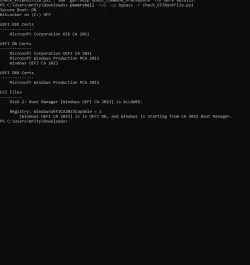
It still needs the 2023 KEK certificate and to have a 2023 boot manage installed.This is what I have so far. Can I leave it as is? It's on a unsupported device.

Sorted....made USB Install Media on the machine with Rufus and latest 252H iso using the new "Use Windows CA 2023 Signed Bootloaders" feature.If you need it, definitely make bootable media that uses the 2023 signed boot manager. Nothing with a 2011 signed boot manager will start now that the 2011 certificate is revokedd in DBX. There are instructions on doing this in several posts in this thread, even in the Microsoft document.
All the 2023 certs are in place.
 .
.
Looks like you've arrived.Sorted....made USB Install Media on the machine with Rufus and latest 252H iso using the new "Use Windows CA 2023 Signed Bootloaders" feature.
I think I'm done now.....
View attachment 151074


PS C:\temp> powershell -nop -ep bypass -f Check_EFIBootFile.ps1
Secure Boot: ON
BitLocker on (C:) OFF

UEFI KEK Certs
--------------
    Microsoft Corporation KEK CA 2011
    Microsoft Corporation KEK 2K CA 2023

UEFI DB Certs
-------------
    Microsoft Corporation UEFI CA 2011
    Microsoft Windows Production PCA 2011
    Microsoft Option ROM UEFI CA 2023
    Microsoft UEFI CA 2023
    Windows UEFI CA 2023

UEFI DBX Certs
--------------

EFI Files
---------
    Disk 0: Boot Manager [Windows UEFI CA 2023] is ALLOWED.

    Registry: WindowsUEFICA2023Capable = 2
        [Windows UEFI CA 2023] is in UEFI DB, and Windows is starting from CA 2023 Boot Manager.
PS C:\temp>Are you saying Windows did it without your assistance like running commands in Powershell or whatever?On my ASUS tower it now looks like a Windows Update has added some (all?) of the keys I need for the upcoming 2023 certs, in case others are worrying about it:
.....
Yes, that is what I'm saying., except for running the original 2 scripts in the beginning of this thread. On sept 11, 2025 I ran the Check_EFIBootFile.ps1 and this is the result"Are you saying Windows did it without your assistance like running commands in Powershell or whatever?
Windows PowerShell
Copyright (C) Microsoft Corporation. All rights reserved.

Install the latest PowerShell for new features and improvements! https://aka.ms/PSWindows

PS C:\WINDOWS\system32> cd c:\temp
PS C:\temp> powershell -nop -ep bypass -f Check_EFIBootFile.ps1
Secure Boot: ON                                                                                                         BitLocker on (C:) OFF                                                                                                                                                                                                                           UEFI KEK Certs                                                                                                          --------------
    Microsoft Corporation KEK CA 2011

UEFI DB Certs
-------------
    Microsoft Corporation UEFI CA 2011
    Microsoft Windows Production PCA 2011
    Windows UEFI CA 2023

UEFI DBX Certs
--------------

EFI Files
---------
    Disk 0: Boot Manager [Production PCA 2011] is ALLOWED.

    Registry: WindowsUEFICA2023Capable = 1
        [Windows UEFI CA 2023] is in UEFI DB.

Bootable Media
--------------
    USB D: "MACRIUMBOOT"
        Boot File [Production PCA 2011] is ALLOWED.
There is no matching image.

PS C:\temp>
So Microsoft has started the process of actually pushing the certs into firmware.Yes, that is what I'm saying., except for running the original 2 scripts in the beginning of this thread. On sept 11, 2025 I ran the Check_EFIBootFile.ps1 and this is the result"
....
Then, for my level of expertise, instructions took turns that lost me so I decided to just wait it out. Out of curiosity I ran the script again and got the code I displayed above. I don't know if is all I need but perhaps Microsoft is on top of things!
If you have revoked trust in the 2011 certificates you'd have to update your Macrium recovery drives to use the 2023 certificate signed boot manager. There have been some instructions on how to do that posted here.So now my older Macrium backups will be worthless ?
Easy to fix USB drives for the 2023 Certs.So now my older Macrium backups will be worthless ?
set /p id=Enter Destination Drive Letter with a colon:
echo %id%
pause

COPY %id%\EFI\MICROSOFT\BOOT\BCD %id%\EFI\MICROSOFT\BOOT\BCD.BAK
pause

bcdboot c:\windows /f UEFI /s %id% /bootex
pause

COPY %id%\EFI\MICROSOFT\BOOT\BCD.BAK %id%\EFI\MICROSOFT\BOOT\BCD
pauseC:\Users\theislands\Downloads\copy Key to Boot USB>set /p id=Enter Destination Drive Letter with a colon:
Enter Destination Drive Letter with a colon: d:
C:\Users\theislands\Downloads\copy Key to Boot USB>echo d:
d:
C:\Users\theislands\Downloads\copy Key to Boot USB>pause
Press any key to continue . . .
C:\Users\theislands\Downloads\copy Key to Boot USB>COPY d:\EFI\MICROSOFT\BOOT\BCD d:\EFI\MICROSOFT\BOOT\BCD.BAK
1 file(s) copied.
C:\Users\theislands\Downloads\copy Key to Boot USB>pause
Press any key to continue . . .
C:\Users\theislands\Downloads\copy Key to Boot USB>bcdboot c:\windows /f UEFI /s d: /bootex
BFSVC Error: Could not open the BCD template store. Status = [c0000022]
C:\Users\theislands\Downloads\copy Key to Boot USB>pause
Press any key to continue . . .
C:\Users\theislands\Downloads\copy Key to Boot USB>COPY d:\EFI\MICROSOFT\BOOT\BCD.BAK d:\EFI\MICROSOFT\BOOT\BCD
1 file(s) copied.
C:\Users\theislands\Downloads\copy Key to Boot USB>pause
Press any key to continue . . .C:\>powershell -nop -ep bypass -f "C:\Check_EFIBootFile.ps1
Secure Boot: ON
BitLocker on (C:) OFF
UEFI KEK Certs
--------------
Microsoft Corporation KEK CA 2011
Microsoft Corporation KEK 2K CA 2023
UEFI DB Certs
-------------
Microsoft Corporation UEFI CA 2011
Microsoft Windows Production PCA 2011
Microsoft Option ROM UEFI CA 2023
Microsoft UEFI CA 2023
Windows UEFI CA 2023
UEFI DBX Certs
--------------
Microsoft Windows Production PCA 2011
EFI Files
---------
Disk 0: Boot Manager [Windows UEFI CA 2023] is ALLOWED.
Registry: WindowsUEFICA2023Capable = 2
[Windows UEFI CA 2023] is in UEFI DB, and Windows is starting from CA 2023 Boot Manager.
Bootable Media
--------------
USB G: "RESCUE"
Boot File [Windows UEFI CA 2023] is ALLOWED
As I was told earlier...... Look back for a post by @Scott , #1104, for two commands that should get you the missing ones.What's the thing with mine?
And do I need to worry abt the existing 2011 certs?
Why only one but not two 2023 certs?
Missing the "Microsoft Option ROM UEFI CA 2023" key.Does i have already that keys?
View attachment 152364

Missing the "Microsoft Option ROM UEFI CA 2023" key.
Look back for a post by @Scott , #1104, for two commands that should get you the missi
Already done that but i dont get any update after thatMissing the "Microsoft Option ROM UEFI CA 2023" key.
Look back for a post by @Scott , #1104, for two commands that should get you the missing one.
Did you run them as instructed? The first from a COMMAND window, with admin rights, the second from a PowerShell window also with admin rights. You get a response from the first one but no response from the second, it just returns a prompt.Already done that but i dont get any update after that