Did you manually update your Secure Boot Keys ?


Did you run them as instructed? The first from a COMMAND window, with admin rights, the second from a PowerShell window also with admin rights. You get a response from the first one but no response from the second, it just returns a prompt.

Another way is to update to the BIOS for your motherboard. The board is new enough Asrock should include the 2023 keys as defaults by now.
Yea, still no update, i will try tommorow again. I had already, my mb is ASRock b760 pro rs with bios version 13.01.
 

My Computer My Computer

At a glance

Windows 11
OS
Windows 11
Computer type
PC/Desktop
Manufacturer/Model
Asrock b760 pro rs
Yea, still no update, i will try tommorow again. I had already, my mb is ASRock b760 pro rs with bios version 13.01.
Those two commands run a task that was pre-loaded on your computer by a Windows update. The task downloads the necessary keys as it runs. If your Windows isn't fully up-to-date it can't run, or if the repository isn't available to you I don't imagine it will run correctly or completely.

It's entirely possible the keys you have came with your up-to-date BIOS.

Check event viewer for any of the Event Codes in the below document to see some clues for what might have happened relative to running the command.
 

My Computers My Computers

  • At a glance

    Windows 11 ProRyzen 7 5800XGSkill 3200, 2x8GBMSI RX 6800 XT Gaming Z
    OS
    Windows 11 Pro
    Computer type
    PC/Desktop
    Manufacturer/Model
    DIY
    CPU
    Ryzen 7 5800X
    Motherboard
    Gigabyte B550M Aorus Pro
    Memory
    GSkill 3200, 2x8GB
    Graphics Card(s)
    MSI RX 6800 XT Gaming Z
    Sound Card
    on-board Realtek
    Monitor(s) Displays
    MSI 180hz
    Screen Resolution
    1440p
    Hard Drives
    Samsung 980 Pro, Samsung 870 Evo, generic PCIe NVME, WD 1TB 2.5" laptop spinner
    PSU
    Corsair RM 650
    Case
    mATX
    Cooling
    BeQuiet 240mm AIO and a bunch of case fans
    Keyboard
    one that clacks softly
    Mouse
    logitech
    Internet Speed
    bunches of bps
    Browser
    Firefox
    Antivirus
    Windows' own
  • At a glance

    Win11 ProRyzen 7 170016GB DDR4RX-480
    Operating System
    Win11 Pro
    Computer type
    PC/Desktop
    Manufacturer/Model
    DIY
    CPU
    Ryzen 7 1700
    Motherboard
    GA-AB350M G-3
    Memory
    16GB DDR4
    Graphics card(s)
    RX-480
    Sound Card
    In-Built Realtek
    Monitor(s) Displays
    Samsung
    Screen Resolution
    1440p
    Hard Drives
    NVME/SSD's
    PSU
    Thermaltake BX1 550W
    Case
    Some junky thing
    Cooling
    ThermalTake Assassin(?)
    Browser
    FF/Edge
    Antivirus
    Whatever Windows does
    Other Info
    Secure Boot enabled updated to 2023 CA keys, TPM2.0 enabled with system drive Bitlocker'd.
Those two commands run a task that was pre-loaded on your computer by a Windows update. The task downloads the necessary keys as it runs. If your Windows isn't fully up-to-date it won't run, or if the repository isn't available to you, I don't imagine it will run correctly or completely.

Check event viewer for any of the Event Codes in the below document to see some clues for what might have happened.
So after that i should i get windows update? And what Windows version should i get
 

My Computer My Computer

At a glance

Windows 11
OS
Windows 11
Computer type
PC/Desktop
Manufacturer/Model
Asrock b760 pro rs

My Computers My Computers

  • At a glance

    Windows 11 ProRyzen 7 5800XGSkill 3200, 2x8GBMSI RX 6800 XT Gaming Z
    OS
    Windows 11 Pro
    Computer type
    PC/Desktop
    Manufacturer/Model
    DIY
    CPU
    Ryzen 7 5800X
    Motherboard
    Gigabyte B550M Aorus Pro
    Memory
    GSkill 3200, 2x8GB
    Graphics Card(s)
    MSI RX 6800 XT Gaming Z
    Sound Card
    on-board Realtek
    Monitor(s) Displays
    MSI 180hz
    Screen Resolution
    1440p
    Hard Drives
    Samsung 980 Pro, Samsung 870 Evo, generic PCIe NVME, WD 1TB 2.5" laptop spinner
    PSU
    Corsair RM 650
    Case
    mATX
    Cooling
    BeQuiet 240mm AIO and a bunch of case fans
    Keyboard
    one that clacks softly
    Mouse
    logitech
    Internet Speed
    bunches of bps
    Browser
    Firefox
    Antivirus
    Windows' own
  • At a glance

    Win11 ProRyzen 7 170016GB DDR4RX-480
    Operating System
    Win11 Pro
    Computer type
    PC/Desktop
    Manufacturer/Model
    DIY
    CPU
    Ryzen 7 1700
    Motherboard
    GA-AB350M G-3
    Memory
    16GB DDR4
    Graphics card(s)
    RX-480
    Sound Card
    In-Built Realtek
    Monitor(s) Displays
    Samsung
    Screen Resolution
    1440p
    Hard Drives
    NVME/SSD's
    PSU
    Thermaltake BX1 550W
    Case
    Some junky thing
    Cooling
    ThermalTake Assassin(?)
    Browser
    FF/Edge
    Antivirus
    Whatever Windows does
    Other Info
    Secure Boot enabled updated to 2023 CA keys, TPM2.0 enabled with system drive Bitlocker'd.
Win11 24h2 or 25h2 i believe.
Okay i will try again. What if my motherboard wont update that? I can do it by Myself yea?
 

My Computer My Computer

At a glance

Windows 11
OS
Windows 11
Computer type
PC/Desktop
Manufacturer/Model
Asrock b760 pro rs
Okay i will try again. What if my motherboard wont update that? I can do it by Myself yea?
There's a couple ways I know of to update keys. One depends on your BIOS providing the capability to append a key into the DB variable, the other is to use MOSBY.

But it's not a certainty it's needed. The OpROM key is needed to validate signed firmware binaries in third party devices that run code before the OS boots up... something like a network PXE boot card or a RAID or other storage controller.
 

My Computers My Computers

  • At a glance

    Windows 11 ProRyzen 7 5800XGSkill 3200, 2x8GBMSI RX 6800 XT Gaming Z
    OS
    Windows 11 Pro
    Computer type
    PC/Desktop
    Manufacturer/Model
    DIY
    CPU
    Ryzen 7 5800X
    Motherboard
    Gigabyte B550M Aorus Pro
    Memory
    GSkill 3200, 2x8GB
    Graphics Card(s)
    MSI RX 6800 XT Gaming Z
    Sound Card
    on-board Realtek
    Monitor(s) Displays
    MSI 180hz
    Screen Resolution
    1440p
    Hard Drives
    Samsung 980 Pro, Samsung 870 Evo, generic PCIe NVME, WD 1TB 2.5" laptop spinner
    PSU
    Corsair RM 650
    Case
    mATX
    Cooling
    BeQuiet 240mm AIO and a bunch of case fans
    Keyboard
    one that clacks softly
    Mouse
    logitech
    Internet Speed
    bunches of bps
    Browser
    Firefox
    Antivirus
    Windows' own
  • At a glance

    Win11 ProRyzen 7 170016GB DDR4RX-480
    Operating System
    Win11 Pro
    Computer type
    PC/Desktop
    Manufacturer/Model
    DIY
    CPU
    Ryzen 7 1700
    Motherboard
    GA-AB350M G-3
    Memory
    16GB DDR4
    Graphics card(s)
    RX-480
    Sound Card
    In-Built Realtek
    Monitor(s) Displays
    Samsung
    Screen Resolution
    1440p
    Hard Drives
    NVME/SSD's
    PSU
    Thermaltake BX1 550W
    Case
    Some junky thing
    Cooling
    ThermalTake Assassin(?)
    Browser
    FF/Edge
    Antivirus
    Whatever Windows does
    Other Info
    Secure Boot enabled updated to 2023 CA keys, TPM2.0 enabled with system drive Bitlocker'd.
There's a couple ways I know of to update keys. One depends on your BIOS providing the capability to append a key into the DB variable, the other is to use MOSBY.

But it's not a certainty it's needed. The OpROM key is needed to validate signed firmware binaries in third party devices that run code before the OS boots up... something like a network PXE boot card or a RAID or other storage controller.
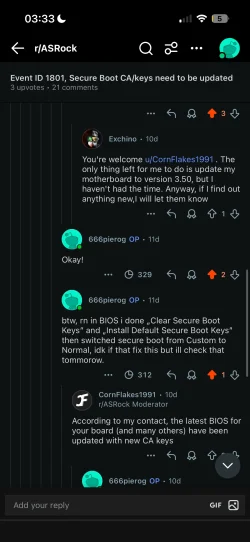
I already asked on Reddit ASRock and they said that my BIOS is already updated with that all but i dont see that keys already missing?
 

My Computer My Computer

At a glance

Windows 11
OS
Windows 11
Computer type
PC/Desktop
Manufacturer/Model
Asrock b760 pro rs
I already asked on Reddit ASRock and they said that my BIOS is already updated with that all but i dont see that keys already missing?
 

Attachments

  • IMG_6864.webp
    IMG_6864.webp
    126.8 KB · Views: 5

My Computer My Computer

At a glance

Windows 11
OS
Windows 11
Computer type
PC/Desktop
Manufacturer/Model
Asrock b760 pro rs
I already asked on Reddit ASRock and they said that my BIOS is already updated with that all but i dont see that keys already missing?
Then Asrock didn't provide the 2023 OpROM key for some reason. Neither did Gigabyte for my motherboard.... but MSI did for my son's motherboard. Strange why they'd do that, I guess they don't figure their customers plan on running any expansion cards that need it.

But none of this explains why the commands didn't get you the OpROM, nor install the 2023 Boot Manager files, which it should have.

Are you running in secure boot now? if not, enable secure boot and then run the commands again.
 

My Computers My Computers

  • At a glance

    Windows 11 ProRyzen 7 5800XGSkill 3200, 2x8GBMSI RX 6800 XT Gaming Z
    OS
    Windows 11 Pro
    Computer type
    PC/Desktop
    Manufacturer/Model
    DIY
    CPU
    Ryzen 7 5800X
    Motherboard
    Gigabyte B550M Aorus Pro
    Memory
    GSkill 3200, 2x8GB
    Graphics Card(s)
    MSI RX 6800 XT Gaming Z
    Sound Card
    on-board Realtek
    Monitor(s) Displays
    MSI 180hz
    Screen Resolution
    1440p
    Hard Drives
    Samsung 980 Pro, Samsung 870 Evo, generic PCIe NVME, WD 1TB 2.5" laptop spinner
    PSU
    Corsair RM 650
    Case
    mATX
    Cooling
    BeQuiet 240mm AIO and a bunch of case fans
    Keyboard
    one that clacks softly
    Mouse
    logitech
    Internet Speed
    bunches of bps
    Browser
    Firefox
    Antivirus
    Windows' own
  • At a glance

    Win11 ProRyzen 7 170016GB DDR4RX-480
    Operating System
    Win11 Pro
    Computer type
    PC/Desktop
    Manufacturer/Model
    DIY
    CPU
    Ryzen 7 1700
    Motherboard
    GA-AB350M G-3
    Memory
    16GB DDR4
    Graphics card(s)
    RX-480
    Sound Card
    In-Built Realtek
    Monitor(s) Displays
    Samsung
    Screen Resolution
    1440p
    Hard Drives
    NVME/SSD's
    PSU
    Thermaltake BX1 550W
    Case
    Some junky thing
    Cooling
    ThermalTake Assassin(?)
    Browser
    FF/Edge
    Antivirus
    Whatever Windows does
    Other Info
    Secure Boot enabled updated to 2023 CA keys, TPM2.0 enabled with system drive Bitlocker'd.
Then Asrock didn't provide the 2023 OpROM key for some reason. Neither did Gigabyte for my motherboard.... but MSI did for my son's motherboard. Strange why they'd do that, I guess they don't figure their customers plan on running any expansion cards that need it.

But none of this explains why the commands didn't get you the OpROM, nor install the 2023 Boot Manager files, which it should have.

Are you running in secure boot now? if not, enable secure boot and then run the commands again.
Yea i need secure boot for some games. Strange thing is that they told me already they done that
 

My Computer My Computer

At a glance

Windows 11
OS
Windows 11
Computer type
PC/Desktop
Manufacturer/Model
Asrock b760 pro rs
Yea i need secure boot for some games. Strange thing is that they told me already they done that
If you think you need the key then go get MOSBY and install all the keys. You'll also close a recognized potential back-door security vulnerability at the same time by creating a PK key that's unique to your computer. MOSBY doesn't install a 2023 CA signed boot manager but Windows will when it's ready for that with an update; the boot manager goes into the EFI boot partition not firmware.

Another way to get the OpROM key is to download it from the Microsoft GitHub site and append it to DB from within BIOS.
 

My Computers My Computers

  • At a glance

    Windows 11 ProRyzen 7 5800XGSkill 3200, 2x8GBMSI RX 6800 XT Gaming Z
    OS
    Windows 11 Pro
    Computer type
    PC/Desktop
    Manufacturer/Model
    DIY
    CPU
    Ryzen 7 5800X
    Motherboard
    Gigabyte B550M Aorus Pro
    Memory
    GSkill 3200, 2x8GB
    Graphics Card(s)
    MSI RX 6800 XT Gaming Z
    Sound Card
    on-board Realtek
    Monitor(s) Displays
    MSI 180hz
    Screen Resolution
    1440p
    Hard Drives
    Samsung 980 Pro, Samsung 870 Evo, generic PCIe NVME, WD 1TB 2.5" laptop spinner
    PSU
    Corsair RM 650
    Case
    mATX
    Cooling
    BeQuiet 240mm AIO and a bunch of case fans
    Keyboard
    one that clacks softly
    Mouse
    logitech
    Internet Speed
    bunches of bps
    Browser
    Firefox
    Antivirus
    Windows' own
  • At a glance

    Win11 ProRyzen 7 170016GB DDR4RX-480
    Operating System
    Win11 Pro
    Computer type
    PC/Desktop
    Manufacturer/Model
    DIY
    CPU
    Ryzen 7 1700
    Motherboard
    GA-AB350M G-3
    Memory
    16GB DDR4
    Graphics card(s)
    RX-480
    Sound Card
    In-Built Realtek
    Monitor(s) Displays
    Samsung
    Screen Resolution
    1440p
    Hard Drives
    NVME/SSD's
    PSU
    Thermaltake BX1 550W
    Case
    Some junky thing
    Cooling
    ThermalTake Assassin(?)
    Browser
    FF/Edge
    Antivirus
    Whatever Windows does
    Other Info
    Secure Boot enabled updated to 2023 CA keys, TPM2.0 enabled with system drive Bitlocker'd.
If you think you need the key then go get MOSBY and install all the keys. You'll also close a recognized potential back-door security vulnerability at the same time by creating a PK key that's unique to your computer. MOSBY doesn't install a 2023 CA signed boot manager but Windows will when it's ready for that with an update; the boot manager goes into the EFI boot partition not firmware.

Another way to get the OpROM key is to download it from the Microsoft GitHub site and append it to DB from within BIOS.
I'd rather wait for Microsoft to add it themselves. I hope they'll add it in 2026. Could you provide a link to the Microsoft page where I can download it?
 

My Computer My Computer

At a glance

Windows 11
OS
Windows 11
Computer type
PC/Desktop
Manufacturer/Model
Asrock b760 pro rs
I'd rather wait for Microsoft to add it themselves. I hope they'll add it in 2026
Be sure to stay running in Secure Boot mode, and also allow diagnostics reporting so they will be able to.

I think your motherboard is for an Intel processor, so this would be the location for the signed OpROM key:
 

My Computers My Computers

  • At a glance

    Windows 11 ProRyzen 7 5800XGSkill 3200, 2x8GBMSI RX 6800 XT Gaming Z
    OS
    Windows 11 Pro
    Computer type
    PC/Desktop
    Manufacturer/Model
    DIY
    CPU
    Ryzen 7 5800X
    Motherboard
    Gigabyte B550M Aorus Pro
    Memory
    GSkill 3200, 2x8GB
    Graphics Card(s)
    MSI RX 6800 XT Gaming Z
    Sound Card
    on-board Realtek
    Monitor(s) Displays
    MSI 180hz
    Screen Resolution
    1440p
    Hard Drives
    Samsung 980 Pro, Samsung 870 Evo, generic PCIe NVME, WD 1TB 2.5" laptop spinner
    PSU
    Corsair RM 650
    Case
    mATX
    Cooling
    BeQuiet 240mm AIO and a bunch of case fans
    Keyboard
    one that clacks softly
    Mouse
    logitech
    Internet Speed
    bunches of bps
    Browser
    Firefox
    Antivirus
    Windows' own
  • At a glance

    Win11 ProRyzen 7 170016GB DDR4RX-480
    Operating System
    Win11 Pro
    Computer type
    PC/Desktop
    Manufacturer/Model
    DIY
    CPU
    Ryzen 7 1700
    Motherboard
    GA-AB350M G-3
    Memory
    16GB DDR4
    Graphics card(s)
    RX-480
    Sound Card
    In-Built Realtek
    Monitor(s) Displays
    Samsung
    Screen Resolution
    1440p
    Hard Drives
    NVME/SSD's
    PSU
    Thermaltake BX1 550W
    Case
    Some junky thing
    Cooling
    ThermalTake Assassin(?)
    Browser
    FF/Edge
    Antivirus
    Whatever Windows does
    Other Info
    Secure Boot enabled updated to 2023 CA keys, TPM2.0 enabled with system drive Bitlocker'd.
Be sure to stay running in Secure Boot mode, and also allow diagnostics reporting so they will be able to.

I think your motherboard is for an Intel processor, so this would be the location for the signed OpROM key:
Thank you very much! I should import these three files in the BIOS, right? Is there any guide for that? I’m new to these things, but I like to have everything done perfectly.
 

My Computer My Computer

At a glance

Windows 11
OS
Windows 11
Computer type
PC/Desktop
Manufacturer/Model
Asrock b760 pro rs
Thank you very much! I should import these three files in the BIOS, right? Is there any guide for that? I’m new to these things, but I like to have everything done perfectly.
Just the DBupdateOROM2023.bin object.

Doing this seems to be peculiar to each motherboard BIOS, and the mfr's aren't very nice about telling us how to do things. I'd navigate into the Secure Boot section where the different secure boot variables are listed and click on the one for DB, then look for something like APPEND. It will want you to steer it to a partition on one of the drives for the file, so probably a USB stick is best since it's usually easier to identify.

BTW: now's the time to do this since your BIOS has the needed 2023 keys as defaults and your Windows is still booting from the 2011 certificates. If things go horribly south, just boot back into BIOS and look for a setting to "Restore Default Keys" and you're right back where you are now.

And whatever you do, be sure to disable bitlocker and decrypt drives... or at the least have recovery keys printed out and in your hand to recover them. Any time you mess with the Secure Boot process there's a potential the TPM won't unseal the key and BL fails over to recovery.
 
Last edited:

My Computers My Computers

  • At a glance

    Windows 11 ProRyzen 7 5800XGSkill 3200, 2x8GBMSI RX 6800 XT Gaming Z
    OS
    Windows 11 Pro
    Computer type
    PC/Desktop
    Manufacturer/Model
    DIY
    CPU
    Ryzen 7 5800X
    Motherboard
    Gigabyte B550M Aorus Pro
    Memory
    GSkill 3200, 2x8GB
    Graphics Card(s)
    MSI RX 6800 XT Gaming Z
    Sound Card
    on-board Realtek
    Monitor(s) Displays
    MSI 180hz
    Screen Resolution
    1440p
    Hard Drives
    Samsung 980 Pro, Samsung 870 Evo, generic PCIe NVME, WD 1TB 2.5" laptop spinner
    PSU
    Corsair RM 650
    Case
    mATX
    Cooling
    BeQuiet 240mm AIO and a bunch of case fans
    Keyboard
    one that clacks softly
    Mouse
    logitech
    Internet Speed
    bunches of bps
    Browser
    Firefox
    Antivirus
    Windows' own
  • At a glance

    Win11 ProRyzen 7 170016GB DDR4RX-480
    Operating System
    Win11 Pro
    Computer type
    PC/Desktop
    Manufacturer/Model
    DIY
    CPU
    Ryzen 7 1700
    Motherboard
    GA-AB350M G-3
    Memory
    16GB DDR4
    Graphics card(s)
    RX-480
    Sound Card
    In-Built Realtek
    Monitor(s) Displays
    Samsung
    Screen Resolution
    1440p
    Hard Drives
    NVME/SSD's
    PSU
    Thermaltake BX1 550W
    Case
    Some junky thing
    Cooling
    ThermalTake Assassin(?)
    Browser
    FF/Edge
    Antivirus
    Whatever Windows does
    Other Info
    Secure Boot enabled updated to 2023 CA keys, TPM2.0 enabled with system drive Bitlocker'd.
Just the DBupdateOROM2023.bin object.

Doing this seems to be peculiar to each motherboard BIOS, and the mfr's aren't very nice about telling us how to do things. I'd navigate into the Secure Boot section where the different secure boot variables are listed and click on the one for DB, then look for something like APPEND. It will want you to steer it to a partition on one of the drives for the file, so probably a USB stick is best since it's usually easier to identify.

BTW: now's the time to do this since your BIOS has the needed 2023 keys as defaults and your Windows is still booting from the 2011 certificates. If things go horribly south, just boot back into BIOS and look for a setting to "Restore Default Keys" and you're right back where you are now.

And whatever you do, be sure to disable bitlocker and decrypt drives... or at the least have recovery keys printed out and in your hand to recover them. Any time you mess with the Secure Boot process there's a potential the TPM won't unseal the key and BL fails over to recovery.
Already done, thats all yea? So i dont need to do anything else i mean when these keys expire
1762876592494.webp
 

My Computer My Computer

At a glance

Windows 11
OS
Windows 11
Computer type
PC/Desktop
Manufacturer/Model
Asrock b760 pro rs
Already done, thats all yea? So i dont need to do anything else i mean when these keys expire
View attachment 152426
All there then.

When Microsoft installs 2023 signed boot files it will seamlessly start using the appropriate 2023 key to validate. Until then it can validate 2011 signed boot files for as long as Microsoft leaves them there and for so long as you don't revoke trust in the 2011 key .

But if you should manually revoke trust in the 2011 key make absolutely positive you have 2023 signed boot files installed first or the system will no longer start in secure boot mode.
 
Last edited:

My Computers My Computers

  • At a glance

    Windows 11 ProRyzen 7 5800XGSkill 3200, 2x8GBMSI RX 6800 XT Gaming Z
    OS
    Windows 11 Pro
    Computer type
    PC/Desktop
    Manufacturer/Model
    DIY
    CPU
    Ryzen 7 5800X
    Motherboard
    Gigabyte B550M Aorus Pro
    Memory
    GSkill 3200, 2x8GB
    Graphics Card(s)
    MSI RX 6800 XT Gaming Z
    Sound Card
    on-board Realtek
    Monitor(s) Displays
    MSI 180hz
    Screen Resolution
    1440p
    Hard Drives
    Samsung 980 Pro, Samsung 870 Evo, generic PCIe NVME, WD 1TB 2.5" laptop spinner
    PSU
    Corsair RM 650
    Case
    mATX
    Cooling
    BeQuiet 240mm AIO and a bunch of case fans
    Keyboard
    one that clacks softly
    Mouse
    logitech
    Internet Speed
    bunches of bps
    Browser
    Firefox
    Antivirus
    Windows' own
  • At a glance

    Win11 ProRyzen 7 170016GB DDR4RX-480
    Operating System
    Win11 Pro
    Computer type
    PC/Desktop
    Manufacturer/Model
    DIY
    CPU
    Ryzen 7 1700
    Motherboard
    GA-AB350M G-3
    Memory
    16GB DDR4
    Graphics card(s)
    RX-480
    Sound Card
    In-Built Realtek
    Monitor(s) Displays
    Samsung
    Screen Resolution
    1440p
    Hard Drives
    NVME/SSD's
    PSU
    Thermaltake BX1 550W
    Case
    Some junky thing
    Cooling
    ThermalTake Assassin(?)
    Browser
    FF/Edge
    Antivirus
    Whatever Windows does
    Other Info
    Secure Boot enabled updated to 2023 CA keys, TPM2.0 enabled with system drive Bitlocker'd.
Dziękuję bardzo! Powinienem zaimportować te trzy pliki do BIOS-u, prawda? Czy jest na to jakiś przewodnik? Jestem nowy w tych sprawach, ale lubię, gdy wszystko jest zrobione idealnie.

Just the DBupdateOROM2023.bin object.

Doing this seems to be peculiar to each motherboard BIOS, and the mfr's aren't very nice about telling us how to do things. I'd navigate into the Secure Boot section where the different secure boot variables are listed and click on the one for DB, then look for something like APPEND. It will want you to steer it to a partition on one of the drives for the file, so probably a USB stick is best since it's usually easier to identify.

BTW: now's the time to do this since your BIOS has the needed 2023 keys as defaults and your Windows is still booting from the 2011 certificates. If things go horribly south, just boot back into BIOS and look for a setting to "Restore Default Keys" and you're right back where you are now.

And whatever you do, be sure to disable bitlocker and decrypt drives... or at the least have recovery keys printed out and in your hand to recover them. Any time you mess with the Secure Boot process there's a potential the TPM won't unseal the key and BL fails over to recovery.

All there then.

When Microsoft installs 2023 signed boot files it will seamlessly start using the appropriate 2023 key to validate. Until then it can validate 2011 signed boot files for as long as Microsoft leaves them there and for so long as you don't revoke trust in the 2011 key .

But if you should manually revoke trust in the 2011 key make absolutely positive you have 2023 signed boot files installed first or the system will no longer start in secure boot mode.
thanks! Theres any guide about that?
 

My Computer My Computer

At a glance

Windows 11
OS
Windows 11
Computer type
PC/Desktop
Manufacturer/Model
Asrock b760 pro rs

My Computers My Computers

  • At a glance

    Windows 11 ProRyzen 7 5800XGSkill 3200, 2x8GBMSI RX 6800 XT Gaming Z
    OS
    Windows 11 Pro
    Computer type
    PC/Desktop
    Manufacturer/Model
    DIY
    CPU
    Ryzen 7 5800X
    Motherboard
    Gigabyte B550M Aorus Pro
    Memory
    GSkill 3200, 2x8GB
    Graphics Card(s)
    MSI RX 6800 XT Gaming Z
    Sound Card
    on-board Realtek
    Monitor(s) Displays
    MSI 180hz
    Screen Resolution
    1440p
    Hard Drives
    Samsung 980 Pro, Samsung 870 Evo, generic PCIe NVME, WD 1TB 2.5" laptop spinner
    PSU
    Corsair RM 650
    Case
    mATX
    Cooling
    BeQuiet 240mm AIO and a bunch of case fans
    Keyboard
    one that clacks softly
    Mouse
    logitech
    Internet Speed
    bunches of bps
    Browser
    Firefox
    Antivirus
    Windows' own
  • At a glance

    Win11 ProRyzen 7 170016GB DDR4RX-480
    Operating System
    Win11 Pro
    Computer type
    PC/Desktop
    Manufacturer/Model
    DIY
    CPU
    Ryzen 7 1700
    Motherboard
    GA-AB350M G-3
    Memory
    16GB DDR4
    Graphics card(s)
    RX-480
    Sound Card
    In-Built Realtek
    Monitor(s) Displays
    Samsung
    Screen Resolution
    1440p
    Hard Drives
    NVME/SSD's
    PSU
    Thermaltake BX1 550W
    Case
    Some junky thing
    Cooling
    ThermalTake Assassin(?)
    Browser
    FF/Edge
    Antivirus
    Whatever Windows does
    Other Info
    Secure Boot enabled updated to 2023 CA keys, TPM2.0 enabled with system drive Bitlocker'd.
None I know of. I don't find there to be a good reason for me to do it.
Okay, thank you. So rn i shouldnt get that error in event viewer yea?
 

My Computer My Computer

At a glance

Windows 11
OS
Windows 11
Computer type
PC/Desktop
Manufacturer/Model
Asrock b760 pro rs
Back
Top Bottom