Did you manually update your Secure Boot Keys ?


Well... You can setup all the new keys as well as the get a more secure PK by running MOSBY again. :-)
Which was the main reason I learned how to use MOSBY ;-)

I stayed with it once I saw how easy it is to use... and that it eliminates the extraneous chain of trust (more than just their PK) being planted by OEM's in BIOS updates for 2023 default keys.
 
Last edited:

My Computers

System One System Two

  • OS
    Windows 11 Pro
    Computer type
    PC/Desktop
    Manufacturer/Model
    DIY
    CPU
    Ryzen 7 5800X
    Motherboard
    Gigabyte B550M Aorus Pro
    Memory
    GSkill 3200, 2x8GB
    Graphics Card(s)
    MSI RX 6800 XT Gaming Z
    Sound Card
    on-board Realtek
    Monitor(s) Displays
    MSI 180hz
    Screen Resolution
    1440p
    Hard Drives
    Samsung 980 Pro, Samsung 870 Evo, generic PCIe NVME, WD 1TB 2.5" laptop spinner
    PSU
    Corsair RM 650
    Case
    mATX
    Cooling
    BeQuiet 240mm AIO and a bunch of case fans
    Keyboard
    one that clacks softly
    Mouse
    logitech
    Internet Speed
    bunches of bps
    Browser
    Firefox
    Antivirus
    Windows' own
  • Operating System
    Win11 Pro
    Computer type
    PC/Desktop
    Manufacturer/Model
    DIY
    CPU
    Ryzen 7 1700
    Motherboard
    GA-AB350M G-3
    Memory
    16GB DDR4
    Graphics card(s)
    RX-480
    Sound Card
    In-Built Realtek
    Monitor(s) Displays
    Samsung
    Screen Resolution
    1440p
    Hard Drives
    NVME/SSD's
    PSU
    Thermaltake BX1 550W
    Case
    Some junky thing
    Cooling
    ThermalTake Assassin(?)
    Browser
    FF/Edge
    Antivirus
    Whatever Windows does
    Other Info
    Secure Boot enabled updated to 2023 CA keys, TPM2.0 enabled with system drive Bitlocker'd.
Thanks gunrunnerjohn and Hader for the default UEFI explanation. This is on an unsupported Asus machine by the way...so what you explained makes sense. Right now, when I run the script:

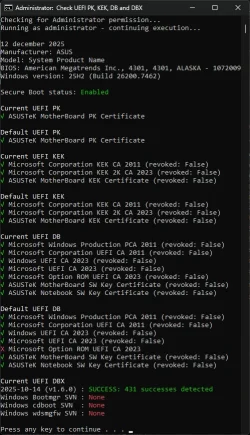
Green checkmarks on everything except default KEK (Windows 2023) and default DB (Windows, Microsoft, and Option 2023). DBX shows "success" in green and I don't have any SVN installed (it says none).
 

My Computers

System One System Two

  • OS
    Windows 11
    Computer type
    PC/Desktop
    Manufacturer/Model
    Custom
    CPU
    Intel i7-7700K
    Motherboard
    Asus Prime Z-270A
    Memory
    32GB 2666Mhz (Kingston Hyper X Fury)
    Graphics Card(s)
    Asus Nvidia 1050Ti
    Sound Card
    N/A
    Monitor(s) Displays
    Samsung C27F390
    Screen Resolution
    1920 x 1080
    Hard Drives
    1TB Western Digital SN770 (System) and 2TB Western Digital SN770 (Storage)
    Antivirus
    Windows Security
  • Operating System
    Windows 11 Home
    Computer type
    Laptop
    Manufacturer/Model
    Dell/XPS 15 9510
    CPU
    i9-11900H
    Motherboard
    Unknown
    Memory
    32GB
    Graphics card(s)
    Integrated Intel and Nvidia 3050Ti
    Sound Card
    Integrated (Realtek)
    Monitor(s) Displays
    None
    Screen Resolution
    1920 x 1200 (non-Touch)
    Hard Drives
    2TB SK Hynix P41 Platinum
    Antivirus
    Windows Security
Green checkmarks on everything except default KEK (Windows 2023) and default DB (Windows, Microsoft, and Option 2023). DBX shows "success" in green and I don't have any SVN installed (it says none).
You will only get the default KEK and default DB with a BIOS update; but these aren't necessary for routine operation anyway.

I wouldn't worry about the SVN for now unless you operate the machine in a high-threat environment... like a common-use machine giving a lot of people easy physical access to it. Microsoft will update it for you with a routine monthly security updates.
 

My Computers

System One System Two

  • OS
    Windows 11 Pro
    Computer type
    PC/Desktop
    Manufacturer/Model
    DIY
    CPU
    Ryzen 7 5800X
    Motherboard
    Gigabyte B550M Aorus Pro
    Memory
    GSkill 3200, 2x8GB
    Graphics Card(s)
    MSI RX 6800 XT Gaming Z
    Sound Card
    on-board Realtek
    Monitor(s) Displays
    MSI 180hz
    Screen Resolution
    1440p
    Hard Drives
    Samsung 980 Pro, Samsung 870 Evo, generic PCIe NVME, WD 1TB 2.5" laptop spinner
    PSU
    Corsair RM 650
    Case
    mATX
    Cooling
    BeQuiet 240mm AIO and a bunch of case fans
    Keyboard
    one that clacks softly
    Mouse
    logitech
    Internet Speed
    bunches of bps
    Browser
    Firefox
    Antivirus
    Windows' own
  • Operating System
    Win11 Pro
    Computer type
    PC/Desktop
    Manufacturer/Model
    DIY
    CPU
    Ryzen 7 1700
    Motherboard
    GA-AB350M G-3
    Memory
    16GB DDR4
    Graphics card(s)
    RX-480
    Sound Card
    In-Built Realtek
    Monitor(s) Displays
    Samsung
    Screen Resolution
    1440p
    Hard Drives
    NVME/SSD's
    PSU
    Thermaltake BX1 550W
    Case
    Some junky thing
    Cooling
    ThermalTake Assassin(?)
    Browser
    FF/Edge
    Antivirus
    Whatever Windows does
    Other Info
    Secure Boot enabled updated to 2023 CA keys, TPM2.0 enabled with system drive Bitlocker'd.
The only missing certs are a couple in the Default UEFI DB, those are from Gigabyte, and apparently they haven't added those. Since the Current UEFI DB is what is actually being used, I'm not going to lose sleep over those. Everything's there, my system boots just fine, and I don't get any secure boot errors in the Event Log. Time to move on. :lmao:

I suppose at some time the Microsoft Corporation UEFI CA 2011 (revoked: False) might need to be revoked, but I don't boot anything that would use that now.

1766856031181.webp
 

My Computers

System One System Two

  • OS
    Win 11 Pro 25H2, Build 26200.8524
    Computer type
    PC/Desktop
    Manufacturer/Model
    Home Brew
    CPU
    Intel Core i5 14500
    Motherboard
    Gigabyte B760M G P WIFI
    Memory
    64GB DDR4
    Graphics Card(s)
    GeForce RTX 4060
    Sound Card
    Chipset Realtek
    Monitor(s) Displays
    LG 45" Ultragear, Acer 24" 1080p
    Screen Resolution
    5120x1440, 1920x1080
    Hard Drives
    Crucial P310 2TB 2280 PCIe Gen4 3D NAND NVMe M.2 SSD (O/S)
    Silicon Power 2TB US75 NVMe PCIe Gen4 M.2 2280 SSD (backup)
    Crucial BX500 2TB 3D NAND (2nd backup)
    Seagate 4TB Ironwolf, rotating HDD archive files
    External off-line backup Drives: 2 NVMe 4TB drives in external enclosures
    PSU
    Thermaltake Toughpower GF3 750W
    Case
    LIAN LI LANCOOL 216 E-ATX PC Case
    Cooling
    Lots of fans!
    Keyboard
    Microsoft Comfort Curve 2000
    Mouse
    Logitech G305
    Internet Speed
    Verizon FiOS 1GB
    Browser
    Firefox
    Antivirus
    Malware Bytes & Windows Defender Security
  • Operating System
    Win 11 Pro 25H2, Build 26200.8524
    Computer type
    PC/Desktop
    Manufacturer/Model
    Home Brew
    CPU
    Intel Core i5 14400
    Motherboard
    Gigabyte B760M DS3H AX
    Memory
    32GB DDR5
    Graphics card(s)
    Intel 700 Embedded GPU
    Sound Card
    Realtek Embedded
    Monitor(s) Displays
    27" HP 1080p
    Screen Resolution
    1920x1080
    Hard Drives
    Crucial P310 2TB 2280 PCIe Gen4 eD NAND PCIe SSD
    Samsung EVO 990 2TB NVMe Gen4 SSD
    Samsung 2TB SATA SSD
    PSU
    Thermaltake Smart BM3 650W
    Case
    Okinos Micro ATX Case
    Cooling
    Fans
    Keyboard
    Microsoft Comfort Curve 2000
    Mouse
    Logitech G305
    Internet Speed
    Verizon FiOS 1GB
    Browser
    Firefox
    Antivirus
    Malware Bytes & Windows Defender Security
Which was the main reason I learned how to use MOSBY ;-)

I stayed with it once I saw how easy it is to use... and that it eliminates the extraneous chain of trust (more than just their PK) being planted by OEM's in BIOS updates for 2023 default keys.
When I read about all the sloppy handling of the PK security by the various entities, MB makers and even Microsoft, I was a bit surprised. That's when I realized that just having a completely random PK that is unique to my machine probably wouldn't be a bad thing! :lmao:
 

My Computers

System One System Two

  • OS
    Win 11 Pro 25H2, Build 26200.8524
    Computer type
    PC/Desktop
    Manufacturer/Model
    Home Brew
    CPU
    Intel Core i5 14500
    Motherboard
    Gigabyte B760M G P WIFI
    Memory
    64GB DDR4
    Graphics Card(s)
    GeForce RTX 4060
    Sound Card
    Chipset Realtek
    Monitor(s) Displays
    LG 45" Ultragear, Acer 24" 1080p
    Screen Resolution
    5120x1440, 1920x1080
    Hard Drives
    Crucial P310 2TB 2280 PCIe Gen4 3D NAND NVMe M.2 SSD (O/S)
    Silicon Power 2TB US75 NVMe PCIe Gen4 M.2 2280 SSD (backup)
    Crucial BX500 2TB 3D NAND (2nd backup)
    Seagate 4TB Ironwolf, rotating HDD archive files
    External off-line backup Drives: 2 NVMe 4TB drives in external enclosures
    PSU
    Thermaltake Toughpower GF3 750W
    Case
    LIAN LI LANCOOL 216 E-ATX PC Case
    Cooling
    Lots of fans!
    Keyboard
    Microsoft Comfort Curve 2000
    Mouse
    Logitech G305
    Internet Speed
    Verizon FiOS 1GB
    Browser
    Firefox
    Antivirus
    Malware Bytes & Windows Defender Security
  • Operating System
    Win 11 Pro 25H2, Build 26200.8524
    Computer type
    PC/Desktop
    Manufacturer/Model
    Home Brew
    CPU
    Intel Core i5 14400
    Motherboard
    Gigabyte B760M DS3H AX
    Memory
    32GB DDR5
    Graphics card(s)
    Intel 700 Embedded GPU
    Sound Card
    Realtek Embedded
    Monitor(s) Displays
    27" HP 1080p
    Screen Resolution
    1920x1080
    Hard Drives
    Crucial P310 2TB 2280 PCIe Gen4 eD NAND PCIe SSD
    Samsung EVO 990 2TB NVMe Gen4 SSD
    Samsung 2TB SATA SSD
    PSU
    Thermaltake Smart BM3 650W
    Case
    Okinos Micro ATX Case
    Cooling
    Fans
    Keyboard
    Microsoft Comfort Curve 2000
    Mouse
    Logitech G305
    Internet Speed
    Verizon FiOS 1GB
    Browser
    Firefox
    Antivirus
    Malware Bytes & Windows Defender Security
When I read about all the sloppy handling of the PK security by the various entities, MB makers and even Microsoft, I was a bit surprised. That's when I realized that just having a completely random PK that is unique to my machine probably wouldn't be a bad thing! :lmao:
It's more than just sloppy handling of PK security by OEM's. There are quite a few BIOS' that don't even enforce Secure Boot validation with default settings. MSI motherboards in particular, you have to change a default setting to Do Not Execute Image (or something similarly dangerous sounding) for proper security. Some BIOS's just completely ignore validation failures with no setting exposed in BIOS to make it respect Secure Boot even though it enables it and Windows even thinks it works.

OEM's don't really care that we have secure systems, only that it boots up first time and every time for owners regardless of the consequences to them.
 
Last edited:

My Computers

System One System Two

  • OS
    Windows 11 Pro
    Computer type
    PC/Desktop
    Manufacturer/Model
    DIY
    CPU
    Ryzen 7 5800X
    Motherboard
    Gigabyte B550M Aorus Pro
    Memory
    GSkill 3200, 2x8GB
    Graphics Card(s)
    MSI RX 6800 XT Gaming Z
    Sound Card
    on-board Realtek
    Monitor(s) Displays
    MSI 180hz
    Screen Resolution
    1440p
    Hard Drives
    Samsung 980 Pro, Samsung 870 Evo, generic PCIe NVME, WD 1TB 2.5" laptop spinner
    PSU
    Corsair RM 650
    Case
    mATX
    Cooling
    BeQuiet 240mm AIO and a bunch of case fans
    Keyboard
    one that clacks softly
    Mouse
    logitech
    Internet Speed
    bunches of bps
    Browser
    Firefox
    Antivirus
    Windows' own
  • Operating System
    Win11 Pro
    Computer type
    PC/Desktop
    Manufacturer/Model
    DIY
    CPU
    Ryzen 7 1700
    Motherboard
    GA-AB350M G-3
    Memory
    16GB DDR4
    Graphics card(s)
    RX-480
    Sound Card
    In-Built Realtek
    Monitor(s) Displays
    Samsung
    Screen Resolution
    1440p
    Hard Drives
    NVME/SSD's
    PSU
    Thermaltake BX1 550W
    Case
    Some junky thing
    Cooling
    ThermalTake Assassin(?)
    Browser
    FF/Edge
    Antivirus
    Whatever Windows does
    Other Info
    Secure Boot enabled updated to 2023 CA keys, TPM2.0 enabled with system drive Bitlocker'd.
I suppose at some time the Microsoft Corporation UEFI CA 2011 (revoked: False) might need to be revoked, but I don't boot anything that would use that now.
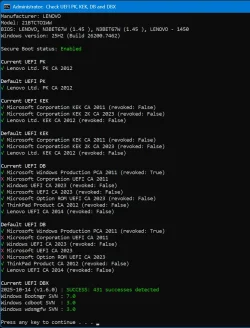
Interestingly, my system #1 does not have the Microsoft Corporation UEFI CA 2011, and never has. It is not in the current or the default DB. I have never had a problem.

P16s Check UEFI.webp
 

My Computers

System One System Two

  • OS
    Windows 11 Pro 24H2
    Computer type
    Laptop
    Manufacturer/Model
    Lenovo P16s Workstation
    CPU
    Intel i7-1260P 12th Gen 4.7GHz
    Memory
    32GB DDR4-3200
    Graphics Card(s)
    NVIDIA T550 Laptop GPU
    Sound Card
    Realtek Audio
    Monitor(s) Displays
    16" Laptop Display
    Screen Resolution
    2560x1600
    Hard Drives
    2TB Samsung M.2 2280 SSD PCIe 4.0 x 4 NVMe
    Mouse
    Logitech MX Anywhere 2s
    Internet Speed
    1000 Mb
    Browser
    Firefox
    Antivirus
    Avast
  • Operating System
    Windows 11 Pro 24H2
    Computer type
    Laptop
    Manufacturer/Model
    Lenovo P50 Workstation
    CPU
    i7-6820HQ 6th Gen 3.6 GHz
    Memory
    32GB DDR4-2133
    Graphics card(s)
    NVIDIA Quadro M2000M Laptop GPU
    Sound Card
    Realtek Audio
    Monitor(s) Displays
    15.6" Laptop Display
    Screen Resolution
    1920x1080
    Hard Drives
    2 x 1TB Samsung M.2 2280 SSD PCIe 3.0 x 4 NVMe
    Cooling
    Dual Fan System
    Mouse
    Logitech MX Anywhere 2s
    Internet Speed
    1000 Mb
    Browser
    Firefox
    Antivirus
    Avast
Interestingly, my system #1 does not have the Microsoft Corporation UEFI CA 2011, and never has. It is not in the current or the default DB. I have never had a problem.
Maybe because you don´t boot from Linux-based UFDs.
 

My Computer

System One

  • OS
    Windows 10
Some nice to know update. I was already fine on all fronts with my Current UEFI values settings. But had 1 red cross in my Default UEFI values DB. Ignored that; not that important. I today updated my BIOS to a newer version. Checked everything again and I saw that red cross was gone. So a BIOS update of the manufacturer did solve that issue also.

Before: (don't look at the "None" stuff below. Fixed that, but forget to take a snapshot of that situation, It was 7.0, 3.0 and 3.0 after that fix.)
CA2023 Solved Check PK,KEK,DB,DBX new#1.webp

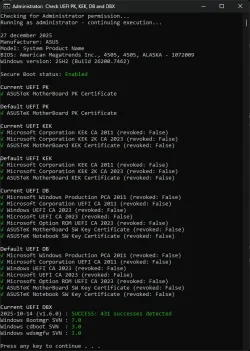
After the BIOS update:
CA2023 Solved Check PK,KEK,DB,DBX new#2 After BIOS update 4505. All clear.webp

Confirming that a BIOS update will fix that Default UEFI value also.
The BIOS update had a remark that came with it; "Enhance overall system security."
It solved that red cross at the Default UEFI DB value "Microsoft Option ROM UEFI CA 2023"
It seems that ASUS and MS is talking to each other about introducing CA2023.
 

My Computer

System One

  • OS
    Win 11 Pro "25H2" Build 26200.8524, Zorin OS Pro
    Computer type
    PC/Desktop
    Manufacturer/Model
    Self built
    CPU
    Intel® Core™ i7-12700KF 12th Gen.
    Motherboard
    ASUS Prime Z690-A, BIOS v4505
    Memory
    32GB DDR5 5600-36 Vengeance
    Graphics Card(s)
    PCIe4.0 Asus NVIDIA RTX3060Ti
    Sound Card
    Onboard; Realtek
    Monitor(s) Displays
    34" LG 34UC79G-B Curved 21:9 144Hz
    Screen Resolution
    2560x1080 (No HDR)
    Hard Drives
    250Gb Samsung 870PRO NVMe (Win 11 Pro)
    1Tb Samsung 980PRO NVMe
    1Tb Samsung 970EVO NVMe
    2Tb Samsung 990PRO NVMe with heatsink.
    4Tb WDC WD40EZRZ Blue SATA (Int.)
    4Tb WDC WD40EZRZ Blue SATA (Int.)
    3Tb WDC WD30EFRZ Red SATA (Int.)
    256Gb Samsung 840PRO SSD (RHEL 9,5)
    256Gb Samsung 850PRO SSD (Zorin OS Pro 18)
    PSU
    Coolermaster 850W V2 Gold with internal 12cm exaust fan
    Case
    Be-Quiet Pure Base 600.
    Cooling
    3x Be-Quiet! 12/14cm "Silent Wings 4" casefans, 1x Arctic Freezer i35 CPU towerblock with fan.
    Keyboard
    Steelseries APEX 7 keyboard.
    Mouse
    Logitech G-502 Hero
    Internet Speed
    1Gb
    Browser
    Brave
    Antivirus
    F-Secure
    Other Info
    No Noise system.
    256Gb Kingston Travler USB 3.0 drive.
    64Gb Sandisk USB 3.2 drive. (Ventoy)
    8Gb Philips USB 3.0 drive. (Win. Inst.)
    8Gb Philips USB 3.0 drive. (Rescue disk)
    2Tb WD USB 3.0 Passport drive.
    USB Ext. 500Gb WD SATA drive.
    External USB 3.0 C.A. CD/DVD* burner.
Interestingly, my system #1 does not have the Microsoft Corporation UEFI CA 2011, and never has. It is not in the current or the default DB. I have never had a problem.
Seems to me you have to run "Apply 2023 KEK, DB and bootmgfw update.cmd" See if that changes that red cross at CA2011 inside the Current UEFI values of the DB. On the subject of the red crosses inside the default UEFI values of the DB; Did you check if there is a new BIOS update for your motherboard/laptop? I had 1 red cross also and that disappeared as soon I had updated my BIOS with a newer version today.....

You have secure boot enabled so Windows is looking at CA2011 today during startup. (will change in the future into CA2023. All we have to do is wait till a MS build update where all files signed with CA2011 will be replaced by the ones pointing towards CA2023)

Did you experience troubles during a normal update? CA2011 and CA2025 is present in 25H2. Run SFC /scannow and DISM /RestoreHealth to see if there is something which needs fixing.....
 

My Computer

System One

  • OS
    Win 11 Pro "25H2" Build 26200.8524, Zorin OS Pro
    Computer type
    PC/Desktop
    Manufacturer/Model
    Self built
    CPU
    Intel® Core™ i7-12700KF 12th Gen.
    Motherboard
    ASUS Prime Z690-A, BIOS v4505
    Memory
    32GB DDR5 5600-36 Vengeance
    Graphics Card(s)
    PCIe4.0 Asus NVIDIA RTX3060Ti
    Sound Card
    Onboard; Realtek
    Monitor(s) Displays
    34" LG 34UC79G-B Curved 21:9 144Hz
    Screen Resolution
    2560x1080 (No HDR)
    Hard Drives
    250Gb Samsung 870PRO NVMe (Win 11 Pro)
    1Tb Samsung 980PRO NVMe
    1Tb Samsung 970EVO NVMe
    2Tb Samsung 990PRO NVMe with heatsink.
    4Tb WDC WD40EZRZ Blue SATA (Int.)
    4Tb WDC WD40EZRZ Blue SATA (Int.)
    3Tb WDC WD30EFRZ Red SATA (Int.)
    256Gb Samsung 840PRO SSD (RHEL 9,5)
    256Gb Samsung 850PRO SSD (Zorin OS Pro 18)
    PSU
    Coolermaster 850W V2 Gold with internal 12cm exaust fan
    Case
    Be-Quiet Pure Base 600.
    Cooling
    3x Be-Quiet! 12/14cm "Silent Wings 4" casefans, 1x Arctic Freezer i35 CPU towerblock with fan.
    Keyboard
    Steelseries APEX 7 keyboard.
    Mouse
    Logitech G-502 Hero
    Internet Speed
    1Gb
    Browser
    Brave
    Antivirus
    F-Secure
    Other Info
    No Noise system.
    256Gb Kingston Travler USB 3.0 drive.
    64Gb Sandisk USB 3.2 drive. (Ventoy)
    8Gb Philips USB 3.0 drive. (Win. Inst.)
    8Gb Philips USB 3.0 drive. (Rescue disk)
    2Tb WD USB 3.0 Passport drive.
    USB Ext. 500Gb WD SATA drive.
    External USB 3.0 C.A. CD/DVD* burner.
The only missing certs are a couple in the Default UEFI DB, those are from Gigabyte, and apparently they haven't added those. Since the Current UEFI DB is what is actually being used, I'm not going to lose sleep over those. Everything's there, my system boots just fine, and I don't get any secure boot errors in the Event Log. Time to move on. :lmao:

I suppose at some time the Microsoft Corporation UEFI CA 2011 (revoked: False) might need to be revoked, but I don't boot anything that would use that now.
You're fine already. Curious at those red crosses inside the Default UEFI values of the DB? Did you look if there is a new BIOS update available for your motherboard? As I found out today; I had one (red cross) also but that disappeared when I updated my BIOS with a new version today. Have a look. Not that super important. But still.
Don't worry about that CA2011 revoke action. It will happen sometime in 2026. Not now. It's still active and needed today. Windows is using this today. As soon MS (with a future update) replaces all signed files with CA2011 by ones signed with CA2023. As soon as the end of the validity of CA2011 passed it will be revoked. The DBX will see to it.
 

My Computer

System One

  • OS
    Win 11 Pro "25H2" Build 26200.8524, Zorin OS Pro
    Computer type
    PC/Desktop
    Manufacturer/Model
    Self built
    CPU
    Intel® Core™ i7-12700KF 12th Gen.
    Motherboard
    ASUS Prime Z690-A, BIOS v4505
    Memory
    32GB DDR5 5600-36 Vengeance
    Graphics Card(s)
    PCIe4.0 Asus NVIDIA RTX3060Ti
    Sound Card
    Onboard; Realtek
    Monitor(s) Displays
    34" LG 34UC79G-B Curved 21:9 144Hz
    Screen Resolution
    2560x1080 (No HDR)
    Hard Drives
    250Gb Samsung 870PRO NVMe (Win 11 Pro)
    1Tb Samsung 980PRO NVMe
    1Tb Samsung 970EVO NVMe
    2Tb Samsung 990PRO NVMe with heatsink.
    4Tb WDC WD40EZRZ Blue SATA (Int.)
    4Tb WDC WD40EZRZ Blue SATA (Int.)
    3Tb WDC WD30EFRZ Red SATA (Int.)
    256Gb Samsung 840PRO SSD (RHEL 9,5)
    256Gb Samsung 850PRO SSD (Zorin OS Pro 18)
    PSU
    Coolermaster 850W V2 Gold with internal 12cm exaust fan
    Case
    Be-Quiet Pure Base 600.
    Cooling
    3x Be-Quiet! 12/14cm "Silent Wings 4" casefans, 1x Arctic Freezer i35 CPU towerblock with fan.
    Keyboard
    Steelseries APEX 7 keyboard.
    Mouse
    Logitech G-502 Hero
    Internet Speed
    1Gb
    Browser
    Brave
    Antivirus
    F-Secure
    Other Info
    No Noise system.
    256Gb Kingston Travler USB 3.0 drive.
    64Gb Sandisk USB 3.2 drive. (Ventoy)
    8Gb Philips USB 3.0 drive. (Win. Inst.)
    8Gb Philips USB 3.0 drive. (Rescue disk)
    2Tb WD USB 3.0 Passport drive.
    USB Ext. 500Gb WD SATA drive.
    External USB 3.0 C.A. CD/DVD* burner.
Firstly: I misunderstood the poster's question at first read. I'm now pretty sure he was asking how to get the 2023 keys into his DEFAULT variables, which can only be done with a BIOS update.

What's happening is BIOS have a "hidden" non-volatile data base with the default keys the OEM ships the system and BIOS with. When you "restore" them it copies them into the active keys area and replaces whatever is there.

But.. I definitely do have experience with what happens when "loading default keys". I pretty much "bricked" one of my systems as far as running in secure boot. That's because I had successfully loaded up the 2023 keys AND changed over to running the 2023 signed boot manager. When I restored defaults... which were only the 2011 kyes... it would no longer boot in secure boot until I recovered the 2011 boot manager.

Other people's systems might have a different response should they do it. Any with a fully updated BIOS (all the 2023 secure boot keys as defaults) might not even notice it. Any who've used MOSBY will lose their unique and privately-owned PK and return to the OEM-owned PK even if they have 2023 keys for defaults.

And no argument at all that BIOS's could call it anything, it's something people should discover, how it works and how to recover. Or better yet, just stay out of Secure Boot section if they don't want to learn these things. Which shouldn't be a problem since I had no idea it existed or what it did before I started this quest to get my system's secure boot keys updated. I don't think I should have need to touch those controls in the future, probably the case with 99% of everyone else.

Some BIOS' also have the commands you found: you can SET NEW KEY in each variable with the system is in SETUP MODE (all keys deleted). You can also APPEND a key, or add one to the variable. You can also DELETE a key, or SAVE it out to a file. I'm not sure what they do exactly, I don't think SAVING a key (for instance) results in what is properly considered a Certificate. And why delete a key if you don't want it useable... isn't that what revoking trust is about by appending it to DBX does?

And more about SET NEW KEY: it's done in SETUP MODE which deletes all keys when performed: PK, KEK, DB and DBX are all deleted and therefore have to all be re-loaded. You have to load the new keys in a specific order (I don't know what that is). And then there is getting certificates prepared to load in: creating and self-signing PK is a task in itself. You can get KEK and DB certificates from Microsoft (assuming you're not rolling your own Chain of Trust) but KEK has to be signed by the PK you created, which is another task in itself. No idea how to do any of those.
Thanks for the info. Makes some sense. About that DBX part. I think it must be correctly filled with correct data. I think that Windows is checking if a certificate has expired it looks into the DBX DB if that is done rightly so. (legal or not) Every certificate has an expiration date. Once that has passed the certificate is no longer valid. The DBX will tell Windows if this correct or not. If not then it will assume there is something wrong and starts to complain I guess. I am weary about doing stuff with deleting, adding etc. It is mainly intended for the OEM. I rather not touching that if I don't know or can oversee what the consequences will be. If it is not broken don't fix it. Not needed to brick my system. When I installed 25H2 from scratch, CA2011 and CA2023 were already incorporated. I check it by using a fresh VM. Did even check if it was the case with an old 24H2 VM. Both are there also. CA2023 introduced by updates from MS I guess. (maybe it was already there with 24H2 in the beginning also.... Did not check that)

I can also confirm "I'm now pretty sure he was asking how to get the 2023 keys into his DEFAULT variables, which can only be done with a BIOS update."
I think it also. But there is more. I had 1 red cross inside de Default values of the DB. (ROM option CA 2023) Updated my BIOS today and that red cross is now gone. It went form red to green. I have now green checkmarks everywhere when I look at that cmd-result.
 

My Computer

System One

  • OS
    Win 11 Pro "25H2" Build 26200.8524, Zorin OS Pro
    Computer type
    PC/Desktop
    Manufacturer/Model
    Self built
    CPU
    Intel® Core™ i7-12700KF 12th Gen.
    Motherboard
    ASUS Prime Z690-A, BIOS v4505
    Memory
    32GB DDR5 5600-36 Vengeance
    Graphics Card(s)
    PCIe4.0 Asus NVIDIA RTX3060Ti
    Sound Card
    Onboard; Realtek
    Monitor(s) Displays
    34" LG 34UC79G-B Curved 21:9 144Hz
    Screen Resolution
    2560x1080 (No HDR)
    Hard Drives
    250Gb Samsung 870PRO NVMe (Win 11 Pro)
    1Tb Samsung 980PRO NVMe
    1Tb Samsung 970EVO NVMe
    2Tb Samsung 990PRO NVMe with heatsink.
    4Tb WDC WD40EZRZ Blue SATA (Int.)
    4Tb WDC WD40EZRZ Blue SATA (Int.)
    3Tb WDC WD30EFRZ Red SATA (Int.)
    256Gb Samsung 840PRO SSD (RHEL 9,5)
    256Gb Samsung 850PRO SSD (Zorin OS Pro 18)
    PSU
    Coolermaster 850W V2 Gold with internal 12cm exaust fan
    Case
    Be-Quiet Pure Base 600.
    Cooling
    3x Be-Quiet! 12/14cm "Silent Wings 4" casefans, 1x Arctic Freezer i35 CPU towerblock with fan.
    Keyboard
    Steelseries APEX 7 keyboard.
    Mouse
    Logitech G-502 Hero
    Internet Speed
    1Gb
    Browser
    Brave
    Antivirus
    F-Secure
    Other Info
    No Noise system.
    256Gb Kingston Travler USB 3.0 drive.
    64Gb Sandisk USB 3.2 drive. (Ventoy)
    8Gb Philips USB 3.0 drive. (Win. Inst.)
    8Gb Philips USB 3.0 drive. (Rescue disk)
    2Tb WD USB 3.0 Passport drive.
    USB Ext. 500Gb WD SATA drive.
    External USB 3.0 C.A. CD/DVD* burner.
Seems to me you have to run "Apply 2023 KEK, DB and bootmgfw update.cmd" See if that changes that red cross at CA2011 inside the Current UEFI values of the DB. On the subject of the red crosses inside the default UEFI values of the DB; Did you check if there is a new BIOS update for your motherboard/laptop? I had 1 red cross also and that disappeared as soon I had updated my BIOS with a newer version today.....

You have secure boot enabled so Windows is looking at CA2011 today during startup. (will change in the future into CA2023. All we have to do is wait till a MS build update where all files signed with CA2011 will be replaced by the ones pointing towards CA2023)

Did you experience troubles during a normal update? CA2011 and CA2025 is present in 25H2. Run SFC /scannow and DISM /RestoreHealth to see if there is something which needs fixing.....
My BIOS is always current, as I get automatic notifications for updates. No troubles during Win updates, and I run SFC and DISM after each one.

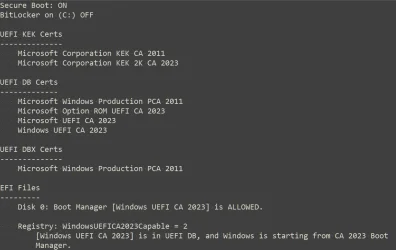
I am booting from Windows UEFI CA 2023, as you can see below. The missing cert is the Microsoft Corporation UEFI CA 2011, for which I do not know the purpose. @Anibor_11 above says it has something to do with Linux systems? Anyway, it has never been on my system and I don't think I need it. Everything else looks good, including all the 2023 certs, so I would rather not mess with it.

P16s UEFI report.webp
 

My Computers

System One System Two

  • OS
    Windows 11 Pro 24H2
    Computer type
    Laptop
    Manufacturer/Model
    Lenovo P16s Workstation
    CPU
    Intel i7-1260P 12th Gen 4.7GHz
    Memory
    32GB DDR4-3200
    Graphics Card(s)
    NVIDIA T550 Laptop GPU
    Sound Card
    Realtek Audio
    Monitor(s) Displays
    16" Laptop Display
    Screen Resolution
    2560x1600
    Hard Drives
    2TB Samsung M.2 2280 SSD PCIe 4.0 x 4 NVMe
    Mouse
    Logitech MX Anywhere 2s
    Internet Speed
    1000 Mb
    Browser
    Firefox
    Antivirus
    Avast
  • Operating System
    Windows 11 Pro 24H2
    Computer type
    Laptop
    Manufacturer/Model
    Lenovo P50 Workstation
    CPU
    i7-6820HQ 6th Gen 3.6 GHz
    Memory
    32GB DDR4-2133
    Graphics card(s)
    NVIDIA Quadro M2000M Laptop GPU
    Sound Card
    Realtek Audio
    Monitor(s) Displays
    15.6" Laptop Display
    Screen Resolution
    1920x1080
    Hard Drives
    2 x 1TB Samsung M.2 2280 SSD PCIe 3.0 x 4 NVMe
    Cooling
    Dual Fan System
    Mouse
    Logitech MX Anywhere 2s
    Internet Speed
    1000 Mb
    Browser
    Firefox
    Antivirus
    Avast
I am weary about doing stuff with deleting, adding etc. It is mainly intended for the OEM.
I would disagree with that. Yes, OEM's might use this too but mainly during BIOS development and debug. Production BIOS' have it all "hard coded" in when first flashed to firmware and they do not change it until developing and debugging the next revision.

As I understand it, those features and how they are supposed to work are laid out in the UEFI specification. It's obviously intended to allow a (sufficiently knowledgeable) user/owner to customize and manage their machine's secure boot variables to harden its security (something any mass-market PC is obviously lacking when it shares a PK with every other machine made by that OEM who doesn't even keep it secure). I'd imagine corporate IT's use it (or could use it) for hardening security on critical systems to manage their risk exposure.
 
Last edited:

My Computers

System One System Two

  • OS
    Windows 11 Pro
    Computer type
    PC/Desktop
    Manufacturer/Model
    DIY
    CPU
    Ryzen 7 5800X
    Motherboard
    Gigabyte B550M Aorus Pro
    Memory
    GSkill 3200, 2x8GB
    Graphics Card(s)
    MSI RX 6800 XT Gaming Z
    Sound Card
    on-board Realtek
    Monitor(s) Displays
    MSI 180hz
    Screen Resolution
    1440p
    Hard Drives
    Samsung 980 Pro, Samsung 870 Evo, generic PCIe NVME, WD 1TB 2.5" laptop spinner
    PSU
    Corsair RM 650
    Case
    mATX
    Cooling
    BeQuiet 240mm AIO and a bunch of case fans
    Keyboard
    one that clacks softly
    Mouse
    logitech
    Internet Speed
    bunches of bps
    Browser
    Firefox
    Antivirus
    Windows' own
  • Operating System
    Win11 Pro
    Computer type
    PC/Desktop
    Manufacturer/Model
    DIY
    CPU
    Ryzen 7 1700
    Motherboard
    GA-AB350M G-3
    Memory
    16GB DDR4
    Graphics card(s)
    RX-480
    Sound Card
    In-Built Realtek
    Monitor(s) Displays
    Samsung
    Screen Resolution
    1440p
    Hard Drives
    NVME/SSD's
    PSU
    Thermaltake BX1 550W
    Case
    Some junky thing
    Cooling
    ThermalTake Assassin(?)
    Browser
    FF/Edge
    Antivirus
    Whatever Windows does
    Other Info
    Secure Boot enabled updated to 2023 CA keys, TPM2.0 enabled with system drive Bitlocker'd.

My Computers

System One System Two

  • OS
    Windows 11 Pro 25H2
    Computer type
    PC/Desktop
    Manufacturer/Model
    Homebuilt
    CPU
    Intel Core i9 13900K
    Motherboard
    Asus ProArt Z790 Creator WiFi - Bios 3107
    Memory
    Corsair Dominator Platinum 64gb 5600MT/s DDR5 Dual Channel
    Graphics Card(s)
    Sapphire NITRO+ AMD Radeon RX 7900 XTX Vapor-X 24GB
    Sound Card
    External DAC: Cambridge Audio DACMagic200M - Headphone Amp: Topping L50
    Monitor(s) Displays
    Panasonic MX950 Mini LED 55" TV 120hz
    Screen Resolution
    3840 x 2160 120hz
    Hard Drives
    Samsung 980 Pro 2TB (OS)
    Samsung 980 Pro 1TB (Files)
    Lexar NZ790 4TB
    LaCie d2 Professional 6TB external - USB 3.1
    Seagate Expansion 16TB external - USB 3.2
    Seagate One Touch 18TB external HD - USB 3.0
    PSU
    Corsair RM1200x Shift
    Case
    Corsair RGB Smart Case 5000x (white)
    Cooling
    Corsair iCue H150i Elite Capellix XT
    Keyboard
    Incase Ergonomic USB (Microsoft clone)
    Mouse
    Logitech MX Master 3S
    Internet Speed
    Fibre 900/500 Mbps
    Browser
    Microsoft Edge Chromium
    Antivirus
    Bitdefender Total Security
    Other Info
    AMD Radeon Software & Drivers 26.1.1
    Hasleo Backup Suite
    Dashlane password manager
    Kensington Verimark fingerprint reader
    Logitech Brio 4K webcam
    Orico 10-port powered USB 3.0 hub
  • Operating System
    Windows 11 Pro 25H2
    Computer type
    Laptop
    Manufacturer/Model
    Asus Vivobook X1605VA
    CPU
    Intel® Core™ i9-13900H
    Motherboard
    Asus X1605VA bios 309
    Memory
    32GB DDR4-3200 Dual channel
    Graphics card(s)
    *Intel Iris Xᵉ Graphics G7
    Sound Card
    Realtek | Intel SST Bluetooth & USB
    Monitor(s) Displays
    16.0-inch, WUXGA 16:10 aspect ratio, IPS-level Panel
    Screen Resolution
    1920 x 1200 60hz
    Hard Drives
    512GB M.2 NVMe™ PCIe® 3.0 SSD
    Mouse
    Logitech MX Ergo Trackball
    Antivirus
    Bitdefender Total Security
    Other Info
    720p Webcam
    WiFi & USB to ethernet
My BIOS is always current, as I get automatic notifications for updates. No troubles during Win updates, and I run SFC and DISM after each one.

I am booting from Windows UEFI CA 2023, as you can see below. The missing cert is the Microsoft Corporation UEFI CA 2011, for which I do not know the purpose. @Anibor_11 above says it has something to do with Linux systems? Anyway, it has never been on my system and I don't think I need it. Everything else looks good, including all the 2023 certs, so I would rather not mess with it.
I can explain what the current CA2011 does. Now at this moment you have secure boot enabled. Yes? What does it do? Well.. During bootup the boot manager looks at this setting. It always load certain files in order to get Windows up and running. With secure boot turned on it does an additional thing; When it loads a file or driver it looks inside that file or driver and checks if the file or driver is signed with a certain certificate. It will look at this certificate and checks it's validity. Valid? It loads the file or driver. Expired? It does not load the file or driver!! That is what secure boot means.

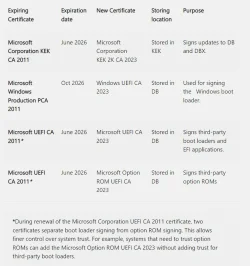
At this moment it checks it against the CA2011 certificate. (that is the one which is valid now) That CA2011 certificate will expire in June 2026. Before that time a new certificate must be in place then: CA2023. Also all the file currently signed with that CA2011 certificate must be replaced by files that are signed with the new CA2023 certificate. So at the moment the boot loader is checking all files or drivers with the current CA2011 certificate. So it must be there and is still valid at the moment. I think you have a special situation that many others don't have for some reason. A missing CA2011, secure boot is on and Windows does not mind if it's there or not. Strange. Maybe if it isn't there in the DB and DBX it ignores it and will boot normally. I have to test that in a VM what would happen than. It is maybe an explanation for your situation. Have you ever done an In-place-Installment? I think not. Strange behavior.

To give you an idea; Goto C:\Windows\system32\drivers for example. Pick a certain .sys (acpi.sys) file Left click - properties. Many files (not all) do have an extra tab called: "Digital Signatures" Look at this tab. At "Embedded Signatures"; doubleclick on the line "Microsoft Windows" - View certificate. You are looking at the certificate that that particular file is signed with: "Microsoft Windows Production PCA 2011" valid from 19-6-2025 to 17-6-2026.

In the tab "Certification Path" you will see from top to bottom 3 certificates;
- Root certificate (Microsoft Root Certificate Authority, valid from 23-6-2010 to 23-6-2035),
- Intermediate certificate (Microsoft Windows Production PCA 2011, valid from 19-10-2011 to 19-10-2026) and
- Microsoft Windows (this certificate)

That file must be replaced before 17-6-2026 and pointing towards the new CA2023. After that date the bootloader will not load this old file and rendering Windows useless during startup..... So this file must be replaced before the time the CA2011 certificate will expire. That replacing will be done during a Windows build update. Unknown to us when this will happen. Our systems are ready to receive the new files. The CA2023 is already in place ahead of time.
Normally MS will do this also before those files will be replaced.

There is a risk. If people don't update their systems and thus not receiving that build where all files are replaced by the new ones. After that time the CA2011 will expire and Windows will not boot in the worst case scenario. I suspect MS will have this in their minds also and are preventing this from happening.... The only option than is to disable secure boot. Windows will startup normally but without checking the validity of the files. But with a risk: rootkits.

MS is slowly ramping up their security the last couple of years. The first real sign (there were earlier signs also but not that demanding.) was Win11 24H2 and that it not will install if there is no TPM 2.0 chip on board off the motherboard. By this method (and TPM) MS want to protect Windows and it users against rootkits among other things. Nobody want to sit in a situation whereby Ransomware has taken over your machine and locks it. You have to pay Bitcoins to a criminal in order to get your system unlocked. (It will encrypt every file on your system that contains personal data; pictures, documents etc. with an (for us) unknown encryption key.)


TPM also provides a secure, tamper-resistant environment for cryptographic operations, securing things like encryption keys, user credentials (passwords, biometrics), and boot integrity, making it essential for features like BitLocker, Windows Hello, and Secure Boot to protect against malware and sophisticated attacks.
 
Last edited:

My Computer

System One

  • OS
    Win 11 Pro "25H2" Build 26200.8524, Zorin OS Pro
    Computer type
    PC/Desktop
    Manufacturer/Model
    Self built
    CPU
    Intel® Core™ i7-12700KF 12th Gen.
    Motherboard
    ASUS Prime Z690-A, BIOS v4505
    Memory
    32GB DDR5 5600-36 Vengeance
    Graphics Card(s)
    PCIe4.0 Asus NVIDIA RTX3060Ti
    Sound Card
    Onboard; Realtek
    Monitor(s) Displays
    34" LG 34UC79G-B Curved 21:9 144Hz
    Screen Resolution
    2560x1080 (No HDR)
    Hard Drives
    250Gb Samsung 870PRO NVMe (Win 11 Pro)
    1Tb Samsung 980PRO NVMe
    1Tb Samsung 970EVO NVMe
    2Tb Samsung 990PRO NVMe with heatsink.
    4Tb WDC WD40EZRZ Blue SATA (Int.)
    4Tb WDC WD40EZRZ Blue SATA (Int.)
    3Tb WDC WD30EFRZ Red SATA (Int.)
    256Gb Samsung 840PRO SSD (RHEL 9,5)
    256Gb Samsung 850PRO SSD (Zorin OS Pro 18)
    PSU
    Coolermaster 850W V2 Gold with internal 12cm exaust fan
    Case
    Be-Quiet Pure Base 600.
    Cooling
    3x Be-Quiet! 12/14cm "Silent Wings 4" casefans, 1x Arctic Freezer i35 CPU towerblock with fan.
    Keyboard
    Steelseries APEX 7 keyboard.
    Mouse
    Logitech G-502 Hero
    Internet Speed
    1Gb
    Browser
    Brave
    Antivirus
    F-Secure
    Other Info
    No Noise system.
    256Gb Kingston Travler USB 3.0 drive.
    64Gb Sandisk USB 3.2 drive. (Ventoy)
    8Gb Philips USB 3.0 drive. (Win. Inst.)
    8Gb Philips USB 3.0 drive. (Rescue disk)
    2Tb WD USB 3.0 Passport drive.
    USB Ext. 500Gb WD SATA drive.
    External USB 3.0 C.A. CD/DVD* burner.
I would disagree with that. Yes, OEM's might use this too but mainly during BIOS development and debug. Production BIOS' have it all "hard coded" in when first flashed to firmware and they do not change it until developing and debugging the next revision.

As I understand it, those features and how they are supposed to work are laid out in the UEFI specification. It's obviously intended to allow a (sufficiently knowledgeable) user/owner to customize and manage their machine's secure boot variables to harden its security (something any mass-market PC is obviously lacking when it shares a PK with every other machine made by that OEM who doesn't even keep it secure). I'd imagine corporate IT's use it for hardening security on critical systems when it's deemed a necessary step to manage their risk.

And while it certainly may seem daunting to learn how to do it, I remember that I got the PC bug back in the original IBM PC day when BIOS was read in off floppy disks at boot and we'd "peek and poke" (literally) instructions into memory locations from the console to modify how things worked at boot up. Not that I think this was a primary reason for its inclusion in UEFI specifications., but this is definitely something enthusiasts might like doing if for no other reason than the learning experience.

A tool like MOSBY, though, makes it all very simple. It doesn't have to use Microsoft's certificates, you can "roll your own" then point to them at loading time and it creates a cryptologically unique PK at every use so the root of trust isn't compromised at the outset.
Have to agree with the first part. Beside OEM's; Big company's or even special brand retailers may also have use for this to make their equipment "special". Custom. I have had no experience with MOSBY. I have also no need to thinker arround with this kind of stuff. It it works, it works. I rather spend my time to tweak Windows and look under it's hood than to fiddle with my keys in such a way that my machine becomes the only one of it's kind in the world by customizing the hell out of it.

I am also from those IBM days (I used clones, cheaper) with those old XT and AT's. 286, 386 (and it's special buddy; math processor) 80486, Pentium etc. Seen it all.

Even programmed floppy drives to be double sided on Digital's CP/M in assembler. (school) Programmed a lot in assembler with the Z80, Intels 8080 and 8088, VIC20 and C64's CPU 6502/6510, Had a blast with these things made even an custom made Centronics interface by my own design and programmed (EEPROM) it so I could print stuff on my EPSON 8-pin nail-printer using the back port of my VIC20/C64. Worked like a charm. Ancient stuff by today's standard. Still remember the microcodes to program the CPU, DMA and IO controller back then. Debugging was a skill and as I wrote more programs the easier it got. Doing stuff that normal things are not supposed to be doing. Found also a way to manipulate the videochip to produce colors outside the borders of the VIC20 and C64. Fun days.... Ah.... Those days were not so complicated as now. Went from Assembler to basic to PERL. That last one I still program in today. Custom programs. Even in my workplace. The biggest benefit? Not platform depended. Once written you can use the same scripts on Windows or Linux. (The library's are adapted for those platforms. Not the scripts.) Even Oracle uses it today still in their products for updating stuff. (am an DBA) So peek and poke in Basic. VIC20/C64 days. I recognize it.
 

My Computer

System One

  • OS
    Win 11 Pro "25H2" Build 26200.8524, Zorin OS Pro
    Computer type
    PC/Desktop
    Manufacturer/Model
    Self built
    CPU
    Intel® Core™ i7-12700KF 12th Gen.
    Motherboard
    ASUS Prime Z690-A, BIOS v4505
    Memory
    32GB DDR5 5600-36 Vengeance
    Graphics Card(s)
    PCIe4.0 Asus NVIDIA RTX3060Ti
    Sound Card
    Onboard; Realtek
    Monitor(s) Displays
    34" LG 34UC79G-B Curved 21:9 144Hz
    Screen Resolution
    2560x1080 (No HDR)
    Hard Drives
    250Gb Samsung 870PRO NVMe (Win 11 Pro)
    1Tb Samsung 980PRO NVMe
    1Tb Samsung 970EVO NVMe
    2Tb Samsung 990PRO NVMe with heatsink.
    4Tb WDC WD40EZRZ Blue SATA (Int.)
    4Tb WDC WD40EZRZ Blue SATA (Int.)
    3Tb WDC WD30EFRZ Red SATA (Int.)
    256Gb Samsung 840PRO SSD (RHEL 9,5)
    256Gb Samsung 850PRO SSD (Zorin OS Pro 18)
    PSU
    Coolermaster 850W V2 Gold with internal 12cm exaust fan
    Case
    Be-Quiet Pure Base 600.
    Cooling
    3x Be-Quiet! 12/14cm "Silent Wings 4" casefans, 1x Arctic Freezer i35 CPU towerblock with fan.
    Keyboard
    Steelseries APEX 7 keyboard.
    Mouse
    Logitech G-502 Hero
    Internet Speed
    1Gb
    Browser
    Brave
    Antivirus
    F-Secure
    Other Info
    No Noise system.
    256Gb Kingston Travler USB 3.0 drive.
    64Gb Sandisk USB 3.2 drive. (Ventoy)
    8Gb Philips USB 3.0 drive. (Win. Inst.)
    8Gb Philips USB 3.0 drive. (Rescue disk)
    2Tb WD USB 3.0 Passport drive.
    USB Ext. 500Gb WD SATA drive.
    External USB 3.0 C.A. CD/DVD* burner.
I can explain what the current CA2011 does. Now at this moment you have secure boot enabled. Yes? What does it do? Well.. During bootup the boot manager looks at this setting. It always load certain files in order to get Windows up and running. With secure boot turned on it does an additional thing; When it loads a file or driver it looks inside that file or driver and checks if the file or driver is signed with a certain certificate. It will look at this certificate and checks it's validity. Valid? It loads the file or driver. Expired? It does not load the file or driver!! That is what secure boot means.

At this moment it checks it against the CA2011 certificate. (that is the one which is valid now) That CA2011 certificate will expire in June 2026. Before that time a new certificate must be in place then: CA2023. Also all the file currently signed with that CA2011 certificate must be replaced by files that are signed with the new CA2023 certificate. So at the moment the boot loader is checking all files or drivers with the current CA2011 certificate. So it must be there and is still valid at the moment. I think you have a special situation that many others don't have for some reason. A missing CA2011, secure boot is on and Windows does not mind if it's there or not. Strange. Maybe if it isn't there in the DB and DBX it ignores it and will boot normally. I have to test that in a VM what would happen than. It is maybe an explanation for your situation. Have you ever done an In-place-Installment? I think not. Strange behavior.

To give you an idea; Goto C:\Windows\system32\drivers for example. Pick a certain .sys (acpi.sys) file Left click - properties. Many files (not all) do have an extra tab called: "Digital Signatures" Look at this tab. At "Embedded Signatures"; doubleclick on the line "Microsoft Windows" - View certificate. You are looking at the certificate that that particular file is signed with: "Microsoft Windows Production PCA 2011" valid from 19-6-2025 to 17-6-2026.

In the tab "Certification Path" you will see from top to bottom 3 certificates;
- Root certificate (Microsoft Root Certificate Authority, valid from 23-6-2010 to 23-6-2035),
- Intermediate certificate (Microsoft Windows Production PCA 2011, valid from 19-10-2011 to 19-10-2026) and
- Microsoft Windows (this certificate)

That file must be replaced before 17-6-2026 and pointing towards the new CA2023. After that date the bootloader will not load this old file and rendering Windows useless during startup..... So this file must be replaced before the time the CA2011 certificate will expire. That replacing will be done during a Windows build update. Unknown to us when this will happen. Our systems are ready to receive the new files. The CA2023 is already in place ahead of time.
Normally MS will do this also before those files will be replaced.

There is a risk. If people don't update their systems and thus not receiving that build where all files are replaced by the new ones. After that time the CA2011 will expire and Windows will not boot in the worst case scenario. I suspect MS will have this in their minds also and are preventing this from happening.... The only option than is to disable secure boot. Windows will startup normally but without checking the validity of the files. But with a risk: rootkits.

MS is slowly ramping up their security the last couple of years. The first real sign (there were earlier signs also but not that demanding.) was Win11 24H2 and that it not will install if there is no TPM 2.0 chip on board off the motherboard. By this method (and TPM) MS want to protect Windows and it users against rootkits among other things. Nobody want to sit in a situation whereby Ransomware has taken over your machine and locks it. You have to pay Bitcoins to a criminal in order to get your system unlocked. (It will encrypt every file on your system that contains personal data; pictures, documents etc. with an (for us) unknown encryption key.)


TPM also provides a secure, tamper-resistant environment for cryptographic operations, securing things like encryption keys, user credentials (passwords, biometrics), and boot integrity, making it essential for features like BitLocker, Windows Hello, and Secure Boot to protect against malware and sophisticated attacks.
Let's clarify:

Microsoft Windows Production PCA 2011 will be replaced by the new Windows UEFI CA 2023.
Microsoft Corporation UEFI CA 2011 will be replaced by the new Microsoft UEFI CA 2023. (This is the 2011 one I am missing and never had.)

But what does the (missing) Microsoft Corporation UEFI CA 2011 (NOT the Microsoft Windows Production PCA 2011) do? Maybe it is used with Linux or other third party systems, which I do not use? I have had no adverse effects without this cert.

BTW, I have indeed done a couple of in-place upgrades in the past year.

A separate observation: I looked at the cert for acpi.sys as you suggested. It is using the Microsoft Windows Production PCA 2011, which is REVOKED and in the DBX on my system. This does not seem to make sense.
 

My Computers

System One System Two

  • OS
    Windows 11 Pro 24H2
    Computer type
    Laptop
    Manufacturer/Model
    Lenovo P16s Workstation
    CPU
    Intel i7-1260P 12th Gen 4.7GHz
    Memory
    32GB DDR4-3200
    Graphics Card(s)
    NVIDIA T550 Laptop GPU
    Sound Card
    Realtek Audio
    Monitor(s) Displays
    16" Laptop Display
    Screen Resolution
    2560x1600
    Hard Drives
    2TB Samsung M.2 2280 SSD PCIe 4.0 x 4 NVMe
    Mouse
    Logitech MX Anywhere 2s
    Internet Speed
    1000 Mb
    Browser
    Firefox
    Antivirus
    Avast
  • Operating System
    Windows 11 Pro 24H2
    Computer type
    Laptop
    Manufacturer/Model
    Lenovo P50 Workstation
    CPU
    i7-6820HQ 6th Gen 3.6 GHz
    Memory
    32GB DDR4-2133
    Graphics card(s)
    NVIDIA Quadro M2000M Laptop GPU
    Sound Card
    Realtek Audio
    Monitor(s) Displays
    15.6" Laptop Display
    Screen Resolution
    1920x1080
    Hard Drives
    2 x 1TB Samsung M.2 2280 SSD PCIe 3.0 x 4 NVMe
    Cooling
    Dual Fan System
    Mouse
    Logitech MX Anywhere 2s
    Internet Speed
    1000 Mb
    Browser
    Firefox
    Antivirus
    Avast
Let's clarify:

Microsoft Windows Production PCA 2011 will be replaced by the new Windows UEFI CA 2023.
Microsoft Corporation UEFI CA 2011 will be replaced by the new Microsoft UEFI CA 2023. (This is the 2011 one I am missing and never had.)

But what does the (missing) Microsoft Corporation UEFI CA 2011 (NOT the Microsoft Windows Production PCA 2011) do? Maybe it is used with Linux or other third party systems, which I do not use? I have had no adverse effects without this cert.

BTW, I have indeed done a couple of in-place upgrades in the past year.

A separate observation: I looked at the cert for acpi.sys as you suggested. It is using the Microsoft Windows Production PCA 2011, which is REVOKED and in the DBX on my system. This does not seem to make sense.
There's definitely some confusion out there, MS and Dell have indicated that W11 will boot normally with expired certificates, it's just that without the new 2023 certificates in the DB, certain apps, drivers and OS's will not boot if they're signed with the new certificate. Too add, a device only needs the have the OS and secure boot certificates fully updated in order for the DBX process to function correctly, that in itself will not invalidate the 2011 certificates, it still requires those expired certificates to be intentionally moved to the DBX and only then does it stop 2011 certificates from booting.
 

My Computer

System One

  • OS
    Windows 11

Latest Support Threads

Back
Top Bottom