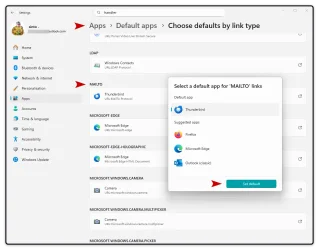
How can I completely disable the mailto protocol in Windows 11 so that clicking an email address link does absolutely nothing? Currently, the OS forces Google Chrome to open, and the Windows 11 'Default apps' GUI does not provide an option to unassign the protocol or leave it blank. I am looking for a registry edit or script to black-hole the action.
It's very annoying when I click on an email address on a website in Firefox, Edge or Brave and suddenly chrome opens up.

It's very annoying when I click on an email address on a website in Firefox, Edge or Brave and suddenly chrome opens up.
- Windows Build/Version
- 23H2 - build 22631.6199
My Computer
At a glance
Windows 11
- OS
- Windows 11