Solved Disable Microsoft Edge Browser in Group Policy


jdUnionngarden

Well-known member
Member
Local time
9:18 PM
Posts
60
Location
Denver, CO
OS
Windows 11 Pro
PowerSpec G355 Gaming Desktop PC
Windows 11 Pro, Ver. 24H2 (OS Build 26100.4652)


Howdy Folks, :-)
I preformed the following in GP:
{
Computer Configuration → Administrative Templates → Windows Components → Microsoft Edge
Double-click “Allow Microsoft Edge to pre-launch at Windows startup, when the system is idle, and each time Microsoft Edge is closed.”
Set it to Disabled.
Same for:
“Allow Microsoft Edge to start and load the Start and New Tab page at Windows startup and each time Microsoft Edge is closed.”
}
Edge still opens but is grayed-out and won't close.
I'm looking for advice, comments on additional or optional steps.
TIA to all who read/reply!
:cool:
 

My Computer

System One

  • OS
    Windows 11 Pro
    Computer type
    PC/Desktop
    Manufacturer/Model
    PowerSpec G355 Gaming Desktop PC
    CPU
    Intel Core i7-9700KF Processor 3.6GHz
    Motherboard
    ASUS Z390-P Prime Intel LGA 1151 ATX Motherboard
    Memory
    16GB DDR4-3000 RAM
    Graphics Card(s)
    NVIDIA GeForce RTX 2060 6GB GDDR6
    Sound Card
    Realtek High Definition Audio
    Monitor(s) Displays
    Dell SE2717HR RVJXC 27" Full HD 1920 X 1080 Monitor
    Screen Resolution
    Full HD 1920 X 1080, 96 dpi
    Hard Drives
    Primary: 500GB M.2 SSD
    Data: 1TB HDD
    PSU
    600 Watt 80 Plus Power Supply
    Case
    (?) Open Front, Top, Bottom & Back
    Cooling
    3 Case Fans, 2 Graphics Card Fans, 1 CPU Fan
    Keyboard
    HP Wireless
    Mouse
    Logitech M510 Wireless
    Internet Speed
    Average 150 to 200+ Mbps via Xfinity xFi Pod to Ethernet cable
    Browser
    Firefox (Chrome Alternate rarely used)
    Antivirus
    Bitdefender
    Other Info
    Comcast Wi-Fi Router (~15 Ft. & 1 Floor below) runs 600+ Mbps
I'm looking for advice, comments on additional or optional steps.
May not be what you wanna hear, but, I recommend uninstalling it! I find it to be one of the most annoying pieces of bloatware ever ingrained into Windows, next to OneDrive!
 

My Computers

System One System Two

  • OS
    Windows 11 Pro
    Computer type
    PC/Desktop
    Manufacturer/Model
    ASUS ROG Strix
  • Operating System
    Windows 11 Pro
    Computer type
    Laptop
    Manufacturer/Model
    ASUS VivoBook
PowerSpec G355 Gaming Desktop PC
Windows 11 Pro, Ver. 24H2 (OS Build 26100.4652)


Howdy Folks, :-)
I preformed the following in GP:
{
Computer Configuration → Administrative Templates → Windows Components → Microsoft Edge
Double-click “Allow Microsoft Edge to pre-launch at Windows startup, when the system is idle, and each time Microsoft Edge is closed.”
Set it to Disabled.
Same for:
“Allow Microsoft Edge to start and load the Start and New Tab page at Windows startup and each time Microsoft Edge is closed.”
}
Edge still opens but is grayed-out and won't close.
I'm looking for advice, comments on additional or optional steps.
TIA to all who read/reply!
:cool:
do you want edge fully disabled? or only the prelaunch disabled?
 

My Computer

System One

  • OS
    Windows 11 Pro
@dacrone
I thought it couldn't be uninstalled (oh, "fully disabled"), but NBD. It's only annoying when it launches after I click details about a new lock-screen photo. I have it minimized to just a small rectangle top left corner and it closes with just a click and usually doesn't bother me after that. I came across the 'GP setting change' by chance and tried it.
I'm interested in learning anything you can offer.
Thanks, :cool:
/jdU
 

My Computer

System One

  • OS
    Windows 11 Pro
    Computer type
    PC/Desktop
    Manufacturer/Model
    PowerSpec G355 Gaming Desktop PC
    CPU
    Intel Core i7-9700KF Processor 3.6GHz
    Motherboard
    ASUS Z390-P Prime Intel LGA 1151 ATX Motherboard
    Memory
    16GB DDR4-3000 RAM
    Graphics Card(s)
    NVIDIA GeForce RTX 2060 6GB GDDR6
    Sound Card
    Realtek High Definition Audio
    Monitor(s) Displays
    Dell SE2717HR RVJXC 27" Full HD 1920 X 1080 Monitor
    Screen Resolution
    Full HD 1920 X 1080, 96 dpi
    Hard Drives
    Primary: 500GB M.2 SSD
    Data: 1TB HDD
    PSU
    600 Watt 80 Plus Power Supply
    Case
    (?) Open Front, Top, Bottom & Back
    Cooling
    3 Case Fans, 2 Graphics Card Fans, 1 CPU Fan
    Keyboard
    HP Wireless
    Mouse
    Logitech M510 Wireless
    Internet Speed
    Average 150 to 200+ Mbps via Xfinity xFi Pod to Ethernet cable
    Browser
    Firefox (Chrome Alternate rarely used)
    Antivirus
    Bitdefender
    Other Info
    Comcast Wi-Fi Router (~15 Ft. & 1 Floor below) runs 600+ Mbps
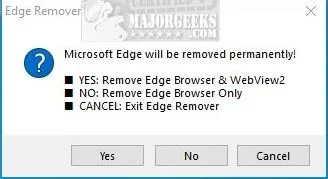
you can block it completely:

or you can enable it to be uninstalled via this (but up to you if you want to do that.. its embedded pretty good in windows):

save the below to a .reg, run it and merge it, reboot (or download and merge the attached .reg - i tested on a 25h2 machine and it still works to enable "Uninstall" from Settings > Apps > Installed Apps

Code:
Windows Registry Editor Version 5.00

[HKEY_LOCAL_MACHINE\SOFTWARE\WOW6432Node\Microsoft\Windows\CurrentVersion\Uninstall\Microsoft Edge]
"NoRemove"=dword:00000000
 

Attachments

Last edited:

My Computer

System One

  • OS
    Windows 11 Pro
Edge Remover v18.28

ER.webp
 

My Computer

System One

  • OS
    Windows 11 Pro
    Computer type
    PC/Desktop
    Manufacturer/Model
    Custom Build
    CPU
    Intel Core i9 12900KF
    Motherboard
    ASUS ROG Maximus Z690 Hero
    Memory
    Corsair 64GB DDR5 Vengeance C40 5200Mhz
    Graphics Card(s)
    ASUS GeForce RTX 3090 ROG Strix OC 24GB
    Sound Card
    OnBoard
    Monitor(s) Displays
    Acer Predator XB323UGP 32" QHD G-SYNC-C 144Hz 1MS IPS LED
    Screen Resolution
    2560 x 1440
    Hard Drives
    1x Samsung 980 Pro Series Gen4 250GB M.2 NVMe
    1x Samsung 980 Pro Series Gen4 500GB M.2 NVMe
    2x Samsung 980 Pro Series Gen4 2TB M.2 NVMe
    PSU
    Corsair AX1200i 1200W 80PLUS Titanium Modular
    Case
    Corsair 4000D Black Case w/ Tempered Glass Side Panel
    Cooling
    Noctua NH-U12A Chromax Black CPU Cooler, 4x Noctua 120mm Fans
    Keyboard
    Logitech MK545
    Mouse
    Logitech MX Master 3
    Internet Speed
    Fixed Wireless 150mbps/75mbps
    Browser
    Firefox
    Antivirus
    Kaspersky
    Other Info
    Thrustmaster TS-PC RACER
    Fanatec CSL Elite Pedals with the Load Cell Kit
    Yamaha Amp with Bose Speakers
@dacrone, @Wolfzz
Thanks for all! :-)
I always get smarter when making a visit here!
:cool:
 

My Computer

System One

  • OS
    Windows 11 Pro
    Computer type
    PC/Desktop
    Manufacturer/Model
    PowerSpec G355 Gaming Desktop PC
    CPU
    Intel Core i7-9700KF Processor 3.6GHz
    Motherboard
    ASUS Z390-P Prime Intel LGA 1151 ATX Motherboard
    Memory
    16GB DDR4-3000 RAM
    Graphics Card(s)
    NVIDIA GeForce RTX 2060 6GB GDDR6
    Sound Card
    Realtek High Definition Audio
    Monitor(s) Displays
    Dell SE2717HR RVJXC 27" Full HD 1920 X 1080 Monitor
    Screen Resolution
    Full HD 1920 X 1080, 96 dpi
    Hard Drives
    Primary: 500GB M.2 SSD
    Data: 1TB HDD
    PSU
    600 Watt 80 Plus Power Supply
    Case
    (?) Open Front, Top, Bottom & Back
    Cooling
    3 Case Fans, 2 Graphics Card Fans, 1 CPU Fan
    Keyboard
    HP Wireless
    Mouse
    Logitech M510 Wireless
    Internet Speed
    Average 150 to 200+ Mbps via Xfinity xFi Pod to Ethernet cable
    Browser
    Firefox (Chrome Alternate rarely used)
    Antivirus
    Bitdefender
    Other Info
    Comcast Wi-Fi Router (~15 Ft. & 1 Floor below) runs 600+ Mbps

Latest Support Threads

Back
Top Bottom