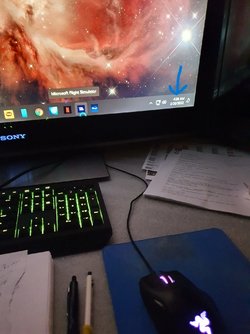
Disappearing taskbar icons.


KOREA7

Well-known member
Local time
3:29 AM
Posts
3
OS
Windows 11
Hi All

Hoping someone can help with my Taskbar problem. Every now and then the right-side corner icons disappear. Usually after a start-up. See Pic. If I completely shut down and restart no issues. Thanking everyone in advance
 

Attachments
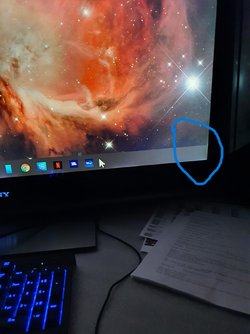
  • Taskbar1.jpg
    Taskbar1.jpg
    163.3 KB · Views: 2
  • Taskbar2.jpg
    Taskbar2.jpg
    204.1 KB · Views: 2

My Computer My Computer

At a glance

Windows 11i9-12900kKingston 128gbAMD RX6800 XT
OS
Windows 11
Computer type
PC/Desktop
Manufacturer/Model
Built
CPU
i9-12900k
Motherboard
AORUS Z690 DDR4
Memory
Kingston 128gb
Graphics Card(s)
AMD RX6800 XT
Monitor(s) Displays
SONY
Screen Resolution
192x1080
Next tome it happens, open task manager. Under processes scroll to the bottom and find Windows Explorer. Right click>restart.
 

My Computers My Computers

  • At a glance

    Win 11 Pro 25H2 26200.9168Intel® Core™ i7-14700KG.SKILL Ripjaws S5 Series 64GB (2 x 32GB) DDR5ASUS GeForce RTX 4070 Super 12GB
    OS
    Win 11 Pro 25H2 26200.9168
    Computer type
    PC/Desktop
    Manufacturer/Model
    Self Built
    CPU
    Intel® Core™ i7-14700K
    Motherboard
    ASUS TUF Z690-PLUS WIFI (BIOS 4505)
    Memory
    G.SKILL Ripjaws S5 Series 64GB (2 x 32GB) DDR5
    Graphics Card(s)
    ASUS GeForce RTX 4070 Super 12GB
    Sound Card
    Sound Blaster AE-5 Plus
    Monitor(s) Displays
    ASUS TUF Gaming 27" 2K HDR Gaming
    Screen Resolution
    2560 x 1440
    Hard Drives
    Samsung 990 Pro 1TB NVMe (Win 11 25H2)
    SK hynix P41 500GB NVMe
    SK hynix P41 2TB NVMe (x3)
    Crucial P3 Plus 4TB
    PSU
    Corsair RM850x Shift
    Case
    Antec Dark Phantom DP502 FLUX
    Cooling
    Corsair Nautilus 360 RS AIO
    Keyboard
    Logitech MK 320
    Mouse
    Razer Basilisk V3
    Internet Speed
    750Mbs
    Browser
    Firefox
    Antivirus
    Winows Security
    Other Info
    MR 8.1 Home
  • At a glance

    Win 11 Pro 25H2 26200.9168Intel Core i5-1140064 GB DDR4MSI GeForce RTX 3060 Ventus 2X 12GB
    Operating System
    Win 11 Pro 25H2 26200.9168
    Computer type
    PC/Desktop
    Manufacturer/Model
    Self Built
    CPU
    Intel Core i5-11400
    Motherboard
    Asus TUF Gaming Z590 Plus WiFi (BIOS 2803)
    Memory
    64 GB DDR4
    Graphics card(s)
    MSI GeForce RTX 3060 Ventus 2X 12GB
    Sound Card
    SoundBlaster Audigy Fx V2
    Monitor(s) Displays
    Samsung F27T350
    Screen Resolution
    1920x1080
    Hard Drives
    Samsung 980 Pro 1TB
    Samsung 970 EVO Plus 2TB
    Samsung 870 EVO 500GB SSD
    PSU
    Corsair HX750
    Case
    Cougar MX330-G Window
    Cooling
    Thermalright Frozen Edge 240 Black AIO
    Internet Speed
    350Mbps
    Browser
    Firefox
    Antivirus
    Windows Security
  • System Three
    Win 11 Pro 25H2 26200.9168
    ASUS PRIME Z370-P II BIOS 3004 7/12/21
    Intel Core i7-8700 CPU @ 3.20GHz
    32GB DDR4 RAM (4x8)
    iGPU Intel UHD Graphics 630
    Cooler Master Hyper 212
    Mid-Tower Desktop
1645662378621.png

1645662439333.png
1645662472207.png
 

My Computer My Computer

At a glance

Windows 11 ProIntel Core i7 @ 1.80GHz16gbIntel UHD Graphics 620 and NVIDIA GeForce MX150
OS
Windows 11 Pro
Computer type
Laptop
Manufacturer/Model
HP/Envy-17T
CPU
Intel Core i7 @ 1.80GHz
Motherboard
HP - 8485 (U3E1)
Memory
16gb
Graphics Card(s)
Intel UHD Graphics 620 and NVIDIA GeForce MX150
Sound Card
Realtek High Definition Audio / Intel Display Audio / NVIDIA Virtual Audio Device (Wave Extensible) (WDM)
Monitor(s) Displays
Generic PnP Monitor on Intel UHD Graphics 620
Screen Resolution
1536x864 pixels
Hard Drives
KBG30ZMV256G TOSHIBA (SSD)
ST1000LM049-2GH172 (SSD)
PSU
HP Standard
Cooling
HP CoolSense
Keyboard
Standard PS/2 Keyboard
Mouse
Anker
Internet Speed
95Mbps
Browser
FireFox
Antivirus
WebRoot
Back
Top Bottom