Disk cloning vs disk image on MaCrium


Something doesn't seem right to me that your image takes that long to make (and to restore) unless you have an exhorbitant amount of data or are using hdds both ways.

As a comparison, I can image and verify that image of all partitions of my system drive (nvme) with a size of 125gb to an external nvme in an enclosure in 6 minutes. I can restore that image in 4 minutes.

My storage drive is an external nvme in enclosure and is 100 GB in size. I can image that drive to another external nvme (in an enclosure) in 22 minutes. I've never had to restore that image. All my external nvme drives are through old usb 3.0.

By the way, Haselo Backup Suite Free images are comparable in time to Macrium. I use both Macrium 8.1 Workstation and Haselo and am gradually weaning myself away from the now unsupported Macrium which I love. It's hard to let it go but I can't afford to buy licenses for 4 computers every year. You might want to check it out rather than use Macrium 8.0 which is very old. Haselo supports BitLocker and UEFI Secure Boot functionality within its Windows environment and emergency recovery media.
Will check out the Haselo. I backed up 950GB
 

My Computer My Computer

At a glance

Wind 11 Pro 24H2 (Dev Channel)/23H2Beta (offl...2 Intel Xeon 5680120 GbMSI(Nvidia) GeForce GTX 970
OS
Wind 11 Pro 24H2 (Dev Channel)/23H2Beta (offline)
Computer type
PC/Desktop
Manufacturer/Model
DELL T7500
CPU
2 Intel Xeon 5680
Memory
120 Gb
Graphics Card(s)
MSI(Nvidia) GeForce GTX 970
Monitor(s) Displays
Dell S2719DGF
Screen Resolution
2560 x 1440 (155Hz)
Hard Drives
Samsung 2TB 870 (24H2 Device)
Samsung 1TB 860 (23H2 Beta)
PSU
Dell 1100W
Antivirus
Premium Malwarebyte, AdwCleaner (Malwarebyte)
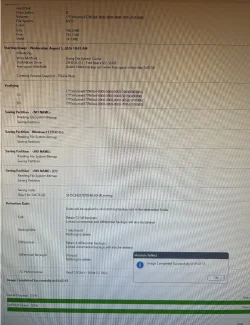
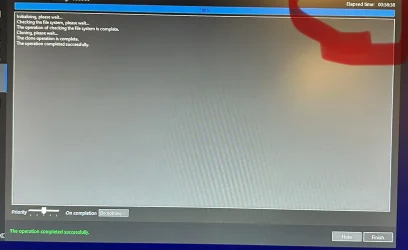
It took 8 hours to clone. I remember it took only 2 hours to make disk image and 2 hours to restore.
I backed up 950GB
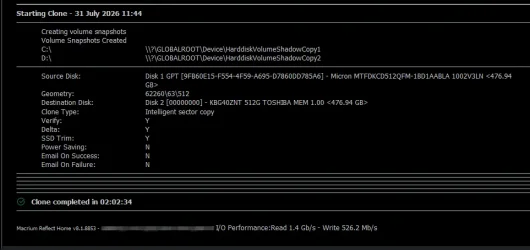
Cloning does seem slower than a backup then restore. My last clone was run from within Windows, cloning from the the laptop's internal SSD to a new SSD in an external USB 3.1 enclosure. The source was a 512GB SSD with about 280GB of data to copy over. That clone took two hours to complete.

1785961485210.webp
 

My Computers My Computers

  • At a glance

    Windows 11 HomeAMD Athlon Silver 3050U8GBRadeon Graphics
    OS
    Windows 11 Home
    Computer type
    Laptop
    Manufacturer/Model
    Acer Aspire 3 A315-23-R9VY
    CPU
    AMD Athlon Silver 3050U
    Memory
    8GB
    Graphics Card(s)
    Radeon Graphics
    Monitor(s) Displays
    laptop screen
    Screen Resolution
    1366x768 native resolution, up to 2560x1440 with Radeon Virtual Super Resolution
    Hard Drives
    1TB Samsung EVO 870 SSD (from April 2026: 250GB EVO 850)
    Internet Speed
    150 Mbps
    Browser
    Edge, Firefox
    Antivirus
    Defender
    Other Info
    UPDATE - 11 April 2026: due to lid hinges starting to break up this laptop has been retired from active duty. The OS with all software and files has been migrated to my System Seven in 'Other systems' to carry on as my general purpose 'main machine'.

    I've now clean installed 25H2 and used Garlin's scripts to update Secure Boot to CA 2023 and revoke the PCA 2011 certificates. It's new role is to test secure boot issues.

    Info for 2021-2026:
    fully 'Windows 11 ready' laptop. Windows 10 C: partition migrated from my old unsupported 'main machine' then upgraded to 11. A test migration ran Insider builds for 2 months. When 11 was released on 5th October 2021 it was re-imaged back to 10 and was offered the upgrade in Windows Update on 20th October. Windows Update offered the 22H2 Feature Update on 20th September 2022. It got the 23H2 Feature Update on 4th November 2023 through Windows Update, 24H2 on 3rd October 2024 through Windows Update by setting the Target Release Version for 24H2, and 25H2 on 30th September 2025 through Windows Update by setting the Target Release Version for 25H2.
  • At a glance

    Windows 11 ProIntel® Core™ i5-520M8GB(integrated graphics) Intel HD Graphics
    Operating System
    Windows 11 Pro
    Computer type
    Laptop
    Manufacturer/Model
    Dell Latitude E4310
    CPU
    Intel® Core™ i5-520M
    Motherboard
    0T6M8G
    Memory
    8GB
    Graphics card(s)
    (integrated graphics) Intel HD Graphics
    Screen Resolution
    1366x768
    Hard Drives
    500GB Crucial MX500 SSD
    Browser
    Firefox, Edge
    Antivirus
    Defender
    Other Info
    unsupported machine: Legacy bios, MBR, TPM 1.2, upgraded from W10 to W11 using W10/W11 hybrid install media workaround.

    In-place upgrade to 22H2 using ISO and a workaround.
    Feature Update to 23H2 by manually installing the Enablement Package.
    In-place upgrade to 24H2 using hybrid 23H2/24H2 install media.
    Upgraded to 25H2 by Enablement Package.

    Also running Insider Dev, and Canary builds and Windows 10 as native boot .vhdx.
  • My SYSTEM THREE is a Dell Latitude 5410, i7-10610U, 32GB RAM, 512GB NVMe ssd, supported device running Windows 11 Pro.

    My SYSTEM FOUR was a 2-in-1 convertible Lenovo Yoga 11e (1st gen) type 20DA, Celeron N2930, 8GB RAM, 256GB ssd. Unsupported device. This has now been sold. It has been replaced by my System Eight.

    My SYSTEM FIVE is a Dell Latitude 3190 2-in-1, Pentium Silver N5030, 8GB RAM, 1TB NVMe ssd, supported device running Windows 11 Pro, plus Insider Beta, Dev, and Canary builds (and a few others) as a native boot .vhdx.

    My SYSTEM SIX is a Dell Latitude 5550, Core Ultra 7 165H, 64GB RAM, 1TB NVMe SSD, supported device, Windows 11 Pro 24H2, Hyper-V host machine. Updated to 25H2 on 30th September 2025.

    My SYSTEM SEVEN is a Lenovo Thinkpad T580, 1920x1080 touchscreen, Intel Core i7-8650U, 16GB RAM, 512GB NVMe SSD + 2nd 512GB NVMe SSD, a supported device for Windows 11. This is my current general purpose 'main machine'. The installed Windows 11 Home from my System One has been migrated to this machine. As its new home has an existing digital licence for Pro I've been able to upgrade the migrated OS from Home to Pro.

    My SYSTEM EIGHT is a 2-in-1 convertible Lenovo Yoga 11e (5th gen) type 20LN, Celeron N4120, 8GB RAM, 512GB NVMe ssd, a supported device for Windows 11. Currently running Windows 11 Pro, plus Insider Dev, Beta, and Canary builds as native boot vhdx.
That is a lot of data. Any imaging app one uses is as slow as the bandwidth available. The speed with which any app can read and write an image or clone is bottlenecked by the hardware one has.(cpu,type of drives for both source and destination, type of usb connection if used)

Your images are slow because of the drives you are using.

According to co-pilot
Your Samsung 870 SATA SSD tops out at 520–560 MB/s read speed
This is the hard ceiling for imaging speed. Even with dual Xeons, you cannot exceed the SATA III limit.

However the destination is a HDD which has approximate write speed of 100-150 MBs. If your destination is slower than your source, the destination becomes the bottleneck and an image will be witten at or near the speed of the hdd..


My Computers My Computers

  • At a glance

    Windows 11 Pro 25H2 26200.8875i9-10900 10 core 20 threads32 gbnone-Intel UHD Graphics 630
    OS
    Windows 11 Pro 25H2 26200.8875
    Computer type
    PC/Desktop
    Manufacturer/Model
    Dell Optiplex 7080
    CPU
    i9-10900 10 core 20 threads
    Motherboard
    DELL 0J37VM
    Memory
    32 gb
    Graphics Card(s)
    none-Intel UHD Graphics 630
    Sound Card
    Integrated Realtek
    Monitor(s) Displays
    Benq 27
    Screen Resolution
    2560x1440
    Hard Drives
    2x1tb Solidigm m.2 nvme /External drives 512gb Samsung m.2 sata+2tb Kingston m2.nvme
    PSU
    500w
    Case
    MT
    Cooling
    Dell Premium
    Keyboard
    Logitech wired
    Mouse
    Logitech wireless
    Internet Speed
    so slow I'm too embarrassed to tell
    Browser
    #1 Edge #2 Firefox
    Antivirus
    Defender+MWB Premium
  • At a glance

    Windows 11 Pro 24H2 26200.8875AMD Ryzen 7 6800U32 gbintegrated
    Operating System
    Windows 11 Pro 24H2 26200.8875
    Computer type
    PC/Desktop
    Manufacturer/Model
    Beelink Mini PC SER5
    CPU
    AMD Ryzen 7 6800U
    Memory
    32 gb
    Graphics card(s)
    integrated
    Sound Card
    integrated
    Monitor(s) Displays
    Benq 27
    Screen Resolution
    2560x1440
    Hard Drives
    1TB Crucial nvme
    Keyboard
    Logitech wired
    Mouse
    Logitech wireless
    Internet Speed
    still too embarrassed to tell
    Browser
    Firefox
    Antivirus
    Defender
    Other Info
    System 3 is non compliant Dell 9020 i7-4770/24gb ram Win11 PRO 26200.8875
Did the disk image earlier today and it took only 1:42 minutes for 700Gb
 

Attachments

  • IMG_6765.webp
    IMG_6765.webp
    579.2 KB · Views: 2

My Computer My Computer

At a glance

Wind 11 Pro 24H2 (Dev Channel)/23H2Beta (offl...2 Intel Xeon 5680120 GbMSI(Nvidia) GeForce GTX 970
OS
Wind 11 Pro 24H2 (Dev Channel)/23H2Beta (offline)
Computer type
PC/Desktop
Manufacturer/Model
DELL T7500
CPU
2 Intel Xeon 5680
Memory
120 Gb
Graphics Card(s)
MSI(Nvidia) GeForce GTX 970
Monitor(s) Displays
Dell S2719DGF
Screen Resolution
2560 x 1440 (155Hz)
Hard Drives
Samsung 2TB 870 (24H2 Device)
Samsung 1TB 860 (23H2 Beta)
PSU
Dell 1100W
Antivirus
Premium Malwarebyte, AdwCleaner (Malwarebyte)
I installed Haselo last night and did a DISK/PARTITION backup and then did a restored to another ssd. It work fine. Backup time is 1 hour and restore time is 2 hour.s. So far so good.

This how I did.

DISK0 : 2TB SSD (main startup windows)
DISK1: 1TB Seagate hard drive
DISK2: 1TB SSD

I ran backup and store the image file on DISK1 and then restored the image file from DISK1 to DISK2.
And then configured the BIOS to startup from DISK2. It works flawlessly and faster than the free version of MacCrium.
 
Last edited:

My Computer My Computer

At a glance

Wind 11 Pro 24H2 (Dev Channel)/23H2Beta (offl...2 Intel Xeon 5680120 GbMSI(Nvidia) GeForce GTX 970
OS
Wind 11 Pro 24H2 (Dev Channel)/23H2Beta (offline)
Computer type
PC/Desktop
Manufacturer/Model
DELL T7500
CPU
2 Intel Xeon 5680
Memory
120 Gb
Graphics Card(s)
MSI(Nvidia) GeForce GTX 970
Monitor(s) Displays
Dell S2719DGF
Screen Resolution
2560 x 1440 (155Hz)
Hard Drives
Samsung 2TB 870 (24H2 Device)
Samsung 1TB 860 (23H2 Beta)
PSU
Dell 1100W
Antivirus
Premium Malwarebyte, AdwCleaner (Malwarebyte)

Latest Support Threads

Back
Top Bottom