Disk partitioning prior to clean install of Win 11


Tranas

Member
Local time
11:28 PM
Posts
22
OS
Windows 11 Pro
I need to do a clean install of Win11 Pro Retail on new drives. Would like to partition the drives prior to install with 2 partitions - OS and Data. Earlier versions of Windows allowed you to partition prior to the OS install - is this still available in Win11 or do I need to do that separately?

TIA
 

My Computer My Computer

At a glance

Windows 11 Proi9-14900KCorsair DDR5 192GB 5200MHzonboard
OS
Windows 11 Pro
Computer type
PC/Desktop
Manufacturer/Model
Homebrew
CPU
i9-14900K
Motherboard
Asus Pro WS W680-ACE
Memory
Corsair DDR5 192GB 5200MHz
Graphics Card(s)
onboard
Sound Card
onboard
Monitor(s) Displays
Asus VA27U
Screen Resolution
3840 x 2160
Hard Drives
4TB Iron Wolf Pro
ST 4000NT001
Cooling
Corsair Nautilus 360
yes

1743676706651.webp
 

My Computers My Computers

  • At a glance

    Windows 11 Pro 25H2 26200.8894AMD Ryzen 7 5825U with Radeon Graphics16GB
    OS
    Windows 11 Pro 25H2 26200.8894
    Computer type
    Laptop
    Manufacturer/Model
    Acemagic LX15PRO
    CPU
    AMD Ryzen 7 5825U with Radeon Graphics
    Motherboard
    BIOS CT_BI_AMI_LX15PRO_AB8139_A-004
    Memory
    16GB
    Screen Resolution
    1920 x 1080
    Hard Drives
    SSD 2TB
    Internet Speed
    30 Mbps
    Browser
    Brave
    Antivirus
    Webroot SecureAnywhere Complete beta
  • At a glance

    Windows 11 Pro 23H2 22631.2506Atom N450 1.66GHz2GB
    Operating System
    Windows 11 Pro 23H2 22631.2506
    Computer type
    Laptop
    Manufacturer/Model
    HP Mini 210-1090NR PC (bought in late 2009!)
    CPU
    Atom N450 1.66GHz
    Memory
    2GB
    Browser
    Brave
    Antivirus
    Webroot
  • Acer Swift SF114-34 laptop
    OS Windows 11 Pro 26200.8894
    CPU Pentium Silver N6000
    RAM 4GB
    BIOS v1.17
    SSD Samsung 970 EVO Plus SSD 2TB (an upgrade)
Which partitioning software would you suggest.
 

My Computer My Computer

At a glance

Windows 11 Proi9-14900KCorsair DDR5 192GB 5200MHzonboard
OS
Windows 11 Pro
Computer type
PC/Desktop
Manufacturer/Model
Homebrew
CPU
i9-14900K
Motherboard
Asus Pro WS W680-ACE
Memory
Corsair DDR5 192GB 5200MHz
Graphics Card(s)
onboard
Sound Card
onboard
Monitor(s) Displays
Asus VA27U
Screen Resolution
3840 x 2160
Hard Drives
4TB Iron Wolf Pro
ST 4000NT001
Cooling
Corsair Nautilus 360
None is needed.
 

My Computers My Computers

  • At a glance

    Windows 11 Pro 25H2 26200.8894AMD Ryzen 7 5825U with Radeon Graphics16GB
    OS
    Windows 11 Pro 25H2 26200.8894
    Computer type
    Laptop
    Manufacturer/Model
    Acemagic LX15PRO
    CPU
    AMD Ryzen 7 5825U with Radeon Graphics
    Motherboard
    BIOS CT_BI_AMI_LX15PRO_AB8139_A-004
    Memory
    16GB
    Screen Resolution
    1920 x 1080
    Hard Drives
    SSD 2TB
    Internet Speed
    30 Mbps
    Browser
    Brave
    Antivirus
    Webroot SecureAnywhere Complete beta
  • At a glance

    Windows 11 Pro 23H2 22631.2506Atom N450 1.66GHz2GB
    Operating System
    Windows 11 Pro 23H2 22631.2506
    Computer type
    Laptop
    Manufacturer/Model
    HP Mini 210-1090NR PC (bought in late 2009!)
    CPU
    Atom N450 1.66GHz
    Memory
    2GB
    Browser
    Brave
    Antivirus
    Webroot
  • Acer Swift SF114-34 laptop
    OS Windows 11 Pro 26200.8894
    CPU Pentium Silver N6000
    RAM 4GB
    BIOS v1.17
    SSD Samsung 970 EVO Plus SSD 2TB (an upgrade)
For some reason, the attachment was not visible. So I presume you can configure the size of the OS partition after you click Next? The pic shows only the full 80GB drive as a single partition.
 

My Computer My Computer

At a glance

Windows 11 Proi9-14900KCorsair DDR5 192GB 5200MHzonboard
OS
Windows 11 Pro
Computer type
PC/Desktop
Manufacturer/Model
Homebrew
CPU
i9-14900K
Motherboard
Asus Pro WS W680-ACE
Memory
Corsair DDR5 192GB 5200MHz
Graphics Card(s)
onboard
Sound Card
onboard
Monitor(s) Displays
Asus VA27U
Screen Resolution
3840 x 2160
Hard Drives
4TB Iron Wolf Pro
ST 4000NT001
Cooling
Corsair Nautilus 360
that 80GB was just an example. You can delete all the partitions and then create two new ones for OS and Data - it's really easy.
 

My Computers My Computers

  • At a glance

    Windows 11 Pro 25H2 26200.8894AMD Ryzen 7 5825U with Radeon Graphics16GB
    OS
    Windows 11 Pro 25H2 26200.8894
    Computer type
    Laptop
    Manufacturer/Model
    Acemagic LX15PRO
    CPU
    AMD Ryzen 7 5825U with Radeon Graphics
    Motherboard
    BIOS CT_BI_AMI_LX15PRO_AB8139_A-004
    Memory
    16GB
    Screen Resolution
    1920 x 1080
    Hard Drives
    SSD 2TB
    Internet Speed
    30 Mbps
    Browser
    Brave
    Antivirus
    Webroot SecureAnywhere Complete beta
  • At a glance

    Windows 11 Pro 23H2 22631.2506Atom N450 1.66GHz2GB
    Operating System
    Windows 11 Pro 23H2 22631.2506
    Computer type
    Laptop
    Manufacturer/Model
    HP Mini 210-1090NR PC (bought in late 2009!)
    CPU
    Atom N450 1.66GHz
    Memory
    2GB
    Browser
    Brave
    Antivirus
    Webroot
  • Acer Swift SF114-34 laptop
    OS Windows 11 Pro 26200.8894
    CPU Pentium Silver N6000
    RAM 4GB
    BIOS v1.17
    SSD Samsung 970 EVO Plus SSD 2TB (an upgrade)
Thanks
 

My Computer My Computer

At a glance

Windows 11 Proi9-14900KCorsair DDR5 192GB 5200MHzonboard
OS
Windows 11 Pro
Computer type
PC/Desktop
Manufacturer/Model
Homebrew
CPU
i9-14900K
Motherboard
Asus Pro WS W680-ACE
Memory
Corsair DDR5 192GB 5200MHz
Graphics Card(s)
onboard
Sound Card
onboard
Monitor(s) Displays
Asus VA27U
Screen Resolution
3840 x 2160
Hard Drives
4TB Iron Wolf Pro
ST 4000NT001
Cooling
Corsair Nautilus 360
Windows should be pointed to install on an unallocated space and it should be on the beginning of the drive.
- Create first the Windows (EFI, MSR, C: and Recovery) partition. 80G is a good size for windows and programs.
- Create the Data partition or partitions
- Delete the first partition and point to install on the unallocated space created and proceed
 

My Computers My Computers

  • At a glance

    Windows 11 Pro - Windows 7 HP 64 - Lubuntui5 6600K - 800MHz to 4400MHz4+4G GSkill DDR4 3000IG - Intel 530
    OS
    Windows 11 Pro - Windows 7 HP 64 - Lubuntu
    Computer type
    PC/Desktop
    Manufacturer/Model
    custom build
    CPU
    i5 6600K - 800MHz to 4400MHz
    Motherboard
    GA-Z170-HD3P
    Memory
    4+4G GSkill DDR4 3000
    Graphics Card(s)
    IG - Intel 530
    Monitor(s) Displays
    Samsung 226BW
    Screen Resolution
    1680x1050
    Hard Drives
    (1) -1 SM951 – 128GB M.2 AHCI PCIe SSD drive for Win 11
    (2) -1 WD SATA 3 - 1T for Data
    (3) -1 WD SATA 3 - 1T for backup
    (4) -1 BX500 SSD - 256G for Windows 7 and Lubuntu
    PSU
    Thermaltake 450W TR2 gold
    Keyboard
    Old and good Chicony mechanical keyboard
    Mouse
    Logitech mX performance - 9 buttons (had to disable some)
    Internet Speed
    500 Mb/s
    Browser
    Firefox 64
  • At a glance

    Windows 11 Proi7-4500U 800- 3000MHz(4+4)G DDR3 1600IG intel 4400 + NVIDIA GeForce GT 745M
    Operating System
    Windows 11 Pro
    Computer type
    Laptop
    Manufacturer/Model
    Asus Q550LF
    CPU
    i7-4500U 800- 3000MHz
    Motherboard
    Asus Q550LF
    Memory
    (4+4)G DDR3 1600
    Graphics card(s)
    IG intel 4400 + NVIDIA GeForce GT 745M
    Sound Card
    Realtek
    Monitor(s) Displays
    LG Display LP156WF4-SPH1
    Screen Resolution
    1920 x 1080
    Hard Drives
    BX500 120G SSD for Windows and programs
    & 1T HDD for data
    Internet Speed
    500 Mb/s
    Browser
    Firefox 64
On BIOS
Set Disk mode to AHCI, not RAID
Select OS mode = UEFI
Disable fast boot and secure boot (you can turn it on after installation)

Windows can be installed in two ways: Legacy-MBR or UEFI-GPT
To install as Legacy-MBR you must boot the installation drive as Legacy
To install as UEFI-GPT you must boot the installation drive as UEFI.

As you have a UEFI BIOS, you should install as UEFI-GPT
Detach any other drives (SATA or Power cable) from the MB.

During POST, press F8 to launch the boot menu. You will see two options for the USB drive. USB UEFI (Name) and USB (Name). Select USB UEFI (Name) to install as UEFI-GPT.
Select the unallocated space and then proceed.
Don't enable updates or connect to the internet during installation.
If you want to use a local account What is "oobe\bypassnro"


My Computers My Computers

  • At a glance

    Windows 11 Pro - Windows 7 HP 64 - Lubuntui5 6600K - 800MHz to 4400MHz4+4G GSkill DDR4 3000IG - Intel 530
    OS
    Windows 11 Pro - Windows 7 HP 64 - Lubuntu
    Computer type
    PC/Desktop
    Manufacturer/Model
    custom build
    CPU
    i5 6600K - 800MHz to 4400MHz
    Motherboard
    GA-Z170-HD3P
    Memory
    4+4G GSkill DDR4 3000
    Graphics Card(s)
    IG - Intel 530
    Monitor(s) Displays
    Samsung 226BW
    Screen Resolution
    1680x1050
    Hard Drives
    (1) -1 SM951 – 128GB M.2 AHCI PCIe SSD drive for Win 11
    (2) -1 WD SATA 3 - 1T for Data
    (3) -1 WD SATA 3 - 1T for backup
    (4) -1 BX500 SSD - 256G for Windows 7 and Lubuntu
    PSU
    Thermaltake 450W TR2 gold
    Keyboard
    Old and good Chicony mechanical keyboard
    Mouse
    Logitech mX performance - 9 buttons (had to disable some)
    Internet Speed
    500 Mb/s
    Browser
    Firefox 64
  • At a glance

    Windows 11 Proi7-4500U 800- 3000MHz(4+4)G DDR3 1600IG intel 4400 + NVIDIA GeForce GT 745M
    Operating System
    Windows 11 Pro
    Computer type
    Laptop
    Manufacturer/Model
    Asus Q550LF
    CPU
    i7-4500U 800- 3000MHz
    Motherboard
    Asus Q550LF
    Memory
    (4+4)G DDR3 1600
    Graphics card(s)
    IG intel 4400 + NVIDIA GeForce GT 745M
    Sound Card
    Realtek
    Monitor(s) Displays
    LG Display LP156WF4-SPH1
    Screen Resolution
    1920 x 1080
    Hard Drives
    BX500 120G SSD for Windows and programs
    & 1T HDD for data
    Internet Speed
    500 Mb/s
    Browser
    Firefox 64
The free diskgenius app for converting mbr to gpt
 

My Computer My Computer

At a glance

Windows 11Intel i5 7500Kingston 8 GB DDR4Intel Graphics HD 630
OS
Windows 11
Computer type
PC/Desktop
Manufacturer/Model
DIY
CPU
Intel i5 7500
Motherboard
ASRock B250M
Memory
Kingston 8 GB DDR4
Graphics Card(s)
Intel Graphics HD 630
Monitor(s) Displays
HKC M242
Hard Drives
SanDisk SSD PLus 240
Browser
Chrome
that 80GB was just an example. You can delete all the partitions and then create two new ones for OS and Data - it's really easy.
Well, actually it was not really easy. The partition creation feature in Windows install does not allow you to create an OS partition at the beginning of the disk and sets up additional partitions it 'knows' are needed where it thinks they are needed. Windows install is simply not a good partitioning tool.

The solution was to use GParted Live on a bootable USB set up using Rufus. In my case, I chose to create 250GB unallocated at the beginning of the drive with the balance of the 4 TB drive used for data. After partitioning, Windows 11 was installed to the unallocated space where it created additional partitions as needed.

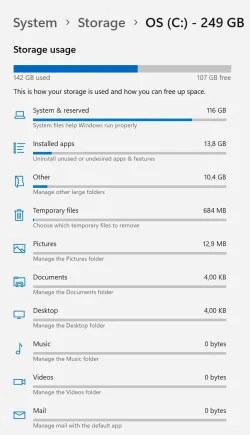
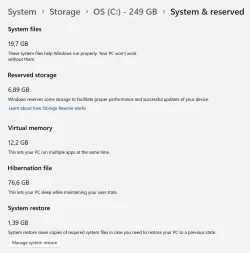
There is a lot of conflicting information about the appropriate size of the OS partition - generally underestimating the size needed. On this particular machine, after a clean install of Windows 11 Pro in a 250 GB partition, there is 142 GB used, most of which is System & Reserved files. See attached snips. FWIW, a Macrium image of the OS partition comes in at about 31 GB. The Hibernation file size is pretty astounding and Windows 11 appears to have issues with hibernation when installed on a desktop machine. Will post those issues in a separate thread as they seem unrelated to the partitioning issue.
 

Attachments

  • OS Storage.webp
    OS Storage.webp
    54.3 KB · Views: 1
  • System Reserved.webp
    System Reserved.webp
    60.9 KB · Views: 1

My Computer My Computer

At a glance

Windows 11 Proi9-14900KCorsair DDR5 192GB 5200MHzonboard
OS
Windows 11 Pro
Computer type
PC/Desktop
Manufacturer/Model
Homebrew
CPU
i9-14900K
Motherboard
Asus Pro WS W680-ACE
Memory
Corsair DDR5 192GB 5200MHz
Graphics Card(s)
onboard
Sound Card
onboard
Monitor(s) Displays
Asus VA27U
Screen Resolution
3840 x 2160
Hard Drives
4TB Iron Wolf Pro
ST 4000NT001
Cooling
Corsair Nautilus 360
1) Please run: diskparinfo > post a share link


2) Open disk management > widen rows and columns > post images or share links


My Computer My Computer

At a glance

Windows 10Intel(R) Core(TM) i7-4800MQ CPU @ 2.70GHz16 GB Total: Manufacturer : Samsung MemoryTyp...NVIDIA Quadro K3100M; Intel(R) HD Graphics 4600
OS
Windows 10
Computer type
Laptop
Manufacturer/Model
HP
CPU
Intel(R) Core(TM) i7-4800MQ CPU @ 2.70GHz
Motherboard
Product : 190A Version : KBC Version 94.56
Memory
16 GB Total: Manufacturer : Samsung MemoryType : DDR3 FormFactor : SODIMM Capacity : 8GB Speed : 1600
Graphics Card(s)
NVIDIA Quadro K3100M; Intel(R) HD Graphics 4600
Sound Card
IDT High Definition Audio CODEC; PNP Device ID HDAUDIO\FUNC_01&VEN_111D&DEV_76E0
Hard Drives
Model Hitachi HTS727575A9E364
Antivirus
Microsoft Defender
Other Info
Mobile Workstation
On BIOS
Set Disk mode to AHCI, not RAID
Select OS mode = UEFI
Disable fast boot and secure boot (you can turn it on after installation)

Windows can be installed in two ways: Legacy-MBR or UEFI-GPT
To install as Legacy-MBR you must boot the installation drive as Legacy
To install as UEFI-GPT you must boot the installation drive as UEFI.

As you have a UEFI BIOS, you should install as UEFI-GPT
Detach any other drives (SATA or Power cable) from the MB.

During POST, press F8 to launch the boot menu. You will see two options for the USB drive. USB UEFI (Name) and USB (Name). Select USB UEFI (Name) to install as UEFI-GPT.
Select the unallocated space and then proceed.
Don't enable updates or connect to the internet during installation.
If you want to use a local account What is "oobe\bypassnro"


Worthwhile noting that you need to be sure that RAID is configured prior to Windows 11 install on most machines supporting Intel RAID.

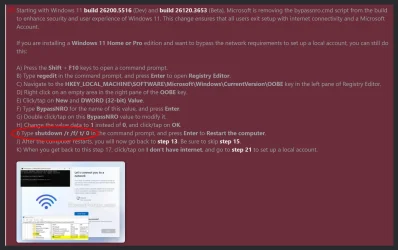
Brinks clean install instruction was certainly helpful, however there seem to be errors in the instruction, specifically in the Registry instructions on how to bypass the network requirements to set up a local account.

The shutdown line in Command prompt should be: shutdown /r /f /t 0 rather than the shutdown /r /f/ t/ 0 shown in the instruction.
 

Attachments

  • Shutdown.webp
    Shutdown.webp
    132.5 KB · Views: 2

My Computer My Computer

At a glance

Windows 11 Proi9-14900KCorsair DDR5 192GB 5200MHzonboard
OS
Windows 11 Pro
Computer type
PC/Desktop
Manufacturer/Model
Homebrew
CPU
i9-14900K
Motherboard
Asus Pro WS W680-ACE
Memory
Corsair DDR5 192GB 5200MHz
Graphics Card(s)
onboard
Sound Card
onboard
Monitor(s) Displays
Asus VA27U
Screen Resolution
3840 x 2160
Hard Drives
4TB Iron Wolf Pro
ST 4000NT001
Cooling
Corsair Nautilus 360
The shutdown line in Command prompt should be: shutdown /r /f /t 0 rather than the shutdown /r /f/ t/ 0 shown in the instruction.
It was a typo.


How were system and reserved sizes chosen / created? 116 GB?

When available post diskpar info and disk management.


The default sizes during a clean install are
System 100 MB
Reserved 15 MB
 

My Computer My Computer

At a glance

Windows 10Intel(R) Core(TM) i7-4800MQ CPU @ 2.70GHz16 GB Total: Manufacturer : Samsung MemoryTyp...NVIDIA Quadro K3100M; Intel(R) HD Graphics 4600
OS
Windows 10
Computer type
Laptop
Manufacturer/Model
HP
CPU
Intel(R) Core(TM) i7-4800MQ CPU @ 2.70GHz
Motherboard
Product : 190A Version : KBC Version 94.56
Memory
16 GB Total: Manufacturer : Samsung MemoryType : DDR3 FormFactor : SODIMM Capacity : 8GB Speed : 1600
Graphics Card(s)
NVIDIA Quadro K3100M; Intel(R) HD Graphics 4600
Sound Card
IDT High Definition Audio CODEC; PNP Device ID HDAUDIO\FUNC_01&VEN_111D&DEV_76E0
Hard Drives
Model Hitachi HTS727575A9E364
Antivirus
Microsoft Defender
Other Info
Mobile Workstation
It was a typo.


How were system and reserved sizes chosen / created? 116 GB?

When available post diskpar info and disk management.


The default sizes during a clean install are
System 100 MB
Reserved 15 MB

S happens. Maybe they should fix the typo?

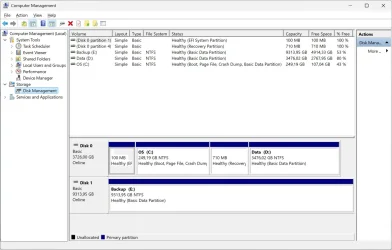
Windows chose all sizes for the install files. The only thing I set up were the partitions. Snip of current disk management attached.

As I mentioned, Windows has issues with hibernate. Apparently also associated with fast start. On this box, when the system hibernates, it crashes on wakeup and fills up/trashes the OS partition. See attached snip of earlier crash. Macrium to the rescue... but this fast start thing is apparently not ready for prime time.
 

Attachments

  • DM.webp
    DM.webp
    87.4 KB · Views: 1
  • System and reserved error2.webp
    System and reserved error2.webp
    16.3 KB · Views: 1

My Computer My Computer

At a glance

Windows 11 Proi9-14900KCorsair DDR5 192GB 5200MHzonboard
OS
Windows 11 Pro
Computer type
PC/Desktop
Manufacturer/Model
Homebrew
CPU
i9-14900K
Motherboard
Asus Pro WS W680-ACE
Memory
Corsair DDR5 192GB 5200MHz
Graphics Card(s)
onboard
Sound Card
onboard
Monitor(s) Displays
Asus VA27U
Screen Resolution
3840 x 2160
Hard Drives
4TB Iron Wolf Pro
ST 4000NT001
Cooling
Corsair Nautilus 360

Please run the V2 log collector > post a share link


My Computer My Computer

At a glance

Windows 10Intel(R) Core(TM) i7-4800MQ CPU @ 2.70GHz16 GB Total: Manufacturer : Samsung MemoryTyp...NVIDIA Quadro K3100M; Intel(R) HD Graphics 4600
OS
Windows 10
Computer type
Laptop
Manufacturer/Model
HP
CPU
Intel(R) Core(TM) i7-4800MQ CPU @ 2.70GHz
Motherboard
Product : 190A Version : KBC Version 94.56
Memory
16 GB Total: Manufacturer : Samsung MemoryType : DDR3 FormFactor : SODIMM Capacity : 8GB Speed : 1600
Graphics Card(s)
NVIDIA Quadro K3100M; Intel(R) HD Graphics 4600
Sound Card
IDT High Definition Audio CODEC; PNP Device ID HDAUDIO\FUNC_01&VEN_111D&DEV_76E0
Hard Drives
Model Hitachi HTS727575A9E364
Antivirus
Microsoft Defender
Other Info
Mobile Workstation
Log attached
 

Attachments

My Computer My Computer

At a glance

Windows 11 Proi9-14900KCorsair DDR5 192GB 5200MHzonboard
OS
Windows 11 Pro
Computer type
PC/Desktop
Manufacturer/Model
Homebrew
CPU
i9-14900K
Motherboard
Asus Pro WS W680-ACE
Memory
Corsair DDR5 192GB 5200MHz
Graphics Card(s)
onboard
Sound Card
onboard
Monitor(s) Displays
Asus VA27U
Screen Resolution
3840 x 2160
Hard Drives
4TB Iron Wolf Pro
ST 4000NT001
Cooling
Corsair Nautilus 360

1) Some of the files were in a foreign language.

Code:
Windows Search tarnybos skirtas laikas netiketai baigesi. Tai buvo atlikta 1 karta (-us). èis koregavimo veiksmas u₧ims 30000 milisek.: Restart the service.

Please use English as the default language during the troubleshooting:


2) The BIOS Version/Date American Megatrends Inc. 3701, 2024-06-28

Upgrade the BIOS: 3701 > 4101


3) Open administrative command prompt and copy and paste:

DISM /Online /Add-Capability /CapabilityName:WMIC~~~~

Post a link.


4) Run: tuneup_plus_log > post a share link


5) For new BSOD > post a new V2 share link into the newest post


Code:
Event[34]
  Log Name: System
  Source: volmgr
  Date: 2025-04-26T07:28:21.0320000Z
  Event ID: 46
  Task: None
  Level: Error
  Opcode: N/A
  Keyword: Classic,
  User: N/A
  User Name: N/A
  Computer: BX14
  Description:
Crash dump initialization failed!
 

My Computer My Computer

At a glance

Windows 10Intel(R) Core(TM) i7-4800MQ CPU @ 2.70GHz16 GB Total: Manufacturer : Samsung MemoryTyp...NVIDIA Quadro K3100M; Intel(R) HD Graphics 4600
OS
Windows 10
Computer type
Laptop
Manufacturer/Model
HP
CPU
Intel(R) Core(TM) i7-4800MQ CPU @ 2.70GHz
Motherboard
Product : 190A Version : KBC Version 94.56
Memory
16 GB Total: Manufacturer : Samsung MemoryType : DDR3 FormFactor : SODIMM Capacity : 8GB Speed : 1600
Graphics Card(s)
NVIDIA Quadro K3100M; Intel(R) HD Graphics 4600
Sound Card
IDT High Definition Audio CODEC; PNP Device ID HDAUDIO\FUNC_01&VEN_111D&DEV_76E0
Hard Drives
Model Hitachi HTS727575A9E364
Antivirus
Microsoft Defender
Other Info
Mobile Workstation
1) Some of the files were in a foreign language.

Code:
Windows Search tarnybos skirtas laikas netiketai baigesi. Tai buvo atlikta 1 karta (-us). èis koregavimo veiksmas u₧ims 30000 milisek.: Restart the service.

Please use English as the default language during the troubleshooting:


2) The BIOS Version/Date American Megatrends Inc. 3701, 2024-06-28

Upgrade the BIOS: 3701 > 4101


3) Open administrative command prompt and copy and paste:

DISM /Online /Add-Capability /CapabilityName:WMIC~~~~

Post a link.


4) Run: tuneup_plus_log > post a share link


5) For new BSOD > post a new V2 share link into the newest post


Code:
Event[34]
  Log Name: System
  Source: volmgr
  Date: 2025-04-26T07:28:21.0320000Z
  Event ID: 46
  Task: None
  Level: Error
  Opcode: N/A
  Keyword: Classic,
  User: N/A
  User Name: N/A
  Computer: BX14
  Description:
Crash dump initialization failed!
1) This machine has never been set to a default display language other than EN. Maybe there is a need to also change the region format to EN to get a 100% English log. FWIW that particular error was related to Windows Search - the index likely gets trashed as a result of the unexpected shutdown. Rebuilt the index. All is well so far.

2) Did the BIOS upgrade.

So BIOS upgrade + turn off hibernation has resulted in a stable system at this point. If it stays that way, I may try turning hibernation back on to see if the real issue was the BIOS. Will post a new log if anything occurs.

TYVM for your time
 

My Computer My Computer

At a glance

Windows 11 Proi9-14900KCorsair DDR5 192GB 5200MHzonboard
OS
Windows 11 Pro
Computer type
PC/Desktop
Manufacturer/Model
Homebrew
CPU
i9-14900K
Motherboard
Asus Pro WS W680-ACE
Memory
Corsair DDR5 192GB 5200MHz
Graphics Card(s)
onboard
Sound Card
onboard
Monitor(s) Displays
Asus VA27U
Screen Resolution
3840 x 2160
Hard Drives
4TB Iron Wolf Pro
ST 4000NT001
Cooling
Corsair Nautilus 360

Please run Tuneup plus.

It will modify settings to reduce the likelihood of missing BSODs.


Monitor using:


My Computer My Computer

At a glance

Windows 10Intel(R) Core(TM) i7-4800MQ CPU @ 2.70GHz16 GB Total: Manufacturer : Samsung MemoryTyp...NVIDIA Quadro K3100M; Intel(R) HD Graphics 4600
OS
Windows 10
Computer type
Laptop
Manufacturer/Model
HP
CPU
Intel(R) Core(TM) i7-4800MQ CPU @ 2.70GHz
Motherboard
Product : 190A Version : KBC Version 94.56
Memory
16 GB Total: Manufacturer : Samsung MemoryType : DDR3 FormFactor : SODIMM Capacity : 8GB Speed : 1600
Graphics Card(s)
NVIDIA Quadro K3100M; Intel(R) HD Graphics 4600
Sound Card
IDT High Definition Audio CODEC; PNP Device ID HDAUDIO\FUNC_01&VEN_111D&DEV_76E0
Hard Drives
Model Hitachi HTS727575A9E364
Antivirus
Microsoft Defender
Other Info
Mobile Workstation
Back
Top Bottom